Fusion - the Fusion 360 Bridge
Public Made by Adomby adom
Drive Autodesk Fusion 360 from the cloud via Adom Bridge: component libraries, IPC package generation, board layout, exports (STEP/Gerbers/BOM/CPL), fast APS cloud search, and parametric modeling.

Install?
This package installs the bridge's SKILLS into your container so your AI knows how to drive it; Adom Bridge loads the bridge runtime itself from the release zip.
adom-wiki pkg install adom/fusion-bridgeLatest: v1.11.44, published
Download for your machine · v1.11.44?
Release 1.11.44
Family
- Member of DEPRECATED: Bridge SDK (moved into Adom Bridge); the revision this page was built from is not recorded not recorded
Dependencies 1 app
- app adom/adom-bridge *
Contents
- Demo video: a wiki Cloud Library becomes a proven Fusion library (1:51)
- Demo videos: Hydrogen driving Fusion
- Feature guides
- New since 1.10
- The schematic front door: fusion_schematic
- Show off a library: fusion_make_showcase_project
- Live per-net routing
- The dialog policy
- Restarts, prove and sign-in
- The demo: one verb, a whole guided tour (fusion_demo)
- The wiki-to-EE circle: one verb per content type (NEW in 1.9.9-1.9.26)
- Component library manager - the Adom basic parts library
- Generate IPC packages from parameters (ElectronicsPackageGenerator)
- Electronics boards: project -> schematic -> 2D board -> 3D board
- Manufacturing exports: Gerbers, BOM, CPL
- Design rules per manufacturer
- How the bridge talks to Fusion (architecture)
- Dialog awareness: parent/child screenshots (the automation breakthrough)
- Fast cloud search + file management (APS) - the ONLY cloud-search path
- Why APS (and why the old in-app search is now DISABLED)
- Authentication (one-time, then silent)
- Best sign-in: your NATIVE Chrome/Edge via ABE (adom-browser-extension)
- APS verbs
- Installing Fusion for the user (or finding theirs)
- Full verb catalog
- Two install layers (they are NOT the same thing)
- Install (via Adom Bridge)
- Source code
- Platforms
- Contributing
README
markdownAdom Bridge - Fusion 360 Bridge
This package installs the bridge's SKILLS into your container so your AI knows how to drive it; Adom Bridge loads the bridge runtime itself from the release zip.
Drive Autodesk Fusion 360 from the cloud through Adom Bridge:
component libraries with real 3D, parametric IPC package generation with laser-etched markings,
electronics board workflows, manufacturing exports (Gerbers/BOM/CPL), per-manufacturer design rules,
and fast APS cloud-file search - all by asking your AI. Every verb returns a rich _hint, so a
calling AI never has to guess.
"generate an IPC SOIC-8 with LM358 etched on top and export the STEP" - just ask Claude
Demo video: a wiki Cloud Library becomes a proven Fusion library (1:51)
Watch the video (webm, 1920x1200) | Hero frame | Reproducible demo script

What it shows, recorded live on a real Windows desktop with the bridge driving everything: the LAN7800 component page, one click to add it to a Cloud Library, four more parts in four clicks, the library with all five, the Fusion export with BOTH human approvals on camera (Chrome's "access other apps on this device" prompt and Adom Bridge's own "Allow 1 hr" web-control approval), Fusion binding each part's STEP onto its footprint with pin 1 verified, the proof pass with the in-Fusion palette narrating, and the finished library: every part with its symbol, footprint, rendered 3D and a green Mapped check. Narrated by TTS; every scene is its own clip in the manifest so any one can be re-shot.
Demo videos: Hydrogen driving Fusion
Each one is a single prompt typed into Hydrogen, then Hydrogen drives Fusion through this bridge with nobody touching the mouse. Full prompts and how they were made: Demo videos.
 |
Clearing a modal dialog that blocks a script (51 s). A script runs ADD, Fusion's library picker blocks it, and the bridge reads the dialog and cancels it in the background. |
 |
One prompt: parts library to schematic, 2D board and 3D board (55 s). Schematic, 2D board and the 3D board with each part's real 3D model, no dialogs. |
 |
A real 3D model on every part of a library (1:45). Why binding STEP models to a multi-part library is hard, the order that works, and six parts bound live. |
Feature guides
Short version below, full detail in each guide.
| guide | what it covers |
|---|---|
| APS cloud search | Find any team design in ~2s instead of a 30-minute folder walk. Setup, the never-charge guarantee, why the old search is hard-blocked, and the zero-result fallback that lists sibling folders through the Data API. |
| Schematics | The front door fusion_schematic {action: open, create, show}, a library's parts on a new schematic and board with fusion_make_showcase_project, driving the schematic editor, and the async EAGLE import so parts instantiate. |
| 2D board layout | PCB editor, design rules by fab with ruleWarnings, layer + stackup discovery, live per-net routing with native DRC, and gerbers/BOM/CPL for the fab. |
| 3D view, export and STEP colorization | The 3D PCB, the native viewport frame in fusion_state, camera motion with fusion_view, every export format, web-grade GLB (16 MB to ~465 KB), and recoloring a grey imported STEP. |
| Electronics library manager | Symbols, IPC footprints and real 3D packages, generated rather than hand-drawn, explicit 3D placement, plus how to verify a part before shipping it. |
| Multi-part library import | How a zip of .lbr + STEPs becomes a Library Manager library with rendering 3D on every part: cloud .f3d urns, per-part minting (and the wrong-footprint trap it avoids), proof, and what the user sees. With screenshots. |
| Mechanical BOM and physical properties | Kit-aware assembly BOM that matches Fusion's Manage to BOM, and per-part volume/mass for costing. |
| Sign-in, sessions and updates | Multi-profile Autodesk sign-in, SSO without passwords, one login covering APS, the needs_signin short-circuit, restartPolicy, and silent auto-updates. |
| Autodesk's Fusion MCP server | Proxy Autodesk + Anthropic's local MCP server (text-to-CAD, Electronics object model) so a cloud AI can reach it, and turn it on for the user. |
| Demo videos | Three short demos of Hydrogen driving Fusion (dialogs, library to 3D board, 3D library binding): the exact prompts, how they were recorded and cut, and where we share them. |
| Driving Fusion's preferences | Reach ANY Fusion preference, not just the thin API slice, by driving the Preferences dialog. |
| Contributing | Check out the source, change it, test it on your own box, and send a pull request for review. Account and CLI setup, the dialog rules, unsigned local builds, the verb suite, and how review and approval work. |
New since 1.10
Short entries, newest behavior first in each guide. The changelog has every release.
| what | verbs and fields | in short |
|---|---|---|
| Schematic front door | fusion_schematic {action: open, create, show} |
One verb for every way into a schematic. open takes a cloud fileName, urn or query, a local EAGLE schPath, or a Fusion-native filePath. create writes a blank EAGLE schematic on the box and opens it with no dialog. show switches the open design to its schematic view. Every reply names the verb that did the work in via. |
| Showcase project | fusion_make_showcase_project, fusion_eagle_import_status |
Puts every deviceset of a library (or the ones in devicesets) on a new schematic and a new board, with no nets and with the library's bound 3D carried across. It is generated as EAGLE source and opened dialog-free. It is async: it returns a runId, and you poll fusion_eagle_import_status. |
| Live per-net routing | fusion_routing_state, fusion_plan_route, fusion_route_net, fusion_routing_drc |
Read the live board, plan a bounded two-pad path, create copper trace by trace with board and revision guards, then run native Autodesk DRC. Each DRC error carries layer, x and y in mm. |
| Design rules by fab | fusion_set_design_rules |
{action:"list"} lists every fab, process and layer count from the rule packs on adom/pcb-design-rules. Applying a profile returns ruleWarnings when the profile carries a rule that native DRC will report as noise. |
| Explicit 3D placement | fusion_make_3d_package, fusion_build_library_3d |
placement: {translation, rotation, scale:1} applies the manufacturer's authored transform and bypasses every heuristic. orient:false imports the model exactly as authored. |
| Native viewport frame | fusion_state |
The reply carries nativeViewport, geometry and windowPixels, so a blank window capture is reported as blank and the frame Fusion itself renders is there to use. |
| APS zero-result fallback | fusion_aps_search |
A zero from the server index never stands alone. The reply carries data.fallback and data.completeness, and sibling folders are listed through the Data API. |
| Caller-aware prove | fusion_create_library, fusion_install_library_bundle, fusion_prove_result |
An AI thread binds and places only (verdict: bound_not_proven). Web control proves. prove:true or prove:false always wins. |
| Restart policy | restartPolicy, allowRestart, fusion_restart_for_addin |
Under the default auto the bridge restarts Fusion itself when the add-in needs it. Chains never restart Fusion unless the caller passes allowRestart:true. |
| Sign-in short-circuit | needs_signin |
Every add-in verb answers errorCode: needs_signin in under a second while Fusion is signing in. |
The schematic front door: fusion_schematic
A schematic is a view of an electronics design, not a file of its own, so there is one verb that
gets you there from whatever you have. fusion_schematic {action:"open"} lands in the schematic
editor from a cloud fileName, urn or query, from a local EAGLE .sch (its sibling .brd is
imported with it so parts instantiate, or pass withBoard:false for a dialog-free schematic alone),
or from a Fusion-native .fsch. {action:"create"} writes a blank EAGLE schematic on the box and
opens it as a new local electronics design with no dialog. {action:"show"} switches the design
that is already open. When a name search opens the 3D PCB or a mechanical file instead, the verb
retries the exact cloud name once and otherwise answers not_an_electronics_design with the
candidate documents.
adom-bridge fusion_schematic '{"action":"open","query":"BQ25792"}'
adom-bridge fusion_schematic '{"action":"create","name":"scratch"}'
Show off a library: fusion_make_showcase_project
"Make a schematic and board with these three sensors on it" is one call:
fusion_make_showcase_project {libraryPath, devicesets?, name?}. Every deviceset in the library (or
the ones you name) is placed in a row on a fresh sheet and a fresh board, with no nets, and the
library's bound 3D urns are carried across so the 3D PCB shows the real bodies. The two documents
are named <name>-sch and <name>-brd, the board opens last so it is active for the 2D and 3D
views, and each view is fitted. The verb is async: it returns a runId and you poll
fusion_eagle_import_status {runId}. The library block is embedded verbatim, because Fusion
refuses a schematic whose library was re-assembled piecewise from a Fusion-exported .lbr.
Live per-net routing
Four verbs route a live two-layer board one net at a time. fusion_routing_state reads the board's
identity, geometry revision, pads, copper and per-net airwires. fusion_plan_route calculates a
read-only, bounded orthogonal path between two pads. fusion_route_net creates the copper with
board and revision guards and reads the exact copper back. fusion_routing_drc runs native
Autodesk DRC, and each error carries layer, x and y in mm, plus a summary by description
and a note when Overlap warnings are same-signal joints. The geometric preflight is conservative.
Native DRC is the final word. Detail in 2D board layout.
The dialog policy
A dialog in front of Fusion is never a reason to restart it. The bridge reads every dialog through
UIA (title, text, button names) and expires it safely without a person: the known ones through
their rule, the unknown ones with WM_CLOSE, which is Cancel or the X and never saves or discards.
When that clears it, the verb runs (dialog_expired_retry after a timeout). Only a dialog that
survives comes back, as blocked_by_dialog with dialogs[] {hwnd, title, category, text, buttons, resolution}, so the AI answers it by button name. Native Windows Open and Save dialogs are read
and expired like any other, and Fusion's own tool windows do not count as dialogs.
Restarts, prove and sign-in
restartPolicy(in~/.adom/fusion-bridge/prefs.json, or the env varADOM_FUSION_RESTART_POLICY) defaults toauto: the bridge restarts Fusion in the background when the add-in needs it (addin_restarting), saves what Fusion can save, and records the restart in the action ledger (fusion_action_ledger).askkeeps the confirmation toast and the wait, for a machine a person shares with the AI.- Chains (
fusion_create_library,fusion_install_library_bundle) never restart Fusion on their own.allowRestart:truewithrestartReasonis the only way, and the restart is recorded inrestarts[]onfusion_prove_result. A long operation in flight answersfusion_addin_busyinstead of being mistaken for a dead add-in. - Prove is decided by the caller. An AI thread binds and places only (
verdict: bound_not_proven,partsBound, the library path). Web control proves.prove:trueorprove:falsealways wins, and the reply says what prove costs before it starts. - While Fusion's main window says it is signing in, every add-in verb answers
errorCode: needs_signinin well under a second, withneedsSignin,mainTitleand a hint that points at the sign-in skill. It is the same signal asfusion_readiness, never a reason to restart.
The demo: one verb, a whole guided tour (fusion_demo)
Tour mode (
fusion_demo {"mode": "tour"}): the ASYNC showcase for progress-bar front-ends - walks symbol, footprint, device view, 3D package off the bundled sample library (plus project/schematic/2D/3D viafusion_make_test_projectby default, or a cloud design whenquerynames one), reports{percent, stepLabel, elapsedSec, estimatedSec}viafusion_demo_progress, and the final poll carries the screenshot gallery (shots: [{title, image}]). Background by default. The staged onboarding flow below remains barefusion_demo {}.
New to this? Run one verb and watch:
adom-bridge fusion_demo '{}'
fusion_demo takes a first-time user from nothing to a real board. It launches Fusion, finishes
the Autodesk sign-in, turns on cloud search, and then walks the actual story of a PCB:
electronics project -> schematic -> 2D board layout -> 3D board, screenshotting each view.
It is staged and resumable: each call advances as far as it safely can and returns stage,
done, a narrate line written for a newcomer, the screenshots to show them, and a _hint with
the exact next action. Keep calling it until done:true.
Two things it deliberately does NOT do:
- It never leaves you parked on the sign-in page. It drives the sign-in through your native browser (via the Adom browser extension), because that profile is usually already signed into Autodesk - one click instead of a password + 2FA. An anonymous automation browser would force a full fresh login, so the demo never uses one.
- It never just name-drops cloud search. It sets APS up for you, then runs a live sample search so you watch your whole Autodesk hub return results in about two seconds.
If you decline the cloud-search setup, run fusion_demo '{"stage":"skip_aps"}' and the tour
continues without it. To demo a specific design: fusion_demo '{"query":"BQ25792"}'.
Playbook for the AI running it: the bundled fusion-demo skill.
The wiki-to-EE circle: one verb per content type (NEW in 1.9.9-1.9.26)
The Web Control demo's contract: every electronics content type a wiki component page implies, one first-class verb each, ALL background (your foreground is never touched):
| Content | Verb |
|---|---|
| Library | fusion_open_lbr {"filePath": "C:/....lbr"} |
| Symbol | fusion_show_symbol {"name": "<deviceset>"} (library open, or pass libraryPath) |
| Footprint | fusion_show_footprint {"name": "..."} |
| 3D chip | fusion_show_3d_package {"name": "...", "libraryPath": "...", "stepPath": "C:/....step"} |
| Project | fusion_make_test_project {"libraryPath": "..."} |
| Schematic | fusion_show_schematic {} |
| 2D board | fusion_show_2d_board {} |
| 3D board | fusion_show_3d_board {} |
Each verb, live-proven on real wiki component pages (the Inolux 0402/0603 LED family):
Library - the Content Manager with the footprint-package Mapped check and the REAL
3D model rendering in the preview (a genuine minted cloud URN bound in packages3d):

Symbol - fusion_show_symbol lands in the symbol editor:

Footprint - fusion_show_footprint, pads + silkscreen cathode mark:

3D chip - fusion_show_3d_package with stepPath: the part's STEP body imported and
auto-oriented onto its footprint in the Package3D environment:

Project - fusion_make_test_project: the generated test design, parts placed:

Schematic - fusion_show_schematic on the generated circuit (R1 in series with the
part, VCC/GND):

2D board - fusion_show_2d_board: both parts placed, net routed (gerbers export
from here):

3D board - fusion_show_3d_board: the REAL component model rendered on the board
(resolved from the element's package3d_urn):

Bare-artifact wrapping: fusion_show_symbol / fusion_show_footprint also accept a
raw <symbol> / <package> XML fragment (symbolXml / packageXml) - the bridge
generates a minimal wrapper library around it so a one-off artifact shows properly in
the Library Manager. Single-artifact libraries (symbol-only, footprint-only) are valid;
a 3D-only library parses but has nothing to display (a 3D binding needs a package).
fusion_make_test_project is the from-scratch answer for "a customer only has a
component page": it generates a minimal test circuit (the part + a generated 330R series
resistor, routed on a small board) as real EAGLE .sch/.brd server-side and imports both
DIALOG-FREE via Document.newDesignFromLocal. No cloud, no sign-in. After it, the
schematic/2D/3D verbs work on the result - and if the source library carries a 3D
binding, the generated board's element gets package3d_urn, so the 3D PCB renders the
REAL component model, not a generic extrusion.
The correct library (3D rendering in the Content Manager): mint a real cloud URN
with fusion_make_3d_package (returns wip_urn; needs a signed-in session - the ONE
cloud-dependent step in the circle), bind it into the .lbr's <packages3d>, reopen.
Autodesk's thumbnail service lags ~2-3 min behind a fresh mint. Or skip the dance:
fusion_bind_library_3d {"libraryPath": "...", "stepPath": "..."} does mint +
bind + reopen in one call (shipped 1.9.28).
Background etiquette (hard contract): every verb above runs in the background - the
envelope denies Fusion's self-activation grabs, yields to real user input (it never
fights the human), keystrokes go via PostMessage, and native modal dialogs are banned
from automation. The user can keep typing in other threads the whole time. Pass
foreground: true on any window-raising verb when the user explicitly wants to watch.
Component library manager - the Adom basic parts library
The bridge builds and opens full EAGLE-format component libraries in Fusion's library editor. Below: the entire Adom basic parts library (138 parts - 0402/0603/0805 R/C/L, LEDs, and more) open in the Content Manager: the component list, the R-0402 deviceset's schematic symbol, footprint + 3D chip previews, and the footprint/package Mapped check EEs look for.
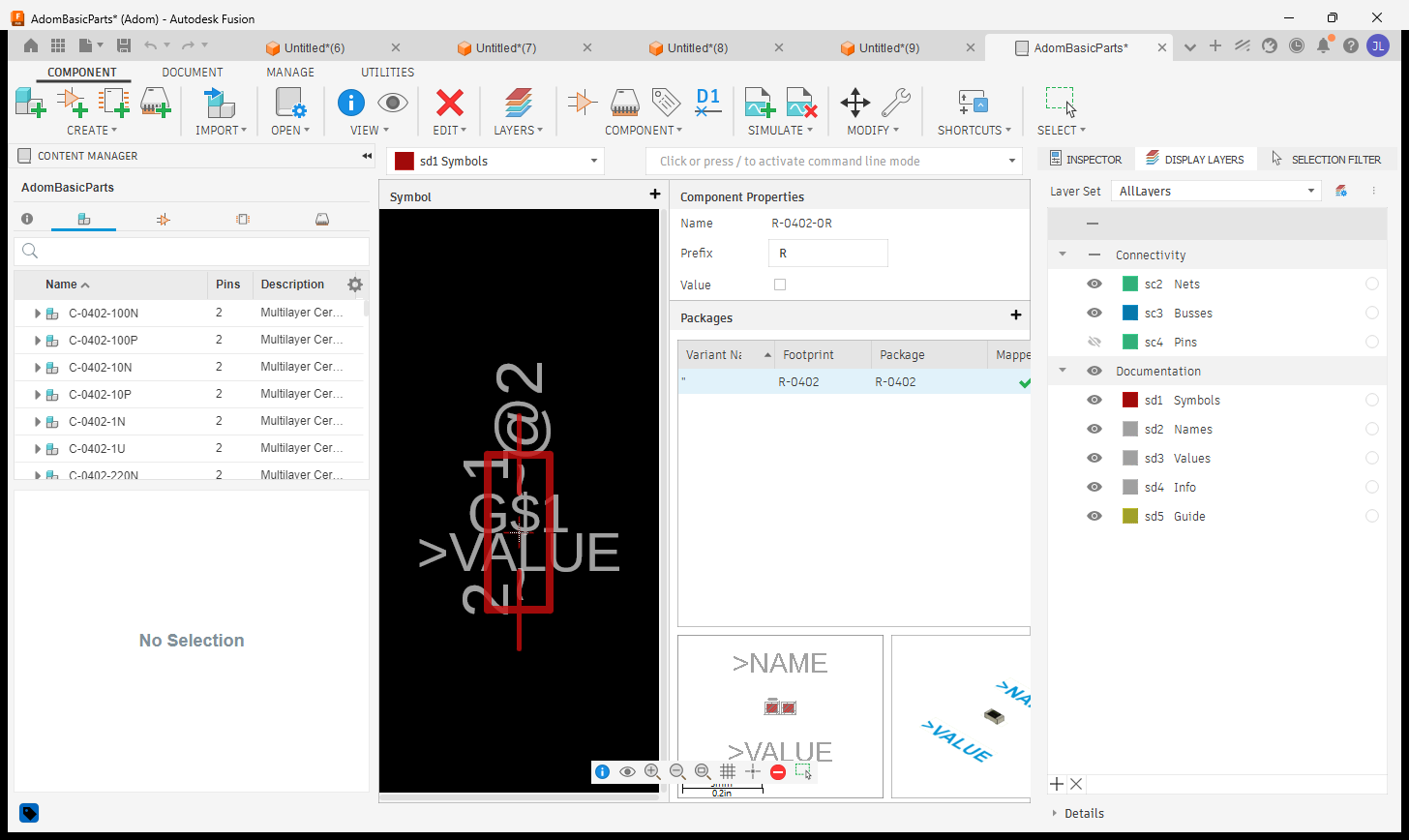
fusion_open_lbr- open any.lbrin the library editorfusion_build_library_3d- build a whole RENDERING multi-part 3D library in one callfusion_capture_library_views- capture the symbol / footprint / component view per part- Get the library: adom-basic-parts-fusion-lbr

Generate IPC packages from parameters (ElectronicsPackageGenerator)
Fusion ships a built-in ElectronicsPackageGenerator add-in (~50 package families with IPC-7351B
calculators). This bridge drives it headlessly via fusion_generate_package: parametric 3D
package + laser-etched marking + STEP export, in ONE call, a few seconds per part.
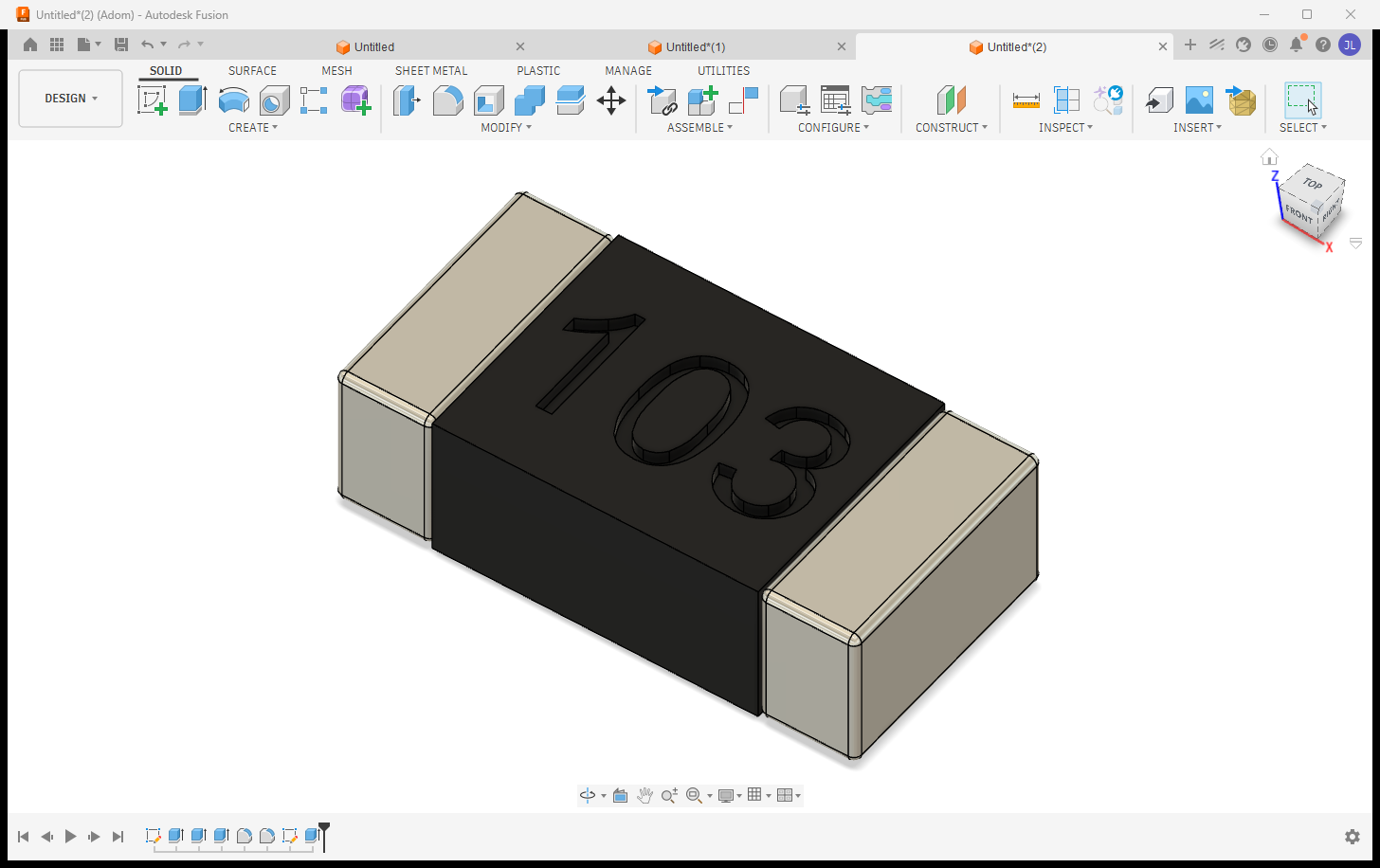
adom-bridge fusion_generate_package '{
  "type": "soic",
  "params": {"DPins": 8, "D": 4.9, "E": 6.0, "E1": 3.9, "e": 1.27, "A": 1.6, "A1": 0.1, "b": 0.41, "L": 0.84},
  "etch": "LM358\nADOM-A",
  "outputStep": "C:/tmp/ADOM-LM358-SOIC8.step"
}'
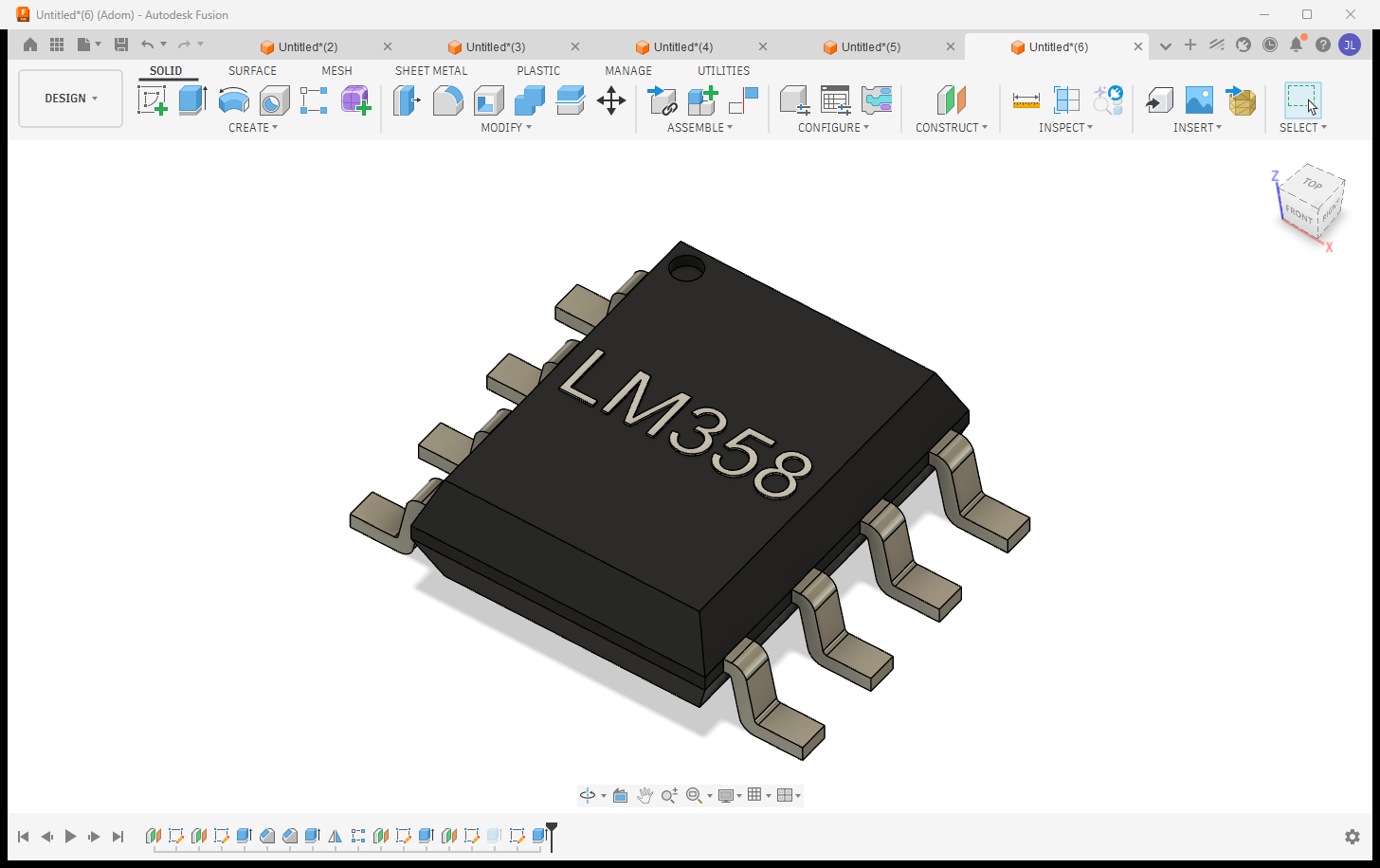
Why this matters: the output is OUR generated geometry from open IPC-7351B math - no vendor CAD licenses, no redistribution restrictions - the royalty-free path to a complete component library. Families: chip (0402/0603/0805...), soic, soj, sot23/143/223, son, qfn, qfp, plcc, bga, dfn2/3/4, dip (+sockets), dpak, melf, molded, ecap, radial + axial passives, crystals (+HC49), oscillators, headers (straight/right-angle, socket/SMD), standoffs, chip arrays, LEDs.
Markings that read like real silkscreen:
- Raised WHITE text by default (a thin positive extrude painted white - the contrast humans can
read;
etchStyle:"engraved"for a sunken laser cut when a datasheet calls for it). - The top surface is found from the whole-chip bounding box: only upward faces in the top 5% height band count (terminals tie the body on height), then largest area wins.
- Text runs along the longest axis of the face (auto-rotated 90° when needed), with a 10% margin ENFORCED by measuring the placed text and shrink-to-fitting - never a font-metric guess.
- Multi-line:
"LM358\nADOM-A"= MPN + variant, per-line auto-fit. - A sidecar manifest (
<step>.manifest.json) records every setting picked + WHY + the calculated bboxes, so a marking refresh (adding a variant line later) reproduces placement exactly.
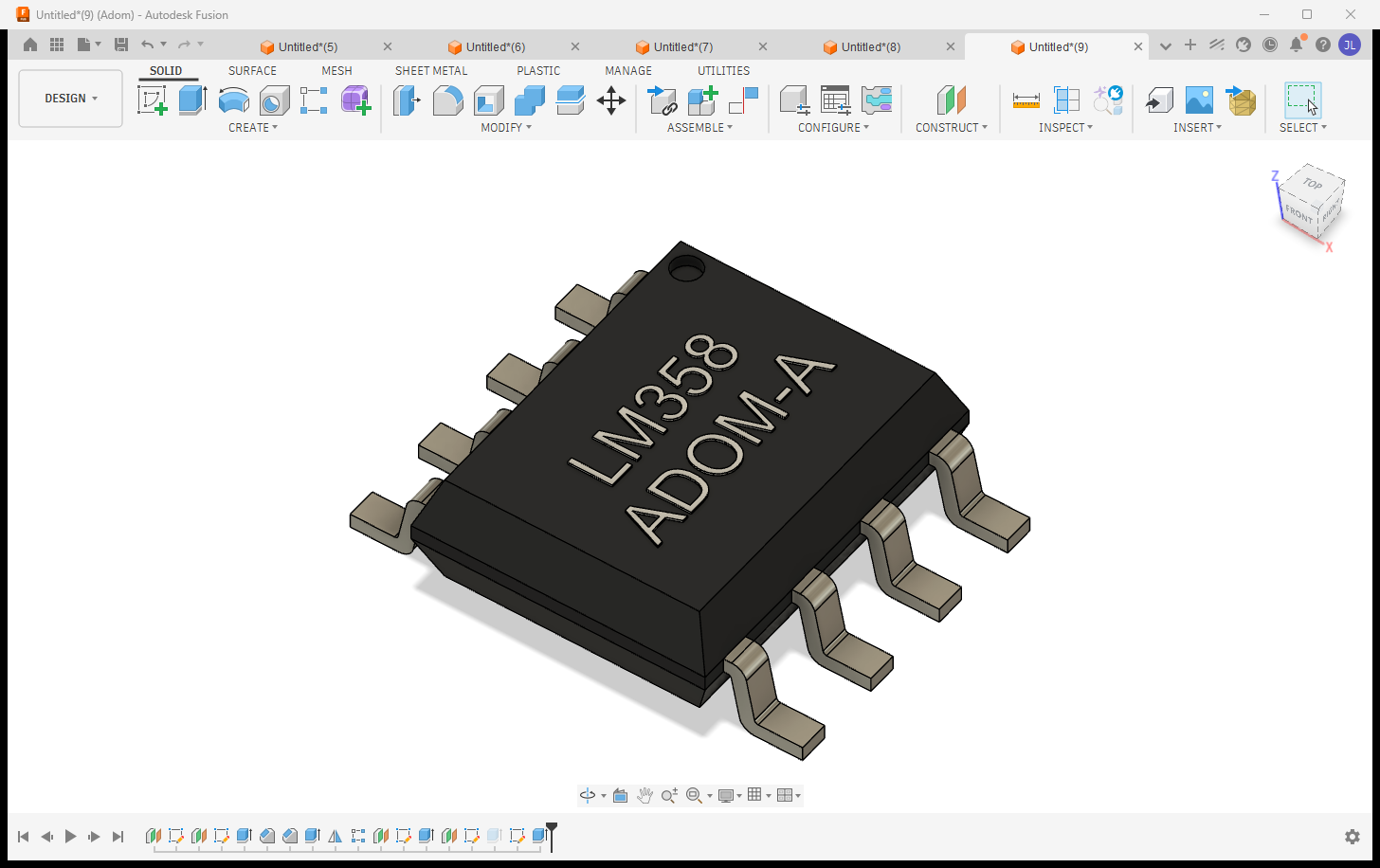
The exported STEP is colored (AP214): the white marking arrives white in KiCad's 3D viewer.
Electronics boards: project -> schematic -> 2D board -> 3D board
A Fusion electronics design is a parent/child chain: the PROJECT file (open THIS) links the
schematic, the 2D board layout, and the generated 3D PCB. The bridge opens the project and switches
views on command - each show_* verb returns a screenshot array so the AI SEES what it switched to.
| View | Verb |
|---|---|
| Project (parent: schematic + 2D + 3D previews) | fusion_open_cloud_file / fusion_aps_open (the project file) |
| Schematic | fusion_schematic {action:"open"} from anywhere, or fusion_show_schematic on the open design |
| 2D board layout | fusion_show_2d_board |
| 3D board | fusion_show_3d_board (orbit it with fusion_view {action:"orbit"}) |
Real Adom boards driven through it - the DRV8411A copper layout in the 2D editor, and the TI DRV8323SR + ST VL53L8 boards rendered as populated 3D PCBs:
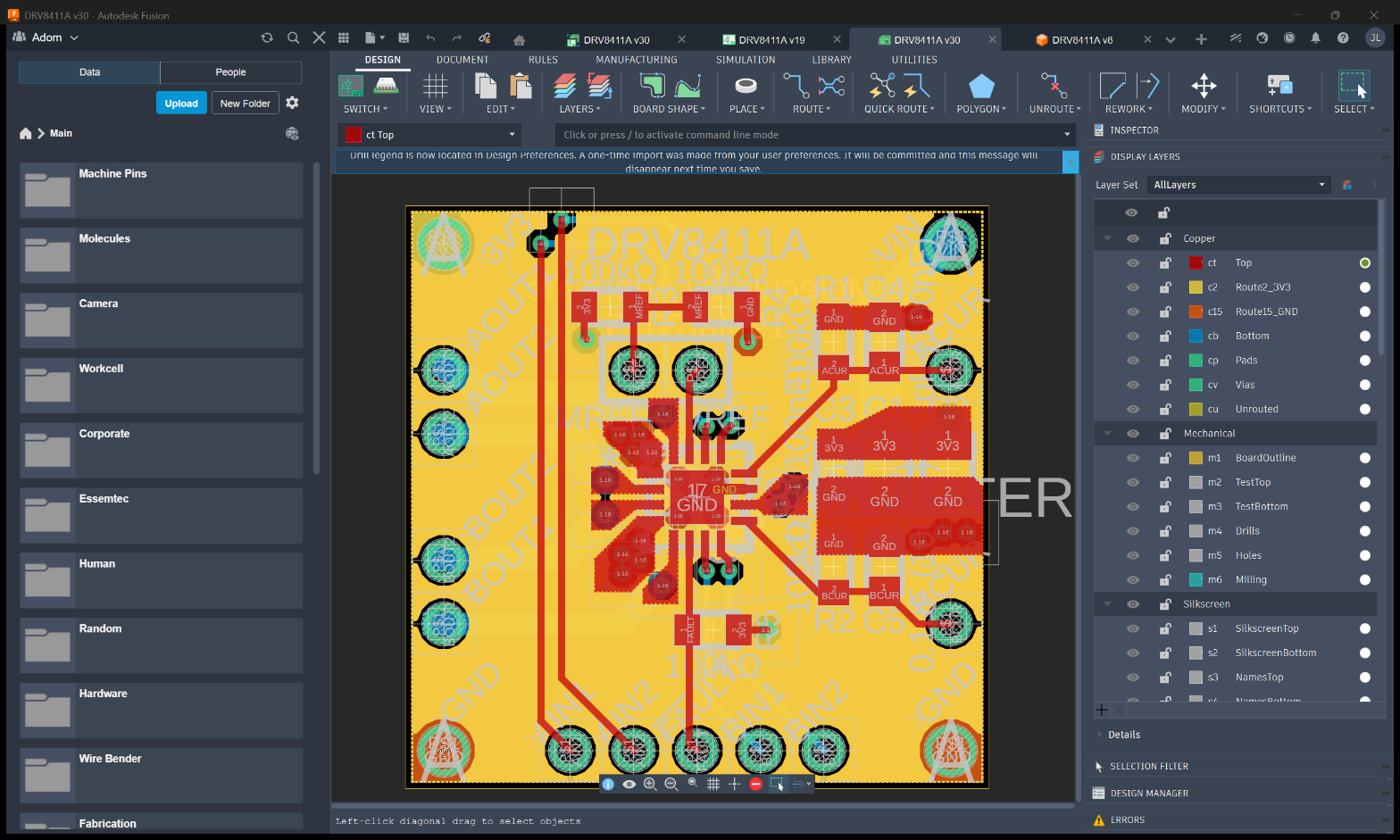
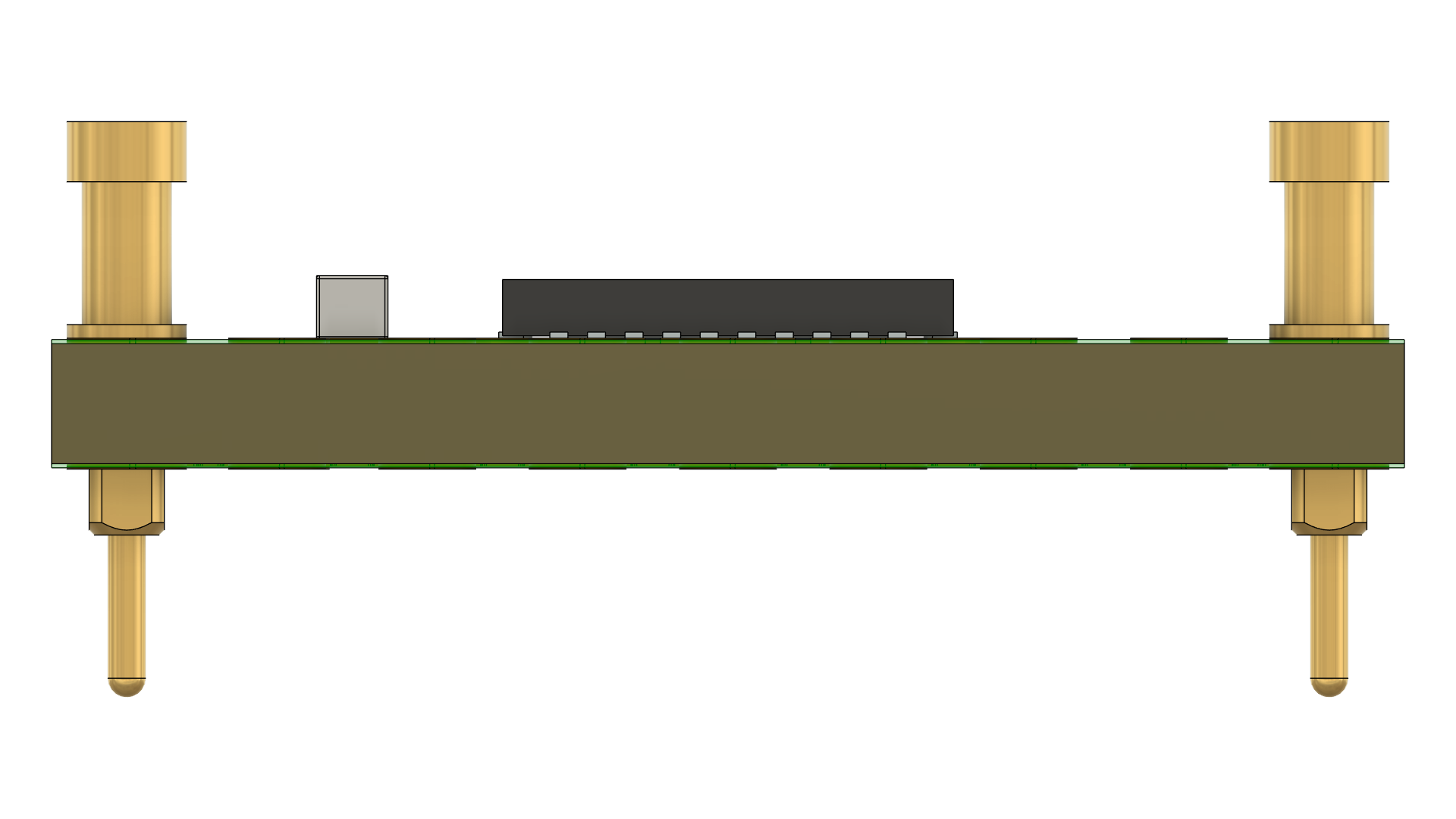
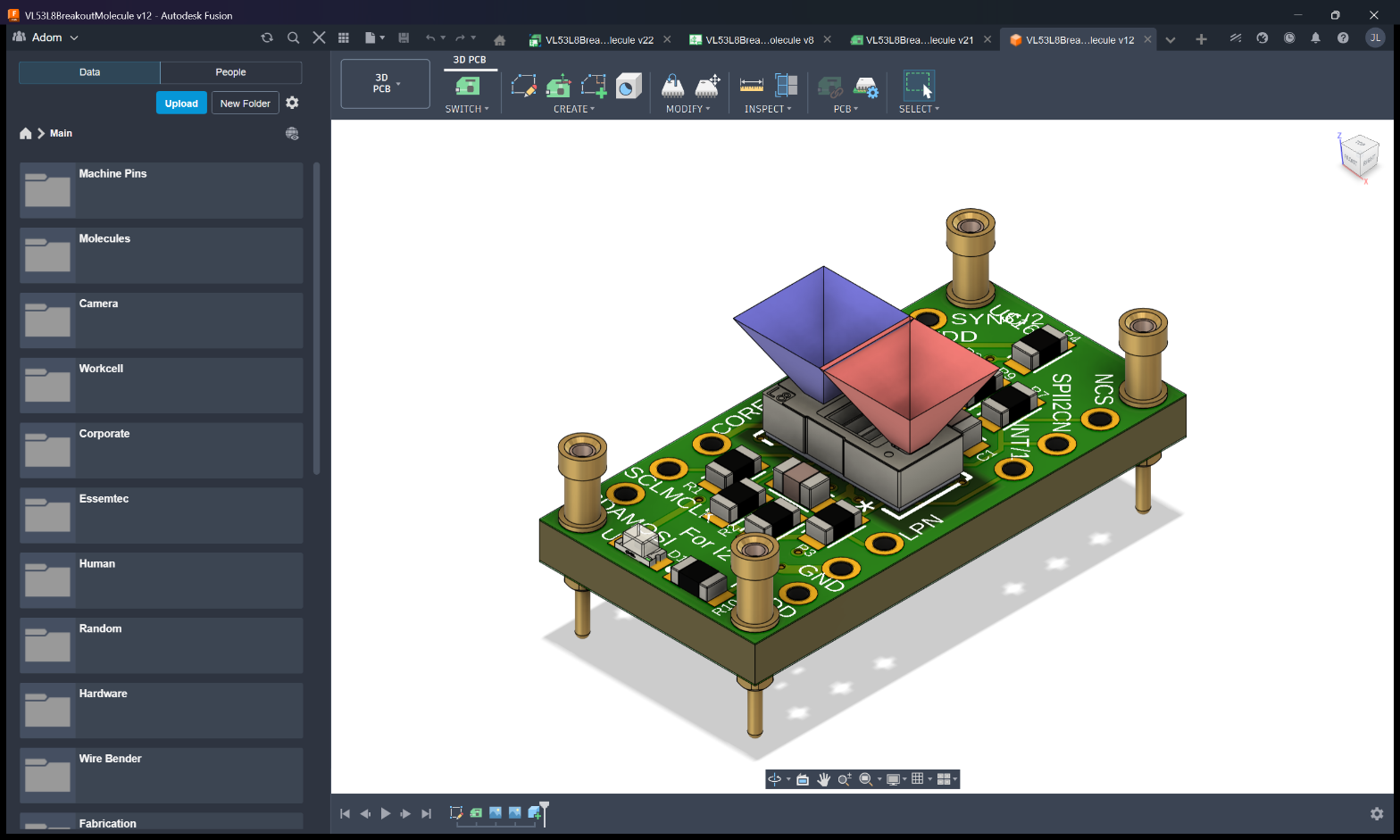
Always open the PROJECT - opening a child (.brd / 3D) directly gives an isolated view. The open
verbs reprimand via _hint if you open a non-project file.
Manufacturing exports: Gerbers, BOM, CPL
One verb each, straight from the open board:
adom-bridge fusion_export_gerbers '{"outputPath": "C:/tmp/gerbers"}'   # JLCPCB-ready CAM job
adom-bridge fusion_export_bom     '{"outputPath": "C:/tmp/bom.csv"}'   # grouped by value+package
adom-bridge fusion_export_cpl     '{"outputPath": "C:/tmp/cpl.csv"}'   # pick-and-place centroids
Plus mechanical exports: STEP / IGES / STL / 3MF / USDZ / OBJ / DXF / DWG. Long exports return
promptly with statusVerb: fusion_get_app_state - the AI polls instead of blocking.
Design rules per manufacturer
fusion_set_design_rules loads a fab's design rules into the open board, so DRC matches what the
fab checks. The rule packs live on the wiki page
adom/pcb-design-rules (JLCPCB, PCBWay, OSH Park,
Seeed, Eurocircuits, Aisler, Elecrow, Advanced Circuits, Sierra, MacroFab, NextPCB, ALLPCB and
3rd party fab), one .edru per vendor, process and layer count.
adom-bridge fusion_set_design_rules '{"action":"list"}'                 # every fab, process, layers row (no Fusion needed)
adom-bridge fusion_set_design_rules '{"fab":"jlcpcb","layers":"2"}'     # fetch, stage and load that profile
adom-bridge fusion_set_design_rules '{"druPath":"C:/tmp/house.edru"}'   # a local rule file as-is
With no fab the bundled 3rd party fab rules load, and layers auto-detects from the open board.
The reply carries ruleWarnings when the profile has a same-signal Copper Clearance rule over an
all/all or trace scope, which native DRC reports as Overlap warnings at every pad entry and trace
joint. Confirm the load with fusion_alerts: a refused file is an in-canvas toast, never a dialog.
The matching JLCPCB CAM jobs used by fusion_export_gerbers ship in resources/.
How the bridge talks to Fusion (architecture)
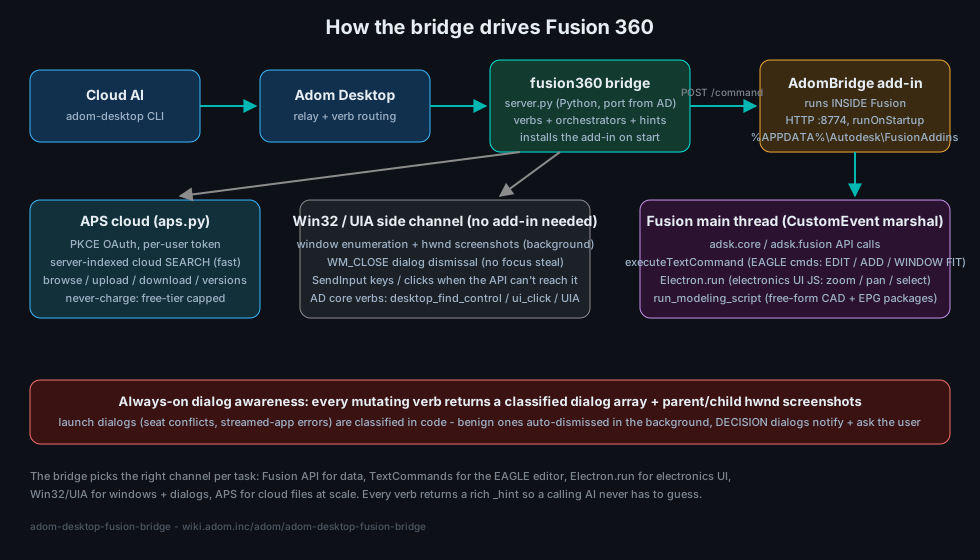
The bridge picks the right channel per task:
- The bridge exe (
adom-fusion-bridge.exe, Rust, source underrust/): spawned by Adom Bridge, receives everyfusion_*verb. The Python server left the package with the first exe-only release, 1.9.357 (2026-09-04); since 1.10.0 no sidecar exists at all. - AdomBridge add-in - installed BY the bridge into every Fusion add-in location
(
%APPDATA%\Autodesk\FusionAddinson 2025+ Fusion, plus the legacyAPI\AddInsdirs - Fusion moved this across versions and silently ignores the others). It serves HTTP :8774 inside Fusion and marshals work onto Fusion's single main thread via CustomEvent. - In-Fusion channels: the
adskPython API for data/geometry,executeTextCommandfor EAGLE editor commands (EDIT / ADD / WINDOW FIT),Electron.runfor electronics-UI JS (zoom/pan/select), andrun_modeling_scriptfor free-form CAD (this is how EPG packages and laser markings are generated). - Win32 / UIA side channel - when the API can't reach it: background hwnd screenshots, WM_CLOSE
dialog dismissal (no focus steal), SendInput keys/clicks, and ab core verbs
(
desktop_find_control/desktop_ui_click). - APS cloud (inside the exe): fast server-indexed search + file ops at scale (below).
Dialog awareness: parent/child screenshots (the automation breakthrough)
Demo: a script runs ADD, Fusion's modal picker blocks it, and the bridge reads it and cancels it in the background.
Fusion's classic failure mode is a modal dialog (save prompt, recovery, licensing) silently blocking the add-in's main thread while the caller sees only a fake "not responding". The breakthrough: Adom Bridge's window capture returns a window's owned child popups - dialogs that don't even enumerate in a normal window list - so every mutating verb returns a classified dialog array + screenshots and the AI can never fly blind past one.
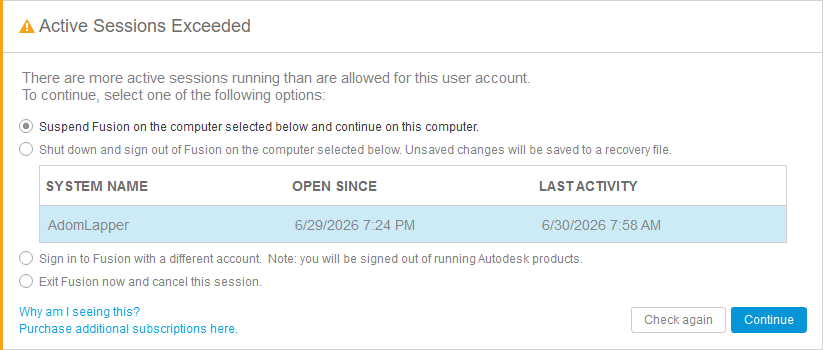
- Benign launch errors (an incomplete webdeploy folder) are auto-dismissed in the background (WM_CLOSE - never a focus-stealing Escape).
- DECISION dialogs - like the seat conflict above, whose options suspend Fusion on the user's OTHER
machine - are never auto-picked: the bridge returns
needsUserDecision:trueand the AI notifies + asks the user. fusion_statecarries the classified dialog list (blockingDialogs) on demand, andfusion_dismiss_blocking_dialogsanswers the known-safe ones.- A dialog is never a reason to restart Fusion. See "The dialog policy" above: the bridge expires
what it safely can and returns the rest as
blocked_by_dialogwith its text and buttons.
Fast cloud search + file management (APS) - the ONLY cloud-search path
fusion_aps_search finds any design in the team's Fusion cloud in ~2 seconds (server-indexed),
plus browse / recent / file-info / versions / upload / download / folder creation, and
fusion_aps_open opens any design by name at any folder depth.
Why APS (and why the old in-app search is now DISABLED)
Autodesk offers no fast file-search API for Fusion. The only in-app option walks the cloud
folder tree from the add-in, which takes 30+ minutes and can crash Fusion (WinError 10054).
We searched far and wide; APS (Autodesk Platform Services) Data Management is the only thing
Autodesk offers that works. So as of v1.6.76 the old verbs
(fusion_search_cloud_files, fusion_walk_cloud_tree) are hard-disabled in code - they return
an error that redirects to APS and can no longer reach (or crash) Fusion. There is no fallback;
APS is the path. It costs a one-time OAuth sign-in, and once set up it is fast and stays signed in.
Authentication (one-time, then silent)
APS uses Autodesk's official OAuth (PKCE). Setup is once per company (an admin registers the
APS app, fusion_aps_set_client_id), then each user signs in once (fusion_aps_signin);
tokens refresh silently afterward. Per-org by design: each company uses its own APS app and quota.
You are never charged - the bridge caps all calls to Autodesk's free tier.
The bridge checks APS state in code on every cloud call (_aps_guarded) and returns a rich,
self-teaching _hint (is it configured? signed in? token live? the full verb list, and the exact
next step) so the AI is never stuck on an opaque auth error.
Best sign-in: your NATIVE Chrome/Edge via ABE (adom-browser-extension)
Autodesk's email OTP / 2FA and "which profile is signed in" headaches vanish if the AI drives the
browser you're already logged into Autodesk with. That is what ABE
(adom-browser-extension) provides. If ABE
isn't installed, the AI will walk you through the one-time install, then open the Autodesk auth URL
in your real profile and capture the token - no password typing. Fallback:
fusion_aps_signin {allowDefaultBrowser:true} (OS default browser).
APS verbs
| Verb | Does |
|---|---|
fusion_aps_status |
configured? signed in? token live? + never-charge meter |
fusion_aps_signin |
one-time OAuth sign-in (prefer ABE native browser) |
fusion_aps_search {query} |
server-indexed name search across the whole team hub |
fusion_aps_open {query} |
find + open a design in Fusion, any folder depth |
fusion_aps_browse / fusion_aps_recent |
walk hubs/projects/folders, newest-modified designs |
fusion_aps_file_info / fusion_aps_versions |
version history / who / when / size |
fusion_aps_download / fusion_aps_upload |
pull/push a cloud file (no Fusion needed) |
fusion_aps_create_folder |
make a subfolder (never dump loose files in a shared root) |
fusion_aps_set_browser / get_browser / forget_browser |
remember the native browser+profile |
fusion_aps_set_client_id |
set the org's PKCE client id (once per company) |
fusion_search_cloud_filesfusion_walk_cloud_tree |
DISABLED (crashed Fusion) - use fusion_aps_search |
Cloud hygiene: the bridge NEVER writes to a shared project root - uploads default to an
Adom AI Workspace folder with per-task subfolders, and fusion_cleanup_cloud_files deletes
precisely by lineage URN (never by name).
Installing Fusion for the user (or finding theirs)
The AI does the whole setup - the user never gets handed a download link:
- Detection first: ab detects an existing Fusion via this bridge's
detectpaths - per-user (%LOCALAPPDATA%) AND system-wide (%ProgramFiles%, from--globalinstall) webdeploy installs.fusion_readiness/ ab'sbridge_readinessanswer installed/running/ready without launching anything. - AI-driven install: if Fusion is absent, the AI OFFERS to install it and does it on a yes - the fusion-onboarding skill silent-installs the free trial / personal-use tier (plenty for viewing and real work), drives the Autodesk sign-in (the user types only their own credentials/2FA), and deploys the add-in. A view-only trial install is a first-class option for users who just need to open and inspect designs.
- Never a manual step: the bridge restarts Fusion itself (
fusion_stop/fusion_start), installs the add-in to every add-in directory Fusion has ever used, and fires an ab toast the moment a step needs the user (sign-in, 2FA, license acceptance).
Full verb catalog
All verbs return a rich _hint. fusion_describe '{}' is the machine-readable source of truth; this table is generated from it.
164 verbs. Regenerate with python3 tools/gen-readme-verbs.py.
Lifecycle and readiness
fusion_addin_status- Is the AdomBridge add-in loaded and answering inside Fusion?fusion_apply_fusion_update- Readiness EXECUTOR (Rust port, Phase 3): click Fusion's update offer IN THE BACKGROUND when auto-update is on (sticky pref; fusion_set_auto_update).fusion_describe- Self-describe every verb the bridge exposes (this list) for ab's Verbs tab + runner.fusion_get_app_state- Current app state: running, active document, workspace, isElectronics.fusion_install_fusion- Install Fusion 360 FOR the user - downloads Autodesk's official Client Downloader and streams the free trial silently, with NO shell_execute and NO ab approval...fusion_kill- Force-KILL Fusion 360 (taskkill /F) - the desperate path for when fusion_stop cannot close it (stuck modal / wedged process).fusion_readiness- FAST readiness check (does NOT launch Fusion): is the Fusion host app installed + running + the bridge ready to drive?fusion_set_auto_update- Turn AUTOMATIC Fusion updating on/off for this user.fusion_start- Launch Fusion 360 (if needed) and wait for the AdomBridge add-in to be ready.fusion_stop- Gracefully STOP Fusion 360: close docs cleanly + WM_CLOSE, then wait.fusion_uninstall- CASCADE CLEANUP, called by ab's bridge_uninstall BEFORE this bridge's cache is deleted (ab 2.0.35+).fusion_verb_times- This machine MEASURED timings per verb/stage - the same store that paces every progress bar and ETA.
Sign-in and seat
fusion_aps_forget_browser- Forget the remembered Autodesk sign-in browser (re-detect next time).fusion_aps_get_browser- Show the remembered Autodesk sign-in browser (None until set).fusion_aps_set_browser- Remember the browser+profile that authed to Autodesk so every later sign-in reuses it (power users have many browsers/profiles; the OS default is usually the...fusion_aps_set_client_id- Set the org's APS (PKCE) client id used for cloud search.fusion_aps_signin- Open the Autodesk sign-in in the REMEMBERED browser+profile (not the OS default); a background listener captures the token.fusion_claim_seat- Make THIS machine the active Fusion seat, the first-class way to move a licence between boxes while testing.fusion_release_seat- Give up the Autodesk seat from THIS machine so another box can claim it with no modal at all: closes Fusion cleanly (documents are NOT discarded; an unsaved...fusion_resolve_seat_dialog- Readiness EXECUTOR (Rust port, Phase 3): detect + resolve the Autodesk seat/licensing modal ('Active Sessions Exceeded' / 'Suspend Remote Session') in the...fusion_set_seat_takeover- Read/toggle the mid-session Autodesk seat-takeover sweep (STICKY per user, default ON).fusion_signin- SELF-DRIVING as of 1.9.32: launches Fusion if needed, clicks Sign In, opens the OAuth in the right profile, TYPES THE EMAIL and advances to the exact remaining...fusion_signin_2fa- Submit Autodesk's emailed 6-DIGIT verification code to finish a Fusion sign-in, typed IN THE BACKGROUND (UIA SetValue + Invoke - never steals the user's...fusion_web_signin- Sign a pup browser window into an Autodesk WEB surface (library.io, the hub portal at .autodesk360.com, Autodesk Account) via Google SSO.
Cloud files and APS
fusion_aps_browse- Browse hubs/projects/folders without launching Fusion.fusion_aps_create_folder- Create a subfolder in a project (free; needs data:create scope).fusion_aps_download- Download a cloud file to the local machine (no Fusion needed).fusion_aps_file_info- Version history + who/when/size for a file (tip + recent versions).fusion_aps_get- Raw authenticated GET against a free APS path (dev/verify helper).fusion_aps_open- Find a cloud design by name and open it in Fusion (any folder depth).fusion_aps_recent- Most-recently-modified designs across the team hub, newest first.fusion_aps_search- Server-indexed search across the whole team hub: about 20-30 s hub-wide, a few seconds with projectId (not a 30-min folder walk).fusion_aps_status- APS state: configured, signed in, token live, never-charge meter.fusion_aps_upload- Upload a local file as a NEW cloud file (free Data Management; needs data:write scope).fusion_aps_versions- Full (uncapped) version history of a file.fusion_cleanup_cloud_files- PRECISELY delete a list of cloud files by lineage urn - SAFE cleanup of AI-created clutter.fusion_create_cloud_folder- Create a subfolder in a cloud project through the signed-in Fusion session's Data API (no APS needed).fusion_delete_cloud_file- DESTRUCTIVE: delete ONE cloud file through the signed-in Fusion session's Data API.fusion_list_cloud_files- List files/folders in a cloud project (optionally a subfolder).fusion_list_cloud_projects- List the cloud PROJECTS visible to the signed-in Fusion session (hub walk - slow on big teams; prefer fusion_aps_search for finding files).fusion_open_by_urn- Open a cloud ELECTRONICS DESIGN by URN. PCB/ELECTRONICS NAV RULE: a board is NOT a standalone file - the schematic, 2D board and 3D board are VIEWS inside ONE...fusion_open_by_urn_note- (see fusion_open_by_urn)fusion_open_cloud_file- Open a CLOUD file by name (the front door to every design flow).fusion_save_to_cloud- Save the ACTIVE document to Autodesk cloud storage with an explicit name and destination.fusion_search_cloud_files- DISABLED (returns an error): the in-app add-in search took 30+ min and CRASHED Fusion (WinError 10054).fusion_walk_cloud_tree- DISABLED (returns an error): the in-app add-in walk took 30+ min and CRASHED Fusion (WinError 10054).
Libraries and 3D packages
fusion_attach_3d_package- LOW-LEVEL primitive: attaches ONE model to ONE package.fusion_bind_library_3d- LOW-LEVEL primitive: binds ONE STEP onto one deviceset.fusion_build_library_3d- Build a RENDERING multi-part 3D library in ONE call - the whole programmatic pipeline.fusion_capture_library_views- Capture the LIBRARY-EDITOR views EEs trust: the schematic SYMBOL (full pinout), the FOOTPRINT (pads + layer stack), and the COMPONENT/device view (Content...fusion_create_library- ONE-CALL library creation for web-control (one call = one consent).fusion_generate_package- Generate an IPC-7351-compliant parametric 3D package via Fusion's BUILT-IN ElectronicsPackageGenerator (EPG) - ~50 package families...fusion_install_library_bundle- COMPOSITE, the Fusion twin of kicad_install_library_bundle (#68): ONE call takes a staged Cloud Library bundle (zip of .lbr + .step models, or a...fusion_library_manager- Open Fusion's Library Manager and switch to one of its three tabs.fusion_library_parts- Every ORDERABLE variant in a .lbr with its part numbers - offline, no Fusion needed.fusion_make_3d_package- Create a RENDERING component 3D package (FOOTPRINT + chip, aligned) for ONE part, fully programmatically with ZERO GUI dialogs.fusion_managed_library_create- Create a NEW managed library on library.io FROM the library in front (which must already be saved in a Fusion Hub).fusion_managed_library_link- Link the library IN FRONT to an existing managed library on library.io.fusion_managed_library_pull- Pull the newest version FROM library.io into the linked library in front.fusion_managed_library_push- Push a NEW VERSION of the library in front up to its linked managed library on library.io.fusion_managed_library_unlink- Unlink the library in front from its managed library on library.io.fusion_open_lbr- Import an EAGLE .lbr library into Fusion's Electronics LIBRARY editor (Content Manager / Electronics Library workspace), not a PCB design.fusion_plan_library_import- PRE-FLIGHT for a library import: does NO work and changes nothing.fusion_preflight_lbr- PRE-ANALYZE a .lbr: will Fusion open it?fusion_prove_result- POLL a background run started by fusion_create_library or the detached fusion_build_library_3d.fusion_show_3d_package- Open the 3D CHIP view (Package3DEnvironment) for a library package - and the RELIABLE way to get a 3D model into a library: pass stepPath and it is attached...fusion_show_attributes- Show a component's METADATA, as data and on screen.fusion_show_footprint- Open a FOOTPRINT (package) in Fusion's library editor.fusion_show_library- Eight-surfaces contract: the LIBRARY surface.fusion_show_symbol- Open a schematic SYMBOL in Fusion's library editor - first-class, no hand-built EDIT strings.
Schematic, board and routing
fusion_board_info- Raw board geometry XML (copper/arcs/lines) for the open board.fusion_eagle_import_status- The run record of a background fusion_new_electronics_from_eagle import: stage (started | done | failed), documentName, partsExpected (elements in the .brd)...fusion_electron_pan- Smoothly PAN + zoom the view to frame a board-coordinate box (mm; get part positions from fusion_board_info).fusion_electron_run- Run an EAGLE/Electron command in the open board (the generic extension point, e.g. RUN ).fusion_electron_select- SELECT a part (by reference designator, or x/y board mm) and surface its properties - the way clicking a part reveals the properties panel.fusion_electron_zoom- Smoothly ZOOM the schematic/2D board for a recording (the whole motion is one call).fusion_electronics_query- TYPED electronics read model: rows for one of Autodesk's 49 electronics entity classes (Element, Signal, Net, Layer, Via, Smd, Wire, Pad, Part, Instance, Pin...fusion_import_electronics- Import a Fusion-NATIVE electronics file (.fsch schematic, .fbrd board, .flbr library; NOT legacy EAGLE .sch/.brd/.lbr) from the Fusion machine as a NEW local...fusion_make_showcase_project- Put a library's parts on a NEW schematic and board to SHOW THEM OFF: every deviceset in the .lbr (or the ones in devicesets[]) placed in a row on a fresh sheet...fusion_make_test_project- Create a NEW electronics test project FROM SCRATCH around a library part - the Web Control demo's PROJECT button, and the answer to 'a customer only has a...fusion_new_electronics_from_eagle- Import a legacy EAGLE .sch (+ paired .brd) into a NEW Fusion electronics design so the parts INSTANTIATE (schematic + populated board, lands in the PCB editor).fusion_open_board- Open a LOCAL legacy EAGLE .brd in Fusion's 2D board editor (dialog-free Document.newDesignFromLocal; a background open).fusion_open_electronics- Read whether an ELECTRONICS editor (schematic, board or library) is the active workspace, so you know if Electron.* text commands and fusion_electron_run will...fusion_open_schematic- Open a LOCAL legacy EAGLE .sch in Fusion's Schematic Editor (dialog-free Document.newDesignFromLocal; a background open).fusion_plan_route- Calculate a read-only, bounded orthogonal A* path between two pads on a live two-layer board.fusion_route_net- Create explicit net copper in the live Fusion canvas.fusion_routing_drc- Run fresh native Autodesk DRC and read UL_BOARD.errors, including approved errors, warnings and airwires.fusion_routing_state- Read the live board's identity, geometry revision, pads, copper and per-net airwires from a fresh Fusion export.fusion_schematic- START HERE for a schematic. ONE verb, three actions.fusion_show_2d_board- Switch the OPEN electronics design to its 2D PCB Editor (board layout) view.fusion_show_3d_board- Switch the OPEN electronics design to its 3D PCB view (populated board).fusion_show_project- Eight-surfaces contract: bring the PROJECT/design to its top level.fusion_show_schematic- Switch the OPEN electronics design to its SCHEMATIC view (the symmetric partner of fusion_show_2d_board / fusion_show_3d_board, via Fusion's SwitchSchDocCmd).
Design rules and manufacturing
fusion_board_stackup- Read a board's PHYSICAL fabrication stackup (see the pcb-stackup skill): copper layer count + copper/dielectric thicknesses from the EAGLE design rules...fusion_detect_layers- Detect 2-layer vs 4-layer board (ULP + CAM comparison).fusion_export_bom- Export a Bill of Materials CSV (grouped by value+package) from the open board.fusion_export_cpl- Export the Component Placement List (pick-and-place) CSV.fusion_export_gerbers- Run the bundled JLCPCB CAM job (auto 2/4-layer) to produce the gerber + drill ZIP.fusion_set_design_rules- Load a FAB's design rules (DRC) into the open board.
Exports
fusion_export_3mf- Export to 3MF mesh.fusion_export_board_image- Render the OPEN board (or schematic) to a PNG via EAGLE's EXPORT IMAGE with a layer preset: all, top_copper, bottom_copper, top_silkscreen, bottom_silkscreen...fusion_export_cloud_file- Export the ACTIVE Fusion Design document to a local file on the Fusion machine in one of step, stl, f3d, iges, sat or smt (despite the name it does not fetch a...fusion_export_dwg- Export 2D DWG.fusion_export_dxf- Export 2D DXF.fusion_export_eagle_source- Export the ACTIVE electronics document as plain EAGLE XML (.sch or .brd; the outputPath extension picks the format).fusion_export_f3d- Export the active design as a Fusion archive (.f3d).fusion_export_fbx- Export to FBX mesh.fusion_export_iges- Export to IGES.fusion_export_lbr- Export the electronics LIBRARY in front as an EAGLE .scr script via Electron.run EXPORT SCRIPT: a text dump of every symbol, package and device, the round-trip...fusion_export_obj- Export to OBJ mesh.fusion_export_optimized_glb- Fusion board -> wiki-grade optimized GLB.fusion_export_sat- Export to SAT (ACIS solid).fusion_export_skp- Export to SketchUp (.skp).fusion_export_source- Export the ACTIVE electronics document in Fusion's native source format via Document.CopyToDesktop: .fbrd (board), .fsch (schematic) or .flbr (library); the...fusion_export_step- Export the active design to STEP (needs the 3D view).fusion_export_stl- Export to STL mesh.fusion_export_usdz- Export to USDZ (AR / Hydrogen 3D).fusion_fetch_optimized_glb- Finish a fusion_export_optimized_glb job: bounded-poll the optimizer by jobId and write the GLB to outputPath when complete.
View, state and capture
fusion_activate_document- Make a named open document the ACTIVE one before driving it.fusion_document_info- Metadata for the ACTIVE document: name, product type, save state, version, parent project.fusion_interactive- Is Fusion taking input RIGHT NOW? Reads the add-in's busy flag (a long bridge command in flight), Fusion's own hasActiveJobs, and the main thread's latency on...fusion_live_feed- A ~1 fps look INTO Fusion while the bridge drives it, kept as a BOX-SIDE ring buffer (~10 min).fusion_screenshot_fusion- Background PrintWindow capture of Fusion's MAIN window (largest same-title window; works occluded/bottom-of-z-order, never raises anything) or a specific...fusion_set_driving_badge- Read/toggle the 'Adom is driving Fusion' TASKBAR OVERLAY BADGE (STICKY per user, default ON).fusion_set_window_sizing- Read/toggle auto-sizing Fusion's WINDOW after launch (STICKY, default ON).fusion_state- The RENDER-ME verb (kicad_state parity, issues #28/#30): running + window + dialog + busy state PLUS a fresh background screenshot of whatever Fusion is...fusion_take_screenshot- Screenshot the Fusion window in the BACKGROUND (no focus steal, reads through occlusion).fusion_view- FIRST-CLASS camera motion. 3D (the active Design viewport, through Fusion's own camera): fit | home | iso | top | front | right | back | left | bottom | orbit...
Dialogs and recovery
fusion_action_ledger- Read the append-only record of what the bridge did in the BACKGROUND on this machine - dialogs it answered, Untitled scratch docs it swept, Fusion auto-starts...fusion_alerts- Fusion's OWN alert toasts, read from its log.fusion_cancel_run- STOP a library import that is in flight (fusion_install_library_bundle / fusion_create_library) - the user's escape hatch from a long run, wired to a Cancel...fusion_check_recovery- Ask whether a cloud file has a crash-recovery document waiting, which would raise Fusion's recovery modal on open.fusion_close_all_documents- Close ALL open documents without save dialogs.fusion_close_document- Close ONE document WITHOUT the modal save dialog (save:false discards silently - the automation-safe close).fusion_close_window- Close a DIALOG window by hwnd (WM_CLOSE, like clicking X) - for dialogs without Cancel/Escape handling (e.g. Recovered Documents).fusion_dismiss_blocking_dialogs- Detect + classify (and optionally dismiss) blocking Fusion dialogs.fusion_notify_owner- LAST-RESORT human escalation: toast the user's MAIN computer (fans out cross-ab to every peer on the relay, so it reaches them even when this bridge runs on an...fusion_reset_workspace- Bring Fusion back to a clean slate between runs: closes named documents AND the Untitled scratch the library/bind flow leaves behind (page issue #59).fusion_restart_for_addin- ASYNC: returns immediately (started:true) and restarts Fusion in the background, SAVING the user's open documents first; poll fusion_readiness until ready with...
Modeling and parameters
fusion_assembly_bom- Structured, kit-aware MECHANICAL bill of materials for the active Design assembly (the counterpart to the electronics-only fusion_export_bom).fusion_get_design_info- Design-level summary of the active design: components, bodies, sketches, units, root name.fusion_get_parameters- All user + model parameters of the active design (name, expression, value, unit).fusion_import_step- Import a STEP/.stp (or other native-importable) file into a NEW Fusion design via the native import API.fusion_inspect_bodies- GEOMETRY READ-BACK: what actually got built, in MILLIMETRES.fusion_open_design- Open a LOCAL design file (routes through the add-in import).fusion_physical_properties- Per-component physical properties (volume cm3, mass kg, density, area, center of mass) for the active design.fusion_run_modeling_script- Run an adsk.fusion modeling script in the live session (sketches/extrudes/params).fusion_set_parameter- Set one parameter's expression by name in the ACTIVE 3D Design document (user parameters first, then model parameters).
Demo and narration
fusion_demo- FIRST-TIME-USER DEMO in one verb - the thing to run when someone new wants to SEE what this bridge does (HD's installer calls this).fusion_demo_progress- Poll a running fusion_demo tour: {percent, elapsedSec, estimatedSec, step, stepLabel, done, failed, shots, shotCount, stepShot}.fusion_narrate- Play one bundled narration clip on the box now (the guided tour's voice): dock, dashboard, or any [-a|-b] clip in resources/demo-audio.
Other
fusion_account- WHO Fusion is signed in as on this machine, and whether this machine currently holds the Autodesk SEAT.fusion_execute_text_command- Run a raw Fusion TEXT COMMAND (app.executeTextCommand) - the escape hatch to Fusion internals (Electron.* electronics commands included).fusion_get_preferences- Read current Fusion appearance/navigation preferences (theme, activeTheme, invertScrollZoom, orbitScheme, modelingOrientation, gestureNav, cameraPivot...fusion_list_text_commands- List Fusion's internal TEXT COMMANDS (TextCommands.List) whose name contains filter, case-insensitive; the discovery tool for fusion_execute_text_command.fusion_mcp_call- Call any tool on Autodesk's Fusion MCP server (fusion_mcp_read, fusion_mcp_update, fusion_mcp_execute, fusion_mcp_electronics_read).fusion_mcp_enable- Turn Autodesk's Fusion MCP server ON by driving Fusion's Preferences dialog for the user.fusion_mcp_resources- List Autodesk MCP resources, or read one by uri.fusion_mcp_status- Is Autodesk's Fusion MCP server up, and what does it expose?fusion_mcp_tools- Full tool list from Autodesk's Fusion MCP server INCLUDING input schemas, so you can construct a valid fusion_mcp_call.fusion_prefs_close- Apply+OK (save:true, the default) or Cancel Fusion's Preferences dialog.fusion_prefs_open- Open Fusion's Preferences dialog and optionally jump to a section, then hand back a SCREENSHOT + shotId you can click in.fusion_prewarm- Warm the bridge ahead of the first real call, WITHOUT starting Fusion: confirms the add-in is synced into every Fusion add-in folder, readies the space-free...fusion_set_preference- Set Fusion appearance/navigation preferences in the LIVE session - applies immediately, NO restart.
Two install layers (they are NOT the same thing)
This page ships two separate artifacts, and it matters which one you want:
| Layer | What it is | Who installs it | Contents | Size |
|---|---|---|---|---|
Wiki package (adom-wiki pkg install adom/fusion-bridge) |
SKILLS ONLY for a container's AI | your cloud/ah container | SKILL.md + skills/** (the AI playbooks: APS, driving, onboarding, cloud hygiene, molecule export, PCB stackup) |
tiny, text |
Release zip (adom-bridge-fusion-v<ver>.zip, pointed at by adom-bridge-fusion-manifest.json) |
the bridge RUNTIME | Adom Bridge, via bridge_install |
adom-fusion-bridge.exe, describe.py, the AdomBridge Fusion add-in, resources/ |
about 6 MB |
The package teaches your AI how to drive Fusion; the release zip is the code Adom Bridge runs on the machine where Fusion lives. Installing the package alone gives you skills with no bridge;
bridge_install alone gives you a working bridge whose calling AI has no skills. Most setups want both.
The release zip is deliberately runtime-only: demo videos and screenshots live on this page (Files tab), never inside the artifact streamed to every user's machine.
Install (via Adom Bridge)
adom-bridge bridge_install '{"manifestUrl": "https://wiki.adom.inc/api/v1/pages/fusion-bridge/files/adom-bridge-fusion-manifest.json"}'
adom-wiki pkg install adom/fusion-bridge   # the skills pack for your AI
Auto-updates via updateManifestUrl (ab polls on launch + every 4h). Every release lands on the
insiders manifest first, and the public manifest moves only after the pre-production gate, so the
two tiers can serve different versions. 164 verbs -
fusion_describe '{}' returns the full machine-readable catalog. More demos:
Source code
The full source lives on this page (Files tab): the Rust exe (rust/), the AdomBridge add-in
(addin/), the verb contract (describe.py, contracts/describe.json), skills, tests and
manufacturer resources. GitHub mirror:
adom-inc/fusion-bridge (the wiki is canonical). MIT licensed.
Platforms
Windows (primary, tested end to end). macOS install paths handled in fusion_detect.py. Linux: not
supported (Autodesk ships no Fusion host app for Linux).
Contributing
The wiki page is the repo. Every release pushes the whole source tree (the Rust exe, the Fusion add-in, the verb contract, the skills, the tests) to adom/fusion-bridge, and pull requests are reviewed there. A GitHub mirror exists, and the wiki repo is canonical.
If your AI had to work around the bridge, that workaround is a contribution waiting to happen.
Every failing reply from the exe carries a _contribute field that says where to file it or fix
it, and fusion_describe carries a contribute block with the same pointer. The
fusion-contributing skill (installed with the package) walks an AI through the whole loop: file
the issue with the reply JSON, clone with adom-wiki repo clone adom/fusion-bridge, make the
change, build the exe, try it on your own box behind a dev pin, and send the pull request with
adom-wiki pr create. CONTRIBUTING.md has the same commands for people.
Bug reports with a repro (like #55 and #63, both root-caused and fixed) directly shape releases.