Fusion - the Fusion 360 Bridge
Public Made by Adomby adom
Drive Autodesk Fusion 360 from the cloud via Adom Bridge: component libraries, IPC package generation, board layout, exports (STEP/Gerbers/BOM/CPL), fast APS cloud search, and parametric modeling.
Mechanical BOM and physical properties
Two verbs that turn a Fusion mechanical assembly into a purchasing bill of materials, and read per-part volume and mass for costing.
These exist because fusion_export_bom is electronics-only. Point it at a Design-workspace
assembly and it tells you No board open (current workspace: Design). There was no mechanical
equivalent, so anyone who wanted a parts list had to hand-write an occurrence walk inside
fusion_run_modeling_script.
Contributed by Oliver, who built BOM Forge on this bridge, hit both gaps, and sent a PR with the fix.
The counting problem these solve
Walk allOccurrences naively and you count every screw in the model. But when you buy a
"bracket with fasteners" kit, the screws arrive in that box. Counting them separately means
ordering hardware you already have.
Measured on a real assembly:
| part | flat walk | kit-aware | error |
|---|---|---|---|
| T Nut Drop In 2020 M5 | 28 | 14 | 2.0x over |
| T Nut Eco 4040 M8 | 44 | 18 | 2.4x over |
| BHCS M8x16 | 46 | 20 | 2.3x over |
| BHCS M5x8 (fully bundled) | counted | 0 | should not be ordered at all |
The kit-aware counts match Fusion's own Manage -> BOM.
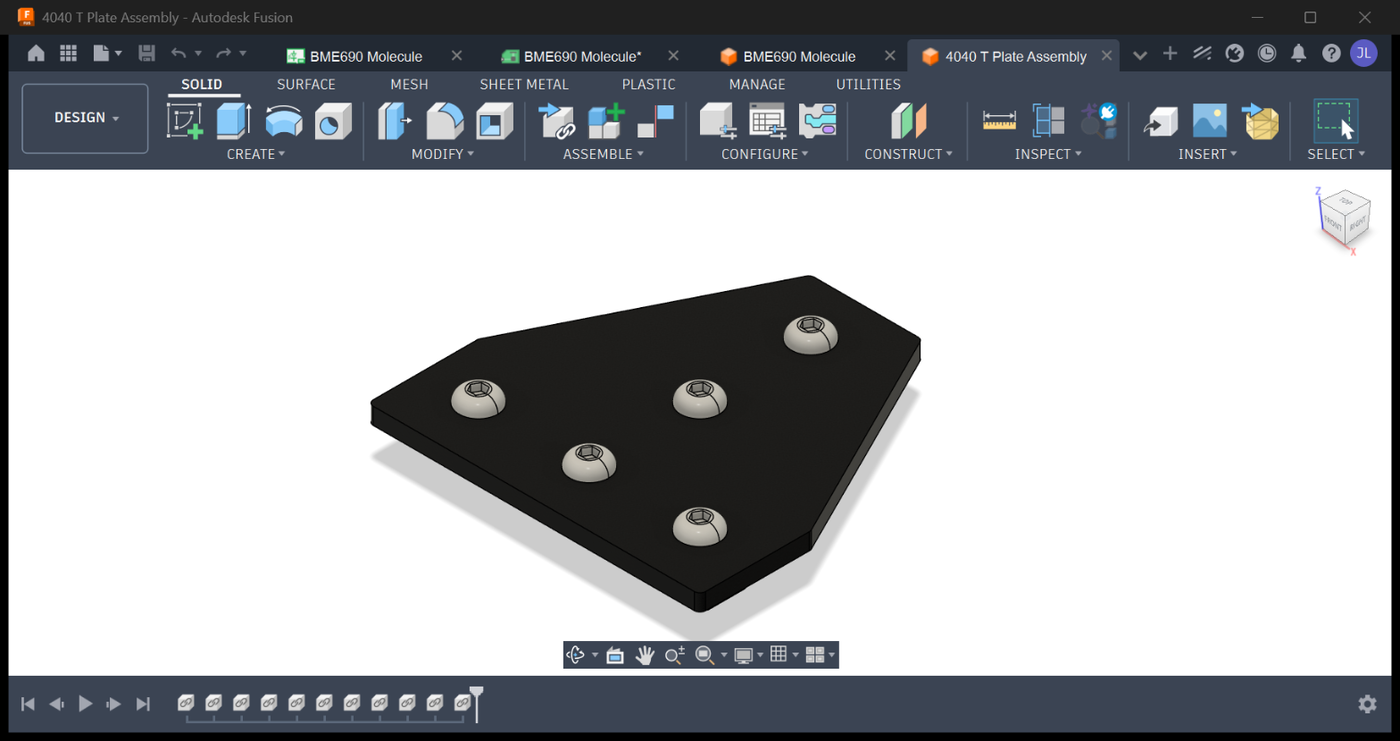
Below is a real Adom mechanical assembly, the 4040 T Plate, open in the Design workspace (captured
with Fusion in the background). It is an aluminum T-plate with 5 BHCS M8x16 on top and 5 T Nut
Eco 4040 M8 underneath. Running fusion_assembly_bom on it returns exactly that kit-aware list, 3
parts across 11 instances (plate x1, BHCS_M8x16 x5, T Nut Eco 4040 M8 x5), which is what a flat
occurrence walk would over-count.
fusion_assembly_bom
Structured, kit-aware BOM for the active assembly. Recurses organizational subassemblies, but stops at a physical part or a purchased kit.
adom-desktop fusion_assembly_bom '{}'
adom-desktop fusion_assembly_bom '{"treatAsUnit":["with fasteners","bearing unit"],
                                   "outputPath":"C:/tmp/bom.csv"}'
| arg | meaning |
|---|---|
treatAsUnit |
name substrings counted as ONE unit and not exploded. Default ["with fasteners"], case-insensitive substring match |
exclude |
top-level component-name prefixes to skip entirely |
includePhysicalProperties |
adds volume_cm3 / mass_kg per line (slow, see below) |
outputPath |
also write a CSV to this Windows path |
Returns parts[] of {componentName, partNumber, description, material, quantity, bodies}, plus
partCount and totalInstances.
The leaf rule, which is the whole trick: a component is a leaf when its name matches
treatAsUnit or it has bRepBodies.count > 0. Anything else is organizational and gets
recursed through.
fusion_physical_properties
Per-component volume, mass, density, area and center of mass, read directly rather than through a modeling script.
adom-desktop fusion_physical_properties '{}'
adom-desktop fusion_physical_properties '{"names":["Bracket A","Idler"],"accuracy":"high"}'
| arg | meaning |
|---|---|
names |
component names to measure. Default: all |
accuracy |
low | medium | high | veryhigh. Default low |
Returns properties keyed by component name, each {volume_cm3, mass_kg, density, area_cm2, center_of_mass}.
Performance, and why the timeout is 300s
getPhysicalProperties runs per component on Fusion's main thread. On a large assembly this is
the slow part, not the walk. Two consequences:
includePhysicalPropertiesdefaults to false on the BOM. Leave it off unless you need it.- When you only need a few parts, call
fusion_physical_propertieswith an explicitnameslist instead of pulling properties through the whole BOM.
Both verbs carry a 300s add-in timeout for this reason. If a call returns a relay timeout at ~60s, the work is still running on the bridge; poll rather than treating it as failure.
Worked example: a costed BOM
# 1. structured parts list, CSV for purchasing
adom-desktop fusion_assembly_bom '{"outputPath":"C:/tmp/bom.csv"}'

# 2. volumes only for the printed parts, to price filament
adom-desktop fusion_physical_properties '{"names":["Spool Holder","Guide Block"]}'
That is the shape BOM Forge uses: the BOM for quantities, targeted physical properties for the printed parts, then pricing applied downstream.
Limits worth knowing
- The BOM aggregates to a flat parts list with quantities, not a hierarchy with a
Levelcolumn. That matches Manage -> BOM, which is what purchasing needs. If you want the hierarchy, open an issue and it can be added without breaking the response shape. treatAsUnitis a case-insensitive substring match on the component name. Kit naming conventions beyond "with fasteners" must be passed explicitly.- A component with bodies and children is treated as a leaf, so its children are not counted. That is intentional: a physical part is a leaf.
# Mechanical BOM and physical properties
Two verbs that turn a Fusion **mechanical assembly** into a purchasing bill of materials, and read
per-part volume and mass for costing.
These exist because `fusion_export_bom` is **electronics-only**. Point it at a Design-workspace
assembly and it tells you `No board open (current workspace: Design)`. There was no mechanical
equivalent, so anyone who wanted a parts list had to hand-write an occurrence walk inside
`fusion_run_modeling_script`.
Contributed by **Oliver**, who built [BOM Forge](https://wiki.adom.inc/adom/bom-forge) on this
bridge, hit both gaps, and sent a PR with the fix.
## The counting problem these solve
Walk `allOccurrences` naively and you count every screw in the model. But when you buy a
"bracket **with fasteners**" kit, the screws arrive in that box. Counting them separately means
ordering hardware you already have.
Measured on a real assembly:
| part | flat walk | kit-aware | error |
|---|---|---|---|
| T Nut Drop In 2020 M5 | 28 | **14** | 2.0x over |
| T Nut Eco 4040 M8 | 44 | **18** | 2.4x over |
| BHCS M8x16 | 46 | **20** | 2.3x over |
| BHCS M5x8 (fully bundled) | counted | **0** | should not be ordered at all |
The kit-aware counts match Fusion's own **Manage -> BOM**.
Below is a real Adom mechanical assembly, the 4040 T Plate, open in the Design workspace (captured
with Fusion in the **background**). It is an aluminum T-plate with 5 BHCS M8x16 on top and 5 T Nut
Eco 4040 M8 underneath. Running `fusion_assembly_bom` on it returns exactly that kit-aware list, **3
parts across 11 instances** (plate x1, BHCS_M8x16 x5, T Nut Eco 4040 M8 x5), which is what a flat
occurrence walk would over-count.

## `fusion_assembly_bom`
Structured, kit-aware BOM for the active assembly. Recurses organizational subassemblies, but
stops at a physical part or a purchased kit.
```bash
adom-desktop fusion_assembly_bom '{}'
adom-desktop fusion_assembly_bom '{"treatAsUnit":["with fasteners","bearing unit"],
"outputPath":"C:/tmp/bom.csv"}'
```
| arg | meaning |
|---|---|
| `treatAsUnit` | name substrings counted as ONE unit and not exploded. Default `["with fasteners"]`, case-insensitive substring match |
| `exclude` | top-level component-name prefixes to skip entirely |
| `includePhysicalProperties` | adds `volume_cm3` / `mass_kg` per line (slow, see below) |
| `outputPath` | also write a CSV to this Windows path |
Returns `parts[]` of `{componentName, partNumber, description, material, quantity, bodies}`, plus
`partCount` and `totalInstances`.
**The leaf rule**, which is the whole trick: a component is a leaf when its name matches
`treatAsUnit` **or** it has `bRepBodies.count > 0`. Anything else is organizational and gets
recursed through.
## `fusion_physical_properties`
Per-component volume, mass, density, area and center of mass, read directly rather than through a
modeling script.
```bash
adom-desktop fusion_physical_properties '{}'
adom-desktop fusion_physical_properties '{"names":["Bracket A","Idler"],"accuracy":"high"}'
```
| arg | meaning |
|---|---|
| `names` | component names to measure. Default: all |
| `accuracy` | `low` \| `medium` \| `high` \| `veryhigh`. Default `low` |
Returns `properties` keyed by component name, each `{volume_cm3, mass_kg, density, area_cm2,
center_of_mass}`.
## Performance, and why the timeout is 300s
`getPhysicalProperties` runs **per component on Fusion's main thread**. On a large assembly this is
the slow part, not the walk. Two consequences:
- `includePhysicalProperties` defaults to **false** on the BOM. Leave it off unless you need it.
- When you only need a few parts, call `fusion_physical_properties` with an explicit `names` list
instead of pulling properties through the whole BOM.
Both verbs carry a 300s add-in timeout for this reason. If a call returns a relay timeout at ~60s,
the work is still running on the bridge; poll rather than treating it as failure.
## Worked example: a costed BOM
```bash
# 1. structured parts list, CSV for purchasing
adom-desktop fusion_assembly_bom '{"outputPath":"C:/tmp/bom.csv"}'
# 2. volumes only for the printed parts, to price filament
adom-desktop fusion_physical_properties '{"names":["Spool Holder","Guide Block"]}'
```
That is the shape BOM Forge uses: the BOM for quantities, targeted physical properties for the
printed parts, then pricing applied downstream.
## Limits worth knowing
- The BOM aggregates to a **flat parts list with quantities**, not a hierarchy with a `Level`
column. That matches Manage -> BOM, which is what purchasing needs. If you want the hierarchy,
open an issue and it can be added without breaking the response shape.
- `treatAsUnit` is a case-insensitive **substring** match on the component name. Kit naming
conventions beyond "with fasteners" must be passed explicitly.
- A component with bodies **and** children is treated as a leaf, so its children are not counted.
That is intentional: a physical part is a leaf.