Fusion - the Fusion 360 Bridge
Public Made by Adomby adom
Drive Autodesk Fusion 360 from the cloud via Adom Bridge: component libraries, IPC package generation, board layout, exports (STEP/Gerbers/BOM/CPL), fast APS cloud search, and parametric modeling.
APS cloud search
Fast, server-indexed search over your team's Fusion cloud files, plus browse, download, upload and version history. This is the single most-used part of the bridge, and it replaced a path that was genuinely unusable.
Why this exists
Fusion's in-app Python API has no indexed file-search endpoint. The only way to find a file was
to walk the cloud Data API one folder at a time, each folder a separate HTTP round trip to
Autodesk. On a real team hub that took 30+ minutes and could crash Fusion outright with
WinError 10054.
Autodesk Platform Services (APS) Data Management does expose indexed search. Same data, same account, roughly 2 seconds instead of half an hour.
So the old verbs are gone. fusion_search_cloud_files and fusion_walk_cloud_tree are
hard-blocked and return a refusal that carries live APS state and points at fusion_aps_search.
APS is not an optimization here, it is the only cloud-search path.
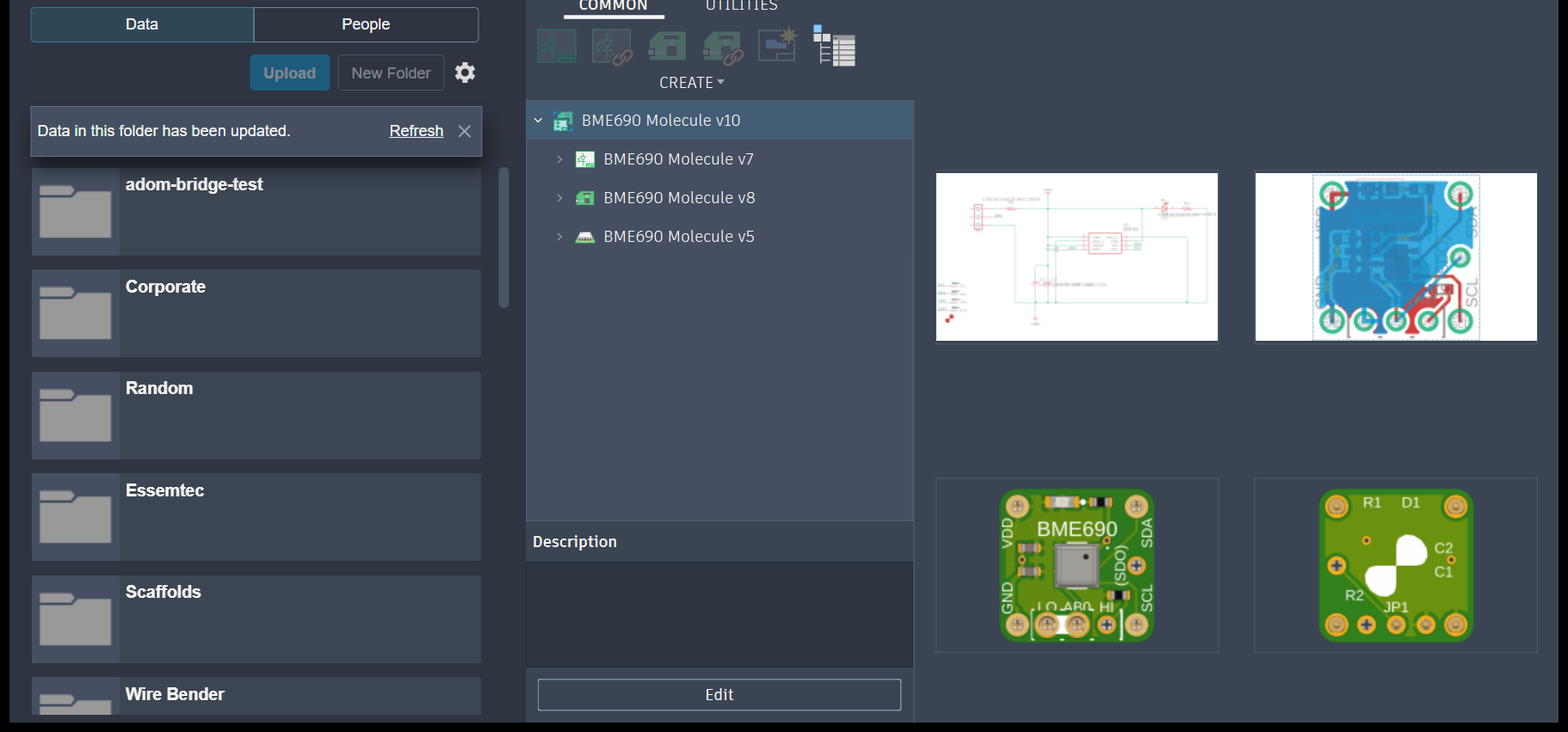
These are the team's Fusion cloud files, the folders and projects APS indexes (a Molecule project
expanded, with its schematic, board and 3D previews). Walking this panel folder by folder through
Fusion's Data API took 30+ minutes on a real hub; fusion_aps_search queries the same files,
same account, in about 2 seconds.
It never costs money
Two independent guarantees, both enforced in code:
- Allowlist. The bridge calls only Data Management (
/project/v1/,/data/v1/) and OSS storage (/oss/v2/), which are in APS's always-free set. The paid APIs (Model Derivative, Design Automation, Reality Capture) are never called. A path outside the allowlist is refused before the request leaves. - A monthly call cap, well under the free quota, that fails closed.
A card on file at Autodesk is only ever for identity verification. fusion_aps_status reports
callsThisMonth, monthlyCap and capRemaining so this is auditable.
Setup, once per company plus once per user
adom-desktop fusion_aps_status '{}'                                  # configured? signed in?
adom-desktop fusion_aps_set_client_id '{"clientId":"..."}'           # once per company
adom-desktop fusion_aps_signin '{"profile":"chrome:[email protected]"}'   # once per user
Register a Desktop/PKCE app at aps.autodesk.com with the Data Management API enabled and the callbacks the status verb lists. Only the Client ID is stored; the bridge runs its own PKCE OAuth with no client secret.
Sign-in is usually silent. If your browser profile already holds an Autodesk session, consent
goes through without a password or 2FA. The best moment to run it is immediately after a Fusion
sign-in, while that SSO session is warm. fusion_readiness checks APS on every launch and says so
in its hint, precisely so this is not a second login for the user.
No Adom browser extension? Still fine. Sign-in falls back to nbrowser_open_os_window, an
extension-free open of the consent URL in a real browser profile. The extension only buys
automation (the assistant can click Approve for you); it is never a prerequisite.
Searching
adom-desktop fusion_aps_search '{"query":"charger","limit":10}'
adom-desktop fusion_aps_open   '{"query":"BQ25792"}'      # search then open the best match
fusion_aps_search returns name, project, hub and URN. fusion_aps_open resolves a name straight
to an open document, which is the verb you usually want.
The rest of the surface
| verb | what it does |
|---|---|
fusion_aps_browse |
walk hubs / projects / folders |
fusion_aps_recent |
recently modified files |
fusion_aps_file_info |
metadata for one file |
fusion_aps_versions |
version history |
fusion_aps_download |
pull a file out of the cloud |
fusion_aps_upload |
push a local file in |
fusion_aps_create_folder |
make a folder |
fusion_aps_get |
raw authenticated GET, for development |
fusion_aps_set_browser / get_browser / forget_browser |
remember which browser profile authed |
fusion_open_by_urn |
open a specific URN directly |
Reading fusion_aps_status honestly
signedIn means usable right now, not "a token file exists". It refreshes if it can. Two
companion fields exist because those are different states:
hasStoredToken- a token is on disk, possibly deadrefreshFailed- the stored token is dead and could not be refreshed
This distinction was added after status cheerfully reported signedIn: true while every search
failed with APS token_expired. If you see refreshFailed: true, run fusion_aps_signin again.
When a search returns nothing
- Confirm
fusion_aps_statusshowssignedIn: trueandrefreshFailed: false. - APS indexes the cloud. Unsaved local documents are not searchable.
- The design may live in a hub the signed-in account cannot see.
fusion_aps_browseshows which hubs are reachable.
Electronics file hierarchy
A Fusion electronics design is a parent/child chain, and you open the PROJECT, never a child:
PROJECT        EcadDesignProductType   <- open this
  |- schematic   SchematicProductType
  |- board/.brd  BoardProductType
  |- 3D PCB      DesignProductType     (generated from the .brd; a leaf)
Opening a child gives an isolated or empty view. The open verbs warn in their _hint when you open
a non-EcadDesignProductType file. See schematics and
2D board layout.
# APS cloud search
Fast, server-indexed search over your team's Fusion cloud files, plus browse, download, upload and
version history. This is the single most-used part of the bridge, and it replaced a path that was
genuinely unusable.
## Why this exists
Fusion's in-app Python API has **no indexed file-search endpoint**. The only way to find a file was
to walk the cloud Data API one folder at a time, each folder a separate HTTP round trip to
Autodesk. On a real team hub that took **30+ minutes** and could crash Fusion outright with
`WinError 10054`.
Autodesk Platform Services (APS) Data Management **does** expose indexed search. Same data, same
account, roughly **2 seconds** instead of half an hour.
So the old verbs are gone. `fusion_search_cloud_files` and `fusion_walk_cloud_tree` are
**hard-blocked** and return a refusal that carries live APS state and points at `fusion_aps_search`.
APS is not an optimization here, it is the only cloud-search path.
These are the team's Fusion cloud files, the folders and projects APS indexes (a Molecule project
expanded, with its schematic, board and 3D previews). Walking this panel folder by folder through
Fusion's Data API took **30+ minutes** on a real hub; `fusion_aps_search` queries the same files,
same account, in about **2 seconds**.

## It never costs money
Two independent guarantees, both enforced in code:
1. **Allowlist.** The bridge calls only Data Management (`/project/v1/`, `/data/v1/`) and OSS
storage (`/oss/v2/`), which are in APS's always-free set. The paid APIs (Model Derivative,
Design Automation, Reality Capture) are never called. A path outside the allowlist is refused
before the request leaves.
2. **A monthly call cap**, well under the free quota, that fails closed.
A card on file at Autodesk is only ever for identity verification. `fusion_aps_status` reports
`callsThisMonth`, `monthlyCap` and `capRemaining` so this is auditable.
## Setup, once per company plus once per user
```bash
adom-desktop fusion_aps_status '{}' # configured? signed in?
adom-desktop fusion_aps_set_client_id '{"clientId":"..."}' # once per company
adom-desktop fusion_aps_signin '{"profile":"chrome:[email protected]"}' # once per user
```
Register a Desktop/PKCE app at [aps.autodesk.com](https://aps.autodesk.com) with the Data
Management API enabled and the callbacks the status verb lists. Only the Client ID is stored; the
bridge runs its own PKCE OAuth with no client secret.
**Sign-in is usually silent.** If your browser profile already holds an Autodesk session, consent
goes through without a password or 2FA. The best moment to run it is **immediately after a Fusion
sign-in**, while that SSO session is warm. `fusion_readiness` checks APS on every launch and says so
in its hint, precisely so this is not a second login for the user.
No Adom browser extension? Still fine. Sign-in falls back to `nbrowser_open_os_window`, an
extension-free open of the consent URL in a real browser profile. The extension only buys
automation (the assistant can click Approve for you); it is never a prerequisite.
## Searching
```bash
adom-desktop fusion_aps_search '{"query":"charger","limit":10}'
adom-desktop fusion_aps_open '{"query":"BQ25792"}' # search then open the best match
```
`fusion_aps_search` returns name, project, hub and URN. `fusion_aps_open` resolves a name straight
to an open document, which is the verb you usually want.
## The rest of the surface
| verb | what it does |
|---|---|
| `fusion_aps_browse` | walk hubs / projects / folders |
| `fusion_aps_recent` | recently modified files |
| `fusion_aps_file_info` | metadata for one file |
| `fusion_aps_versions` | version history |
| `fusion_aps_download` | pull a file out of the cloud |
| `fusion_aps_upload` | push a local file in |
| `fusion_aps_create_folder` | make a folder |
| `fusion_aps_get` | raw authenticated GET, for development |
| `fusion_aps_set_browser` / `get_browser` / `forget_browser` | remember which browser profile authed |
| `fusion_open_by_urn` | open a specific URN directly |
## Reading `fusion_aps_status` honestly
`signedIn` means **usable right now**, not "a token file exists". It refreshes if it can. Two
companion fields exist because those are different states:
- `hasStoredToken` - a token is on disk, possibly dead
- `refreshFailed` - the stored token is dead and could not be refreshed
This distinction was added after status cheerfully reported `signedIn: true` while every search
failed with `APS token_expired`. If you see `refreshFailed: true`, run `fusion_aps_signin` again.
## When a search returns nothing
- Confirm `fusion_aps_status` shows `signedIn: true` and `refreshFailed: false`.
- APS indexes the **cloud**. Unsaved local documents are not searchable.
- The design may live in a hub the signed-in account cannot see. `fusion_aps_browse` shows which
hubs are reachable.
## Electronics file hierarchy
A Fusion electronics design is a parent/child chain, and **you open the PROJECT**, never a child:
```
PROJECT EcadDesignProductType <- open this
|- schematic SchematicProductType
|- board/.brd BoardProductType
|- 3D PCB DesignProductType (generated from the .brd; a leaf)
```
Opening a child gives an isolated or empty view. The open verbs warn in their `_hint` when you open
a non-`EcadDesignProductType` file. See [schematics](schematics.md) and
[2D board layout](board-layout-2d.md).