Fusion - the Fusion 360 Bridge
Public Made by Adomby adom
Drive Autodesk Fusion 360 from the cloud via Adom Bridge: component libraries, IPC package generation, board layout, exports (STEP/Gerbers/BOM/CPL), fast APS cloud search, and parametric modeling.
2D board layout and manufacturing output
The PCB side of Fusion Electronics: the board editor, design rules, layer discovery, and every artifact a fab or assembler needs.
Getting to the board
adom-desktop fusion_aps_open   '{"query":"BQ25792"}'   # open the PROJECT (not the .brd)
adom-desktop fusion_show_2d_board '{}'                 # PCB editor
adom-desktop fusion_board_info '{}'                    # size, layer count, component count
Opening the .brd child directly gives an isolated view. See schematics for why.
Design rules
adom-desktop fusion_load_design_rules '{}'                       # what is loaded now
adom-desktop fusion_set_design_rules  '{"preset":"adom"}'        # apply Adom's DRU
Adom's DRU rules ship with the bridge under resources/. Applying a house ruleset before routing is
what keeps a board manufacturable at the fab you use.
Layers
fusion_detect_layers reports the real layer stack of the open board rather than assuming a
2-layer or 4-layer default. It is backed by a layer-detect ULP shipped in resources/.
fusion_board_stackup returns the physical stackup: per-layer thickness, copper weight and
material. This matters more than it sounds. When you render a board in 3D, the board bbox is the
FR4 body, never the whole assembly, because components overhang the edges and tower above it.
Getting that wrong produces a 3D model that looks correct and measures wrong.
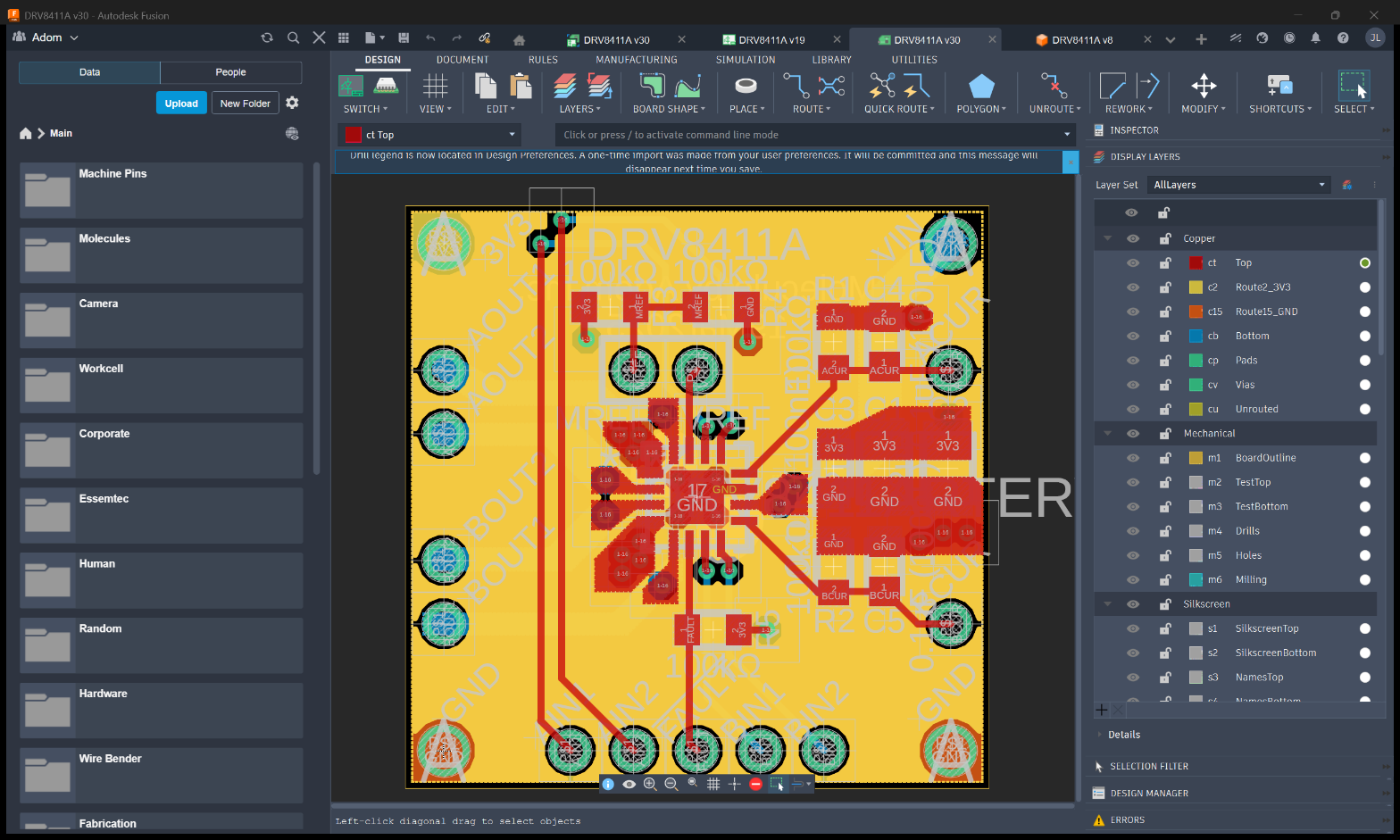
Below is a real Adom board, the DRV8411A motor-driver, open in the Fusion Electronics 2D PCB
editor. The copper pours, routed traces, silkscreen and pad stack are all live and editable here,
which is where fusion_electron_run commands act.
Routing
Fusion Electronics is EAGLE underneath, so routing is driven with EAGLE commands:
adom-desktop fusion_electron_run '{"command":"RATSNEST;"}'
adom-desktop fusion_electron_run '{"command":"AUTO ;"}'      # autoroute
fusion_execute_text_command is space-delimited. Note the space in AUTO ;.
Manufacturing output
| verb | produces |
|---|---|
fusion_export_gerbers |
Gerbers + drill files, via a CAM job |
fusion_export_bom |
electronics BOM (this is the electronics-only one, see below) |
fusion_export_cpl |
component placement list for pick-and-place |
fusion_export_dxf / fusion_export_dwg |
2D vector output |
JLCPCB CAM jobs ship with the bridge in resources/, so gerbers come out in the shape JLC expects
rather than a generic set you have to fix.
adom-desktop fusion_export_gerbers '{"outputPath":"C:/tmp/fab"}'
adom-desktop fusion_export_bom     '{"outputPath":"C:/tmp/bom.csv"}'
adom-desktop fusion_export_cpl     '{"outputPath":"C:/tmp/cpl.csv"}'
fusion_export_bom is electronics-only
On a mechanical assembly it returns No board open (current workspace: Design). That is expected.
For mechanical assemblies use fusion_assembly_bom, which is kit-aware and
matches Fusion's Manage -> BOM.
Publish the whole design, not just the 3D
When a board gets a wiki page, that page repo should carry every exportable file: .f3d/.step
/.usdz, EAGLE .brd + .sch, Fusion .fbrd + .fsch, gerbers, BOM, CPL, GLBs and renders. The
page exists so someone else can build the design, and a 3D model alone does not let them.
Gotchas
- Wrong workspace is the usual cause of a refused verb. Check
isElectronicsinfusion_get_app_state. - A blocking dialog (recovery prompt, update nag) will swallow commands silently. Clear it with
fusion_dismiss_blocking_dialogs. - Gerber export runs a CAM job and is genuinely slow on a dense board. A relay timeout at ~60s does not mean it failed; the work continues on the bridge, so poll.
# 2D board layout and manufacturing output
The PCB side of Fusion Electronics: the board editor, design rules, layer discovery, and every
artifact a fab or assembler needs.
## Getting to the board
```bash
adom-desktop fusion_aps_open '{"query":"BQ25792"}' # open the PROJECT (not the .brd)
adom-desktop fusion_show_2d_board '{}' # PCB editor
adom-desktop fusion_board_info '{}' # size, layer count, component count
```
Opening the `.brd` child directly gives an isolated view. See [schematics](schematics.md) for why.
## Design rules
```bash
adom-desktop fusion_load_design_rules '{}' # what is loaded now
adom-desktop fusion_set_design_rules '{"preset":"adom"}' # apply Adom's DRU
```
Adom's DRU rules ship with the bridge under `resources/`. Applying a house ruleset before routing is
what keeps a board manufacturable at the fab you use.
## Layers
`fusion_detect_layers` reports the real layer stack of the open board rather than assuming a
2-layer or 4-layer default. It is backed by a layer-detect ULP shipped in `resources/`.
`fusion_board_stackup` returns the physical stackup: per-layer thickness, copper weight and
material. This matters more than it sounds. When you render a board in 3D, the **board bbox is the
FR4 body**, never the whole assembly, because components overhang the edges and tower above it.
Getting that wrong produces a 3D model that looks correct and measures wrong.
Below is a real Adom board, the DRV8411A motor-driver, open in the Fusion Electronics 2D PCB
editor. The copper pours, routed traces, silkscreen and pad stack are all live and editable here,
which is where `fusion_electron_run` commands act.

## Routing
Fusion Electronics is EAGLE underneath, so routing is driven with EAGLE commands:
```bash
adom-desktop fusion_electron_run '{"command":"RATSNEST;"}'
adom-desktop fusion_electron_run '{"command":"AUTO ;"}' # autoroute
```
`fusion_execute_text_command` is **space-delimited**. Note the space in `AUTO ;`.
## Manufacturing output
| verb | produces |
|---|---|
| `fusion_export_gerbers` | Gerbers + drill files, via a CAM job |
| `fusion_export_bom` | electronics BOM (this is the **electronics-only** one, see below) |
| `fusion_export_cpl` | component placement list for pick-and-place |
| `fusion_export_dxf` / `fusion_export_dwg` | 2D vector output |
JLCPCB CAM jobs ship with the bridge in `resources/`, so gerbers come out in the shape JLC expects
rather than a generic set you have to fix.
```bash
adom-desktop fusion_export_gerbers '{"outputPath":"C:/tmp/fab"}'
adom-desktop fusion_export_bom '{"outputPath":"C:/tmp/bom.csv"}'
adom-desktop fusion_export_cpl '{"outputPath":"C:/tmp/cpl.csv"}'
```
### `fusion_export_bom` is electronics-only
On a mechanical assembly it returns `No board open (current workspace: Design)`. That is expected.
For mechanical assemblies use [`fusion_assembly_bom`](mechanical-bom.md), which is kit-aware and
matches Fusion's Manage -> BOM.
## Publish the whole design, not just the 3D
When a board gets a wiki page, that page repo should carry **every** exportable file: `.f3d`/`.step`
/`.usdz`, EAGLE `.brd` + `.sch`, Fusion `.fbrd` + `.fsch`, gerbers, BOM, CPL, GLBs and renders. The
page exists so someone else can build the design, and a 3D model alone does not let them.
## Gotchas
- Wrong workspace is the usual cause of a refused verb. Check `isElectronics` in
`fusion_get_app_state`.
- A blocking dialog (recovery prompt, update nag) will swallow commands silently. Clear it with
`fusion_dismiss_blocking_dialogs`.
- Gerber export runs a CAM job and is genuinely slow on a dense board. A relay timeout at ~60s does
not mean it failed; the work continues on the bridge, so poll.