Chip Fetcher (cf)
Public Made by Adomby adom
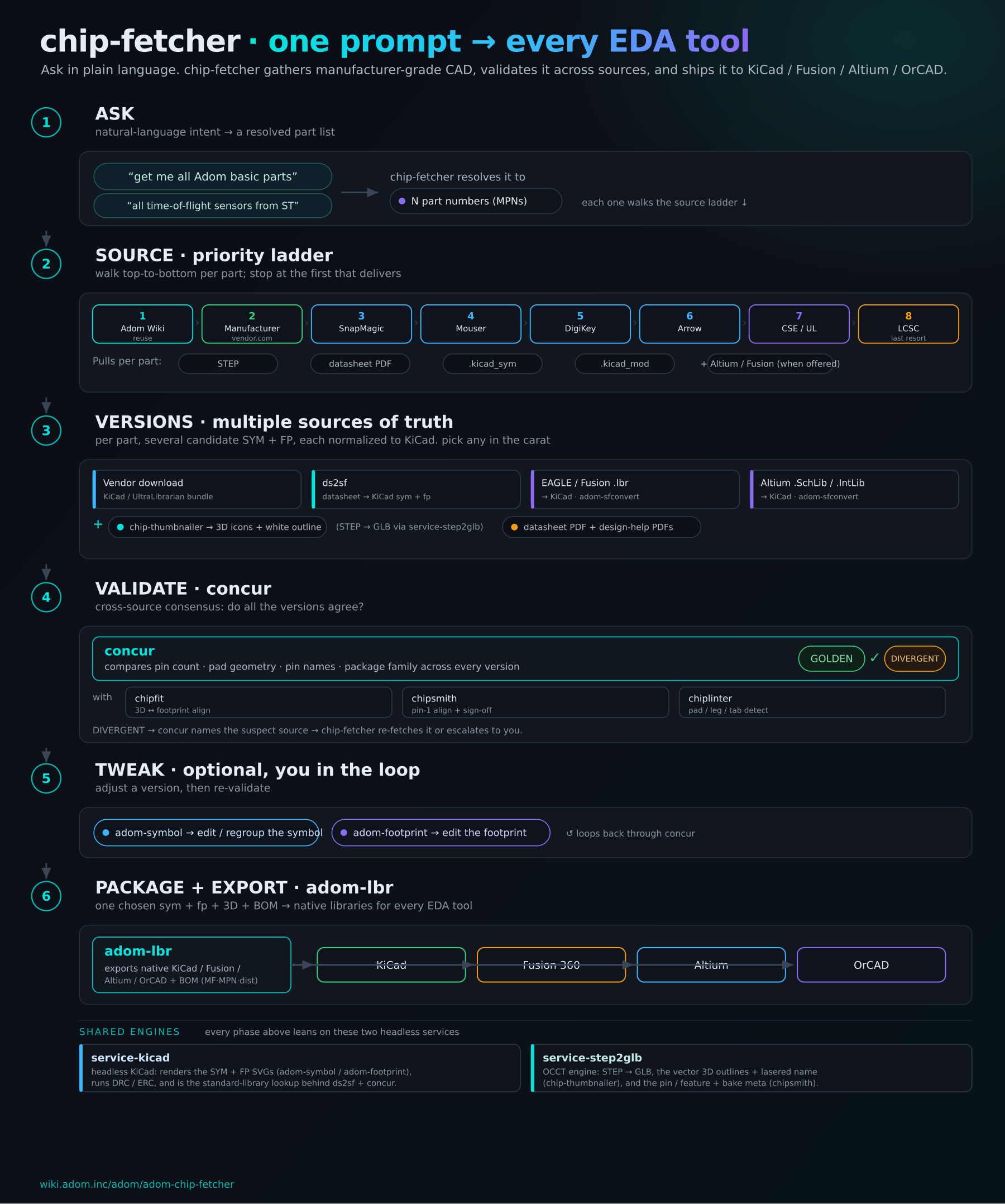
Crawls the web on your behalf to gather everything about the chips you care about: datasheets, symbols, footprints, 3D models, stock and pricing, straight from the manufacturer first, into your EDA tool. Say "cf" to your AI.

Install?
Crawls the web on your behalf to gather everything about the chips you care about: datasheets, symbols, footprints, 3D models, stock and pricing, straight from the manufacturer first, into your EDA tool. Say "cf" to your AI.
adom-wiki pkg install adom/adom-chip-fetcherLatest: v1.4.6, published
Dependencies 12 apps, 1 skill
- skill adom/adom-sfconvert *
- app adom/adom-symbol *
- app adom/adom-footprint *
- app adom/adom-ds2sf *
- app adom/adom-concur *
- app adom/adom-step *
- app adom/adom-lbr *
- app adom/adom-chip-thumbnailer *
- app adom/adom-chipsmith *
- app adom/adom-parts-search *
- app adom/adom-mouser *
- app adom/adom-digikey *
- app adom/adom-jlcpcb *
Contents
README
markdownchip-fetcher (cf)
The stack
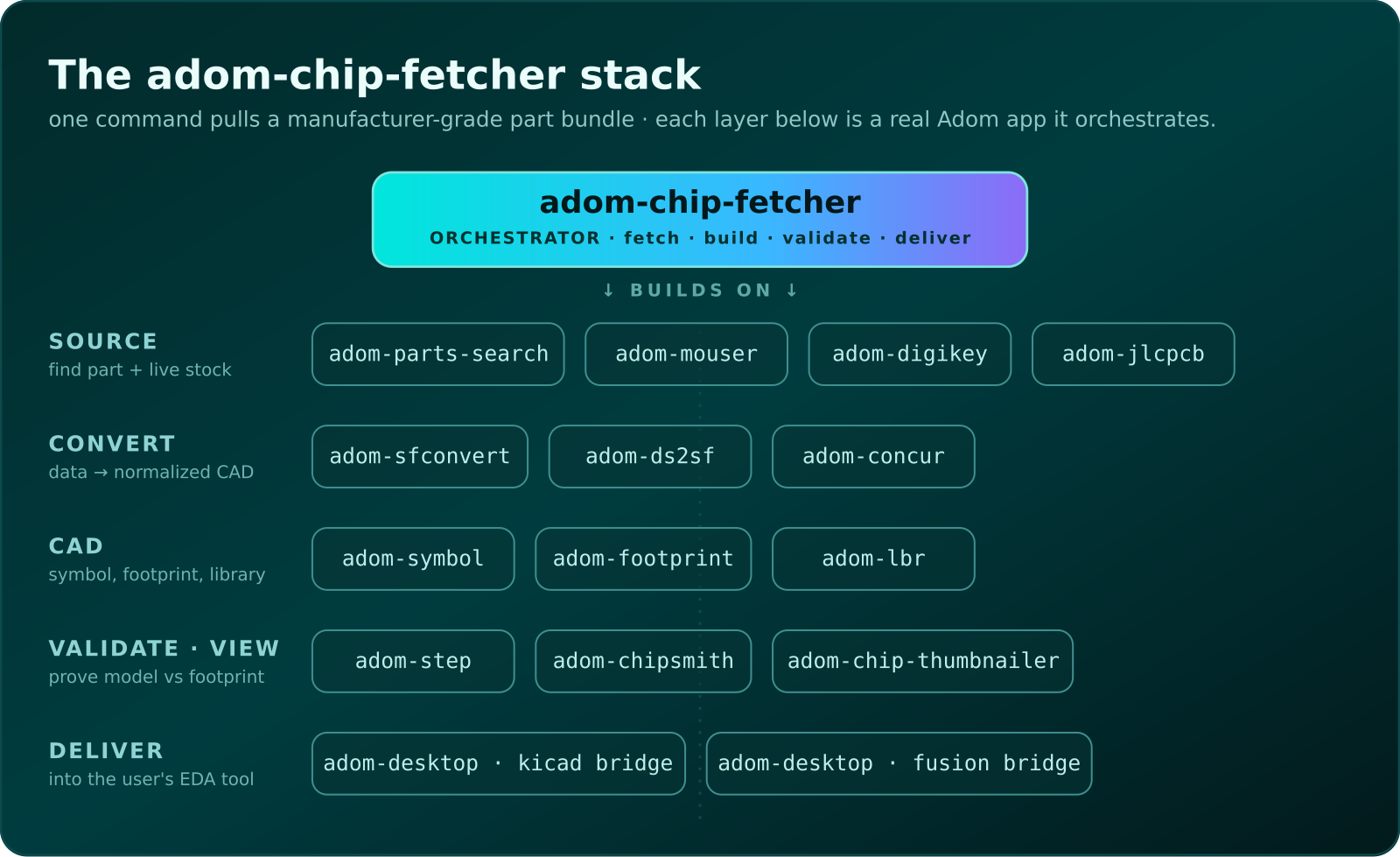
adom-chip-fetcher is the top of a stack, one command pulls a manufacturer-grade part bundle by orchestrating a tier of focused Adom apps. Each box below is a real app (click through to its page):
Chip Fetcher, cf to everyone who uses it, crawls the web on your behalf. You drive it entirely through your AI with the word cf ("fetch STM32H743VIT6 with cf"). Name the chips you care about and it gathers everything about them, the datasheet, symbol, footprint, 3D STEP model, design-help PDFs, stock and pricing, by driving Chrome through pup on your desktop, manufacturer site first, and lands it all in one structured library your EDA tool can use.
The defining rule: fetch from the manufacturer's own website first, only fall back to Mouser, DigiKey, or Component Search Engine when the manufacturer doesn't self-host CAD, and only with explicit user approval.
What it does
chip-fetcher fetch TPS62840            # opens the TI page → UL deep-link → drives the form → auto-pulls
chip-fetcher pull '<windows-path>'     # pulls a downloaded zip from the user's desktop
chip-fetcher import path/to/zip --mpn  # absorbs a downloaded file into library/<MPN>/
chip-fetcher list                       # shows what's in library/ vs missing per slot
chip-fetcher login <source>             # signs in to a vendor from pup's OS-keychain vault (chip-fetcher stores no passwords)
chip-fetcher doctor [--fix]             # first-run check: skill, 13 sister tools, desktop bridge, pup, library
chip-fetcher app                        # the dashboard in a maximized pup window
chip-fetcher install                    # deploys SKILL.md to ~/.claude/skills/adom-chip-fetcher/
In the Hydrogen dock
Chip Fetcher is a card on the Hydrogen Dock Bar, the app-launcher rail on the right edge of the workspace. Here it is running in ah, between the Fusion and Pup bridges:

One click on the card installs the CLI and its thirteen sister tools into your container (skipped when already present), starts the dashboard with adom-chip-fetcher serve --print-url, and opens the MAIN dashboard in the dock's webview tab; there is no separate launcher page. While the rail is open the dock polls GET /api/status every 15 seconds and paints the card's LED from it: dashboard, AI skill, sister tools, desktop bridge and library, each facet with a hint naming the exact fix.
The dashboard leads with a Say it strip, the phrases you say to your AI to drive it ("fetch STM32F103C8T6 with chip fetcher"), then the component LED row, and a Welcome card on an empty library so a first run shows exactly what to do next. The settings cog (upper right) opens the shared Adom settings modal: component Install / Update rows with live consoles, the taskbar-progress choice (an indeterminate Windows taskbar bar on the dashboard window for the whole lookup), dashboard toggles, and your vendor logins, which live in pup's OS-keychain vault and never in chip-fetcher.
Not on your dock yet? Dock settings (the gear at the top of the rail), Add app, adom/adom-chip-fetcher. The full mechanics live in the adom-chip-fetcher-dock skill.
Your AI drives the page the same way you do: chip-fetcher ui toast "downloading STEP", ui select <MPN>, ui settings open, ui state, ui console.
After running, each chip lands in:
library/<MPN>/
├── <MPN>.step          # rich manufacturer STEP, named PRODUCTs (Body, ThermalPin, PinsArrayLR, PinsArrayTB)
├── <MPN>.kicad_sym
├── <MPN>.kicad_mod
├── <MPN>.pdf           # datasheet
├── <MPN>-errata-*.pdf
├── <MPN>-appnote-*.pdf
├── <MPN>-hwguide.pdf
└── info.json           # provenance trail (mfr-direct vs mouser-fallback)
Reuse first, then align pin-1
Reuse before re-fetch. The sourcing ladder now starts at the Adom Wiki (Source::AdomWiki): if the part is already published as a component bundle, chip-fetcher pulls that bundle (.kicad_sym / .kicad_mod / STEP / datasheet) instead of scraping vendors. Free, fast, and Adom-consistent. It only falls through to the manufacturer-first ladder when there's no published match.
Pin-1 alignment. From the dashboard you can Align pin-1 in chipsmith: line up the 3D chip's pin-1 with the footprint's pin-1 and sign off. chip-fetcher reads the sign-off back, derives the footprint's own pin-1 corner straight from the .kicad_mod, shows a Pin-1 status on every card (and flags a chip-vs-footprint mismatch), and gate --strict requires it.
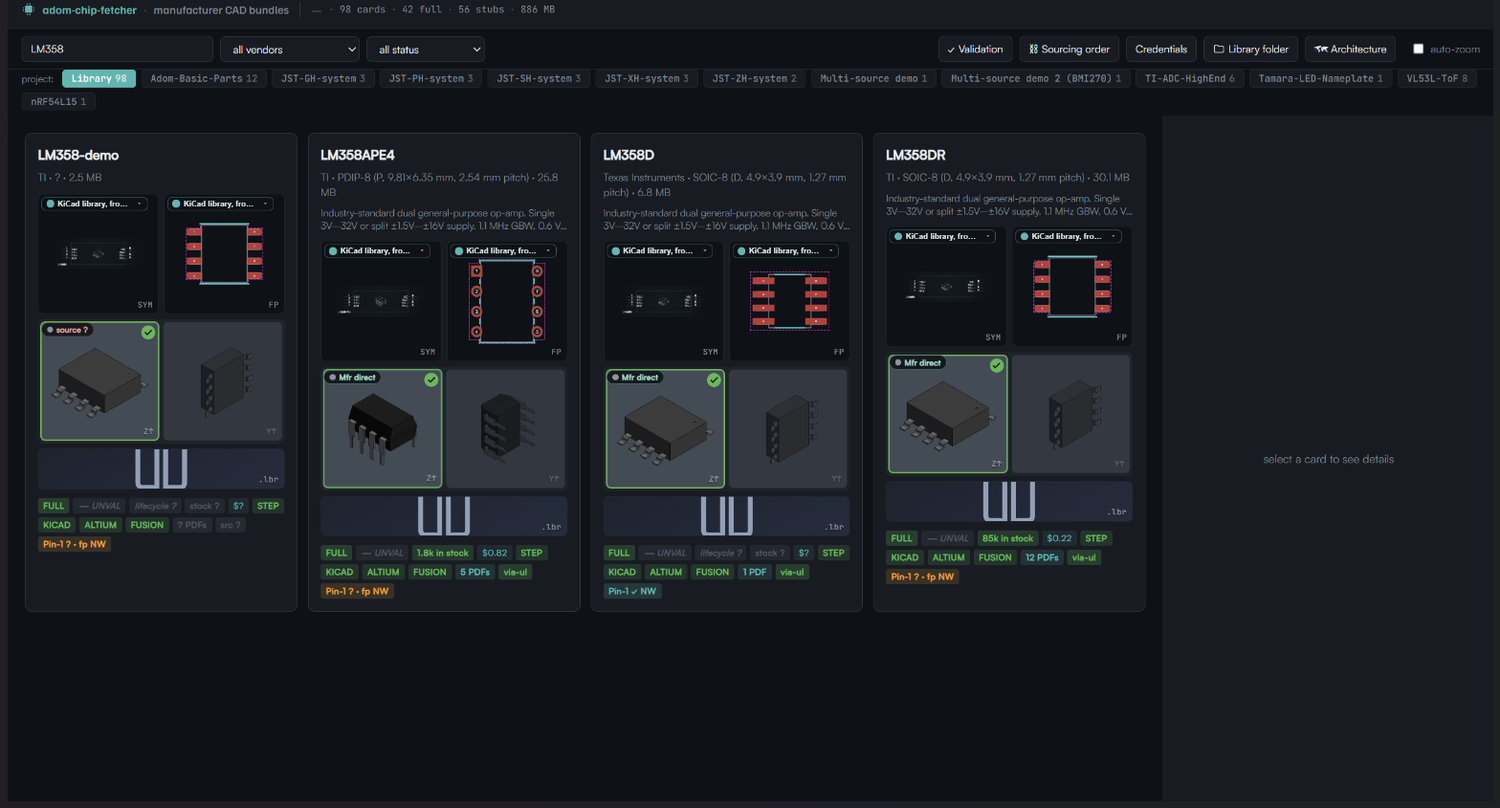
Each card is one part. The Pin-1 badge shows the footprint target (fp NW) until you align + sign off in chipsmith, then it locks to the chip corner (Pin-1 checkmark NW).
Verified vendors
| Vendor | Path | Notes |
|---|---|---|
| Texas Instruments | vendor.ultralibrarian.com/TI/embedded/... |
mfr-direct via UL |
| STMicroelectronics | vendor.ultralibrarian.com/stmicro/embedded/... |
mfr-direct via UL |
| Analog Devices | vendor.ultralibrarian.com/adi/embedded/... |
mfr-direct via UL |
| Microchip | vendor.ultralibrarian.com/microchip/... |
mfr-direct via UL (iframe) |
| NXP | nxp.com (BXL) + nxp.componentsearchengine.com (STEP) |
mfr-direct |
| Espressif | Mouser ECAD-Model fallback | mfr-uploaded to SamacSys |
| Lattice | Mouser ECAD-Model fallback | mfr-uploaded to SamacSys |
| Renesas | Mouser ECAD-Model fallback | mfr-uploaded to SamacSys |
| JST | jst-mfg.com (email-gated) |
mfr-direct STEP/IGES emailed to you, see below |
Email-delivered CAD (JST)
Some manufacturers email the CAD file instead of serving a download. JST is the reference case: since April 2025, requesting a STEP/IGES on jst-mfg.com sends it as an email attachment. The full flow, driving your real Chrome past Cloudflare, the License Agreement form, retrieving the attachment via adom-google (Gmail) or a build-your-own fetcher for other providers, and the breadcrumb pattern that keeps chip-fetcher provider-agnostic, is documented in its own sub-README:
docs/jst-email-gated-cad.md, Email-delivered CAD: the JST flow (and how to add any email-gated manufacturer)
docs/jst-showcase.md, the full JST story with screenshots: how chip-fetcher cracked JST's Cloudflare + email gate end-to-end, and bundled the 5 most-common JST connectors with symbol + footprint + 3D.
Note on JST files: JST's download License Agreement (clause 2) prohibits redistributing their CAD to third parties, so we do not rehost JST's emailed STEP/IGES or datasheets. Connector component pages we publish use the redistributable KiCad libraries for symbol/footprint/3D and link to JST for any JST-authored model.
Agents: the same content lives in the skill as playbooks/jst.md +
playbooks/jst-email-retrieval.md.
Demo (60s, narrated)
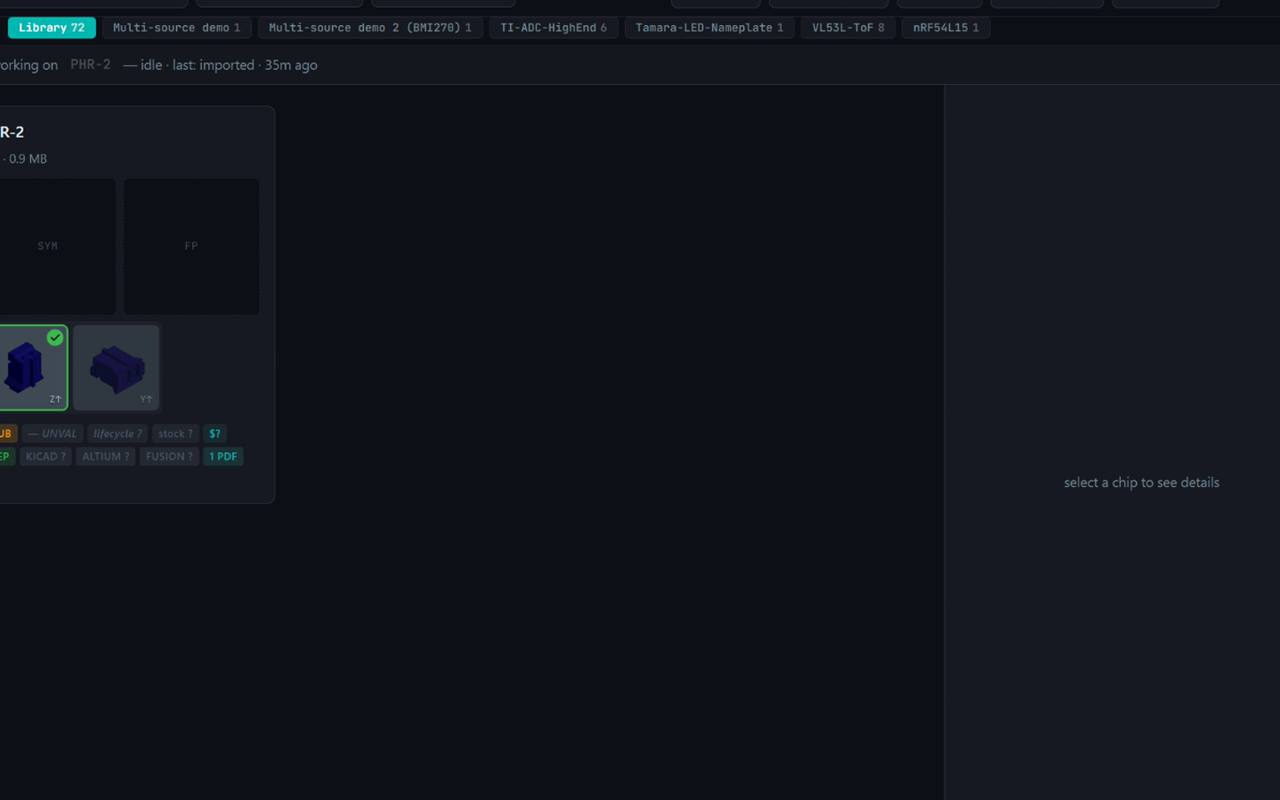
▶ Watch the 60-second demo, proven end-to-end on PHR-2: JST's global catalog → the License Agreement form → the "data has been sent to your email address" confirmation → adom-google pulls the emailed PHR-2.STEP → the chip-fetcher library card with its auto-rendered 3D model.
Reproducible recipe (scenes, narration, TTS config): demo/jst-email-gated-cad-demo-script.md.
See SKILL.md for the full skill documentation, vendor URL patterns, and the failure-mode notes captured from real Adom-user feedback.
Install
adom-wiki pkg install adom/adom-chip-fetcher   # binary (adom-chip-fetcher + chip-fetcher alias), UI assets, both skills, and every sister tool
adom-chip-fetcher doctor                       # one line per component; --fix installs anything missing
Or from the dock: Dock settings, Add app, adom/adom-chip-fetcher, click the card.
License
MIT, © 2026 Adom Industries Inc. Open source; see LICENSE. Modify, fork, and redistribute freely.