Adom Symbol
Public Made by Adomby adom
KiCad symbol creator with interactive viewer and delivery to KiCad/Fusion 360

Install?
KiCad symbol creator with interactive viewer and delivery to KiCad/Fusion 360
adom-wiki pkg install adom/adom-symbolLatest: v1.2.6, published
Dependencies 1 app
- app adom/adom-lbr *
Contents
- Chip thumbnail in every symbol (default since 1.2.0)
- Hints that send the AI to the Adom wiki first (from 1.2.1)
- --outline-name none (from 1.2.2)
- Hairline outline stroke (from 1.2.3)
- Orderable identity (from 1.2.4)
- Hidden properties are stacked below the body (from 1.2.5)
- Try it on any component page: the symbol-variants widget
- What it does
- The live viewer
- Install
- Quick start
- CLI reference
- 3D-chip outline contract (for adom-lbr)
- Outline placement (the math render exposes)
- The contract, proven
- Architecture
- Build from source
- Wiki
- Contributing & forking — open source under the Adom org
- License
README
markdownadom-symbol
Standalone Rust CLI + live app for KiCad schematic symbols. Generates
.kicad_sym files natively in Rust, renders them as gorgeous dark-themed SVGs
through the shared service-kicad container, and serves an AI-drivable live
viewer with a full layout studio. No Node, no gallia, no local KiCad install.
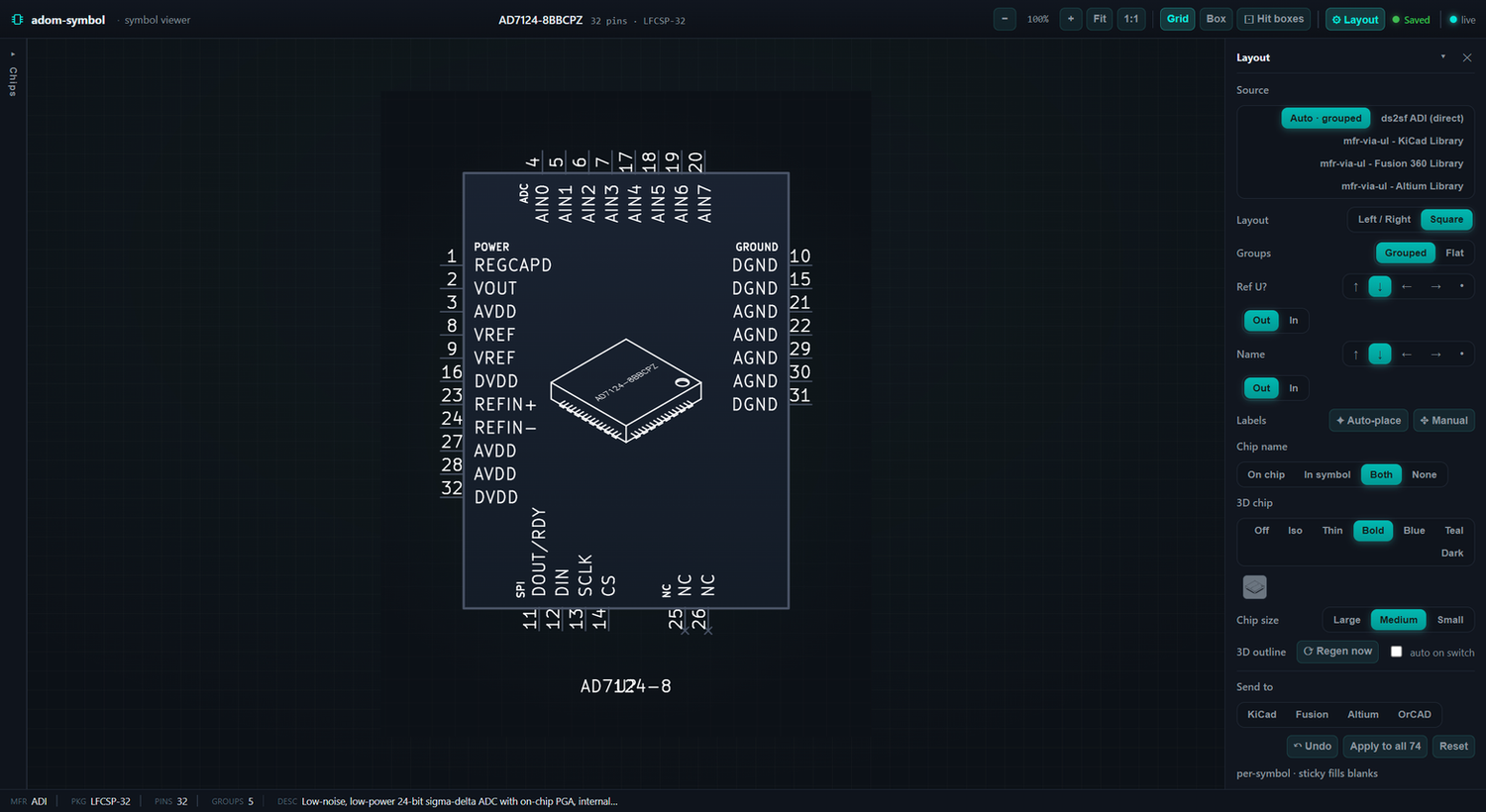
Chip thumbnail in every symbol (default since 1.2.0)
adom-symbol create bakes a 3D-chip thumbnail into the middle of the symbol body as
real KiCad polylines: the part's real outline when chip-thumbnailer has rendered
<mpn>-3d-outline-*-named.svg, otherwise a generic isometric chip with the part name
lasered on top. Turn it off with --no-chip-outline (or preferences.chipOutline:false,
or chipOutline:false in ~/.claude/skills/adom/preferences.json); size it with
--chip-size large|medium|small.
The source is picked in order: --outline-svg <file> (or outlineSvg in the create JSON),
then an auto-discovered <mpn>-3d-outline-{heavy,dark,hairline,teal}-named.svg beside --out,
beside the create JSON, in the cwd or in chip-fetcher's library/<mpn>/, then the built-in
generic chip. The icon is centred in the text-free lane between the pin-name columns; a short
2-column body is grown on the grid so a readable icon (9 mm or more) fits, and under 9 mm the
icon is left out. A hidden Adom_Chip_Outline property records what was baked, and render
sees it and does not composite a second chip on top. The stdout of create says which source
was used.
Hints that send the AI to the Adom wiki first (from 1.2.1)
When a chip outline was baked, create ends with _hint: lines. The first is WIKI FIRST:
before fetching, modelling or lasering anything for the part, run
adom-wiki discover search --query <MPN> (and adom-wiki discover find <MPN>), because an
existing component page already carries the reviewed symbol, footprint, .lbr, the
manufacturer STEP, the outline cache (artwork/<MPN>-thumbs.json) and provenance;
adom-wiki repo clone adom/<slug> and reuse it. When the generic chip was baked, a second
hint lists where to get the real body, the wiki again first, then the manufacturer STEP,
chip-fetcher fetch <MPN>, or modelling it from the datasheet, followed by
adom-chip-thumbnailer once <MPN> and a re-run of create.
--outline-name none (from 1.2.2)
With an un-named outline (--outline-svg <lib>/<MPN>-3d-outline-heavy.svg), adom-symbol
lasers the part number UNDER the chip inside the icon box; that is --outline-name under,
the default. When the outline comes from a side-etched STEP, where the MPN already shows on
the chip's wall, pass --outline-name none (or preferences.outlineName: "none" in the
create JSON) so the part number is not shown twice. The CLI flag wins over the create JSON.
Hairline outline stroke (from 1.2.3)
Baked chip-outline polylines are written with a 0.0254 mm (1 mil) stroke. KiCad draws any stroke at least one pixel wide, so the dense thumbnailer art reads as a crisp single-pixel line at every zoom; the earlier 0.14 to 0.17 mm stroke smeared it into a blob. adom-lbr 2.44.0+ maps the same stroke to Altium's Smallest line width and to 0.0254 mm EAGLE wires, so the hairline reaches Altium and Fusion from this one symbol.
Orderable identity (from 1.2.4)
The BOM and CPL a fab receives with the gerbers are built from the part's identity fields,
so the create JSON carries them and create writes them onto the symbol as hidden properties:
| Create JSON | Symbol property |
|---|---|
mpn (the orderable manufacturer part number, e.g. VL53L5CXV0GC/1) |
MPN |
manufacturer |
Manufacturer |
datasheetUrl |
Datasheet |
description |
Description |
distributors.mouser |
Mouser |
distributors.digikey |
DigiKey |
distributors.lcsc |
LCSC |
wikiUrl (the part's Adom wiki component page, https://wiki.adom.inc/<owner>/<slug>) |
Adom Wiki |
{
  "symbolName": "VL53L5CX",
  "mpn": "VL53L5CXV0GC/1",
  "manufacturer": "STMicroelectronics",
  "distributors": { "mouser": "...", "digikey": "...", "lcsc": "..." },
  "wikiUrl": "https://wiki.adom.inc/adom/vl53l5cx"
}
An empty mpn or wikiUrl is not written. When mpn, manufacturer, wikiUrl or any of the three
distributor numbers is missing, create prints a _hint: NOT ORDERABLE YET line naming
each missing field. One lookup fills the numbers: adom-parts-search search <MPN> (Mouser,
DigiKey and JLCPCB/LCSC with stock and price). A distributor that genuinely does not stock
the part is left out, and said so on the wiki page. adom-lbr 2.45.0+ carries these
properties into Altium parameters (plus Supplier N links) and Fusion attributes, and
kicad-cli sch export bom --fields reads them straight off a schematic.
Hidden properties are stacked below the body (from 1.2.5)
KiCad's Symbol Editor still paints hidden fields in grey. Placed at the origin they drew as
one unreadable pile of text over the symbol. Hidden properties (Footprint, Datasheet,
Description, Manufacturer, MPN, Adom Wiki, the distributor numbers, Adom_Chip_Outline) are
now stacked in a column below the body, 2.54 mm apart, under the Value.
Try it on any component page: the symbol-variants widget
Put that tag on its own line in a component page README (point src at the page's own page.json) and readers get 2-column, 2-column grouped, square, and square-grouped layouts, the chip outline fitted in the body, and centred-name variants, generated in the browser by this same engine (compiled to WebAssembly) and downloadable as .kicad_sym. The page's default symbol is never touched.
What it does
- Generate
.kicad_symnatively in Rust — rectangle-body ICs with grouped, side-sorted pins (Category A) and discrete passives derived from a KiCad baseline symbol (Category B). - Render the symbol to a cropped, dark-themed SVG via service-kicad
(
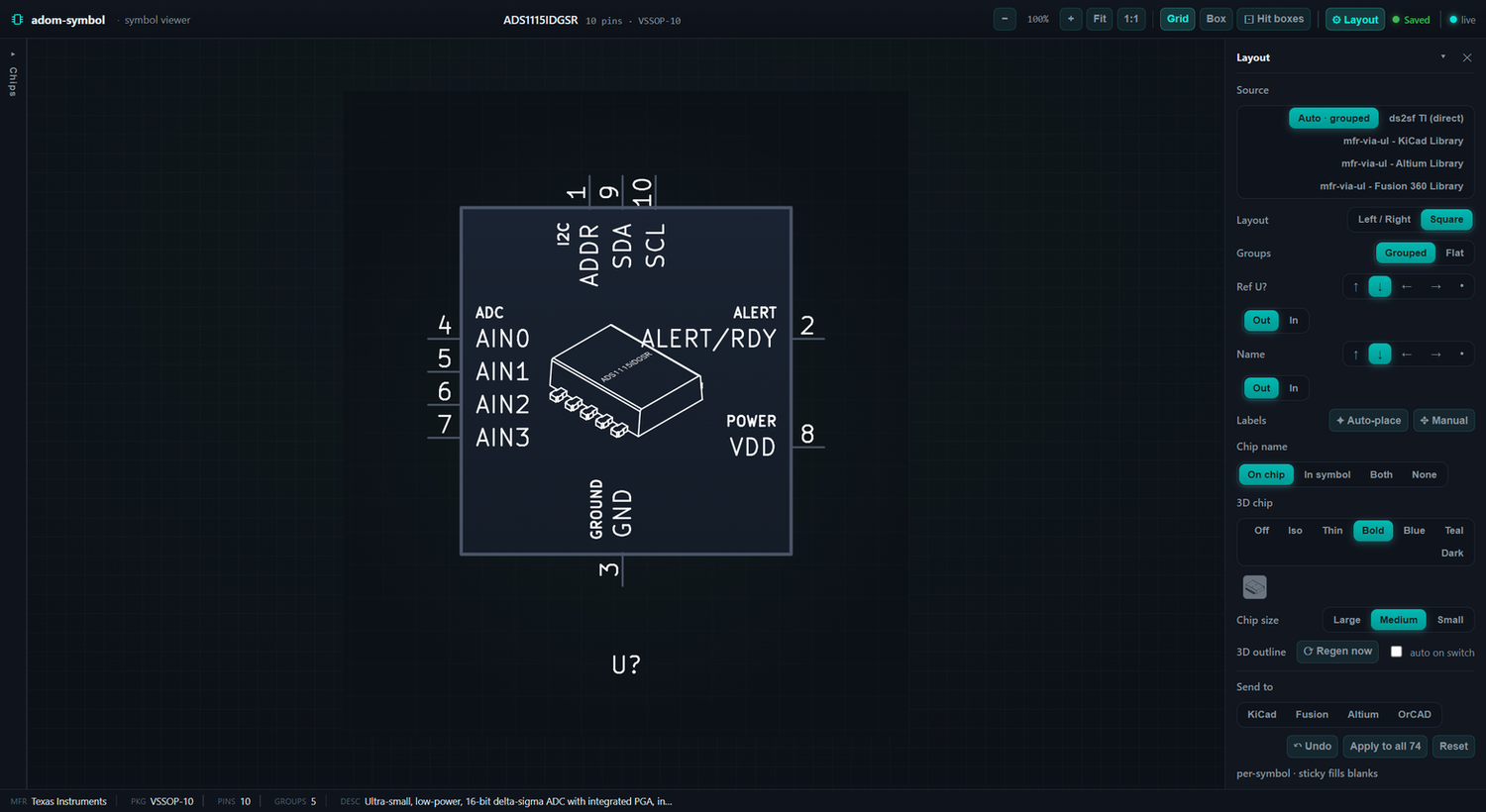
POST /kicad/sch/export/svg) — the same render path the chip-fetcher dashboard uses, so the thumbnail and the app match exactly. The default render inlines the part's 3D-chip vector outline (with the part number lasered on) into the body centre as real<polyline>s — crisp in every renderer (browser, librsvg thumbnailer, anything), not a rasterisable<image>. - Browse + lay out a whole chip-fetcher library in the live viewer: a left chip-library rail (with project filters), a docked Layout studio for the source / pin arrangement / designator placement / 3D-chip style, drag-to- place labels, one-step Undo, and Send to KiCad / Fusion 360 / Altium / OrCAD.
- Emit an outline contract — alongside
<mpn>-symbol.svg,renderwrites<mpn>-symbol-outline.mm.svg+<mpn>-symbol-outline.jsonso adom-lbr can draw the exact same chip outline onto the EAGLE/Fusion 360 symbol with zero guessing. See 3D-chip outline contract. - Serve a live, AI-drivable app: the frontend stays connected to the Rust
server (
GET /statepoller +POST /evalchannel), so the AI can push a new symbol, hot-patch the UI, or read the console in real time.
The live viewer
adom-symbol serve opens an interactive, AI-drivable viewer over the whole
chip-fetcher library. The Layout studio is always open on the right — it's
where you shape the symbol — and a collapsible chip-library rail sits on the
left.
Browse the library. Every chip in the library root, with chip-fetcher's project filters; ↑/↓ to step through, and each chip auto-saves the look you give it (per-symbol; your last-used choices fill in untouched chips).
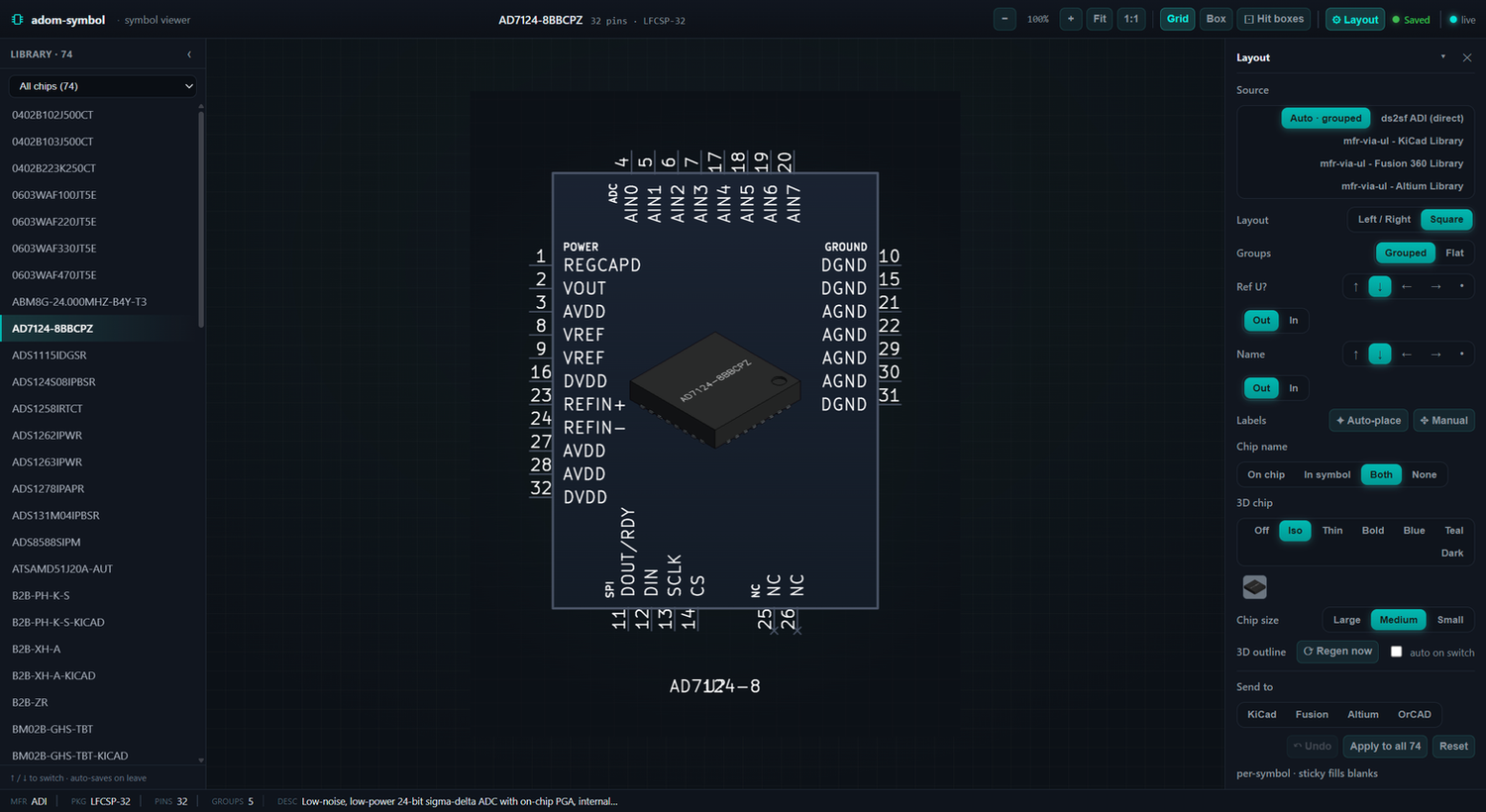
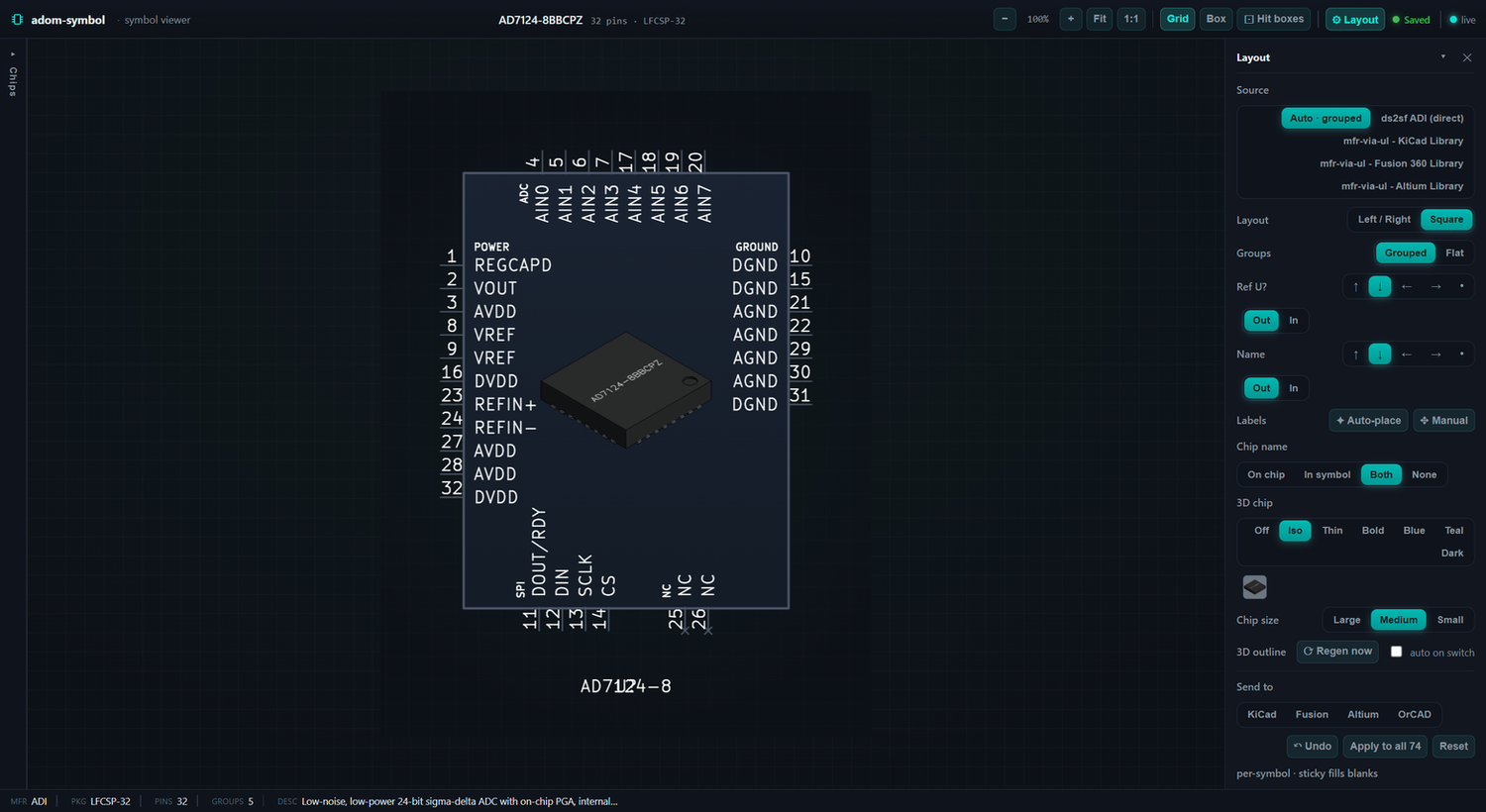
Shape it in the Layout studio. Pick the source (auto-grouped from ds2sf, or any manufacturer / Altium / Fusion / KiCad library variant), the pin layout (left-right, square, square-grouped) and grouping, the 3D-chip overlay style (off / shaded iso / thin / bold / blue / teal / dark) and size, where the chip name shows (lasered on the chip, in the symbol, both, or hidden), and then Send to a desktop EDA tool.
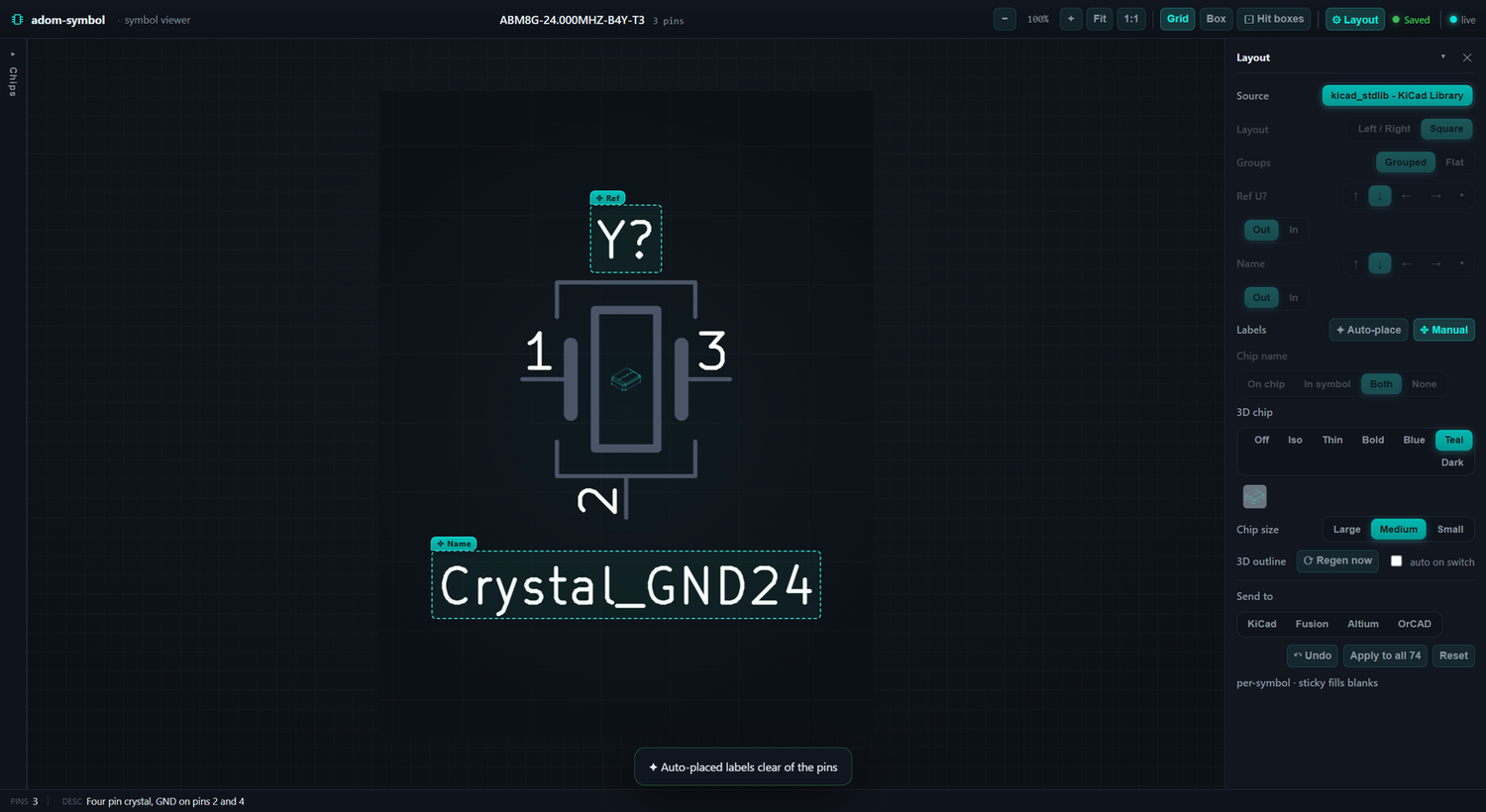
Place the labels — auto or by hand. The Reference (U?/Y?) and chip-name
designators don't have to overlap the body or pins. Auto-place centres both
clear of everything; flip on Manual and each label gets a drag-outline you
grab and drop exactly where you want — it re-renders live and auto-saves to that
chip. Any change (layout, 3D look, size, auto-place, a label drag) steps back
with ↶ Undo or Ctrl/⌘+Z.
Install
adompkg install adom-symbol
Quick start
# Create a symbol from structured pin JSON (stdin or --file)
adom-symbol create --file rp2040.json --out RP2040

# Preview an existing .kicad_sym as a themed viewer
adom-symbol preview --file RP2040/RP2040.kicad_sym

# Render a .kicad_sym to a themed thumbnail SVG (+ outline contract for adom-lbr)
adom-symbol render --file RP2040/RP2040.kicad_sym --out RP2040-symbol.svg

# Run the live app (AI-drivable: /state, /load, /eval, /console)
adom-symbol serve --port 8781 --file RP2040/RP2040.kicad_sym
Open the served app through the Adom proxy URL
(https://<slug>.adom.cloud/proxy/8781/), never localhost:8781 — the webview
renders outside the container.
CLI reference
| Command | Description |
|---|---|
create --file <json> [--out <dir>] |
Generate .kicad_sym + SVG + viewer HTML from pin JSON |
preview --file <kicad_sym> [--out <dir>] |
Render an existing symbol to a themed viewer |
render --file <kicad_sym> --out <svg> [--iso <png>] [--chip-size large|medium|small] |
Render to a themed thumbnail SVG; auto-composites the 3D-chip outline + emits the outline contract |
embed --file <kicad_sym> [--out <html>] |
Export a self-contained interactive HTML viewer (pan/zoom + pin info) |
serve [--port 8781] [--file <kicad_sym>] |
Run the live AI-drivable viewer + layout studio |
3D-chip outline contract (for adom-lbr)
The default render composites the part's 3D-chip vector outline (white
heavy style, with the part number lasered on the top face) into the symbol
body — sized to 0.62× the body's smaller side, fitted from the source
320×320 outline canvas and centred on the body rectangle.
Because that exact placement was previously re-guessed downstream (adom-lbr fit
the outline to ~0.38× of a different reference frame, so it drifted ~30% small),
render now exposes the placement so it can be transcribed 1:1. Next to
<mpn>-symbol.svg it writes:
| File | What it is |
|---|---|
<mpn>-symbol-outline.mm.svg |
The outline strokes only, as decimated (lite) <polyline>s, in the same units / origin / viewBox as <mpn>-symbol.svg (mm, Y-down). A drop-in overlay; each stroke keeps the source style's real colour/width/dash (and the neon glow <defs>, blur scaled to mm). |
<mpn>-symbol-outline.json |
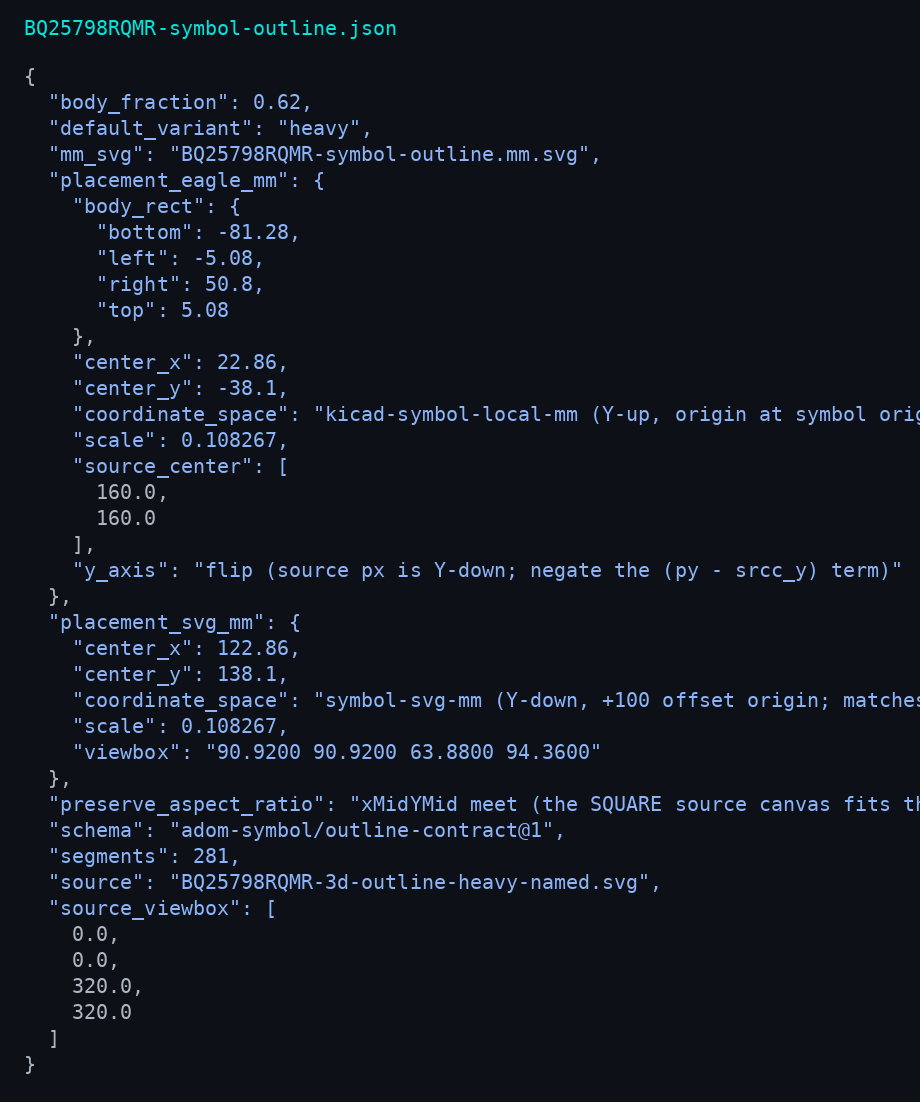
A self-describing sidecar: the canonical default_variant, the source viewBox, segment count, and the exact transform in both frames — EAGLE/KiCad Y-up (what adom-lbr maps to) and the symbol-svg Y-down overlay frame. |
adom-lbr generate --symbol-art <mpn>-symbol-outline.mm.svg detects the contract
(via the sibling .json), derives the svg→EAGLE offset/flip from the two frame
centres, and emits the outline as layer-94 <wire>s — no re-fitting, no
re-decimation, so the art lands exactly where adom-symbol drew it.
The canonical embedded variant is
heavy(white#e6edf3, single visible layer) — clean as schematic wires. The multi-layer styles (blueprint/xrayadd hidden dashed edges,neonis a 2-layer glow) are deliberately avoided for embedding.
Outline placement (the math render exposes)
For a source outline point (px, py) in the 320×320 canvas:
scale      = min(body_w, body_h) · 0.62 / 320          # mm per source unit
eagle_x    = center_x + (px − 160) · scale             # KiCad/EAGLE Y-up
eagle_y    = center_y − (py − 160) · scale             # (note the Y flip)
center_x/center_y (and the Y-down symbol.svg-frame equivalents) are written
verbatim into the sidecar, so a consumer never has to reconstruct them.
The contract, proven
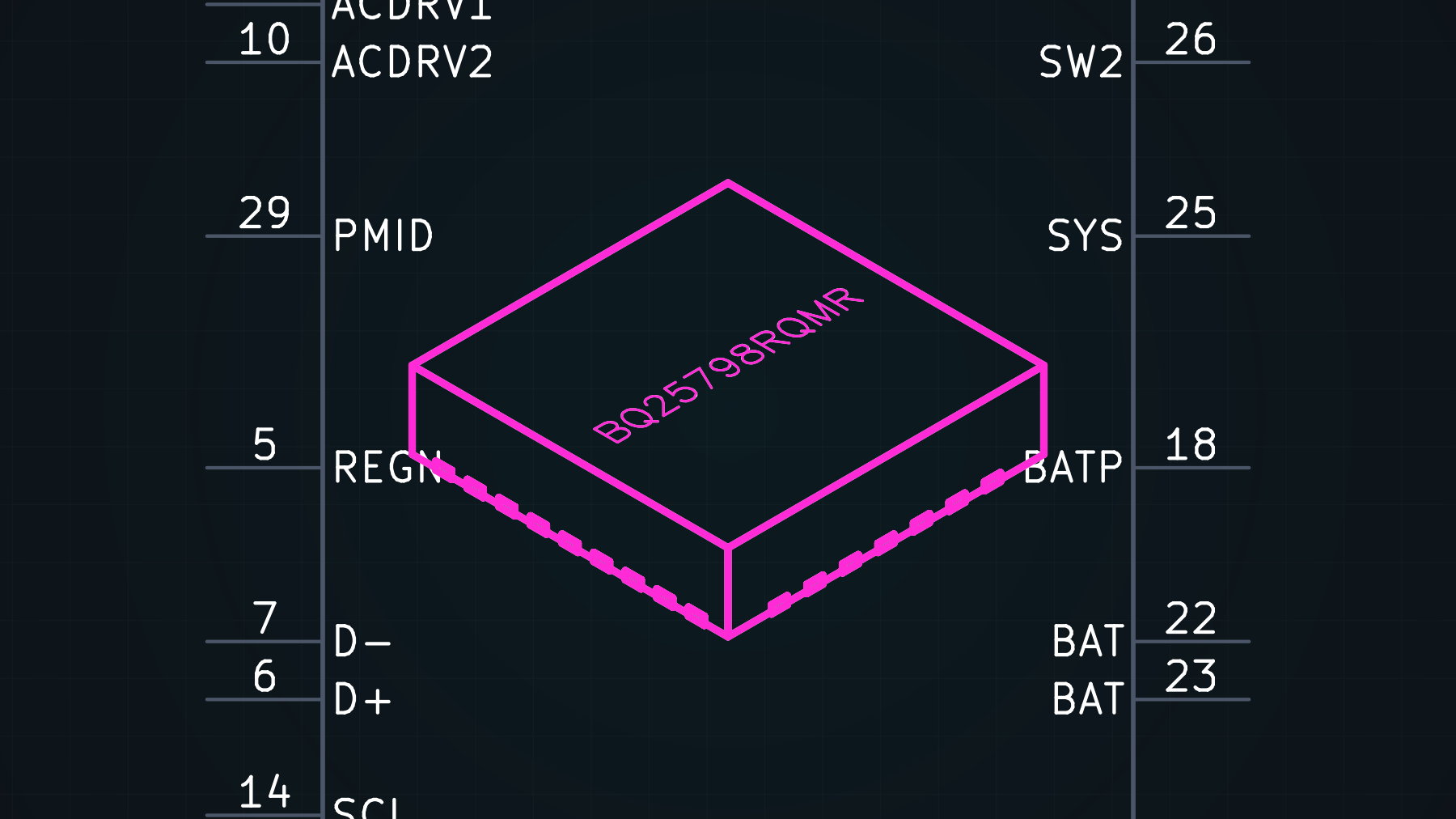
The emitted .mm.svg (recoloured magenta) placed over the live -symbol.svg —
dead-centre in the body, framed by the real pins, tracing the chip body, side
pads and lasered name. Zero drift.
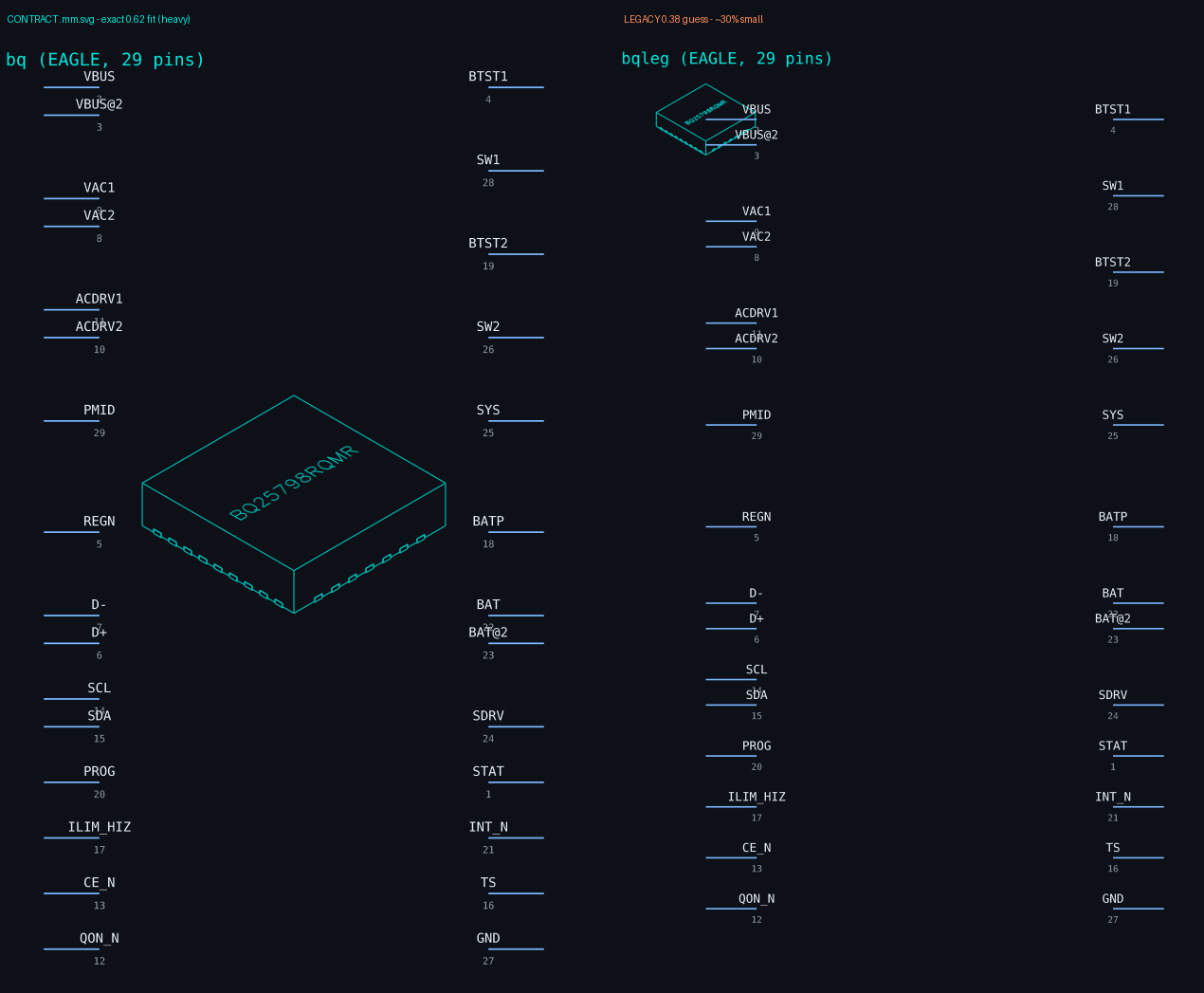
Real EAGLE .lbr output: left transcribed 1:1 from the contract (exact 0.62
fit, centred); right the legacy guess — too small and off-centre, because
it fit the source's ink bbox instead of the canvas.
Architecture
Pure Rust. Symbol generation (src/sym_gen.rs, src/discrete_gen.rs) is a
byte-for-byte port of the original generator, verified against golden files
in tests/. The only network dependency is service-kicad for SVG rendering
— a lightweight proxy to the shared KiCad-10 container, so nothing installs
KiCad locally. The live app server (src/server.rs) follows the Adom
app-creator contract: GET /state, POST /load, POST /eval +
GET /eval/pending + POST /eval/:id/result, GET/POST /console,
POST /shutdown, GET /favicon.svg, and best-effort HD port registration.
Per-symbol layout (including dragged label positions) persists to each chip's
info.json and bakes into its .kicad_sym on save.
Build from source
The full source ships on the wiki app page — anyone in the community can build it locally:
# Fetch the source bundle from the wiki
adompkg source adom-symbol            # downloads + unpacks the repo

cargo build --release                 # standalone — only needs Rust + cargo
cargo test --release                  # runs the golden-file parity tests
cp target/release/adom-symbol ~/.local/bin/
The only runtime dependency is network access to a service-kicad endpoint
(KICAD_SERVICE_API, defaults to the shared container).
Wiki
https://wiki.adom.inc/adom/adom-symbol
Contributing & forking — open source under the Adom org
adom-symbol is open source under the adom org on the Adom Wiki. The full source lives in this page's repo (public) — open the Files tab, or adompkg source adom-symbol. Third-party developers are welcome to modify it and contribute back.
Modify it
- Get the source from the Files tab (or
adompkg source adom-symbol), make your changes, runcargo test --release(keep the golden tests green), and rebuild.
Contribute back to Adom — two paths
Pull request (preferred). The wiki runs a PR-per-page flow: propose your change on this page and the maintainer reviews + merges it — no fork needed.
Fork + breadcrumb. Prefer your own fork or add-on? Publish it as your own wiki page, then drop a breadcrumb on this page pointing at your fork so it's discoverable:
- Read existing trails:
GET https://wiki.adom.inc/api/v1/pages/adom-symbol/breadcrumbs - Attach a breadcrumb from your fork's page targeting this anchor (a short label + your slug).
The breadcrumb leaves a linked path back here, so Adom's AI can auto-discover your fork and surface it to users — the trail is followable both ways. Your fork stays yours; the original stays discoverable.
- Read existing trails:
License
MIT — © 2026 Adom Industries Inc. Open source; see LICENSE. Modify, fork, and redistribute freely.