Adom Desktop - Fusion 360 Bridge
Public Made by Adomby adom
Drive Autodesk Fusion 360 from the cloud via Adom Desktop: component libraries, IPC package generation, board layout, exports (STEP/Gerbers/BOM/CPL), fast APS cloud search, and parametric modeling.


Adom Desktop - Fusion 360 Bridge
Drive Autodesk Fusion 360 from the cloud through Adom Desktop:
component libraries with real 3D, parametric IPC package generation with laser-etched markings,
electronics board workflows, manufacturing exports (Gerbers/BOM/CPL), per-manufacturer design rules,
and fast APS cloud-file search - all by asking your AI. Every verb returns a rich _hint, so a
calling AI never has to guess.
"generate an IPC SOIC-8 with LM358 etched on top and export the STEP" - just ask Claude
The demo: one verb, a whole guided tour (fusion_demo)
New to this? Run one verb and watch:
adom-desktop fusion_demo '{}'
fusion_demo takes a first-time user from nothing to a real board. It launches Fusion, finishes
the Autodesk sign-in, turns on cloud search, and then walks the actual story of a PCB:
electronics project -> schematic -> 2D board layout -> 3D board, screenshotting each view.
It is staged and resumable: each call advances as far as it safely can and returns stage,
done, a narrate line written for a newcomer, the screenshots to show them, and a _hint with
the exact next action. Keep calling it until done:true.
Two things it deliberately does NOT do:
- It never leaves you parked on the sign-in page. It drives the sign-in through your native browser (via the Adom browser extension), because that profile is usually already signed into Autodesk - one click instead of a password + 2FA. An anonymous automation browser would force a full fresh login, so the demo never uses one.
- It never just name-drops cloud search. It sets APS up for you, then runs a live sample search so you watch your whole Autodesk hub return results in about two seconds.
If you decline the cloud-search setup, run fusion_demo '{"stage":"skip_aps"}' and the tour
continues without it. To demo a specific design: fusion_demo '{"query":"BQ25792"}'.
Playbook for the AI running it: the bundled fusion-demo skill.
Component library manager - the Adom basic parts library
The bridge builds and opens full EAGLE-format component libraries in Fusion's library editor. Below: the entire Adom basic parts library (138 parts - 0402/0603/0805 R/C/L, LEDs, and more) open in the Content Manager: the component list, the R-0402 deviceset's schematic symbol, footprint + 3D chip previews, and the footprint/package Mapped check EEs look for.
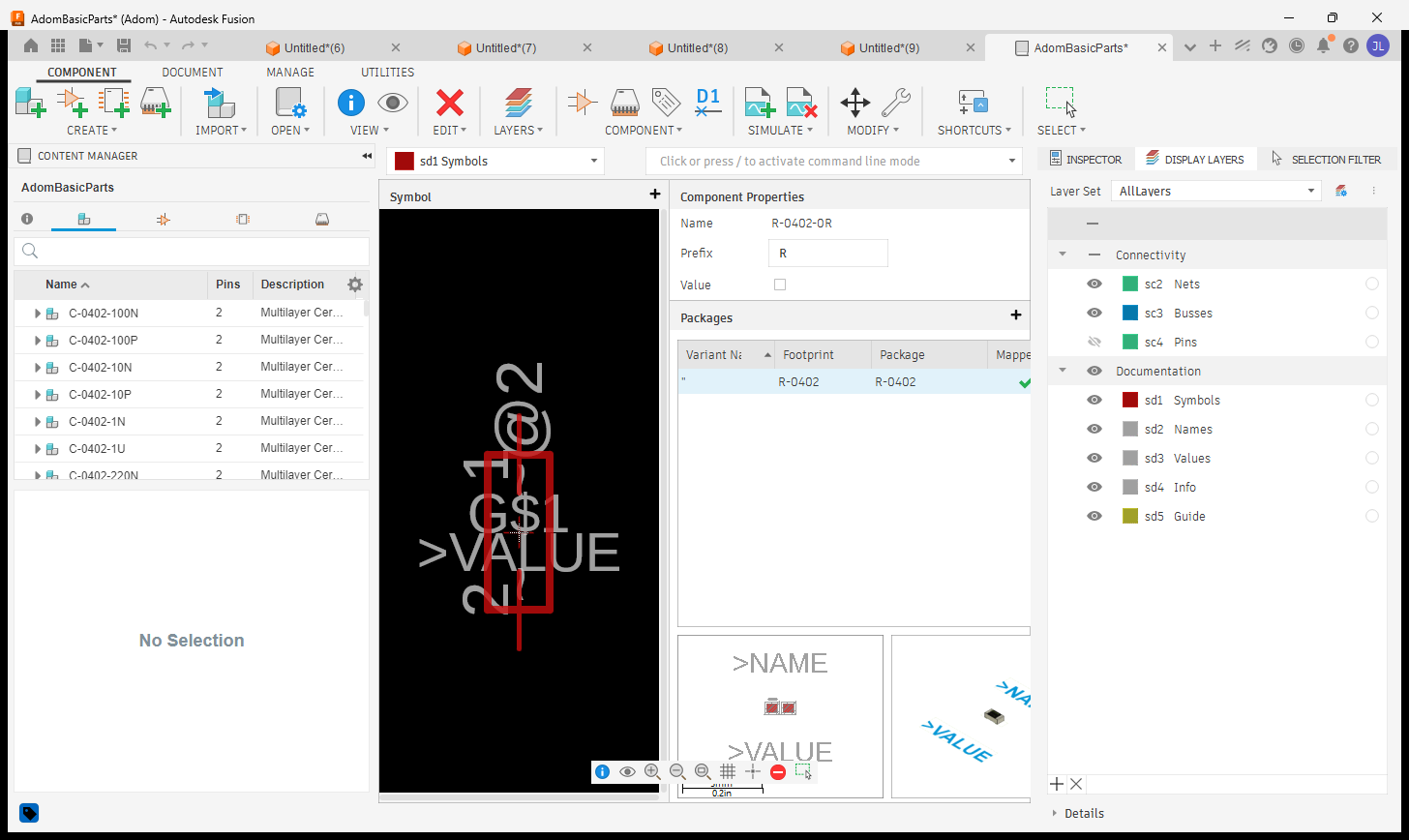
fusion_open_lbr- open any.lbrin the library editorfusion_build_library_3d- build a whole RENDERING multi-part 3D library in one callfusion_capture_library_views- capture the symbol / footprint / component view per part- Get the library: adom-basic-parts-fusion-lbr

Generate IPC packages from parameters (ElectronicsPackageGenerator)
Fusion ships a built-in ElectronicsPackageGenerator add-in (~50 package families with IPC-7351B
calculators). This bridge drives it headlessly via fusion_generate_package: parametric 3D
package + laser-etched marking + STEP export, in ONE call, a few seconds per part.
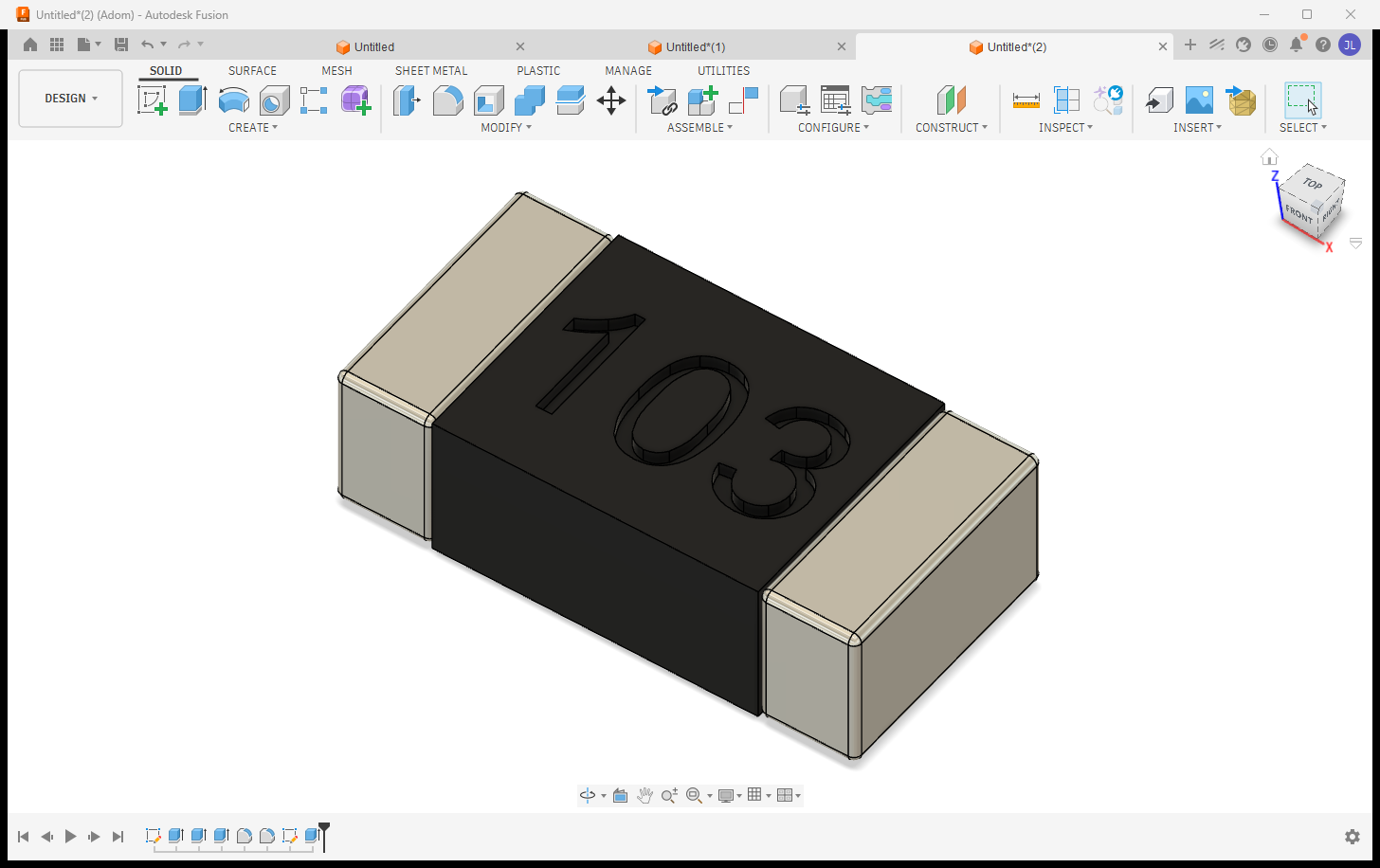
adom-desktop fusion_generate_package '{
  "type": "soic",
  "params": {"DPins": 8, "D": 4.9, "E": 6.0, "E1": 3.9, "e": 1.27, "A": 1.6, "A1": 0.1, "b": 0.41, "L": 0.84},
  "etch": "LM358\nADOM-A",
  "outputStep": "C:/tmp/ADOM-LM358-SOIC8.step"
}'
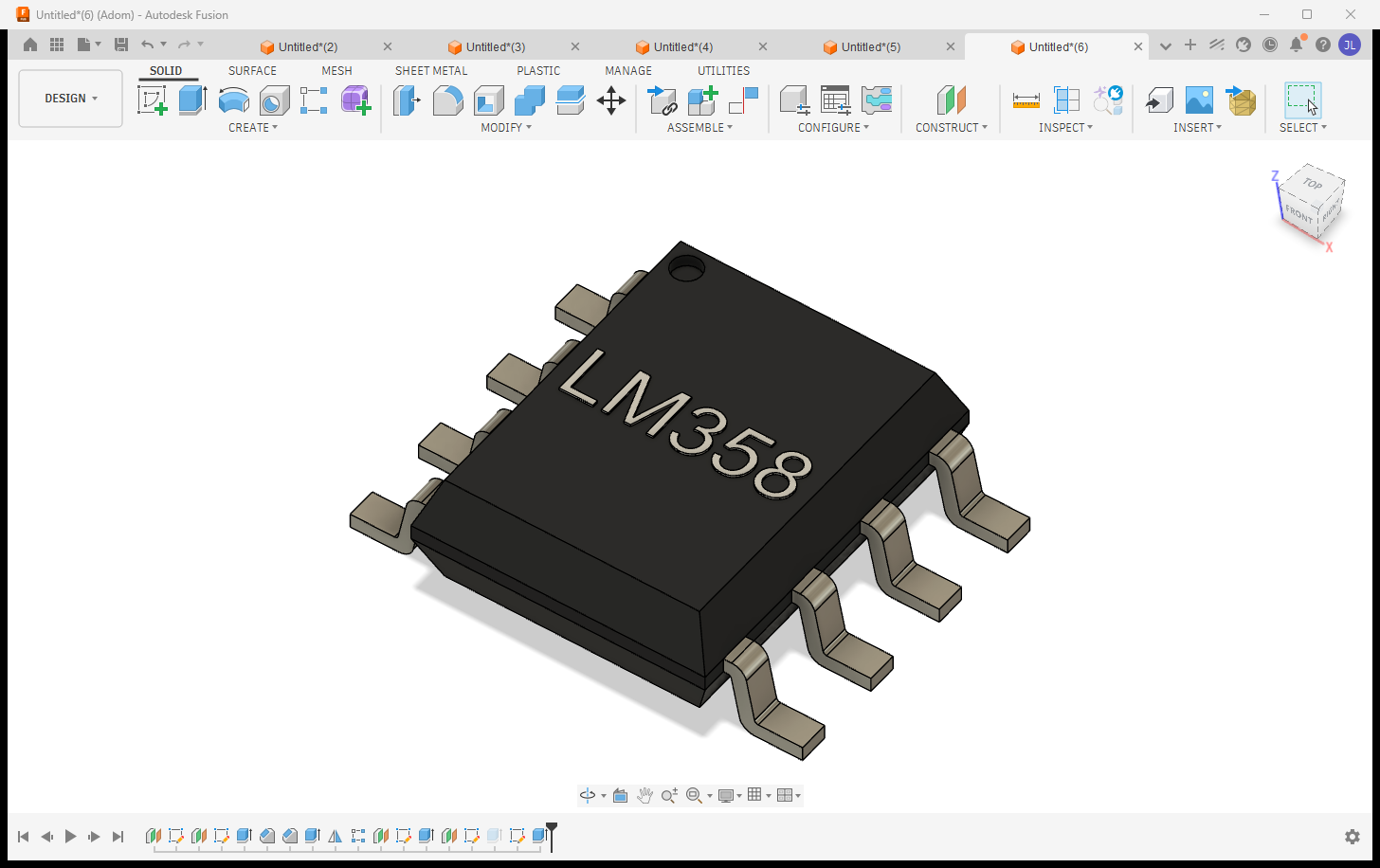
Why this matters: the output is OUR generated geometry from open IPC-7351B math - no vendor CAD licenses, no redistribution restrictions - the royalty-free path to a complete component library. Families: chip (0402/0603/0805...), soic, soj, sot23/143/223, son, qfn, qfp, plcc, bga, dfn2/3/4, dip (+sockets), dpak, melf, molded, ecap, radial + axial passives, crystals (+HC49), oscillators, headers (straight/right-angle, socket/SMD), standoffs, chip arrays, LEDs.
Markings that read like real silkscreen:
- Raised WHITE text by default (a thin positive extrude painted white - the contrast humans can
actually read;
etchStyle:"engraved"for a sunken laser cut when a datasheet calls for it). - The top surface is found from the whole-chip bounding box: only upward faces in the top 5% height band count (terminals tie the body on height), then largest area wins.
- Text runs along the longest axis of the face (auto-rotated 90° when needed), with a 10% margin ENFORCED by measuring the placed text and shrink-to-fitting - never a font-metric guess.
- Multi-line:
"LM358\nADOM-A"= MPN + variant, per-line auto-fit. - A sidecar manifest (
<step>.manifest.json) records every setting picked + WHY + the calculated bboxes, so a marking refresh (adding a variant line later) reproduces placement exactly.
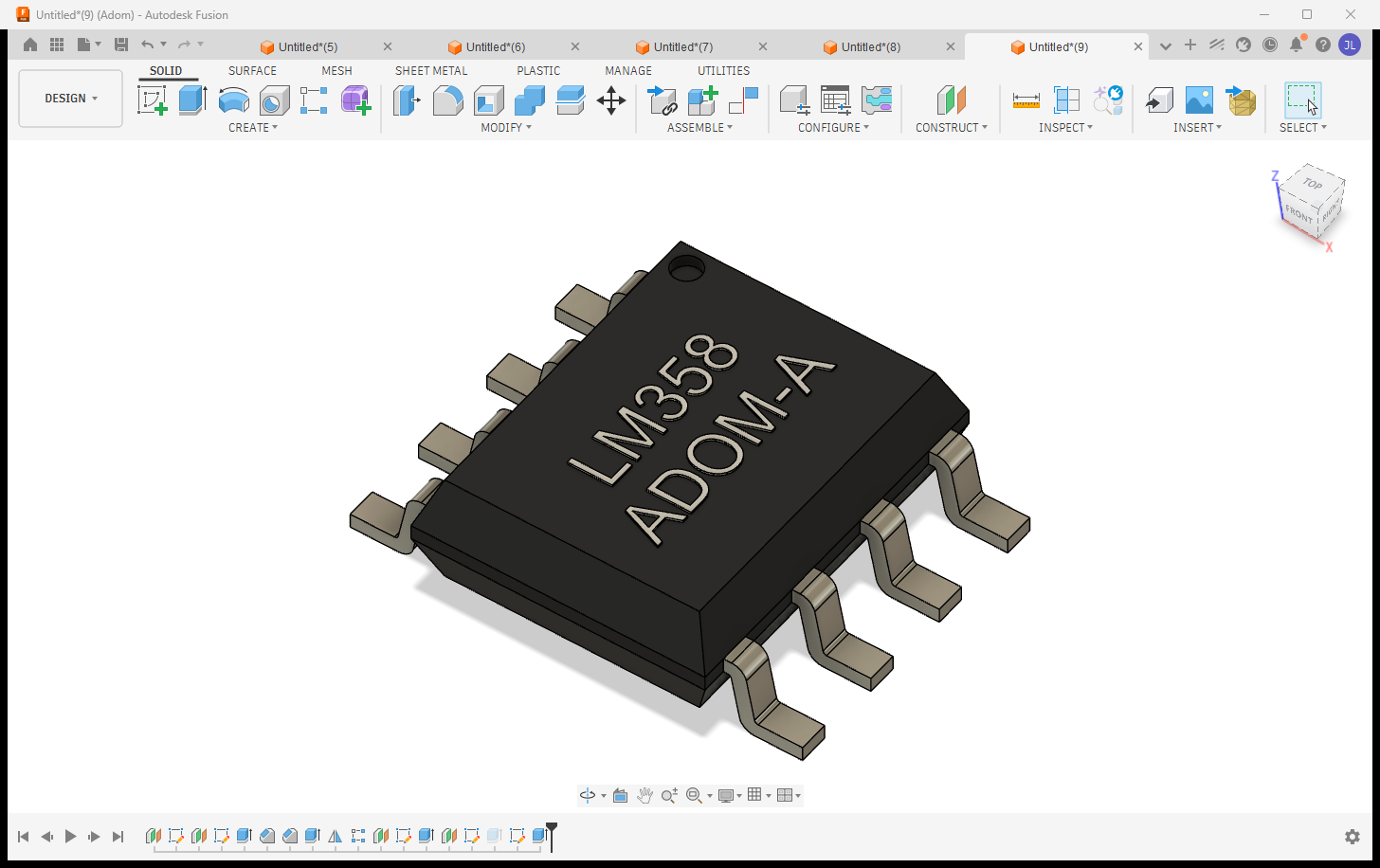
The exported STEP is colored (AP214): the white marking arrives white in KiCad's 3D viewer.
Electronics boards: project -> schematic -> 2D board -> 3D board
A Fusion electronics design is a parent/child chain: the PROJECT file (open THIS) links the
schematic, the 2D board layout, and the generated 3D PCB. The bridge opens the project and switches
views on command - each show_* verb returns a screenshot array so the AI SEES what it switched to.
| View | Verb |
|---|---|
| Project (parent: schematic + 2D + 3D previews) | fusion_open_cloud_file / fusion_aps_open (the project file) |
| Schematic | fusion_show_schematic |
| 2D board layout | fusion_show_2d_board |
| 3D board | fusion_show_3d_board (orbitable via fusion_run_modeling_script) |
Real Adom boards driven through it - the DRV8411A copper layout in the 2D editor, and the TI DRV8323SR + ST VL53L8 boards rendered as populated 3D PCBs:
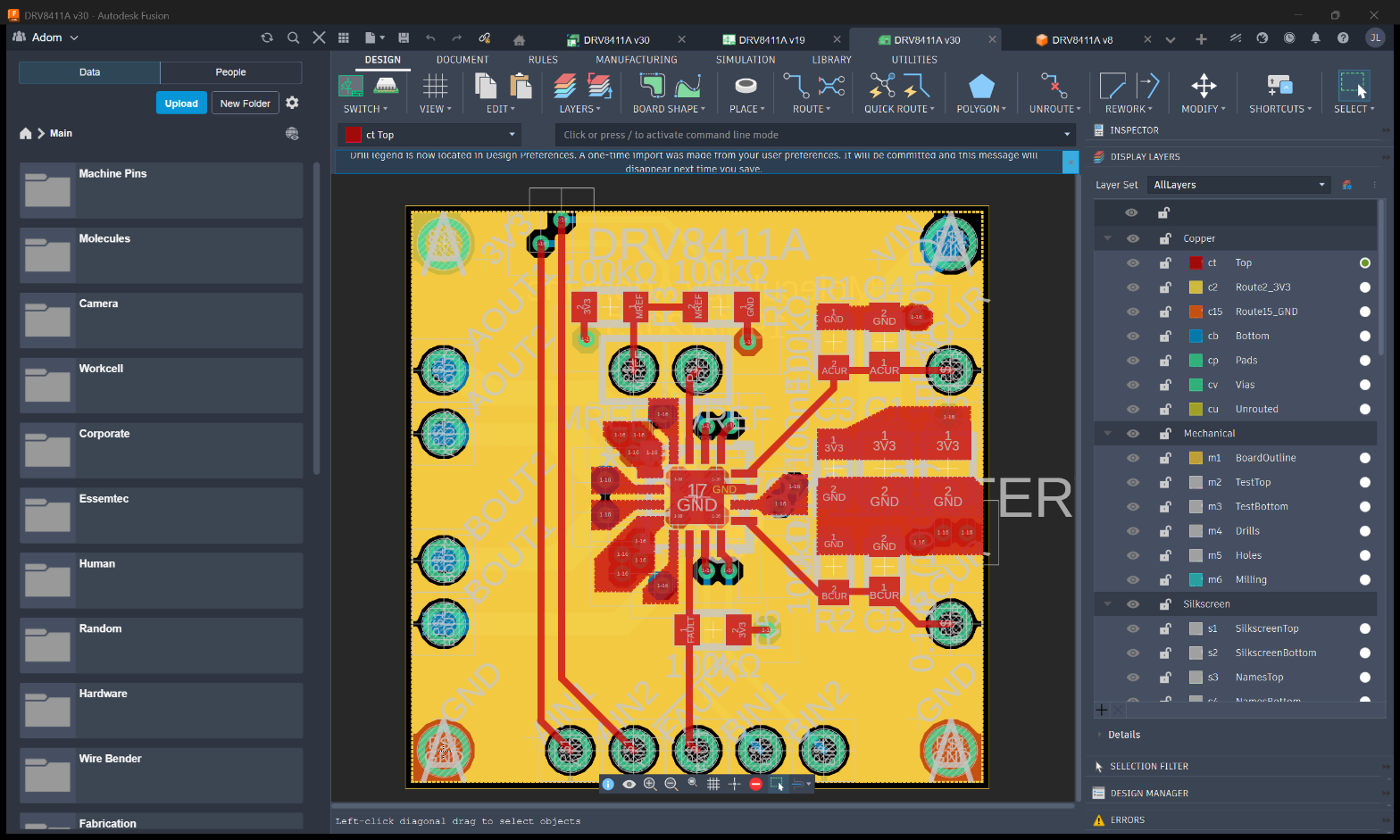
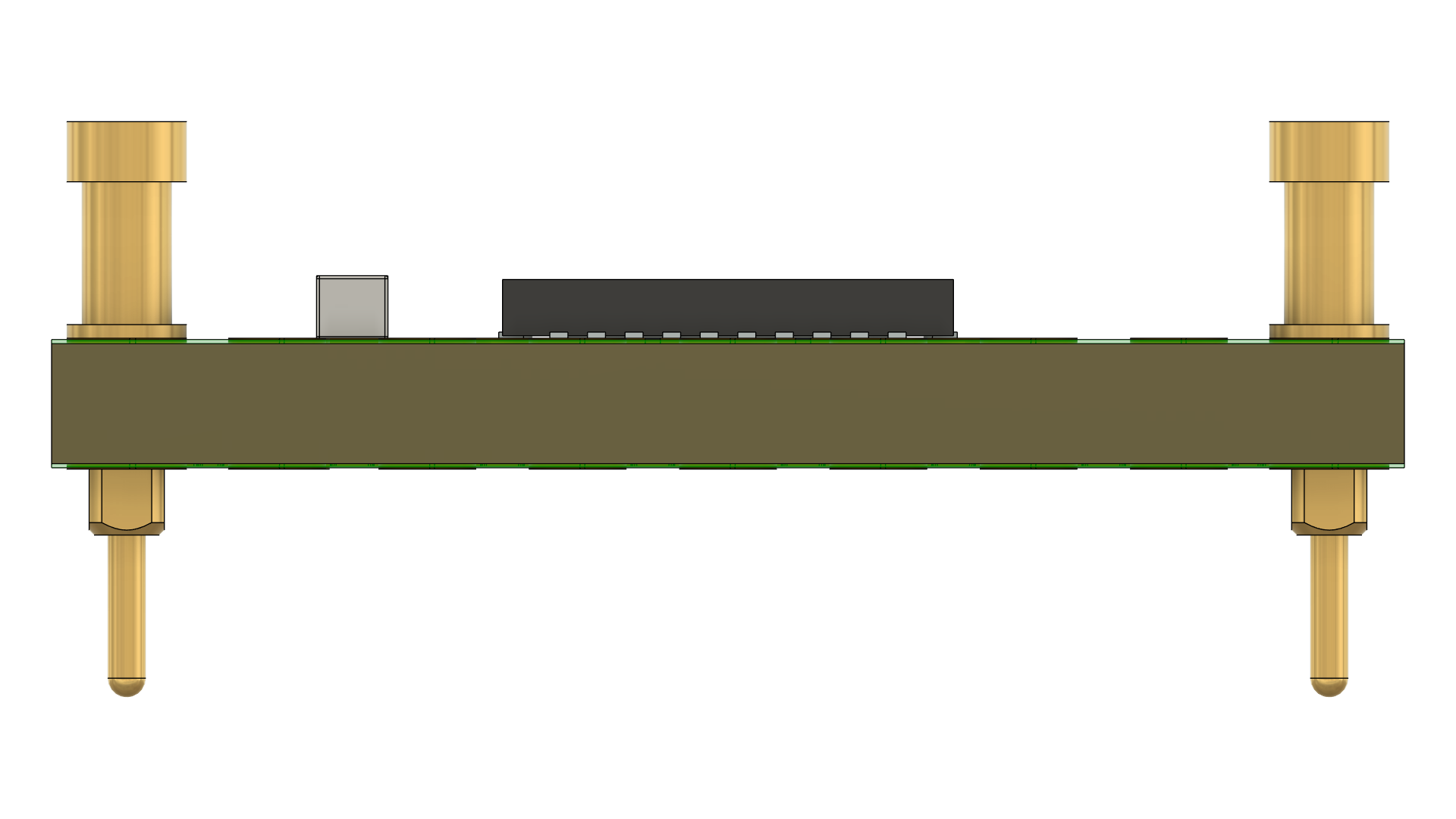
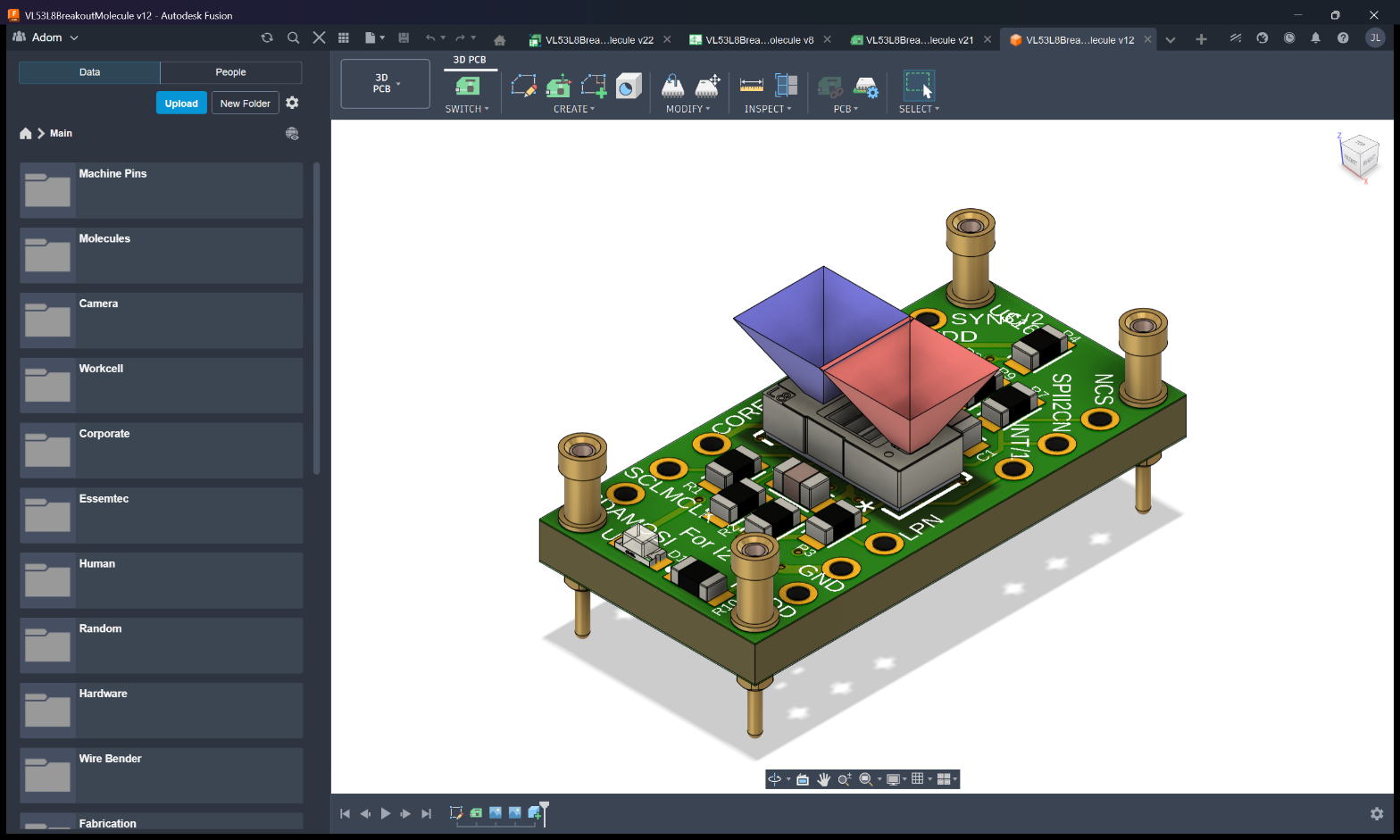
Always open the PROJECT - opening a child (.brd / 3D) directly gives an isolated view. The open
verbs reprimand via _hint if you open a non-project file.
Manufacturing exports: Gerbers, BOM, CPL
One verb each, straight from the open board:
adom-desktop fusion_export_gerbers '{"outputPath": "C:/tmp/gerbers"}'   # JLCPCB-ready CAM job
adom-desktop fusion_export_bom     '{"outputPath": "C:/tmp/bom.csv"}'   # grouped by value+package
adom-desktop fusion_export_cpl     '{"outputPath": "C:/tmp/cpl.csv"}'   # pick-and-place centroids
Plus mechanical exports: STEP / IGES / STL / 3MF / USDZ / OBJ / DXF / DWG. Long exports return
promptly with statusVerb: fusion_get_app_state - the AI polls instead of blocking.
Design rules per manufacturer (JLCPCB 2-layer, 4-layer, ...)
The bridge ships manufacturer rule files + CAM jobs in resources/ and loads them into the open
board, so DRC matches what the fab actually checks:
adom-desktop fusion_load_design_rules '{"ruleFile": "JLCPCB-2layer.dru"}'
adom-desktop fusion_set_design_rules  '{"rules": {"minClearance": 0.127}}'   # ad-hoc tweaks
Included: JLCPCB 2-layer + 4-layer DRU rules, the matching Gerber CAM jobs (used by
fusion_export_gerbers), and Adom's house rules.
How the bridge talks to Fusion (architecture)
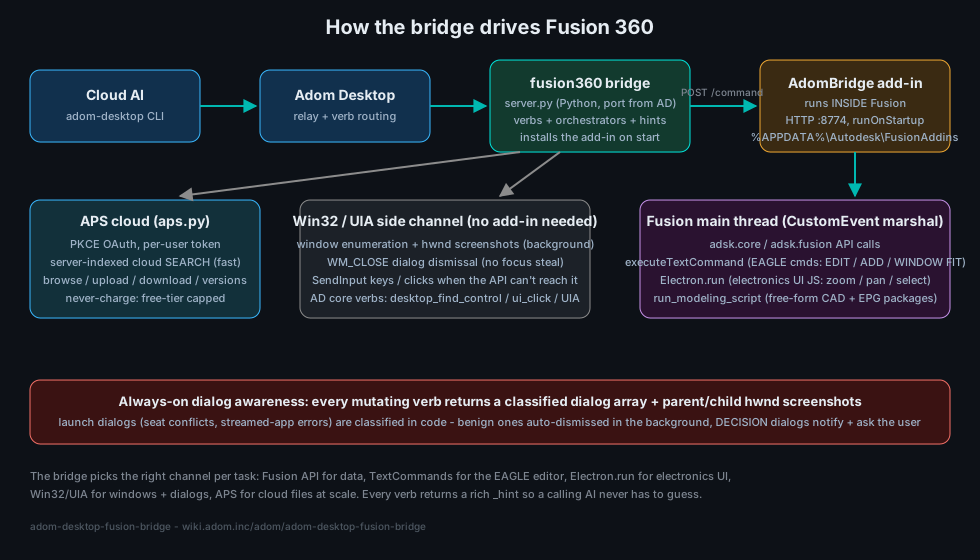
The bridge picks the right channel per task:
- Python bridge server (
server.py) - spawned by Adom Desktop, receives everyfusion_*verb. - AdomBridge add-in - installed BY the bridge into every Fusion add-in location
(
%APPDATA%\Autodesk\FusionAddinson 2025+ Fusion, plus the legacyAPI\AddInsdirs - Fusion moved this across versions and silently ignores the others). It serves HTTP :8774 inside Fusion and marshals work onto Fusion's single main thread via CustomEvent. - In-Fusion channels: the
adskPython API for data/geometry,executeTextCommandfor EAGLE editor commands (EDIT / ADD / WINDOW FIT),Electron.runfor electronics-UI JS (zoom/pan/select), andrun_modeling_scriptfor free-form CAD (this is how EPG packages and laser markings are generated). - Win32 / UIA side channel - when the API can't reach it: background hwnd screenshots, WM_CLOSE
dialog dismissal (no focus steal), SendInput keys/clicks, and AD core verbs
(
desktop_find_control/desktop_ui_click). - APS cloud (
aps.py) - fast server-indexed search + file ops at scale (below).
Dialog awareness: parent/child screenshots (the automation breakthrough)
Fusion's classic failure mode is a modal dialog (save prompt, recovery, licensing) silently blocking the add-in's main thread while the caller sees only a fake "not responding". The breakthrough: Adom Desktop's window capture returns a window's owned child popups - dialogs that don't even enumerate in a normal window list - so every mutating verb returns a classified dialog array + screenshots and the AI can never fly blind past one.
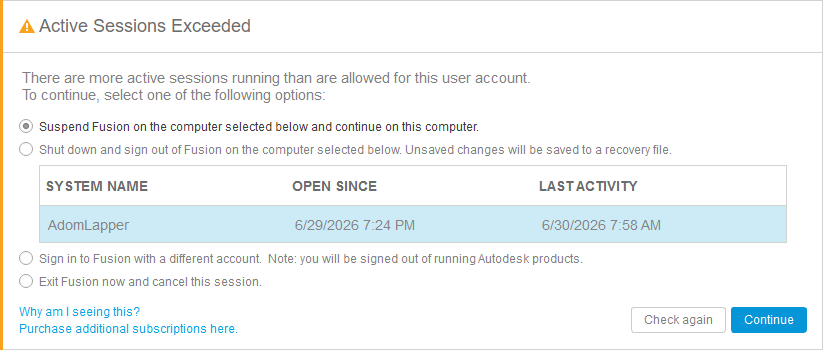
- Benign launch errors (an incomplete webdeploy folder) are auto-dismissed in the background (WM_CLOSE - never a focus-stealing Escape).
- DECISION dialogs - like the seat conflict above, whose options suspend Fusion on the user's OTHER
machine - are never auto-picked: the bridge returns
needsUserDecision:trueand the AI notifies + asks the user. fusion_check_dialogspolls the dialog array on demand;fusion_dismiss_blocking_dialogsclears the known-safe ones.
Fast cloud search + file management (APS) - the ONLY cloud-search path
fusion_aps_search finds any design in the team's Fusion cloud in ~2 seconds (server-indexed),
plus browse / recent / file-info / versions / upload / download / folder creation, and
fusion_aps_open opens any design by name at any folder depth.
Why APS (and why the old in-app search is now DISABLED)
Autodesk offers no fast file-search API for Fusion. The only in-app option walks the cloud
folder tree from the add-in, which takes 30+ minutes and can crash Fusion (WinError 10054).
We searched far and wide; APS (Autodesk Platform Services) Data Management is the only thing
Autodesk offers that actually works. So as of v1.6.76 the old verbs
(fusion_search_cloud_files, fusion_walk_cloud_tree) are hard-disabled in code - they return
an error that redirects to APS and can no longer reach (or crash) Fusion. There is no fallback;
APS is the path. It costs a one-time OAuth sign-in, and once set up it is fast and stays signed in.
Authentication (one-time, then silent)
APS uses Autodesk's official OAuth (PKCE). Setup is once per company (an admin registers the
APS app, fusion_aps_set_client_id), then each user signs in once (fusion_aps_signin);
tokens refresh silently afterward. Per-org by design: each company uses its own APS app and quota.
You are never charged - the bridge caps all calls to Autodesk's free tier.
The bridge checks APS state in code on every cloud call (_aps_guarded) and returns a rich,
self-teaching _hint (is it configured? signed in? token live? the full verb list, and the exact
next step) so the AI is never stuck on an opaque auth error.
Best sign-in: your NATIVE Chrome/Edge via ABE (adom-browser-extension)
Autodesk's email OTP / 2FA and "which profile is signed in" headaches vanish if the AI drives the
browser you're already logged into Autodesk with. That is what ABE
(adom-browser-extension) provides. If ABE
isn't installed, the AI will walk you through the one-time install, then open the Autodesk auth URL
in your real profile and capture the token - no password typing. Fallback:
fusion_aps_signin {allowDefaultBrowser:true} (OS default browser).
APS verbs
| Verb | Does |
|---|---|
fusion_aps_status |
configured? signed in? token live? + never-charge meter |
fusion_aps_signin |
one-time OAuth sign-in (prefer ABE native browser) |
fusion_aps_search {query} |
server-indexed name search across the whole team hub |
fusion_aps_open {query} |
find + open a design in Fusion, any folder depth |
fusion_aps_browse / fusion_aps_recent |
walk hubs/projects/folders, newest-modified designs |
fusion_aps_file_info / fusion_aps_versions |
version history / who / when / size |
fusion_aps_download / fusion_aps_upload |
pull/push a cloud file (no Fusion needed) |
fusion_aps_create_folder |
make a subfolder (never dump loose files in a shared root) |
fusion_aps_set_browser / get_browser / forget_browser |
remember the native browser+profile |
fusion_aps_set_client_id |
set the org's PKCE client id (once per company) |
fusion_search_cloud_filesfusion_walk_cloud_tree |
DISABLED (crashed Fusion) - use fusion_aps_search |
Cloud hygiene: the bridge NEVER writes to a shared project root - uploads default to an
Adom AI Workspace folder with per-task subfolders, and fusion_cleanup_cloud_files deletes
precisely by lineage URN (never by name).
Installing Fusion for the user (or finding theirs)
The AI does the whole setup - the user never gets handed a download link:
- Detection first: AD detects an existing Fusion via this bridge's
detectpaths - per-user (%LOCALAPPDATA%) AND system-wide (%ProgramFiles%, from--globalinstall) webdeploy installs.fusion_readiness/ AD'sbridge_readinessanswer installed/running/ready without launching anything. - AI-driven install: if Fusion is absent, the AI OFFERS to install it and does it on a yes - the fusion-onboarding skill silent-installs the free trial / personal-use tier (plenty for viewing and real work), drives the Autodesk sign-in (the user types only their own credentials/2FA), and deploys the add-in. A view-only trial install is a first-class option for users who just need to open and inspect designs.
- Never a manual step: the bridge restarts Fusion itself (
fusion_stop/fusion_start), installs the add-in to every add-in directory Fusion has ever used, and fires an AD toast the moment a step genuinely needs the user (sign-in, 2FA, license acceptance).
Full verb catalog
All verbs return a rich _hint. fusion_describe '{}' is the machine-readable source of truth; this table is generated from it.
55 verbs.
Lifecycle
fusion_start- Launch Fusion 360 (if needed) and wait for the AdomBridge add-in to be ready.fusion_stop- Gracefully STOP Fusion 360: close docs cleanly + WM_CLOSE, then waitfusion_kill- Force-KILL Fusion 360 (taskkill /F) - the desperate path for when fusion_stop cannot close it (stuck modal / wedged procfusion_close_window- Close the active Fusion document/window.fusion_get_app_state- Current app state: running, active document, workspace, isElectronicsfusion_readiness- FAST readiness check (does NOT launch Fusion): is the Fusion host app installed + running + the bridge ready to drive? Afusion_new_electronics_from_eagle- Import a legacy EAGLE .sch (+ paired .brd) into a NEW Fusion electronics design so the parts INSTANTIATE (schematic + pofusion_notify_owner- LAST-RESORT human escalation: toast the user's MAIN computer (fans out cross-AD to every peer on the relay, so it reache
Cloud search & files (APS)
fusion_aps_status- APS state: configured, signed in, token live, never-charge meter.fusion_aps_set_client_id- Set the org's APS (PKCE) client id used for cloud search.fusion_aps_signin- Open the Autodesk sign-in in the REMEMBERED browser+profile (not the OS default); a background listener captures the tokfusion_aps_set_browser- Remember the browser+profile that authed to Autodesk so every later sign-in reuses it (power users have many browsers/prfusion_aps_get_browser- Show the remembered Autodesk sign-in browser (None until set).fusion_aps_forget_browser- Forget the remembered Autodesk sign-in browser (re-detect next time).fusion_aps_search- Server-indexed search across the whole team hub (seconds, not a 30-min folder walk).fusion_aps_open- Find a cloud design by name and open it in Fusion (any folder depth)fusion_open_by_urn- Open a cloud ELECTRONICS DESIGN by URNfusion_aps_browse- Browse hubs/projects/folders without launching Fusion.fusion_aps_recent- Most-recently-modified designs across the team hub, newest first.fusion_aps_file_info- Version history + who/when/size for a file (tip + recent versions).fusion_aps_versions- Full (uncapped) version history of a file.fusion_aps_download- Download a cloud file to the local machine (no Fusion needed).fusion_aps_upload- Upload a local file as a NEW cloud file (free Data Management; needs data:write scope)fusion_aps_create_folder- Create a subfolder in a project (free; needs data:create scope)fusion_aps_get- Raw authenticated GET against a free APS path (dev/verify helper).fusion_walk_cloud_treefusion_search_cloud_files
Electronics
fusion_show_schematic- Switch the OPEN electronics design to its SCHEMATIC view (the symmetric partner of fusion_show_2d_board / fusion_show_3dfusion_show_2d_board- Switch the OPEN electronics design to its 2D PCB Editor (board layout) viewfusion_show_3d_board- Switch the OPEN electronics design to its 3D PCB view (populated board)fusion_board_info- Raw board geometry XML (copper/arcs/lines) for the open board.fusion_open_lbr- Import an EAGLE .lbr library into Fusion's Electronics LIBRARY editor (Content Manager / Electronics Library workspace),fusion_attach_3d_package- Attach a real 3D chip model to a library package, end to end: opens the .lbr (library active), runs Electron.Create3DPacfusion_install_fusion- Install Fusion 360 FOR the user - downloads Autodesk's official Client Downloader and streams the free trial silently, wfusion_generate_package- Generate an IPC-7351-compliant parametric 3D package via Fusion's BUILT-IN ElectronicsPackageGenerator (EPG) - ~50 packafusion_make_3d_package- Create a RENDERING component 3D package (FOOTPRINT + chip, aligned) for ONE part, fully programmatically with ZERO GUI dfusion_build_library_3d- Build a RENDERING multi-part 3D library in ONE call - the whole programmatic pipelinefusion_capture_library_views- Capture the LIBRARY-EDITOR views EEs trust: the schematic SYMBOL (full pinout), the FOOTPRINT (pads + layer stack), andfusion_cleanup_cloud_files- PRECISELY delete a list of cloud files by lineage urn - SAFE cleanup of AI-created clutterfusion_run_modeling_script- Run an adsk.fusion modeling script in the live session (sketches/extrudes/params)fusion_set_preference- Set Fusion appearance/navigation preferences in the LIVE session - applies immediately, NO restartfusion_get_preferences- Read current Fusion appearance/navigation preferences (theme, activeTheme, invertScrollZoom, orbitScheme, modelingOrient
CAD & 3D export
fusion_export_step- Export the active design to STEP (needs the 3D view).
Manufacturing
fusion_export_gerbers- Run the bundled JLCPCB CAM job (auto 2/4-layer) to produce the gerber + drill ZIP.fusion_export_bom- Export a Bill of Materials CSV (grouped by value+package) from the open board.fusion_export_cpl- Export the Component Placement List (pick-and-place) CSV.fusion_set_design_rules- Load manufacturing-grade DRC into the open board (JLCPCB 2/4-layer profiles).fusion_load_design_rules- Load a bundled .edru design-rule set into the board.fusion_detect_layers- Detect 2-layer vs 4-layer board (ULP + CAM comparison).fusion_dismiss_blocking_dialogs- Detect + classify (and optionally dismiss) blocking Fusion dialogs.fusion_electron_run- Run an EAGLE/Electron command in the open board (the generic extension point, e.gfusion_electron_zoom- Smoothly ZOOM the schematic/2D board for a recording (the whole motion is one call)fusion_electron_pan- Smoothly PAN + zoom the view to frame a board-coordinate box (mm; get part positions from fusion_board_info)fusion_electron_select- SELECT a part (by reference designator, or x/y board mm) and surface its properties - the way clicking a part reveals th
Self
fusion_describe- Self-describe every verb the bridge exposes (this list) for AD's Verbs tab + runner.
Two install layers (they are NOT the same thing)
This page ships two separate artifacts, and it matters which one you want:
| Layer | What it is | Who installs it | Contents | Size |
|---|---|---|---|---|
Wiki package (adom-wiki pkg install adom/adom-desktop-fusion-bridge) |
SKILLS ONLY for a container's AI | your cloud/HD container | SKILL.md + skills/** (the AI playbooks: APS, driving, onboarding, cloud hygiene, molecule export, PCB stackup) |
tiny, text |
Release zip (adom-bridge-fusion-v<ver>.zip, pointed at by adom-bridge-fusion-manifest.json) |
the bridge RUNTIME | Adom Desktop, via bridge_install |
server.py, aps.py, describe.py, handlers/, the AdomBridge Fusion add-in, resources/ |
~456 KB |
The package teaches your AI how to drive Fusion; the release zip is the code Adom Desktop actually
runs on the machine where Fusion lives. Installing the package alone gives you skills with no bridge;
bridge_install alone gives you a working bridge whose calling AI has no skills. Most setups want both.
The release zip is deliberately runtime-only: demo videos and screenshots live on this page (Files tab), never inside the artifact streamed to every user's machine.
Install (via Adom Desktop)
adom-desktop bridge_install '{"manifestUrl": "https://wiki.adom.inc/api/v1/pages/adom-desktop-fusion-bridge/files/adom-bridge-fusion-manifest.json"}'
adom-wiki pkg install adom/adom-desktop-fusion-bridge   # the skills pack for your AI
Auto-updates via updateManifestUrl (AD polls on launch + every 4h). 55 verbs -
fusion_describe '{}' returns the full machine-readable catalog. More demos:
Source code
The full source lives on this page (Files tab): server.py, aps.py, the AdomBridge add-in,
describe.py, handlers, skills, and manufacturer resources. GitHub mirror:
adom-inc/adom-desktop-fusion-bridge (the wiki is canonical). MIT licensed.
Platforms
Windows (primary, tested end to end). macOS install paths handled in fusion_detect.py. Linux: not
supported (Autodesk ships no Fusion host app for Linux).
Contributing
Open a discussion on this page - bug reports with a repro (like #55 and #63, both root-caused and fixed) directly shape releases.