Adom Desktop - Fusion 360 Bridge
Public Made by Adomby adom
Drive Autodesk Fusion 360 from the cloud via Adom Desktop: component libraries, IPC package generation, board layout, exports (STEP/Gerbers/BOM/CPL), fast APS cloud search, and parametric modeling.
Building, publishing + forking this bridge
How to build the Adom Desktop Fusion 360 bridge, publish a new version, and (for the community) fork it, test your fork in Adom Desktop, and open a pull request back. Written from the real publish flow - every pitfall here was hit live, so you don't have to re-learn them.
The big picture
This bridge is open source. You can't publish to the canonical wiki page
(wiki.adom.inc/adom/adom-desktop-fusion-bridge) - it's owned by adom. The community flow is:
fork the page  ->  edit code  ->  bump version  ->  build zip  ->  publish (RELEASE)  ->
  bridge_install YOUR manifest into Adom Desktop  ->  test live  ->  open a PR back to adom
The wiki has TWO storage layers - put each artifact in the right one
| Artifact | Where it goes | How |
|---|---|---|
Source files (server.py, addin/, *.md, the manifest JSON) |
the page's git repo | adom-wiki repo push --files ... |
The build .zip (binary) |
a release asset | adom-wiki release upload ... |
⛔ PITFALL #1: the
.zipis a RELEASE, NOT a git file.*.zipis gitignored, andadom-wiki repo push --files X.zipsilently skips it (it reportsokbut the file never lands - the URL 404s with a 228-byte{"error":"File not found"}whose sha you'll mistake for the zip's). Binaries go throughadom-wiki release upload. Only the small manifest JSON goes in the git repo, and it points at the release asset.
Step 1 - bump the version (two files, in lockstep)
printf '1.5.8' > BRIDGE_VERSION
sed -i 's/"version": "1.5.7"/"version": "1.5.8"/' bridge.json
Step 2 - build the zip (the bridge source tree at the zip root)
The zip is the same file set as the previous release, at the zip root (no top-level dir). If the
zip binary isn't installed, use Python:
import zipfile, os, hashlib
files = [l.strip() for l in os.popen("git ls-files")]  # or the prior release's file list
out = "adom-bridge-fusion-v1.5.8.zip"
with zipfile.ZipFile(out, "w", zipfile.ZIP_DEFLATED) as z:
    for f in files:
        if os.path.isfile(f): z.write(f, f)
print("sha256:", hashlib.sha256(open(out,"rb").read()).hexdigest(), "size:", os.path.getsize(out))
# sanity: confirm your change is inside, e.g. zipfile.ZipFile(out).read('server.py')
The zip is RUNTIME ONLY (16.7 MB -> 456 KB, learned the hard way 2026-07-17)
Do NOT zip git ls-files wholesale. That sweeps in everything that belongs on the PAGE - hero
images, screenshots, demo MP4s, architecture diagrams, long docs - and streams it to EVERY user's
machine on bridge_install. v1.6.76 shipped 16.7 MB of which 15.3 MB was media. Runtime-only
rebuild: 456 KB, 97% smaller, zero functional change.
Build from git ls-files MINUS media:
EXCLUDE_EXT = {'.mp4','.png','.jpg','.jpeg','.gif','.svg','.webm','.zip'}
files = [f for f in git_ls_files()
         if os.path.splitext(f)[1].lower() not in EXCLUDE_EXT
         and not f.startswith('screenshots/')]
Keep: server.py, aps.py, describe.py, handlers/, addin/, resources/, text skills/,
manifests. Sanity threshold: a bridge runtime zip is well under 1 MB. If yours is bigger, LIST
ITS CONTENTS before uploading - something non-runtime is inside.
The same rule applies to the pkg tarball: keep page.json files[] a text-only whitelist
(SKILL.md, skills/**, install scripts). Never a broad glob that catches images.
Step 3 - publish the zip as a RELEASE asset
adom-wiki release create <org>/<slug> 1.5.8                       # idempotent
adom-wiki release upload <org>/<slug> 1.5.8 adom-bridge-fusion-v1.5.8.zip --json
The JSON response gives the asset's sha256, size, and download_url
(/download/<org>/<slug>/1.5.8/adom-bridge-fusion-v1.5.8.zip). The release preserves your sha
(unlike /files/, which re-stores). Verify:
curl -sL https://wiki.adom.inc/download/<org>/<slug>/1.5.8/adom-bridge-fusion-v1.5.8.zip | sha256sum.
Step 4 - point the manifest at the release + push it (text, git-ok)
adom-bridge-fusion-manifest.json:
{ "manifest_version": 1, "name": "fusion360", "version": "1.5.8",
  "url": "https://wiki.adom.inc/download/<org>/<slug>/1.5.8/adom-bridge-fusion-v1.5.8.zip",
  "sha256": "<the release asset's sha256>", "size": <bytes>, "released_at": "<UTC ISO8601>" }
adom-wiki repo push <org>/<slug> --files adom-bridge-fusion-manifest.json BRIDGE_VERSION bridge.json -m "v1.5.8"
PITFALL #2:
sha256/sizeMUST match the served asset, orbridge_installrejects it. Use the values from therelease uploadJSON, and re-download the URL to confirm before installing.
Step 5 - install into Adom Desktop + test
adom-desktop bridge_install '{"manifestUrl":"https://wiki.adom.inc/api/v1/pages/<slug>/files/adom-bridge-fusion-manifest.json","force":true}'
- Server-only change (
server.py/describe.py/handlers/): that's it. AD reaps + respawns the bridge server from the new cache on the next verb call. Nofusion_stop. Verify a new verb appears withfusion_describe(needs Fusion running -fusion_startfirst if it isn't; the describe gate returnsfusion_not_runningotherwise). - Add-in change (
addin/AdomBridge/...): Fusion holds those files open, so you ALSO need:fusion_stop-> run the cache'sinstall_addin.py(shell_execute, syncs cache -> Roaming AddIns) -> hash-verify withGet-FileHash/sha256sum, NOTfindstr(findstr false-negatives on UTF-8 box/dash chars) ->fusion_start.
PITFALL #3: bumping
BRIDGE_VERSIONdoes NOT mean the running add-in changed - the version marker moves independently of the Roaming sync. Always hash-verify add-in files.
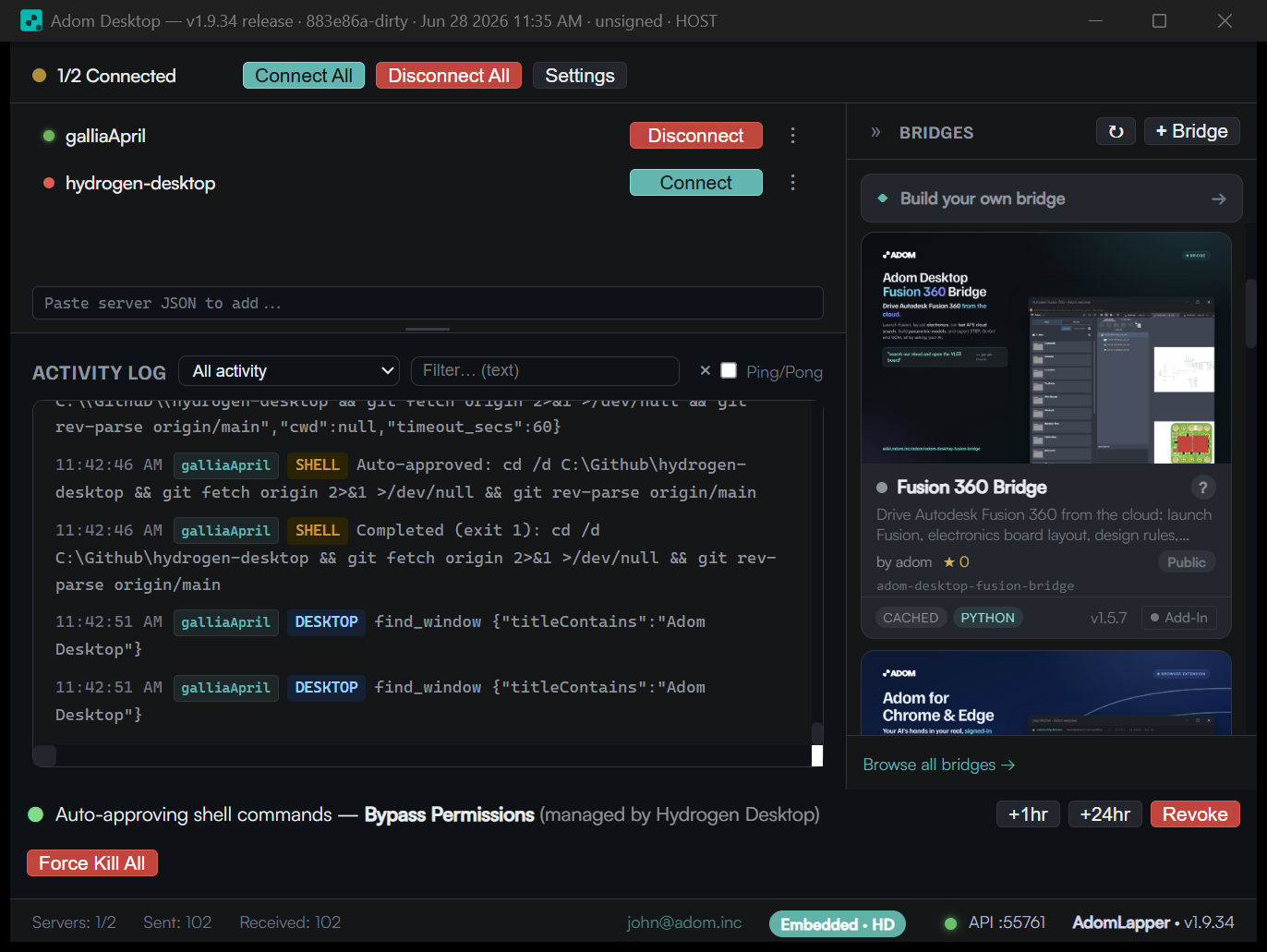
After install, the Adom Desktop BRIDGES panel shows the bridge with the new version + CACHED
(here v1.5.7). That card is your confirmation the install landed:
Forking + pull request (community)
adom-wiki repo fork <org>/<slug>            # fork the page under your own owner
# ...edit, bump version, build zip, release upload to YOUR fork, point the manifest at YOUR release...
adom-desktop bridge_install '{"manifestUrl":".../<your-fork-slug>/.../manifest.json","force":true}'   # test your fork live
adom-wiki pr create <org>/<slug> ...        # PR your changes back to the canonical page
Keeping skill-bundled READMEs in sync (do this before every publish)
If a bundled skill ships copies of deep docs in its folder (e.g. skills/fusion-libraries/ carries
MAKING_LIBRARIES.md + LIBRARY_FINDINGS.md so the installed AI reads them locally), re-copy the
repo-root READMEs into the skill folder before building the zip, rewriting their image refs to absolute
wiki URLs (https://wiki.adom.inc/<org>/<slug>/files/<img>.png). Otherwise the bundled copy drifts from
the canonical root copy. (See the fusion-bridge-dev skill, "Bundle deep READMEs INTO each skill".)
page.json: brief vs description (they render in DIFFERENT places)
The wiki renders these two fields in two very different spots, and mixing them up makes the Install card read like a README (done it, got told off):
| Field | Renders as | Content |
|---|---|---|
brief |
the page header one-liner under the title | WHAT THE BRIDGE DOES - the feature copy |
description |
the Install card body, right above the pkg install command |
ONLY what pkg install gives you |
Correct description for any bridge is ~2 sentences, no feature list:
"Installs this bridge's skills into your container so your AI knows how to drive the bridge. The bridge runtime itself is loaded by Adom Desktop from the release zip."
That sentence also does real work: it tells users the package is not the bridge. See adom/adom-desktop issues #20 and #21 for the SDK-wide asks (state the pkg-vs-runtime split on every bridge page; lint release/pkg payloads for media bloat).
Pitfall checklist (the short version)
Zip is runtime-only - no mp4/png/svg/screenshots. Over ~1 MB? list contents before uploading.
description= what pkg install does (2 sentences). Feature copy goes inbrief..zip->release upload, neverrepo push(gitignored + silently skipped).Manifest JSON ->
repo push; itsurlis the release download URL, not/files/.sha256/sizemust match the served asset (re-download to confirm).zipbinary may be absent -> Pythonzipfile.Server-only change =
bridge_installonly; add-in change = alsofusion_stop+install_addin.py+ hash-verify +fusion_start.fusion_describeneeds Fusion running; a closed Fusion returnsfusion_not_running, not "0 verbs broken".
# Building, publishing + forking this bridge
How to build the Adom Desktop Fusion 360 bridge, publish a new version, and (for the community)
fork it, test your fork in Adom Desktop, and open a pull request back. Written from the real
publish flow - every pitfall here was hit live, so you don't have to re-learn them.
## The big picture
This bridge is open source. You can't publish to the canonical wiki page
(`wiki.adom.inc/adom/adom-desktop-fusion-bridge`) - it's owned by `adom`. The community flow is:
```
fork the page -> edit code -> bump version -> build zip -> publish (RELEASE) ->
bridge_install YOUR manifest into Adom Desktop -> test live -> open a PR back to adom
```
## The wiki has TWO storage layers - put each artifact in the right one
| Artifact | Where it goes | How |
|---|---|---|
| Source files (`server.py`, `addin/`, `*.md`, the **manifest JSON**) | the page's **git repo** | `adom-wiki repo push --files ...` |
| The build **`.zip`** (binary) | a **release asset** | `adom-wiki release upload ...` |
> ⛔ **PITFALL #1: the `.zip` is a RELEASE, NOT a git file.** `*.zip` is gitignored, and
> `adom-wiki repo push --files X.zip` **silently skips it** (it reports `ok` but the file never lands -
> the URL 404s with a 228-byte `{"error":"File not found"}` whose sha you'll mistake for the zip's).
> Binaries go through `adom-wiki release upload`. Only the small **manifest JSON** goes in the git repo,
> and it **points at** the release asset.
## Step 1 - bump the version (two files, in lockstep)
```bash
printf '1.5.8' > BRIDGE_VERSION
sed -i 's/"version": "1.5.7"/"version": "1.5.8"/' bridge.json
```
## Step 2 - build the zip (the bridge source tree at the zip root)
The zip is the same file set as the previous release, at the zip root (no top-level dir). If the
`zip` binary isn't installed, use Python:
```python
import zipfile, os, hashlib
files = [l.strip() for l in os.popen("git ls-files")] # or the prior release's file list
out = "adom-bridge-fusion-v1.5.8.zip"
with zipfile.ZipFile(out, "w", zipfile.ZIP_DEFLATED) as z:
for f in files:
if os.path.isfile(f): z.write(f, f)
print("sha256:", hashlib.sha256(open(out,"rb").read()).hexdigest(), "size:", os.path.getsize(out))
# sanity: confirm your change is inside, e.g. zipfile.ZipFile(out).read('server.py')
```
### The zip is RUNTIME ONLY (16.7 MB -> 456 KB, learned the hard way 2026-07-17)
Do NOT zip `git ls-files` wholesale. That sweeps in everything that belongs on the PAGE - hero
images, screenshots, demo MP4s, architecture diagrams, long docs - and streams it to EVERY user's
machine on `bridge_install`. v1.6.76 shipped 16.7 MB of which **15.3 MB was media**. Runtime-only
rebuild: **456 KB, 97% smaller, zero functional change.**
Build from `git ls-files` MINUS media:
```python
EXCLUDE_EXT = {'.mp4','.png','.jpg','.jpeg','.gif','.svg','.webm','.zip'}
files = [f for f in git_ls_files()
if os.path.splitext(f)[1].lower() not in EXCLUDE_EXT
and not f.startswith('screenshots/')]
```
Keep: `server.py`, `aps.py`, `describe.py`, `handlers/`, `addin/`, `resources/`, text `skills/`,
manifests. **Sanity threshold: a bridge runtime zip is well under 1 MB. If yours is bigger, LIST
ITS CONTENTS before uploading** - something non-runtime is inside.
The same rule applies to the **pkg tarball**: keep `page.json` `files[]` a text-only whitelist
(`SKILL.md`, `skills/**`, install scripts). Never a broad glob that catches images.
## Step 3 - publish the zip as a RELEASE asset
```bash
adom-wiki release create <org>/<slug> 1.5.8 # idempotent
adom-wiki release upload <org>/<slug> 1.5.8 adom-bridge-fusion-v1.5.8.zip --json
```
The JSON response gives the asset's **`sha256`, `size`, and `download_url`**
(`/download/<org>/<slug>/1.5.8/adom-bridge-fusion-v1.5.8.zip`). The release **preserves your sha**
(unlike `/files/`, which re-stores). Verify:
`curl -sL https://wiki.adom.inc/download/<org>/<slug>/1.5.8/adom-bridge-fusion-v1.5.8.zip | sha256sum`.
## Step 4 - point the manifest at the release + push it (text, git-ok)
`adom-bridge-fusion-manifest.json`:
```json
{ "manifest_version": 1, "name": "fusion360", "version": "1.5.8",
"url": "https://wiki.adom.inc/download/<org>/<slug>/1.5.8/adom-bridge-fusion-v1.5.8.zip",
"sha256": "<the release asset's sha256>", "size": <bytes>, "released_at": "<UTC ISO8601>" }
```
```bash
adom-wiki repo push <org>/<slug> --files adom-bridge-fusion-manifest.json BRIDGE_VERSION bridge.json -m "v1.5.8"
```
> **PITFALL #2: `sha256`/`size` MUST match the served asset**, or `bridge_install` rejects it.
> Use the values from the `release upload` JSON, and re-download the URL to confirm before installing.
## Step 5 - install into Adom Desktop + test
```bash
adom-desktop bridge_install '{"manifestUrl":"https://wiki.adom.inc/api/v1/pages/<slug>/files/adom-bridge-fusion-manifest.json","force":true}'
```
- **Server-only change** (`server.py` / `describe.py` / `handlers/`): that's it. AD reaps + respawns
the bridge **server** from the new cache on the next verb call. **No `fusion_stop`.** Verify a new
verb appears with `fusion_describe` (needs Fusion running - `fusion_start` first if it isn't; the
describe gate returns `fusion_not_running` otherwise).
- **Add-in change** (`addin/AdomBridge/...`): Fusion holds those files open, so you ALSO need:
`fusion_stop` -> run the cache's `install_addin.py` (`shell_execute`, syncs cache -> Roaming AddIns) ->
**hash-verify with `Get-FileHash`/`sha256sum`, NOT `findstr`** (findstr false-negatives on UTF-8
box/dash chars) -> `fusion_start`.
> **PITFALL #3:** bumping `BRIDGE_VERSION` does NOT mean the running add-in changed - the version marker
> moves independently of the Roaming sync. Always hash-verify add-in files.
After install, the Adom Desktop **BRIDGES** panel shows the bridge with the new version + `CACHED`
(here `v1.5.7`). That card is your confirmation the install landed:

## Forking + pull request (community)
```bash
adom-wiki repo fork <org>/<slug> # fork the page under your own owner
# ...edit, bump version, build zip, release upload to YOUR fork, point the manifest at YOUR release...
adom-desktop bridge_install '{"manifestUrl":".../<your-fork-slug>/.../manifest.json","force":true}' # test your fork live
adom-wiki pr create <org>/<slug> ... # PR your changes back to the canonical page
```

## Keeping skill-bundled READMEs in sync (do this before every publish)
If a bundled skill ships copies of deep docs in its folder (e.g. `skills/fusion-libraries/` carries
`MAKING_LIBRARIES.md` + `LIBRARY_FINDINGS.md` so the installed AI reads them locally), **re-copy the
repo-root READMEs into the skill folder before building the zip**, rewriting their image refs to absolute
wiki URLs (`https://wiki.adom.inc/<org>/<slug>/files/<img>.png`). Otherwise the bundled copy drifts from
the canonical root copy. (See the `fusion-bridge-dev` skill, "Bundle deep READMEs INTO each skill".)
## page.json: `brief` vs `description` (they render in DIFFERENT places)
The wiki renders these two fields in two very different spots, and mixing them up makes the Install
card read like a README (done it, got told off):
| Field | Renders as | Content |
|---|---|---|
| `brief` | the **page header** one-liner under the title | WHAT THE BRIDGE DOES - the feature copy |
| `description` | the **Install card body**, right above the `pkg install` command | ONLY what `pkg install` gives you |
Correct `description` for any bridge is ~2 sentences, no feature list:
> "Installs this bridge's skills into your container so your AI knows how to drive the bridge. The
> bridge runtime itself is loaded by Adom Desktop from the release zip."
That sentence also does real work: it tells users the package is **not** the bridge. See
adom/adom-desktop issues #20 and #21 for the SDK-wide asks (state the pkg-vs-runtime split on every
bridge page; lint release/pkg payloads for media bloat).
## Pitfall checklist (the short version)
- **Zip is runtime-only** - no mp4/png/svg/screenshots. Over ~1 MB? list contents before uploading.
- **`description` = what pkg install does** (2 sentences). Feature copy goes in `brief`.
- `.zip` -> `release upload`, never `repo push` (gitignored + silently skipped).
- Manifest JSON -> `repo push`; its `url` is the **release download URL**, not `/files/`.
- `sha256`/`size` must match the **served** asset (re-download to confirm).
- `zip` binary may be absent -> Python `zipfile`.
- Server-only change = `bridge_install` only; add-in change = also `fusion_stop` + `install_addin.py` + hash-verify + `fusion_start`.
- `fusion_describe` needs Fusion running; a closed Fusion returns `fusion_not_running`, not "0 verbs broken".