Control Panel Dashboard
Public Unreviewedby Caleb
Live control and telemetry dashboard for the Control Panel pair (Workcell CM5 carrier + Scaffold RP2350 dock). Bench-style PS1 controls (millivolt/milliamp setpoints with hold-to-accelerate steppers a
Install
Live control and telemetry dashboard for the Control Panel pair (Workcell CM5 carrier + Scaffold RP2350 dock). Bench-style PS1 controls (millivolt/milliamp setpoints with hold-to-accelerate steppers and live CV/CC state), the PS2 switch, an oscilloscope-style monitor of all four rails (merged single-plot view or per-supply windows with individually selectable voltage/current/power lanes, an adjustable timebase from 60 s down to 1 ms with high-rate burst sweeps, labeled time and unit axes, per-rail show/hide, fullscreen mode, and CSV-exportable data recording), a dashboard-computed air quality index from the gas sensor, toggles for the microphone, USB2 route, M.2 Wi-Fi power, scaffold MCU reset/BOOTSEL and its status LED, a user-MCU firmware menu flashed through the onboard debug probe, bound (user-connected) USB devices, environmental and inertial telemetry, and all 26 scaffold USER_IO machine contacts tri-statable to high, low, or Hi-Z. A background logger appends a 1 Hz CSV snapshot of every variable plus a JSONL record per control event, in daily files gzipped after midnight and kept 30 days (about 15 MB per day live, 2 MB compressed). Mock mode (simulated physics) and live mode (SSH to the CM5). Fully AI-drivable: every control is a plain HTTP endpoint.
adom-wiki pkg install caleb/control-panel-dashboardLatest: v0.13.0, published
Dependencies 2 components
- component caleb/control-panel-workcell ^2.0.0
- component caleb/control-panel-scaffold ^2.0.0
Control Panel Dashboard
Live control and telemetry UI for the Control Panel pair: Workcell (Raspberry Pi CM5 carrier) and Scaffold (RP2350 dock). Runs in a Hydrogen webview tab; every control is a plain HTTP endpoint so the AI can drive it too.
Full application reference: architecture, every panel, the hardware paths behind each control, the complete HTTP API, firmware protocol, log format, and live-mode status.
What it shows
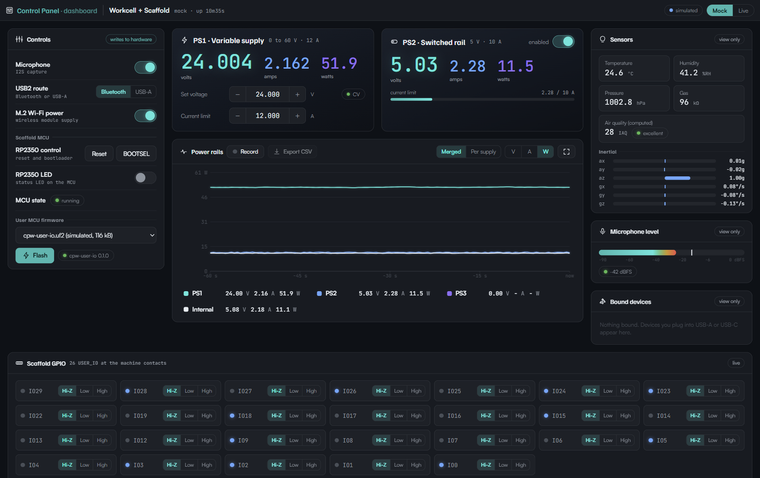
- Supply controls at the top: PS1 (the 0 to 60 V / 12 A variable supply) with bench-style controls: voltage setpoint and current limit adjustable to 1 mV / 1 mA (a click steps one millivolt, holding accelerates through 10 mV, 100 mV, and 1 V), live V/A/W readouts, and a CV/CC badge that flips when the load hits the limit and the voltage sags. PS2 (the switched 5 V / 10 A rail) has its enable switch and current readout.
- Power rails monitor: PS1, PS2, PS3, and Internal traced oscilloscope-style over the selected time window with a labeled time axis. The timebase adjusts from 60 s down to 1 ms: windows of 10 s and up replay the 500 ms telemetry stream, faster windows trigger fresh high-rate sweeps (GET /burst) like an oscilloscope. Merged view overlays every visible supply on one plot of the chosen measurement (V, A, or W); Per supply gives each rail its own window with voltage, current, and power lanes on independent unit-labeled scales, each lane individually selectable per supply. Click a rail in the legend to add or remove it. The monitor expands to fullscreen, and a recorder captures every rail at 500 ms per sample (up to 2 hours) for export as a .csv. PS3 has no current sensing fitted, so it reports voltage only.
- Controls (writes to hardware): microphone, USB2 route (Bluetooth or USB-A), M.2 Wi-Fi power, scaffold MCU reset / BOOTSEL, the RP2350 status LED, and the firmware flasher.
- User MCU firmware: a menu of every
.uf2/.elfinfirmware/builds/, flashed to the scaffold RP2350. - Scaffold GPIO: the 26 USER_IO lines at the machine contacts, each with a Hi-Z / Low / High tab. Every RP2350 pin has its own output enable, so each line tri-states independently; in Hi-Z the indicator shows the level the pin reads.
- View-only telemetry: environmental and inertial sensors, a dashboard-computed air quality index (0 to 500, from the gas element's resistance against a self-learned clean-air baseline with humidity weighting), microphone level, and bound devices (user-connected USB).

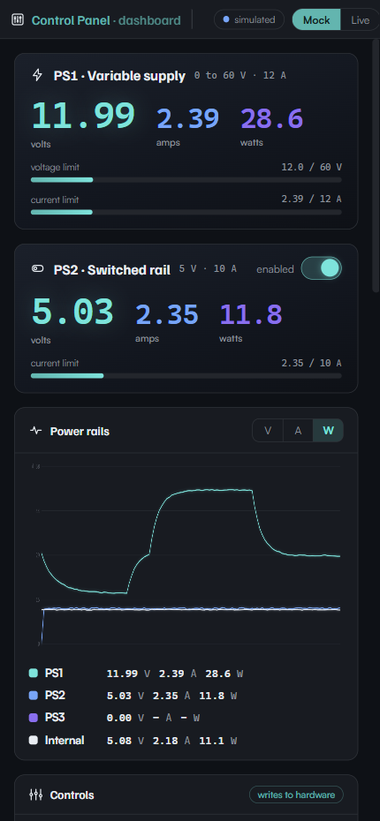
At phone width the layout reshapes to a single column:
Background log
Always on. Every second one CSV row captures every variable (rails, setpoints, toggles,
GPIO packed as hex bitfields, mic, sensors, IAQ, mode); every control action appends one
JSONL event record. Daily files live under logs/, are written in 15 s batches (SD-card
friendly), gzip after midnight, and are kept for CPW_LOG_RETAIN_DAYS (default 30).
Budget: about 15 MB per 24 h live, about 2 MB per day gzipped. The header's log chip shows
today's size and downloads the current CSV; GET /logs lists every file and
GET /logs/<name> downloads it.
Modes
| Mode | What happens |
|---|---|
| mock (default) | Full simulated physics. Safe anywhere, no hardware needed. |
| live | Drives the real CM5 over SSH (CPW_BOARD_SSH). Toggles move real GPIO; flashing writes the real RP2350. |
Run
node server.js          # port 8852 (registered in the Adom port registry)
node server.js --dev    # adds POST /eval (AI hot-patch channel)
Open through the container proxy ($VSCODE_PROXY_URI with port 8852), never 127.0.0.1.
AI-drivable surface
State lives on the server; the UI is a thin client over SSE + GET /state, with a polled
GET /pending event cursor for proxies that buffer SSE.
GET  /state /console /health /pending?since=N /events(SSE)
POST /api/ps2-enable {"on":true}         POST /api/mic-enable {"on":true}
POST /api/usb-mux {"route":"bt|usba"}    POST /api/m2-power {"on":true}
POST /api/scaffold-led {"on":true}
POST /api/user-io {"gpio":n,"state":"hiz|low|high"}
POST /api/ps1-set {"v":0..60,"ilim":0..12}      (1 mV / 1 mA resolution)
POST /api/record {"on":true}   POST /api/record-clear   GET /record.csv
GET  /burst?span_ms=1..60000    (high-rate sweep for fast timebases)
GET  /logs                      (list log files)   GET /logs/<name>  (download)
POST /api/mcu-reset  /api/mcu-bootsel
POST /api/firmware-select {"file":"x.uf2"}   /api/firmware-flash {}
POST /api/mode {"mode":"mock|live"}
POST /ui/toast {"type":"info","msg":"..."}   POST /console  POST /shutdown
User MCU firmware
firmware/cpw-user-io/ is the default scaffold firmware: a JSON-lines USB CDC agent that
reports and drives all 26 USER_IO (GPIO10/11/20/21 reserved) with edge push events.
Build with the pico-sdk (PICO_BOARD=pico2), drop the .uf2 in firmware/builds/, and it
appears in the dashboard's firmware menu within 5 seconds. firmware/flash.sh is the
board-side flash flow.