molecule-pipeline
Public Made by Adomby adom
Top-level router for moving molecules between EDA tools, the wiki, and Hydrogen: one entry point that routes publish/import intents to the right skill chain and enforces the pipeline invariants.
molecule-pipeline — move molecules through the Adom ecosystem
This is the page. If you want a board you designed to live in the Adom ecosystem — on the wiki, importable into any Hydrogen account, wireable in the 3D editor — everything starts here. Share this page; nothing else is required reading.
Say one sentence, get the whole pipeline
Your agent handles every step below from a single prompt:
"Move molecule ABC from KiCad on my computer up to the wiki."
"Get molecule ABC into my Hydrogen account."
"Publish my molecule ABC and import it into my Hydrogen account."
Works the same for Fusion 360 and Altium sources — name your tool or let the agent detect it from your files.
What happens under the hood
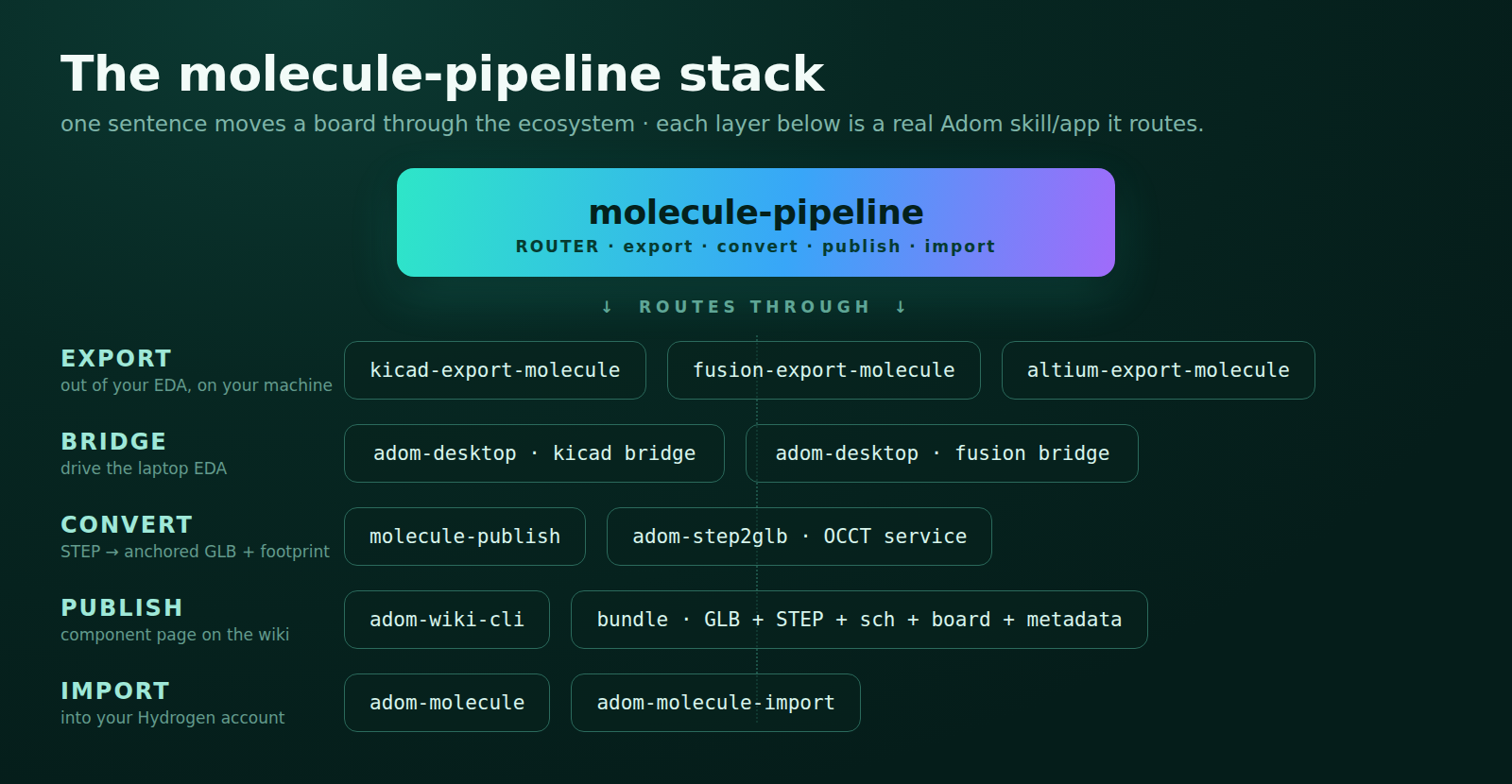
| Stage | Skill / tool | What it guarantees |
|---|---|---|
| 1. Export | kicad-export-molecule / fusion-export-molecule / altium-export-molecule |
STEP exported on your machine (so your 3D models bake in) + schematic + board + silk, pulled via adom-desktop |
| 2. Convert + publish | molecule-publish → OCCT service (adom-step2glb) |
Anchored GLB (Z-up, front-left pin at origin), gold machine pins, silkscreen, footprint + symbol JSON with real wire-attach heights — gated on conversion stats, never published degraded |
| 3. Import | adom-molecule-import (ships with adom-molecule) |
Reuses the published GLB (no re-optimization), registers under YOUR owner, collision-guarded |
Setup (once per container)
# no adom-wiki on this container yet? bootstrap it first:
curl -fsSL https://wiki.adom.inc/download/adom/adom-wiki-cli/1.0.2/adom-wiki-cli-v1.0.2 \
  -o ~/.local/bin/adom-wiki && chmod +x ~/.local/bin/adom-wiki

adom-wiki pkg install adom/molecule-pipeline      # the router (this page)
adom-wiki pkg install adom/kicad-export-molecule  # + your EDA's export skill
Dependency tree
molecule-pipeline
├── molecule-publish                     convert · package · publish
│   ├── adom-step2glb                    OCCT conversion CLI + shared service
│   └── adom-wiki-cli                    wiki publish/read (preinstalled on Adom containers)
├── adom-molecule                        Hydrogen CLI; ships adom-molecule-import
└── <your EDA export skill>              stage-1 front-end (install the one you use)
    ├── kicad-export-molecule
    │   ├── adom-desktop                 laptop bridge (KiCad bridge verbs)
    │   └── kicad-to-molecule            only if your board needs wings/machine pins added
    ├── fusion-export-molecule
    │   └── adom-desktop                 laptop bridge (Fusion bridge verbs)
    └── altium-export-molecule           interim; direct path in progress
        └── adom-altium-library-importer Adom machine-pin libs inside Altium
- molecule-publish
- adom-step2glb
- adom-wiki-cli
- adom-molecule
- kicad-export-molecule · fusion-export-molecule · altium-export-molecule
- adom-desktop · kicad-to-molecule · adom-altium-library-importer
Laptop prerequisites: Adom Desktop running; your EDA installed; for molecules, the board carries the Adom machine-pin furniture (MP1–MP4 markers + corner machine pins — kicad-to-molecule adds them to a plain board).
What a published molecule page carries
You provide (the bare-minimum bundle): STEP + schematic + board/layout. The tools add: the OCCT-converted GLB (anchored, gold pins, optimized) and the metadata (footprint + symbol JSON with wire-attach heights).
Every molecule page on the wiki therefore carries the full published set — GLB + STEP + schematic + board + metadata — and the tools expect all five: import reuses the GLB, wiring reads the metadata, reproduction uses the sources. No partial molecules, no ambiguity about what "published" means.
The invariants (why results are consistent)
- The full published set (GLB + STEP + schematic + board + metadata) always reaches the wiki — you supply the sources, the tools generate and attach the rest.
- The only GLB is the OCCT-converted one — never an EDA's native export.
- STEP is exported on the design machine so custom 3D models survive.
- Every stage verifies before the next starts; a failed gate stops the run.
- Import reuses the published model — nothing is regenerated.
Related pages
kicad-export-molecule·fusion-export-molecule·altium-export-moleculemolecule-publish— the convert/package/publish middleadom-molecule— the CLI + import skilladom-step2glb— the OCCT conversion service/CLIkicad-to-molecule— make a plain PCB molecule-ready first
# molecule-pipeline — move molecules through the Adom ecosystem
**This is the page.** If you want a board you designed to live in the Adom
ecosystem — on the wiki, importable into any Hydrogen account, wireable in the
3D editor — everything starts here. Share this page; nothing else is required
reading.
## Say one sentence, get the whole pipeline
Your agent handles every step below from a single prompt:
> **"Move molecule ABC from KiCad on my computer up to the wiki."**
> **"Get molecule ABC into my Hydrogen account."**
> **"Publish my molecule ABC and import it into my Hydrogen account."**
Works the same for Fusion 360 and Altium sources — name your tool or let the
agent detect it from your files.
## What happens under the hood

| Stage | Skill / tool | What it guarantees |
|---|---|---|
| 1. Export | `kicad-export-molecule` / `fusion-export-molecule` / `altium-export-molecule` | STEP exported **on your machine** (so your 3D models bake in) + schematic + board + silk, pulled via adom-desktop |
| 2. Convert + publish | `molecule-publish` → OCCT service (`adom-step2glb`) | Anchored GLB (Z-up, front-left pin at origin), gold machine pins, silkscreen, footprint + symbol JSON with real wire-attach heights — gated on conversion stats, never published degraded |
| 3. Import | `adom-molecule-import` (ships with `adom-molecule`) | Reuses the published GLB (no re-optimization), registers under YOUR owner, collision-guarded |
## Setup (once per container)
```bash
# no adom-wiki on this container yet? bootstrap it first:
curl -fsSL https://wiki.adom.inc/download/adom/adom-wiki-cli/1.0.2/adom-wiki-cli-v1.0.2 \
-o ~/.local/bin/adom-wiki && chmod +x ~/.local/bin/adom-wiki
adom-wiki pkg install adom/molecule-pipeline # the router (this page)
adom-wiki pkg install adom/kicad-export-molecule # + your EDA's export skill
```
## Dependency tree
```
molecule-pipeline
├── molecule-publish convert · package · publish
│ ├── adom-step2glb OCCT conversion CLI + shared service
│ └── adom-wiki-cli wiki publish/read (preinstalled on Adom containers)
├── adom-molecule Hydrogen CLI; ships adom-molecule-import
└── <your EDA export skill> stage-1 front-end (install the one you use)
├── kicad-export-molecule
│ ├── adom-desktop laptop bridge (KiCad bridge verbs)
│ └── kicad-to-molecule only if your board needs wings/machine pins added
├── fusion-export-molecule
│ └── adom-desktop laptop bridge (Fusion bridge verbs)
└── altium-export-molecule interim; direct path in progress
└── adom-altium-library-importer Adom machine-pin libs inside Altium
```
- [molecule-publish](https://wiki.adom.inc/adom/molecule-publish)
- [adom-step2glb](https://wiki.adom.inc/adom/adom-step2glb)
- [adom-wiki-cli](https://wiki.adom.inc/adom/adom-wiki-cli)
- [adom-molecule](https://wiki.adom.inc/adom/adom-molecule)
- [kicad-export-molecule](https://wiki.adom.inc/adom/kicad-export-molecule) · [fusion-export-molecule](https://wiki.adom.inc/adom/fusion-export-molecule) · [altium-export-molecule](https://wiki.adom.inc/adom/altium-export-molecule)
- [adom-desktop](https://wiki.adom.inc/adom/adom-desktop) · [kicad-to-molecule](https://wiki.adom.inc/adom/kicad-to-molecule) · [adom-altium-library-importer](https://wiki.adom.inc/barrett-land/adom-altium-library-importer)
**Laptop prerequisites:** Adom Desktop running; your EDA installed; for
molecules, the board carries the Adom machine-pin furniture (MP1–MP4 markers +
corner machine pins — [kicad-to-molecule](https://wiki.adom.inc/adom/kicad-to-molecule)
adds them to a plain board).
## What a published molecule page carries
**You provide** (the bare-minimum bundle): STEP + schematic + board/layout.
**The tools add**: the OCCT-converted **GLB** (anchored, gold pins, optimized)
and the metadata (footprint + symbol JSON with wire-attach heights).
Every molecule page on the wiki therefore carries the full published set —
**GLB + STEP + schematic + board + metadata** — and the tools expect all five:
import reuses the GLB, wiring reads the metadata, reproduction uses the
sources. No partial molecules, no ambiguity about what "published" means.
## The invariants (why results are consistent)
1. The full published set (GLB + STEP + schematic + board + metadata) always reaches the wiki — you supply the sources, the tools generate and attach the rest.
2. The **only** GLB is the OCCT-converted one — never an EDA's native export.
3. STEP is exported on the design machine so custom 3D models survive.
4. Every stage verifies before the next starts; a failed gate stops the run.
5. Import reuses the published model — nothing is regenerated.
## Related pages
- [`kicad-export-molecule`](https://wiki.adom.inc/adom/kicad-export-molecule) · [`fusion-export-molecule`](https://wiki.adom.inc/adom/fusion-export-molecule) · [`altium-export-molecule`](https://wiki.adom.inc/adom/altium-export-molecule)
- [`molecule-publish`](https://wiki.adom.inc/adom/molecule-publish) — the convert/package/publish middle
- [`adom-molecule`](https://wiki.adom.inc/adom/adom-molecule) — the CLI + import skill
- [`adom-step2glb`](https://wiki.adom.inc/adom/adom-step2glb) — the OCCT conversion service/CLI
- [`kicad-to-molecule`](https://wiki.adom.inc/adom/kicad-to-molecule) — make a plain PCB molecule-ready first