KiCad - the KiCad Bridge
Public Made by Adomby adom
Drive your own KiCad from an AI, in the background: open every editor, read the whole board as data (the EDA Bridge Standard board model), stack-up, part heights, netlists, place, route, pour, DRC and exports.


Adom Bridge: KiCad Bridge
A reverse bridge that lets Adom Bridge (ab), and the AI driving it, control the user's own KiCad on Windows: open and drive every editor, install symbol/footprint libraries, place parts, run DRC/ERC, export manufacturing files, and screenshot any window back to the AI.
Two artifacts on this page, which one do you want?
Release ZIP ( adom-bridge-kicad-v*.zip)Package ( adom-wiki pkg install adom/kicad-bridge)What it is The bridge runtime: the native Rust kicad-bridge.exethat drives KiCad (the Python server it replaced is kept in the repo for reference)Skills + docs only, for a container/agent Who loads it Adom Bridge downloads it automatically via adom-bridge-kicad-manifest.jsonYou, into a container, to teach an agent the kicad_*verbsContains code, certs, UIA scripts, board template SKILL.mdfiles (no binaries, no images)You install it manually? No: Bridge handles it Yes The package is not the bridge. Installing the package does not give you a working bridge; Adom Bridge loading the release zip does. Both are kept deliberately small, the zip is auto-bundled into Adom Bridge, so it ships only what the runtime needs.
KiCad is the user's host app. The bridge detects an existing KiCad and, if none is present, installs one for them, it never asks the user to download or click through anything by hand.
- Page / docs: https://wiki.adom.inc/adom/kicad-bridge
- Bridge SDK: https://wiki.adom.inc/adom/adom-bridge-sdk
- Verb namespace:
kicad_*· Status verb:kicad_bridge_status· Health:GET /status
Every screenshot in this README was captured on ADOMBASELINE, a stock Hyper-V VM with no GPU, driven end-to-end through the bridge, install → libraries → editors → 2D → 3D. If it renders there, it renders on a real laptop.
The demo, recorded (2:47, narrated)
Watch the recording: the guided tour exactly as a user gets it from the dashboard's Play the demo button, recorded on a real Windows desktop. Six beats on the Adom ESC G431 motor controller pulled from the wiki: the STM32 symbol in the Symbol Editor, its LQFP-48 footprint, the chip in 3D, the full schematic, the 2D board and the 3D board with every MOSFET in place. Each window is brought forward once, captioned, and moved (zoom, pan, orbit) while the narration explains it. The same recording plays inline in the dashboard.
How the dock card, the dashboard and this demo fit together: docs/dashboard.md.
Feature guides
| guide | what it covers |
|---|---|
| Dashboard | The dock card, the dashboard and how the demo fits in. |
| How the bridge compares | Feature matrix against every notable KiCad MCP server and AI tool, with the gaps on both sides. |
| The Rust port plan | One dependency-free binary: what moves to KiCad's API, what ab already does, what PowerShell goes away, phases and risks. |
| The ESC G431 demo: placement and routing by three engines | A real public Adom board placed and routed from scratch by Claude Fable 5.1, GPT-6 Astra and Freerouting through the bridge, with real times, result quality, tokens, dollars and agent counts per engine. |
| Native zone plans | kicad_apply_zone_plan: one Undo step, full-candidate DRC, the no-op and refill contracts. |
| Native silkscreen text, graphics and fields | The stable-ID silk batch verbs, what each refuses, and what KiCad 10.0.5 will not do over IPC. |
| Linked view refresh | kicad_refresh_board_views: refreshing one PCB editor and its bound 3D viewer in the background. |
| Astra's working notes | How the AI Flow thread contributes to this bridge: preflight, branch PRs, acceptance. The three *-astra-prompt.md files beside it are the prompts used for the ESC demo runs. |
| KiCad wishlist: automation without the foreground | Every place the bridge needs UI automation, real input or the foreground because KiCad has no API for it, ranked worst first, with the feature request that would fix each. |
| Your wiki page as a KiCad PCM repository | The page serves repository.json, packages.json and the zips anonymously, so it is a Plugin and Content Manager repository as-is: the sample library package, the packer, adding the repository in KiCad or with kicad_pcm_add_repository, and updates through PCM's Update button or kicad_pcm_install {update:true}. |
Live routing (from 0.9.340)
Four verbs edit copper in the open PCB editor through KiCad's official IPC API (KiCad 10.0.1+
with the IPC API server enabled): kicad_routing_state, kicad_route_net, kicad_remove_route
and kicad_routing_validate. The AI chooses the waypoints; each call lands as one native Undo step,
carries a revision guard, and is DRC-checked against a snapshot before it commits. This is not an
autorouter and not an electrical sign-off. Details and the regression demo: SKILL.md
and demo/routing/README.md. The guide to both engines, with a live run and screenshots: docs/autorouting.md.
The board model: the same board data as Altium and Fusion (from 1.0.59)
kicad_routing_state {"model":"standard"} reads the whole board in the
EDA Bridge Standard's shape, the one altium_routing_state and
fusion_routing_state answer: tracks, arcs, vias, pads with their sizes (a custom pad as its bounding rectangle),
parts, copper pours, the board outline with its arcs, cutouts and keepouts, the unconnected count worked out from the
copper itself (with the pads of each piece to join) and a revision that only moves when copper, parts or the outline
move. Millimetres, y up, KiCad layer names. It reads the live PCB editor (unsaved edits included) or the
.kicad_pcb file with KiCad closed. The edit verbs take that revision as expectedRevision, and with
frame:"standard" they take its coordinates as they are.
Its companions, by the standard's names:
| Verb | What it tells you |
|---|---|
kicad_layer_stack |
the stack-up: copper thickness per layer, the dielectric under each (thickness, Dk, material), planes and their nets, masks, finish |
kicad_pour_state |
the copper actually poured: filled area per zone and per layer, islands, zones that poured nothing |
kicad_bodies |
each part's 3D body as a box and its height, read from the 3D model files: the tallest parts, what a height check cannot see |
kicad_netlist |
the netlist as {net: ["U1.8", ...]}, compared pin by pin with the nets you expect, with every pin's electrical type |
And the standard's quick reads, each a view of the same model: kicad_board_summary (parts by side, nets, layers in
use, board size and area), kicad_list_nets (with pad counts), kicad_list_designators, kicad_copper_layers,
kicad_layers_in_use, kicad_component_data (a part's placement, size and nets) and kicad_component_pins (its pads
with net, position, size and hole).
Checked against KiCad's own DRC on six of KiCad 10's demo boards: the same unconnected count on every one. The details, the rules and the pitfalls: the kicad-board-model skill.
The demo verb: kicad_demo
One verb that shows the whole bridge off, built for the AI that demos Adom Bridge during Hydrogen's install. Six beats, in the order a hardware person thinks:
| Beat | Shows |
|---|---|
| 1 | the schematic symbol in the user's own Symbol Editor |
| 2 | the footprint for that same part |
| 3 | that part in 3D |
| 4 | a schematic using it (U1 + two 10k resistors) |
| 5 | the 2D board layout |
| 6 | the finished board in 3D |
adom-bridge kicad_demo '{}'                      # start: prepares, warms KiCad, opens beat 1
adom-bridge kicad_demo '{"step":"footprint"}'    # ...then follow data.nextCall each time
adom-bridge kicad_demo '{"all":true}'            # bulk (non-interactive; slower than one request budget)
adom-bridge kicad_close '{"force":true}'         # tear down
It narrates itself. Every beat returns say (a line to speak), pointOut
(what's actually on screen), window (match it in kicad_screenshot_all) and
nextCall. One beat per call is the default precisely so the AI can talk, screenshot,
then move on.
It ships nothing. The two demo parts, the schematic and the board are all
generated in code, and the 3D bodies come from KiCad's own bundled
3dmodels/*.3dshapes: so the runtime zip stays small and the 3D views are real.
Parts install into the user's real Adom library; the project lands in
Documents/adom-kicad-demo.
No KiCad? It offers to install it. kicad_demo returns an offer instead of an
error; kicad_demo '{"installKiCad": true}' silently installs the official build
(per-user, no UAC) and then runs the tour. Watching the AI install your EDA tool is
itself a good demo beat.
It never takes your screen. Every window opens in the background and all input is
window-targeted (UIA / PostMessage), so you can keep working while it runs.
How it fits together
The bridge is one native Rust executable, kicad-bridge.exe, that Adom Bridge launches on the user's
machine (port: 0: Adom Bridge picks the port and passes ADOM_BIND_HOST). There is no Python or other
runtime to provision. It speaks HTTP
(POST /command, GET /status) and reaches KiCad through four control surfaces, picking the
lightest one that can do the job.

| # | Surface | Used for | Where |
|---|---|---|---|
| 1 | kicad-cli (subprocess) | headless DRC/ERC, gerber/pdf/svg/step/bom export, format upgrade | handlers/export.py, run_drc, run_erc, lint_* |
| 2 | KiCad IPC (kipy) | board/schematic introspection, confirmed footprint placement (KiCad 9+) | handlers/place_footprint.py |
| 3 | Embedded Python | JSON-RPC inside each KiCad process, dispatched on its wx UI thread | plugin_payload/adom_bridge.py, handlers/bridge_client.py |
| 4 | Win32 / UIA / SendKeys | open editors, screenshots, clicks/keys, dialog handling, window management | handlers/kicad_ui.py, handlers/close_windows.py |
The window tour
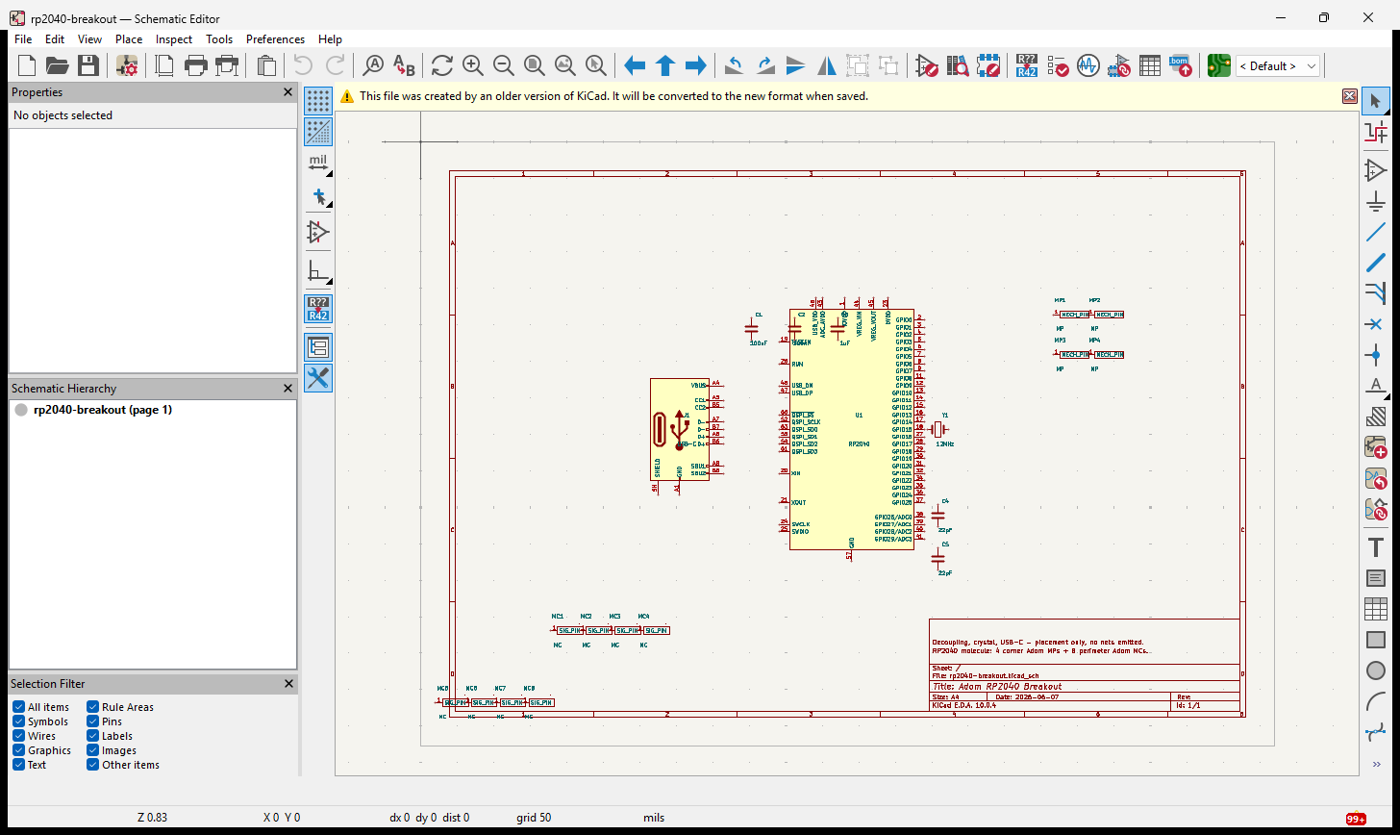
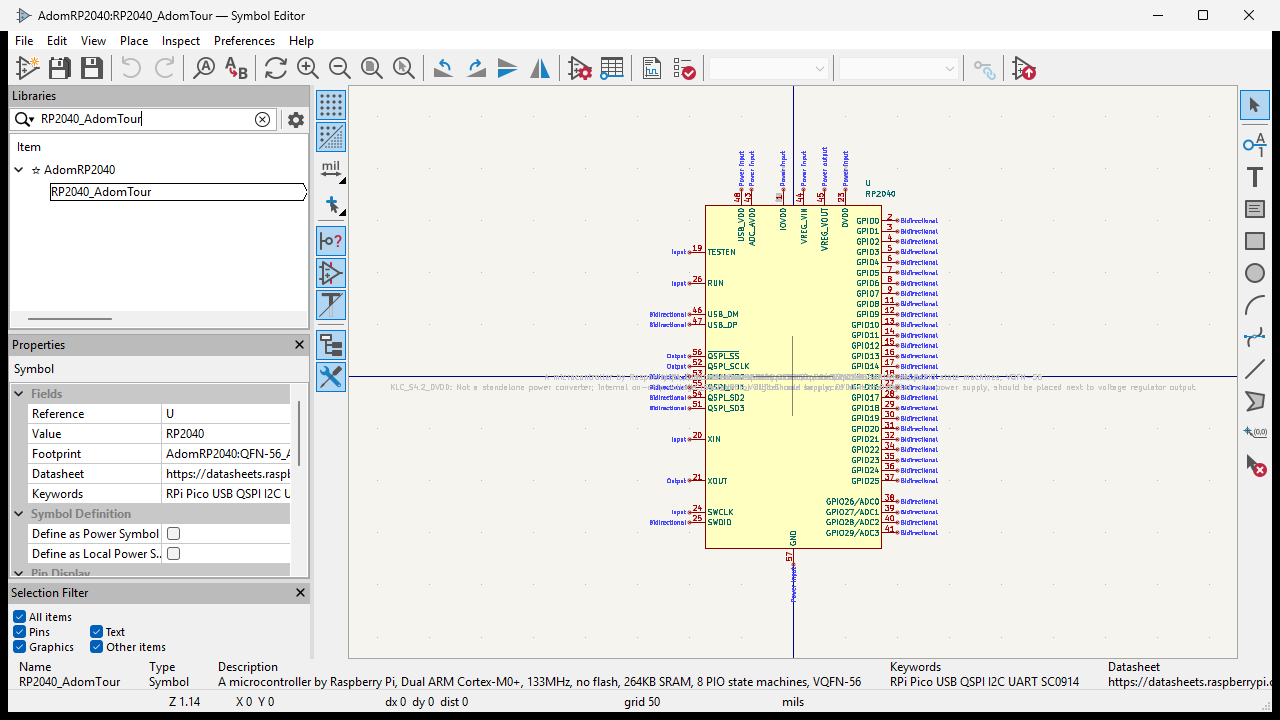
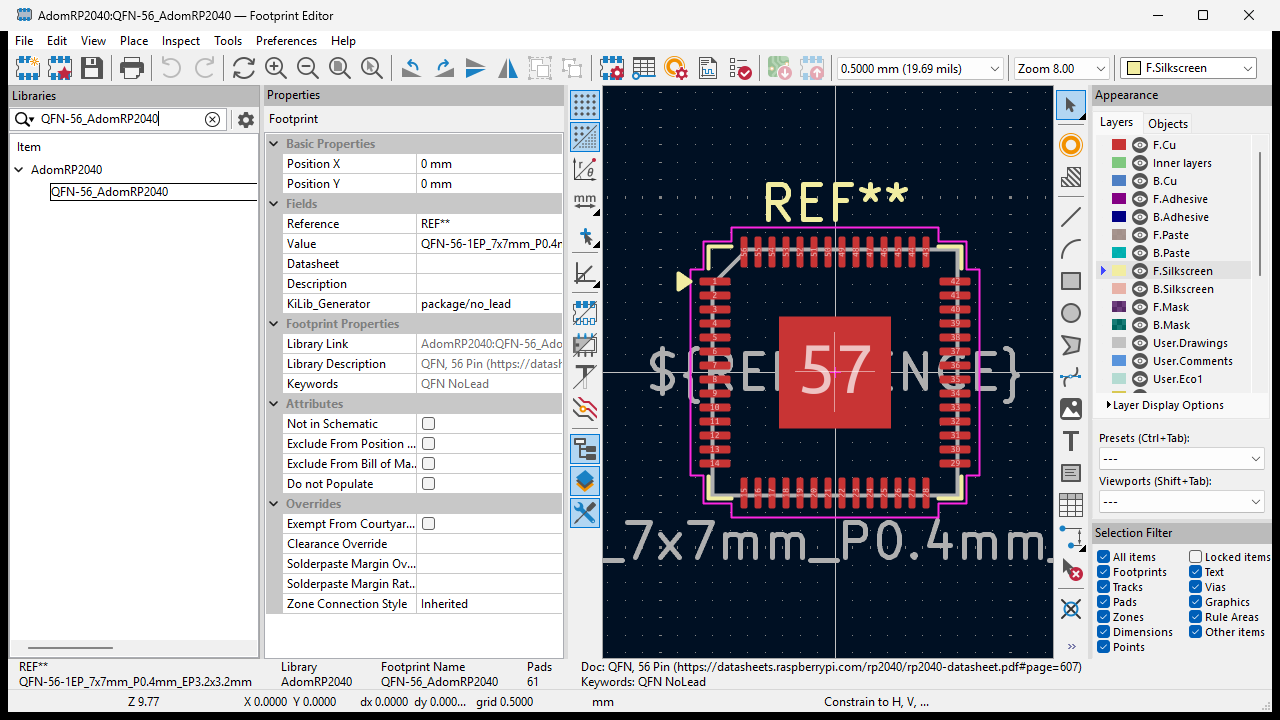
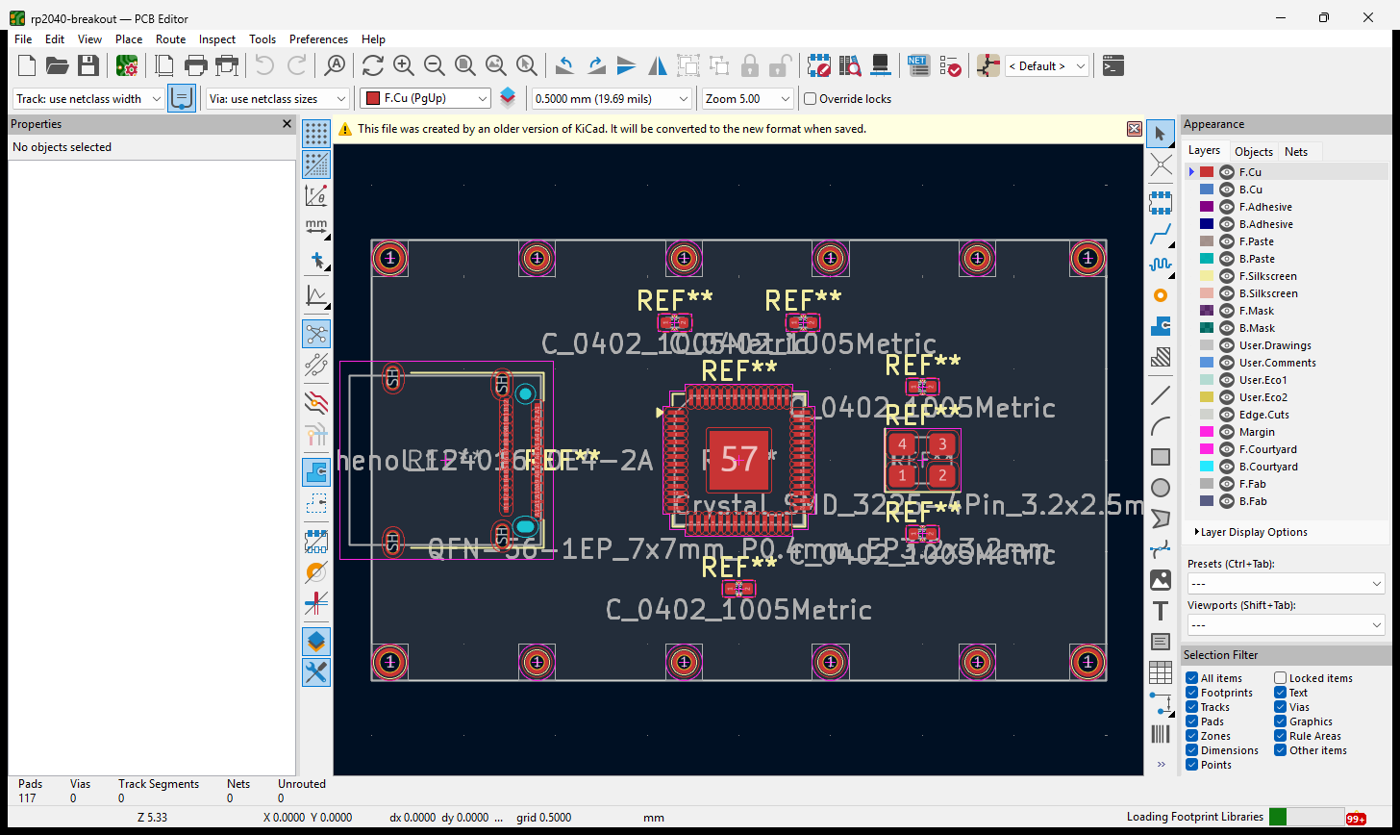
Everything below was opened and captured on the GPU-less VM. Sample data is the RP2040 breakout
generated by tour-pack-rp2040/ (an AdomRP2040 symbol + QFN-56_AdomRP2040 footprint + a board).
Schematic editor: kicad_open_schematic
The RP2040 breakout: the MCU (U1), USB-C, a 12 MHz crystal, decoupling, and mounting pins.
Symbol editor: kicad_open_symbol_editor
Opens straight to a symbol (kicad_install_symbol puts it in a user library first).
Footprint editor: kicad_open_footprint_editor
{"footprintName":"QFN-56_AdomRP2040","library":"AdomRP2040"} loads the part directly, 56 pins +
thermal pad, 7×7 mm, 0.4 mm pitch, courtyard and silkscreen.
PCB editor (2D): kicad_open_board
The routed breakout, copper, silkscreen, the QFN-56 land pattern, mounting holes.
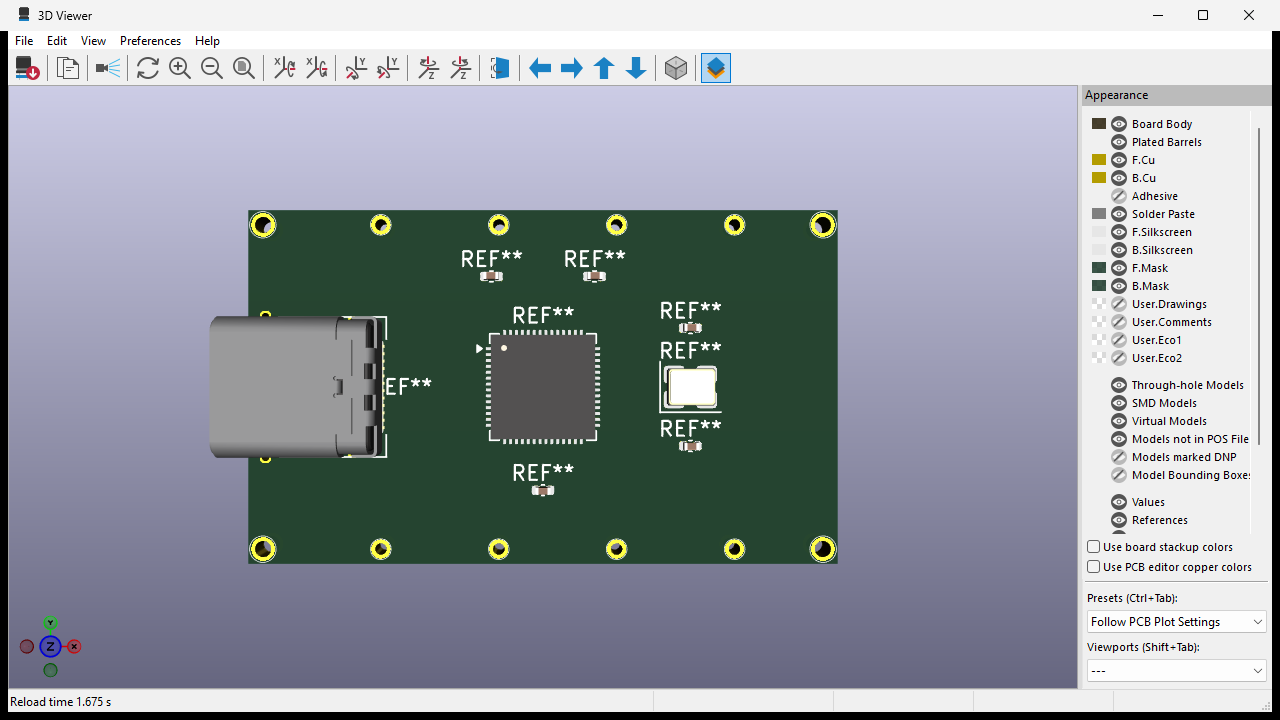
3D viewer: kicad_open_3d_viewer {"editor":"pcb"}
The full board in 3D, board body, the USB-C connector's 3D model, the QFN chip body, SMD parts, plated through-holes. Rendered on the CPU via the software-OpenGL fallback (below); reload 1.7 s.
Install & upgrade: zero manual steps
The bridge never tells the user to go download KiCad. kicad_upgrade fetches the official installer
and runs it silently, picking the scope automatically:
- Elevated Bridge →
/allusers /S(system-wide,%ProgramFiles%\KiCad). - Non-elevated Bridge →
/currentuser /S(%LocalAppData%\Programs\KiCad, no UAC prompt).
kicad_readiness reports whether KiCad is installed and ready without side effects; the AI routes on
it before offering to install. Hard-won install details (all handled for you):
- KiCad 10's NsisMultiUser installer requires a scope flag, bare
/Serrorsrc=666660. - Bridge's portable Python has no CA bundle; the bridge ships
certs/cacert.pemand uses it for TLS. - Downloads are size-checked against
Content-Length(a truncated installer otherwise fails at NSIS). %APPDATA%/kicad/<ver>/lib tables don't exist until first launch, the bridge bootstraps them soinstall_library/install_footprintwork on a never-opened KiCad.kicad_upgrade {"diagnoseOnly":true}reports token-elevation type +EnableLUAwithout installing.
Dialogs & error handling: the bridge clears the pointless ones
KiCad throws modal dialogs that stall automation. The bridge scans every window owned by a running KiCad process (by PID, reliable, unlike title matching), auto-expires the benign ones, screenshots what it dismissed, and returns a hint so the AI can decide what (if anything) to tell the user.
Auto-expired benign dialogs include:
- "Could not use OpenGL / falling back to software rendering" (GPU-less hosts).
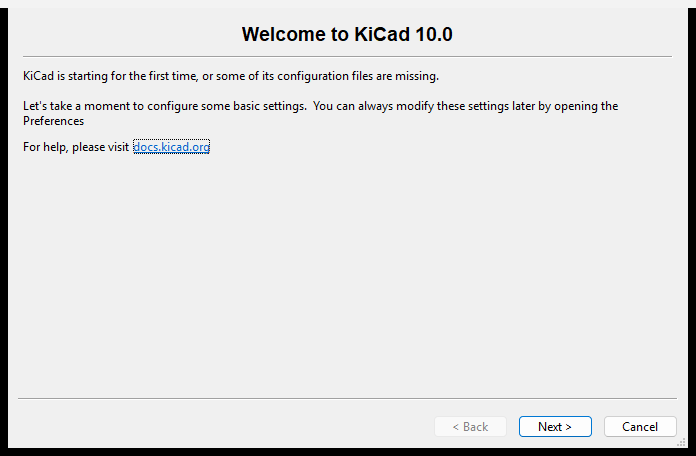
- "Welcome to KiCad, starting for the first time" first-run wizard (dismissing accepts defaults).
- "This file was created by an older version of KiCad" conversion notice.
Verbs:
kicad_window_info: lists windows and self-heals (auto-expires benign dialogs) by default.kicad_dismiss_dialogs {"all":true}: clear everything blocking;{"screenshot":true}returns images of each;{"forceSoftwareCanvas":true}persists Cairo canvas;{"debug":true}dumps the raw PID-based scan.kicad_screenshot_all: one call returns every open KiCad window, so the AI can spot an error dialog it didn't expect and read the message.
Software-OpenGL fallback (last resort)
kicad_enable_software_opengl deploys Mesa's llvmpipe (a CPU OpenGL rasterizer) into KiCad's bin
so a box with no usable GPU: Hyper-V, RDP, headless CI, can still render the editors and the 3D
viewer. This is how every 3D shot above exists.
⚠️ It renders on the CPU and is slow. It is a worst-case fallback only, a real GPU (or GPU-P / DDA passthrough) is vastly better. The bridge keeps it so a GPU-less box isn't a dead end; it is never suggested proactively.
Verb reference
Every verb of this build (361, kicad_describe is the live catalog with inputs, hints and pitfalls). A name marked standard is the EDA Bridge Standard's name for the verb after the arrow.
Board model and reads (EDA Bridge Standard) (12)
| Verb | What it does |
|---|---|
kicad_board_summary |
One-screen summary of the board: parts by side, nets, pads, copper layers and those actually in use, the outline's size and area, unconnected and the revision. |
kicad_bodies |
Every part's 3D body as a box: its footprint rectangle on the board and its height range above the surface it sits on, read from the 3D model files the footprints name. For height checks, enclosure fit and placement review. |
kicad_component_data |
Placement data for one part or all of them: footprint, value, side, position, rotation, the size of its pads' extent, pad count and the nets on its pads. |
kicad_component_pins |
Every pad of one part with its net, position, layer, size, rotation and hole. |
kicad_copper_layers |
The board's copper layers top to bottom by KiCad's names (F.Cu, In1.Cu.., B.Cu). |
kicad_layer_stack |
The board's stack-up: copper layers top to bottom with copper thickness and the dielectric under each (thickness, Dk, material), the masks and the board thickness. For impedance, current capacity and fab quotes. |
kicad_layers_in_use |
Which copper layers actually carry copper (tracks, arcs, vias, pads, pours), densest first, and which are empty. |
kicad_list_designators |
Every part designator on the board, in natural order (R2 before R10). |
kicad_list_nets |
Every net on the board with its pad count. |
kicad_netlist |
The compiled netlist in the EDA Bridge Standard's shape: every net with its pins as Ref.Pin across every sheet (hierarchy resolved); or one net; or compare with the nets you expect. parts:true adds each part's pins with their electrical types. |
kicad_pour_state |
Every copper pour (zone) on every layer with the copper KiCad actually poured: filled area per zone and per layer, islands, and the zones that poured nothing. |
kicad_routing_state |
Inspect the live editor: pads, copper, revision and KiCad-measured net connectivity. |
Schematic (45)
| Verb | What it does |
|---|---|
kicad_annotate |
standard → kicad_sch_annotate |
kicad_design_review |
Schematic design review from the netlist: ICs without a decoupling capacitor on each power-pin net, I2C lines without pull-ups, floating or undriven reset and enable pins, LEDs without a series resistor, regulators without input or output capacitors, rails without bulk capacitance, unannotated or duplicate references. Each finding has severity, refs, nets, why and how to fix. |
kicad_render_schematic |
Render a schematic sheet to PNG (kicad-cli sch export svg, rasterised in the bridge), and keep visual baselines: baseline:"set" stores the image under /.adom/baselines/, baseline:"compare" reports the pixel drift percentage, the changed region and a diff image. |
kicad_sch_annotate |
Number every X? reference on a .kicad_sch the way eeschema's Annotate does: the first free number per prefix across the project's sheets, in position order, units of one multi-unit part sharing a designator (edits the file on disk). |
kicad_sch_batch |
Apply a list of schematic edit operations to one .kicad_sch in ONE read and ONE atomic write: all or nothing, one ERC before and after, dryRun reports the plan. |
kicad_sch_bus |
Draw a bus polyline on a .kicad_sch (one bus segment per pair of points), optionally with a bus label such as D[0..7] at its first point (edits the file on disk). |
kicad_sch_bus_entry |
Add a 45-degree bus entry (the short diagonal between a member wire and a bus) at a point (edits the file on disk). |
kicad_sch_check |
Connectivity and layout check of a sheet from the file: dangling wire ends, floating labels, unconnected non-passive pins, nets that reach only one pin, distinct net names shorted together, no-connect flags on wired pins, and with overlaps:true symbol, label and text collisions (symbol body and pin extents). Each finding has a location and a fix. |
kicad_sch_components |
List the placed symbols of a .kicad_sch: reference, value, footprint, lib id, every unit with position, rotation and mirror, and every field. |
kicad_sch_connect |
standard → kicad_sch_connect_to_net |
kicad_sch_connect_pins |
Wire two pins by Ref.Pin with a horizontal and vertical (L-shaped) route, adding junction dots where the route makes a T with existing wires (edits the file on disk). |
kicad_sch_connect_to_bus |
Fan a set of pins onto a bus: per pin a wire to just short of the bus, a 45-degree bus entry onto it, and a member label (D0, D1 ...) on the wire (edits the file on disk). |
kicad_sch_connect_to_net |
Connect one or many pins to a named net: a short stub wire away from the body plus a net label (local, global, hierarchical) or a power symbol at its end (edits the file on disk). |
kicad_sch_create |
Create a blank KiCad 10 schematic (.kicad_sch) with a paper size and title block; optionally add it to an existing project as a hierarchical sheet of the root, or make it the root of a new project. |
kicad_sch_delete |
Delete any top-level item (symbol, wire, label, junction, sheet ...) from a .kicad_sch by uuid, every unit of a symbol by reference, or labels by name (edits the file on disk). |
kicad_sch_delete_wire |
Delete wires (or bus segments) by uuid, by their two endpoints, or every wire through a point, and prune junction dots that no longer join three or more items (edits the file on disk). |
kicad_sch_edit |
standard → kicad_sch_set_property |
kicad_sch_edit_label |
Edit net labels on a .kicad_sch: rotate (with the justify KiCad pairs with the angle), move to a point or by a delta, rename, or move every label of a net by (dx, dy) (edits the file on disk). |
kicad_sch_fix_connectivity |
Snap near-miss wire ends onto the pin, label, sheet pin or wire end they almost touch (within a tolerance). dryRun (the default) lists the moves; dryRun:false writes them. |
kicad_sch_hierarchy |
The sheet tree of a design, recursively: each sheet's name, file, uuid, instance path, page, position, size and pins; renumber:true reassigns page numbers depth-first (root 1). |
kicad_sch_items |
List the wiring items of a .kicad_sch with uuids and coordinates: wires, buses, bus entries, labels (local, global, hierarchical), power symbols, junctions, no-connects, texts, sheets. |
kicad_sch_junction |
Add junction dots at one or many points, or remove them by uuid or point (edits the file on disk). |
kicad_sch_label |
Add a net label (local, global, hierarchical) or a power symbol on a .kicad_sch (edits the file on disk). |
kicad_sch_move |
Move a placed symbol (by reference) so its anchor lands on a new point or by a delta; every unit of a multi-unit part and every field move with it, and stretchWires keeps the attached wires on the pins (edits the file on disk). |
kicad_sch_move_region |
Move everything inside a box by (dx, dy): symbols by their anchor, wire ends inside the box (wires crossing the edge stretch), labels, junctions, no-connects, texts, bus entries, sheets (edits the file on disk). |
kicad_sch_no_connect |
Put no-connect flags on pins of a .kicad_sch (an intentionally open pin: a spare GPIO, an unused connector pin) so ERC stops reporting them, or remove flags (edits the file on disk). |
kicad_sch_page |
Read or set a schematic's page: paper size (A5 to A0, A to E, USLetter, USLegal, USLedger, custom mm), orientation and title block (title, date, rev, company, comments 1 to 9). |
kicad_sch_pins |
Every pin's absolute (x, y) on a .kicad_sch for the given references (rotation and mirror applied), with number, name, electrical type, outward direction, and the wires, labels and net touching it. |
kicad_sch_place_part |
standard → kicad_sch_place_symbol |
kicad_sch_place_symbol |
Place a library symbol on a .kicad_sch (edits the file on disk; the lib_symbols entry is copied from the library when the sheet lacks it). |
kicad_sch_replace_symbol |
Change the library symbol of a placed part (lib id), keeping its units, fields and position; the new lib_symbols entry is copied from the library (edits the file on disk). |
kicad_sch_reset_fields |
Put a symbol's Reference and Value (or the named fields) back at the library symbol's offsets, angle and justify, through the unit's rotation and mirror (edits the file on disk). |
kicad_sch_rotate |
Rotate a placed symbol to an absolute angle (0, 90, 180, 270); every unit turns by the same delta about its own anchor and the fields turn with it (edits the file on disk). |
kicad_sch_set_property |
Set or add a field on a placed symbol by reference: Value, Footprint, Datasheet, a custom field, or Reference itself (edits the file on disk). |
kicad_sch_sheet |
Hierarchical sheets on a page: add (creates the child file when missing and links it), edit (name, file, size, position), move, delete (the child file is kept), duplicate (a new child file with fresh uuids and free references). |
kicad_sch_sheet_pins |
A sheet's pins: list, add, edit (rename, shape, move along an edge), delete; import:true adds a pin for every hierarchical label in the child not yet on the sheet; validate:true reports labels without pins, pins without labels and shape mismatches. |
kicad_sch_sheet_symbol |
standard → kicad_sch_sheet |
kicad_sch_split_wire |
Split the wire passing through a point into two wires there, and put a junction dot at the cut (edits the file on disk). |
kicad_sch_swap_part |
standard → kicad_sch_replace_symbol |
kicad_sch_text |
Add free text (a note, a title, a design comment) to a .kicad_sch with size, angle, justify, bold and italic (edits the file on disk). |
kicad_sch_trace_point |
Everything electrically connected at a point on a sheet: the wires, labels, pins, junctions, sheet pins and no-connect flags there, and for each net they belong to the whole net (pins, labels, power symbols, wires) with its name. |
kicad_sch_update_from_library |
Re-embed the lib_symbols definitions of a .kicad_sch from their libraries (all, or the listed lib ids) and report which changed (edits the file on disk). |
kicad_sch_wire |
Draw a wire polyline on a .kicad_sch (one wire segment per pair of points; edits the file on disk). |
kicad_sch_zoom |
Find parts on a schematic sheet and frame them: where each sits (mm), which are not on the sheet, and a proof frame: KiCad's own plot of the sheet cropped to the parts, each outlined. The schematic half of cross-probing (kicad_zoom_to is the board half). |
kicad_update_pcb |
standard → kicad_update_pcb_from_schematic |
Symbols, footprints and libraries (34)
| Verb | What it does |
|---|---|
kicad_adom_library_heal |
Reconcile a SPLIT Adom library: merge the orphaned file's symbols into the registered one (default), repoint the row, or prune the symbols KiCad refuses. Human-chosen; dryRun previews. |
kicad_adom_library_status |
Report Adom library install state across KiCad versions. |
kicad_create_footprint |
standard → kicad_fp_create |
kicad_create_symbol |
standard → kicad_sym_create |
kicad_export_part |
One-off single-part library exports: a .kicad_sym with ONLY that symbol, a .pretty with ONLY that footprint, the bare 3D model file. The reverse of install. |
kicad_find_symbol |
standard → kicad_search_library |
kicad_fp_create |
Write a new footprint (.kicad_mod, KiCad 10) into a .pretty folder from a pad list: courtyard generated with a margin, fab outline, silkscreen box clear of the pads with a pin-1 dot, reference and value text, optional 3D model. |
kicad_fp_edit |
Edit a .kicad_mod in place: edit, delete, add or renumber pads; append, replace or delete graphics on a layer (line, arc, rect, circle, poly); set description, tags and attributes; replace, append or delete 3D models (path, offset, scale, rotate). Everything not edited stays byte-identical. |
kicad_fp_info |
Full details of one footprint: pads (number, type, shape, position, size, drill, layers), layers used, courtyard box, graphics per layer, attributes, properties and 3D models. |
kicad_install_extension |
Install the bridge's extension into the tool (the standard's install_extension). Not in KiCad: KiCad needs no extension installed inside it: its IPC API is built in, so there is nothing to install, ping or keep a receipt for. |
kicad_install_footprint |
Write a .kicad_mod into the global Adom.pretty footprint library, register it in fp-lib-table, optionally install and wire a 3D model. |
kicad_install_library |
Register a symbol/footprint library in the user's sym-/fp-lib-table (footprint installs also carry a bundle's 3D models). |
kicad_install_library_bundle |
Install an Adom wiki Cloud Library bundle zip (symbols + footprints + 3D models) in one call. |
kicad_install_plugin |
Retired: the native bridge installs no Python plugin into KiCad. Returns success with nothing to do so old scripts keep working. |
kicad_install_receipt |
The last extension install's receipt (the standard's install_receipt). Not in KiCad: KiCad needs no extension installed inside it: its IPC API is built in, so there is nothing to install, ping or keep a receipt for. |
kicad_install_symbol |
Merge the symbol(s) of a .kicad_sym into the single global Adom library (Adom.kicad_sym), creating and registering it on first use. |
kicad_lint_library |
Lint a symbol/footprint library: the bridge's structural check, KiCad's own verdict (kicad-cli), and the standard's content rules (pads, courtyard, origin, silkscreen, 3D body, description; pins, footprint link, pins against pads, part number), each finding with its rule and severity. |
kicad_list_footprints |
What footprints actually exist, per library: the fp-lib-table (URIs expanded, stock libraries included) plus unregistered .pretty folders in the user dir. |
kicad_list_symbols |
Names in a registered symbol library, with KiCad's own inventory. |
kicad_make_part_project |
Generate a small real project (pro/sch/pcb) AROUND an installed Adom-library part, so the project/schematic/2D-board/3D-board surfaces have something true to show for one component. |
kicad_model_check |
Read-only 3D model diagnostics for a footprint or a whole board: which (model ...) references exist, where KiCad looks, whether each file exists and holds geometry. |
kicad_pcm_add_repository |
Register a PCM repository in kicad.json (pcm.repositories), the way Plugin and Content Manager > Manage > add URL does. |
kicad_pcm_install |
Install or update a package from a KiCad PCM repository on disk, exactly as the Plugin and Content Manager would (no dialog). |
kicad_pcm_list |
Packages KiCad's PCM considers installed on this machine, each with updateAvailable from its own repository (read-only). |
kicad_pcm_remove_repository |
Drop a PCM repository from kicad.json pcm.repositories. Installed packages stay installed. |
kicad_pcm_uninstall |
Remove a PCM-installed package: its 3rdparty directories and its record. |
kicad_read_symbol |
standard → kicad_sym_info |
kicad_remove_symbol |
standard → kicad_sym_delete |
kicad_rescan_libraries |
Make newly installed parts visible ONCE: reload every open editor's library tree in place (seconds, nothing closed), then verify each listed footprint by loading it in the Footprint Editor. force:true is the process restart, the last resort. |
kicad_search_library |
Search symbols and footprints across every registered library (project and global sym-lib-table / fp-lib-table, stock and PCM libraries included) by name, keyword and description; ranked hits with lib ids. |
kicad_sym_create |
Append a symbol to a .kicad_sym (KiCad 10) from a pin list: rectangle body sized to the pins and names, pins on the 2.54 mm grid by side, Reference/Value/Footprint/Datasheet/Description/keywords and custom fields, multi-unit when pins name units. |
kicad_sym_delete |
Delete one symbol from a .kicad_sym; refuses when other symbols extend it unless force:true. |
kicad_sym_info |
Full details of one symbol: every pin (number, name, electrical type, shape, position, length, unit, hidden), unit and body-style counts, fields, power flag, extends (resolved). |
kicad_uninstall_library |
Remove a library from the user's sym-/fp-lib-table: the inverse of kicad_install_library. Optionally deletes the copy the install made. |
Placement and board edits (33)
| Verb | What it does |
|---|---|
kicad_add_footprint |
Add a library footprint at x, y, rotation and side with a reference and value, a row or grid of them (count, pitch), or a copy of a placed one (duplicateOf); optional pad nets. |
kicad_add_mounting_hole |
Add a mounting hole footprint at x, y: NPTH by default, or plated with a pad (and a net); KiCad's MountingHole library footprint when one matches the drill, else a generated one. |
kicad_align_footprints |
Align footprints on a common left, right, top, bottom or centre line, or distribute them evenly, by courtyard box or anchor, through kicad_move_footprint's checked move. |
kicad_board_outline |
Draw the board outline on Edge.Cuts: a rectangle, a rounded rectangle with true arcs, or a polygon; replace:true removes the old outline first. |
kicad_board_pads |
Every pad in BOARD coordinates with its net: the input a router needs. |
kicad_check_clearance |
Measure the gap between footprints, courtyard to courtyard or pad copper to pad copper, for the listed refs or the whole board, and report every pair under a threshold, closest first. |
kicad_cross_probe |
From a schematic symbol (reference, uuid or sheet path) to the board footprint linked to it, and back, by the footprint's symbol path link. |
kicad_delete_footprint |
Delete footprints by reference, as one native Undo step live or one atomic write to a closed file. |
kicad_delete_graphics |
Delete board graphics (lines, rects, circles, arcs, polygons, curves, texts, text boxes, dimensions) by uuid, or every one on a layer and/or of a type. |
kicad_edit_footprint |
Edit placed footprints: value, reference, any field (add, change, remove), DNP, exclude from BOM or position files and other attributes, and the lock. |
kicad_flip_footprint |
Move footprints to the other side of the board, mirrored about their anchors: KiCad's own FlipItems live on 10.0.6+, a full client-side mirror otherwise (and on a closed file). |
kicad_footprint_graphics |
List a placed footprint's graphics (silkscreen, fab, courtyard lines, rects, circles, arcs, polygons, texts) and edit one by uuid: vertices, width, layer, fill, or delete it. |
kicad_footprint_models |
List, add, replace or remove the 3D model entries (path, offset, scale, rotation, visibility) of a placed footprint. |
kicad_get_selection |
What is selected in the PCB editor right now: ids, types, footprint references, nets and positions. |
kicad_import_svg |
Import an SVG logo or artwork as filled polygons on a silkscreen, copper, mask or user layer, at a position and size; curves flattened, holes kept. |
kicad_move_footprint |
Move one footprint, or a batch, live in the PCB editor as ONE native Undo step, after checking the revision, courtyard collisions and the board outline. |
kicad_place_decoupling |
Plan positions for decoupling capacitors beside an IC's power pins (each cap just outside the courtyard, power pad facing its pin), dryRun by default; apply moves them through kicad_move_footprint's live commit as one Undo step. |
kicad_placement_state |
Every footprint with its courtyard box, side, pose, pads and nets, the board outline, the nets each footprint touches and a ratsnest estimate: the input an AI needs to place a board. |
kicad_placement_validate |
Check the placement: courtyard overlaps between every footprint pair, footprints outside the outline or parked, the ratsnest total, and KiCad DRC filtered to placement-class violations. |
kicad_save |
Save the document at filePath, or the topmost open board or sheet (the standard's save): a board through KiCad's API, a schematic through the Schematic Editor's own File > Save. |
kicad_save_board |
Save the board open in the PCB editor (File > Save through the IPC API) and confirm the file on disk matches the editor. |
kicad_score_placement |
Score a placement 0 to 100 with named deductions: courtyard overlaps, parts off the board, connectors away from the edge, decoupling caps far from their IC's power pin, and ratsnest length. |
kicad_select_clear |
Clear the live PCB editor's selection. |
kicad_select_items |
Set the PCB editor's selection to items by id and/or footprints by reference: replace (default), add or remove. |
kicad_select_net |
Select every copper item of one net on the live board (pours, tracks, vias, pads) so the editor highlights the net as a whole; no cursor, no hotkey. |
kicad_selection |
standard → kicad_get_selection |
kicad_set_layer_count |
Set the copper layer count (2, 4, 6 or 8) of a closed board: the layers table and, when the board has one, the physical stack-up (board thickness kept). |
kicad_silk_fields_batch |
Update native footprint reference/value field geometry by stable field UUID. |
kicad_silk_graphics_batch |
Create/update/remove native silkscreen lines, borders, arcs and Bezier leaders by stable ID. |
kicad_silk_text_batch |
Create, update and remove standalone silkscreen text by stable UUID with native Undo and DRC preflight. |
kicad_text_bounds |
Measure candidate silkscreen text using native KiCad text metrics without editing. |
kicad_update_footprints_from_library |
Compare placed footprints with their current library definition and, with apply:true, replace the ones that differ, keeping position, side, reference, value, fields, pad nets and the schematic link. |
kicad_update_pcb_from_schematic |
Compare the schematic's netlist with the board (missing, extra and changed footprints, changed values, pad net changes) and, on a closed board file, apply it: add missing footprints from the libraries in a row below the board, update values and links, assign pad nets, mark extras. |
Routing, copper and rules (26)
| Verb | What it does |
|---|---|
kicad_add_rule |
standard → kicad_custom_rules |
kicad_add_track |
Write one copper segment to a CLOSED board file. |
kicad_add_via |
Drop one via so a route can change layer. |
kicad_add_zone |
Add copper zones (pours) live as one Undo step: DRC preflight with the zone filled, then created and filled through the IPC API. |
kicad_apply_zone_plan |
Reconcile a complete explicit-owned zone plan as one native Undo step after full-candidate DRC. |
kicad_autoroute |
Route a board with the engine the USER picked: "ai" (recommended) returns the plan request you drive with kicad_route_net; "freerouting" runs Freerouting headless (installed on demand) and lands its copper live as one undo step per net, or into the closed file. |
kicad_board_rules |
Read or write the project's board constraints (Board Setup > Constraints: min clearance, track width, via, annular ring, hole sizes and spacing, copper to edge, silk, text) and the predefined track widths, via sizes and diff pairs in the .kicad_pro. |
kicad_copy_routing |
Copy the tracks and vias inside a source box to a target offset, optionally remapping nets by pairing footprints (refMap or a reference pattern), live with DRC preflight as ONE Undo step. |
kicad_custom_rules |
List, add, replace, remove and validate the named rules in the project's .kicad_dru (per-layer width or clearance, netclass pairs, any KiCad constraint). |
kicad_freerouting |
The Freerouting engine's lifecycle: status (disk facts only), install (88 MB download with its own Java, no elevation, only when asked), uninstall (removes the bridge's Freerouting folder and nothing else). |
kicad_list_design_rules |
List the fabs / processes / layer counts on adom/pcb-design-rules. |
kicad_modify_track |
Change the width, layer or endpoints of existing tracks by id, live in the PCB editor as ONE Undo step after a KiCad DRC preflight. |
kicad_net_classes |
standard → kicad_netclasses |
kicad_netclasses |
Read every netclass in the project (.kicad_pro) with its clearance, widths, via and diff pair sizes, its patterns and the board nets they match; create or update a class, assign nets by pattern, remove a class. |
kicad_plan_fanout |
Plan the fanout of a BGA or QFN/QFP: detect the pad pitch, pick dogbone or via-in-pad per ball, the escape layer, surface stubs for the outer ring, a via grid for an exposed pad, returned as kicad_route_net-ready calls. |
kicad_refill_zones |
Refill every copper zone (or the listed ones when KiCad accepts a list) in the open PCB editor, wait for the fill to settle, and report the filled copper per zone and layer. |
kicad_remove_route |
Remove specific unlocked copper item IDs live as one Undo step. |
kicad_remove_zone |
Remove zones (pours or keepouts) by id live as one Undo step. |
kicad_repour |
standard → kicad_refill_zones |
kicad_route |
Lay a whole path for one net in a single write, vias included. |
kicad_route_diff_pair |
Route a differential pair as two coupled parallel paths offset from one centerline (gap, width, layer, vias placed as pairs), each half through kicad_route_net's planner, DRC preflight, ONE Undo step, with the length skew reported. |
kicad_route_net |
Commit a waypoint path or branching paths for ONE net live with native Undo and DRC preflight. |
kicad_route_pair |
standard → kicad_route_diff_pair |
kicad_routing_validate |
Run KiCad DRC against the current unsaved live board snapshot. |
kicad_set_design_rules |
Stage a fab's .kicad_dru next to a board and run DRC with it. |
kicad_zone_state |
Read every zone on the live board with KiCad's filled copper area per layer and the coverage. |
Checks, exports and manufacturing (29)
| Verb | What it does |
|---|---|
kicad_errors |
Every KiCad error/warning DIALOG on screen, with its exact text (read-only, background). |
kicad_estimate_cost |
The board's numbers in the shape a quote tool needs (size, layers, thickness, min track/space/drill, holes, SMD/THT parts and joints, unique parts) plus a rough JLCPCB-style price table with every assumption stated. |
kicad_export_3d |
Export the board's 3D model through kicad-cli in a format other than STEP: stl, glb, vrml, ply, brep, xao, u3d, stpz or 3dpdf (the standard's export_3d). obj, 3mf, iges and other formats KiCad cannot write are refused by name. |
kicad_export_bom |
Export the project's bill of materials as a CSV through kicad-cli from its root schematic (the standard's export_bom). |
kicad_export_bom_csv |
Export a BOM CSV from a schematic via kicad-cli. |
kicad_export_dxf |
Export board layers to DXF via kicad-cli, one .dxf per layer (mechanical outline, panel drawings, laser stencils). |
kicad_export_fab_package |
One-call fab package: Gerbers and drill, a BOM grouped from the board (value + footprint + MPN), the CPL, a README listing every file, all zipped. fab:"jlcpcb" writes JLCPCB's BOM and CPL columns (LCSC part field included). |
kicad_export_gencad |
Export the board as GenCAD 1.4 via kicad-cli (test-fixture and some assembly houses' CAM input). |
kicad_export_gerber |
Export Gerbers AND Excellon drill files (plated and non-plated separate, with drill maps) from a board via kicad-cli: a complete fab set in one call. |
kicad_export_ipc2581 |
Export the board as IPC-2581 (one XML with copper, drill, stackup, netlist and BOM) via kicad-cli. |
kicad_export_ipc356 |
Export the IPC-D-356 netlist (bare-board electrical test) via kicad-cli. |
kicad_export_library_part |
standard → kicad_export_part |
kicad_export_manufacturing |
standard → kicad_export_fab_package |
kicad_export_molecule |
One-shot molecule export pack: STEP + silk renders + sch/pro discovery for the Adom molecule pipeline. |
kicad_export_odb |
Export the board as ODB++ via kicad-cli (zip by default). |
kicad_export_pdf |
Plot a board or schematic to PDF via kicad-cli. |
kicad_export_pos |
Export the pick-and-place (component position / CPL) file from a board via kicad-cli, optionally reformatted for a fab's assembly service. |
kicad_export_spice |
Export a schematic's SPICE netlist with KiCad's own exporter (kicad-cli), headless, and say what it holds: its elements, the analyses the schematic carries, and the model files it includes. |
kicad_export_step |
Export a STEP model of the board via kicad-cli. |
kicad_export_svg |
Plot a board or schematic to SVG via kicad-cli. |
kicad_fab_check |
Will a fab make this board? Its smallest features (track, clearance rule, via and pad holes and rings, SMD pads, edge clearance, hole spacing, silkscreen text and lines, layers, size) measured and compared with a fab's limits from adom/pcb-design-rules, each finding naming the fab's page and the date it was read; or with limits you give. |
kicad_format_upgrade |
Upgrade a file to the current KiCad file format. |
kicad_lint_board |
Lint a .kicad_pcb (DRC pre-check) via kicad-cli. |
kicad_lint_schematic |
Lint a .kicad_sch (ERC pre-check) via kicad-cli. |
kicad_render_board |
Render a 3D image (PNG/JPG) of a board from a side via kicad-cli pcb render, headless, no KiCad window. |
kicad_run_drc |
Run kicad-cli pcb drc on a board and return the parsed JSON report (violations, unconnected, counts by severity). |
kicad_run_erc |
Run kicad-cli sch erc on a schematic and return the parsed JSON report. |
kicad_run_script |
Run a Python script of your own with KiCad's bundled Python, where import pcbnew works, headless; its output comes back. |
kicad_validate_for_fab |
Manufacturability pre-flight: closed outline, layer count, min track, space, drill and ring vs a fab profile, copper near the edge, silkscreen on pads, vias in pads, acid traps, footprints without 3D models, fiducials (assembly), plus KiCad DRC errors and unconnected items. Pass or fail with findings. |
Projects (4)
| Verb | What it does |
|---|---|
kicad_project_create |
Create a new KiCad 10 project folder: .kicad_pro, a blank .kicad_sch and a blank .kicad_pcb (2 to 32 copper layers), optional title and text variables; a fab rules name is recorded to stage later. |
kicad_project_info |
A project at a glance: name, files with sizes and dates, the schematic sheet tree, the board (layers, footprints, nets, size), text variables, net classes, last modified, and KiCad lock files. |
kicad_project_rename |
Rename a project: the .kicad_pro, root .kicad_sch, .kicad_pcb, .kicad_prl (and .kicad_dru, backups folder), with the references inside updated (project file entries, every schematic's instance headers, the board's sheet references and title). Refused while KiCad has the project open. |
kicad_project_snapshot |
Timestamped copy of the project's files into /snapshots/[-label]/, plus schematic and board PDFs made with kicad-cli. |
Windows, editors, install and the bridge (178)
| Verb | What it does |
|---|---|
kicad_3d_view |
Drive the 3D Viewer without the mouse: zoom, rotate, view orientation, flip, or a scripted tour; menu commands posted to the viewer in the background. |
kicad_3d_viewer_settings |
Read or set the 3D viewer's model-visibility toggles (SMD, through-hole, virtual, not-in-POS, DNP) that can hide every chip body. |
kicad_activate_document |
Make a board or schematic the current one, in the background (the standard's activate_document): KiCad's verbs take the file's path, and a board opened here is the one the PCB editor's API serves. |
kicad_add_body |
Put a 3D body (a STEP or VRML model) on a library footprint. It REPLACES the footprint's models unless keepExisting:true, so a re-import never stacks a second body. |
kicad_add_models |
Attach footprints, parameters, comment and description to a library symbol (the standard's add_models). KiCad has one Footprint field: the first model goes there when it is empty, and every model joins the symbol's footprint filters. |
kicad_add_symbol_art |
Draw artwork (polylines: a chip outline, a logo) inside a library symbol's body rectangle, scaled to fit with a margin and centred, keeping its aspect; the art comes as point lists or from another symbol's polylines (adom-symbol's baked chip outline). |
kicad_agent_recover |
Recover a halted script agent (the standard's agent_recover). Not in KiCad: KiCad has no resident script agent to manage: the bridge reaches KiCad through kicad-cli, its built-in IPC API and KiCad's own Python per call, so there is nothing to start, stop, check or recover. |
kicad_agent_start |
Start the tool's resident script agent (the standard's agent_start). Not in KiCad: KiCad has no resident script agent to manage: the bridge reaches KiCad through kicad-cli, its built-in IPC API and KiCad's own Python per call, so there is nothing to start, stop, check or recover. |
kicad_agent_status |
Report the tool's resident script agent (the standard's agent_status). Not in KiCad: KiCad has no resident script agent to manage: the bridge reaches KiCad through kicad-cli, its built-in IPC API and KiCad's own Python per call, so there is nothing to start, stop, check or recover. |
kicad_agent_stop |
Stop the tool's resident script agent (the standard's agent_stop). Not in KiCad: KiCad has no resident script agent to manage: the bridge reaches KiCad through kicad-cli, its built-in IPC API and KiCad's own Python per call, so there is nothing to start, stop, check or recover. |
kicad_align_parts |
standard → kicad_align_footprints |
kicad_analyze_connections |
Connectivity overview: suspected-unconnected pins, power nets, highest-fanout nets/components (read-only). |
kicad_animate_view |
Camera choreography on the open board, run inside the bridge so the timing is tight enough to narrate over: zooms on the PCB editor (KiCad's own actions through its API), and in the 3D Viewer orbits, rolls, views, pans and flips (its View-menu commands), all in the background. |
kicad_assembly_check |
Ready for JLCPCB assembly? The board against both JLCPCB PCBA tiers as published (Economic and Standard): board or panel size, thickness and layers, parts on one or both sides, the smallest package and the finest pin pitch, fiducials, and the purchased parts with no LCSC number; answers the cheapest tier every rule allows. |
kicad_auto_classes |
Net classes from the nets' own names: GND, Power (VCC, VDD, 3V3, VBAT...), Clock and HighSpeed (USB, Ethernet, HDMI, PCIe, DDR, MIPI, LVDS, SATA), and the differential pairs their names spell; a proposal first, written into the project's net classes with apply. |
kicad_board_report |
One shareable page per board: every check run against the board and its project (KiCad's DRC and ERC, a fab's limits, the board against the schematic, symbols against footprints, return paths, copper balance, impedance widths, 3D heights, pair skew and part orientation) with a picture of the board, written as a single HTML file. |
kicad_bom |
The project's bill of materials: every schematic part (fields, DNP, exclude from BOM) merged with the board (footprint, position, side), one line per manufacturer part number, checked for what an order needs, and written as bom.csv, bom-jlcpcb.csv + cpl-jlcpcb.csv, bom-mouser.csv and bom-digikey.csv (+ bom.json). |
kicad_bridge_call |
Retired: there is no in-KiCad plugin to call. Use the verb that does the job directly. |
kicad_bridge_status |
Retired: the in-KiCad Python plugin (reverse bridge) is not part of the native bridge. Reports that, plus what replaced each of its jobs. |
kicad_build_board |
Build a NEW board from a parts list and a netlist: the outline (a rectangle with rounded corners allowed, or a polygon), every footprint from its library placed by its own origin, pad nets assigned, saved; then read back pin by pin. |
kicad_build_schematic |
Draw a design's schematic from its netlist with library symbols, as a new sheet (and project): one column per block, every part placed, a wire stub and a net label on every connected pin, the title block filled; then KiCad's netlist of it checked against the nets given, pin by pin, and ERC run. |
kicad_build_symbol_modes |
Give a library symbol its De Morgan alternate body (KiCad's second display mode): the alternate drawing for every unit, the standard body's pins copied with any pin shapes changed (inverted inputs), and the symbol marked as having two body styles. |
kicad_cancel_run |
Stop the bridge's own long job (the standard's cancel_run): a kicad_autoroute Freerouting job in the background, keeping what is done. Nothing else in KiCad can be interrupted from outside. |
kicad_check_dialogs |
List every KiCad dialog open right now, classified, each with its buttons, what it means and what is safe to do, and a screenshot (the standard's check_dialogs). Answers nothing, closes nothing. |
kicad_check_for_updates |
Read-only: installed KiCad vs latest stable. |
kicad_check_orientation |
Advisory: two-pad parts whose rotation could be better. Each part is scored at 0, 90, 180 and 270 degrees by airline length (a net's spanning tree, or for a plane-like net the distance to its nearest pad); parts whose best turn saves minImprovementMm are listed. Nothing is moved. |
kicad_cleanup_libs |
Clean a symbol or footprint library: the parts no given project uses, and parts that repeat another part under a different name (same pins and graphics, or same pads and graphics). A plan by default; apply removes the names you list. |
kicad_click |
Click at coordinates inside a KiCad window. |
kicad_clone_symbol |
Copy a symbol inside a .kicad_sym under a new name, every unit and body style included. |
kicad_close |
Close KiCad (editors first, then the project manager). |
kicad_close_3d_viewer |
Close the 3D viewer window. |
kicad_close_all_documents |
Close every open board, schematic and library editor without a save dialog (the standard's close_all_documents); unsaved work stays open and is listed unless save or discardUnsaved says what to do. |
kicad_close_document |
Close ONE open board or schematic by its path, never saving (the standard's close_document): the editor window goes, KiCad and the project stay. |
kicad_close_footprint_editor |
Close the Footprint Editor window. |
kicad_close_symbol_editor |
Close the Symbol Editor window. |
kicad_compile |
Check a project's schematic the way a compile does: KiCad's ERC on the root sheet (hierarchy followed) and the netlist, with the messages counted by class and the net and part counts. |
kicad_component_classes |
List, make or remove component classes on the board (KiCad 9+), each optionally with a room: a rule area that keeps the class's parts together (fitted around their pads or a rectangle), enforced by a custom DRC rule. The classes scope rules (A.hasComponentClass('')) and group a channel for kicad_replicate_layout. |
kicad_connect_workspace |
Connect the tool to a cloud workspace (the standard's connect_workspace). Not in KiCad: KiCad has no cloud workspace to connect to. |
kicad_copper_balance |
Copper per layer as a share of the board, poured copper included, and how evenly mirrored layers match (F.Cu against B.Cu, In1 against the last inner layer): a pair that differs by more than 20 points can bow or twist through reflow. |
kicad_copy_footprint |
Duplicate a footprint inside a .pretty library under a new name (every pad, graphic, text and 3D model copied). |
kicad_create_part_project |
standard → kicad_make_part_project |
kicad_cross_check |
Compare the schematic's designators with the board's (the standard's cross_check, computed by its engine): parts on the sheets but not on the board, and parts on the board but not on any sheet. |
kicad_current_capacity |
Whether each named net's copper carries its current: per layer, the narrowest track against the width IPC-2221 needs for the temperature rise, and how many vias a layer change needs. |
kicad_demo |
Six-beat KiCad showcase tour: staged, or a background job with structured progress (percent/ETA), an ab demo-panel remote, captions, narration, per-beat verification and a kicad_state final payload. |
kicad_describe |
List every verb with input, example, hint, related verbs and pitfalls. |
kicad_diagnostics |
Environment the bridge runs in: user, paths, env vars that matter, KiCad config dir. |
kicad_dialog_log |
What the bridge's dialog sweeps pressed since it started, newest last: each KiCad dialog it dismissed (benign notices, error boxes after a verb), with its title, body, the button and when. |
kicad_diff_pairs |
Differential pairs on the board: list the pairs KiCad's router recognises from net names (+/-, P/N, _P/_N), with the net class that sets their width and gap; define one (a net class holding both nets, with diffPairWidth and diffPairGap) or remove that class. |
kicad_dismiss_dialogs |
Programmatically expire KiCad dialogs (auto-clears the benign OpenGL/software-render notice; {all:true} clears every dialog). |
kicad_doc_params |
Read or set a sheet's document parameters: KiCad's title block (Title, Revision, Date, Company, Comment1 to Comment9). |
kicad_document_info |
The active KiCad document (the topmost KiCad window): its name, kind (board, schematic, library, project, model), whether it has unsaved changes, where it is saved, and its project (the standard's document_info). Read only; opens nothing. |
kicad_edit_parts |
standard → kicad_edit_footprint |
kicad_edit_pours |
Change existing copper pours (zones) in place without redrawing them: clearance, minimum width, thermal reliefs (on/off, spoke width, gap) or the pad connection, priority, the net, and whether islands are kept; then refill (the standard's edit_pours). |
kicad_edit_tracks |
Change given tracks by their routing_state id: width, layer and ends (the standard's edit_tracks). One Undo step, read back. |
kicad_enable_software_opengl |
LAST-RESORT fallback: deploy Mesa llvmpipe software OpenGL into KiCad's bin so it renders on a GPU-less host (Hyper-V/RDP/headless). SLOW (CPU). Never suggest proactively. |
kicad_ensure_licensed |
One call to a usable KiCad (the standard's ensure_licensed): KiCad needs no seat or sign-in, so this says it is free and starts it if it is not running. |
kicad_eval |
Run a Python snippet with KiCad's pcbnew module, headless: with filePath the board is loaded as board; set result to return a value as JSON. |
kicad_extension_ping |
Ping the bridge's extension inside the tool (the standard's extension_ping). Not in KiCad: KiCad needs no extension installed inside it: its IPC API is built in, so there is nothing to install, ping or keep a receipt for. |
kicad_extensions |
KiCad's plugins and add-ons through its Plugin and Content Manager (the standard's extensions): list what is installed, install one, remove one. |
kicad_extract_netlist |
Extract the full netlist from a schematic: every component and every net with its nodes (read-only, via kicad-cli). |
kicad_find_connections |
Everything one component connects to, pin by pin, with peer pins per net (read-only). |
kicad_find_space |
Free spots on the board for a part near another: clear of every other part's courtyard on that side, of that side's tracks and vias, and inside the outline, nearest first. check:true lists parts that already overlap or leave the outline. |
kicad_fix_keyboard |
Reset stuck modifier keys on a KiCad window. |
kicad_footprint_from_land_pattern |
Build a complete footprint from the land pattern a datasheet prints: pads numbered the standard way (chip, dual SOIC/TSSOP/DFN, SOT, quad QFP/QFN, BGA), an exposed pad, the courtyard, silkscreen kept clear of the copper with a pin-1 dot, a fab outline with a pin-1 chamfer, and a 3D body box when the height is given. |
kicad_footprint_primitives |
Geometry of one PLACED part on the board (the standard's footprint_primitives): its graphic lines and arcs, pads (shape, size, hole, net, solder and paste mask expansion in um) and texts, in mils in KiCad's board frame with each item's layer; other kinds are counted. |
kicad_foreground |
Bring a KiCad window in front of the user: the one sanctioned exception to the never-foreground rule. A reason written for the person is required; the bridge captions it first. |
kicad_generate_body |
Make a part's 3D body from its package family and datasheet dimensions (chip, SOIC, QFN, QFP, BGA, SOT-23, DFN, MELF, electrolytic can, crystal, pin header and others), to IPC-7351 proportions, optionally with a marking on its top; written as a STEP file and, given a footprint, attached to it. |
kicad_get_settings |
Read the bridge's user-visible settings (overlay badges, ...). |
kicad_height_check |
Will it fit the enclosure? Each part's height from its 3D model (top and bottom), the parts over a height limit board-wide or under a lid feature in a region, and bodies that collide or come closer than a gap. |
kicad_impedance |
The track width for a target impedance (and the pair width and gap for a differential target) on each copper layer, from the board's own stack-up; optionally the width or pair rules for kicad_custom_rules. |
kicad_import_design |
Bring a board from another tool into a NEW KiCad project through kicad-cli's importer: eagle, altium, pads, cadstar, fabmaster, pcad or solidworks (the standard's import_design). The source files are never changed. |
kicad_import_step |
Place a STEP as free 3D geometry with the board (the standard's import_step). Not in KiCad: KiCad places 3D models only as a footprint's own model. |
kicad_instances |
Every running KiCad process (the standard's instances): the project manager and any standalone editors, with pid and version. |
kicad_ipc_api |
Read or flip KiCad's IPC API server switch (Preferences > Plugins) that live routing needs. |
kicad_jlcpcb_order |
A JLCPCB order in one call: the board checked against JLCPCB's fab limits, the Gerbers and drill zipped the way JLCPCB's order page takes them, the JLCPCB BOM and pick-and-place (CPL), the assembly-tier check and the order-form values, in one folder with every issue in one list. |
kicad_launch |
Cold-start KiCad (project manager) when nothing is running. |
kicad_layers |
The board's whole layer set: KiCad's id, name, kind (signal, power, mixed, user) and the user's name for each, and whether the open PCB editor shows it. |
kicad_length_tune |
Lengthen a routed net to a target length, or to match another net (a pair's skew, a DDR byte lane): a serpentine in its longest straight track that has room beside it, the bumps sized to add exactly the length missing, every bump clear of other copper and inside the board. Live as one Undo step after a DRC check, else in the closed file. |
kicad_library_views |
Pictures of library parts for review, each as an image file: the schematic symbol, the footprint (pads with their numbers), the 3D body seated on the footprint, and the device view (every symbol pin mapped to a pad). |
kicad_license |
Drive the tool's licence page (the standard's license). Not in KiCad: KiCad is GPL-3.0-or-later and has no licence page to drive. |
kicad_license_status |
What licence KiCad is on, in plain words: KiCad is free, open-source software (GPL-3.0-or-later), so there is no seat, sign-in or trial; with the installed version. |
kicad_list_installed_libraries |
Every symbol and footprint library KiCad loads: the global tables and, with projectPath, the project's own, with nickname, path and whether the path exists. |
kicad_list_library |
Names of every symbol in a .kicad_sym or every footprint in a .pretty folder, the kind taken from the path (the standard's list_library). |
kicad_list_versions |
Every KiCad install found (registry and standard folders) with bin dir, kicad-cli path and version. |
kicad_log_tail |
New KiCad log output since a byte offset: what KiCad said about ITSELF (read-only). |
kicad_menu_items |
List a KiCad window's menu bar items (path, id, accelerator), optionally filtered by a substring: what kicad_send_key {menu} and kicad_3d_view can fire. |
kicad_net_connections |
Every pad on the board with its net and owner (U1.3), and per net its span and airline length: the minimum spanning tree over its pads, the shortest copper a router could need (the standard's net_connections). |
kicad_net_lengths |
Routed length of every net (or the ones named) by layer, with its vias; the skew inside each differential pair; and the spread of matched-length groups against a tolerance. |
kicad_normalize_bodies |
Move each 3D model of a footprint library (or one footprint) onto its pad cluster when its body sits more than minShiftMm from the pads' centre, by its offset; models already on their pads are left alone. |
kicad_open_3d_viewer |
Open the 3D board viewer for a .kicad_pcb. |
kicad_open_board |
Open a .kicad_pcb in the PCB editor (pcbnew). |
kicad_open_document |
Open a board, schematic or project by path in KiCad without taking the foreground (the standard's open_document): .kicad_pcb in the PCB editor, .kicad_sch in the Schematic Editor, .kicad_pro in the project manager. |
kicad_open_editors |
List currently open KiCad editor windows. |
kicad_open_footprint_editor |
Open the Footprint Editor (optionally at a footprint). |
kicad_open_project |
Open a KiCad project (.kicad_pro) in the project manager without taking the foreground (the standard's open_project). |
kicad_open_schematic |
Open a .kicad_sch in the schematic editor (eeschema). |
kicad_open_symbol_editor |
Open the Symbol Editor (optionally at a symbol). |
kicad_panelize |
Step a rectangular board into a manufacturing panel: rows x cols copies, each copy's nets renamed B-, rails, three tooling holes and three fiducials; separated by V-score (copies abutting, V-cut lines on Cmts.User) or mouse-bite tabs (copies a gap apart, the rout path on Edge.Cuts broken at the tabs, five 0.6 mm holes a tab), with JLCPCB's panel rules checked; written as a new board and checked with KiCad's DRC. |
kicad_part_parameters |
The parameter (field) names a project's placed parts carry, with how many parts carry each; or, with name, that parameter's value on every part. Read only. |
kicad_pcb_report |
Numbers instead of pixels (the standard's pcb_report): for a footprint library, every footprint's pads, pad box, primitive census and 3D bodies; for a board, outline, parts with nets and bodies, census and tracks. |
kicad_physical_properties |
Volume, mass and centre of mass per part (the standard's physical_properties). Not in KiCad: it has no materials or masses on a part. |
kicad_pin_pad_check |
Do the footprints fit their symbols? Part by part, the symbol's pin numbers (every pin, from the schematic's netlist) against the footprint's pad numbers on the board: pins with no pad, pads with no pin, and parts only on the sheets or only on the board. |
kicad_place_footprint |
Deterministically place a footprint into a board preview. |
kicad_place_on_sch |
Place one symbol or a ';' list of symbols from a .kicad_sym on ONE new sheet, sized from the measured parts (12.7 mm gaps, 15.24 mm margins, A4 at least), each with the next free designator and its name as the value; fills the title block. |
kicad_place_parts |
Put footprints from a library onto a board, each with its position, rotation and side (the standard's place_parts), and read them back. |
kicad_placement_check |
A placement review before routing: parts whose pads and 3D bodies come closer than a margin on the same side, parts off the board or over its edge, pads too close to the edge for assembly and depanelling, and parts on a mounting hole. |
kicad_plan_route |
Plan a path for one net between two pads without changing the board: a grid search around the existing copper that keeps the clearance rules, on the allowed copper layers, with vias where they help. Answered as kicad_route_net's own arguments. |
kicad_plate_vias |
Make every drilled pad in a footprint library a plated hole through every copper layer (thru_hole, *.Cu *.Mask): a thru_hole pad on only some copper layers, or an smd pad with a drill (thermal vias written as surface pads). Numbered unplated holes are listed, and plated only with includeNpth. |
kicad_plugin_diagnose |
Retired: reports that no plugin is expected and whether a leftover Python plugin payload is still on disk. |
kicad_preferences |
Read KiCad's own settings, all or one by dotted path, or change them with set (the standard's preferences). KiCad rewrites its settings on exit, so set is refused while it runs. |
kicad_prewarm |
Get this machine ready for a fast first KiCad call: detect KiCad, seed its first-run config, mark its setup wizard done, repair its taskbar shortcuts. Idempotent. |
kicad_progress |
What this bridge is doing RIGHT NOW: one progress block per in-flight phase for THIS caller (stepLabel, percent, etaSec, confidence, blockedBy, stepShot), plus the machine's timing history. |
kicad_read_board |
The whole board in one read (the standard's read_board): components, nets, layers, copper, rules, occupancy and outline, from the open PCB editor when it serves the board, else the file. |
kicad_read_footprint |
standard → kicad_fp_info |
kicad_read_schematic |
The parts on one schematic sheet (the standard's read_schematic): designator, library reference, comment, position and parameters, for filePath or the sheet open in the Schematic Editor. |
kicad_read_sheet_file |
Read a schematic sheet straight from its .kicad_sch file, with no KiCad running: every placed part unit with its designator, library symbol, value, description, uuid, unit and unit count, position, rotation, flags, and optionally its fields and pins. |
kicad_readiness |
Is KiCad installed and usable here; if not, the three alternatives (service-kicad, kicad-cli in your container, another box). |
kicad_refresh_board_views |
Refresh the exact PCB editor and its already-open linked 3D viewer without focus or mouse. |
kicad_remove_footprint |
Delete one footprint from a .pretty library (a library file, not a part on the board: that is kicad_remove_parts). |
kicad_remove_graphics |
standard → kicad_delete_graphics |
kicad_remove_items |
Delete specific free tracks, arcs and vias given by their geometry, exactly as kicad_routing_state {model:"standard"} reported them, as one Undo step (the standard's remove_items). |
kicad_remove_parts |
standard → kicad_delete_footprint |
kicad_rename_footprint |
Rename a footprint in a .pretty library: the file and the name inside it. |
kicad_rename_symbol |
Rename a symbol in a .kicad_sym (its units too); symbols that extend it follow the new name. |
kicad_render_board_3d |
standard → kicad_render_board |
kicad_render_board_layers |
Render chosen board layers to a PNG or SVG through kicad-cli without opening a window (the standard's render_board_layers): a preset view (copper, silkscreen, solder mask, paste, outline, drill, assembly, fabrication, either side) or a list of layers. |
kicad_replicate_layout |
Copy one channel's placement to matching channels: each target keeps its anchor part where it is, and every other part takes the source's offset and rotation from the anchor (turned by the anchors' rotation difference). One Undo step, with kicad_move_footprint's checks. |
kicad_return_path |
Signal tracks that run over a gap in the reference copper (pours and planes) on their neighbouring layers, with how far and where the gap starts, and a ready kicad_apply_zone_plan call that pours the reference net under each gap. |
kicad_review_board |
Design review of the whole board in one read (with the schematic's parts from KiCad's netlist when the project has one): duplicate designators, parts off the board or near its edge, placeholder values on the board and the sheets, one-pin nets, parts without a footprint, missing vendor part numbers and datasheets, and disabled or missing design rules, each finding with its severity. |
kicad_ripup_nets |
Delete every unlocked track, arc and via of the named nets live, as one Undo step (pads, pours and locked copper stay). |
kicad_routing_drc |
KiCad's DRC on the board as the PCB editor holds it (unsaved edits included; the file when no editor serves it), with the project's rules and zones refilled: one clean or not-clean answer with every violation's place (the standard's routing_drc). |
kicad_rules_by_kind |
Every design rule the board answers to, grouped by kind (Clearance, Width, RoutingVias, HoleSize, ...) and sorted by priority (1 wins), from the project's custom rules (.kicad_dru), net classes and Board Setup minimums (the standard's rules_by_kind). |
kicad_schematic_data |
The parts on one schematic sheet with their pins (the standard's schematic_data): number, name, electrical type, position, orientation and length of each pin; designator filters to one part. |
kicad_schematic_review |
Review the schematic before updating the board: every pin (with its electrical type) against KiCad's own netlist of the design. Errors: power pins on no net, outputs driving each other. Warnings: pins on no net, one-pin nets, inputs nothing drives, IC supplies with no decoupling capacitor to ground. |
kicad_screenshot_all |
Screenshot every open KiCad window. |
kicad_selftest_script_error |
Self-test the script-error safety net (the standard's selftest_script_error). Not in KiCad: KiCad runs no resident script engine to test: a failing kicad_eval snippet already comes back as eval_failed with its traceback. |
kicad_send_key |
Send a key to KiCad, or fire a menu item by label; chords and menu labels resolve to menu commands (background) |
kicad_set_layer_visibility |
Show or hide one layer in the open PCB editor (KiCad's own layer visibility, through its API), read back. |
kicad_set_models |
Set a library symbol's one footprint link (the standard's set_models): replaces the Footprint field of a symbol in a .kicad_sym and says whether another was there. |
kicad_set_params |
Set parameters on a library symbol (fields; a missing one is added hidden), optionally its value (the standard's comment) and its footprint link. |
kicad_set_settings |
Change bridge settings; applies immediately (e.g. overlay badges stamped/cleared on live windows). |
kicad_set_track_width |
Set the width of the EXISTING tracks and arcs on nets or a net class, optionally on one layer (the standard's set_track_width): widen power nets after routing, or thin a net that fails clearance. Net-class rules only steer new routing. |
kicad_set_visibility |
Show or hide one field of a library symbol. |
kicad_setup_trial |
From nothing to a working KiCad, one step per call (the standard's setup_trial): reports stage install, launch or done and the one next action. KiCad has no trial or sign-in, so no person is needed. |
kicad_sheet_params |
Write parameters onto PLACED parts on the schematic sheets (the BOM write-back: MPN, Manufacturer, Mouser/DigiKey/LCSC numbers, anything): every unit of each designator, on whichever sheet of the project holds it. A missing parameter is added hidden. |
kicad_show_2d_board |
Show the 2D board layout in the PCB Editor. |
kicad_show_3d_board |
Show the whole board in 3D (the board's 3D viewer). |
kicad_show_3d_chip |
Show a single part in 3D (the footprint's 3D view). |
kicad_show_footprint |
Show a footprint in the Footprint Editor. |
kicad_show_library |
Browse a symbol or footprint library (no part loaded). |
kicad_show_project |
Show the whole electronics PROJECT: the KiCad Project Manager (top of the design tree). |
kicad_show_schematic |
Show a schematic (2D) in the Schematic Editor. |
kicad_show_symbol |
Show a schematic symbol in the Symbol Editor (design/library surface). |
kicad_signin |
Sign in to the tool's account (the standard's signin). Not in KiCad: KiCad has no account to sign in to. |
kicad_signin_status |
Account and workspace state (the standard's signin_status): KiCad has neither, so licensed is true, workspaceConnected false, and running says whether it is up. |
kicad_silk_designators |
Place every reference designator the way assembly houses want: one size, upright, beside its own part, clear of every pad (JLCPCB: 0.15 mm), every other part's body and the other designators, inside the board, then read back from KiCad. Parts with no clear spot are reported, not forced onto pads. |
kicad_silk_state |
The silkscreen as it stands: every part's body box, its designator and value as placed (text, position, size, rotation, shown), and the free texts and graphics on both silkscreen layers. |
kicad_silkscreen_prep |
Get the silkscreen off the copper for fab: the Gerbers set to subtract the solder mask from the silkscreen (KiCad's own clipping), silkscreen lying outside the board deleted, designators that sit on pads moved beside their parts, and KiCad's silkscreen DRC findings counted before and after. |
kicad_simulate |
Simulate a schematic with SPICE, headless: KiCad's netlist of the sheet run by the ngspice library KiCad installs, with the analysis you give (transient, AC, DC sweep, operating point) or the one the schematic carries, optionally stepped over a part's value, a model parameter or the temperature; each probe comes back downsampled with its first, last, min and max values (AC as dB and phase), and as a CSV file. |
kicad_state |
KiCad's full state of the union: every owned window as inline base64 PNG + logical state. |
kicad_status |
Bridge health, KiCad version, install location and uptime. |
kicad_swap_footprint |
Put another library footprint on one placed part at the same position, rotation and side, keeping its reference, fields, schematic link, DNP/BOM flags and lock; pads keep their nets by number and assigns sets nets on any pad. Tracks are not moved. |
kicad_symbol_mode |
Show one body style of a library symbol as a picture: mode 0 the standard body, mode 1 the De Morgan alternate (KiCad's two display modes), for one unit, plotted by KiCad itself (kicad-cli) without opening an editor. |
kicad_symbol_prims |
A library symbol's drawing: primitives counted by kind, the body rectangle, the polylines' bounding box, units and body styles, the footprint link and filters. Read only. |
kicad_taskbar_repair |
Fix the white taskbar icon on standalone KiCad editors by writing KiCad's own AUMID onto its Start Menu shortcuts. |
kicad_teardrops |
Add (or remove) teardrops with KiCad's own Edit > Edit Teardrops on the board open in the PCB editor: on vias, PTH pads and SMD pads, optionally track to track, for the whole board or the selection; teardrops counted before and after. |
kicad_test_board |
Place one footprint, or a ';' list, from a library on ONE board: a NEW board (wMm x hMm outline) when pcbPath does not exist, APPENDED right of the parts already there when it does; optionally pad nets on the last part. |
kicad_thermal_vias |
A thermal via grid in a part's exposed pad (the ground or thermal pad under a QFN, DFN, PowerPAD or regulator): centred, inset from the pad's edge, on the pad's net, sized by the project's Default net class. Live as one Undo step after a DRC preflight, else written into the closed file. |
kicad_tool_update |
KiCad's own updates (the standard's tool_update): check whether a newer stable KiCad is offered, apply it with the official installer when KiCad is closed, or read or set KiCad's own automatic update check. |
kicad_trace_net |
Every pin on one named net (read-only). |
kicad_uninstall |
Remove everything this bridge created: plugin payload, Adom symbol/footprint/3D libraries and their lib-table rows, Mesa fallback DLLs, discovery files, demo and staging projects. Never KiCad itself, never user projects. |
kicad_upgrade |
Install/upgrade KiCad via the official installer (agent installs for the user). |
kicad_variants |
KiCad 10's design variants (which parts are fitted on which build): list every variant with its not-fitted parts and changed fields, make or change one with not-fitted parts (or put parts back), or remove one, on the project's schematic files; KiCad's own netlist for the variant reads the result back. |
kicad_verb_times |
Measured per-verb run times ON THIS MACHINE: count, p50, p90, max, last, failures from the append-only run log, sorted by p90 descending. |
kicad_via_fence |
A via fence for EMC: a row of ground vias on both sides of RF or fast nets' tracks, and/or round the board edge, at a pitch from the frequency (lambda/20 in FR-4) or given; each via clear of other copper and pads, other vias, via keepouts and the edge. Live as one Undo step after a DRC preflight, else written into the closed file. |
kicad_window_info |
Report geometry/state for open KiCad windows (auto-expires benign OpenGL dialogs). |
kicad_xcopy_footprint |
Copy a footprint ACROSS libraries: from fromLib into toLib (created when missing), optionally under a new name. |
kicad_zoom_to |
Frame the open PCB editor's view on parts or a whole net (or the whole board), with KiCad's own Zoom to Selected Objects run through its API, so it works while KiCad stays in the background. |
Running / dependencies
Bridge provisions everything; there is nothing to install by hand.
- Python ≥ 3.11 (Bridge provisions it), stdlib only, plus the bundled
certs/cacert.pem. - KiCad ≥ 7.0 (host app;
kicad_upgradeinstalls it if absent). - OS: Windows (macOS/Linux detection stubs exist; the GUI surfaces are Windows-first).
The bridge binds ADOM_BIND_HOST on a Bridge-assigned port, never 0.0.0.0. Auto-updates via
updateManifestUrl in bridge.json.
Developer docs ship as user-invocable:false skills in the package itself, kicad-bridge-dev
(architecture + hard-won findings), kicad-bridge-publish (release recipe), and kicad-bridge-hero
(page hero recipe). Maintainers get them with the normal pkg install; everyday users are never
offered them.
Contribute
This page's repo is the full source (adom-wiki repo clone adom/kicad-bridge): the Rust bridge, the skills, the docs and the release tooling. Hit a bug or a missing verb? File it with the verbatim reply, and if you fix it, send a branch PR off the current head; Adom merges PRs within minutes during business hours and ships to the insiders tier the same day. The recipe, the build commands and the rules that keep a PR mergeable are in the kicad-bridge-contributing skill and in CONTRIBUTING.md.