Adom SF Convert
Public Made by Adomby adom
Native Rust converter: EAGLE/Fusion .lbr + Altium .SchLib/.PcbLib → KiCad, rendering each format's own geometry.
| Name | Last updated |
|---|---|
| screenshots | 3mo ago |
| skills | 3mo ago |
| src | 3mo ago |
| .gitignore | 3mo ago |
| Cargo.lock | 3mo ago |
| Cargo.toml | 3mo ago |
| hero-build-variants.js | 3mo ago |
| install.sh | 3mo ago |
| LICENSE | 3mo ago |
| package.json | 3mo ago |
| page.json | 3mo ago |
| README.md | 3mo ago |
| SKILL.md | 3mo ago |
| uninstall.sh | 3mo ago |
What this is
adom-sfconvert converts foreign EDA libraries — EAGLE / Fusion 360 .lbr
and Altium .SchLib / .PcbLib / .IntLib — into standard KiCad symbol +
footprint, and renders each format's own geometry as a native SVG. The name
echoes adom-ds2sf: sf = symbol + footprint.
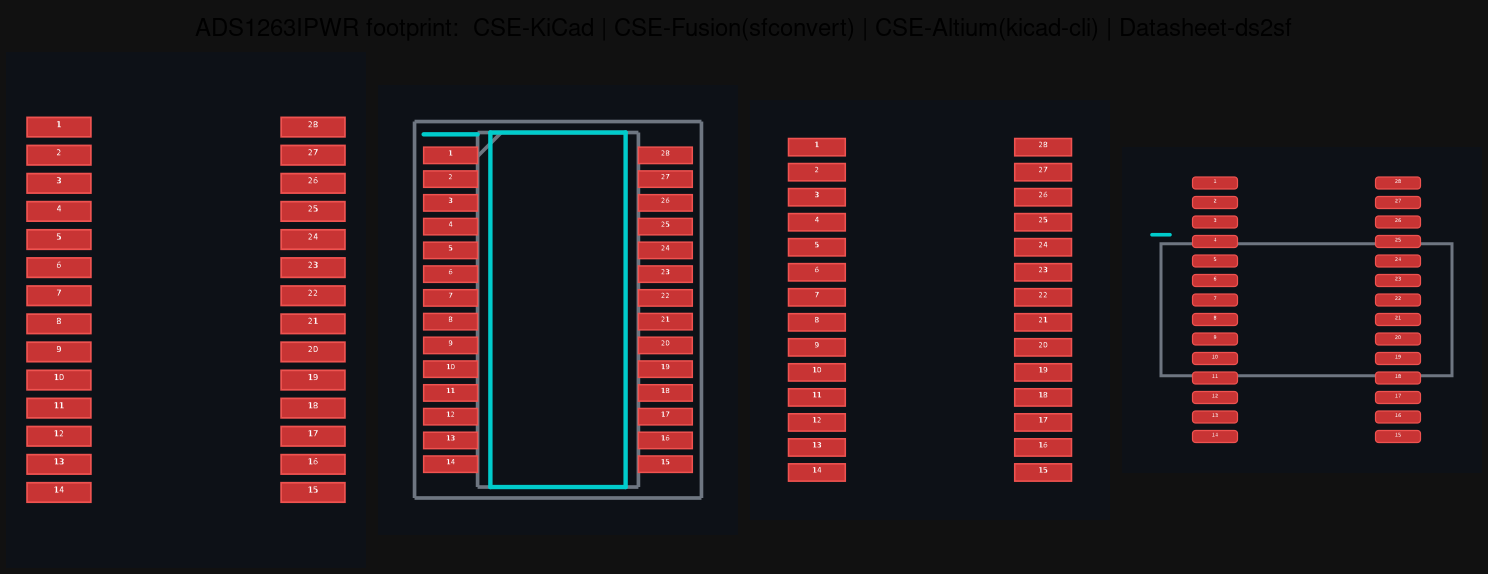
The same part's footprint from four sources — KiCad, Fusion, Altium (native), and the datasheet — each rendered from its OWN geometry so you can see what disagrees.
It is fully native — pure Rust, runs in your container, no KiCad install and no service round-trip. Each format is read by the right native reader:
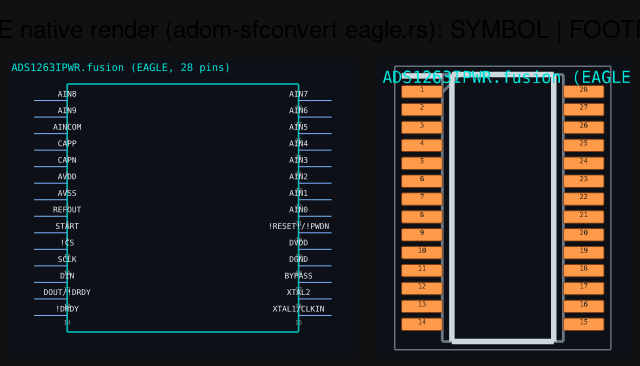
An EAGLE/Fusion .lbr rendered straight from its own geometry by eagle.rs —
symbol and footprint, never round-tripped through KiCad.
| Input | Read by | Native? |
|---|---|---|
EAGLE / Fusion .lbr (XML) |
built-in eagle.rs |
✅ |
Altium .PcbLib (footprints) |
altium-pcblib |
✅ |
Altium .SchLib (symbols) |
altium-schlib |
✅ |
Why native matters
The point of pulling a part's CAD from many sources is to compare what's right
and what's wrong. If every format is normalised through KiCad's importer first,
the sources converge — they all become "KiCad's interpretation," and the
disagreements you wanted to catch are erased. adom-sfconvert renders each
library from its own bytes, so EAGLE looks like EAGLE and Altium looks like
Altium. Conversion to .kicad_sym / .kicad_mod happens only on export.
Usage
adom-sfconvert convert part.lbr     --out-dir ./out --name part   # EAGLE/Fusion
adom-sfconvert convert part.SchLib  --out-dir ./out --name part   # Altium symbol
adom-sfconvert convert part.PcbLib  --out-dir ./out --name part   # Altium footprint
adom-sfconvert version
Each convert emits, into --out-dir:
<name>.kicad_sym/<name>.kicad_mod— the export files.<name>-symbol.svg/<name>-footprint.svg— the native thumbnails, drawn straight from the source geometry.
Where it's used
chip-fetcher calls adom-sfconvert to turn every downloaded EAGLE/Fusion and
Altium library into a per-source thumbnail, shown side-by-side with the KiCad and
datasheet renders so you can pick what to export to your preferred EDA app. After
this tool went native, nothing foreign touches the KiCad service — only
KiCad's own format is rendered remotely.
Companions
adom-ds2sf— extract symbol + footprint from a datasheet PDF.altium-pcblib/altium-schlib— the native Altium readers this builds on.chip-fetcher— the consumer that shows every source for comparison.
License
MIT — © 2026 Adom Industries Inc. Open source; see LICENSE. Modify, fork, and redistribute freely.