JLCPCB Parts Library
Public Made by Adomby adom
Check the JLCPCB / LCSC parts library before you fab — Basic vs Extended tier, LCSC stock and assembly pricing, so you avoid surprise feeder-setup fees. CLI, a Hydrogen app, and a shared backend.
JLCPCB Parts Library
Know it's in the JLCPCB library — Basic or Extended — before you commit a board to fab.
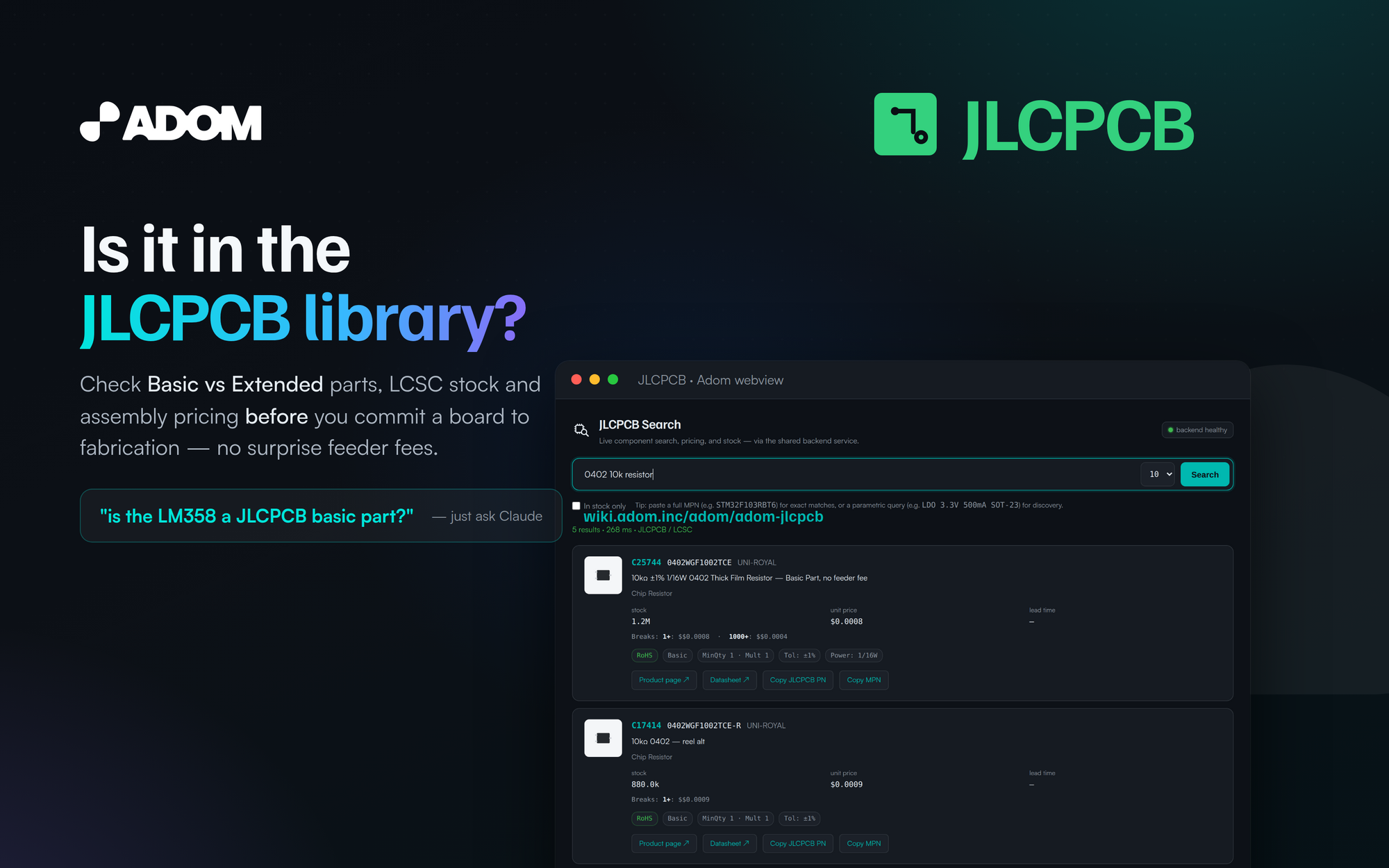
adom-jlcpcb is the single-vendor JLCPCB / LCSC tool for the Adom ecosystem — one Rust binary,
three faces:
- CLI —
adom-jlcpcb search | part | healthfor quick JSON-returning shell use and BOMs. - Hydrogen app —
adom-jlcpcb appopens a searchable UI as a first-class Hydrogen tab. - Backend service —
adom-jlcpcb serveruns the shared proxy (port 8779) that powers theservice-jlcpcbcontainer and feedsadom-parts-search.
adom-wiki pkg install adom-jlcpcb
adom-jlcpcb search "0402 10k resistor"
Basic vs Extended — the question that costs money
On a JLCPCB assembly run, Basic parts are pre-loaded on the line (no fee), while Extended
parts add a per-part feeder setup charge. Picking a Basic equivalent up front can shave real money
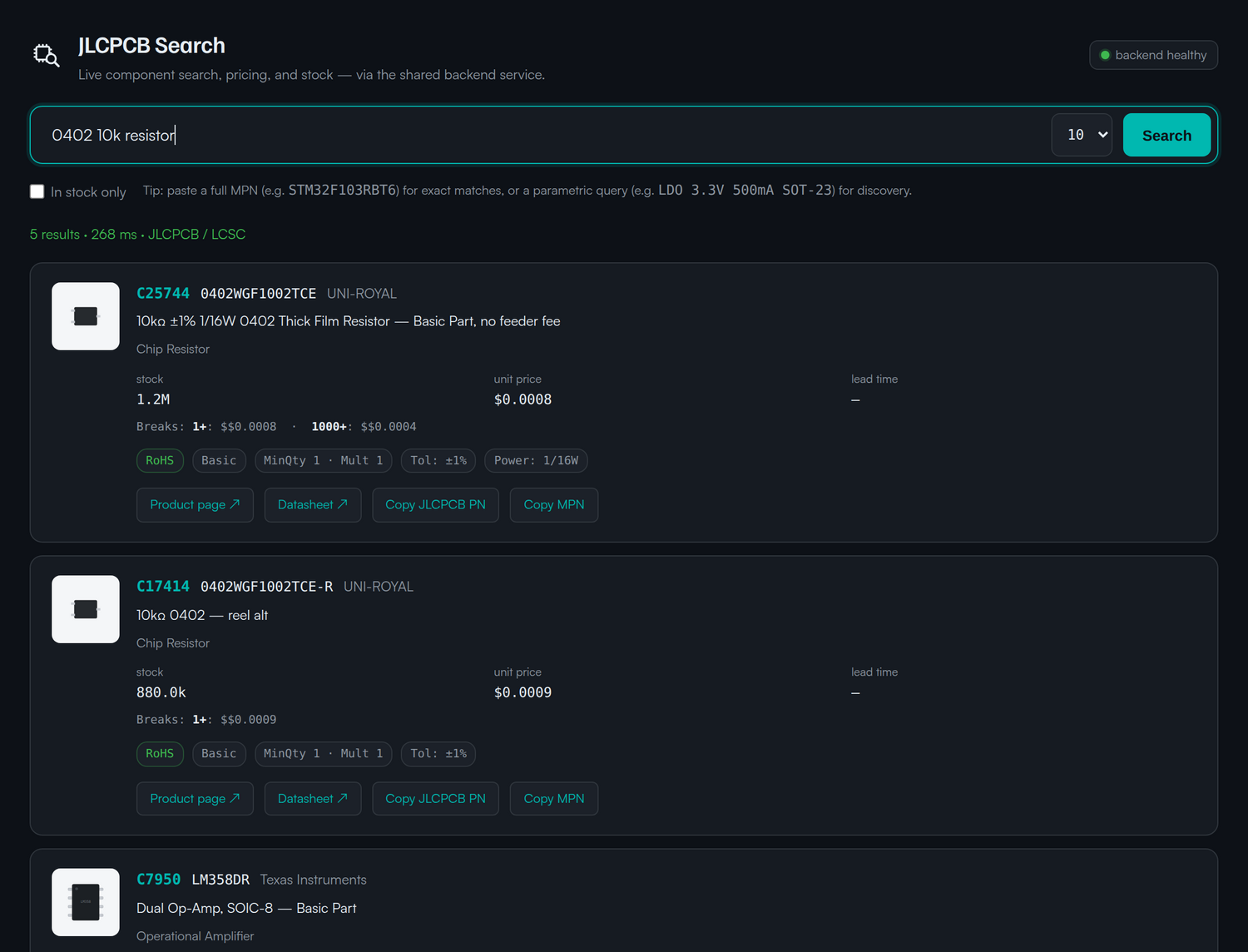
off a build. adom-jlcpcb shows the library tier on every card, alongside LCSC code, stock and
price, so you design around what's actually cheap to place.
Catch the Extended part before fab does
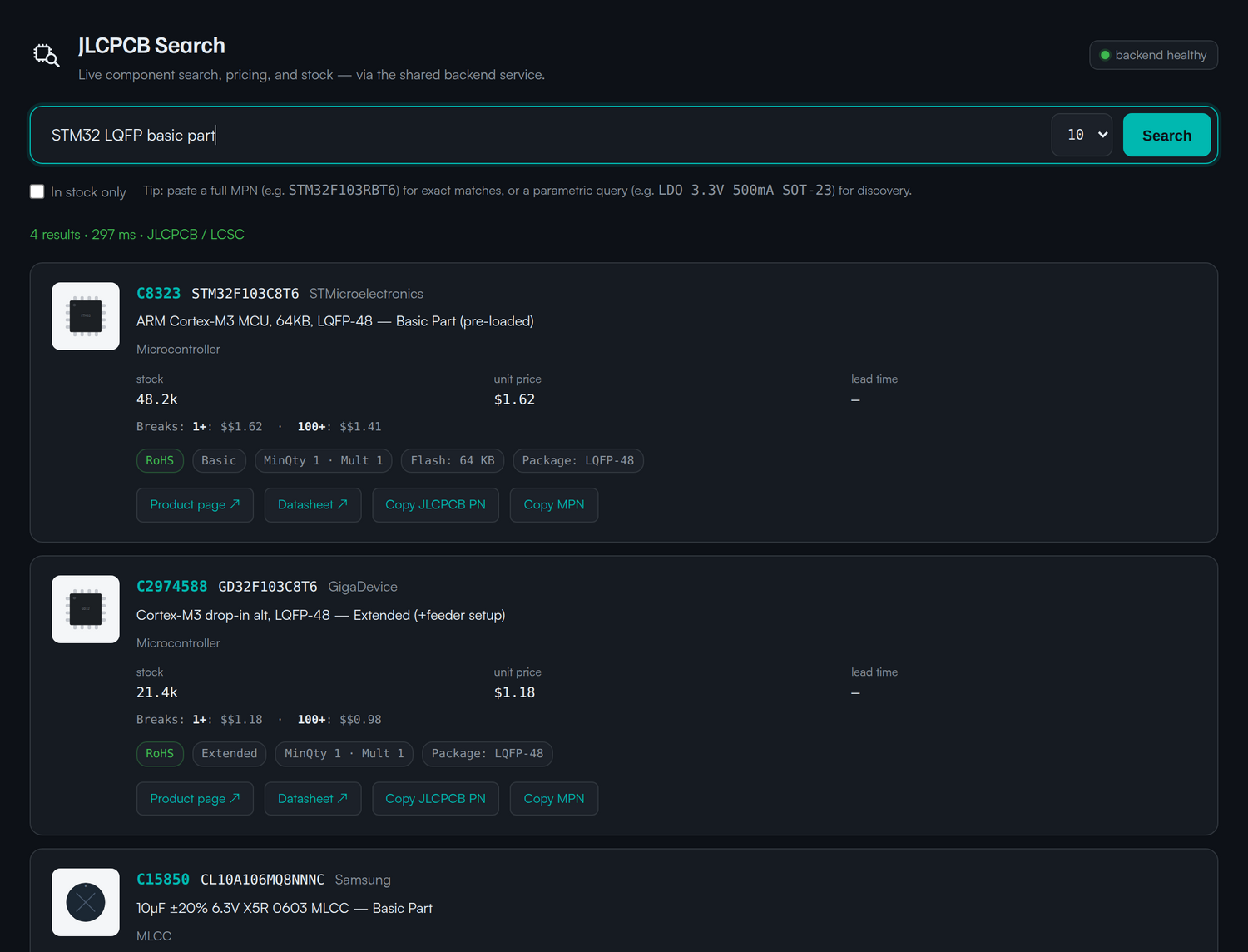
Search your MCU or regulator and you'll see at a glance whether your first pick is Basic, and what the Basic alternative is. Here a popular STM32 is Basic, while a drop-in GD32 equivalent is Extended — exactly the trade-off you want to make before the board goes out.
Scriptable from the first keystroke
search returns JSON; part fetches one LCSC code; health checks the backend. Pipe it into
jq, a BOM, or a board-cost estimator.
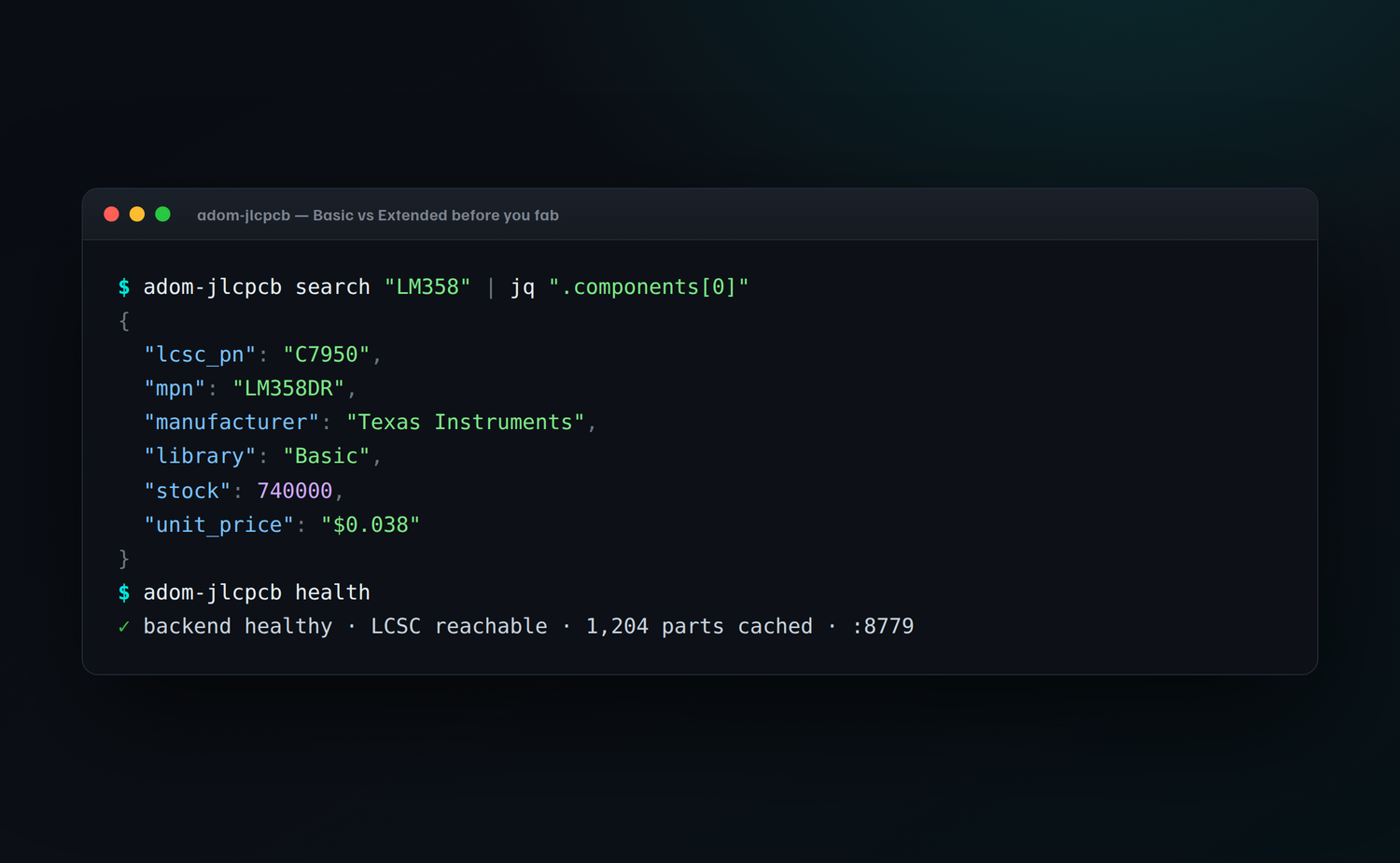
adom-jlcpcb search "LM358" | jq '.components[0]'
adom-jlcpcb part "C7950"
adom-jlcpcb health
Install
adom-wiki pkg install adom-jlcpcb
How it works
  any container                          service-jlcpcb
  $ adom-jlcpcb search "LM358"  ──POST──▶  adom-jlcpcb serve  (:8779)
  $ adom-jlcpcb app                        LCSC resolve + cache
    (Hydrogen webview tab)
                                                 │
                                                 ▼
                                          JLCPCB / LCSC parts API
JLCPCB is an assembly-first workflow, so in adom-parts-search it shows
as a library column rather than competing on the buy-now recommendation — but for "can JLCPCB
place this for me, and is it Basic?" it's the fastest answer in the workspace.
See also
adom-parts-search— searches Mouser, DigiKey and JLCPCB at once and picks the best buy.
Open source — make it yours, then give it back
This app is open source under the MIT license. Fork it, rewrite it, rename it, bend it to your own workflow — and when you've made it better, send your changes back to the Adom Wiki so the whole community benefits. Every wiki page is a git repo with a package registry on top, so contributing back is first-class — improvements that land here ship to every Adom user who installs the app.
adom-wiki pkg install adom-jlcpcb      # install it
#   …edit the source to taste…
adom-wiki pkg publish             # publish your own fork, or
#   open a pull request against this page so the change lands for everyone
One caveat — the search backend is an Adom service. The actual lookups run against Adom's hosted JLCPCB / LCSC backend (
service-jlcpcb), which uses Adom's vendor API credentials and counts against Adom's quota. That hosted backend is an Adom service and is subject to change — rate limits, endpoints, and availability can move at any time. Everything client-side (the CLI, the webview, the rendering and recommendation logic) is yours to fork and republish; the cloud API quota is not.
License
MIT © Adom — do what you want with the code, just pass it on.
# JLCPCB Parts Library
**Know it's in the JLCPCB library — Basic or Extended — before you commit a board to fab.**

`adom-jlcpcb` is the single-vendor JLCPCB / LCSC tool for the Adom ecosystem — one Rust binary,
three faces:
- **CLI** — `adom-jlcpcb search | part | health` for quick JSON-returning shell use and BOMs.
- **Hydrogen app** — `adom-jlcpcb app` opens a searchable UI as a first-class Hydrogen tab.
- **Backend service** — `adom-jlcpcb serve` runs the shared proxy (port 8779) that powers the
`service-jlcpcb` container and feeds [`adom-parts-search`](/adom/adom-parts-search).
```bash
adom-wiki pkg install adom-jlcpcb
adom-jlcpcb search "0402 10k resistor"
```
## Basic vs Extended — the question that costs money
On a JLCPCB assembly run, **Basic** parts are pre-loaded on the line (no fee), while **Extended**
parts add a per-part feeder setup charge. Picking a Basic equivalent up front can shave real money
off a build. `adom-jlcpcb` shows the library tier on every card, alongside LCSC code, stock and
price, so you design around what's actually cheap to place.

## Catch the Extended part before fab does
Search your MCU or regulator and you'll see at a glance whether your first pick is Basic, and what
the Basic alternative is. Here a popular STM32 is Basic, while a drop-in GD32 equivalent is
Extended — exactly the trade-off you want to make *before* the board goes out.

## Scriptable from the first keystroke
`search` returns JSON; `part` fetches one LCSC code; `health` checks the backend. Pipe it into
`jq`, a BOM, or a board-cost estimator.

```bash
adom-jlcpcb search "LM358" | jq '.components[0]'
adom-jlcpcb part "C7950"
adom-jlcpcb health
```
## Install
```bash
adom-wiki pkg install adom-jlcpcb
```
## How it works
```
any container service-jlcpcb
$ adom-jlcpcb search "LM358" ──POST──▶ adom-jlcpcb serve (:8779)
$ adom-jlcpcb app LCSC resolve + cache
(Hydrogen webview tab)
│
▼
JLCPCB / LCSC parts API
```
JLCPCB is an assembly-first workflow, so in [`adom-parts-search`](/adom/adom-parts-search) it shows
as a library column rather than competing on the buy-now recommendation — but for "can JLCPCB
place this for me, and is it Basic?" it's the fastest answer in the workspace.
## See also
- [`adom-parts-search`](/adom/adom-parts-search) — searches Mouser, DigiKey and JLCPCB at once and picks the best buy.
## Open source — make it yours, then give it back
This app is **open source under the MIT license**. Fork it, rewrite it, rename it, bend it to your
own workflow — and when you've made it better, **send your changes back to the Adom Wiki so the
whole community benefits**. Every wiki page is a git repo with a package registry on top, so
contributing back is first-class — improvements that land here ship to every Adom user who installs
the app.
```bash
adom-wiki pkg install adom-jlcpcb # install it
# …edit the source to taste…
adom-wiki pkg publish # publish your own fork, or
# open a pull request against this page so the change lands for everyone
```
> **One caveat — the search backend is an Adom service.** The actual lookups run against
> Adom's hosted JLCPCB / LCSC backend (`service-jlcpcb`), which uses **Adom's vendor API credentials and counts against Adom's quota**. That
> hosted backend is an Adom service and is **subject to change** — rate limits, endpoints, and
> availability can move at any time. Everything client-side (the CLI, the webview, the rendering
> and recommendation logic) is yours to fork and republish; the cloud API quota is not.
## License
MIT © Adom — do what you want with the code, just pass it on.