Adom Footprint
Public Made by Adomby adom
KiCad footprint creator with layer HUD viewer and delivery to KiCad/Fusion 360
adom-footprint
Standalone Rust CLI + live app for KiCad PCB footprints. Generates
.kicad_mod files natively in Rust, renders them as dark-themed SVGs through the
shared service-kicad container, and serves an AI-drivable live viewer.
No Node, no local KiCad install.
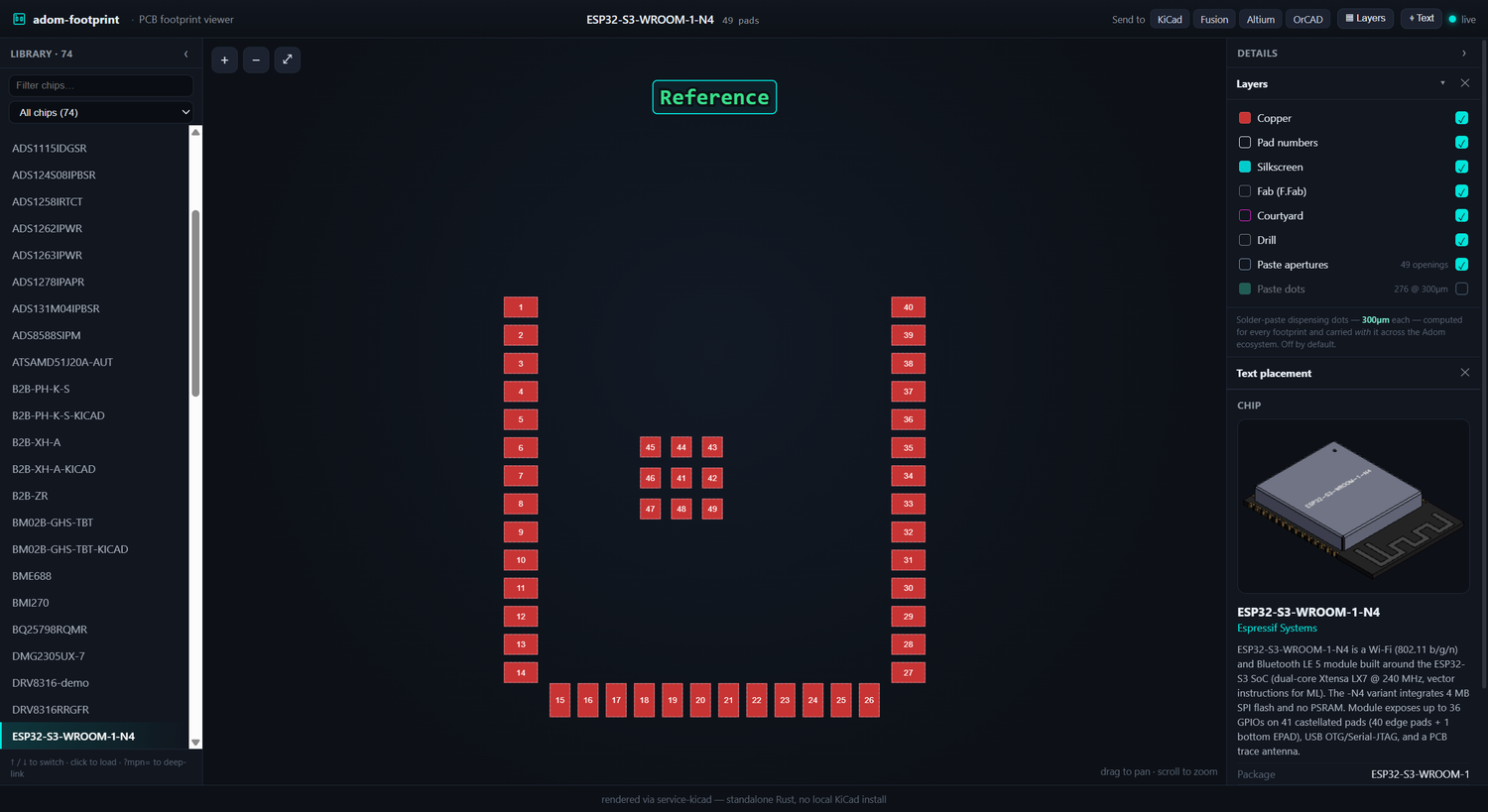
The live app: browse the whole chip-fetcher library on the left (filter / ↑↓ / click, or deep-link with ?mpn=); on the right, a docked details panel with Layers, the text-placement editor, and a 3D chip preview + specs so you can see exactly which part you're on.
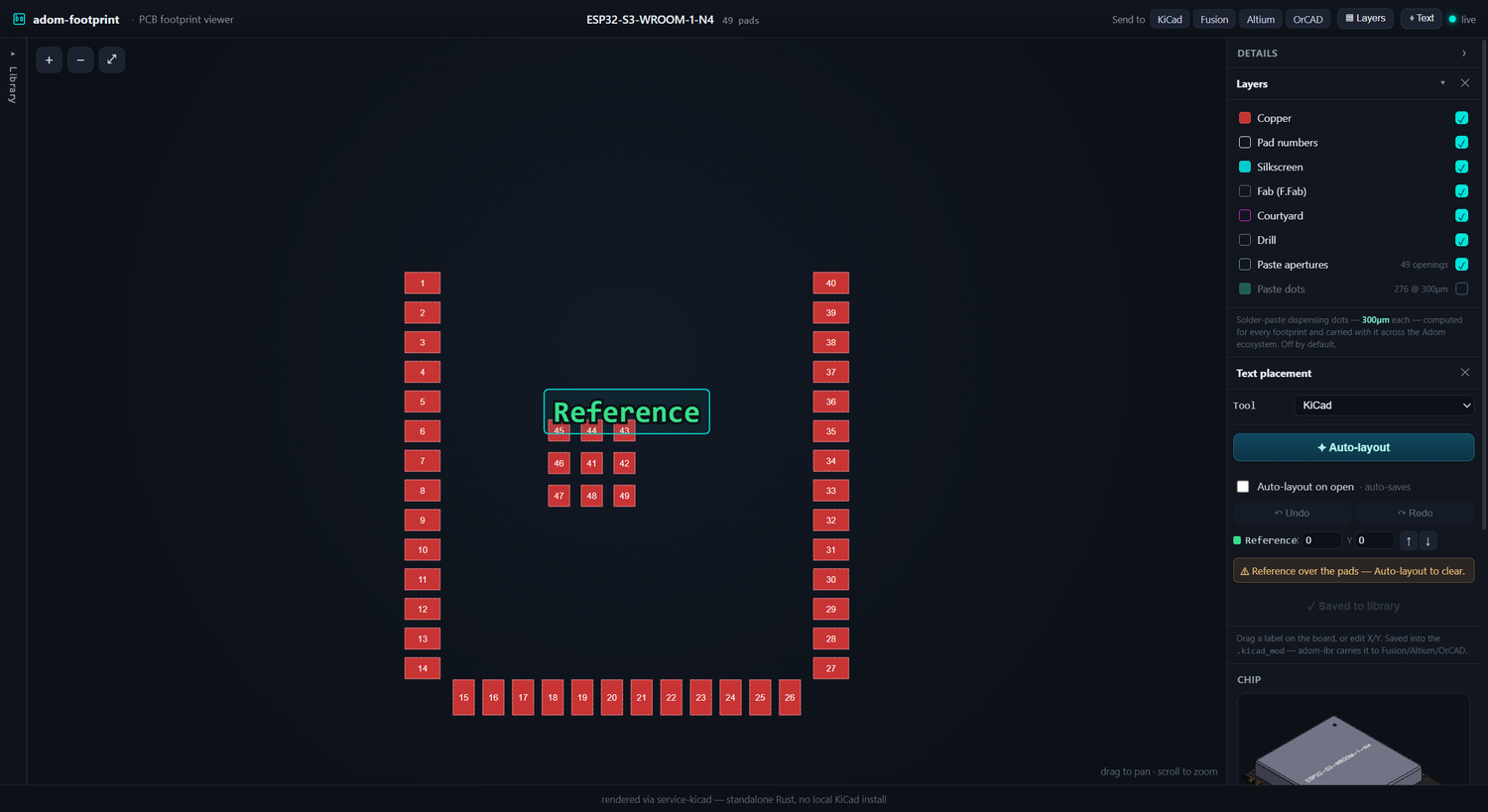
Place the RefDes/Value text: one-click Auto-layout clears the pads (and normalizes the size), or drag/nudge it yourself — with undo and per-EDA naming (KiCad Reference/Value · Altium Designator/Comment · …). Save writes it back to the library .kicad_mod (original backed up to .orig); tick Auto-layout on open to sweep the whole library, auto-saving as you go.
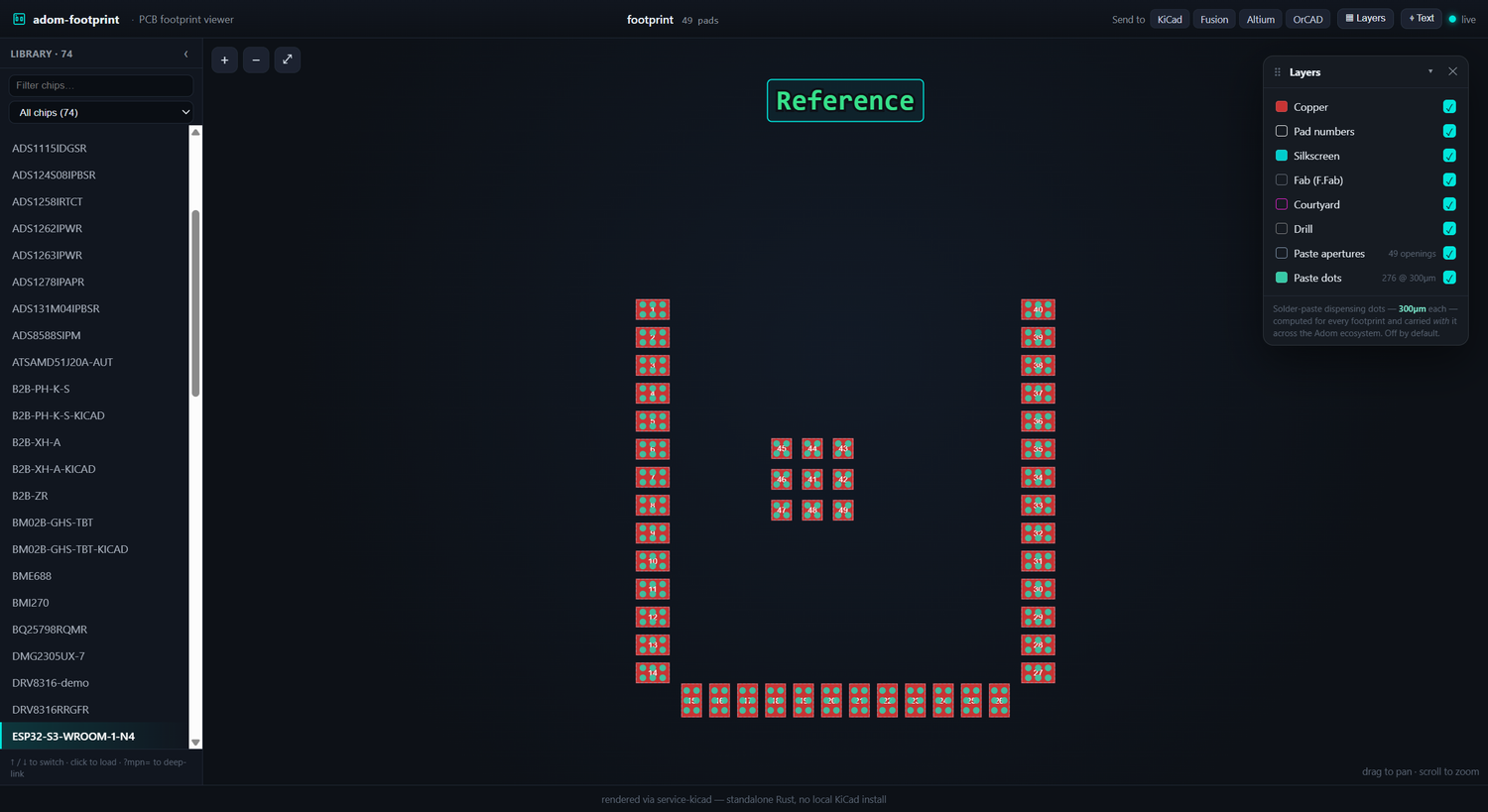
The paste-dots layer: 300µm solder-paste dispensing positions, computed for every footprint (off by default).
What it does
- Generate
.kicad_modnatively in Rust from structured pad data — pads (rect/roundrect/circle, rotation, custom layers), body outline, and courtyard. - Render the footprint to a cropped, dark-themed SVG via service-kicad
(
POST /kicad/pcb/export/svg) by wrapping it in a minimal one-footprint board at page center — the same render path chip-fetcher uses, so thumbnail and app match. - Serve a live, AI-drivable app: the frontend stays connected to the Rust
server (
GET /statepoller +POST /evalchannel), so the AI can push a new footprint, hot-patch the UI, or read the console in real time.
Install
adom-wiki pkg install adom-footprint
Quick start
# Create a footprint from pad JSON (stdin or --file)
echo '{"footprintName":"R_0402","pads":[...]}' | adom-footprint create --out R_0402

# Preview an existing .kicad_mod as a themed viewer
adom-footprint preview --file R_0402/R_0402.kicad_mod

# Run the live app (AI-drivable: /state, /load, /eval, /console)
adom-footprint serve --port 8783 --file R_0402/R_0402.kicad_mod
Open the served app through the Adom proxy URL
(https://<slug>.adom.cloud/proxy/8783/), never localhost:8783 — the webview
renders outside the container.
CLI reference
| Command | Description |
|---|---|
create --file <json> [--out <dir>] |
Generate .kicad_mod + SVG + viewer HTML from pad JSON |
preview --file <kicad_mod> [--out <dir>] |
Render an existing footprint to a themed viewer |
serve [--port 8783] [--file <kicad_mod>] |
Run the live AI-drivable app server |
Architecture
Pure Rust. Footprint generation (src/fp_gen.rs) is verified against golden
files in tests/ (e.g. R_0402.kicad_mod, byte-for-byte). The only network
dependency is service-kicad for SVG rendering — a lightweight proxy to the
shared KiCad-10 container, so nothing installs KiCad locally. The live app
server (src/server.rs) follows the Adom app-creator contract: GET /state,
POST /load, POST /eval + GET /eval/pending + POST /eval/:id/result,
GET/POST /console, POST /shutdown, GET /favicon.svg, and best-effort HD
port registration.
Build from source
The full source ships on the wiki app page — anyone in the community can build it locally:
# Fetch the source bundle from the wiki
adom-wiki repo clone adom-footprint         # downloads + unpacks the repo

cargo build --release                 # standalone — only needs Rust + cargo
cargo test --release                  # runs the golden-file parity tests
cp target/release/adom-footprint ~/.local/bin/
The only runtime dependency is network access to a service-kicad endpoint
(KICAD_SERVICE_API, defaults to the shared container).
Contribute back via pull request
adom-footprint is public, source included. To propose a change:
adom-wiki repo clone adom-footprintto get the repo.- Make your change and run
cargo test --release(keep the golden tests green). - Open a pull request against the wiki page for
adom-footprint.
Note: real PR support on wiki.adom.inc is in progress. Until it lands, send patches or a branch link to the maintainers and they will apply it.
Wiki
# adom-footprint
Standalone Rust CLI + live app for **KiCad PCB footprints**. Generates
`.kicad_mod` files natively in Rust, renders them as dark-themed SVGs through the
shared **service-kicad** container, and serves an AI-drivable live viewer.
No Node, no local KiCad install.

*The live app: browse the whole chip-fetcher library on the left (filter / ↑↓ / click, or deep-link with `?mpn=`); on the right, a docked details panel with Layers, the text-placement editor, and a 3D chip preview + specs so you can see exactly which part you're on.*

*Place the RefDes/Value text: one-click Auto-layout clears the pads (and normalizes the size), or drag/nudge it yourself — with undo and per-EDA naming (KiCad Reference/Value · Altium Designator/Comment · …). **Save** writes it back to the library `.kicad_mod` (original backed up to `.orig`); tick **Auto-layout on open** to sweep the whole library, auto-saving as you go.*

*The paste-dots layer: 300µm solder-paste dispensing positions, computed for every footprint (off by default).*
## What it does
- **Generate** `.kicad_mod` natively in Rust from structured pad data — pads
(rect/roundrect/circle, rotation, custom layers), body outline, and courtyard.
- **Render** the footprint to a cropped, dark-themed SVG via service-kicad
(`POST /kicad/pcb/export/svg`) by wrapping it in a minimal one-footprint board
at page center — the same render path chip-fetcher uses, so thumbnail and app
match.
- **Serve** a live, AI-drivable app: the frontend stays connected to the Rust
server (`GET /state` poller + `POST /eval` channel), so the AI can push a new
footprint, hot-patch the UI, or read the console in real time.
## Install
```
adom-wiki pkg install adom-footprint
```
## Quick start
```bash
# Create a footprint from pad JSON (stdin or --file)
echo '{"footprintName":"R_0402","pads":[...]}' | adom-footprint create --out R_0402
# Preview an existing .kicad_mod as a themed viewer
adom-footprint preview --file R_0402/R_0402.kicad_mod
# Run the live app (AI-drivable: /state, /load, /eval, /console)
adom-footprint serve --port 8783 --file R_0402/R_0402.kicad_mod
```
Open the served app through the Adom proxy URL
(`https://<slug>.adom.cloud/proxy/8783/`), never `localhost:8783` — the webview
renders outside the container.
## CLI reference
| Command | Description |
|---|---|
| `create --file <json> [--out <dir>]` | Generate `.kicad_mod` + SVG + viewer HTML from pad JSON |
| `preview --file <kicad_mod> [--out <dir>]` | Render an existing footprint to a themed viewer |
| `serve [--port 8783] [--file <kicad_mod>]` | Run the live AI-drivable app server |
## Architecture
Pure Rust. Footprint generation (`src/fp_gen.rs`) is **verified against golden
files** in `tests/` (e.g. `R_0402.kicad_mod`, byte-for-byte). The only network
dependency is **service-kicad** for SVG rendering — a lightweight proxy to the
shared KiCad-10 container, so nothing installs KiCad locally. The live app
server (`src/server.rs`) follows the Adom app-creator contract: `GET /state`,
`POST /load`, `POST /eval` + `GET /eval/pending` + `POST /eval/:id/result`,
`GET/POST /console`, `POST /shutdown`, `GET /favicon.svg`, and best-effort HD
port registration.
## Build from source
The full source ships on the wiki app page — anyone in the community can build
it locally:
```bash
# Fetch the source bundle from the wiki
adom-wiki repo clone adom-footprint # downloads + unpacks the repo
cargo build --release # standalone — only needs Rust + cargo
cargo test --release # runs the golden-file parity tests
cp target/release/adom-footprint ~/.local/bin/
```
The only runtime dependency is network access to a service-kicad endpoint
(`KICAD_SERVICE_API`, defaults to the shared container).
## Contribute back via pull request
adom-footprint is public, source included. To propose a change:
1. `adom-wiki repo clone adom-footprint` to get the repo.
2. Make your change and run `cargo test --release` (keep the golden tests green).
3. Open a pull request against the wiki page for `adom-footprint`.
> **Note:** real PR support on wiki.adom.inc is in progress. Until it lands,
> send patches or a branch link to the maintainers and they will apply it.
## Wiki
https://wiki.adom.inc/apps/adom-footprint