Adom Chip Thumbnailer
Public Made by Adomby adom
The chip-icon factory: from a STEP file it renders the complete family of chip icons, shaded 3D orientations, transparent icons, name-lasered variants, and 11 vector outline styles, in a live web app + CLI.
| Name | Last updated |
|---|---|
| bin | 18d ago |
| demo | 3mo ago |
| docs | 4mo ago |
| planner | 18d ago |
| screenshots | 3mo ago |
| src | 18d ago |
| wiki | 3mo ago |
| .gitignore | 3mo ago |
| adom-chip-thumbnailer | 3mo ago |
| adom-chip-thumbnailer-billboard.png | 3mo ago |
| adom-chip-thumbnailer-hero-v3.png | 3mo ago |
| adom-chip-thumbnailer-hero-v4.png | 3mo ago |
| adom-chip-thumbnailer-hero-v5.png | 3mo ago |
| adom-chip-thumbnailer.png | 3mo ago |
| build.sh | 3mo ago |
| Cargo.lock | 18d ago |
| Cargo.toml | 18d ago |
| install.sh | 18d ago |
| LICENSE | 3mo ago |
| package.json | 18d ago |
| page.json | 18d ago |
| README.md | 18d ago |
| SKILL.md | 18d ago |
| uninstall.sh | 18d ago |
| VERSION | 18d ago |


chip-thumbnailer
The chip-icon factory. Give it a STEP file and it renders the complete family of chip icons, in real time, from one source: shaded 3D orientations, transparent icons, name-lasered variants, and a gallery of vector outline styles. CLI + a live web app.
It is the single producer of every chip icon the rest of the Adom EDA stack consumes (adom-symbol's centre overlay, library cards, wiki chip pages). The heavy OCCT work runs on service-step2glb; chip-thumbnailer stays a lean Rust client and does the alpha-keying locally.
Symbol and footprint thumbnails are not this tool's job, those belong to adom-symbol and adom-footprint. chip-thumbnailer renders the chip (its 3D body) in every icon form.
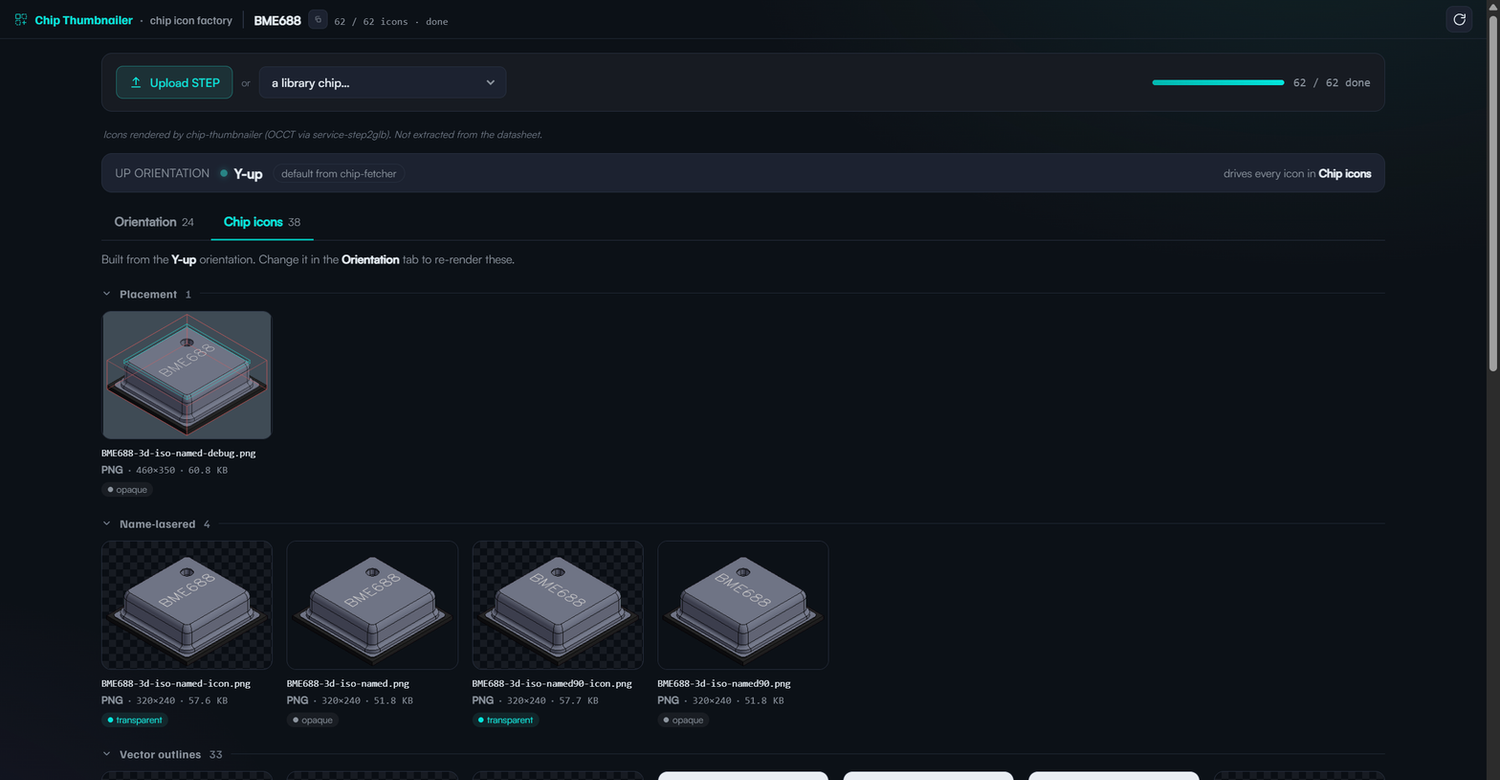
The icon family (from one STEP)
| Output | What it is |
|---|---|
<MPN>-3d-iso[-<axis>][-<size>].png |
shaded 3D render, 6 face-up orientations x sm/md/lg |
<MPN>-3d-iso[-<axis>]-icon.png |
the same, alpha-keyed to a transparent background |
<MPN>-etched.step |
the model with its flat part-number mark (Adom.Chip + Adom.LaserEtch, colours kept) |
<MPN>-3d-iso-named[-icon].png |
the marked chip in the standard iso pose: pin 1 toward you, the part number upright |
<MPN>.mark-plan.json |
where the mark goes and why (face, long axis, band, size, reading direction) |
<MPN>-3d-outline-<style>[-named].svg |
11 vector outline styles via OCCT hidden-line removal |
<MPN>-thumbs.json |
self-describing manifest (palette, files, full-fidelity tool) |
The part number, lasered onto the chip (no other EDA tool does this)
chip-thumbnailer puts the manufacturer part number on the chip the way a real part is marked, decided by Adom's mark planner rather than by hand:
- along the longest usable side of the marking face: a resistor or capacitor along its body, between the metal end caps; an IC parallel to its pin rows; an LED on its front side wall, so the window stays clear;
- as large as fits, on one line, or two equal lines when that makes both larger;
- upright and left to right with pin 1 at the lower left, so the outline shows pin 1 toward you;
- the same mark everywhere: the etched STEP, the shaded icon and every named outline agree on face, direction and place.
Every named outline passes a legibility check before it is written (direction, position, and text height at a 320 px widget). One that fails is kept aside with the reason, never published as the named outline.
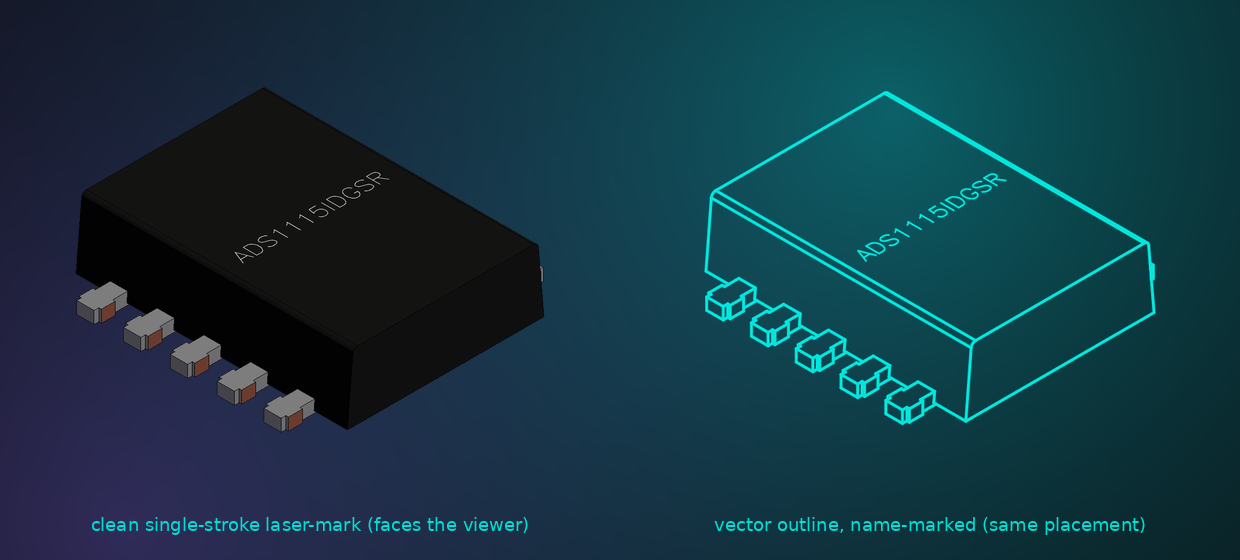
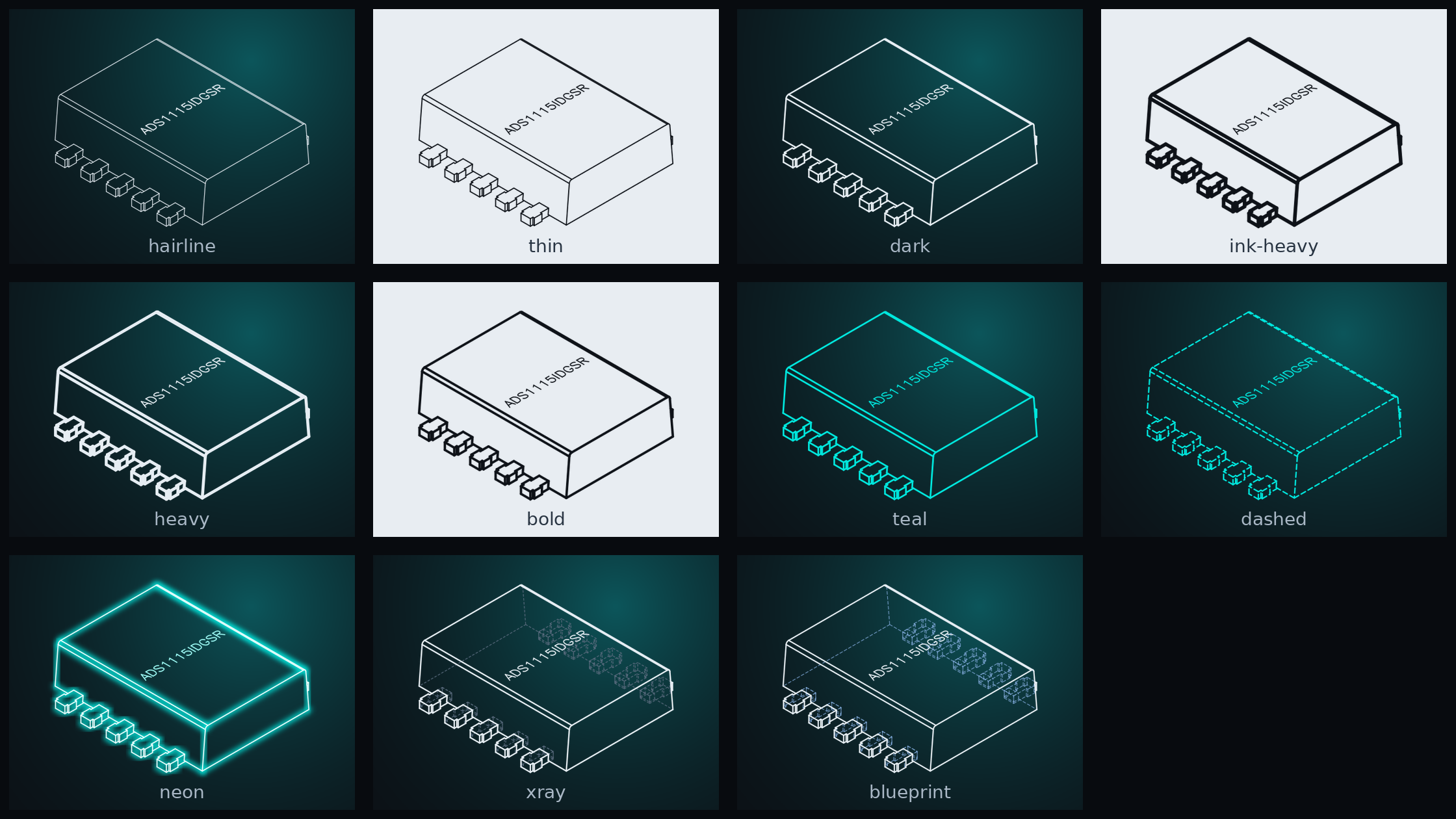
11 outline styles
OCCT hidden-line removal gives a clean, complete isometric outline (body silhouette, top face, every lead), in 11 styles across three axes: colour (white + teal), thickness (hairline to heavy, plus dark "ink on paper"), and approach (solid / dashed / neon / x-ray / blueprint / ink-on-paper). Each comes plain and name-marked.
Name-marked outlines, built for the schematic symbol
Every outline style also comes name-marked, the chip's line-art silhouette with the manufacturer part number on it. This is exactly what a schematic symbol wants in its body: the real chip shape and the part number, instead of a featureless rectangle. adom-symbol drops one straight into the symbol body. The name is the same mark as the etched model: same face, same direction, same place, drawn in the standard pose with pin 1 toward you:
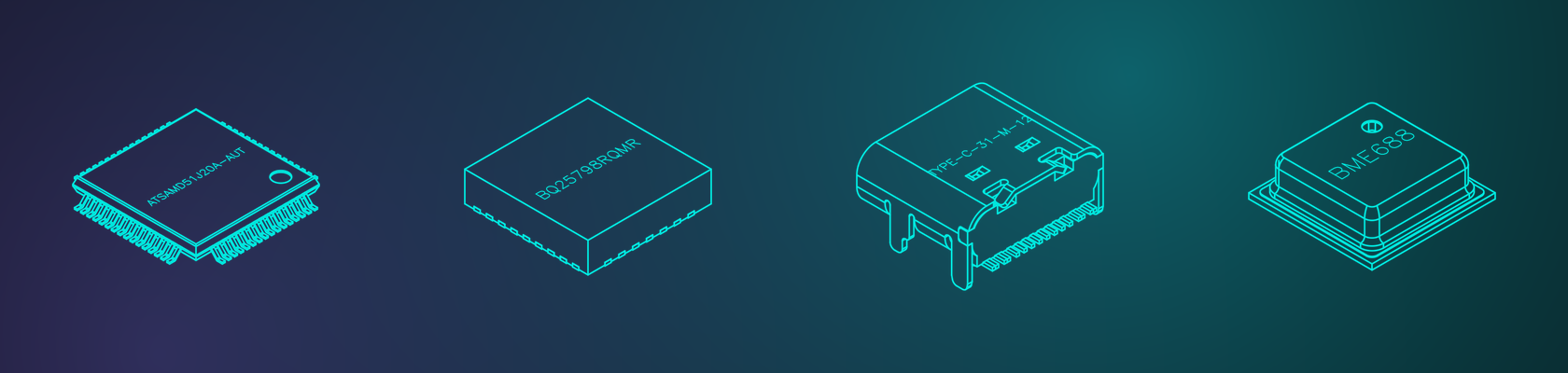
Works across every package type
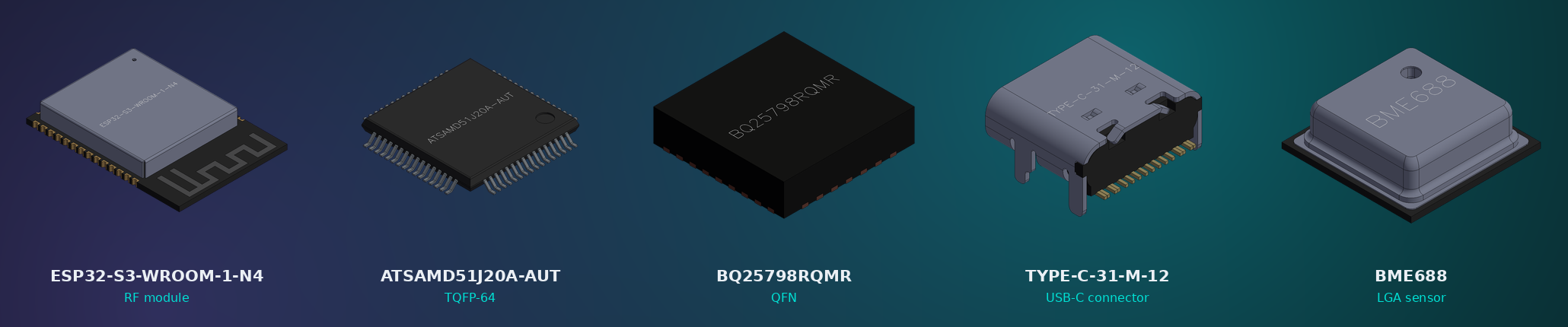
The same one STEP in, full-family out works on whatever the part is, an RF module with a shield can, a fine-pitch TQFP, a leadless QFN, a mechanical USB-C connector, or a tiny LGA sensor. The geometry comes straight from the manufacturer's STEP, so the icon is the real chip and the part number lands on its actual top face every time.
The web app
chip-thumbnailer serve            # run the HTTP server
chip-thumbnailer app              # open it in a Hydrogen webview tab
Drop a STEP file (or pick a library chip) and watch every icon fill into its dashed box in real time, each captioned with file name, format, pixel size, KB, and true alpha transparency. A Regenerate button re-runs the whole family; the orientations stay up top while the outline + name-laser galleries collapse.
CLI
chip-thumbnailer once <MPN>        # render the full family for one chip + manifest
chip-thumbnailer scan              # process every .thumb-pending marker in the library
chip-thumbnailer status <MPN>      # what's there, what's missing
chip-thumbnailer rerender <MPN>    # re-render (--kind 3d)
chip-thumbnailer serve | app       # the web app
chip-thumbnailer health | config   # probe deps / print paths
Every command prints OK: lines for humans and a final JSON line for AI
callers; once's JSON inlines the manifest + a _hints block.
Architecture
chip-thumbnailer calls service-step2glb for the OCCT-heavy work and keeps itself dependency-light:
POST /thumbnail-> the shaded orientation PNGs, plus the clean-font name-laser when called with?name=(the part number drawn on the chip top).POST /outline-> the 11 styled vector outlines (OCCT HLR), plain + name-marked.
The transparent icons are alpha-keyed from the shaded renders in pure
Rust (no Python, no extra deps). The chosen up-axis (info.json
chosen_up_axis) is honoured so Y-up parts pose correctly.
Install
adom-wiki pkg install adom/adom-chip-thumbnailer
chip-thumbnailer install        # fetch SKILL.md + bash completions from the wiki
chip-thumbnailer install fetches SKILL.md fresh from
wiki.adom.inc at
install time (no include_str!, per the no-fallback install rule).
Build
cargo build --release # run as target/release/adom-chip-thumbnailer
No system deps to build. At runtime it needs service-step2glb reachable
(for the OCCT renders); the transparent-icon keying is self-contained.
Open source under the Adom org
chip-thumbnailer is open source (MIT) under the adom org on the Adom Wiki. The source lives in the page's repo (Files tab) and on github.com/adom-inc/chip-thumbnailer. Contribute via the wiki's PR-per-page flow, or fork and drop a breadcrumb on this page so Adom's AI can discover your fork.
License
MIT - (c) 2026 Adom Industries Inc. See LICENSE.