Adom Browser Extension
Public Made by Adomby adom
Your AI's hands in your real, signed-in browser. The Adom Browser Extension (abe) works with both Chrome and Edge: build, drive, and test web apps, and log past vendor walls, in the browser you already use - cookies, SSO, saved logins and captcha trust intact. The nbrowser_* bridge (pup's counterpart) runs in your actual logged-in profile.
Fork & develop your own Adom Browser Extension
A guide for Adom users and third parties who want to build their own version of this extension — fork it, load it in Chrome/Edge developer mode, and iterate. Everything here works against the public, open-source repo.
1. Get the source (fork it)
The extension lives as a wiki page + git repo at wiki.adom.inc/adom/adom-browser-extension.
- Fork / propose changes upstream — use the page's Pull Requests tab to propose edits back, or
- Clone the source — grab the repo from the Files tab (or
adompkg install adom/adom-browser-extension), then copy theextension/folder somewhere you can edit.
The folder you load into the browser is extension/ — it's the one with manifest.json.
2. Load it in Chrome (developer mode)
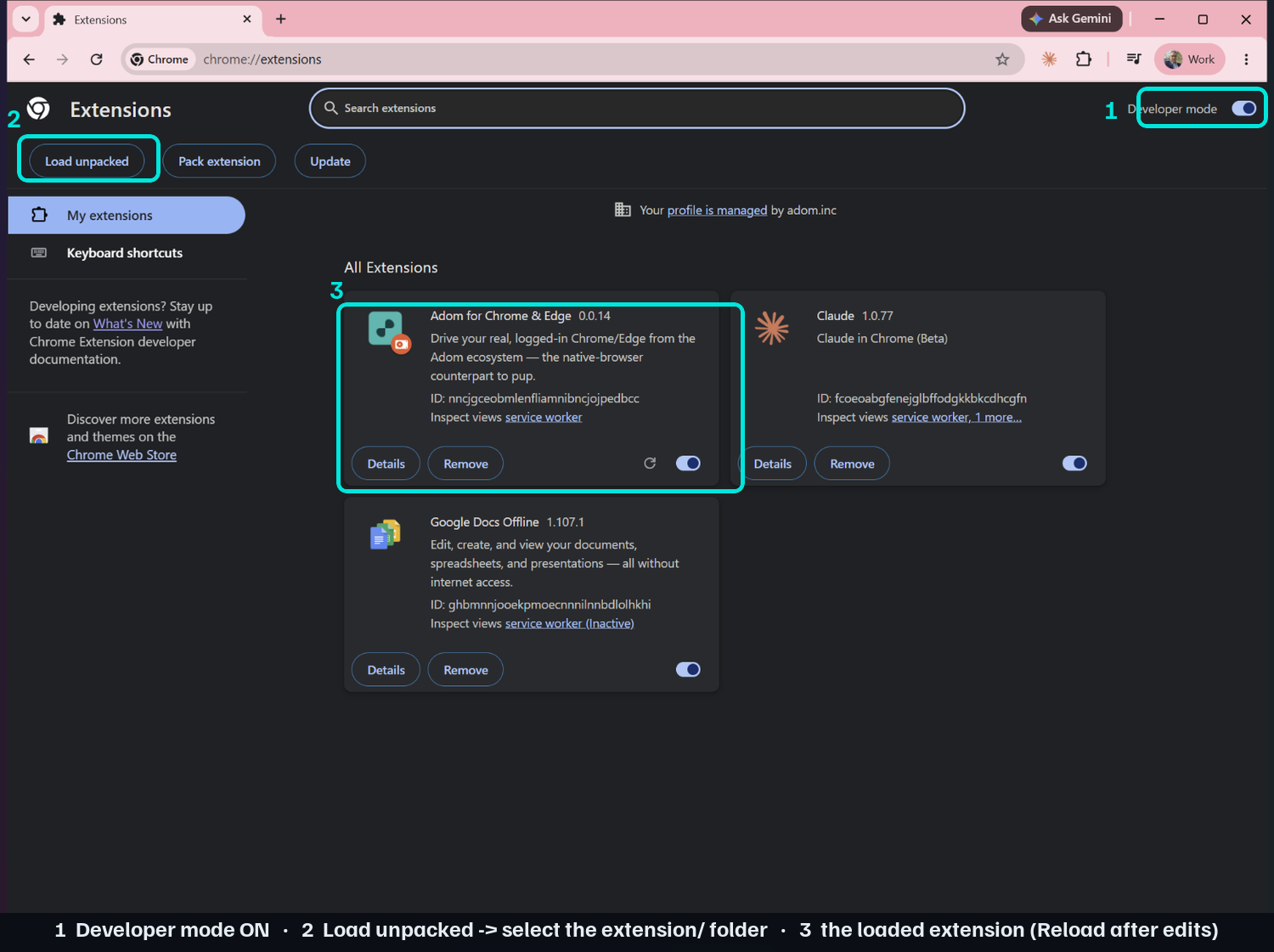
- Open
chrome://extensions. - Turn on Developer mode — the toggle is top-right. ①
- Click Load unpacked (top-left) and pick your
extension/folder. ② - The extension loads — note its ID. ③ After any code edit, click the Reload (↻) button on its card.
3. Load it in Edge (developer mode)
Same idea, slightly different layout:
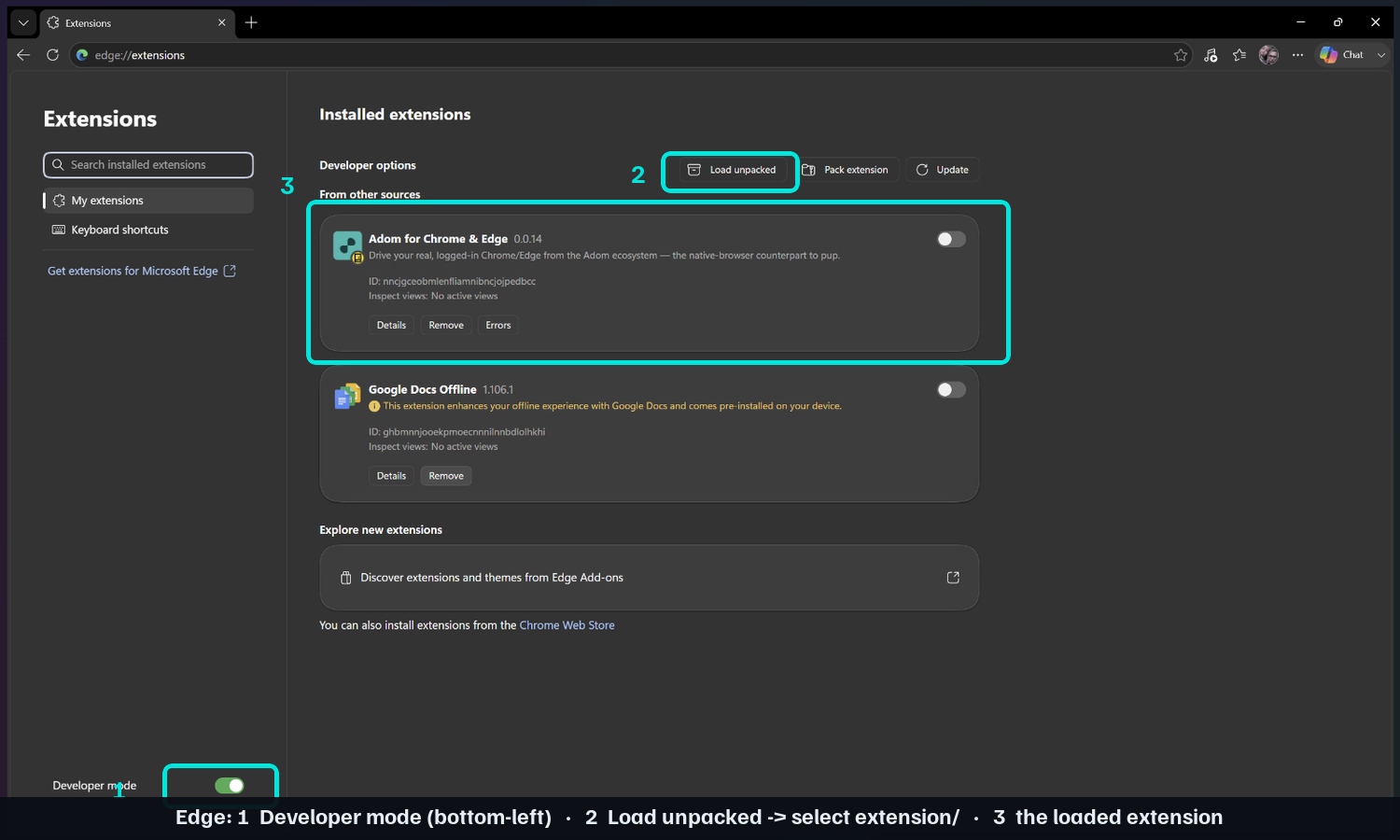
- Open
edge://extensions. - Turn on Developer mode — in Edge the toggle is in the bottom-left of the sidebar. ①
- Click Load unpacked (top of the page) and pick your
extension/folder. ② - The extension loads. ③
4. Or — let adom-desktop install it for you
You don't have to click through it. Ask your Adom AI assistant to do the load-unpacked for you — it
drives the chrome://extensions / edge://extensions page at the OS level (via desktop_navigate
desktop_ui_click— background, no mouse-stealing), toggling Developer mode and clicking Load unpacked on the folder you point it at. It always opens a fresh window for this, never touching the one you're working in.
Paste-into-Claude prompt:
Load my local adom-browser-extension from C:\path\to\extension into Chrome via developer mode.
5. The dev loop
- Edit code in
extension/→ click Reload (↻) on the extension card (or just ask the assistant:reload my extension, which runsnbrowser_dev_reload). - The native-messaging host and the
native-browserbridge reconnect automatically; runnbrowser_statusto confirm (expect a ~3–6 s reconnect after a reload). - Layout:
extension/(the MV3 extension),bridge/(the adom-desktop bridge),host/(the native-messaging host). The verb surface is documented in thedriving-the-extensionskill.
6. Contribute back
Open a Pull Request on the wiki page with your changes. If you publish your own build to the
Chrome Web Store / Edge Add-ons, give your fork a distinct manifest.json key (and extension ID) so
it doesn't collide with the official one.
# Fork & develop your own Adom Browser Extension
A guide for **Adom users and third parties** who want to build their own version of this extension —
fork it, load it in Chrome/Edge **developer mode**, and iterate. Everything here works against the
public, open-source repo.
## 1. Get the source (fork it)
The extension lives as a wiki page + git repo at **[wiki.adom.inc/adom/adom-browser-extension](https://wiki.adom.inc/adom/adom-browser-extension)**.
- **Fork / propose changes upstream** — use the page's **Pull Requests** tab to propose edits back, or
- **Clone the source** — grab the repo from the **Files** tab (or `adompkg install adom/adom-browser-extension`),
then copy the **`extension/`** folder somewhere you can edit.
The folder you load into the browser is **`extension/`** — it's the one with `manifest.json`.
## 2. Load it in Chrome (developer mode)
1. Open **`chrome://extensions`**.
2. Turn on **Developer mode** — the toggle is **top-right**. ①
3. Click **Load unpacked** (top-left) and pick your **`extension/`** folder. ②
4. The extension loads — note its **ID**. ③ After any code edit, click the **Reload (↻)** button on its card.

## 3. Load it in Edge (developer mode)
Same idea, slightly different layout:
1. Open **`edge://extensions`**.
2. Turn on **Developer mode** — in Edge the toggle is in the **bottom-left** of the sidebar. ①
3. Click **Load unpacked** (top of the page) and pick your **`extension/`** folder. ②
4. The extension loads. ③

## 4. Or — let adom-desktop install it for you
You don't have to click through it. Ask your Adom AI assistant to do the load-unpacked for you — it
drives the `chrome://extensions` / `edge://extensions` page at the **OS level** (via `desktop_navigate`
+ `desktop_ui_click` — background, no mouse-stealing), toggling **Developer mode** and clicking
**Load unpacked** on the folder you point it at. It always opens a **fresh window** for this, never
touching the one you're working in.
Paste-into-Claude prompt:
```
Load my local adom-browser-extension from C:\path\to\extension into Chrome via developer mode.
```
## 5. The dev loop
- Edit code in **`extension/`** → click **Reload (↻)** on the extension card (or just ask the assistant:
`reload my extension`, which runs `nbrowser_dev_reload`).
- The native-messaging **host** and the **`native-browser` bridge** reconnect automatically; run
`nbrowser_status` to confirm (expect a ~3–6 s reconnect after a reload).
- Layout: `extension/` (the MV3 extension), `bridge/` (the adom-desktop bridge), `host/` (the
native-messaging host). The verb surface is documented in the **`driving-the-extension`** skill.
## 6. Contribute back
Open a **Pull Request** on the wiki page with your changes. If you publish your **own** build to the
Chrome Web Store / Edge Add-ons, give your fork a distinct `manifest.json` `key` (and extension ID) so
it doesn't collide with the official one.