Adom RC
UnreviewedMany parallel Claude Code chat threads per container — each in its own Hydrogen webview tab, kept in sync with claude.ai/code in your native browser and the Anthropic phone app.
Adom RC
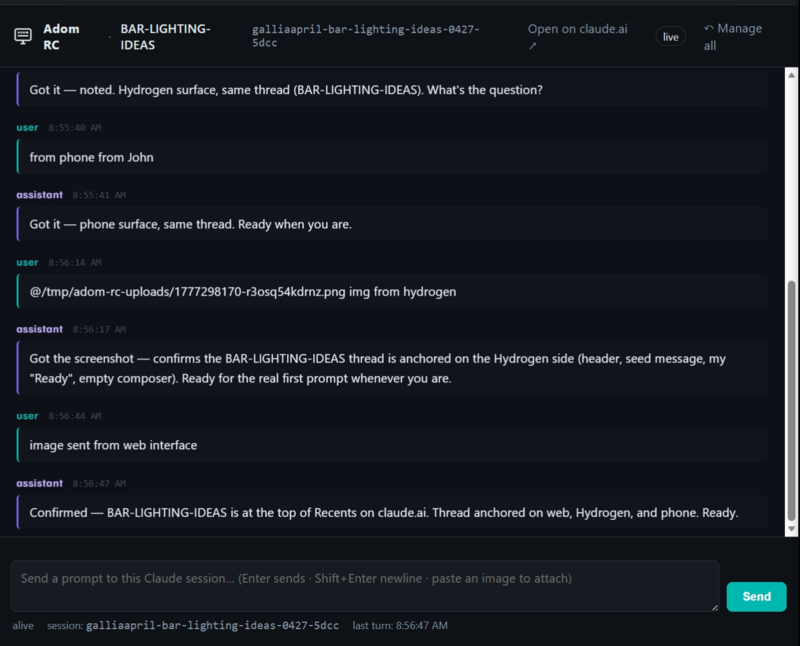
adom-rc runs many parallel Claude Code chat threads on one Adom container, each in its own dedicated Hydrogen webview tab. Every thread is also live on claude.ai/code in your native browser and the Anthropic Claude phone app — same JSONL on disk, three windows.
What it does
- Spawn a chat thread per task. Type a label, click New chat ⧉ — you get a popped-out Hydrogen tab
RC · <label>with a Claude-style chat surface (scrolling feed, composer, image paste with thumbnails). - Three surfaces, one conversation. The thread is live on claude.ai/code in your default browser (one click, no extra login) and on the Anthropic Claude phone app. Type from any one — the other two see it.
- Names you actually recognize. Your label (
silkscreen-readability,tps562201-eval,bar-lighting-ideas) is coerced into the thread title on every surface — Hydrogen tab, /resume picker, claude.ai history, phone-app thread list. Three coercion paths for belt-and-suspenders coverage. - Image paste with thumbnails. Paste a screenshot in the composer — it auto-resizes to ≤1000 px, uploads to a temp path, shows as an 88×88 thumbnail above the composer with click-to-zoom. The
@/tmp/...path is hidden from your text; only injected at send time. - Drive a chat tab from the CLI.
adom-rc input <name> "<text>"queues a message that the tab consumes and submits — same code path as a real Enter keystroke. Useful for ralph-loops and automation.
Quick start
adom-rc start              # daemon on 127.0.0.1:8773 + watchdog
adom-rc open               # management UI as a Hydrogen tab
In the management UI: type a label, click New chat ⧉. Done.
The thread shows up on claude.ai/code under your /history (named adom-rc: <label>) and on the Anthropic Claude phone app under Recents. Same JSONL, same conversation, three windows.
How it works
[hydrogen webview chat tab]
   │ POST /api/inject {tmux_name, text}
   ▼
[adom-rc daemon] ── tmux send-keys ──→ [tmux session running `claude` REPL]
   │                                            │
   │                                            └─→ writes turn to
   │                                                ~/.claude/projects/-home-adom-project/<uuid>.jsonl
   │
   └─ live-tails the JSONL ──→ chat tab polls /api/conversation/<uuid>
                              ─→ claude.ai/code reads same conversation via bridge_session_id
                              ─→ Anthropic phone app same way
Each thread is claude --permission-mode bypassPermissions -n "<label>" running in tmux. tmux send-keys -l "<text>" is the inbound channel; the JSONL on disk is the live-tail source. Three windows, one source of truth.
Drive a chat tab from CLI
adom-rc input <tmux-name-or-label-slug> "<text>"
The tab consumes the queue on its next livetail tick (~1s) and fires the same code path as if you'd typed and hit Enter. The tab itself doesn't need to be focused.
Phone attach (legacy claude rc flow, still supported)
For phone-attachable threads, use adom-rc new --label "<topic>" or /adom-rc handoff "<label>" — the management UI shows a QR + a claude.ai/code?environment=env_… URL. Scan with the Anthropic phone app to attach.
Architecture highlights
- Single Rust binary (~3 MB)
- Bounded thread pool (8 workers, 32-slot queue) — chat-tab polling cannot OOM the daemon
- Streaming JSONL parse + mtime-keyed LRU cache + per-UUID inflight coalescer
- Background watchdog respawns crashed
keepalive: truesessions every 15s - State persisted to
~/.adom-rc/state.json - All UI rendered from embedded HTML/CSS — no node, no bundler
Source
GitHub: adom-inc/adom-rc (v0.2.0)