Adom Wiki Skill Pack
Public Unreviewedby John Lauer
How to use the Adom Wiki without breaking pages — the wiki is six tools in one (git, adompkg, releases, discussions, PRs, discovery), and three repo archetypes have emerged from real use: Page, Skillpack, and Family. Plus how to publish rich component pages (chips, molecules, boards). One install, 15 skills, plus a write-up of the design patterns for the people who build the wiki.
Adom Wiki Skill Pack
One install, 15 skills that teach the AI to use the Adom Wiki without breaking pages — plus a write-up of the wiki repo archetypes that have emerged from real use.
Publishing to wiki.adom.inc is powerful but fraught: the AI re-breaks pages (unlinks heroes, base64-mangles READMEs, writes only one of the two storage layers, forgets to verify what it shipped). And as the wiki has been used heavily, a set of repo archetypes has quietly emerged — patterns nobody had named or written down. This pack fixes both: it bundles the publishing know-how as installable skills, and it names the archetypes so they can be used deliberately.
📌 Note for Colby (and anyone building the wiki): the section The repo archetypes is for you. It documents the page structures that have emerged from heavy real-world use of the wiki — Page, Skillpack, and Family — and a few features they lean on (private source + public releases, the private readme, breadcrumbs, scoring). Some of it is built, some is partial, some is still a spec; each skill labels its status honestly. This is meant as a design mirror: here's how your heaviest user is actually structuring repos, so the platform can meet those patterns.
Install
adompkg install adom-wiki-skillpack
This drops the main adom-wiki-skillpack skill plus 14 sub-skills onto your
container, and pulls in adom-wiki-hero-image (a dependency) for hero
generation.
The wiki is six tools in one
It feels like a wiki, but it's a fusion of six tools you already know, all keyed off one slug per page:
| # | Tool | Like | What it powers |
|---|---|---|---|
| 1 | Git host | GitHub repo | Files tab, README, commits, contributors |
| 2 | adompkg | npm | install / publish / update, dependency maps |
| 3 | Release database | GitHub Releases | versioned downloadable binaries |
| 4 | Discussions | GitHub Issues | a forum thread per page |
| 5 | Pull requests | GitHub PRs | community edits, owner reviews/merges |
| 6 | Discovery | npm search / app-store surfacing | how a page/skill gets found — search, /discover triggers, local skill matching |
Plus a presentation layer (README.md or a custom readme.html, and a separate
private readme for proprietary pages). The scoring/trending signals (stars /
high-fives / installs) feed Discovery's ranking.
Discovery is a first-class pillar, and it's the least-finished one. Layer 1 (local installed-skill matching) works; Layer 2 (the registry
/discoverendpoint) does not yet match declareddiscovery_triggers. Thewiki-discoveryskill carries the current state + a TODO list of what discovery still needs — see it (and finding #3 in our Colby feedback).
The single most important consequence: the git repo and the package registry are
two independent storage layers. adompkg publish does not push your source to
git, and pushing files does not make a tarball. A correct publish writes both.
Doing one leaves the page half-broken — the root of most incidents.
The repo archetypes (emerging from real use)
Three repo shapes have emerged. Naming them turns "how should I structure this?" into a deliberate choice.
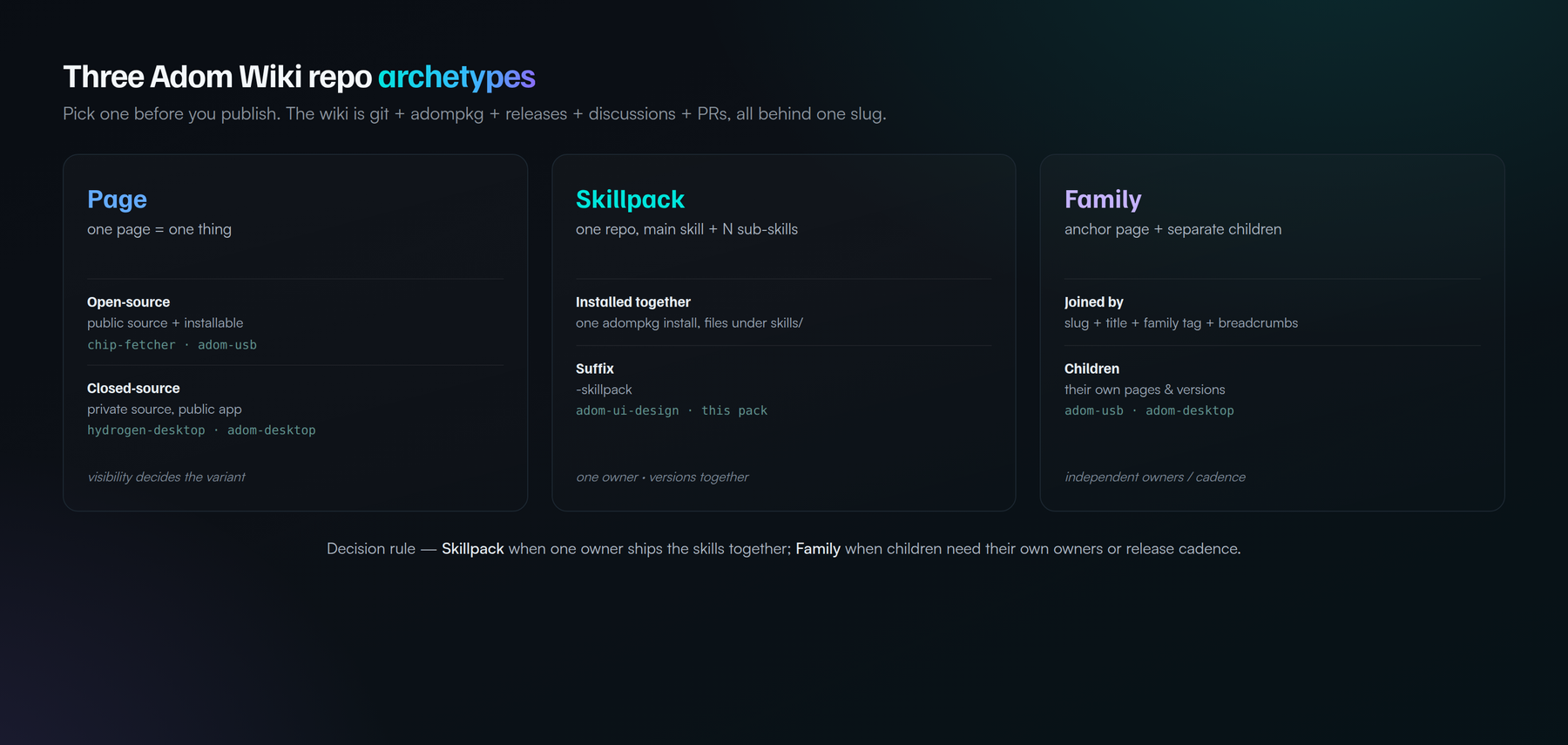
1. Page — one page = one thing
A single page for a single app/tool/skill/doc. Two sub-variants by source visibility:
- Open-source Page — source public + installable. e.g.
chip-fetcher,adom-usb. MIT, contributions welcome. - Closed-source Page — source private, releases/adompkg public, so
people install the compiled app but can't read the code. e.g.
hydrogen-desktop,adom-desktop. Uses the private readme so the page still has public docs.
The wiki lets the git source, the release/package, and the readme each be public or private independently — that's what makes a proprietary app and an open-source library both first-class on the same platform.
2. Skillpack — one repo, one main skill + N sub-skills
One repo / one installable package carrying a whole set of skills, deployed
together by a single adompkg install. Sub-skills are files under skills/, not
separate pages. Convention: the slug ends in -skillpack so the class is
recognizable.
- e.g.
adom-ui-design(grandfathered, predates the suffix), and this pack. - This very repo is a Skillpack — it dogfoods its own archetype.
3. Family — an anchor page + separately-published children
An anchor page plus children published as their own pages, joined by convention rather than living in one repo:
- Slug
<parent>-<descriptor>; Title leads with the parent (Adom USB - CDC serial sniffer); a family tag (<parent>-plugin); and breadcrumbs linking children back to the anchor. - e.g.
adom-desktop(+ bridges),adom-usb(+ sniffer/firmware plugins).
Skillpack vs Family — the decision rule
Both are "a main thing + many smaller things." The divider is ownership and update cadence:
- Skillpack when one author owns all the parts and they version together.
- Family when children have independent owners or release cadences — each is its own page, and third parties can add their own without touching the anchor.
Worked example — chip-fetcher: it's open source AND has many per-vendor
scraper skills (DigiKey, Mouser, TI, Analog Devices) that change daily and
that third parties want to own. As a Skillpack, every vendor tweak would force
the single owner to re-publish the whole pack. So it's better as a Family: an
anchor plus chip-fetcher-digikey, chip-fetcher-mouser, … each independently
publishable, discovered via the family tag + breadcrumbs. Rule of thumb: does
each part need its own lifecycle and maybe its own author? Yes → Family.
The hard rules (page-breakers)
The pack encodes these; they're worth stating here too:
- Write both storage layers every publish (git + registry).
adompkg publishclobbers the hero — it overwrites the repo'spage.json(nohero), so the hero gets unlinked (not deleted) on every publish. Fix: publish first, push a completepage.jsonLAST. (This is the recurring "hero disappeared" bug.)- Never base64 a text file — only real binaries are base64.
- Versions are immutable — bump; never delete-and-recreate (soft-delete trips a UNIQUE constraint).
- Verify with your eyes — open the live page in pup and screenshot it before calling any wiki edit done.
Skills in this pack
| Skill | What it's for |
|---|---|
| adom-wiki-skillpack | Entry point: the five-tools model, the archetypes, the hard rules, the map. |
| wiki-anatomy | The mental model — six tools in one, and the two storage layers. |
| wiki-api | The REST API + adompkg CLI and the publish workflow. |
| wiki-publish-safely | Operational pitfalls as hard rules + the verify-in-pup gate. |
| wiki-readme | Make a great README — README.md vs readme.html, sections, embeds. |
| wiki-visibility | Public vs private source, public releases, the private readme. |
| wiki-repo-styles | The archetype taxonomy and how to choose. |
| wiki-component | Publish a component — chip / molecule / board; the tabbed chip CAD-hub README (symbol, footprint, 3D, pins, specs, sourcing, tape & reel). |
| wiki-family | Build a Family: naming, family tag, anchor registry, breadcrumbs. |
| wiki-skillpack | Build a Skillpack: layout, install.sh, files[], the -skillpack suffix. |
| wiki-hero | Generate a hero, and never let it get unlinked. |
| wiki-breadcrumbs | Third-party "I built an add-on for X" links (implemented, basic). |
| wiki-forking | Fork + community-PR contribution (PRs live; fork-button planned). |
| wiki-discovery | How pages get found — the two layers, current state, and the TODO list (Layer 1 live; /discover partial). |
| wiki-scoring | Stars / high-fives / installs / trending (stars live; rest partial). |
Talk to the AI
- "Publish this tool to the wiki" → wiki-api + wiki-publish-safely
- "What kind of wiki repo should this be?" → wiki-repo-styles
- "Make a hero for this page" / "the hero disappeared" → wiki-hero
- "Write a README for this page" → wiki-readme
- "Keep the source private but let people install it" → wiki-visibility
- "Bundle these skills into one package" → wiki-skillpack
- "Add a child plugin to adom-usb / a bridge to adom-desktop" → wiki-family
Dependencies
| Dependency | Required? | Why |
|---|---|---|
| adom-wiki-hero-image | Yes | Generates the 16:10 hero billboard every page needs; self-contained (bundles brand fonts + wordmark + render pipeline). Pulled automatically by adompkg install. |
Companion tools (not hard dependencies): adompkg itself (the package manager),
and adom-desktop / pup for the verify-in-pup step.
Relationship to gallia
Gallia's adom-wiki-v2 and adom-wiki-hero-image skills remain the
employee-internal source of truth. This pack is the public, installable digest
of that knowledge plus the archetype taxonomy — same model as adom-ui-design.
Update gallia first, then refresh this page.
License
MIT.
# Adom Wiki Skill Pack
**One install, 15 skills that teach the AI to use the Adom Wiki without breaking
pages — plus a write-up of the wiki repo archetypes that have emerged from real
use.**
Publishing to [wiki.adom.inc](https://wiki.adom.inc) is powerful but fraught: the
AI re-breaks pages (unlinks heroes, base64-mangles READMEs, writes only one of
the two storage layers, forgets to verify what it shipped). And as the wiki has
been used heavily, a set of **repo archetypes** has quietly emerged — patterns
nobody had named or written down. This pack fixes both: it bundles the publishing
know-how as installable skills, and it names the archetypes so they can be used
deliberately.
> **📌 Note for Colby (and anyone building the wiki):** the section
> [**The repo archetypes**](#the-repo-archetypes-emerging-from-real-use) is for
> you. It documents the page structures that have emerged from heavy real-world
> use of the wiki — Page, Skillpack, and Family — and a few features they lean on
> (private source + public releases, the private readme, breadcrumbs, scoring).
> Some of it is built, some is partial, some is still a spec; each skill labels
> its status honestly. This is meant as a design mirror: here's how your heaviest
> user is actually structuring repos, so the platform can meet those patterns.
## Install
```bash
adompkg install adom-wiki-skillpack
```
This drops the main `adom-wiki-skillpack` skill plus 14 sub-skills onto your
container, and pulls in **`adom-wiki-hero-image`** (a dependency) for hero
generation.
## The wiki is six tools in one
It feels like a wiki, but it's a fusion of six tools you already know, all keyed
off one slug per page:
| # | Tool | Like | What it powers |
|---|---|---|---|
| 1 | **Git host** | GitHub repo | Files tab, README, commits, contributors |
| 2 | **adompkg** | npm | `install` / `publish` / `update`, dependency maps |
| 3 | **Release database** | GitHub Releases | versioned downloadable binaries |
| 4 | **Discussions** | GitHub Issues | a forum thread per page |
| 5 | **Pull requests** | GitHub PRs | community edits, owner reviews/merges |
| 6 | **Discovery** | npm search / app-store surfacing | how a page/skill gets found — search, `/discover` triggers, local skill matching |
Plus a **presentation** layer (`README.md` or a custom `readme.html`, and a separate
**private readme** for proprietary pages). The **scoring/trending** signals (stars /
high-fives / installs) feed Discovery's ranking.
> **Discovery is a first-class pillar, and it's the least-finished one.** Layer 1
> (local installed-skill matching) works; Layer 2 (the registry `/discover`
> endpoint) does not yet match declared `discovery_triggers`. The `wiki-discovery`
> skill carries the current state + a TODO list of what discovery still needs —
> see it (and finding #3 in our Colby feedback).
The single most important consequence: **the git repo and the package registry are
two independent storage layers.** `adompkg publish` does *not* push your source to
git, and pushing files does *not* make a tarball. A correct publish writes both.
Doing one leaves the page half-broken — the root of most incidents.
## The repo archetypes (emerging from real use)
Three repo shapes have emerged. Naming them turns "how should I structure this?"
into a deliberate choice.

### 1. Page — one page = one thing
A single page for a single app/tool/skill/doc. Two sub-variants by **source
visibility**:
- **Open-source Page** — source public + installable. _e.g._ `chip-fetcher`,
`adom-usb`. MIT, contributions welcome.
- **Closed-source Page** — source **private**, releases/adompkg **public**, so
people install the compiled app but can't read the code. _e.g._
`hydrogen-desktop`, `adom-desktop`. Uses the **private readme** so the page
still has public docs.
> The wiki lets the git source, the release/package, and the readme each be public
> or private independently — that's what makes a proprietary app and an
> open-source library both first-class on the same platform.
### 2. Skillpack — one repo, one main skill + N sub-skills
One repo / one installable package carrying a whole set of skills, deployed
together by a single `adompkg install`. Sub-skills are files under `skills/`, not
separate pages. **Convention: the slug ends in `-skillpack`** so the class is
recognizable.
- _e.g._ `adom-ui-design` (grandfathered, predates the suffix), and **this pack**.
- **This very repo is a Skillpack** — it dogfoods its own archetype.
### 3. Family — an anchor page + separately-published children
An anchor page plus children published as **their own pages**, joined by
convention rather than living in one repo:
- **Slug** `<parent>-<descriptor>`; **Title** leads with the parent
(`Adom USB - CDC serial sniffer`); a **family tag** (`<parent>-plugin`); and
**breadcrumbs** linking children back to the anchor.
- _e.g._ `adom-desktop` (+ bridges), `adom-usb` (+ sniffer/firmware plugins).
### Skillpack vs Family — the decision rule
Both are "a main thing + many smaller things." The divider is **ownership and
update cadence**:
- **Skillpack** when one author owns all the parts and they version *together*.
- **Family** when children have *independent owners or release cadences* — each is
its own page, and third parties can add their own without touching the anchor.
**Worked example — `chip-fetcher`:** it's open source AND has many per-vendor
scraper skills (DigiKey, Mouser, TI, Analog Devices) that **change daily** and
that **third parties** want to own. As a Skillpack, every vendor tweak would force
the single owner to re-publish the whole pack. So it's better as a **Family**: an
anchor plus `chip-fetcher-digikey`, `chip-fetcher-mouser`, … each independently
publishable, discovered via the family tag + breadcrumbs. Rule of thumb: _does
each part need its own lifecycle and maybe its own author?_ Yes → Family.
## The hard rules (page-breakers)
The pack encodes these; they're worth stating here too:
1. **Write both storage layers** every publish (git + registry).
2. **`adompkg publish` clobbers the hero** — it overwrites the repo's `page.json`
(no `hero`), so the hero gets *unlinked* (not deleted) on every publish. Fix:
**publish first, push a complete `page.json` LAST.** (This is the recurring
"hero disappeared" bug.)
3. **Never base64 a text file** — only real binaries are base64.
4. **Versions are immutable** — bump; never delete-and-recreate (soft-delete trips
a UNIQUE constraint).
5. **Verify with your eyes** — open the live page in pup and screenshot it before
calling any wiki edit done.
## Skills in this pack
| Skill | What it's for |
|---|---|
| **adom-wiki-skillpack** | Entry point: the five-tools model, the archetypes, the hard rules, the map. |
| **wiki-anatomy** | The mental model — six tools in one, and the two storage layers. |
| **wiki-api** | The REST API + `adompkg` CLI and the publish workflow. |
| **wiki-publish-safely** | Operational pitfalls as hard rules + the verify-in-pup gate. |
| **wiki-readme** | Make a great README — `README.md` vs `readme.html`, sections, embeds. |
| **wiki-visibility** | Public vs private source, public releases, the private readme. |
| **wiki-repo-styles** | The archetype taxonomy and how to choose. |
| **wiki-component** | Publish a component — chip / molecule / board; the tabbed chip CAD-hub README (symbol, footprint, 3D, pins, specs, sourcing, tape & reel). |
| **wiki-family** | Build a Family: naming, family tag, anchor registry, breadcrumbs. |
| **wiki-skillpack** | Build a Skillpack: layout, install.sh, files[], the `-skillpack` suffix. |
| **wiki-hero** | Generate a hero, and never let it get unlinked. |
| **wiki-breadcrumbs** | Third-party "I built an add-on for X" links _(implemented, basic)_. |
| **wiki-forking** | Fork + community-PR contribution _(PRs live; fork-button planned)_. |
| **wiki-discovery** | How pages get found — the two layers, current state, and the TODO list _(Layer 1 live; `/discover` partial)_. |
| **wiki-scoring** | Stars / high-fives / installs / trending _(stars live; rest partial)_. |
## Talk to the AI
- "Publish this tool to the wiki" → wiki-api + wiki-publish-safely
- "What kind of wiki repo should this be?" → wiki-repo-styles
- "Make a hero for this page" / "the hero disappeared" → wiki-hero
- "Write a README for this page" → wiki-readme
- "Keep the source private but let people install it" → wiki-visibility
- "Bundle these skills into one package" → wiki-skillpack
- "Add a child plugin to adom-usb / a bridge to adom-desktop" → wiki-family
## Dependencies
| Dependency | Required? | Why |
|---|---|---|
| **adom-wiki-hero-image** | Yes | Generates the 16:10 hero billboard every page needs; self-contained (bundles brand fonts + wordmark + render pipeline). Pulled automatically by `adompkg install`. |
Companion tools (not hard dependencies): `adompkg` itself (the package manager),
and `adom-desktop` / pup for the verify-in-pup step.
## Relationship to gallia
Gallia's `adom-wiki-v2` and `adom-wiki-hero-image` skills remain the
employee-internal source of truth. This pack is the **public, installable digest**
of that knowledge plus the archetype taxonomy — same model as `adom-ui-design`.
Update gallia first, then refresh this page.
## License
MIT.