Adom USB
Public Unreviewedby John Lauer
See every USB device across the entire Adom ecosystem — laptop, WSL2, cloud container, Azure VM, workcells — in one dashboard, and mount / unmount / reset / test / force-class / sniff any of them. USB/IP slingshot for the whole mesh.
adom-usb
See every USB device across the entire Adom ecosystem — and mount it anywhere.
adom-usb turns USB from a per-machine accident of geography into a mesh.
Plug a dev board into your laptop and it shows up in one dashboard alongside the
USB on your cloud container, your Azure VM, and the workcells on the bench — and
from that one table you can mount any device onto any host, then reset /
test / force-class / sniff it. It's the same Linux USB/IP "slingshot" Adom
already uses to pull workcell USB into cloud containers, generalized so your own
machines are first-class members of the mesh.
This project is open source (MIT). All source — the Rust CLI, the embedded webview, the inventory/routing engine, the plugin system — is in this repo and published to the Adom Wiki. Contributions, and especially sniffer/decoder plugins, are welcome; see Contributing and Writing a plugin.
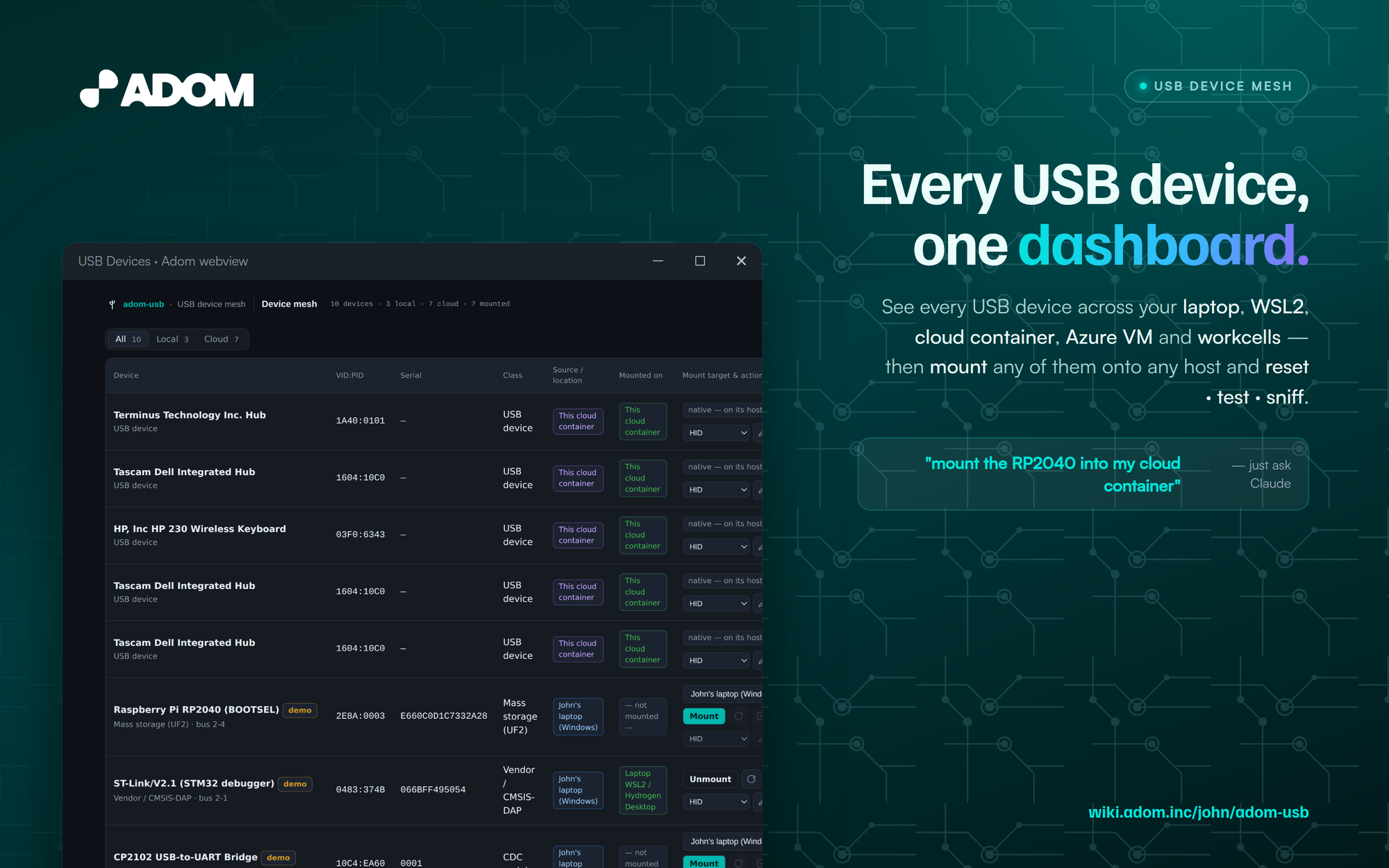
Table of contents
- Install
- Quick start
- How it works
- HTTP API reference
- CLI reference
- Building from source
- Repo layout
- Contributing
- Writing a packet-sniffer plugin
- Publishing your plugin to the wiki
- How the app discovers plugins
- Roadmap
- License
Install
adompkg install adom-usb # from the Adom Wiki (recommended)
or grab the binary directly:
curl -fsSL https://wiki.adom.inc/download/john/adom-usb/0.2.0/adom-usb \
  -o /tmp/adom-usb && chmod +x /tmp/adom-usb \
  && sudo install -m 0755 /tmp/adom-usb /usr/local/bin/adom-usb && adom-usb install
Quick start
adom-usb app                 # live: real lsusb here + any registered agents
adom-usb app --demo          # seed a representative cross-ecosystem set for a tour
adom-usb list --demo         # the unified inventory as JSON, no server
adom-usb health              # is a dashboard server up?
adom-usb plugins list        # sniffer/decoder plugins installed on this host
adom-usb app opens a Hydrogen webview tab named USB Devices. Columns:
device · VID:PID · serial · class · source/location · current mount · target
picker + actions. Filter chips: All / Local / Cloud.
Drive it from a terminal or from Claude — every button is also an HTTP endpoint:
adom-usb mount   laptop:2e8a:0003 laptop-wsl2     # RP2040 → laptop WSL2 (usbipd attach --wsl)
adom-usb mount   laptop:2e8a:0003 this-container  # RP2040 → cloud container (reverse tunnel)
adom-usb unmount laptop:2e8a:0003
curl -s localhost:8896/state | jq                 # hosts, devices, targets, mounts, plugins, log
How it works
The mental model: a USB mesh
Normally a USB device is usable only by the machine it's physically plugged
into. adom-usb treats the fleet as a single fabric with two roles:
- A source is a host with physical USB ports that can export a device (your laptop, an Azure VM, a workcell).
- A target is a host that can consume a device as if it were locally attached (a cloud container, a WSL2 distro, a workcell).
A mount is a directed edge (source, device) → target. The dashboard is the
control plane over the whole graph; the actual bytes travel as standard Linux
USB/IP, tunneled over transports the Adom platform already has.
The unifying idea: "your laptop is a workcell that travels with you." The same device model, association flow, and hot-plug notifications that already move workcell USB into cloud containers are reused verbatim — your personal machines just become additional sources/targets on the same fabric.
USB/IP in 90 seconds
USB/IP is a Linux kernel facility that encapsulates USB Request Blocks (URBs) over TCP. There are two halves:
- Server side (
usbipd/usbip bind) exports a physical device on TCP port 3240. On Windows the equivalent isusbipd-win(the Microsoft-documented project). - Client side (
vhci-hcdkernel module +usbip attach) creates a virtual USB host controller on the consuming machine. The remote device enumerates there exactly as if it were plugged in locally —lsusbsees it, drivers bind to it,/dev/ttyUSB0appears, etc.
adom-usb does not reinvent any of this. It orchestrates the standard tools
across the mesh and gives you one place to see and drive them. Every mount the
dashboard performs is recorded with the exact shell command it runs, visible
in the action log — nothing is hidden behind magic.
Hosts, sources, and targets
The mesh's hosts (see src/devices.rs → hosts()):
| Host | Kind | OS | Exports USB? | Consumes USB? | Bucket |
|---|---|---|---|---|---|
| Your laptop | laptop |
Windows | ✅ usbipd-win |
native only (v1) | local |
| Laptop WSL2 / Hydrogen Desktop | wsl2 |
Linux | — | ✅ vhci-hcd |
local |
| This cloud container | container |
Linux | — | ✅ vhci-hcd |
cloud |
| Azure VM desktop | azure-vm |
Windows | ✅ usbipd-win |
native only (v1) | cloud |
| Azure VM WSL2 / HD-on-VM | wsl2 |
Linux | — | ✅ vhci-hcd |
cloud |
| Workcell (rpi, …) | workcell |
Linux | ✅ usbip |
✅ | cloud |
Only laptop / azure-vm / workcell can export (they have physical ports + an export agent). A device whose source is a container or a WSL2 distro is a consumer's view of a device — it stays native on its host and is not re-exportable. The dashboard reflects this: such rows show "native — on its host" instead of a mount picker.
The routing matrix
For a device on a given source, the set of legal targets (and the mechanism for
each) is computed in src/devices.rs → targets_for():
| Source → Target | Mechanism |
|---|---|
| laptop board → laptop Windows (native) | re-bind to the host driver — trivial |
| laptop board → laptop WSL2 / HD | usbipd bind + usbipd attach --wsl (local, no relay) |
| laptop board → cloud container | usbipd bind → reverse tunnel → usbip attach -r 127.0.0.1 |
| laptop board → Azure-VM WSL2 | usbipd bind → tunnel → usbip attach in the VM's WSL2 |
| laptop board → Azure-VM Windows desktop | deferred — needs the test-signed usbip-win client driver |
| workcell device → any Linux target | existing direct USB/IP TCP path |
v1 rule — Windows is source + local-only. A Windows machine can export its
USB and natively use devices physically plugged into it, but mounting a remote
device into a native Windows desktop is deferred (it requires the test-signed
usbip-win client driver and Secure-Boot-off / test-signing). Those target
cells render as blocked, with the reason shown on hover.
Transport: how a device's port reaches a target
Three cases, by physical topology:
- Same machine (laptop USB → laptop WSL2):
usbipd attach --wsl. No relay, no network — this is the Microsoft-supported path. The cleanest mount. - Cross-machine (laptop USB → cloud container, or → Azure-VM WSL2): the
source
usbipd binds the device, then a reverse tunnel carries the source's local:3240to the target, which runsusbip attach -r 127.0.0.1. This reuses the adom-desktop relay's existingTUNLbyte-pump — the same one that already tunnels RDP — but in the opposite listen-direction (the target listens; the source's agent dials the laptop's localusbipd). The implementation spec lives in the adom-desktop repo atskills/USB_MESH.md. - Workcell → cloud: the workcell's
usbipdis reachable on the facility network; the container dials it directly on:3240. Unchanged from today.
Latency note: bulk/CDC/serial/JTAG/DFU/bootsel devices tunnel fine over a WAN; isochronous devices (webcams, audio, some streaming logic analyzers) are marginal over the relay and are best kept host-local. The UI labels this.
The agent model
Every host exposes the same small verb set — list / export / unexport / attach / detach / reset / class-override / sniff — reached over whatever transport that
host already has:
- Windows hosts (laptop, Azure VM): the agent is a new
adom-desktop usb …subcommand wrappingusbipd-win, reached over the adom-desktop relay. - Linux / WSL2 / container hosts: a thin wrapper over
usbip+usbmon/driver_override. The container side already exists from the workcell feature. - Workcells: the existing agent, unchanged.
The dashboard backend is the orchestrator: on a mount it tells the source
agent to bind, sets up the tunnel if cross-machine, tells the target agent to
attach, and records state. It reaches the laptop + its WSL2 via the adom-desktop
relay and the Azure VM + its WSL2 via azure-winvm.
The broker / registry
A generalized Curium broker (source_type / source_id, extending the
workcell UsbipServer model) is the durable registry: every agent registers its
live inventory and hot-plug events there, so all surfaces see one unified list.
To stay unblocked while that generalization lands, the dashboard can also
aggregate inventory by polling agents directly through their transports.
The dashboard: server-as-truth + AI-drivable
The webview is a thin client. The server is the single source of truth. The
UI never holds its own copy of "what's mounted" — it polls GET /state every
~600 ms and re-renders on change (src/app/ui.html). Every
button is a thin wrapper that POSTs to an endpoint; the same endpoint is
curl-able. That's the defining property of an Adom app: the AI drives it exactly
like a human, and the UI's poller turns either one's state change into the same
visual update. Console logs forward to /console; in --dev mode a /eval
channel lets the AI hot-patch the running UI.
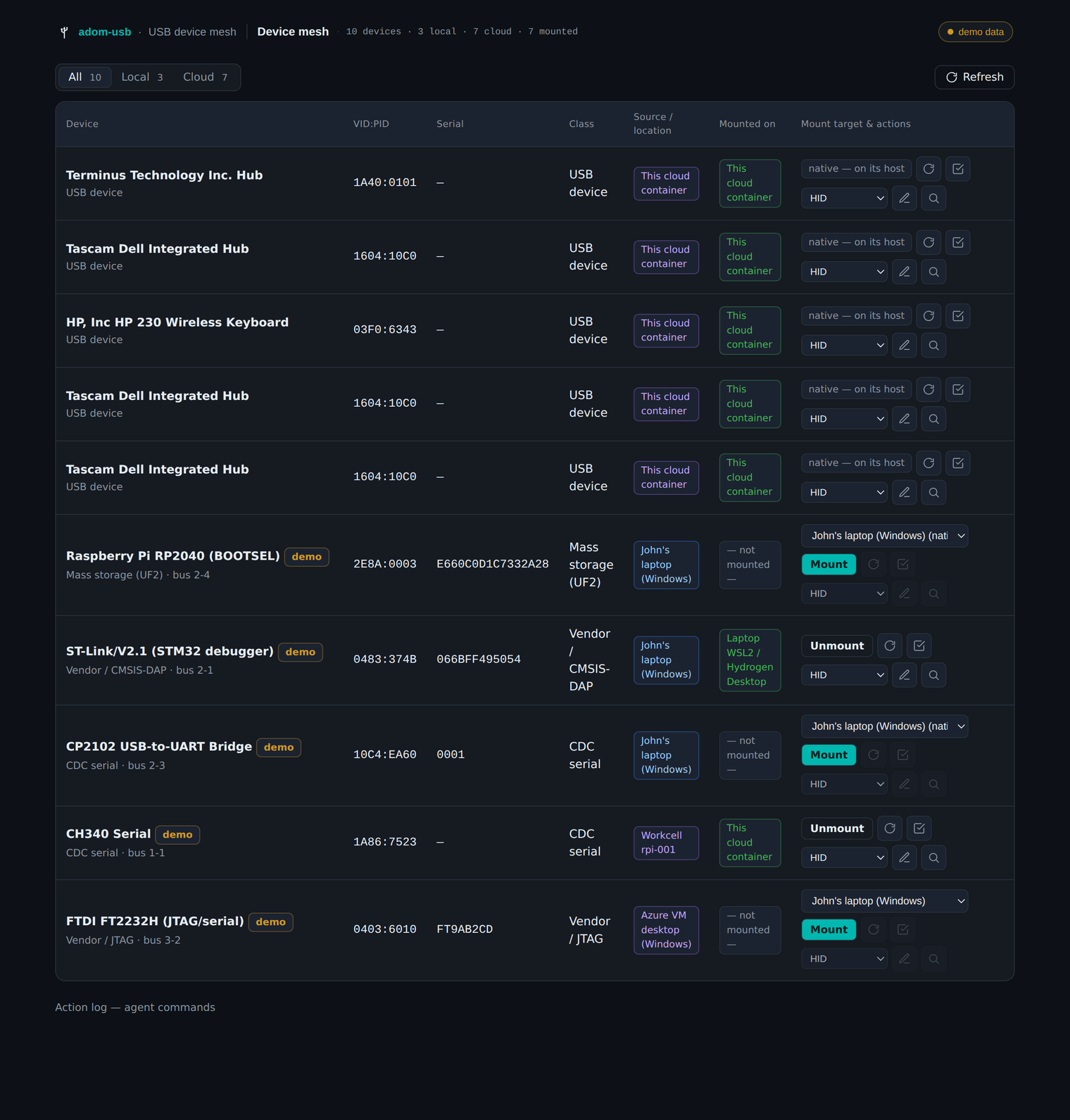
The full device table: real container hubs shown native, demo laptop/workcell/Azure devices with target pickers and mount state, and the action log streaming the exact agent command behind every action.
The device data model
Each device is the BoundDevice shape the workcell USB/IP feature already uses
(see src/devices.rs → Device):
{
  "id": "laptop:10c4:ea60",          // stable: <source>:<vid>:<pid>
  "name": "CP2102 USB-to-UART Bridge",
  "vid": 4292, "pid": 60000,          // numeric; vid_hex/pid_hex added in /state
  "serial": "0001",
  "class": "CDC serial",
  "bus_id": "2-3",                    // USB/IP bus id on the source
  "source_id": "laptop",
  "source_label": "John's laptop (Windows)",
  "location": "local",                // local | cloud (filter bucket)
  "mounted_on": null,                 // host id, or null
  "exportable": true,                 // can it be slingshotted off its source?
  "targets": [ /* computed routing matrix, with mechanism + blocked_reason */ ],
  "capabilities": { "mount": true, "unmount": false, "reset": false,
                    "test": false, "class_override": false, "sniff": false },
  "sniffer_plugin": "adom-usb-sniffer-cdc"  // matched plugin, if any
}
Capabilities: why buttons grey out
reset / test / force-class / sniff operate on the virtual device in a
Linux target — they only make sense once a device is attached to a Linux host.
So they are disabled (greyed, with a hover reason) until you mount the device on
a Linux target; for Windows-native devices they're unavailable entirely. mount
is offered only for exportable, not-yet-remote devices; unmount only when a
device is currently slingshotted to a host other than its source. See
capabilities_for() in src/devices.rs.
Security model
Slingshotting raw USB into a cloud container is real device exposure. The
design keeps mounts explicit, per-device, per-session, and revocable — never
auto-attach. Binding a device on Windows removes it from the host while it's
exported; the UI makes that state obvious and tears it down cleanly on unplug.
usbipd-win install needs a one-time elevation, folded into adom-desktop's
first-run.
HTTP API reference
The app server (default port 8896) is fully scriptable. All POST bodies are
JSON; all responses are JSON (Content-Security-Policy: frame-ancestors * so the
webview can embed it).
| Method | Path | Body | Purpose |
|---|---|---|---|
| GET | / |
— | the dashboard HTML |
| GET | /state |
— | full snapshot: hosts, devices (+ targets/capabilities/sniffer_plugin), counts, plugins, actions |
| GET | /health |
— | {ok, demo, devices, version} |
| POST | /refresh |
— | re-enumerate + bump state_ts |
| POST | /mount |
{device_id, target_id} |
validate against the routing matrix, set the mount, return the agent command |
| POST | /unmount |
{device_id} |
detach from its current target |
| POST | /reset |
{device_id} |
power-cycle / re-enumerate (Linux target only) |
| POST | /test |
{device_id} |
lsusb -v + enumerate/echo health check |
| POST | /class-override |
{device_id} |
bind a forced driver class (HID / storage / serial) |
| POST | /sniff |
{device_id} |
capture USB packets — dispatches to a matching plugin if one is installed, else built-in usbmon |
| POST | /flash |
{device_id, persona} |
flash a stub-firmware persona via a matching firmware device-test pack (e.g. RP2040 → HID keyboard) |
| GET | /plugins |
— | {installed, available, tag, api_version} |
| POST | /console |
log entry | UI console forwarding |
| GET | /console |
— | ring buffer of UI logs (AI debugging) |
| POST | /shutdown |
— | remove the tab and exit |
Mount/op responses always include the exact command that the live agent
runs, and (for sniff) the plugin that handled it — so the orchestration is
auditable and diffable against the real implementation as agents land.
CLI reference
| Command | Purpose |
|---|---|
adom-usb app [--demo] [--no-tab] [--port N] [--dev] |
open the webview dashboard |
adom-usb list [--demo] |
print the unified inventory as JSON |
adom-usb mount <device_id> <target_id> |
mount (POSTs to a running server) |
adom-usb unmount <device_id> |
unmount |
adom-usb health [--port N] |
check a running server |
adom-usb plugins list |
installed sniffer/decoder plugins |
adom-usb plugins search |
publishable plugins on the wiki |
adom-usb install |
deploy the SKILL.md so Claude discovers the app |
Output follows the Adom CLI convention (OK: / ERROR: / Hint:, isatty-gated
color).
Building from source
Requires Rust (stable). No system deps beyond lsusb for live enumeration.
git clone https://github.com/adom-inc/adom-usb && cd adom-usb
cargo build --release          # → target/release/adom-usb
./target/release/adom-usb app --demo --no-tab --port 8899
# open http://127.0.0.1:8899 (or the Coder proxy URL inside a container)
The UI is a single embedded file (src/app/ui.html, compiled in via
include_str!) — there is no JS build step. Edit it and rebuild.
Repo layout
adom-usb/
  src/
    main.rs        # clap CLI surface
    cli.rs         # list / mount / unmount / health / plugins
    devices.rs     # the mesh model: hosts, routing matrix, capabilities, lsusb + demo
    plugins.rs     # plugin discovery, matching, dispatch  ← the extension seam
    install.rs     # deploy SKILL.md
    app/
      mod.rs       # tiny_http server: /state, /mount, /sniff, /plugins, …
      tab.rs       # Hydrogen tab registration (adom-cli)
      ui.html      # the entire dashboard (embedded)
  examples/
    adom-usb-sniffer-cdc/   # a reference sniffer plugin — copy this to start
  skills/adom-usb/SKILL.md  # the Claude-facing skill
  page.json / package.json  # wiki page + adompkg manifest
  screenshots/hero.png      # the billboard hero
Contributing
adom-usb is MIT and developed in the open. Two equally valid front doors:
- GitHub —
github.com/adom-inc/adom-usb. Fork, branch, PR. Keep changes focused; match the surrounding Rust style; runcargo build --releaseandcargo clippyclean. - The Adom Wiki — the wiki page is a git repo with its own PR flow
(
POST /api/v1/pages/adom-usb/prs). Edits to docs, the README, or the page land there and mirror to GitHub.
Good first contributions:
- A sniffer/decoder plugin for a device class you care about (see below) — the highest-leverage way to grow the ecosystem.
- A new host kind or transport mechanism in
devices.rs. - Filling in a live agent (the
adom-desktop usbverb, the reverse tunnel — spec in adom-desktopskills/USB_MESH.md). - UI polish in
ui.html(it's plain HTML/CSS/JS, brand tokens at the top).
Please don't commit the compiled binary to git (it ships in the adompkg
tarball); bin/ and target/ are gitignored.
Writing a packet-sniffer plugin
A plugin extends the mesh with a new capture/decode backend — most commonly a sniffer for a particular device class (CDC serial, HID, mass storage, a vendor protocol). A plugin is nothing more than:
- an executable that implements a tiny CLI contract, and
- a
plugin.jsonmanifest describing what it sniffs and how to match it.
The complete reference plugin lives in
examples/adom-usb-sniffer-cdc/ — copy that
directory and edit it.
1. The manifest (plugin.json)
{
  "slug": "adom-usb-sniffer-cdc",      // unique; also the wiki package slug
  "name": "CDC / ACM serial sniffer",
  "version": "0.1.0",
  "api_version": "1",                   // plugin API version (current: 1)
  "kind": "sniffer",                    // sniffer | decoder
  "entrypoint": "adom-usb-sniffer-cdc", // executable on PATH (or in the plugin dir)
  "matches": {                          // which devices this applies to (globs; "*" = any)
    "class": ["CDC serial"],            // matched against the device's class string
    "vid":   ["*"],                     // 4-hex-digit vendor id, or "*"
    "pid":   ["*"]                      // 4-hex-digit product id, or "*"
  },
  "capture": "usbmon",                  // capture backend you use
  "decoders": ["cdc-acm", "at-commands"],
  "description": "Capture + decode USB CDC/ACM serial traffic to pcap."
}
Matching & specificity. When the user clicks Sniff on a device,
adom-usb picks the most specific installed plugin whose matches apply
(exact class beats *, a concrete vid beats *, etc. — see match_for()
in src/plugins.rs). A plugin with "class": ["*"] is a
universal fallback; a plugin pinned to a vid:pid always wins for that device.
2. The executable contract (plugin API v1)
Your entrypoint must implement exactly two subcommands:
# Print your manifest (the app uses this to introspect installed plugins):
<entrypoint> manifest          # -> prints plugin.json to stdout

# Capture traffic for one device on the (Linux) host where it's mounted:
<entrypoint> sniff \
  --vid <hex> --pid <hex> --busid <bus-id> --target <host> \
  [--seconds <n>] [--out <file.pcap>]
# -> writes a pcap and prints a JSON result:
#    {"ok":true,"pcap":"/tmp/x.pcap","packets":128,"decoders":["cdc-acm"],"summary":"…"}
That's the whole interface. Inside sniff you typically modprobe usbmon and
run tshark/tcpdump filtered to the device's bus + vid/pid, then (optionally)
post-process into a human-readable decode. The reference plugin's ~40-line bash
shows the full pattern; a real decoder might be Rust/Python and emit a richer
summary. Plugins run on the Linux target where the device is mounted, so they
have the virtual device + usbmon available.
3. Test it locally
cd examples/adom-usb-sniffer-cdc && ./install.sh   # drops it in ~/.adom/usb-plugins/
adom-usb plugins list                              # should list your plugin
adom-usb app --demo --no-tab --port 8899 &
curl -s localhost:8899/plugins | jq                # installed: [ your plugin ]
curl -s localhost:8899/state | jq '.devices[]|{id,class,sniffer_plugin}'  # matches?
When a matching device is mounted on a Linux target and you hit Sniff, the app
calls your sniff subcommand and shows the result + the exact command in the
action log.
Publishing your plugin to the wiki
Plugins are ordinary Adom Wiki packages — published with adompkg, exactly like
any other package, plus two conventions that make adom-usb find them:
- Put the
adom_usb_pluginblock in yourpackage.json(so an installed package carries the manifest), and - add
adom-usb-pluginto the package'skeywords(so the registry can surface it).
// package.json
{
  "slug": "adom-usb-sniffer-cdc",
  "version": "0.1.0",
  "type": "app",
  "description": "adom-usb plugin: capture + decode USB CDC/ACM serial to pcap.",
  "keywords": ["adom-usb-plugin", "sniffer", "usb", "cdc"],
  "scripts": { "install": "./install.sh", "uninstall": "./uninstall.sh" },
  "files": ["adom-usb-sniffer-cdc", "plugin.json", "install.sh", "uninstall.sh", "package.json", "README.md"],
  "adom_usb_plugin": {
    "kind": "sniffer",
    "entrypoint": "adom-usb-sniffer-cdc",
    "matches": { "class": ["CDC serial"], "vid": ["*"], "pid": ["*"] },
    "capture": "usbmon",
    "decoders": ["cdc-acm"],
    "api_version": "1"
  }
}
Your install.sh should drop plugin.json + the entrypoint into
~/.adom/usb-plugins/<slug>/ and symlink the entrypoint onto PATH (the
reference plugin does exactly this). Then publish like any Adom package (see the
adom-wiki-v2 skill for the full flow):
WIKI=https://wiki.adom.inc; TOKEN=$(cat /var/run/adom/api-key)
# 1. create the page + git repo (first publish only)
curl -s -X POST "$WIKI/api/v1/pages" -H "Authorization: Bearer $TOKEN" \
  -H "Content-Type: application/json" -H "User-Agent: adompkg/2" \
  -d '{"type":"app","slug":"adom-usb-sniffer-cdc","title":"adom-usb CDC sniffer","brief":"…"}'
# 2. push the source files to the git layer (POST /pages/<slug>/files)
# 3. publish the tarball to the registry
export ADOMPKG_REGISTRY=$WIKI && adompkg publish
Now anyone can adompkg install adom-usb-sniffer-cdc, and every adom-usb
running on a host where it's installed will route the Sniff action for matching
devices to it.
Firmware device-test packs (manufacturer device personas)
A second plugin kind — kind: "firmware" — lets a manufacturer or third
party ship a device-test pack: stub firmware + a flash method + a catalog of
USB personas their chip can become. You plug the chip into the mesh, pick a
persona, the pack flashes the stub, and the device re-enumerates as that USB
class so you can immediately mount / test / sniff it.
This is how you answer "does my USB host stack handle a keyboard? a disk? a
serial port?" without writing firmware — flash hid-keyboard, watch it type;
flash msc-disk, mount it; flash cdc-serial, open the port.
A firmware pack's manifest adds vendor, chips, flash_method, and a
personas catalog:
{
  "slug": "adom-usb-stub-rp2040", "kind": "firmware", "api_version": "1",
  "entrypoint": "adom-usb-stub-rp2040",
  "vendor": "Raspberry Pi", "chips": ["rp2040"],
  "matches": { "vid": ["2e8a"], "pid": ["*"] },     // matched by chip vid/pid
  "flash_method": "uf2-bootsel",                     // picotool / dfu-util / esptool / nrfutil / openocd / bossac / wchisp
  "personas": [
    {"id":"msc-disk",     "name":"Mass-storage disk",  "usb_class":"Mass storage",  "result_vid":"2e8a","result_pid":"0009"},
    {"id":"hid-keyboard", "name":"HID keyboard",        "usb_class":"HID keyboard"},
    {"id":"hid-mouse",    "name":"HID mouse",           "usb_class":"HID mouse"},
    {"id":"cdc-serial",   "name":"CDC serial echo",     "usb_class":"CDC serial"},
    {"id":"midi",         "name":"USB-MIDI",            "usb_class":"Audio/MIDI"}
  ]
}
The firmware-plugin executable contract adds a flash subcommand (and
personas):
<entrypoint> manifest                       # prints plugin.json
<entrypoint> personas                       # prints the persona catalog
<entrypoint> flash --persona <id> --vid <hex> --pid <hex> --busid <b> --target <host>
#  -> flashes the stub (picotool / dfu-util / esptool / …) and prints
#     {"ok":true,"persona":"hid-keyboard","method":"uf2-bootsel","status":"flashed","summary":"…"}
When a firmware pack matches a device, adom-usb shows a Flash ▾ persona
picker on that row; the /state device carries firmware_plugin +
firmware_personas, and POST /flash {device_id, persona} dispatches to the
pack's flash entrypoint.
Sample plugins (install any of these)
A reference fleet is published on the wiki — copy any as a starting point:
| Plugin | Kind | Chip / target | Personas / decoders |
|---|---|---|---|
adom-usb-stub-rp2040 |
firmware | RP2040 (Raspberry Pi) | disk · keyboard · mouse · serial · MIDI |
adom-usb-stub-stm32 |
firmware | STM32 (DFU 0483:df11) | disk · kbd · mouse · serial · RNDIS · audio · MIDI · DFU |
adom-usb-stub-esp32 |
firmware | ESP32-S2/S3 (TinyUSB) | serial · kbd · mouse · disk · MIDI |
adom-usb-stub-nrf |
firmware | nRF52840 / nRF5340 | serial · kbd · mouse · disk |
adom-usb-stub-ti-sitara |
firmware | TI Sitara AM335x/57x/62x | disk · RNDIS · serial · kbd |
adom-usb-stub-samd21 |
firmware | SAMD21/51 (Microchip) | disk · kbd · serial · MIDI |
adom-usb-stub-ch32 |
firmware | CH32V (WCH RISC-V) | serial · kbd · disk |
adom-usb-stub-teensy |
firmware | Teensy 4.x / NXP i.MX RT | kbd · mouse · disk · serial · MIDI · audio |
adom-usb-sniffer-cdc |
sniffer | CDC / ACM serial | cdc-acm · at-commands |
adom-usb-sniffer-hid |
sniffer | HID keyboard/mouse | hid-report · keyboard · mouse |
adom-usb-sniffer-msc |
sniffer | Mass storage / SCSI | scsi-bot · uas |
adom-usb-sniffer-vendor |
sniffer | any device (fallback) | bulk · control · interrupt · vendor |
adom-usb-sniffer-dap |
sniffer | CMSIS-DAP debug probes | cmsis-dap · swd · jtag-cmd |
adompkg install adom-usb-stub-rp2040
adom-usb flash laptop:2e8a:0003 hid-keyboard   # RP2040 → HID keyboard, then it re-enumerates
The firmware packs ship the flash contract as reference templates; manufacturers drop their real signed firmware artifacts in
firmware/<persona>.<ext>and publish their own version.
How the app discovers plugins
Discovery has two sources (both in src/plugins.rs):
Installed (local, cheap, every
/state) —discover_installed()scans:~/.adom/usb-plugins/<slug>/plugin.json(where a plugin'sinstall.shdrops its manifest + entrypoint), and- any
adompkg-installed module under~/project/adom_modules/<slug>/whosepackage.jsoncarries anadom_usb_pluginblock.
For each device,
/stateattachessniffer_plugin= the slug of the best-matching installed plugin (ornull), so the UI can badge it and the Sniff button knows where to route.Registry (network, on demand) —
discover_registry()queries the wiki's discovery API for publishable plugins not yet installed:GET https://wiki.adom.inc/api/v1/discover?triggers=adom-usb-plugin. Surfaced viaGET /plugins(available) andadom-usb plugins search, so the dashboard can show "plugins you could install" with a one-clickadompkg install.
When you click Sniff on a mounted device, the server calls
plugins::match_for(class, vid, pid, installed); if a plugin matches, the action
dispatches to its sniff entrypoint and the response/action-log record the
plugin slug. If none matches, it falls back to the built-in usbmon capture.
That single match_for seam is the entire contract between the app and the
ecosystem — add a plugin, and the mesh grows.
Roadmap
- M1 — Unified inventory ✅ (this release): one cross-ecosystem table, Local/Cloud filters, the plugin discovery layer.
- M2 — Mount/route matrix: local
usbipd attach --wsl→ reverse-tunnel to cloud → cross-machine to Azure WSL2. Gated on the WSL2 custom kernel (CONFIG_USBIP_VHCI_HCD=m) baked into the Hydrogen Desktop golden image. - M3 — Reset + test/enumerate.
- M4 — Force-class-as (HID / mass-storage / serial via
driver_override). - M5 — Sniff/debug built-in + the plugin ecosystem documented here.
The live agents (the adom-desktop usb verb wrapping usbipd-win, and the
reverse tunnel) are specced in the adom-desktop repo at skills/USB_MESH.md.
Skills
This package installs two Claude Code skills:
| Skill | Purpose |
|---|---|
adom-usb |
drive the USB mesh dashboard + author plugins |
adom-usb-publish |
wiki-publish + naming conventions for the Adom USB family (titles lead with "Adom USB", normal hyphen, hero/publish order) |
License
MIT © Adom Industries, Inc. All source is open; contributions welcome.
# adom-usb
**See every USB device across the entire Adom ecosystem — and mount it anywhere.**
`adom-usb` turns USB from a per-machine accident of geography into a **mesh**.
Plug a dev board into your laptop and it shows up in one dashboard alongside the
USB on your cloud container, your Azure VM, and the workcells on the bench — and
from that one table you can **mount** any device onto any host, then **reset /
test / force-class / sniff** it. It's the same Linux USB/IP "slingshot" Adom
already uses to pull workcell USB into cloud containers, generalized so your own
machines are first-class members of the mesh.
This project is **open source (MIT)**. All source — the Rust CLI, the embedded
webview, the inventory/routing engine, the plugin system — is in this repo and
published to the Adom Wiki. Contributions, and especially **sniffer/decoder
plugins**, are welcome; see [Contributing](#contributing) and
[Writing a plugin](#writing-a-packet-sniffer-plugin).

---
## Table of contents
- [Install](#install)
- [Quick start](#quick-start)
- [How it works](#how-it-works)
- [The mental model: a USB mesh](#the-mental-model-a-usb-mesh)
- [USB/IP in 90 seconds](#usbip-in-90-seconds)
- [Hosts, sources, and targets](#hosts-sources-and-targets)
- [The routing matrix](#the-routing-matrix)
- [Transport: how a device's port reaches a target](#transport-how-a-devices-port-reaches-a-target)
- [The agent model](#the-agent-model)
- [The broker / registry](#the-broker--registry)
- [The dashboard: server-as-truth + AI-drivable](#the-dashboard-server-as-truth--ai-drivable)
- [The device data model](#the-device-data-model)
- [Capabilities: why buttons grey out](#capabilities-why-buttons-grey-out)
- [Security model](#security-model)
- [HTTP API reference](#http-api-reference)
- [CLI reference](#cli-reference)
- [Building from source](#building-from-source)
- [Repo layout](#repo-layout)
- [Contributing](#contributing)
- [Writing a packet-sniffer plugin](#writing-a-packet-sniffer-plugin)
- [Publishing your plugin to the wiki](#publishing-your-plugin-to-the-wiki)
- [How the app discovers plugins](#how-the-app-discovers-plugins)
- [Roadmap](#roadmap)
- [License](#license)
---
## Install
```bash
adompkg install adom-usb # from the Adom Wiki (recommended)
```
or grab the binary directly:
```bash
curl -fsSL https://wiki.adom.inc/download/john/adom-usb/0.2.0/adom-usb \
-o /tmp/adom-usb && chmod +x /tmp/adom-usb \
&& sudo install -m 0755 /tmp/adom-usb /usr/local/bin/adom-usb && adom-usb install
```
## Quick start
```bash
adom-usb app # live: real lsusb here + any registered agents
adom-usb app --demo # seed a representative cross-ecosystem set for a tour
adom-usb list --demo # the unified inventory as JSON, no server
adom-usb health # is a dashboard server up?
adom-usb plugins list # sniffer/decoder plugins installed on this host
```
`adom-usb app` opens a Hydrogen webview tab named **USB Devices**. Columns:
device · VID:PID · serial · class · source/location · current mount · target
picker + actions. Filter chips: **All / Local / Cloud**.
Drive it from a terminal or from Claude — every button is also an HTTP endpoint:
```bash
adom-usb mount laptop:2e8a:0003 laptop-wsl2 # RP2040 → laptop WSL2 (usbipd attach --wsl)
adom-usb mount laptop:2e8a:0003 this-container # RP2040 → cloud container (reverse tunnel)
adom-usb unmount laptop:2e8a:0003
curl -s localhost:8896/state | jq # hosts, devices, targets, mounts, plugins, log
```
---
## How it works
### The mental model: a USB mesh
Normally a USB device is usable only by the machine it's physically plugged
into. `adom-usb` treats the fleet as a single fabric with two roles:
- A **source** is a host with physical USB ports that can *export* a device
(your laptop, an Azure VM, a workcell).
- A **target** is a host that can *consume* a device as if it were locally
attached (a cloud container, a WSL2 distro, a workcell).
A **mount** is a directed edge `(source, device) → target`. The dashboard is the
control plane over the whole graph; the actual bytes travel as standard Linux
USB/IP, tunneled over transports the Adom platform already has.
> The unifying idea: **"your laptop is a workcell that travels with you."** The
> same device model, association flow, and hot-plug notifications that already
> move workcell USB into cloud containers are reused verbatim — your personal
> machines just become additional sources/targets on the same fabric.
### USB/IP in 90 seconds
USB/IP is a Linux kernel facility that encapsulates **USB Request Blocks (URBs)
over TCP**. There are two halves:
- **Server side** (`usbipd` / `usbip bind`) exports a physical device on TCP
port **3240**. On Windows the equivalent is **`usbipd-win`** (the
Microsoft-documented project).
- **Client side** (`vhci-hcd` kernel module + `usbip attach`) creates a
*virtual* USB host controller on the consuming machine. The remote device
enumerates there exactly as if it were plugged in locally — `lsusb` sees it,
drivers bind to it, `/dev/ttyUSB0` appears, etc.
`adom-usb` does not reinvent any of this. It **orchestrates** the standard tools
across the mesh and gives you one place to see and drive them. Every mount the
dashboard performs is recorded with the **exact shell command it runs**, visible
in the action log — nothing is hidden behind magic.
### Hosts, sources, and targets
The mesh's hosts (see [`src/devices.rs`](src/devices.rs) → `hosts()`):
| Host | Kind | OS | Exports USB? | Consumes USB? | Bucket |
|---|---|---|---|---|---|
| Your laptop | `laptop` | Windows | ✅ `usbipd-win` | native only (v1) | local |
| Laptop WSL2 / Hydrogen Desktop | `wsl2` | Linux | — | ✅ `vhci-hcd` | local |
| This cloud container | `container` | Linux | — | ✅ `vhci-hcd` | cloud |
| Azure VM desktop | `azure-vm` | Windows | ✅ `usbipd-win` | native only (v1) | cloud |
| Azure VM WSL2 / HD-on-VM | `wsl2` | Linux | — | ✅ `vhci-hcd` | cloud |
| Workcell (rpi, …) | `workcell` | Linux | ✅ `usbip` | ✅ | cloud |
Only **laptop / azure-vm / workcell** can export (they have physical ports +
an export agent). A device whose source is a container or a WSL2 distro is a
*consumer's* view of a device — it stays native on its host and is not
re-exportable. The dashboard reflects this: such rows show **"native — on its
host"** instead of a mount picker.
### The routing matrix
For a device on a given source, the set of legal targets (and the mechanism for
each) is computed in [`src/devices.rs`](src/devices.rs) → `targets_for()`:
| Source → Target | Mechanism |
|---|---|
| laptop board → **laptop Windows (native)** | re-bind to the host driver — trivial |
| laptop board → **laptop WSL2 / HD** | `usbipd bind` + `usbipd attach --wsl` (local, no relay) |
| laptop board → **cloud container** | `usbipd bind` → **reverse tunnel** → `usbip attach -r 127.0.0.1` |
| laptop board → **Azure-VM WSL2** | `usbipd bind` → tunnel → `usbip attach` in the VM's WSL2 |
| laptop board → **Azure-VM Windows desktop** | **deferred** — needs the test-signed usbip-win *client* driver |
| workcell device → any Linux target | existing direct USB/IP TCP path |
**v1 rule — Windows is source + local-only.** A Windows machine can export its
USB and natively use devices physically plugged into it, but mounting a *remote*
device *into* a native Windows desktop is deferred (it requires the test-signed
`usbip-win` client driver and Secure-Boot-off / test-signing). Those target
cells render as blocked, with the reason shown on hover.
### Transport: how a device's port reaches a target
Three cases, by physical topology:
1. **Same machine** (laptop USB → laptop WSL2): `usbipd attach --wsl`. No relay,
no network — this is the Microsoft-supported path. The cleanest mount.
2. **Cross-machine** (laptop USB → cloud container, or → Azure-VM WSL2): the
source `usbipd bind`s the device, then a **reverse tunnel** carries the
source's local `:3240` to the target, which runs `usbip attach -r 127.0.0.1`.
This reuses the adom-desktop relay's existing `TUNL` byte-pump — the same one
that already tunnels RDP — but in the *opposite* listen-direction (the target
listens; the source's agent dials the laptop's local `usbipd`). The
implementation spec lives in the adom-desktop repo at `skills/USB_MESH.md`.
3. **Workcell → cloud**: the workcell's `usbipd` is reachable on the facility
network; the container dials it directly on `:3240`. Unchanged from today.
Latency note: bulk/CDC/serial/JTAG/DFU/bootsel devices tunnel fine over a WAN;
**isochronous** devices (webcams, audio, some streaming logic analyzers) are
marginal over the relay and are best kept host-local. The UI labels this.
### The agent model
Every host exposes the same small verb set — `list / export / unexport / attach
/ detach / reset / class-override / sniff` — reached over whatever transport that
host already has:
- **Windows hosts** (laptop, Azure VM): the agent is a new `adom-desktop usb …`
subcommand wrapping `usbipd-win`, reached over the adom-desktop relay.
- **Linux / WSL2 / container hosts**: a thin wrapper over `usbip` +
`usbmon`/`driver_override`. The container side already exists from the workcell
feature.
- **Workcells**: the existing agent, unchanged.
The **dashboard backend is the orchestrator**: on a mount it tells the source
agent to bind, sets up the tunnel if cross-machine, tells the target agent to
attach, and records state. It reaches the laptop + its WSL2 via the adom-desktop
relay and the Azure VM + its WSL2 via `azure-winvm`.
### The broker / registry
A generalized **Curium** broker (`source_type` / `source_id`, extending the
workcell `UsbipServer` model) is the durable registry: every agent registers its
live inventory and hot-plug events there, so all surfaces see one unified list.
To stay unblocked while that generalization lands, the dashboard can also
aggregate inventory by polling agents directly through their transports.
### The dashboard: server-as-truth + AI-drivable
The webview is a thin client. **The server is the single source of truth.** The
UI never holds its own copy of "what's mounted" — it polls `GET /state` every
~600 ms and re-renders on change ([`src/app/ui.html`](src/app/ui.html)). Every
button is a thin wrapper that `POST`s to an endpoint; the same endpoint is
curl-able. That's the defining property of an Adom app: the AI drives it exactly
like a human, and the UI's poller turns either one's state change into the same
visual update. Console logs forward to `/console`; in `--dev` mode a `/eval`
channel lets the AI hot-patch the running UI.

*The full device table: real container hubs shown native, demo laptop/workcell/Azure
devices with target pickers and mount state, and the action log streaming the exact
agent command behind every action.*
### The device data model
Each device is the `BoundDevice` shape the workcell USB/IP feature already uses
(see [`src/devices.rs`](src/devices.rs) → `Device`):
```jsonc
{
"id": "laptop:10c4:ea60", // stable: <source>:<vid>:<pid>
"name": "CP2102 USB-to-UART Bridge",
"vid": 4292, "pid": 60000, // numeric; vid_hex/pid_hex added in /state
"serial": "0001",
"class": "CDC serial",
"bus_id": "2-3", // USB/IP bus id on the source
"source_id": "laptop",
"source_label": "John's laptop (Windows)",
"location": "local", // local | cloud (filter bucket)
"mounted_on": null, // host id, or null
"exportable": true, // can it be slingshotted off its source?
"targets": [ /* computed routing matrix, with mechanism + blocked_reason */ ],
"capabilities": { "mount": true, "unmount": false, "reset": false,
"test": false, "class_override": false, "sniff": false },
"sniffer_plugin": "adom-usb-sniffer-cdc" // matched plugin, if any
}
```
### Capabilities: why buttons grey out
`reset` / `test` / `force-class` / `sniff` operate on the **virtual device in a
Linux target** — they only make sense once a device is attached to a Linux host.
So they are disabled (greyed, with a hover reason) until you mount the device on
a Linux target; for Windows-native devices they're unavailable entirely. `mount`
is offered only for exportable, not-yet-remote devices; `unmount` only when a
device is currently slingshotted to a host other than its source. See
`capabilities_for()` in [`src/devices.rs`](src/devices.rs).
### Security model
Slingshotting raw USB into a cloud container is **real device exposure**. The
design keeps mounts **explicit, per-device, per-session, and revocable** — never
auto-attach. Binding a device on Windows removes it from the host while it's
exported; the UI makes that state obvious and tears it down cleanly on unplug.
`usbipd-win` install needs a one-time elevation, folded into adom-desktop's
first-run.
---
## HTTP API reference
The app server (default port **8896**) is fully scriptable. All POST bodies are
JSON; all responses are JSON (`Content-Security-Policy: frame-ancestors *` so the
webview can embed it).
| Method | Path | Body | Purpose |
|---|---|---|---|
| GET | `/` | — | the dashboard HTML |
| GET | `/state` | — | full snapshot: `hosts`, `devices` (+ targets/capabilities/sniffer_plugin), `counts`, `plugins`, `actions` |
| GET | `/health` | — | `{ok, demo, devices, version}` |
| POST | `/refresh` | — | re-enumerate + bump `state_ts` |
| POST | `/mount` | `{device_id, target_id}` | validate against the routing matrix, set the mount, return the agent command |
| POST | `/unmount` | `{device_id}` | detach from its current target |
| POST | `/reset` | `{device_id}` | power-cycle / re-enumerate (Linux target only) |
| POST | `/test` | `{device_id}` | `lsusb -v` + enumerate/echo health check |
| POST | `/class-override` | `{device_id}` | bind a forced driver class (HID / storage / serial) |
| POST | `/sniff` | `{device_id}` | capture USB packets — **dispatches to a matching plugin** if one is installed, else built-in usbmon |
| POST | `/flash` | `{device_id, persona}` | flash a stub-firmware persona via a matching **firmware device-test pack** (e.g. RP2040 → HID keyboard) |
| GET | `/plugins` | — | `{installed, available, tag, api_version}` |
| POST | `/console` | log entry | UI console forwarding |
| GET | `/console` | — | ring buffer of UI logs (AI debugging) |
| POST | `/shutdown` | — | remove the tab and exit |
Mount/op responses always include the **exact `command`** that the live agent
runs, and (for sniff) the `plugin` that handled it — so the orchestration is
auditable and diffable against the real implementation as agents land.
---
## CLI reference
| Command | Purpose |
|---|---|
| `adom-usb app [--demo] [--no-tab] [--port N] [--dev]` | open the webview dashboard |
| `adom-usb list [--demo]` | print the unified inventory as JSON |
| `adom-usb mount <device_id> <target_id>` | mount (POSTs to a running server) |
| `adom-usb unmount <device_id>` | unmount |
| `adom-usb health [--port N]` | check a running server |
| `adom-usb plugins list` | installed sniffer/decoder plugins |
| `adom-usb plugins search` | publishable plugins on the wiki |
| `adom-usb install` | deploy the SKILL.md so Claude discovers the app |
Output follows the Adom CLI convention (`OK:` / `ERROR:` / `Hint:`, isatty-gated
color).
---
## Building from source
Requires Rust (stable). No system deps beyond `lsusb` for live enumeration.
```bash
git clone https://github.com/adom-inc/adom-usb && cd adom-usb
cargo build --release # → target/release/adom-usb
./target/release/adom-usb app --demo --no-tab --port 8899
# open http://127.0.0.1:8899 (or the Coder proxy URL inside a container)
```
The UI is a single embedded file (`src/app/ui.html`, compiled in via
`include_str!`) — there is no JS build step. Edit it and rebuild.
## Repo layout
```
adom-usb/
src/
main.rs # clap CLI surface
cli.rs # list / mount / unmount / health / plugins
devices.rs # the mesh model: hosts, routing matrix, capabilities, lsusb + demo
plugins.rs # plugin discovery, matching, dispatch ← the extension seam
install.rs # deploy SKILL.md
app/
mod.rs # tiny_http server: /state, /mount, /sniff, /plugins, …
tab.rs # Hydrogen tab registration (adom-cli)
ui.html # the entire dashboard (embedded)
examples/
adom-usb-sniffer-cdc/ # a reference sniffer plugin — copy this to start
skills/adom-usb/SKILL.md # the Claude-facing skill
page.json / package.json # wiki page + adompkg manifest
screenshots/hero.png # the billboard hero
```
---
## Contributing
`adom-usb` is MIT and developed in the open. Two equally valid front doors:
- **GitHub** — `github.com/adom-inc/adom-usb`. Fork, branch, PR. Keep changes
focused; match the surrounding Rust style; run `cargo build --release` and
`cargo clippy` clean.
- **The Adom Wiki** — the wiki page *is* a git repo with its own PR flow
(`POST /api/v1/pages/adom-usb/prs`). Edits to docs, the README, or the page
land there and mirror to GitHub.
Good first contributions:
- **A sniffer/decoder plugin** for a device class you care about (see below) —
the highest-leverage way to grow the ecosystem.
- A new **host kind** or transport mechanism in `devices.rs`.
- Filling in a live **agent** (the `adom-desktop usb` verb, the reverse tunnel —
spec in adom-desktop `skills/USB_MESH.md`).
- UI polish in `ui.html` (it's plain HTML/CSS/JS, brand tokens at the top).
Please don't commit the compiled binary to git (it ships in the adompkg
tarball); `bin/` and `target/` are gitignored.
---
## Writing a packet-sniffer plugin
A **plugin** extends the mesh with a new capture/decode backend — most commonly a
sniffer for a particular device class (CDC serial, HID, mass storage, a vendor
protocol). A plugin is nothing more than:
1. an **executable** that implements a tiny CLI contract, and
2. a **`plugin.json`** manifest describing what it sniffs and how to match it.
The complete reference plugin lives in
[`examples/adom-usb-sniffer-cdc/`](examples/adom-usb-sniffer-cdc/) — copy that
directory and edit it.
### 1. The manifest (`plugin.json`)
```jsonc
{
"slug": "adom-usb-sniffer-cdc", // unique; also the wiki package slug
"name": "CDC / ACM serial sniffer",
"version": "0.1.0",
"api_version": "1", // plugin API version (current: 1)
"kind": "sniffer", // sniffer | decoder
"entrypoint": "adom-usb-sniffer-cdc", // executable on PATH (or in the plugin dir)
"matches": { // which devices this applies to (globs; "*" = any)
"class": ["CDC serial"], // matched against the device's class string
"vid": ["*"], // 4-hex-digit vendor id, or "*"
"pid": ["*"] // 4-hex-digit product id, or "*"
},
"capture": "usbmon", // capture backend you use
"decoders": ["cdc-acm", "at-commands"],
"description": "Capture + decode USB CDC/ACM serial traffic to pcap."
}
```
**Matching & specificity.** When the user clicks **Sniff** on a device,
`adom-usb` picks the *most specific* installed plugin whose `matches` apply
(exact `class` beats `*`, a concrete `vid` beats `*`, etc. — see `match_for()`
in [`src/plugins.rs`](src/plugins.rs)). A plugin with `"class": ["*"]` is a
universal fallback; a plugin pinned to a `vid:pid` always wins for that device.
### 2. The executable contract (plugin API v1)
Your `entrypoint` must implement exactly two subcommands:
```bash
# Print your manifest (the app uses this to introspect installed plugins):
<entrypoint> manifest # -> prints plugin.json to stdout
# Capture traffic for one device on the (Linux) host where it's mounted:
<entrypoint> sniff \
--vid <hex> --pid <hex> --busid <bus-id> --target <host> \
[--seconds <n>] [--out <file.pcap>]
# -> writes a pcap and prints a JSON result:
# {"ok":true,"pcap":"/tmp/x.pcap","packets":128,"decoders":["cdc-acm"],"summary":"…"}
```
That's the whole interface. Inside `sniff` you typically `modprobe usbmon` and
run `tshark`/`tcpdump` filtered to the device's bus + vid/pid, then (optionally)
post-process into a human-readable decode. The reference plugin's ~40-line bash
shows the full pattern; a real decoder might be Rust/Python and emit a richer
summary. Plugins run **on the Linux target where the device is mounted**, so they
have the virtual device + `usbmon` available.
### 3. Test it locally
```bash
cd examples/adom-usb-sniffer-cdc && ./install.sh # drops it in ~/.adom/usb-plugins/
adom-usb plugins list # should list your plugin
adom-usb app --demo --no-tab --port 8899 &
curl -s localhost:8899/plugins | jq # installed: [ your plugin ]
curl -s localhost:8899/state | jq '.devices[]|{id,class,sniffer_plugin}' # matches?
```
When a matching device is mounted on a Linux target and you hit Sniff, the app
calls your `sniff` subcommand and shows the result + the exact command in the
action log.
---
## Publishing your plugin to the wiki
Plugins are ordinary Adom Wiki packages — published with `adompkg`, exactly like
any other package, plus **two conventions** that make `adom-usb` find them:
1. Put the **`adom_usb_plugin`** block in your `package.json` (so an installed
package carries the manifest), and
2. add **`adom-usb-plugin`** to the package's `keywords` (so the registry can
surface it).
```jsonc
// package.json
{
"slug": "adom-usb-sniffer-cdc",
"version": "0.1.0",
"type": "app",
"description": "adom-usb plugin: capture + decode USB CDC/ACM serial to pcap.",
"keywords": ["adom-usb-plugin", "sniffer", "usb", "cdc"],
"scripts": { "install": "./install.sh", "uninstall": "./uninstall.sh" },
"files": ["adom-usb-sniffer-cdc", "plugin.json", "install.sh", "uninstall.sh", "package.json", "README.md"],
"adom_usb_plugin": {
"kind": "sniffer",
"entrypoint": "adom-usb-sniffer-cdc",
"matches": { "class": ["CDC serial"], "vid": ["*"], "pid": ["*"] },
"capture": "usbmon",
"decoders": ["cdc-acm"],
"api_version": "1"
}
}
```
Your `install.sh` should drop `plugin.json` + the entrypoint into
`~/.adom/usb-plugins/<slug>/` and symlink the entrypoint onto `PATH` (the
reference plugin does exactly this). Then publish like any Adom package (see the
`adom-wiki-v2` skill for the full flow):
```bash
WIKI=https://wiki.adom.inc; TOKEN=$(cat /var/run/adom/api-key)
# 1. create the page + git repo (first publish only)
curl -s -X POST "$WIKI/api/v1/pages" -H "Authorization: Bearer $TOKEN" \
-H "Content-Type: application/json" -H "User-Agent: adompkg/2" \
-d '{"type":"app","slug":"adom-usb-sniffer-cdc","title":"adom-usb CDC sniffer","brief":"…"}'
# 2. push the source files to the git layer (POST /pages/<slug>/files)
# 3. publish the tarball to the registry
export ADOMPKG_REGISTRY=$WIKI && adompkg publish
```
Now anyone can `adompkg install adom-usb-sniffer-cdc`, and every `adom-usb`
running on a host where it's installed will route the Sniff action for matching
devices to it.
---
## Firmware device-test packs (manufacturer device personas)
A second plugin kind — **`kind: "firmware"`** — lets a manufacturer or third
party ship a *device-test pack*: stub firmware + a flash method + a catalog of
**USB personas** their chip can become. You plug the chip into the mesh, pick a
persona, the pack flashes the stub, and the device **re-enumerates as that USB
class** so you can immediately mount / test / sniff it.
This is how you answer "does my USB host stack handle a keyboard? a disk? a
serial port?" without writing firmware — flash `hid-keyboard`, watch it type;
flash `msc-disk`, mount it; flash `cdc-serial`, open the port.
A firmware pack's manifest adds `vendor`, `chips`, `flash_method`, and a
`personas` catalog:
```jsonc
{
"slug": "adom-usb-stub-rp2040", "kind": "firmware", "api_version": "1",
"entrypoint": "adom-usb-stub-rp2040",
"vendor": "Raspberry Pi", "chips": ["rp2040"],
"matches": { "vid": ["2e8a"], "pid": ["*"] }, // matched by chip vid/pid
"flash_method": "uf2-bootsel", // picotool / dfu-util / esptool / nrfutil / openocd / bossac / wchisp
"personas": [
{"id":"msc-disk", "name":"Mass-storage disk", "usb_class":"Mass storage", "result_vid":"2e8a","result_pid":"0009"},
{"id":"hid-keyboard", "name":"HID keyboard", "usb_class":"HID keyboard"},
{"id":"hid-mouse", "name":"HID mouse", "usb_class":"HID mouse"},
{"id":"cdc-serial", "name":"CDC serial echo", "usb_class":"CDC serial"},
{"id":"midi", "name":"USB-MIDI", "usb_class":"Audio/MIDI"}
]
}
```
The firmware-plugin executable contract adds a `flash` subcommand (and
`personas`):
```bash
<entrypoint> manifest # prints plugin.json
<entrypoint> personas # prints the persona catalog
<entrypoint> flash --persona <id> --vid <hex> --pid <hex> --busid <b> --target <host>
# -> flashes the stub (picotool / dfu-util / esptool / …) and prints
# {"ok":true,"persona":"hid-keyboard","method":"uf2-bootsel","status":"flashed","summary":"…"}
```
When a firmware pack matches a device, `adom-usb` shows a **Flash ▾** persona
picker on that row; the `/state` device carries `firmware_plugin` +
`firmware_personas`, and `POST /flash {device_id, persona}` dispatches to the
pack's `flash` entrypoint.
### Sample plugins (install any of these)
A reference fleet is published on the wiki — copy any as a starting point:
| Plugin | Kind | Chip / target | Personas / decoders |
|---|---|---|---|
| `adom-usb-stub-rp2040` | firmware | RP2040 (Raspberry Pi) | disk · keyboard · mouse · serial · MIDI |
| `adom-usb-stub-stm32` | firmware | STM32 (DFU 0483:df11) | disk · kbd · mouse · serial · RNDIS · audio · MIDI · DFU |
| `adom-usb-stub-esp32` | firmware | ESP32-S2/S3 (TinyUSB) | serial · kbd · mouse · disk · MIDI |
| `adom-usb-stub-nrf` | firmware | nRF52840 / nRF5340 | serial · kbd · mouse · disk |
| `adom-usb-stub-ti-sitara` | firmware | TI Sitara AM335x/57x/62x | disk · RNDIS · serial · kbd |
| `adom-usb-stub-samd21` | firmware | SAMD21/51 (Microchip) | disk · kbd · serial · MIDI |
| `adom-usb-stub-ch32` | firmware | CH32V (WCH RISC-V) | serial · kbd · disk |
| `adom-usb-stub-teensy` | firmware | Teensy 4.x / NXP i.MX RT | kbd · mouse · disk · serial · MIDI · audio |
| `adom-usb-sniffer-cdc` | sniffer | CDC / ACM serial | cdc-acm · at-commands |
| `adom-usb-sniffer-hid` | sniffer | HID keyboard/mouse | hid-report · keyboard · mouse |
| `adom-usb-sniffer-msc` | sniffer | Mass storage / SCSI | scsi-bot · uas |
| `adom-usb-sniffer-vendor` | sniffer | any device (fallback) | bulk · control · interrupt · vendor |
| `adom-usb-sniffer-dap` | sniffer | CMSIS-DAP debug probes | cmsis-dap · swd · jtag-cmd |
```bash
adompkg install adom-usb-stub-rp2040
adom-usb flash laptop:2e8a:0003 hid-keyboard # RP2040 → HID keyboard, then it re-enumerates
```
> The firmware packs ship the flash **contract** as reference templates;
> manufacturers drop their real signed firmware artifacts in
> `firmware/<persona>.<ext>` and publish their own version.
## How the app discovers plugins
Discovery has two sources (both in [`src/plugins.rs`](src/plugins.rs)):
1. **Installed (local, cheap, every `/state`)** — `discover_installed()` scans:
- `~/.adom/usb-plugins/<slug>/plugin.json` (where a plugin's `install.sh`
drops its manifest + entrypoint), and
- any `adompkg`-installed module under `~/project/adom_modules/<slug>/` whose
`package.json` carries an `adom_usb_plugin` block.
For each device, `/state` attaches `sniffer_plugin` = the slug of the
best-matching installed plugin (or `null`), so the UI can badge it and the
Sniff button knows where to route.
2. **Registry (network, on demand)** — `discover_registry()` queries the wiki's
discovery API for publishable plugins not yet installed:
`GET https://wiki.adom.inc/api/v1/discover?triggers=adom-usb-plugin`. Surfaced
via `GET /plugins` (`available`) and `adom-usb plugins search`, so the
dashboard can show "plugins you could install" with a one-click
`adompkg install`.
When you click **Sniff** on a mounted device, the server calls
`plugins::match_for(class, vid, pid, installed)`; if a plugin matches, the action
dispatches to its `sniff` entrypoint and the response/action-log record the
plugin slug. If none matches, it falls back to the built-in `usbmon` capture.
That single `match_for` seam is the entire contract between the app and the
ecosystem — add a plugin, and the mesh grows.
---
## Roadmap
- **M1 — Unified inventory** ✅ (this release): one cross-ecosystem table,
Local/Cloud filters, the plugin discovery layer.
- **M2 — Mount/route matrix**: local `usbipd attach --wsl` → reverse-tunnel to
cloud → cross-machine to Azure WSL2. Gated on the WSL2 custom kernel
(`CONFIG_USBIP_VHCI_HCD=m`) baked into the Hydrogen Desktop golden image.
- **M3 — Reset + test/enumerate**.
- **M4 — Force-class-as** (HID / mass-storage / serial via `driver_override`).
- **M5 — Sniff/debug** built-in + the plugin ecosystem documented here.
The live agents (the `adom-desktop usb` verb wrapping `usbipd-win`, and the
reverse tunnel) are specced in the adom-desktop repo at `skills/USB_MESH.md`.
## Skills
This package installs two Claude Code skills:
| Skill | Purpose |
|---|---|
| `adom-usb` | drive the USB mesh dashboard + author plugins |
| `adom-usb-publish` | wiki-publish + naming conventions for the Adom USB family (titles lead with "Adom USB", normal hyphen, hero/publish order) |
## License
[MIT](LICENSE) © Adom Industries, Inc. All source is open; contributions welcome.