The Headless Deskman
Public Unreviewedby barrett-land
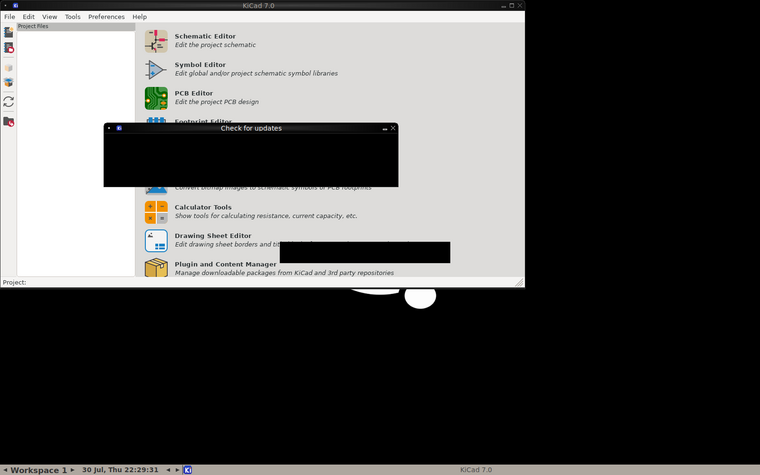
A browser desktop for a headless Adom container. Runs Xvfb+fluxbox+x11vnc+noVNC inside the container and maps a *.adom.cloud port so any browser (or a Hydrogen webview tab) shows the container's GUI — no SSH tunnel, no local viewer. The container hosts the page itself. (Formerly Headview.)

Install?
A browser desktop for a headless Adom container. Runs Xvfb+fluxbox+x11vnc+noVNC inside the container and maps a *.adom.cloud port so any browser (or a Hydrogen webview tab) shows the container's GUI — no SSH tunnel, no local viewer. The container hosts the page itself. (Formerly Headview.)
adom-wiki pkg install barrett-land/headless-deskmanLatest: v0.2.0, published
README
markdownThe Headless Deskman
A browser desktop for a headless Adom container.
headless-deskman gives a headless container a real GUI you can open in any
browser. It starts a virtual X display in the container, scrapes it with VNC,
bridges that to WebSocket with noVNC, and maps a *.adom.cloud port so
Cloudflare serves the page — the container hosts it itself. No SSH tunnel, no
local VNC viewer, no X server on your machine. Open the URL on a laptop, a phone,
or as a Hydrogen webview tab.
Renamed in 0.2.0. This app was
headview. The command is nowheadless-deskman— installing 0.2.0 removes the oldheadviewbinary, and a desktop you started under the old name keeps working (its state migrates from~/.config/headviewautomatically).
Why not ssh -Y?
X11 forwarding does not work through the adom.cloud SSH gateway: the gateway
relays your connection into the container, so the X11 channel never reaches the
container's sshd (DISPLAY comes back empty even with X11Forwarding yes and
xauth installed). The Headless Deskman sidesteps that entirely by serving over
HTTP/WebSocket, which the gateway and Cloudflare pass fine.
Install
adom-wiki pkg install barrett-land/headless-deskman
Quick start
# inside the target container:
headless-deskman up                     # start the desktop, map a port, print the URL
headless-deskman up --app "kicad"       # ...with KiCad already open on it
headless-deskman url                    # print the URL again
headless-deskman status                 # what's running + URL + password
headless-deskman down                   # stop everything and remove the port mapping
headless-deskman up prints a URL like https://desktop-<id>.adom.cloud/vnc.html
and a generated VNC password. Open it anywhere. To launch more apps onto the
desktop:
DISPLAY=:99 pcbnew &
DISPLAY=:99 xterm &
Open it as a Hydrogen tab (from a Hydrogen workspace terminal): headless-deskman open.
The stack
Xvfb (:99) → fluxbox → x11vnc (localhost:5900) → noVNC/websockify (:6080) → port-mapping → https://desktop-<id>.adom.cloud
Notes & limits
- Software rendering only. Xvfb has no GPU, so 2D GUIs are great but OpenGL/3D views (KiCad 3D viewer, Blender viewport) won't render well.
- Security. The VNC server binds
localhost; the public face is the noVNC HTTPS URL, protected by the generated VNC password (headless-deskman password). SetDESKMAN_PASSWORDto pin it instead of generating one. - Run
headless-deskmaninside the target container — it auto-detects the container slug viaadom-cliand maps its own port.
Commands
| Command | What it does |
|---|---|
headless-deskman up |
start desktop, map port, print URL (--display, --geometry, --vnc-port, --web-port, --prefix, --app, --no-password) |
headless-deskman down |
stop everything, remove the mapping (--keep-mapping to keep it) |
headless-deskman status |
show running processes, URL, password |
headless-deskman url |
print the desktop URL |
headless-deskman password |
print the VNC password |
headless-deskman open |
open as a Hydrogen webview tab (needs a Hydrogen terminal) |
headless-deskman install |
(re)install the skill from the wiki |