Wiki Notify for Google Chat
Public Made by Adomby adom
Turn wiki.adom.inc notification emails into a live Google Chat board. One card, one row per issue - newest first, OPEN/CLOSED status, origination date, actor, and a View link - continuously updated in your own Chat space via your own webhook. Emails are swept out of your inbox (trash, archive, or label). Closed items linger until 6am the next day, then drop off. Delegates all auth to adom-google; the only secret is your webhook URL, kept in your private config.
| Name | Last updated |
|---|---|
| bin | 1mo ago |
| docs | 3mo ago |
| .gitignore | 3mo ago |
| HANDOFF-ghost-items-fix.md | 2mo ago |
| install.sh | 3mo ago |
| package.json | 1mo ago |
| page.json | 1mo ago |
| README.md | 1mo ago |
| SKILL.md | 2mo ago |
| uninstall.sh | 3mo ago |
Wiki Notify for Google Chat (wiki-notify-gchat)
Turn wiki.adom.inc notification emails into a live board in Google Chat - and keep your Gmail inbox clean.
wiki notification email ──poll──> per-item state ──render──> ONE card in YOUR Chat space
        │                         (open/closed)              newest first, row per item
        └──sweep──> trash / archive / label
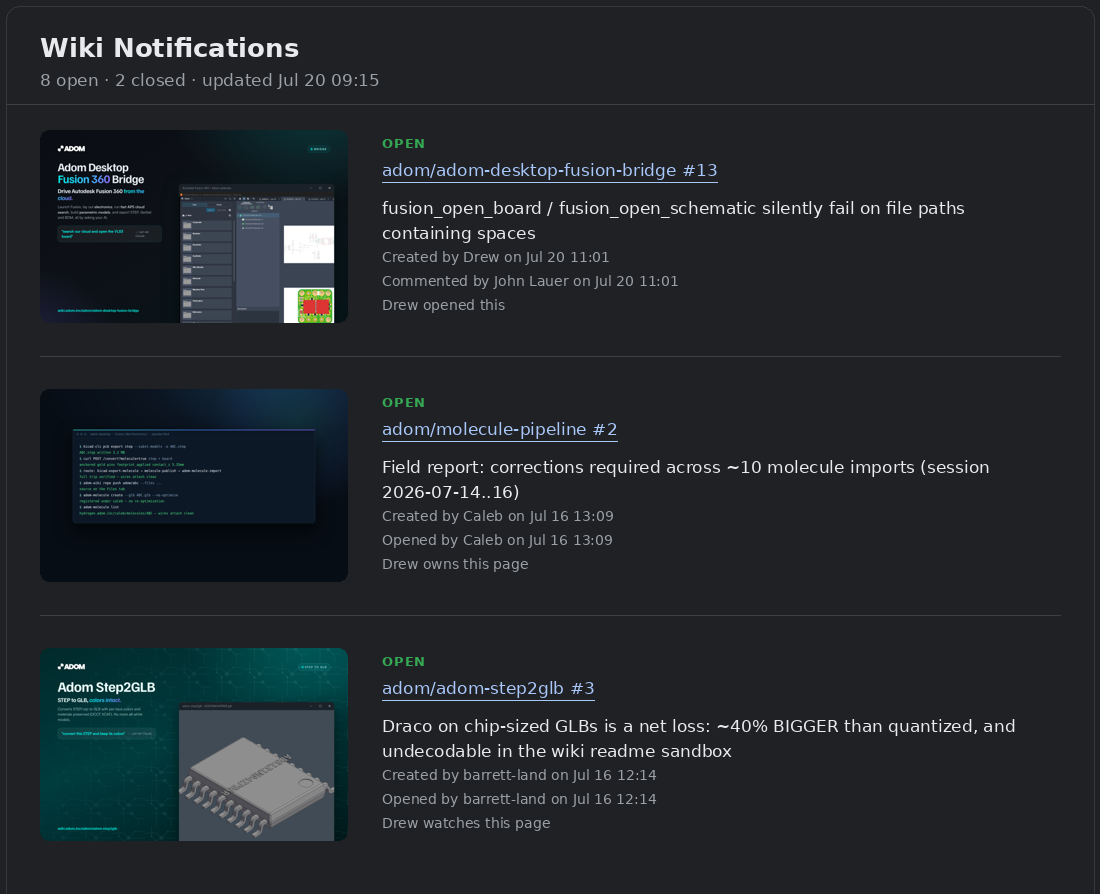
The board is a single card styled like the wiki digest posts: one
divider-ruled row per issue. The left column is the wiki page's hero
image (clickable, opens the page - resolved to the public raster blob via
adom-wiki page stats, since Chat's image proxy cannot render the SVG
/hero/ endpoint). The right column leads with the colored OPEN/CLOSED
status in the digest's [new]/[updated] slot, then the hyperlinked
item ref (page #N, opens the issue), the description, then three
explicitly labeled roles so nothing is ambiguous:
Page author: <name> (who owns the wiki page - not the issue),
Issue opened by <name> on <date> <time> (who posted the issue,
authoritative from the wiki DB), and
Latest: <opened|commented|closed|reopened|mentioned you> by <name> on <date> <time> (whose activity triggered the most recent update). Then
your involvement - "Drew owns this fix" (assigned), "Drew was
mentioned", "Drew commented on this", "Drew watches this page" - from the
mail's "You're receiving this because..." footer, shown only when it adds
a fact the labeled lines don't already state (so no "opened this" next to
an Issue-opened-by line that names you). Set fullName in the config
(e.g. "Drew Owens") so the tool can match you against wiki authorship; it
is otherwise derived from the notification's To header. New activity bubbles to the top.
(Chat cards have no native table widget: the columns widget caps at 2 and
grid tiles are equal-width and unreadable, so the table is this 2-column
layout; set "style": "blocks" for the compact per-item layout with View
buttons.) Open items stay on the board until resolved; when an item
is closed it shows CLOSED - so you get the satisfaction of seeing it done -
then drops off at 6am the next day to keep the board fresh.
How it works (and why a webhook + delete swap)
Google Chat incoming webhooks can only create messages, and only Chat apps
can post cards. So on every change, the tool POSTs a fresh card through your
webhook and then deletes the previous card via adom-google - you created
the space, so you are a space manager and may delete the webhook's messages.
Net effect: always exactly one board card, always the newest message in the
space. No change, no repost.
All Gmail + Chat auth is delegated to
adom-google (safe mode is enough).
The only secret this tool holds is your webhook URL, in your private
config (0600, outside any repo - never commit it).
Install
adom-wiki pkg install adom/wiki-notify-gchat
Setup (each team member does this once, ~3 minutes)
Prerequisite: an authorized adom-google
(adom-google status must show a refresh token; if not, run adom-google auth).
Step 1 - create your own Chat space + webhook (the one manual bit, in the Google Chat UI):
- Create a space for yourself, e.g. Wiki Notifications. It must be a space you create - the tool deletes its old board card as space manager.
- Click the space name > Apps & integrations > Webhooks >
Add webhook, name it (e.g.
wiki-notify), and copy the URL.
Step 2 - configure from the CLI (no file editing needed):
wiki-notify-gchat setup                                  # writes the starter config
wiki-notify-gchat config set webhook '<paste the URL>'   # YOUR secret - stays in the 0600 config
wiki-notify-gchat config set timezone America/Chicago    # IANA zone; the 6am purge follows it
wiki-notify-gchat config set meName Drew                 # first name, for the involvement line
wiki-notify-gchat config set fullName 'Drew Owens'       # wiki author name, detects pages you own
wiki-notify-gchat config set action trash                # or archive | label | keep
wiki-notify-gchat config show                            # review everything (token masked)
The webhook URL is a secret: it lives only in that private config file. If
you ever copy it anywhere else, keep it out of git (.gitignore it).
Step 3 - verify, seed, go live:
wiki-notify-gchat health           # checks auth, config, webhook shape, cron
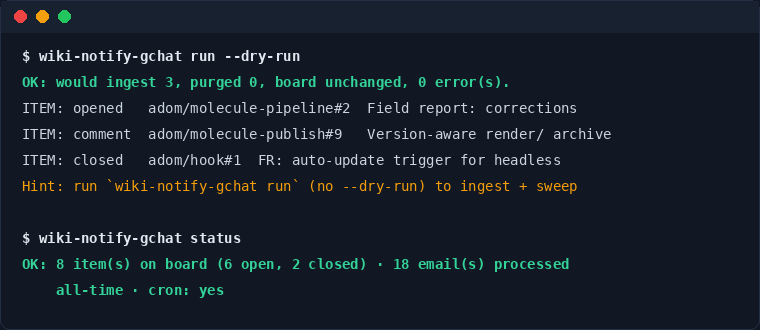
wiki-notify-gchat run --dry-run    # preview: what would be ingested + swept (sends nothing)
wiki-notify-gchat backfill         # seed the board from the last 30 days (no sweeping)
wiki-notify-gchat run              # ingest + sweep + post the board for real
wiki-notify-gchat install-cron     # keep it live every 2 minutes
Every command prints OK:/ERROR: plus Hint: lines telling you (or your
agent) the exact next step, and accepts --json.
What happens to the emails
"action" in the config decides:
| action | effect |
|---|---|
trash (default) |
out of the inbox, recoverable from Trash for 30 days |
archive |
out of the inbox, stays in All Mail forever |
label |
out of the inbox, tagged with labelName (auto-created), e.g. wiki-notify |
keep |
left untouched (board only) |
A requireInBody guard (default wiki.adom.inc) means only genuine wiki
notifications are ever touched - anything else the sender mails stays in your
inbox. A failed board post never sweeps the email; it retries next pass.
Board lifecycle
- New issue / reopened - row appears (or returns) as OPEN, jumps to the top.
- Comment / mention - row bumps to the top, and the comment text itself
renders under the row - commenter name, timestamp, then the comment -
one after another as a thread (up to the last 8; older ones collapse into
a
+N earliernote). Once a day atpurgeHour- the same moment closed items are cleared - every item's thread is trimmed to just its most recent comment so the board never bloats. - Waiting on someone else - an open item on another member's page (and no
mention of you) shows as WAITING; if it is still waiting at
purgeHourthe following day it leaves the board like closed items do - but it is retained in state, so the moment the other party acts it reappears (and if their action closes it, it shows CLOSED). The subtitle counts these as "quietly waiting". - Weekly waiting digest - Sundays at
purgeHour(yourtimezone), a brief separate message lists everything currently waiting: item, link, whose action is needed, days waiting. Last week's digest is swap-deleted. Disable withconfig set weeklySummary false; post on demand withwiki-notify-gchat weekly. - Closed - row shows CLOSED (gray) and sticks around so you can enjoy it,
then is removed at
purgeHour(default 6am, yourtimezone) the next day. - The board caps at
maxRows(default 40); older items collapse into a+N older item(s)line.
Config reference (~/.config/wiki-notify-gchat/config.json)
| Field | Default | Meaning |
|---|---|---|
webhook |
- | YOUR incoming-webhook URL (secret) |
query |
from:[email protected] in:inbox |
Gmail search for candidate emails |
requireInBody |
wiki.adom.inc |
body guard; non-matching mail is never touched |
action |
trash |
trash / archive / label / keep |
labelName |
wiki-notify |
label used when action = label |
pollSeconds |
120 |
poll + cron interval |
purgeHour |
6 |
hour (0-23) closed items drop off, day after closing |
timezone |
container local | IANA zone for dates + the purge |
maxRows |
40 |
card row cap |
boardTitle |
Wiki Notifications |
card header |
style |
table |
table (item ref + status left, details right, divider-ruled rows) or blocks (per-item blocks with View buttons) |
meName |
You |
your first name, used in the involvement line ("Drew opened this") |
fullName |
auto (To header) | your wiki author name (e.g. "Drew Owens"), used to detect pages you authored |
weeklySummary |
true |
Sunday waiting-on-others digest at purgeHour |
delegated |
{} |
pages you own but handed off, {"owner/slug": "Name"}: their open items triage as WAITING attributed to the delegate (mentions still come to you). Set via config set delegated '{"adom/molecule-publish": "Aditya"}' |
Staying alive and staying current (zero maintenance)
- Cold boots self-heal.
install-cronwires three recovery triggers - a cron@rebootentry, a~/.bashrcsnippet, and a Claude CodeUserPromptSubmithook - all callingwiki-notify-gchat ensure(throttled, 15 min).ensurerestarts the cron service via passwordless sudo; if cron cannot start at all it launches a detached watch loop instead (and retires it once cron is back). Nobody ever runs sudo by hand. - Updates are automatic. adom-hook
(part of every adom/core install) runs
adom-wiki pkg updateon a throttled schedule, which pulls new wiki-notify-gchat versions and re-runs the install script. Nothing to do. - Overlapping passes are impossible:
runtakes a file lock, so cron, the watch fallback, andensurenever double-post the board.
Commands
setup | config [set <key> <value>] | health | run [--dry-run]
backfill [--days N] | board [--dry-run] | status | watch
install-cron | ensure [--force] | uninstall-cron | install
All commands accept --json for a {status, data, hints} envelope.
board --dry-run prints the exact card JSON without posting.
Files
| Path | What |
|---|---|
~/.config/wiki-notify-gchat/config.json |
config incl. webhook (0600, private) |
~/.local/state/wiki-notify-gchat/state.json |
item state, processed ids, board message id |
~/.local/state/wiki-notify-gchat/activity.log |
one line per ingest/board/purge |
~/.local/state/wiki-notify-gchat/cron.log |
cron pass output |
For future devs
docs/DESIGN.md records why things are built this way: the Chat API constraints (webhooks are create-only; only apps can send cards; the delete-repost swap and the deleted-message-tombstone trap), the card layouts we tried and killed (pipe tables, grids), the Gmail search quirks, the two-source involvement line, the cron/cold-boot lessons, and why a central service container was deliberately rejected. Read it before redesigning anything.
Troubleshooting
healthsays not authorized: runadom-google auth.- Board stopped updating after a container cold boot: it self-heals on the
next terminal open or Claude prompt (see above); to force it immediately,
wiki-notify-gchat ensure --force. - Board card duplicated (old one not deleted): you must be a space manager of the space - use a space you created. The stray card is one manual delete away; the tool logs a WARN when this happens.
- Wrong purge time: set
"timezone"to your IANA zone. - Board over-counts open items: since 1.6.9 the status sync also drops issues deleted or renumbered off a still-existing page (not just whole-page deletions), so ghosts self-heal within a sync cycle.
Non-Adom orgs
Everything rides on adom-google; see
its page for standing up Google
OAuth outside Adom (self-hosted gateway or managed container via
[email protected]). Adjust query/requireInBody to your own wiki's
notification sender.