Session Monitor
Public Made by Adomby adom
Drive your Claude Code sessions from your phone — every container's sessions in one board. Talk to any of them by voice or text, pick the model per session, and get a push when a session asks a question or is ready for you. Install this CLI to hook a container in and manage its keeper.
Session Monitor
Drive your Claude Code sessions from your phone. Every container's sessions in one board — talk to any of them by voice or text, pick the model per session, and get a push when a session needs you. Works while your laptop is closed.
Talk to a session — by voice
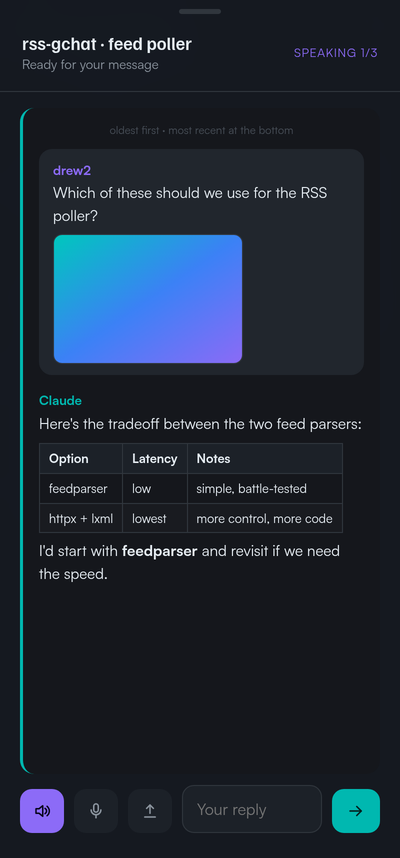
- Reads Claude's latest reply aloud, listens for yours
- The whole thread in view
- Speaker / mic / send
…or by text
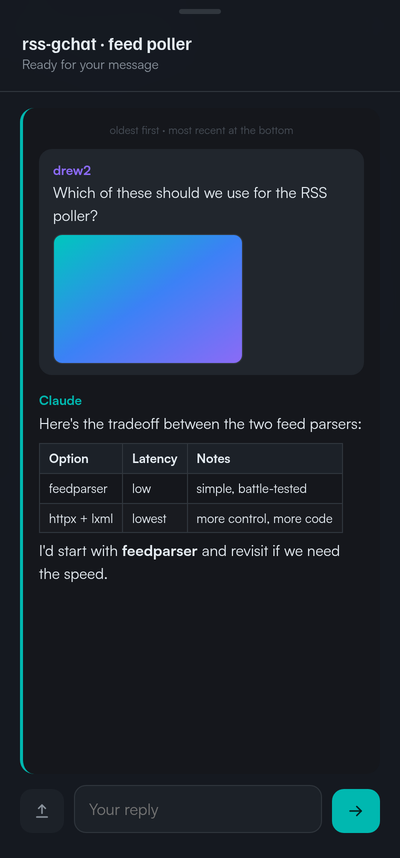
- Same thread, chat-style — type and send
- Pick voice or text in Settings
Details at a glance
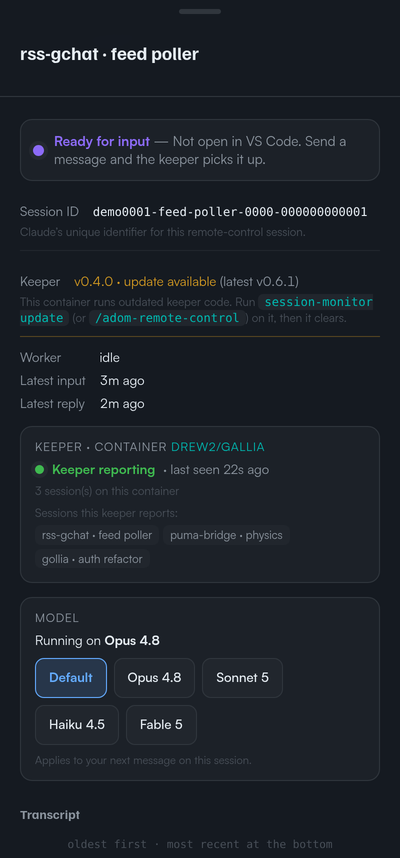
- Live status, keeper health, full transcript
- Choose the model for the next turn — Opus, Sonnet, Haiku, Fable
Settings
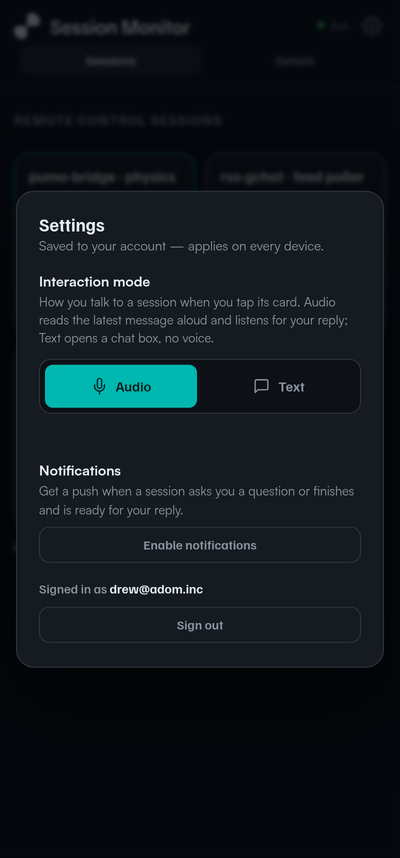
- Voice or text mode — syncs across your devices
- Push notifications: when a session asks a question or is ready for you
- Sign in with Adom
Get started
- In a container, run
/adom-remote-control— hooks it into your board. - Open the board on your phone and Sign in with Adom.
- (iPhone) Add to Home Screen, then enable notifications.
The CLI
Installing this package puts session-monitor on your PATH — it hooks a container in and manages its keeper (the little agent that reads that container's sessions and reports them to your board).
adom-wiki pkg install adom/session-monitor-cli      # puts `session-monitor` on ~/.local/bin

session-monitor keeper start --token <YOUR_TOKEN>   # hook THIS container in + supervise its keeper
session-monitor keeper status                        # local keeper + is the board receiving reports?
session-monitor keeper stop                          # stop this container's keeper
session-monitor keeper logs -n 60                    # tail the keeper log
session-monitor status                               # keeper-fleet health across your containers
session-monitor open                                 # print the board URL for your phone
Add --json to any command for a {status, message, data, hints} envelope.
See also: adom-remote-control — the one-liner skill that hooks a container in (it drives this CLI).
# Session Monitor
**Drive your Claude Code sessions from your phone.** Every container's sessions in one board — talk to any of them by voice or text, pick the model per session, and get a push when a session needs you. Works while your laptop is closed.
---
### Talk to a session — by voice

- Reads Claude's latest reply aloud, listens for yours
- The whole thread in view
- Speaker / mic / send
### …or by text

- Same thread, chat-style — type and send
- Pick voice or text in Settings
### Details at a glance

- Live status, keeper health, full transcript
- Choose the model for the next turn — Opus, Sonnet, Haiku, Fable
### Settings

- Voice or text mode — syncs across your devices
- Push notifications: when a session asks a question or is ready for you
- Sign in with Adom
---
### Get started
1. In a container, run **[`/adom-remote-control`](https://wiki.adom.inc/adom/adom-remote-control)** — hooks it into your board.
2. Open the board on your phone and **Sign in with Adom**.
3. (iPhone) Add to Home Screen, then enable notifications.
---
### The CLI
Installing this package puts `session-monitor` on your PATH — it hooks a container in and manages its keeper (the little agent that reads that container's sessions and reports them to your board).
```bash
adom-wiki pkg install adom/session-monitor-cli # puts `session-monitor` on ~/.local/bin
session-monitor keeper start --token <YOUR_TOKEN> # hook THIS container in + supervise its keeper
session-monitor keeper status # local keeper + is the board receiving reports?
session-monitor keeper stop # stop this container's keeper
session-monitor keeper logs -n 60 # tail the keeper log
session-monitor status # keeper-fleet health across your containers
session-monitor open # print the board URL for your phone
```
Add `--json` to any command for a `{status, message, data, hints}` envelope.
**See also:** [`adom-remote-control`](https://wiki.adom.inc/adom/adom-remote-control) — the one-liner skill that hooks a container in (it drives this CLI).