Dock Bar SDK
Public Made by Adomby adom
The Adom Hydrogen dock bar SDK: drop a dock.json/dockbar.json manifest into your wiki app repo and it becomes a dock candidate. Full manifest reference (webview, container_command steps with --print-url, console show/hide, the ai block) plus the click lifecycle, defaults, testing, and the publisher checklist.
Adom Hydrogen: Dock Bar SDK
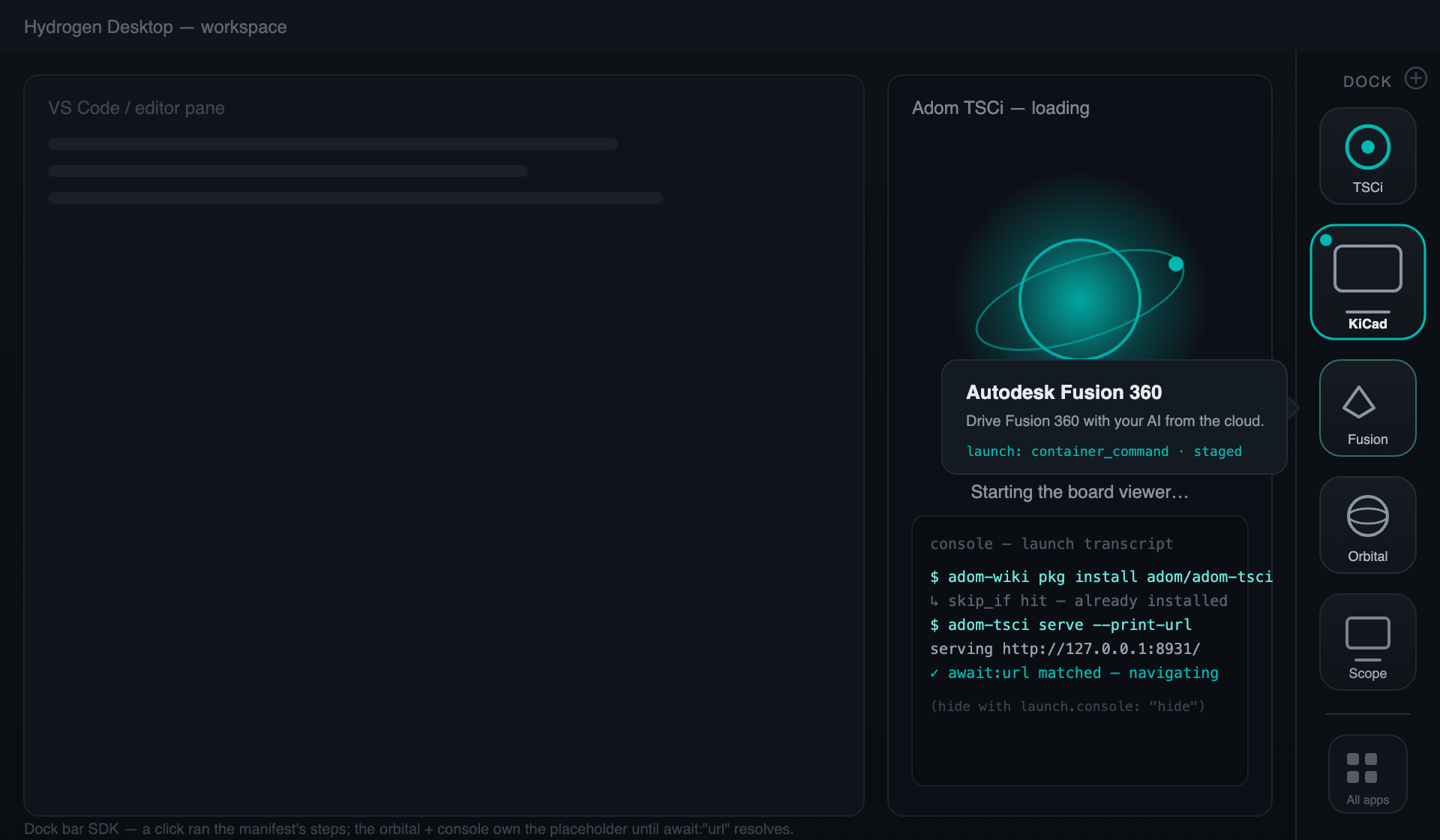
The dock bar is the app-launcher rail on the right edge of the Adom Hydrogen workspace. Every card in it is a wiki app page. This page is the complete SDK: how your app becomes a dock candidate, the full manifest reference, exactly what happens on click, and how to test before you publish.
The one-file contract
Drop a manifest into your wiki page repo and Hydrogen picks it up: your app is now a dock candidate any user (or their AI) can add, and eligible for the curated global list.
Discovery. Hydrogen looks for, in order, first match wins:
dock.jsonat the repo root (canonical)dockbar.jsonat the repo root (equivalent alias)dock.json/dockbar.jsonin a sub-folder, shallowest depth first, alphabetical within a depth. Search depth is capped at 2 levels;node_modules/,.git/, and dot-folders are never searched.
Root placement is strongly preferred, sub-folder discovery exists so monorepo pages can keep the manifest beside the app it describes.
Display is never in the manifest. The dock shows your page's own name, one-line brief, and hero. The manifest describes only how to launch.
The two-layer dock list
- The global manifest (adom-curated): world-readable at
https://wiki.adom.inc/blob/bootstrap/hydrogen-bootstrap/dock/apps.json. Only the adom team edits it;featuredandorderexist only there. Hydrogen refreshes it on launch and on the manifest's ownpoll_secondscadence, so curation never waits for an Hydrogen release. Want in? Make your app dock-ready (below), then open an issue on the adom/adom-hydrogen wiki page. - User-added apps (self-serve, local): any user adds any public wiki app
from Dock settings with
owner/slug, or by asking their AI ("add adom/orbital-lab to my dock"). Local, pinnable, never affects other users.
Manifest reference (dock_manifest: "1.1.0")
{
  "dock_manifest": "1.1.0",
  "webview": { "title": "Adom TSCi", "favicon": "icons/tsci.svg" },
  "launch": {
    "mode": "container_command",
    "console": "show",
    "steps": [
      { "label": "Installing Adom TSCi",
        "run": "adom-wiki pkg install adom/adom-tsci",
        "skip_if": "command -v adom-tsci",
        "timeout_seconds": 180 },
      { "label": "Starting the board viewer",
        "run": "adom-tsci serve --print-url",
        "await": "url",
        "timeout_seconds": 60 }
    ],
    "on_ready": "navigate_placeholder",
    "ai": {
      "prompt": "The user just launched Adom TSCi from the dock. Take over the webview tab named \"Adom TSCi\" and load the board they were last viewing.",
      "thread": "existing",
      "thread_fallback": "new",
      "submit": "staged",
      "typed": false
    }
  }
}
webview: what opens
| Field | Required | Meaning |
|---|---|---|
title |
yes | Webview tab title while the app is loaded |
favicon |
no | Tab icon, a path in your page repo |
url |
for mode: "webview" |
Page to load directly (hosted app, or the wiki page itself) |
launch: what a click does
mode: "webview": nothing to install; the dock loadswebview.urldirectly.mode: "container_command": runstepsin order in the user's workspace, thenon_readydecides who owns the placeholder webview.mode: "ai_thread": no steps; the click goes straight to an AI thread per theaiblock.
| Field | Default | Meaning |
|---|---|---|
console |
"show" |
"show": the full command transcript streams into the placeholder webview under the orbital loading animation while steps run. "hide": orbital animation only, use when the transcript is noise (single fast step, or output that would confuse users). Step labels always tick in the launch toast either way. |
on_ready |
"navigate_placeholder" |
"navigate_placeholder": navigate the placeholder to the URL a step produced. "hand_to_ai": the steps opened a native app; an AI thread (per ai) takes the placeholder over. |
steps[]: the container command contract
| Field | Required | Meaning |
|---|---|---|
label |
yes | Shown in the launch toast while the step runs |
run |
yes | The command, run in the user's workspace |
skip_if |
no | Probe command; exit 0 skips the step (make installs idempotent) |
await |
no | "url": scrape the first URL the command prints, hold it for on_ready |
url_pattern |
no | Scrape regex, default https?://\S+ |
timeout_seconds |
no | Per-step budget; timing out fails the launch with this label |
The --print-url convention is the whole integration contract: a
dock-ready server verb prints its own reachable URL to stdout and keeps
serving. Hydrogen does the rest.
ai: attach an AI thread
No ai block → no thread is ever opened. That's the default: a dock click is
not an AI event unless your manifest says so.
| Field | Default | Meaning |
|---|---|---|
prompt |
app-naming default | The pre-canned prompt. If omitted on an ai launch, Hydrogen uses a sensible default naming the app |
thread |
"new" |
"new": open a fresh conversation. "existing": find this app's thread and pull it to the foreground (below) |
thread_fallback |
"new" |
When thread: "existing" finds nothing: "new" opens a fresh thread; "current" injects into whatever conversation is open |
submit |
"staged" |
"staged": the prompt is placed in the chat input, ready for the user to review and send. "auto": paste + submit immediately |
typed |
false |
false: instant placement. true: human-cadence typing animation, tutorial-style, so the user watches the prompt being written |
thread: "existing", per-app thread lookup. Threads Hydrogen opens for a dock
app are tagged with the app's owner/slug. On the next click, "existing"
finds the most recent thread tagged for your app, foregrounds the Claude
panel, and pulls that conversation up, the user resumes where they left off
instead of accumulating one orphan thread per click. Only if no tagged thread
exists does thread_fallback apply.
Choosing submit + typed:
| You want | Set |
|---|---|
| User stays in control (default, recommended) | submit: "staged" |
| App drives itself hands-free | submit: "auto" |
| Tutorial feel, user watches the prompt appear | typed: true (pairs well with staged) |
| Fast utility relaunch | submit: "auto", typed: false |
What a click actually does (lifecycle)
click ─▶ placeholder webview opens instantly
          │  theme background + Adom orbital animation (free, you bundle nothing)
          │  console transcript streams under it        (unless console: "hide")
          ├─ steps run in order in the workspace         (labels tick in the toast)
          │    skip_if short-circuits · timeout fails the launch with the label
          ├─ a step with await:"url" yields the app URL
          ├─ on_ready:
          │    navigate_placeholder ─▶ placeholder navigates to the URL, orbital fades out
          │    hand_to_ai          ─▶ AI thread (per ai block) takes the webview over
          └─ ai block (if present):
               thread: existing ─▶ foreground this app's tagged thread
                        └ none found ─▶ thread_fallback (new | current)
               prompt placed per submit (staged | auto) and typed (instant | typed)
The loading screen is free: the instant a launch involves a webview, Hydrogen paints the panel with the workspace theme token and runs the transparent orbital animation until the app URL truly loads. Apps opt into nothing. The embeddable single-file animation lives on the adom/orbital-lab wiki page.
Legacy fallbacks
When no dock.json/dockbar.json exists, Hydrogen honors a dock block (same
shape) in the page's package.json, and a legacy launch.ai_prompt string
(equivalent to ai.prompt with submit: "auto", thread: "new"). New apps
should always ship the standalone manifest.
Version history
| dock_manifest | Changes |
|---|---|
1.0.0 |
Initial: webview, launch modes, steps contract, ai block (submit default "auto", thread: "existing" = currently-open conversation only) |
1.1.0 |
dockbar.json alias + sub-folder discovery; launch.console (default "show"); submit default flips to "staged" (user reviews before send); thread: "existing" becomes per-app tagged-thread lookup with thread_fallback |
Manifests declaring 1.0.0 keep 1.0.0 defaults (submit: "auto"), the
default flip applies to 1.1.0+ manifests only, so no shipped app changes
behavior under its feet.
Testing a draft (your own Hydrogen only)
- Per-app, instant: Dock settings (gear) → Add app →
owner/slugreads your page's live manifest immediately. - Whole-list draft: Dock settings → Manifest URL (draft), point the
dock at any
apps.json(a draft-branch blob of adom/hydrogen-bootstrap, or your own file). A DRAFT badge stays on the rail while active; clear the field to return to production. - Simulated preview: the workbench on the adom/adom-hydrogen-dock wiki page simulates the card, launch transcript, and AI-thread behavior.
Publisher checklist
- Public wiki page with a hero and a billboard-quality one-line brief, the dock shows exactly these.
- Install step is
adom-wiki pkg install <owner>/<slug>with askip_ifprobe so relaunches skip it. - Server verb takes
--print-url; that step getsawait: "url". - Sane
timeout_seconds(180 install / 60 serve are good defaults). - Prefer
submit: "staged"(the default), auto-submit is for apps that are useless without the AI acting immediately. - Add
dock.jsonto your page repo root and push. - Preview in the dock workbench, then (optionally) request global listing via an issue on adom/adom-hydrogen.
Implementation status
| Capability | Hydrogen (Windows, main line) | Hydrogen (macOS line) |
|---|---|---|
Discovery: root dock.json |
✅ shipped | ⏳ legacy package.json dock block only |
Discovery: dockbar.json alias + sub-folders |
🔜 spec 1.1.0 | 🔜 spec 1.1.0 |
container_command steps + --print-url |
✅ shipped | ✅ shipped |
| Orbital loading screen + console stream | ✅ shipped | ✅ shipped |
launch.console toggle |
🔜 spec 1.1.0 | 🔜 spec 1.1.0 |
ai block: submit / typed |
✅ shipped (1.0.0 defaults) | ⏳ legacy ai_prompt only |
thread: "existing" per-app lookup |
🔜 spec 1.1.0 (1.0.0 = current conversation) | 🔜 spec 1.1.0 |
This table is updated as the lines converge; the manifest contract above is
the source of truth either way, declare 1.1.0 and your manifest is forward
compatible.
# Adom Hydrogen: Dock Bar SDK
The dock bar is the app-launcher rail on the right edge of the Adom Hydrogen
workspace. Every card in it is a wiki app page. This page is the complete SDK:
how your app becomes a dock candidate, the full manifest reference, exactly
what happens on click, and how to test before you publish.

## The one-file contract
Drop a manifest into your wiki page repo and Hydrogen picks it up: your app is now
a dock candidate any user (or their AI) can add, and eligible for the curated
global list.
**Discovery.** Hydrogen looks for, in order, first match wins:
1. `dock.json` at the repo root (canonical)
2. `dockbar.json` at the repo root (equivalent alias)
3. `dock.json` / `dockbar.json` in a sub-folder, shallowest depth first,
alphabetical within a depth. Search depth is capped at 2 levels;
`node_modules/`, `.git/`, and dot-folders are never searched.
Root placement is strongly preferred, sub-folder discovery exists so monorepo
pages can keep the manifest beside the app it describes.
**Display is never in the manifest.** The dock shows your page's own name,
one-line brief, and hero. The manifest describes only *how to launch*.
## The two-layer dock list
1. **The global manifest (adom-curated)**: world-readable at
`https://wiki.adom.inc/blob/bootstrap/hydrogen-bootstrap/dock/apps.json`. Only the
adom team edits it; `featured` and `order` exist only there. Hydrogen refreshes it
on launch and on the manifest's own `poll_seconds` cadence, so curation
never waits for an Hydrogen release. Want in? Make your app dock-ready (below),
then open an issue on the adom/adom-hydrogen wiki page.
2. **User-added apps (self-serve, local)**: any user adds any public wiki app
from Dock settings with `owner/slug`, or by asking their AI ("add
adom/orbital-lab to my dock"). Local, pinnable, never affects other users.
## Manifest reference (`dock_manifest: "1.1.0"`)
```json
{
"dock_manifest": "1.1.0",
"webview": { "title": "Adom TSCi", "favicon": "icons/tsci.svg" },
"launch": {
"mode": "container_command",
"console": "show",
"steps": [
{ "label": "Installing Adom TSCi",
"run": "adom-wiki pkg install adom/adom-tsci",
"skip_if": "command -v adom-tsci",
"timeout_seconds": 180 },
{ "label": "Starting the board viewer",
"run": "adom-tsci serve --print-url",
"await": "url",
"timeout_seconds": 60 }
],
"on_ready": "navigate_placeholder",
"ai": {
"prompt": "The user just launched Adom TSCi from the dock. Take over the webview tab named \"Adom TSCi\" and load the board they were last viewing.",
"thread": "existing",
"thread_fallback": "new",
"submit": "staged",
"typed": false
}
}
}
```
### `webview`: what opens
| Field | Required | Meaning |
|---|---|---|
| `title` | yes | Webview tab title while the app is loaded |
| `favicon` | no | Tab icon, a path in your page repo |
| `url` | for `mode: "webview"` | Page to load directly (hosted app, or the wiki page itself) |
### `launch`: what a click does
- `mode: "webview"`: nothing to install; the dock loads `webview.url` directly.
- `mode: "container_command"`: run `steps` in order in the user's workspace,
then `on_ready` decides who owns the placeholder webview.
- `mode: "ai_thread"`: no steps; the click goes straight to an AI thread per
the `ai` block.
| Field | Default | Meaning |
|---|---|---|
| `console` | `"show"` | `"show"`: the full command transcript streams into the placeholder webview under the orbital loading animation while steps run. `"hide"`: orbital animation only, use when the transcript is noise (single fast step, or output that would confuse users). Step *labels* always tick in the launch toast either way. |
| `on_ready` | `"navigate_placeholder"` | `"navigate_placeholder"`: navigate the placeholder to the URL a step produced. `"hand_to_ai"`: the steps opened a native app; an AI thread (per `ai`) takes the placeholder over. |
### `steps[]`: the container command contract
| Field | Required | Meaning |
|---|---|---|
| `label` | yes | Shown in the launch toast while the step runs |
| `run` | yes | The command, run in the user's workspace |
| `skip_if` | no | Probe command; exit 0 skips the step (make installs idempotent) |
| `await` | no | `"url"`: scrape the first URL the command prints, hold it for `on_ready` |
| `url_pattern` | no | Scrape regex, default `https?://\S+` |
| `timeout_seconds` | no | Per-step budget; timing out fails the launch with this label |
**The `--print-url` convention is the whole integration contract**: a
dock-ready server verb prints its own reachable URL to stdout and keeps
serving. Hydrogen does the rest.
### `ai`: attach an AI thread
No `ai` block → no thread is ever opened. That's the default: a dock click is
not an AI event unless your manifest says so.
| Field | Default | Meaning |
|---|---|---|
| `prompt` | app-naming default | The pre-canned prompt. If omitted on an ai launch, Hydrogen uses a sensible default naming the app |
| `thread` | `"new"` | `"new"`: open a fresh conversation. `"existing"`: find this app's thread and pull it to the foreground (below) |
| `thread_fallback` | `"new"` | When `thread: "existing"` finds nothing: `"new"` opens a fresh thread; `"current"` injects into whatever conversation is open |
| `submit` | `"staged"` | `"staged"`: the prompt is placed in the chat input, ready for the user to review and send. `"auto"`: paste + submit immediately |
| `typed` | `false` | `false`: instant placement. `true`: human-cadence typing animation, tutorial-style, so the user watches the prompt being written |
**`thread: "existing"`, per-app thread lookup.** Threads Hydrogen opens for a dock
app are tagged with the app's `owner/slug`. On the next click, `"existing"`
finds the most recent thread tagged for *your* app, foregrounds the Claude
panel, and pulls that conversation up, the user resumes where they left off
instead of accumulating one orphan thread per click. Only if no tagged thread
exists does `thread_fallback` apply.
**Choosing `submit` + `typed`:**
| You want | Set |
|---|---|
| User stays in control (default, recommended) | `submit: "staged"` |
| App drives itself hands-free | `submit: "auto"` |
| Tutorial feel, user watches the prompt appear | `typed: true` (pairs well with `staged`) |
| Fast utility relaunch | `submit: "auto", typed: false` |
## What a click actually does (lifecycle)
```
click ─▶ placeholder webview opens instantly
│ theme background + Adom orbital animation (free, you bundle nothing)
│ console transcript streams under it (unless console: "hide")
├─ steps run in order in the workspace (labels tick in the toast)
│ skip_if short-circuits · timeout fails the launch with the label
├─ a step with await:"url" yields the app URL
├─ on_ready:
│ navigate_placeholder ─▶ placeholder navigates to the URL, orbital fades out
│ hand_to_ai ─▶ AI thread (per ai block) takes the webview over
└─ ai block (if present):
thread: existing ─▶ foreground this app's tagged thread
└ none found ─▶ thread_fallback (new | current)
prompt placed per submit (staged | auto) and typed (instant | typed)
```
The loading screen is free: the instant a launch involves a webview, Hydrogen paints
the panel with the workspace theme token and runs the transparent orbital
animation until the app URL truly loads. Apps opt into nothing. The embeddable
single-file animation lives on the adom/orbital-lab wiki page.
## Legacy fallbacks
When no `dock.json`/`dockbar.json` exists, Hydrogen honors a `dock` block (same
shape) in the page's `package.json`, and a legacy `launch.ai_prompt` string
(equivalent to `ai.prompt` with `submit: "auto"`, `thread: "new"`). New apps
should always ship the standalone manifest.
## Version history
| dock_manifest | Changes |
|---|---|
| `1.0.0` | Initial: `webview`, `launch` modes, steps contract, `ai` block (`submit` default `"auto"`, `thread: "existing"` = currently-open conversation only) |
| `1.1.0` | `dockbar.json` alias + sub-folder discovery; `launch.console` (default `"show"`); `submit` default flips to `"staged"` (user reviews before send); `thread: "existing"` becomes per-app tagged-thread lookup with `thread_fallback` |
Manifests declaring `1.0.0` keep 1.0.0 defaults (`submit: "auto"`), the
default flip applies to `1.1.0`+ manifests only, so no shipped app changes
behavior under its feet.
## Testing a draft (your own Hydrogen only)
- **Per-app, instant:** Dock settings (gear) → Add app → `owner/slug` reads
your page's live manifest immediately.
- **Whole-list draft:** Dock settings → **Manifest URL (draft)**, point the
dock at any `apps.json` (a draft-branch blob of adom/hydrogen-bootstrap, or your
own file). A **DRAFT** badge stays on the rail while active; clear the field
to return to production.
- **Simulated preview:** the workbench on the adom/adom-hydrogen-dock wiki
page simulates the card, launch transcript, and AI-thread behavior.
## Publisher checklist
1. Public wiki page with a hero and a billboard-quality one-line brief, the
dock shows exactly these.
2. Install step is `adom-wiki pkg install <owner>/<slug>` with a `skip_if`
probe so relaunches skip it.
3. Server verb takes `--print-url`; that step gets `await: "url"`.
4. Sane `timeout_seconds` (180 install / 60 serve are good defaults).
5. Prefer `submit: "staged"` (the default), auto-submit is for apps that are
useless without the AI acting immediately.
6. Add `dock.json` to your page repo root and push.
7. Preview in the dock workbench, then (optionally) request global listing via
an issue on adom/adom-hydrogen.
## Implementation status
| Capability | Hydrogen (Windows, main line) | Hydrogen (macOS line) |
|---|---|---|
| Discovery: root `dock.json` | ✅ shipped | ⏳ legacy `package.json` dock block only |
| Discovery: `dockbar.json` alias + sub-folders | 🔜 spec 1.1.0 | 🔜 spec 1.1.0 |
| `container_command` steps + `--print-url` | ✅ shipped | ✅ shipped |
| Orbital loading screen + console stream | ✅ shipped | ✅ shipped |
| `launch.console` toggle | 🔜 spec 1.1.0 | 🔜 spec 1.1.0 |
| `ai` block: `submit` / `typed` | ✅ shipped (1.0.0 defaults) | ⏳ legacy `ai_prompt` only |
| `thread: "existing"` per-app lookup | 🔜 spec 1.1.0 (1.0.0 = current conversation) | 🔜 spec 1.1.0 |
This table is updated as the lines converge; the manifest contract above is
the source of truth either way, declare `1.1.0` and your manifest is forward
compatible.