Altium - the Altium Bridge
Public Made by Adomby adom
Adom Bridge for Altium Designer: a resident DelphiScript agent gives the AI eval, the 1,100-command process launcher, all 8 EDA surfaces with screenshots, compile/ERC, DRC, OutJob outputs, native SchLib/PcbLib authoring with STEP 3D bodies, and dialog handling by PID.

Install?
Skills for your container so your AI knows how to drive the Altium Designer bridge (altium_* verbs). The bridge runtime itself is the release zip; Adom Bridge loads that.
adom-wiki pkg install adom/altium-bridgeLatest: v0.2.58, published
Dependencies 1 app
- app adom/adom-bridge ^2.0.3
Contents
- Two artifacts on this page — which one do you want?
- Video: the Altium flow (review draft)
- The window tour — one imported chip, every surface
- Symbol — altium_show_symbol (authored by altium_create_symbol)
- Footprint — altium_show_footprint (authored by altium_create_footprint)
- Library manager — altium_show_library / altium_list_library
- Schematic — altium_place_on_sch
- Symbol variants — altium_build_symbol_modes
- 2D board — altium_test_board / altium_swap_footprint
- 3D board — the STEP body on a real PCB
- How it fits together
- Verb reference
- The dock bar card
- Web control — "Add to Altium library" from a wiki page
- The skillpack — ten skills, propagated like KiCad's and Fusion's
- Parts carry all three vendors
- Zero dialogs, by construction
- Lineage
- Running / dependencies
README
markdownAdom Bridge — Altium Bridge
A reverse bridge that lets Adom Bridge (ab) — and the AI driving it — control the user's own
Altium Designer on Windows: open and drive every design surface, author native
.SchLib/.PcbLib libraries (symbols, footprints, STEP 3D bodies), place parts on schematics and
boards, run compile/ERC and DRC, run OutJobs (Gerber, ODB++, NC drill, BOM, pick-and-place), and
screenshot any window back to the AI.
Keyword: say altium to the AI to reach this bridge. It matches the bridge name altium
and the verb prefix altium_.
Two artifacts on this page — which one do you want?
Release ZIP ( adom-bridge-altium-v*.zip)Package ( adom-wiki pkg install adom/altium-bridge)What it is The bridge runtime: the native altium-bridge.exe(Rust) + the DelphiScript agent that drive AltiumSkills + docs only, for a container/agent Who loads it Adom Bridge downloads it via adom-bridge-altium-manifest.jsonYou, into a container, to teach an agent the altium_*verbsContains server, handlers, agent template, process catalog parser SKILL.mdfiles (no binaries, no images)You install it manually? No — Bridge handles it Yes The package is not the bridge. Installing the package does not give you a working bridge; Adom Bridge loading the release zip does.
Altium Designer is the user's host app. The bridge detects an existing install
(%ProgramFiles%\Altium\AD*\X2.EXE), launches it in the background, bootstraps a resident
DelphiScript agent inside it (the REPL lane), and hands the AI 120 altium_* verbs.
- Page / docs: https://wiki.adom.inc/adom/altium-bridge
- Bridge SDK: https://wiki.adom.inc/adom/adom-bridge-sdk
- Verb namespace:
altium_*· Status verb:altium_status· Health:GET /health - Plan of record (every measured engine fact): the
altium-bridge-planskill in the package.
Every screenshot below is a real capture of Altium Designer 26.9.1 driven end-to-end through the bridge. Two parts appear, both imported from their wiki component pages and authored into native libraries by the bridge itself: the WCH CH340G (USB-serial SOP-16) and the Microchip LAN7800 (USB 3.1 → gigabit Ethernet, QFN-48 + EP) — the latter as ONE component with ten symbol display modes and seven footprint variants, each footprint carrying its own 3D body.
Video: the Altium flow (review draft)
 Video draft |
John and Colby walk through the Altium Bridge, from a prompt to a finished board in Altium Designer. The review draft is the working cut before the voiceover is recorded, so the screen recording section is still silent. Watch it to review the edit, and expect it to be replaced in place by the final video. Watch the draft |
The window tour — one imported chip, every surface
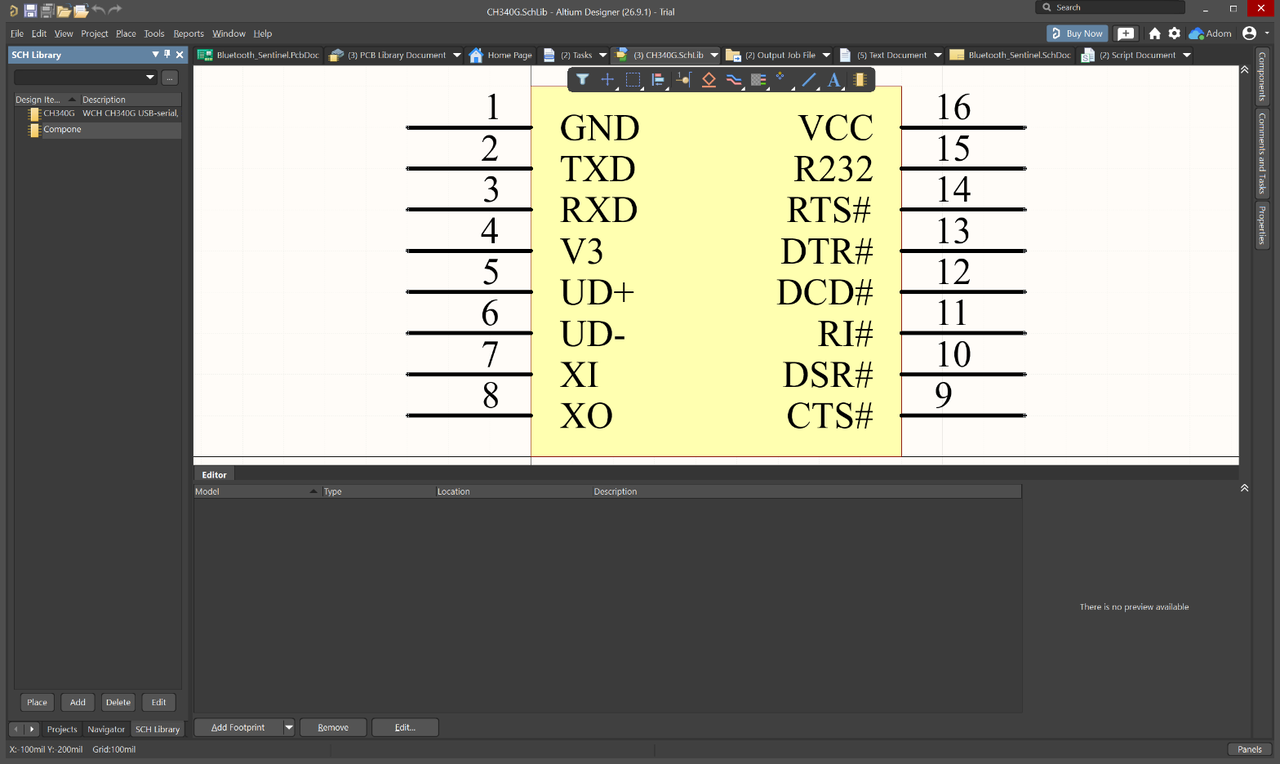
Symbol — altium_show_symbol (authored by altium_create_symbol)
All 16 named pins (GND/TXD/RXD/V3/UD+/UD-/XI/XO · VCC/R232/RTS#/DTR#/DCD#/RI#/DSR#/CTS#).
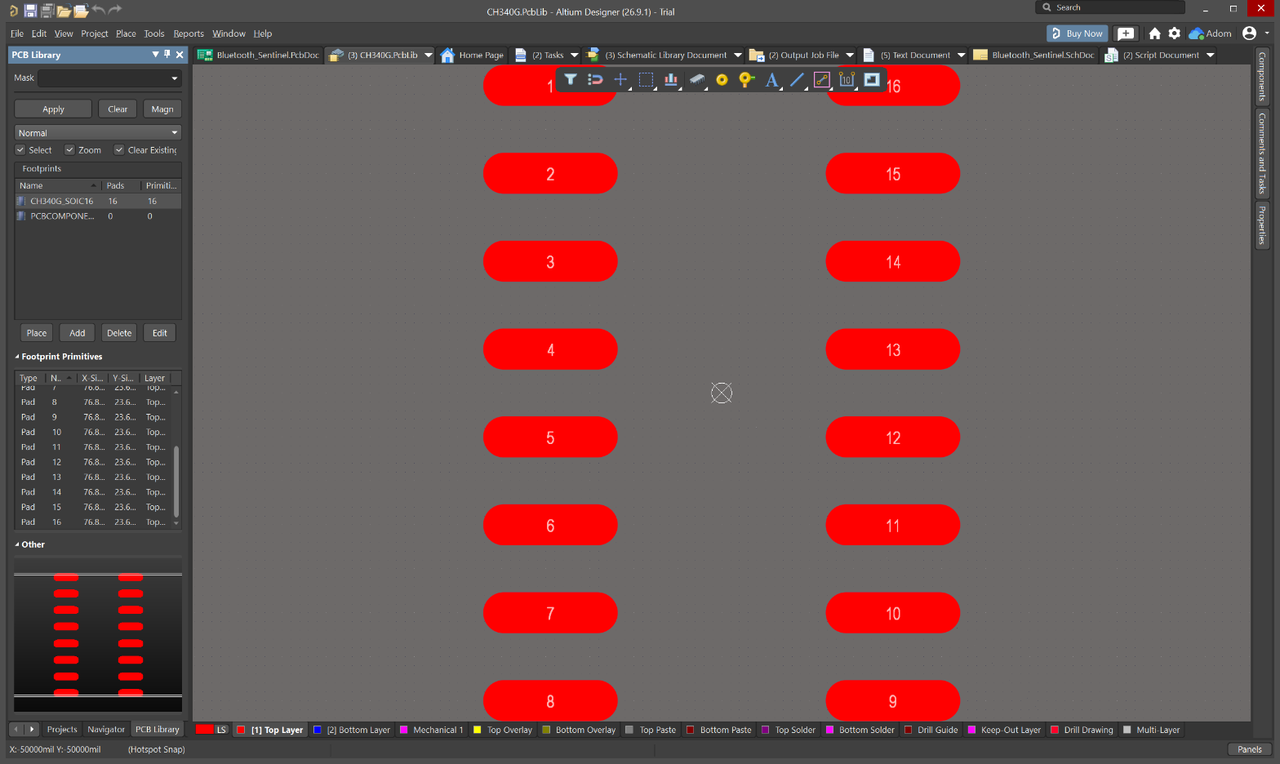
Footprint — altium_show_footprint (authored by altium_create_footprint)
16 SOIC pads parsed from the component page's pads.json (mm → mil).
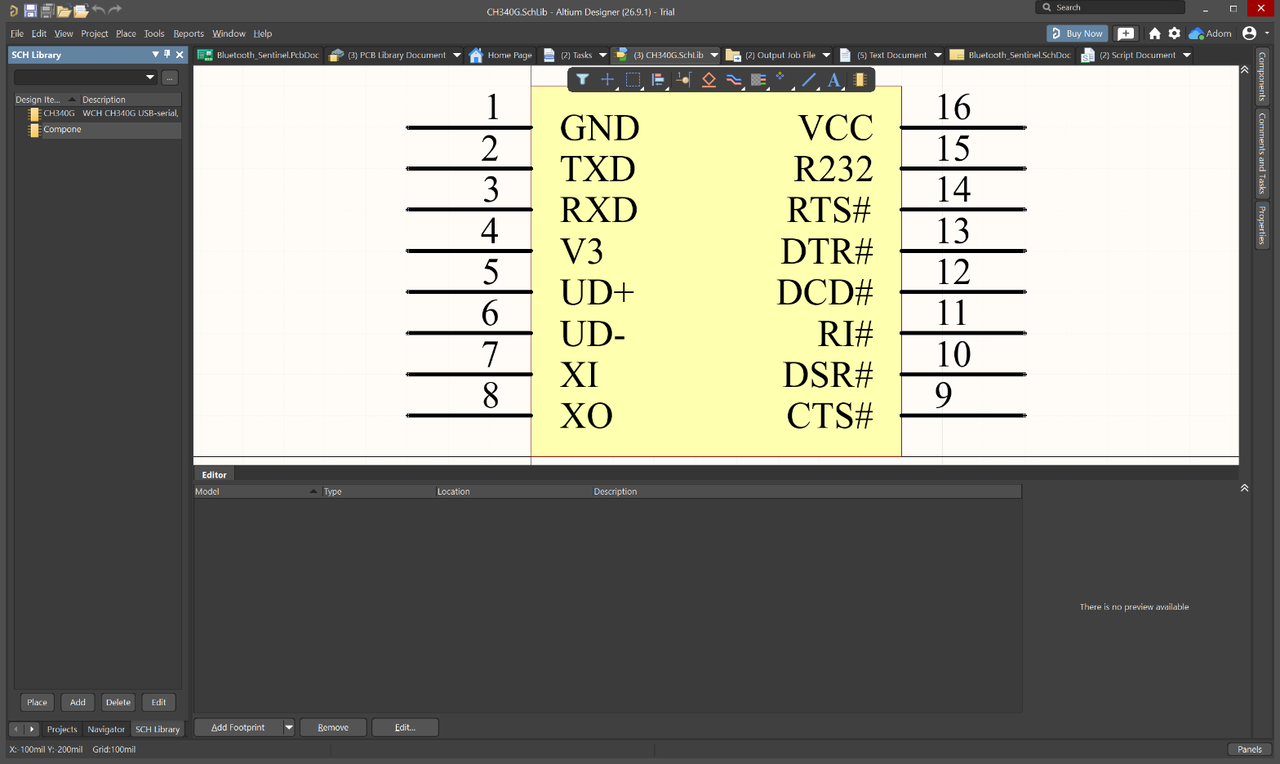
Library manager — altium_show_library / altium_list_library
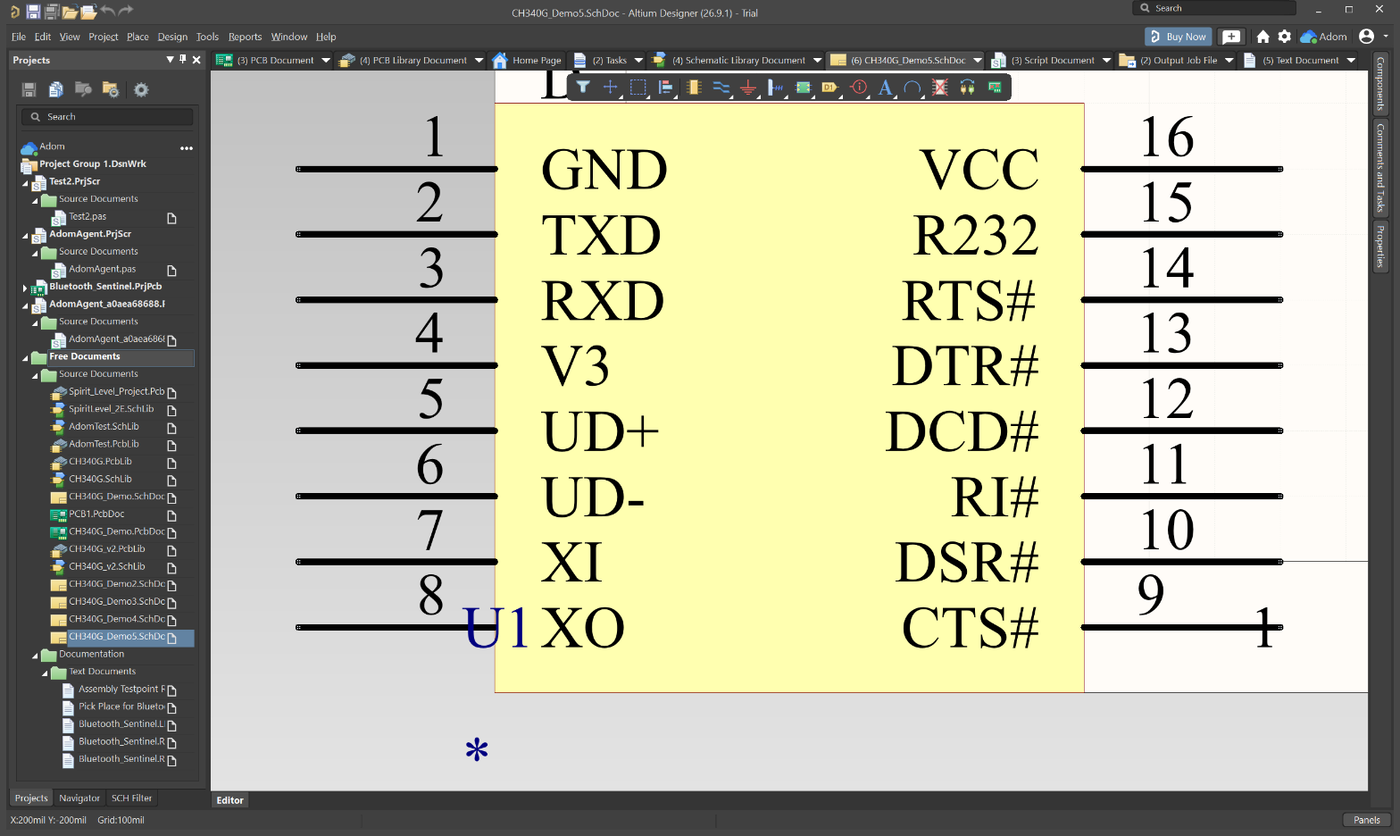
Schematic — altium_place_on_sch
The symbol placed as U1 on a fresh sheet (per-primitive copy — the engine's group
Replicate drops children; the bridge handles that for you). symbolName takes a ; list
(from 0.2.13): every part lands on the same sheet as U1..Un. Pass an existing schPath to ADD
symbols to that sheet; it grows to keep them inside the frame (from 0.2.45).
Sheet sizing (from 0.2.16 / 0.2.17): the sheet is sized from the parts, not the parts from the
sheet. The agent first measures every symbol's bounding box (pins included, plus 250 mil a side
for the pin numbers), then makes a custom sheet that holds the row with 500 mil between parts
and 600 mil margins, never smaller than A4 landscape (11500 x 7600 mil). Any slack is spread
evenly across the gaps. Each designator sits centred above its body and the Comment (the part
number) centred below it. title / number / revision / drawnBy fill the title block and
description becomes a text frame inside the drawing frame along the top; the reply's _hints
name whichever of those were left empty.
Symbol variants — altium_build_symbol_modes
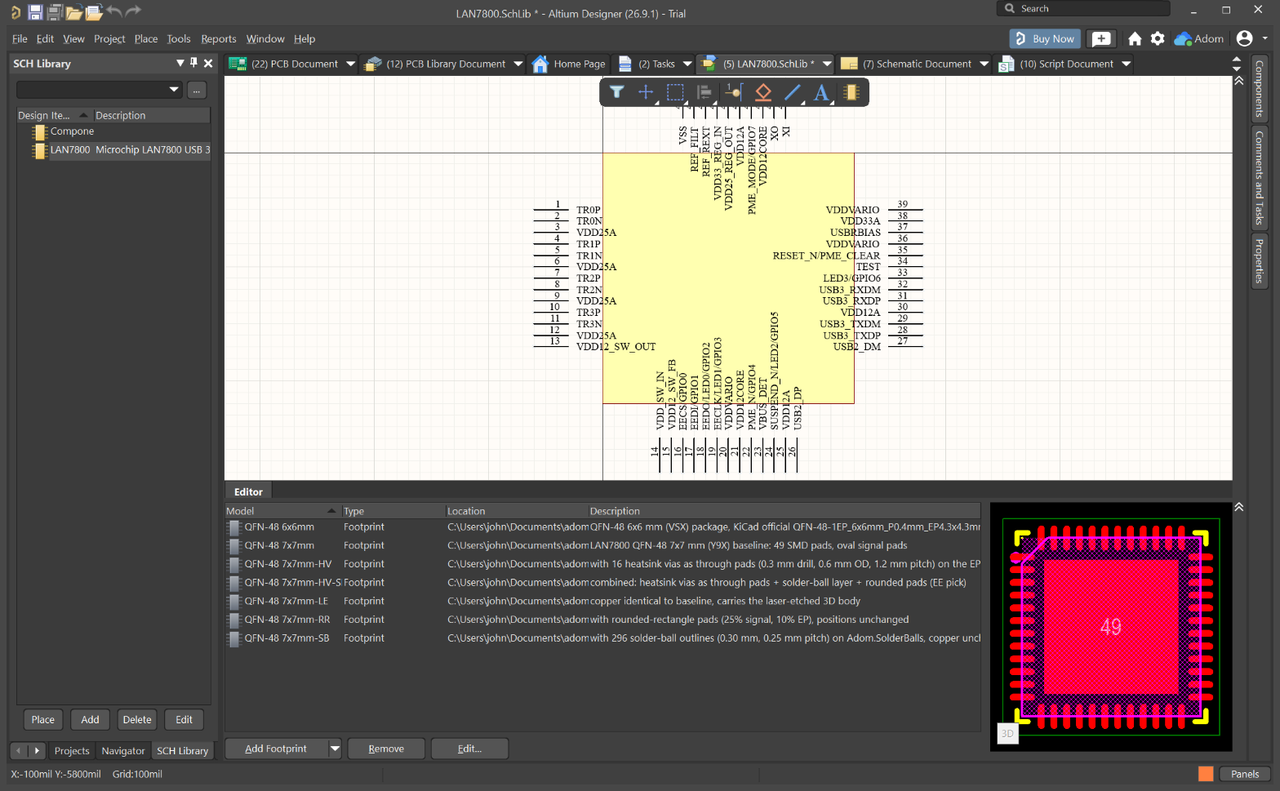
The LAN7800 as one component with ten display modes (Altium's alternate symbols): here the 4-side package look, geometry sized from the measured pin-name lengths so nothing collides.
2D board — altium_test_board / altium_swap_footprint
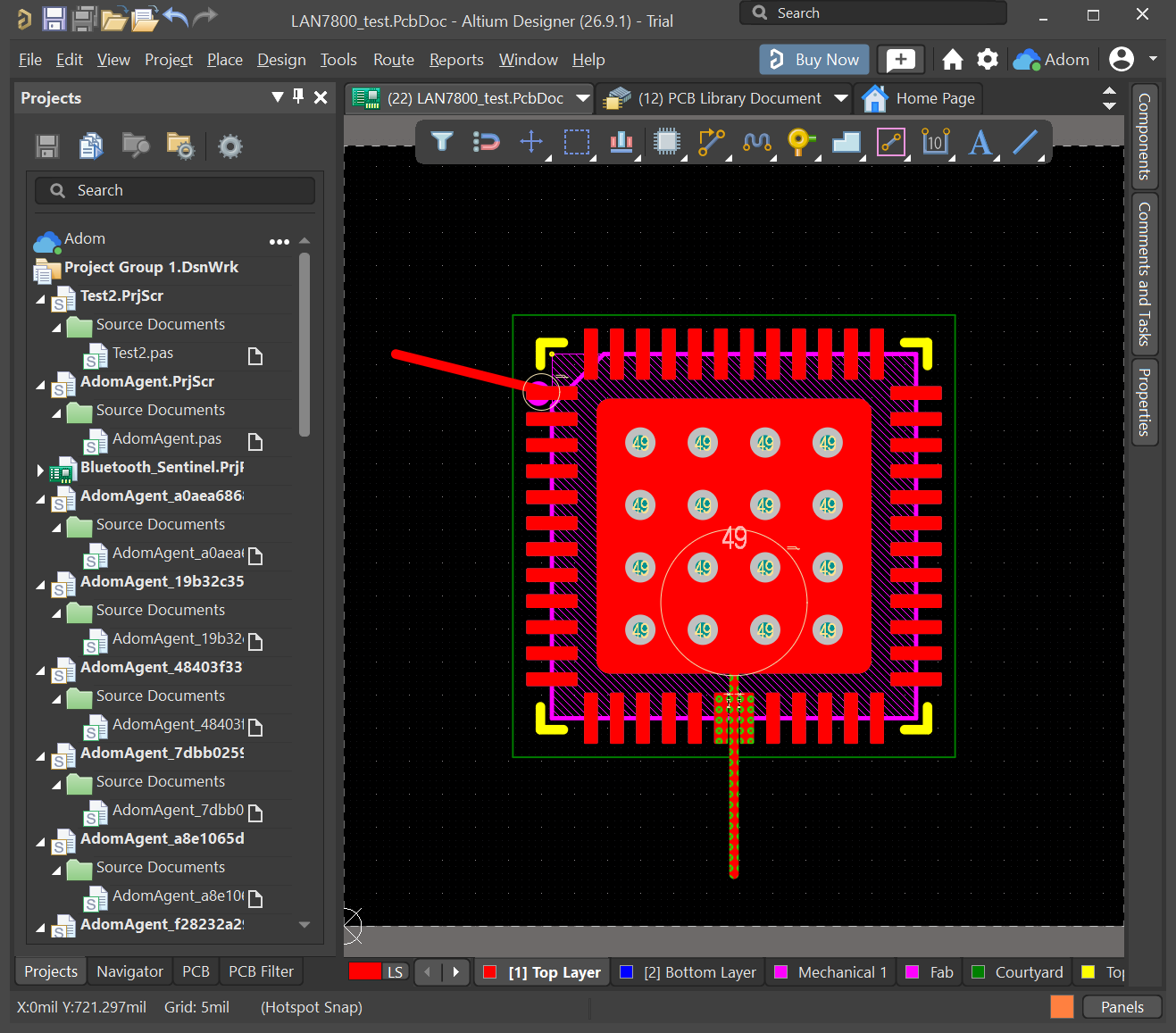
The LAN7800 -HV-SB-RR variant after two live footprint swaps on a wired 15×15 mm test board: rounded pads, sixteen through-hole heatsink vias in the EP (all designator 49 → the EP net), the silk pin-1 dot, and the PIN1 / GND_EP stub tracks that survived both swaps untouched.
altium_test_board takes a ; list in footprintName (from 0.2.13): the parts are spread
evenly along X on one board. The parts are designated U1..Un (so component_pins and
footprint_primitives can address each one). Each part's name is its own Comment on the Top
Overlay under its footprint, so it moves with the part, and its Pattern is the footprint name
(from 0.2.45). Pass an existing pcbPath to ADD parts to that board (from 0.2.40), and
altium_board_shape {mechOutline:true} to give the fab Gerber an outline (from 0.2.45).
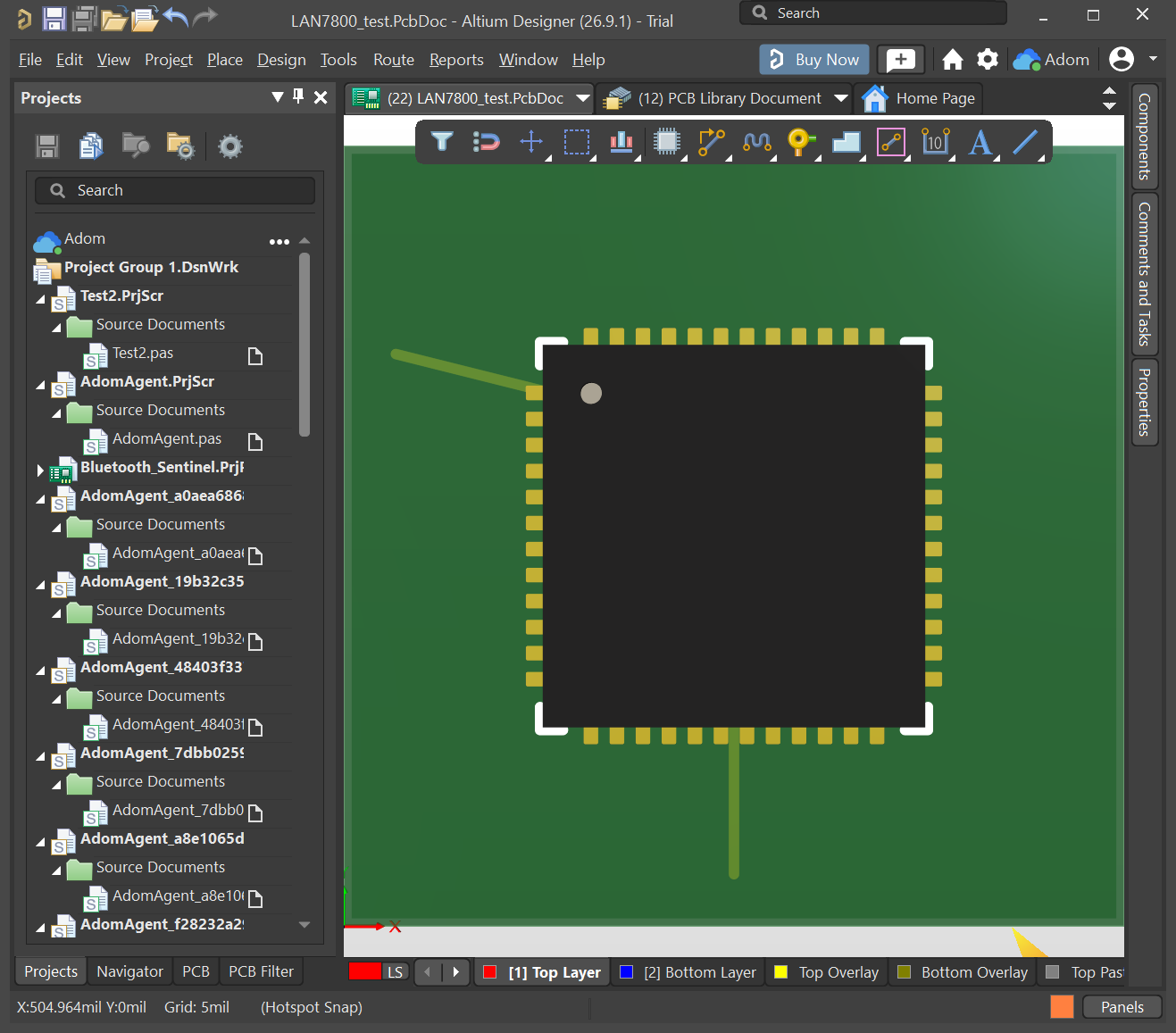
3D board — the STEP body on a real PCB
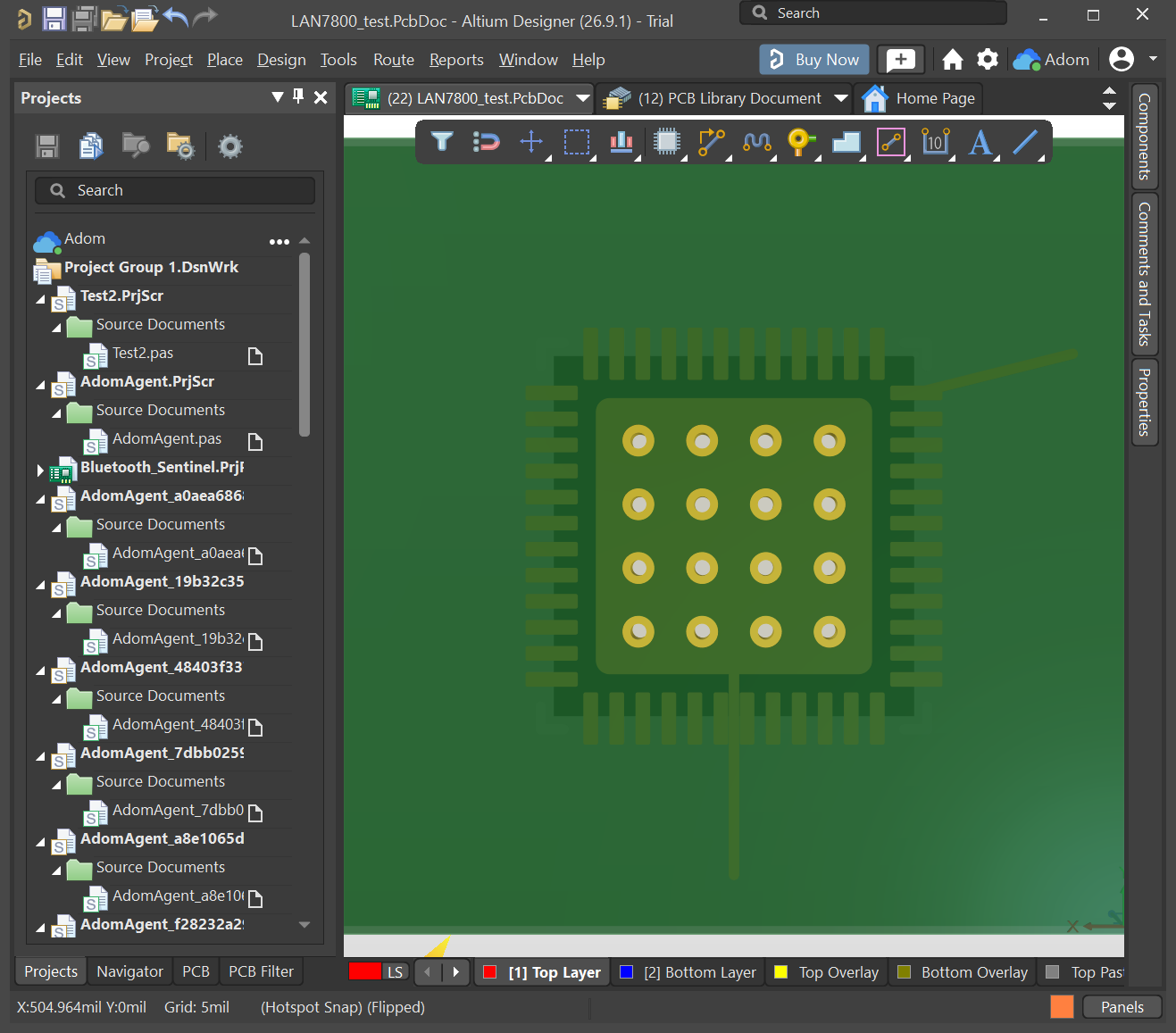
And the underside — the sixteen drilled heatsink vias through the exposed pad. Real copper and drill objects, exactly what the drill file gets:
How it fits together
The bridge is a spawn.kind: exe process Bridge launches on the user's machine
(entrypoint: altium-bridge.exe, a native Rust binary since 0.2.0; port: 0). Every request runs on
its own thread (from 0.2.28), so one slow verb never blocks the rest. It speaks HTTP (POST /command, GET /health) and reaches
Altium through ranked control surfaces, lightest first:
| # | Surface | Used for |
|---|---|---|
| 1 | Resident DelphiScript agent (file-drop REPL inside Altium, bootstrapped via X2.EXE -R) |
eval, open/show, library authoring, placement, compile/DRC/OutJob readback |
| 2 | Process launcher (1,111 Server:Command processes parsed from Altium's own .rcs tables) |
zoom, view switches, document ops — altium_run_command / altium_list_commands |
| 3 | Win32 / UIA | window management, screenshots, dialog detection/dismissal by PID |
| 4 | WebView2 (CDP) | the sign-in / License Management pages — altium_license, altium_signin_status |
| 5 | Altium 365 GraphQL | workspace queries (altium_a365_*; needs a Pro/Enterprise token) |
Modal dialogs freeze the script engine, so every mutating verb scans for dialogs by PID and
returns them with body screenshots (Altium paints dialog text; it is not exposed as text).
A halted engine (DelphiScript runtime errors are modal) recovers with altium_agent_recover.
Verb reference
Board & schematic introspection (0.1.11): list_designators, component_data, component_pins, list_nets, net_connections, layers, copper_layers, read_rules, set_layer_visibility, footprint_primitives, schematic_data — read the live design as data (pads→nets, rules, layers, sheet components with pins), all in tens of milliseconds, no dialogs.
All 120 verbs (prefix altium_). Call altium_describe for the live catalog.
Readiness & lifecycle — readiness, status, launch, close, diagnostics, progress,
agent_start/_stop/_status/_recover, license, signin_status, connect_workspace, uninstall.
agent_status reports the resident loop (alive, responsive, residentAnywhere,
liveWorkspaces[], heartbeat). license_status (licence state in plain words plus a frame of
the License Management page), ensure_licensed (launch if needed, claim a seat, or name the
human step; launchWaitSec, allowSignInReset, allowTrial) and setup_trial (returns the
one next onboarding action) are covered in the altium-licensing skill.
selftest_script_error (from 0.2.23) proves the script-error safety net on this machine: it makes the
agent raise a real DelphiScript runtime error and answers netWorks: true when the bridge photographed
Altium's error box, stopped the halted script itself and left no dialog behind. Any verb that hits a script
error returns errorCode: agent_script_error with errorShot (a PNG of Altium's message) instead of timing out.
Lifecycle — launch (hands the user's foreground window back unless background:false),
close (polite, releases the licence seat; discardChanges:true answers the save prompt in full
and escapes a wedged instance), instances, install, uninstall
Surfaces — show_project, show_schematic, show_2d_board, show_3d_board, show_library,
show_symbol, show_footprint, show_3d_chip, open_document, close_document (path; closes
one open document through its handle, never saves), state, demo, animate_view (camera/zoom
choreography run in-bridge: preset punch_in | showcase3d | orbit | flip | finale and/or
steps[], lane pcb | sch, pauseMs), foreground (raise Altium for a user who asked to
watch; reason of 10+ characters is required; the reply says whether Altium is visiblyOnTop).
show_schematic {filePath} opens a .SchDoc in the background, zooms to fit and returns the frame.
Engine — eval, run_command, list_commands, run_script
Checks & outputs — compile (run_erc), run_drc, run_outjob, export_gerber, export_bom
Author libraries — create_symbol, create_footprint, add_body (STEP or extruded, persisted
and centred on the pads), set_params, build_footprint (a whole footprint from a
tools/kicad2altium.py spec: via pads by duplicate designator, rounded-rect pads, named mechanical
layers), build_symbol_modes (one symbol, N display modes) + symbol_mode (switch + frame),
add_models (N footprint variants on one part — the CHANGE PACKAGE equivalent),
install_library, compile_intlib, extract_intlib, list_library, save,
install_library_bundle + install_receipt (the last bundle install's full receipt, for a
client whose call outlived ab's budget), set_models (from 0.2.15: replace every footprint
model on a symbol with one PCBLIB model; set_params footprint and add_models append)
Chip outline on the symbol (from 0.2.15) — add_symbol_art {libraryPath, symbolName, kicadSym, clear?, mode?} reads the chip-outline polylines adom-symbol baked into the KiCad symbol, maps
the KiCad body rectangle onto the SchLib component's rectangle and draws them, so the Altium
symbol shows the same chip as the KiCad and Fusion ones. kicadSym is a Windows path on the
Altium box (stage it with send_files). clear (default true) removes the component's
existing lines and polylines first, so a re-run replaces instead of stacking; mode is lines
(default, eLine segments) or polyline. symbol_prims {libraryPath, symbolName, models?} is
the read-only check: primitive counts by kind, bodyRectMil, polyBboxMil, and the footprint
models with models:true (off by default; the model walk halts the engine on some builds).
Heatsink vias (from 0.2.20) — plate_vias {libraryPath, footprintName?} turns every drilled
pad in a PcbLib that loaded on the Top Layer into a plated Multi-Layer pad. Run it once after
installing a library whose thermal-pad vias were written as pads with a hole (adom-lbr before
2.46.1), then altium_save the PcbLib. Replies holes, plated, fixed.
Manipulate libraries — clone_symbol (all display modes carried), rename_symbol,
remove_symbol, read_symbol (pins/params/modes read-back), copy_footprint (pads + bodies +
drawing), rename_footprint, remove_footprint, xcopy_footprint (cross-library), cleanup_libs, set_visibility, normalize_bodies, and import_part — one call: footprint spec + STEP + symbol + vendor params (Mouser preferred, DigiKey, LCSC)
Boards & placement — place_on_sch, place_on_pcb, test_board (fresh PcbDoc, board shape
sized to the part, nets + stub tracks), board_shape, swap_footprint (change the package on a
placed part; wiring survives), pcb_report (ground truth: pads, bodies, nets, tracks with bboxes)
Whole-design reads & review — read_board (one agent round trip: components, nets, layers,
copper, rules, occupancy, outline; sections, limit, raw), with board_summary,
rules_by_kind and layers_in_use shaped from the same read; read_schematic (components of
the current sheet; sections, params, limit); cross_check {board?, sheet?} (designators
on the sheet but not the board and the reverse); review_board {board?, sheet?, includeSchematic?, checks?} (14 design-review checks, partial results by design: skipped
and notImplemented say what did not run)
Dialogs & desktop — check_dialogs, dismiss_dialogs, dialog_log (what the standing
dialog reaper dismissed; limit, default 25)
Altium 365 — a365_configure, a365_status, a365_query, a365_oauth_begin / _status /
_cancel, a365_refresh, a365_logout, a365_files_upload, a365_library_overview,
a365_library_schema. Works with Altium Designer closed; tokens stay in the bridge cache and
never appear in a reply. See the altium-a365 skill.
The dock bar card
The bridge is a card in the Hydrogen dock bar — the launcher rail on the right edge of the
workspace — alongside KiCad and Fusion. It is in the curated fleet list
(hydrogen-bootstrap/dock/apps.json, order 35, featured), so every Adom user's rail picks it up
on the next poll, or instantly with Refresh list from wiki.

Clicking the card runs this repo's dockbar.json: an install-or-update step
(adom-wiki pkg update altium-bridge || pkg install adom/altium-bridge — this is how the
skillpack propagates to every container), then altium-dashboard serve --print-url, which
self-backgrounds and prints its URL; the dock opens it in a webview tab and starts a named AI
thread with the Altium prompt. The dashboard is the standard dock anatomy:
| Region | What it does here |
|---|---|
| Say it strip | six phrases you can send straight to a new AI thread — "show me my board in altium 3d", "add this wiki part to my altium library", "run drc on my altium board", … — plus the 2-minute demo player |
| Status LEDs | Relay · Box · Bridge · Altium (version) · Licence · Running · Agent (resident) · Updates — each with a hover hint, live over SSE from /api/status |
| Boxes & actions | the target machine, Setup / Launch Altium / Close Altium |
| Guided demo | the six-beat background tour of the examples that ship with Altium |
Progress for long verbs rides the Windows taskbar button (the app icon fills up), never a toast.
Web control — "Add to Altium library" from a wiki page
Component and molecule pages carry an EXPORTS TO: KiCad · Fusion · Altium row. The bridge's
half is altium_install_library_bundle, the exact peer of kicad_install_library_bundle:

AdomWebControl.run('altium_install_library_bundle', { zipPath, libraryName, capture: true })
// → { success, symbols, footprints, intlibs, installed:[{lib,ok}], altiumRunning, restartNeeded, thumbnailDataUrl? }
The page fetches the bundle (<Lib>.SchLib + <Lib>.PcbLib, or an .IntLib), stages it on the
box with write_file_chunk, and calls the verb; the user clicks Allow once on Adom Bridge's
consent prompt. The verb is zip-slip hardened (256 MB / 512 MB caps), registers the libraries in
Installed Libraries, never closes a running Altium (it reports restartNeeded), and returns a
proof frame — the library as Altium actually opened it:

docs/webcontrol-altium-test.html is the acceptance harness (it loads the wiki's live
webcontrol.js).
The skillpack — ten skills, propagated like KiCad's and Fusion's
adom-wiki pkg install adom/altium-bridge delivers these into ~/.claude/skills/ on every
container, and the dock's install step keeps them current:
| Skill | For |
|---|---|
altium-bridge |
the user skill: every verb, what it returns, and when to reach for it |
altium-install |
installing Altium Designer + the trial sign-in, measured step by step |
altium-libraries |
display modes, footprint variants, STEP bodies, the tri-vendor rule, the pin-1 check |
altium-boards |
test boards, board shape, placement laws, footprint swaps with surviving nets, 3D camera facts |
altium-outputs |
compile/ERC, DRC, OutJob media (Gerber, ODB++, NC drill, BOM, pick-and-place) |
altium-part-import |
add any catalog part with Mouser (preferred) + DigiKey + LCSC part numbers — REUSE / CREATE / APPEND |
altium-kicad-import |
KiCad → Altium, incl. the KiCad-10 downgrade and the native no-importer lane |
altium-bridge-plan |
the plan of record: every automation surface Altium exposes, measured |
altium-bridge-dev |
developer-only: the agent architecture, the dialog doctrine, the engine-halting identifiers |
altium-bridge-publish |
developer-only: the release recipe (lockstep versions, asset upload, pkg staging) |
Parts carry all three vendors
Every component the bridge authors gets Mouser Part # (Adom's preferred vendor), DigiKey Part #,
and the exact LCSC Part # (so JLCPCB BOM/CPL round-trip), plus MPN / Manufacturer / Value /
Package — looked up with one adom-parts-search call. Parameters land hidden; altium_set_visibility
shows the one you want on the schematic.
Zero dialogs, by construction
Altium's scripting debugger breaks on any raised exception, so a raise is a modal. The bridge
designs the class out rather than dismissing it: file reads probe with FileOpen before loading,
every save is preceded by a transaction clear (a dangling PreProcess is what draws the
save-a-copy warning), engine-halting identifiers are catalogued in the dev skill, and every verb
that could draw one scans Altium's child windows afterwards and attaches a frame if it finds any.
A dialog the user sees is logged as a defect, not handled.
And never a half-answered one (from 0.2.35). A dialog left mid-exchange is worse than one left
up. Altium's close-time "Save None" does not dismiss Confirm Save Locally — it unticks the
documents and renames the same window to Confirm Not Saving, which OK then commits; pressing only
the first half left Altium sitting modal. Because Windows disables a process's other top-level
windows for the duration of a modal, that state presents as a disabled main window with nothing on
screen to answer: no menu, no Alt+F4, no -R hand-off reaches it, and it keeps the licence seat.
close and agent_recover detect it (errorCode: altium_modal_orphan) and
close {discardChanges:true} ends it the way Altium's own Exit does — a posted WM_QUIT, which
RELEASES the seat where a taskkill would strand it.
Launching does not cost the user their window (from 0.2.37). Altium foregrounds itself at
startup and offers no switch for it, so altium_launch remembers the window the user was in and
hands it back once Altium settles (foregroundReturnedTo, windowEtiquette: background). Pass
background:false when the user asked to watch Altium come up.
Lineage
The bridge consolidates Barrett Land's summer-2026 Altium work — his earlier repos
barrett-land/adom-desktop-altium-bridge (named when the product was still called Adom Desktop;
this bridge is adom/altium-bridge), altium-part-importer and kicad10-to-altium — into one
master repo: every verb ported onto the resident agent (his bridge forwarded one X2.EXE command
per call), his three-path part workflow and KiCad-10 findings carried into the skillpack, his v10→v9 downgrader vendored under tools/.
His pages stay up with pointers here.
Running / dependencies
Bridge provisions everything; nothing to install by hand.
- No runtime to install: the bridge is one native exe inside the release zip.
- Altium Designer (host app). Not installed yet? Call
altium_install {}and follow_next: the verb stages the install, verifies the installer's signature, and asks the human only for a password, the UAC prompt, or clicks inside the elevated installer. - OS: Windows.
The bridge binds a Bridge-assigned port — never 0.0.0.0. Auto-updates via updateManifestUrl
in bridge.json.
Developer and publish docs live in this page's source repo (dev-skills/, publish-skills/, PUBLISHING.md), not in the
installed package: adom-wiki repo clone adom/altium-bridge to get them. dev-skills/altium-bridge-dev holds every measured
engine fact (the DelphiScript traps, the script-halt safety net, the UIPI lessons) and dev-skills/altium-bridge-test is the
verb battery that gates a promotion.