Adom TTS: Text to Speech
Public Made by Adomby adom
Adom's shared voice service. Reads your AI's answers back to you while you drive, and renders perfectly-timed voiceover tracks for your demo videos, so you never record your own voice.

Install?
Adom's shared text-to-speech CLI + Playground. Reads your AI answers back to you while driving, and renders perfectly-timed voiceover tracks for demo videos.
adom-wiki pkg install adom/adom-ttsLatest: v1.9.57, published
Contents
- The three ways people use it
- 1. While you're driving (hands-free)
- 2. At your laptop, when you'd rather listen than read
- 3. Demo-video voiceovers (exact timing, no recording booth)
- What it looks like
- The live player
- The replayable History
- The verified send (what your AI runs)
- In the Hydrogen dock
- Install
- Quick start
- Dependencies
- Features
- Talk to the AI
- Skills (see the Skills tab)
- CLI reference
- Open source: modify it, then publish it back
- One part isn't yours to change: the voice backend
README
markdownAdom TTS: Text to Speech
Adom's shared voice. A thin Rust CLI + a live player webview for service-tts,
the edge-tts wrapper with Adom pronunciation overrides and a source-hash cache. Your
AI speaks through it; you listen instead of read.
The three ways people use it
1. While you're driving (hands-free)
You're in the car and can't read the screen. Just say:
"Read me your last answer, I'm driving."
Claude composes the reply, speaks it through the shared player, and (this is the important part) verifies you heard it. Clips buffer through dead zones and hotspot drops, retry if they never reached your ears, and land in a replayable History if two updates arrive back-to-back. The full hands-free contract lives in the adom-tts skill (also on this page's Skills tab); it triggers on the words you'd say: "read it to me", "read that back", "I'm in the car", "narrate the answer", and many more.
2. At your laptop, when you'd rather listen than read
You don't have to be driving. Long AI answers are tiring to read; tell your AI "say it out loud" or "talk to me instead of writing" and every reply plays through the player while you keep your eyes on your actual work. Parallel AI threads share ONE player: clips queue in order, never talk over each other, and each one announces which thread is speaking and what the update is about.
3. Demo-video voiceovers (exact timing, no recording booth)
Feed adom-tts a narration script and get a clean, perfectly-timed .mp3 voiceover
track in the house voice (en-US-AndrewNeural). No retakes, no listening to your own
voice. Every clip is cached by source hash, so iterating on a script is instant after
the first render, which is why demo-recording, video-post, and every
tour/walkthrough tool route through it.
What it looks like
The live player
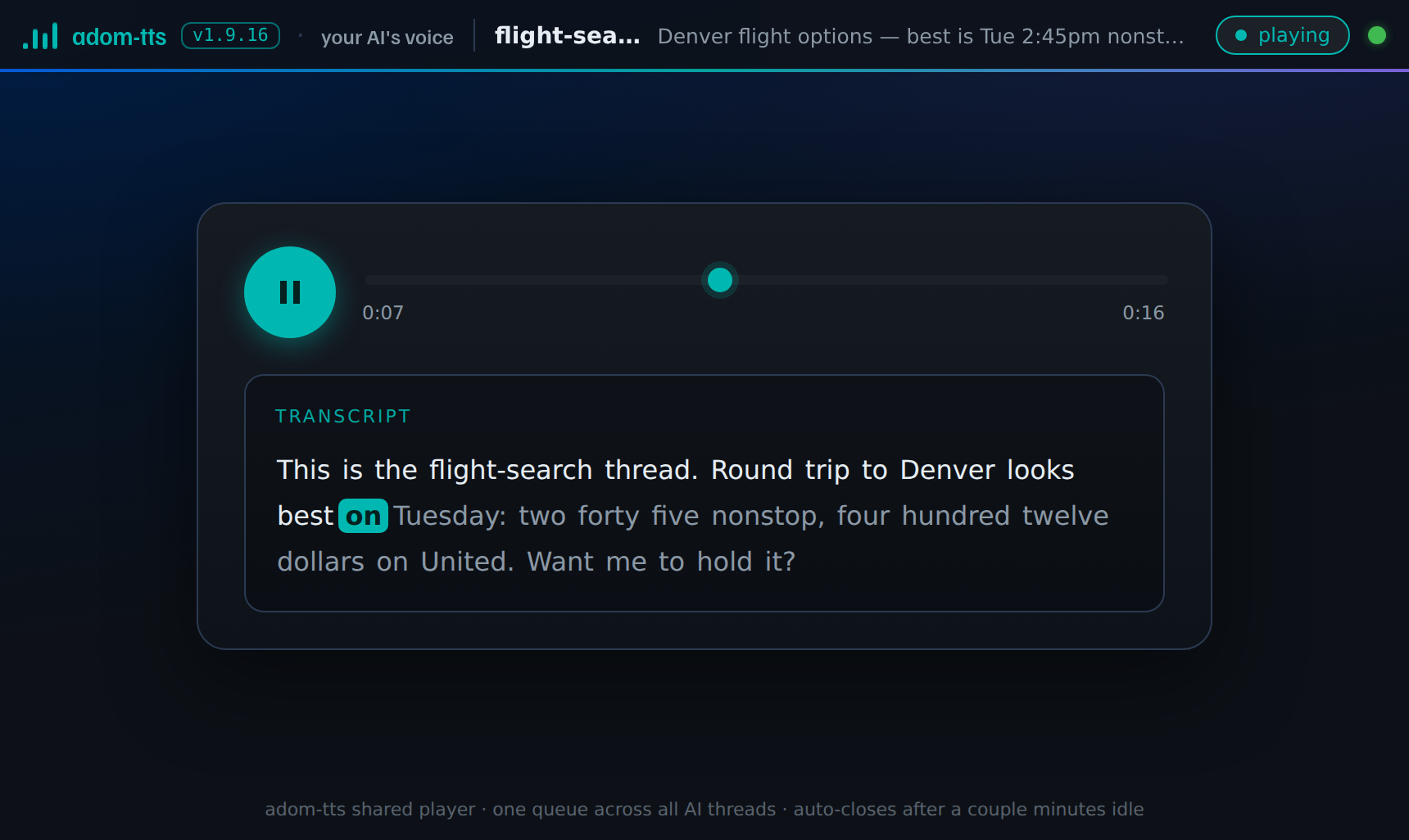
One shared player for all your AI threads, built on the Adom dashboard contract: the house header names WHO is speaking (the thread) and WHAT the clip is about, the starter panel teaches you what to say to your AI (copy a phrase or send it straight to a new thread, or play the built-in demo), and the status pill row shows the player, the playback surface, the voice service and the queue at a glance (tap a pill for the detail, and a red pill always names the fix). The transcript highlights word by word as it speaks, and the freshness pill under the transport tells you when the audio was made, so an old clip can never pass as news.
The replayable History
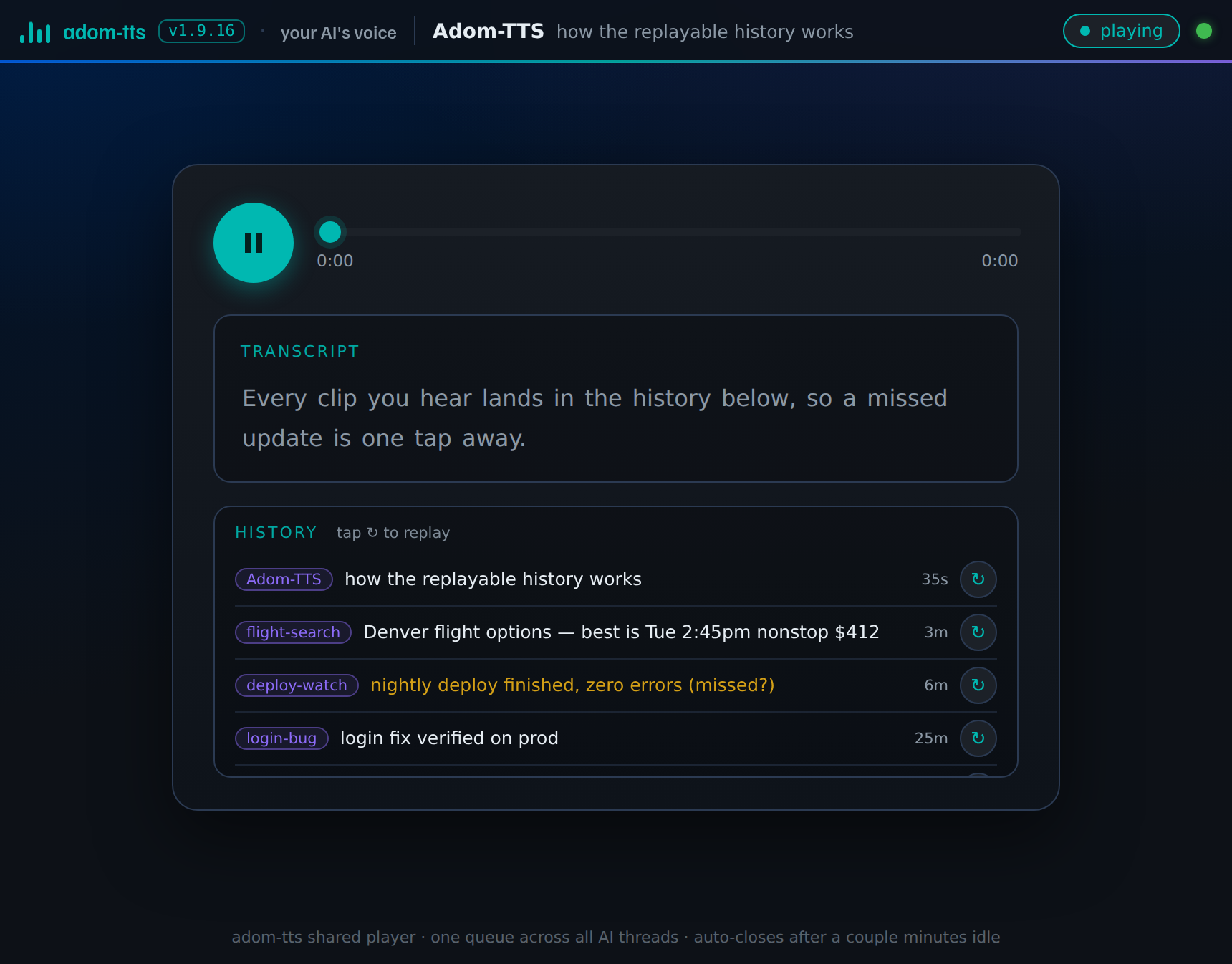
Missed a clip because you drove through a dead zone, or two threads spoke back-to-back? Every played clip is kept, with the sending thread, a one-line description, when it played, and a replay button. Clips that never fully played are flagged, so the one you missed is exactly the one that stands out. Tap the arrow and it plays again.
The verified send (what your AI runs)
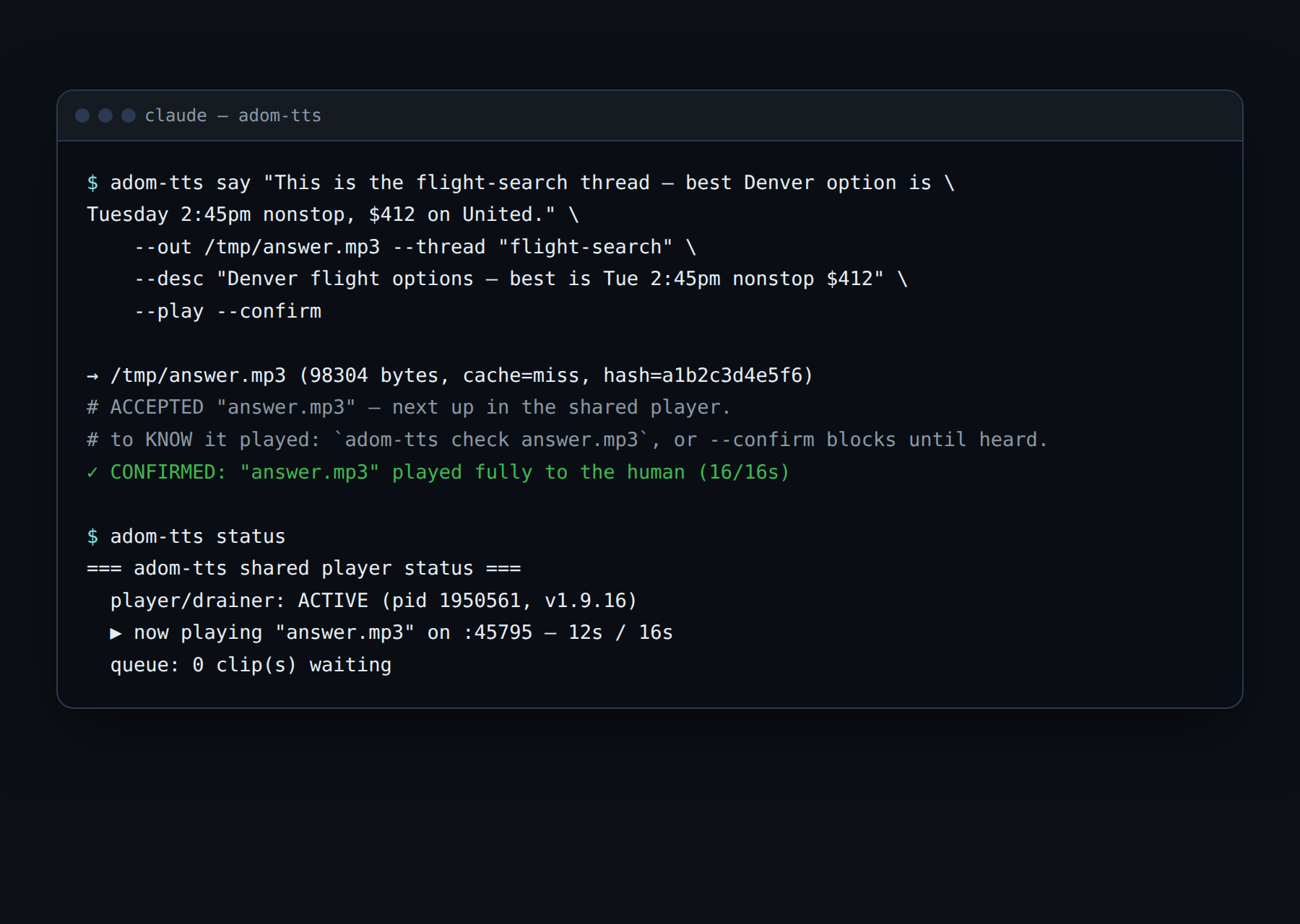
Playback is never assumed. --play queues the clip and reports its queue position;
--confirm blocks until the player proves the audio reached you, end to end. Note the
required --thread and --desc: anonymous clips are refused, because a History full
of reply.mp3 entries helps no one.
In the Hydrogen dock
Adom TTS is a dock app. Add it from Dock settings (the gear at the top of the rail) with
adom/adom-tts: the card installs the CLI, starts the player and opens it in a webview
tab named Adom TTS. The gear in the player's header opens Settings, where you pick
whether clips play in that webview tab or in a Pup desktop browser window.
Install
adom-wiki pkg install adom/adom-tts
adom-tts health        # confirm the shared voice service is reachable
That installs the CLI, the adom-tts Claude Code skill, and bash completions. The CLI
talks to the shared service-tts container. Nothing about a TTS engine is installed
locally.
Quick start
# Speak to the human and VERIFY they heard it (the canonical pattern).
adom-tts say "This is the demo thread: the build is green." \
  --out /tmp/x.mp3 --thread "demo" --desc "build status update" --play --confirm

# Demo voiceover: render a narration track to a file (no playback, no --thread needed).
cat narration.txt | adom-tts say - --out demo-vo.mp3

# What's playing / queued right now? Did my clip play?
adom-tts status
adom-tts check x.mp3

# Replay the most recent clip.
adom-tts play last
Dependencies
This package has zero registry dependencies: it installs and runs standalone.
| Dependency | Required? | Why |
|---|---|---|
service-tts container |
Runtime (shared) | The synthesis backend (edge-tts + pronunciation overrides + cache). Shared Adom infra, already running, not something you install. |
pup (desktop Chrome) |
Optional | Only for --surface pup to play in a desktop browser window instead of the default Hydrogen webview tab. |
Features
- One shared player, many AI threads: a single persistent server owns one webview; clips from every thread play sequentially, never overlapping, each labeled with its thread and description.
- Verified playback:
--confirmblocks until the human heard the clip;checkanswers "did mine play?"; every command returns hints teaching the AI the next correct step. - Never lose a clip: buffering while your device is offline (up to 10 min), automatic retries, hotspot-proof download-then-play, and the replayable History.
- Demo voiceover: house voice
en-US-AndrewNeural, any edge-tts voice via--voice, speed via--rate, stdin piping for long scripts, source-hash cache. - Server-side pronunciation overrides: Adom terms come out right without the caller pre-phoneticizing.
- Swappable backend: edge-tts today; can move to piper/Azure/ElevenLabs server-side with zero caller changes.
Talk to the AI
Paste any of these into Claude Code; they use the exact words the skill triggers on:
Hands-free / drive mode
- "I'm driving, read me your last answer."
- "Read that back to me, I can't look at the screen."
- "I'm in the car, narrate the answer."
Listening at your desk
- "Say it out loud instead of writing it."
- "Talk to me while I work on something else."
Make audio / voiceover
- "Render this script as a demo voiceover track."
- "Synthesize a 30-second walkthrough of this design and play it for me."
Replay
- "Play the last TTS clip again." / "Replay the one I missed from the history."
Skills (see the Skills tab)
| Tier | Skill | Purpose |
|---|---|---|
| User | adom-tts |
Drive mode, listen-at-your-desk, voiceovers, the verified-playback contract. Ships with every install. |
| Dev | adom-tts-dev |
The dev cycle + engineering rules for the shared player (source-only). |
| Publish | adom-tts-publish |
How releases of this app reach the wiki (source-only). |
CLI reference
| Command | Description |
|---|---|
adom-tts say "<text>" --out f.mp3 --thread T --desc D [--play --confirm] |
Synthesize; --play queues it on the shared player (requires --thread + --desc); --confirm blocks until verified heard. - reads stdin. |
adom-tts check <clip.mp3> |
Non-blocking: QUEUED / PLAYING / PLAYED / FAILED for your clip. |
adom-tts status |
Live player, current clip, the whole queue in order. |
adom-tts play last|<id>|<path> |
Replay a clip (newest, by id/hash, or a file). |
adom-tts control replay|pause|play|toggle |
Drive the live player without reloading it. |
adom-tts reopen |
Re-surface the player if its window was closed (queue survives). |
adom-tts open [--print-url] |
Show the player (start one if needed). --print-url is the dock's serve step: prints the direct URL and exits. |
adom-tts settings [set surface webview|pup|desktop] |
Show or change persistent settings (same values as the gear in the player). Webview falls through to desktop (Hydrogen Desktop's own window) when no editor session is connected. |
adom-tts ui toast "<text>" [--kind info|success|error] |
Raise a toast on the player page (the AI narrating over the app). |
adom-tts demo |
Play the built-in three-marker demo (what the starter panel's Play the demo button runs). |
adom-tts load / cue / cue-status / queue clear|drop / control skip |
Live-demo markers and queue management (see the user skill). |
adom-tts logs [--tail N] |
Playback/synthesis event log with verdicts + anomaly hints. |
adom-tts serve [--port N] |
Open the Playground webview. |
adom-tts health [--probe] |
Exit 0 only when the service can speak (synthesis verified), 5 when it answers but the upstream speech endpoint refuses. |
adom-tts voices / pronunciations / config |
Service info. |
Useful flags: --voice en-US-AriaNeural, --rate=+15% or --rate=-4% (signed percentage, write it with =), --surface desktop (Hydrogen Desktop's window), --surface pup,
--no-pronunciations. $ADOM_TTS_API overrides the baked-in service URL.
Exit codes: 0 ok · 1 invalid input · 2 service unreachable · 4 service-side
error · 5 playback not confirmed · 6 missing --thread/--desc with --play.
On 2/4 the service is down: report it; do not install a local TTS engine as a
workaround.
Open source: modify it, then publish it back
adom-tts is open source under the MIT license (see LICENSE). The whole project
lives on this page as a git repo (see the Files tab):
- Get the source:
adom-wiki repo clone adom/adom-tts. - Change whatever you want: add a voice, a flag, a play surface; fix a bug.
- Publish it back: bump the version,
adom-wiki pkg publish,adom-wiki repo push. Your improvement goes to the shared registry and the whole community inherits it.
One part isn't yours to change: the voice backend
The MIT grant covers this CLI and the player. It does not cover the synthesis
backend. Every adom-tts say call hits Adom's cloud service-tts API, which runs
on Adom's infrastructure and counts against Adom's quota. That backend is an Adom
service, subject to change: endpoints, voices, rate limits, and availability can be
modified or retired at Adom's discretion. Your fork is free and yours; the shared voice
service it calls is a managed Adom service, not part of the open-source guarantee.