Adom Theme
Public Made by Adomby adom
The canonical Adom application theme spec: five schemes, exact tokens, font pairings, and the implementation contract.
Adom Theme
The color schemes, tokens, and typefaces that make every Adom surface look like one company built it. This page is the extensive tour: what the five schemes look like, the exact background and foreground values, the fonts we install for the user, and how the system is wired into Hydrogen Desktop (including VS Code), Adom Desktop, and the wiki. The machine-readable contract an implementing agent should follow is SKILL.md on this same page (install: adom-wiki pkg install adom-theme-system).
Why this gets its own page: themes are a big part of whether Adom reads as a professional product or an amateur one. A user touches three of our surfaces in their first ten minutes (Hydrogen Desktop, Adom Desktop, the wiki), and any mismatch between them is instantly visible. So the palette, the names, the fonts, and the rules live in one place, with screenshots proving what each surface actually renders today.
0. Identity and versioning (one number, everywhere)
This page is the whole Adom theme: docs, tokens, fonts, generators, and the VS Code theme pack. Two artifacts share ONE version, locked in the same commit, always:
| Artifact | Name | Version source |
|---|---|---|
| The wiki package (this page) | adom-theme |
package.json at the page root |
| The VS Code extension it installs | adom.adom-theme |
vscode/package.json, kept identical |
If the installed adom.adom-theme version differs from this package's version, the install is stale; run adom-wiki pkg update. That is the ONLY update channel: the extension is never published to the VS Code Marketplace or any gallery, so gallery update checks (latestVersion, updateAvailable) return null for it by design, and that null is not a defect.
History: before 2026-08-02 this page was adom-theme-system and the extension was adom.adom-themes with an independent 7.x version line. Both were renamed and version-locked at 2.0.0 while HD was still pre-release; install.sh purges the legacy extension id so theme pickers never show doubled entries.
One trap for auditors: extension files on disk carry the mtimes stored in the package tarball (publish time), not install time. Read timestamps with the date attached before concluding anything.
1. The five schemes and their standard names
Every scheme has a product label (what users see) and a slug (the frozen storage key). Labels and slugs were unified on 2026-07-25 so the HD settings picker, the VS Code theme pack, and stored preferences all agree. The naming rule: the flagship is plain Adom Studio, and variants earn a suffix.
| Product label | Slug | Character |
|---|---|---|
| Adom Studio (default) | studio |
The editor sits on the lighter ground and the panels drop back, so the code you work in is the brightest thing on screen. Bright text ramp. |
| Adom Studio Dark (Brighter Text) | studio-bright |
Everything on the deep ground with the brighter interface text. Adom Studio is exactly this scheme with the two grounds traded. |
| Adom Studio Dark | studio-dark |
The original screen-tuned set with the quieter text ramp. This is the token base the other schemes override. |
| Adom Kickstand | kickstand |
The identity palette as the design firm delivered it: near-black #191919 ground, muted navy chrome, and the headline face used in prose. |
| Adom Slate | slate |
A calm, cool blue-grey. Uses the code font Windows already ships, so it feels native on a stock machine. |
The five schemes, side by side (real screenshots)
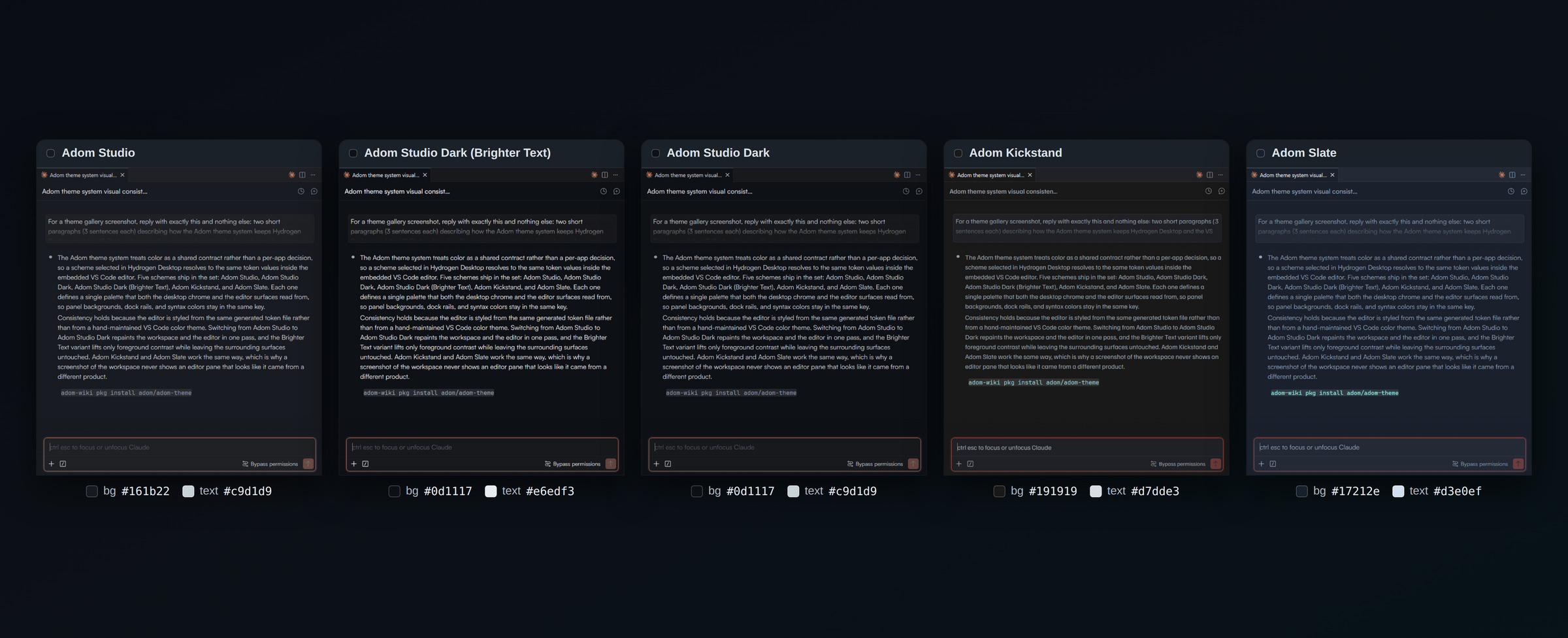
The comparison that actually matters when you pick a theme: the same live Claude chat, same content, captured five times with only workbench.colorTheme changed (applied live through adom-vscode, no reload). The background is what dominates your eye all day; the text color is what you read non-stop. Exact values under each column.
Is "(Brighter Text)" honest? The measured delta
Fair question, asked and verified 2026-08-02: in the 5-column comparison the two Dark variants look nearly identical, because a 12.3:1 vs 16.0:1 text lift compresses at small sizes (both are "light gray on dark"; the jump is 10 points of perceptual lightness, carried entirely in thin glyph strokes). The pixels in the shipped screenshots confirm the lift is real: glyph cores measure 190 luma (Dark) vs 218 luma (Brighter Text), a 15 percent lift exactly tracking the designed #c9d1d9 to #e6edf3 move. Same sentence, same background, zoomed:
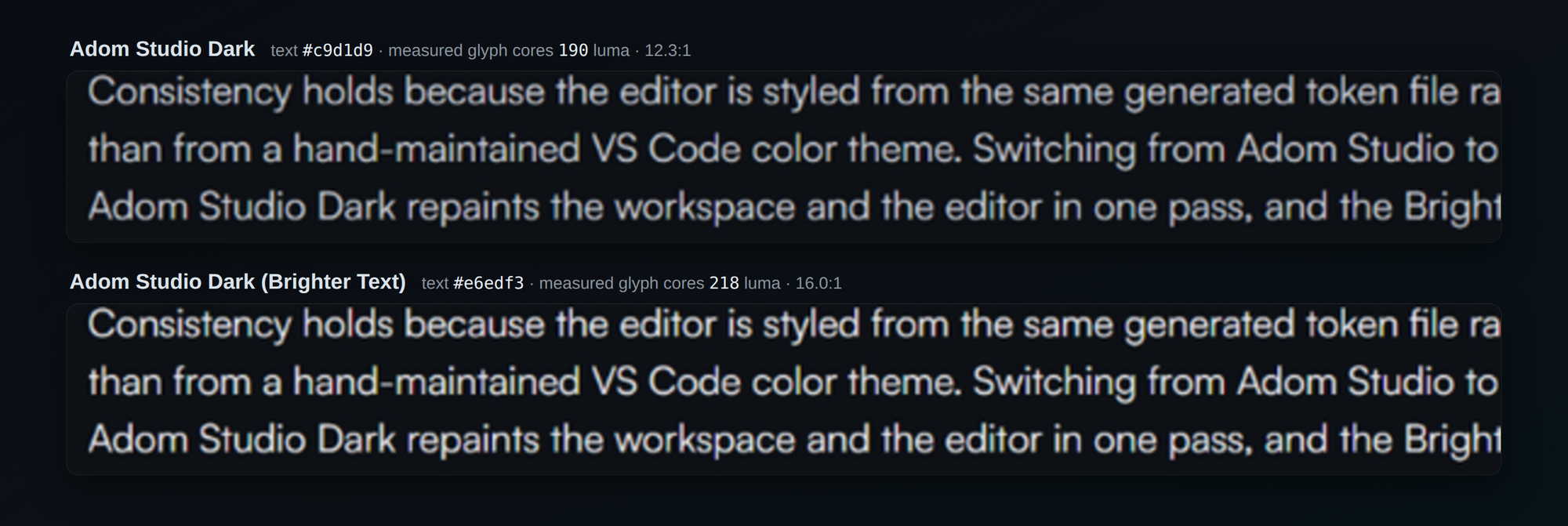
If a bigger delta is ever wanted, the knob is the fg anchor in the generator (one value), but past ~14:1 dark-mode text starts to halo, and Brighter Text already sits at 16:1, so push with care.
Validation: does the active tab flow into the chat body?
The design intent (John, 2026-08-02): the active tab should share the chat body's background so the active conversation reads front-and-center, the tab flowing into its content.
Status: PASS as of 2.3.0, by the one-ground contract. Claude chats paint sideBar.background when resumed from history and editor.background in fullEditor (command-opened) mode, so the only rule that makes the active tab flow into EVERY chat, both modes, plus every file editor, is to unify the grounds: sideBar.background/foreground take the editor ground and text in all five themes. The active tab keeps 2026's anchor equality with the editor ground, so tab == chat == file body everywhere, and inactive tabs keep the raised 2026 chrome tone so the active one is unmistakable. (The interim 2.2.0 contract matched only the history mode; superseded the same day once the fullEditor mode was measured.) The sidebar/editor boundary is carried by the border, not a fill change.
The three-panel consistency proof (Adom Studio, one real screenshot, pixel-verified): an ACTIVE history-resumed chat, an INACTIVE history-resumed chat, and a BRAND-NEW command-opened chat side by side. Before the one-ground contract, the new-mode chat would render a different ground than the history chats; measured now, all three bodies are the identical Adom Studio ground (#161b22, capture-shifted #181b21 in all three panels), and every chat tab flows into its body.
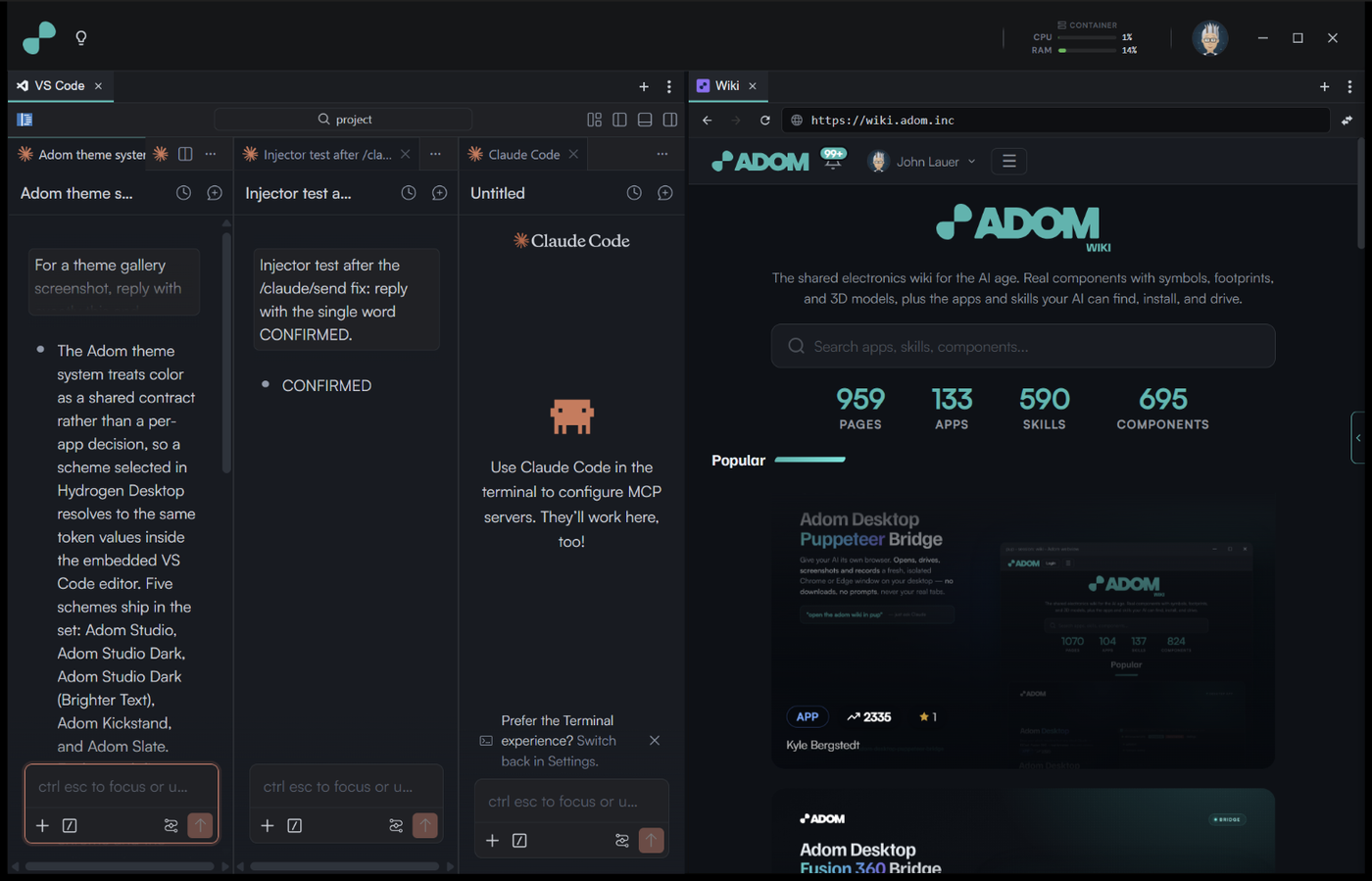

One more measured nuance (2026-08-02): Claude Code has TWO chat surface modes, history-resumed (paints sideBar.background) and fullEditor/command-opened (paints editor.background). The one-ground contract above makes them identical by construction, so the mode difference is invisible in Adom themes.
Two operational notes for future auditors: VS Code caches computed theme data per extension VERSION, so editing theme files under an unchanged version renders nothing (bump to bust); and right after a theme switch, webviews restyle asynchronously, so tabs can wear different themes for a beat. Both are normal.
Each screenshot below is the real Hydrogen Desktop window, captured 2026-08-02 by driving HD's own Settings window: each scheme was selected in Settings > Appearance and Applied, which repaints HD's frontend AND pushes the mapped editor theme in one action. That flow doubled as the theme system's end-to-end unit test, and all five schemes passed on every axis: HD shell scheme attribute, the editor receiving the correct (current) theme label, and the chat body rendering the declared sideBar value within capture tolerance (downscaling shifts solid colors up to 3 channel counts; the hex values in this document are ground truth). Composition standard: sidebar closed, one Claude conversation open and ACTIVE with a second conversation as the inactive background tab, so every shot also proves the active vs inactive tab colors (active tab = the ground, flowing into the chat; inactive tab = the raised chrome tone). Each is the real window (VS Code plus the AI chat on the left, the wiki on the right) captured with that scheme applied end to end, then pixel-verified against the scheme's expected editor background before it was allowed on this page.
Adom Studio (the default)
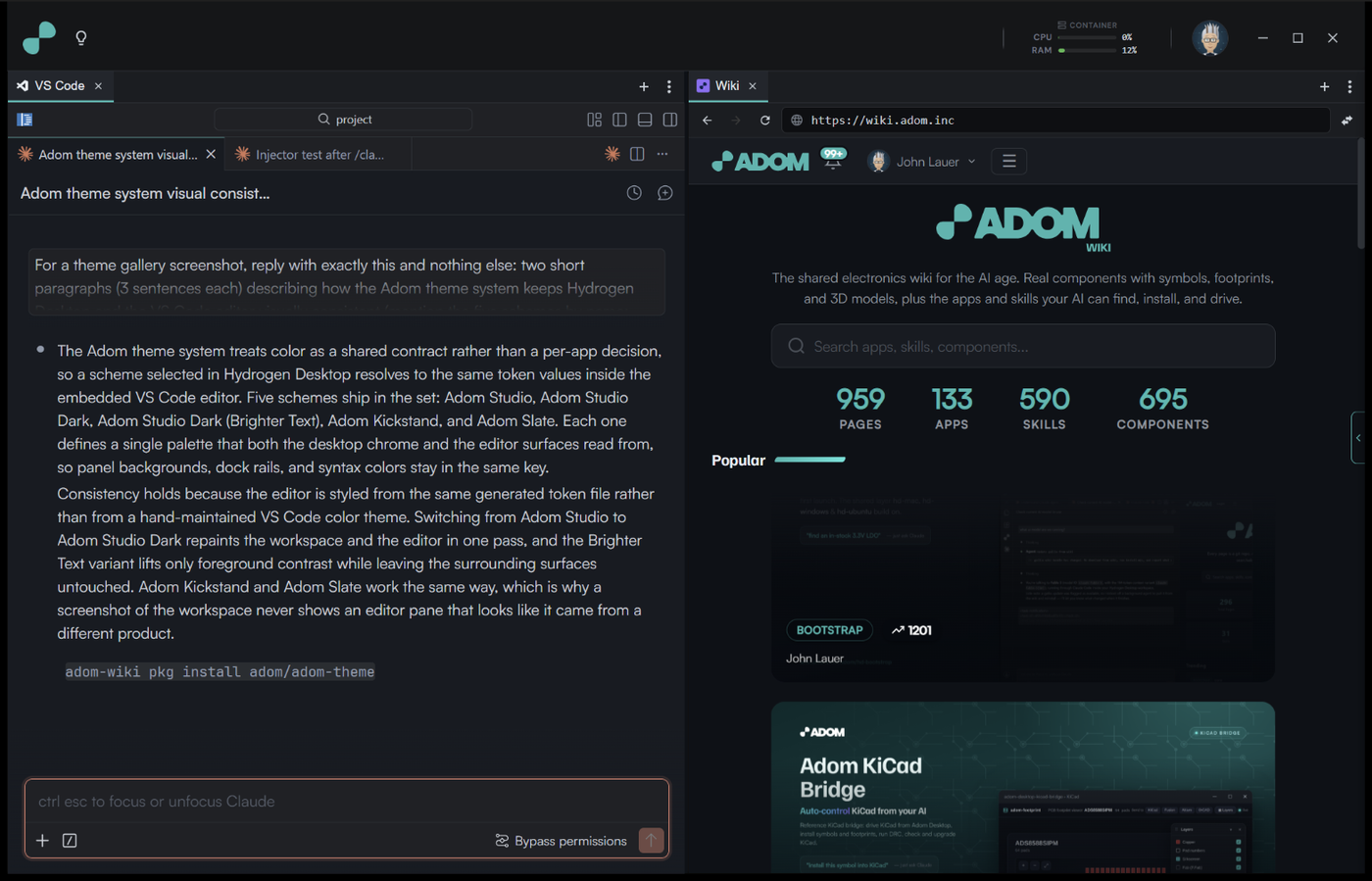
The flagship. The editor sheet is #161b22 and the surrounding chrome drops back to #0d1117. Attention lands on the content, not the frame. The chat renders in Satoshi (an AI conversation is prose), the code blocks in JetBrains Mono.
Adom Studio Dark (Brighter Text)
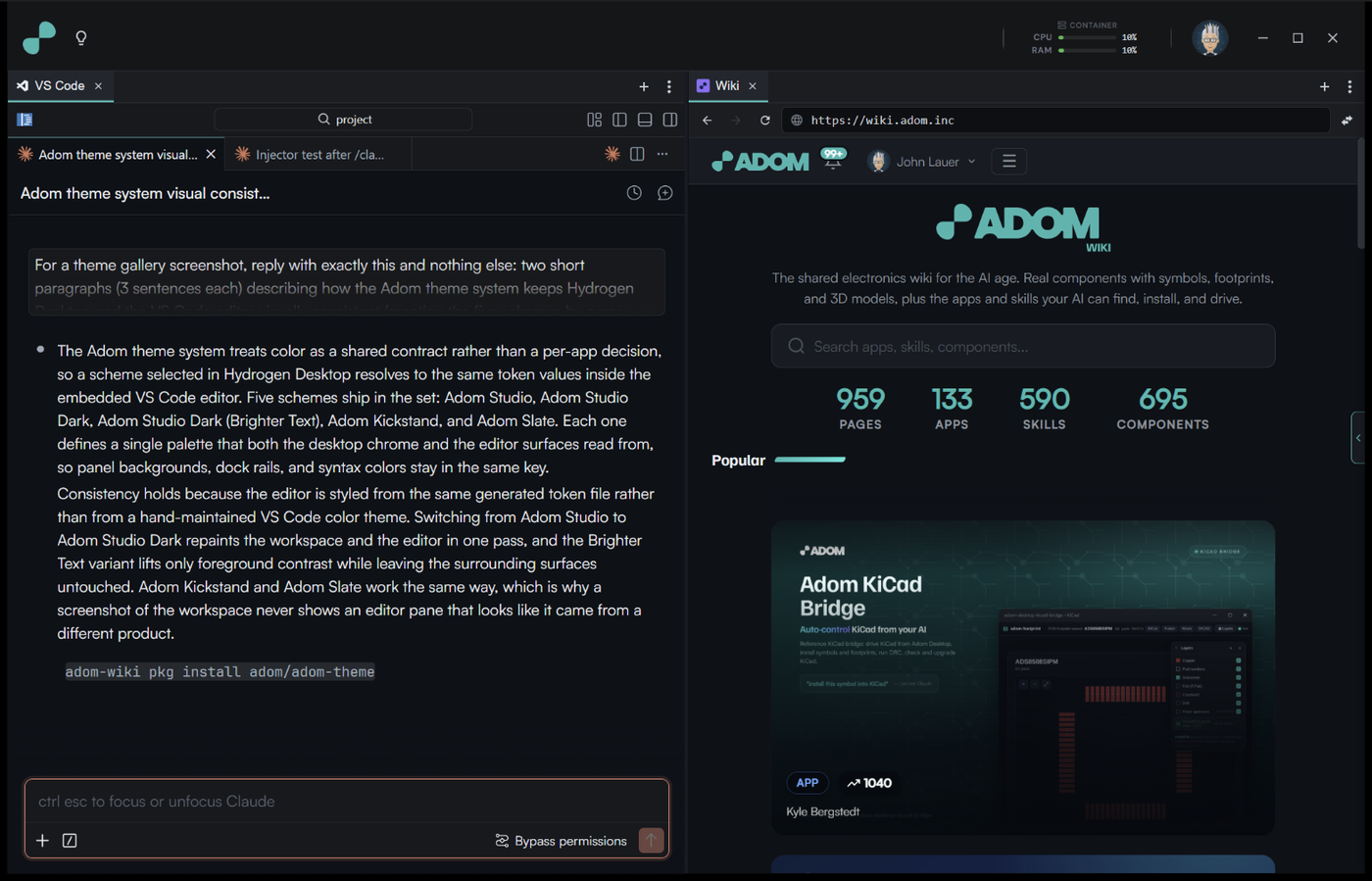
Same ramp as Adom Studio with the grounds swapped: deep #0d1117 everywhere, panels raised on #161b22. A build-time guard (check-scheme-parity.sh) fails the build if these two schemes ever differ by anything other than that swap. The relationship is a contract, not a hope: tune one and the guard makes you tune both.
Adom Studio Dark
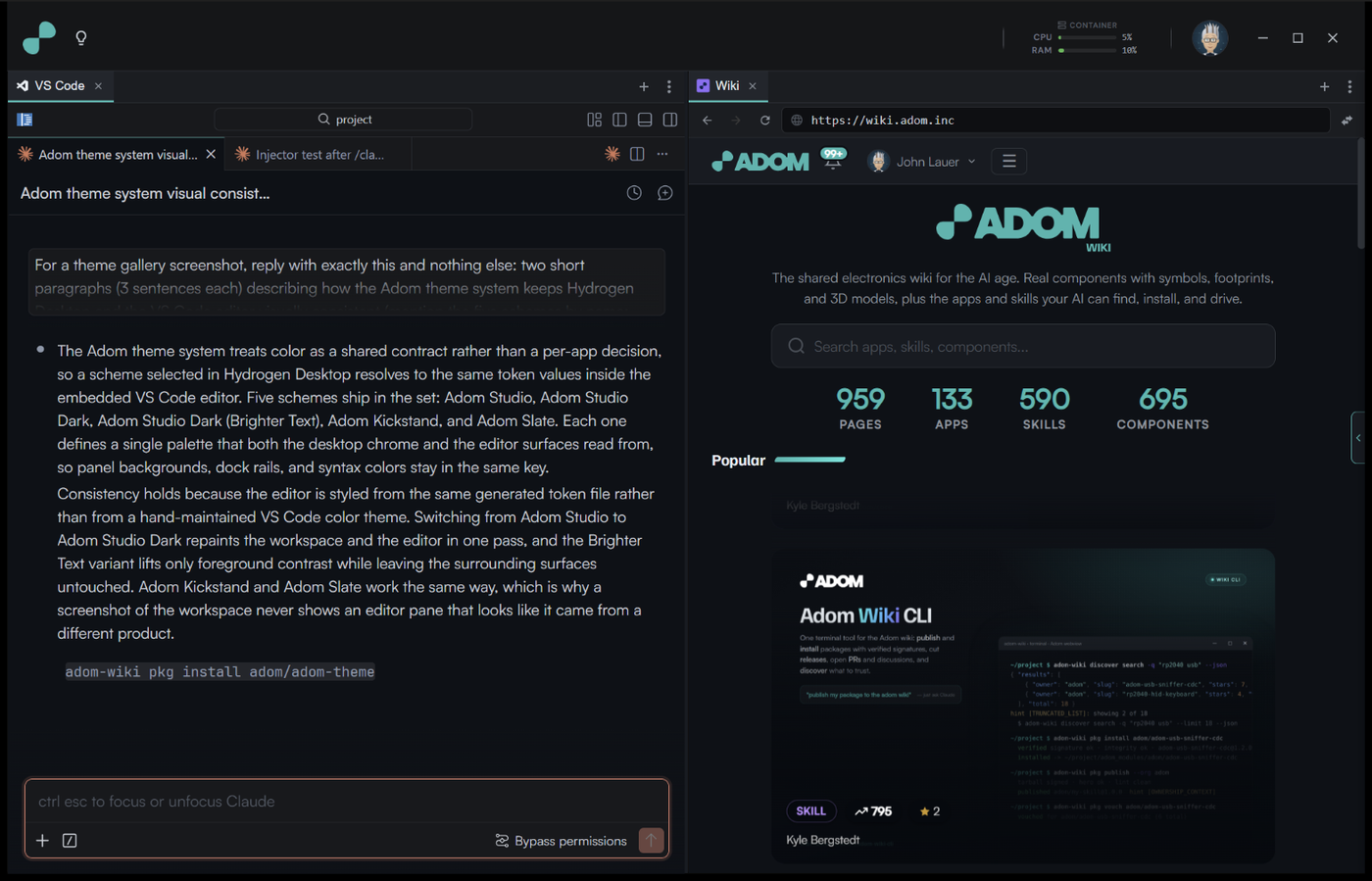
The original palette, tuned for long sessions: same grounds as Bright but with the quieter secondary text (--text-2 drops from #c9d1d9 to #8b949e). In CSS this is the base :root block; it deliberately has no override block of its own.
Adom Kickstand
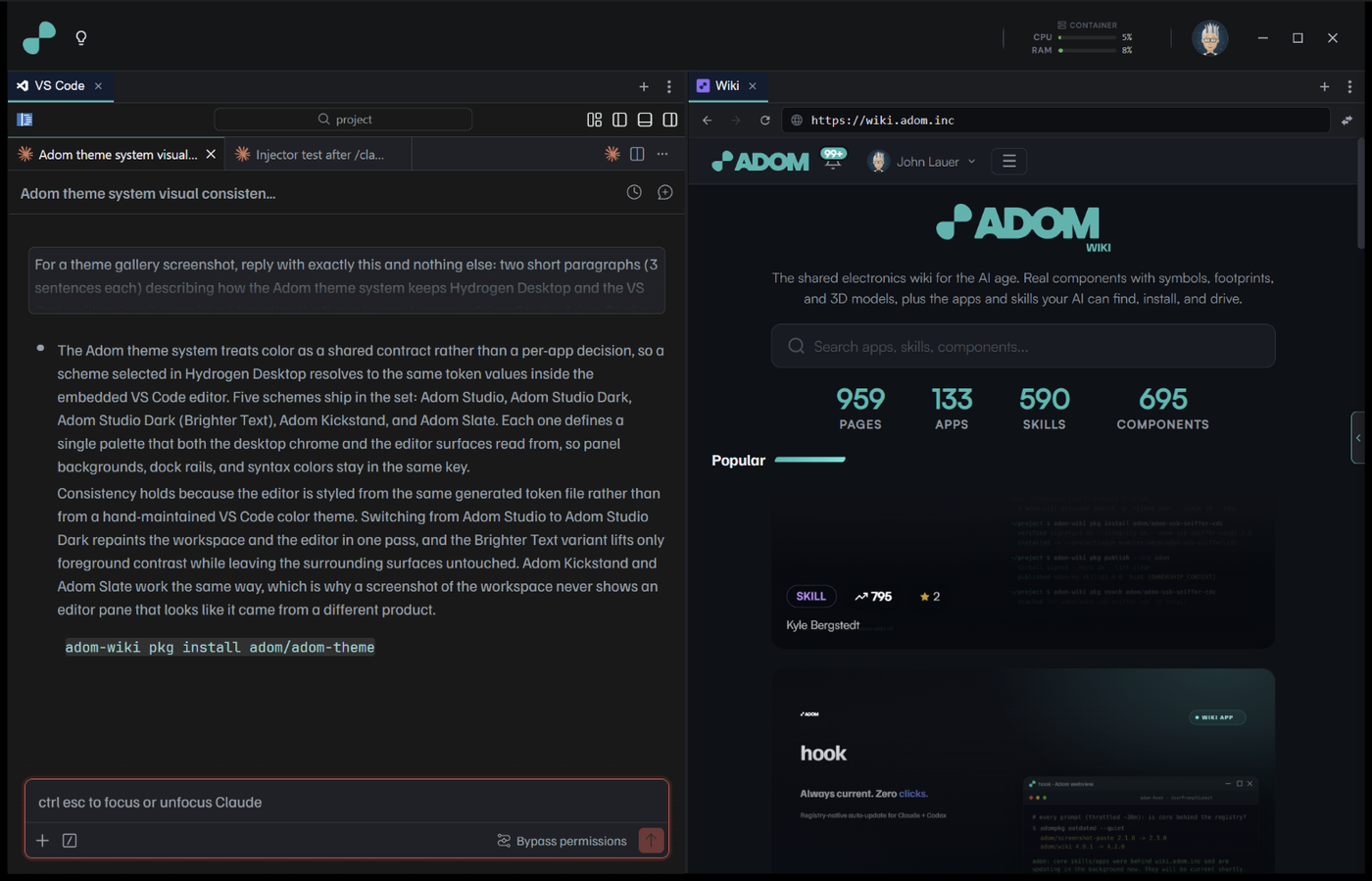
The brand identity palette. Menus, dropdowns, and other overlay chrome use a muted navy #0e1c31, which is a derivation (a 45/55 mix of the brand navy #00204f into the #191919 ground), not a new color. Full-strength navy chrome read as "that weird blue" and was demoted. Prose leads with Familjen Grotesk, the headline face. One documented correction (2026-07-26): the firm's neutral Black ground stays byte-exact, but the chrome grays we derived from it carry a few points of blue, because a pure neutral gray sitting beside the blue-tinted sibling schemes is perceived as warm brown even when the pixels measure exactly neutral.
Adom Slate
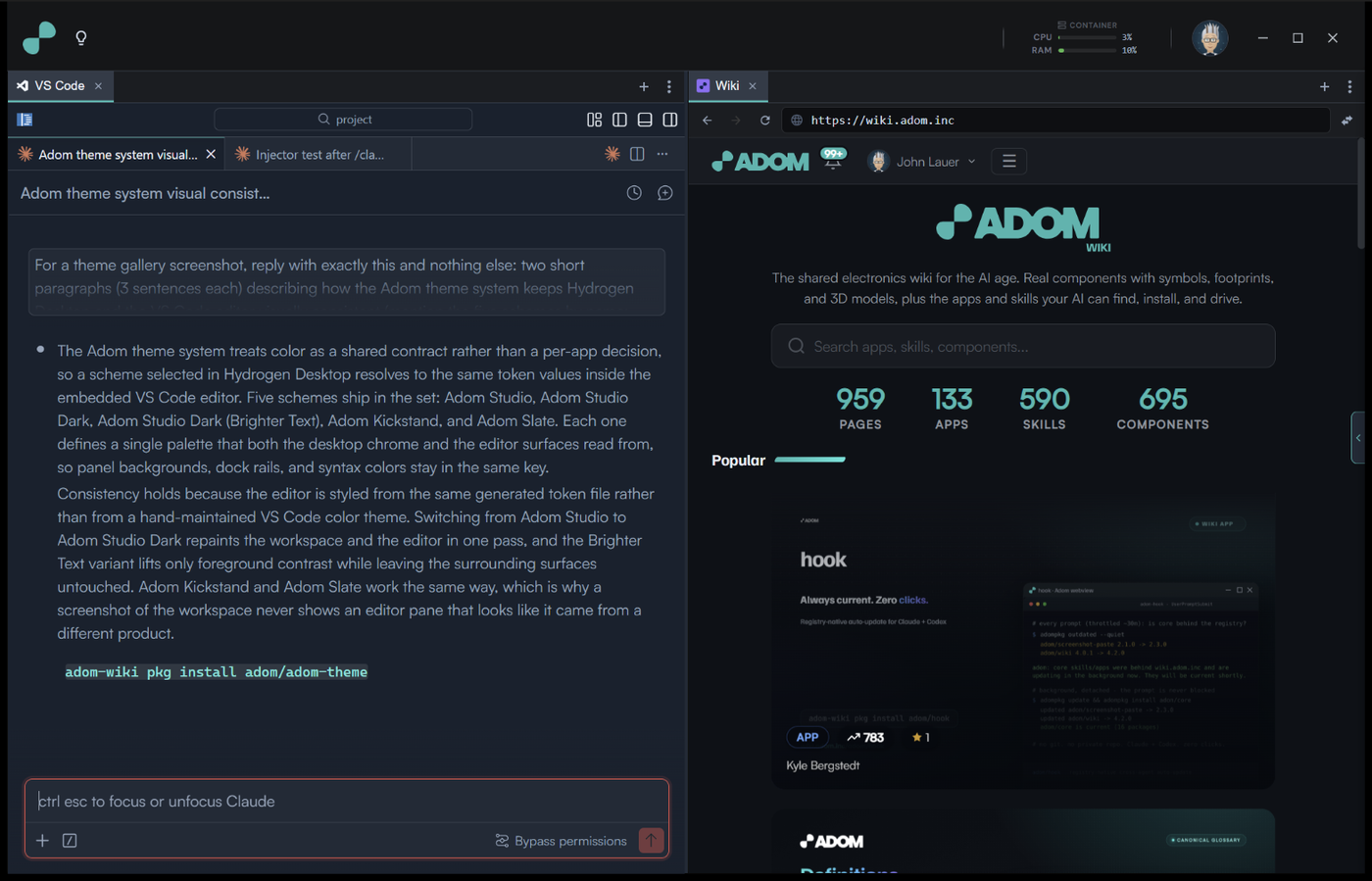
Cool blue-grey (#17212e ground) for people who find the black-on-black families too severe. Its code stack leads with Cascadia Code, which ships with Windows, so it never depends on our font install step.
Fonts from the Settings window (and how that is even possible)
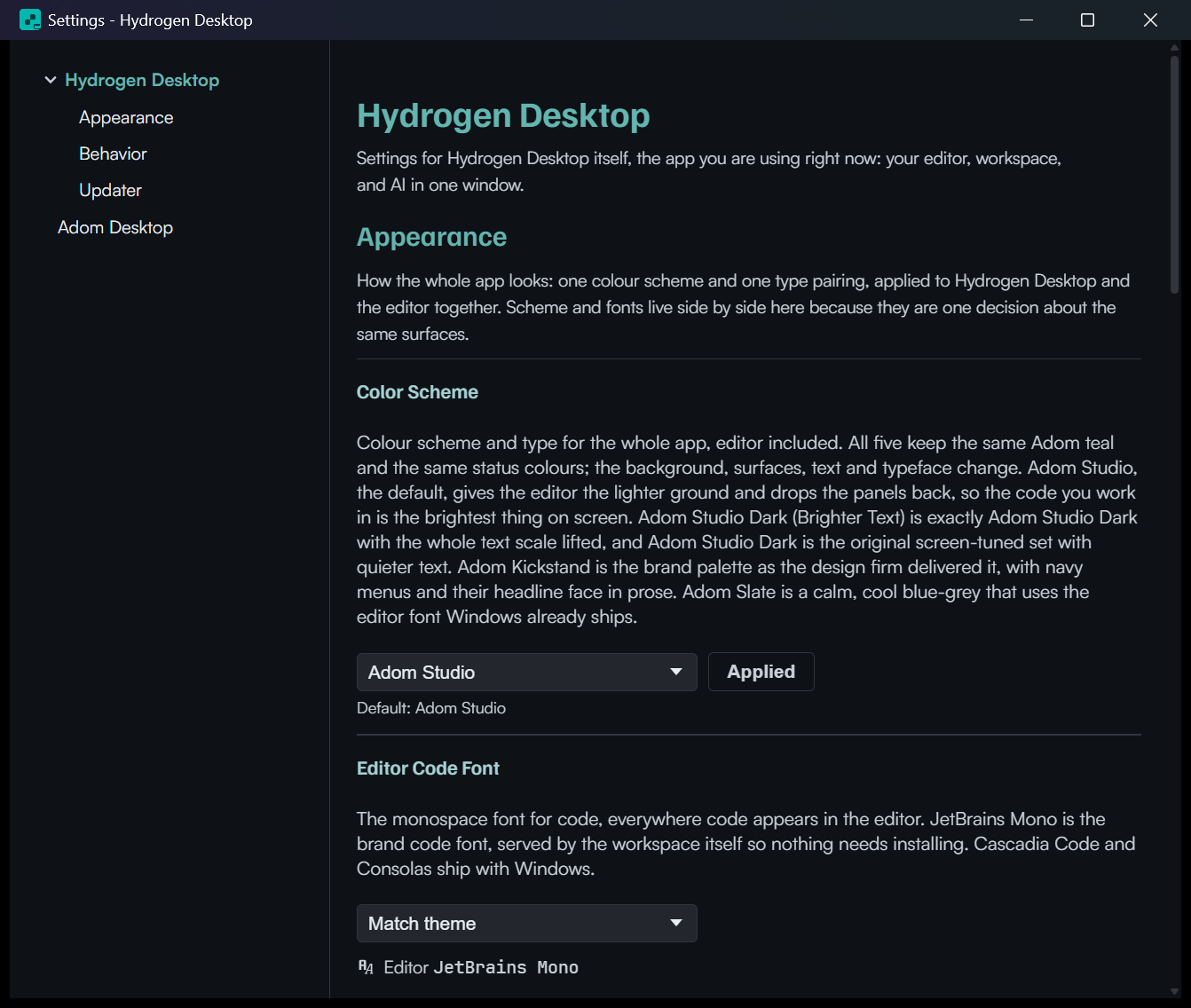
VS Code color themes cannot carry fonts, so the pack alone could never deliver Satoshi or JetBrains Mono. HD does it with two mechanisms working together, both visible in the Settings window's Appearance section:
Delivery: the workspace serves the fonts itself.
install-brand-fonts.sh(run by the golden-image bake, re-runnable after code-server upgrades) copies the woff2 files into code-server's own workbench directory and injects an@font-faceblock intoworkbench.html. The editor fetches the fonts over HTTP from code-server, so a fresh machine needs no Windows font install and can never silently fall back because a machine missed a setup step.Selection: HD pushes VS Code settings keys. The Editor Code Font and Editor Prose Font pickers write
editor.fontFamily,terminal.integrated.fontFamily,debug.console.fontFamily(code face) andchat.fontFamily,markdown.preview.fontFamily(prose face). The chat pair was mapped by decompiling the Claude Code extension:chat.fontFamilyis the conversation PROSE andchat.editor.fontFamilyis the chat's CODE BLOCKS; getting those two backwards renders prose in the system font while code blocks go proportional. "Match theme" follows the scheme's pairing (Satoshi prose + JetBrains Mono code for the Studio family); an explicit pick overrides it for every scheme.
The pickers, in the real Settings window:
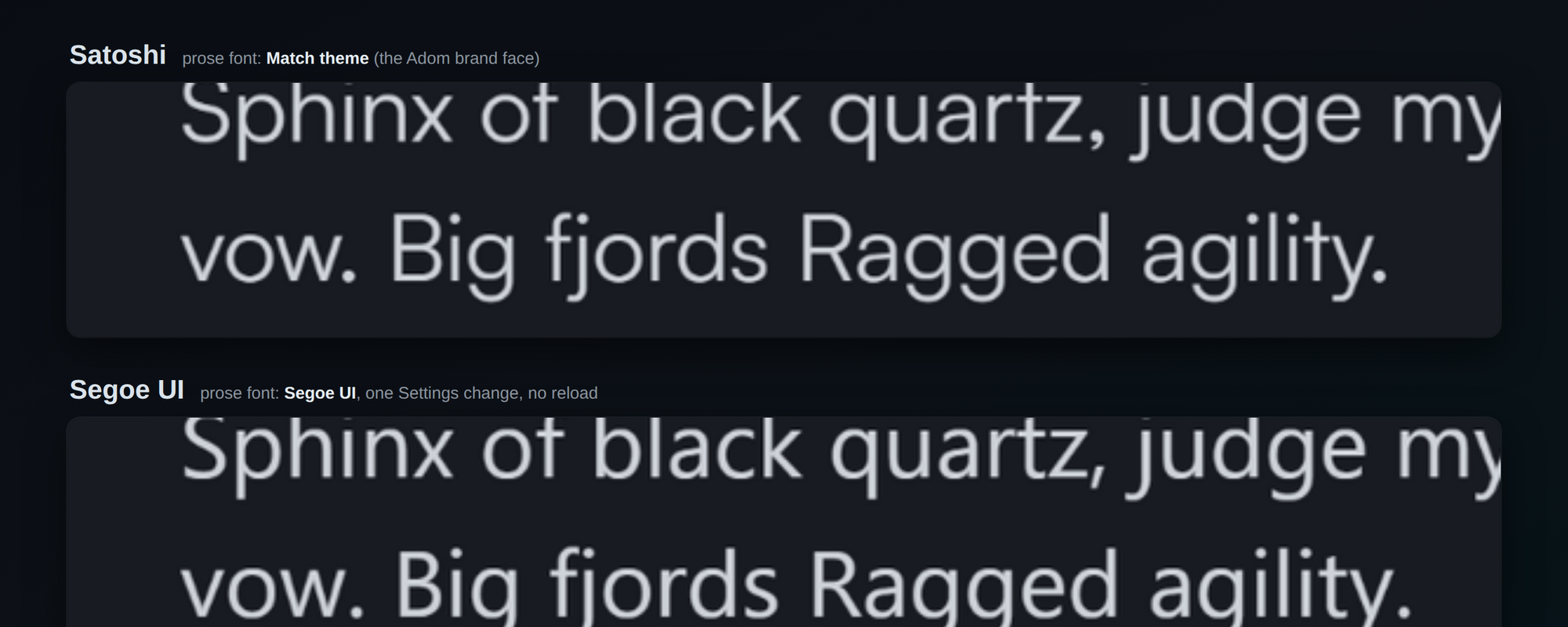
And the proof it works, honestly earned: the first A/B compared the chat INPUT placeholder, which ignores the prose font (John caught it). The redo plants a real chat message, the same pangram sentence at 40pt, prose on Match theme (Satoshi) versus Segoe UI, one Settings change, no reload, 12,800 differing pixels between renders of the identical sentence. The input-placeholder exception is itself now documented: only message prose follows chat.fontFamily.
2. Backgrounds and foregrounds: the token sheet
Backgrounds and foreground text colors are the two things that matter most, so here is the whole generated table, rendered from the live styles.css rather than typed by hand:
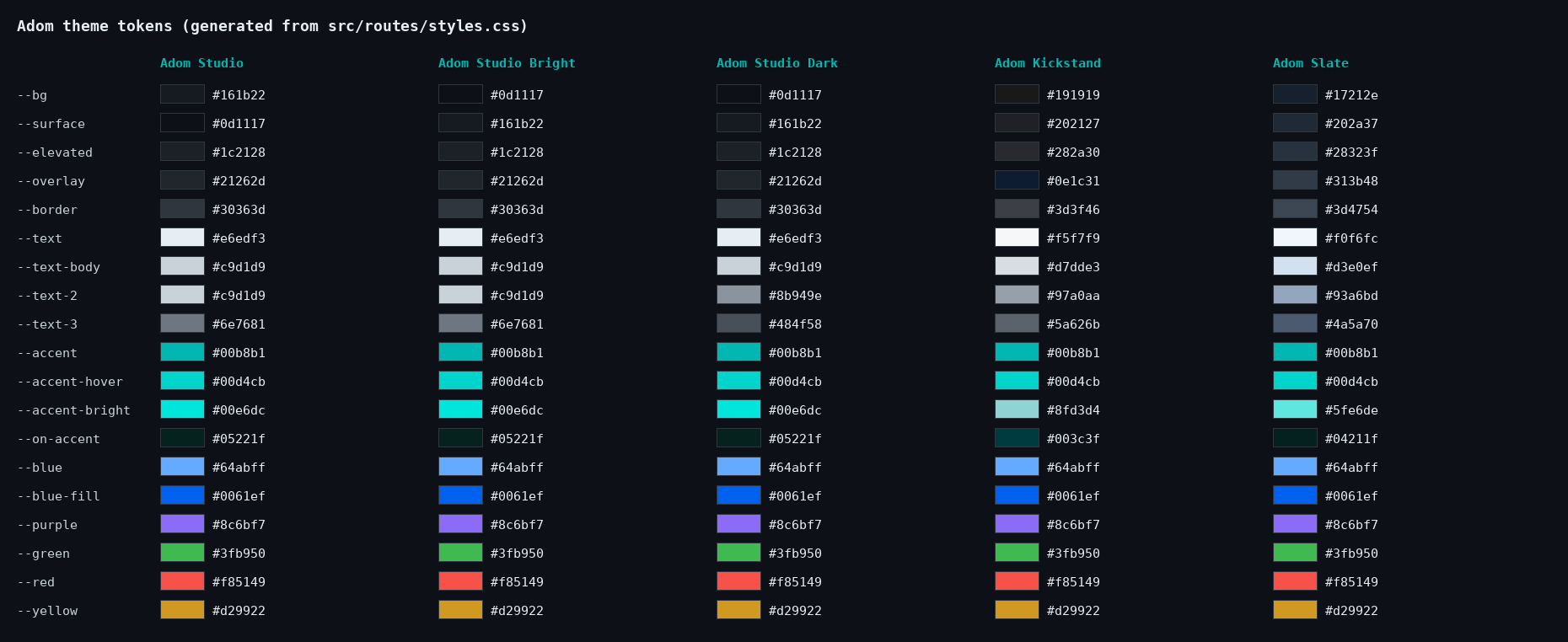
How to read it:
- Grounds.
--bgis the deepest sheet,--surfacecarries panels and toolbars,--elevatedis hover states, raised cards, and always the active tab,--overlayis menus and popovers. The law that keeps Adom Studio usable: the active tab maps to--elevated(#1c2128), never to--surface, because in Adom Studio--surfaceis darker than the editor and a surface-mapped tab renders as a black hole. - Foregrounds. Three working tiers:
--text(#e6edf3family) for emphasis only,--text-body(#c9d1d9) for running text,--text-2for secondary.--text-3exists but fails AA contrast as text; it is for disabled glyphs and borders only. - The constants. Adom teal
#00b8b1is the accent in all five schemes, with--accent-hover #00d4cband a scheme-tinted--accent-bright. Status colors (green#3fb950, red#f85149, yellow#d29922, blue#64abff, purple#8c6bf7) never change between schemes, so "red means error" stays true everywhere. - Text on teal uses
--on-accent(a near-black teal like#05221f), never white.
The token-by-token table with every hex value, plus the measured constraints behind them (contrast bands, the halation ceiling, why there is no teal ground), is in SKILL.md.
3. The fonts we install for the user
Three faces, all licensed for redistribution, all shipped by us so no scheme silently falls back to Segoe UI:
| Face | Role | License |
|---|---|---|
| Satoshi | Prose: UI copy, chat, markdown preview | Fontshare ITF FFL |
| Familjen Grotesk | Headlines, and Kickstand's leading prose face | OFL |
| JetBrains Mono | Code: editor, terminal, code blocks | OFL |
The stacks are defined once in settings.ts and follow the scheme:
| Scheme | Code stack | Prose stack |
|---|---|---|
| studio, studio-bright, studio-dark | 'JetBrains Mono', 'Cascadia Code', Consolas, ui-monospace, monospace |
Satoshi, -apple-system, 'Segoe UI', sans-serif |
| kickstand | same code stack | 'Familjen Grotesk', Satoshi, -apple-system, 'Segoe UI', sans-serif |
| slate | 'Cascadia Code', Consolas, 'JetBrains Mono', ui-monospace, monospace |
Satoshi stack |
Who installs what, and where:
- Inside the workspace (the WSL2 distro that runs the editor): install-brand-fonts.sh fetches the woff2 faces and registers them for the editor, verifying each face over HTTP and checking the wOF2 magic bytes before trusting it. The webfont URL must be absolute (
/_static/lib/vscode/...); a relative URL resolves against the/?folder=route and 404s silently. - On Windows itself: the AI chat panel is an isolated webview that does not load the workbench's webfonts, so Satoshi must also be installed as a real Windows font for chat prose to render there. Standing deployment requirement, documented in DEPLOYMENT-CHECKLIST.md.
- Fresh installs: hd-bootstrap.sh seeds new machines with the Adom Studio theme and the full font pairing, including the chat font keys.
Licensing decides what this page can carry. JetBrains Mono and Familjen Grotesk are OFL 1.1, so their woff2 files live right here in fonts/ with their license texts beside them. Satoshi's Fontshare EULA explicitly forbids "uploading them in a public server", so its binaries are deliberately absent: fonts/satoshi/README.md documents the official Fontshare endpoints, and this page's install.sh fetches the faces from those servers automatically (the EULA-sanctioned channel). Read fonts/LICENSES.md for the full rules before copying font files anywhere.
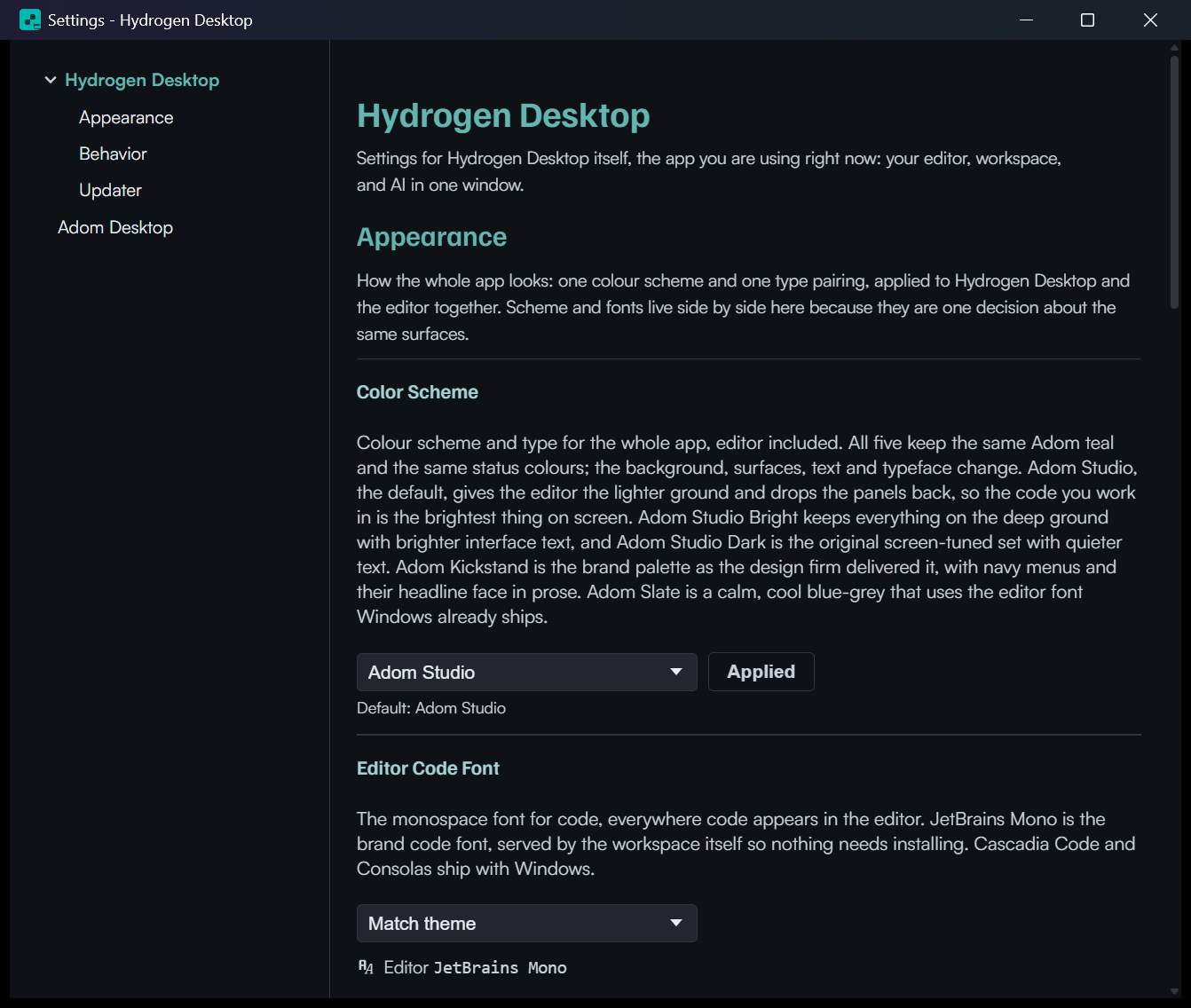
Users can override both slots in Settings. Each picker shows a readout of the family the workbench actually resolved (measured inside the editor document, not assumed), and "Match theme" states which font that means right now. Picks narrate their progress ("Reloading VS Code to set font...", then "Done. JetBrains Mono loaded.") because an editor reload is slow enough to need a spinner:
4. How Hydrogen Desktop implements it
The app shell
- All tokens live in src/routes/styles.css: a base
:rootblock (which IS Adom Studio Dark) plus one[data-scheme='...']override block per scheme. Components consume tokens only; a hardcoded hex in a component is a bug. - The scheme applies as
<html data-scheme="...">. Boot paint reads a versioned localStorage cache (hd-color-scheme2) written by +layout.svelte, so there is no flash of the wrong scheme while stores load. - Because the 2026-07-25 rename reused the slug
studiowith a different meaning, migrations are versioned: a one-shot boot migration stampsdesktop.scheme_slug_version = 2, translates every legacy value (oldstudiobecomesstudio-dark; oldstudio-bright-inverseandinversebecomestudio; retiredblueprintandgraphitemap toslate;contrasttostudio-bright), then always reconciles the editor to match. The lesson: slugs are storage keys, and reusing one without a version bump corrupts every machine that saved the old meaning. - Settings is a real OS window (so you can drag it aside and watch the scheme change underneath), talking to the main window over a small invoke bridge. Scheme picks preview instantly and persist only on Apply.
VS Code specifically
The editor is the surface users stare at all day, so it gets the strictest contract:
- Generated, not hand-maintained. tools/gen-vscode-themes.mjs renders all five VS Code themes from the same tokens through vscode-theme-template.json and packages them as the
adom.adom-themesextension (currently v7.1.0). Change a token in styles.css, regenerate, and the editor follows. It is also why app-side laws (like the active tab being the elevated sheet) hold inside VS Code automatically. - Labels are the contract. HD pushes
workbench.colorThemeby label ("Adom Studio", "Adom Studio Dark (Brighter Text)", "Adom Studio Dark", "Adom Kickstand", "Adom Slate"). VS Code does not warn on an unknown theme name; it silently falls back to its default light theme. That failure turned the editor white three separate times during development, which is why two guards exist: check-installed-themes.sh verifies the pack on the machine and that the live setting resolves, and check-vscode-theme-names.sh gates the bootstrap's theme name against the pack at build time. - Live switching. A scheme pick writes the theme label, that scheme's font pairing, and the sizes through HD's control API in one combined write, then reloads the editor once, with the UI narrating the reload.
- Editor fonts follow section 3:
editor.fontFamily,terminal.integrated.fontFamily, and chat code blocks get the code stack;chat.fontFamilyandmarkdown.preview.fontFamilyget the prose stack.
5. One system, three user-facing surfaces
The three surfaces a user actually looks at are Hydrogen Desktop, Adom Desktop, and the wiki. The theme system's job is to make them read as one product.
Hydrogen Desktop is the reference implementation: tokens, five schemes, generated VS Code pack, font installation, migrations. Everything above.
Adom Desktop already sits on the brand ground with teal accents and reads clearly as Adom:
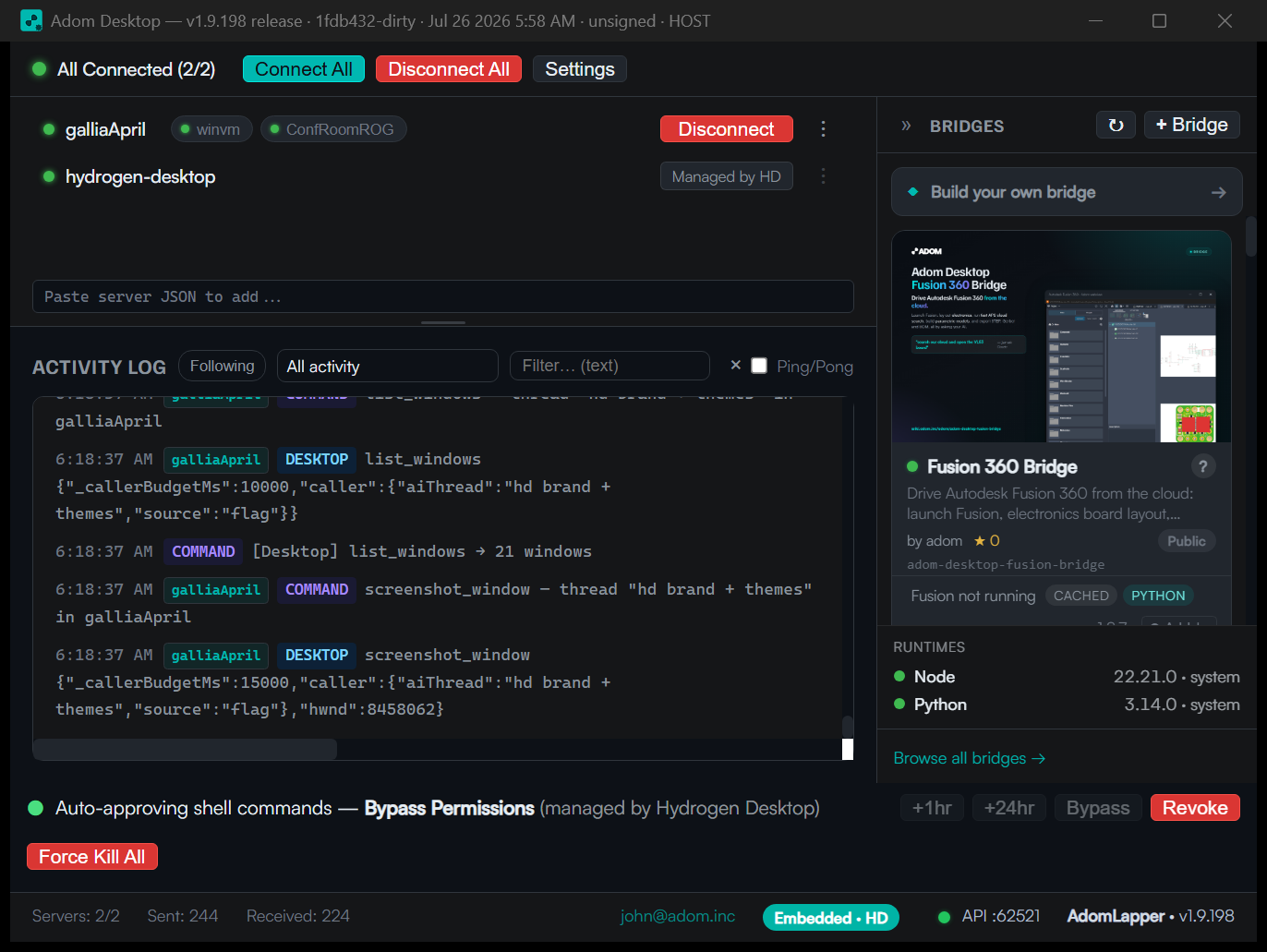
What AD does not yet have is the token layer: its colors are its own CSS rather than the generated --bg / --surface / --text ramp, and it offers no scheme choice. The step-by-step checklist for bringing AD onto the system (adopt the token table, honor the five slugs, reuse the parity and naming laws, style approvals from the same tokens) is in SKILL.md, and the concrete artifacts to start from are on this page: tokens.css (drop-in CSS custom properties for all five schemes) and the generated vscode/ pack as a worked example of projecting the tokens onto another surface. Since HD and AD share one machine and one user, the near-term win is AD honoring the same slugs so a scheme choice in HD can carry across.
The wiki ships the dark ground, teal identity, and Satoshi-style type today:
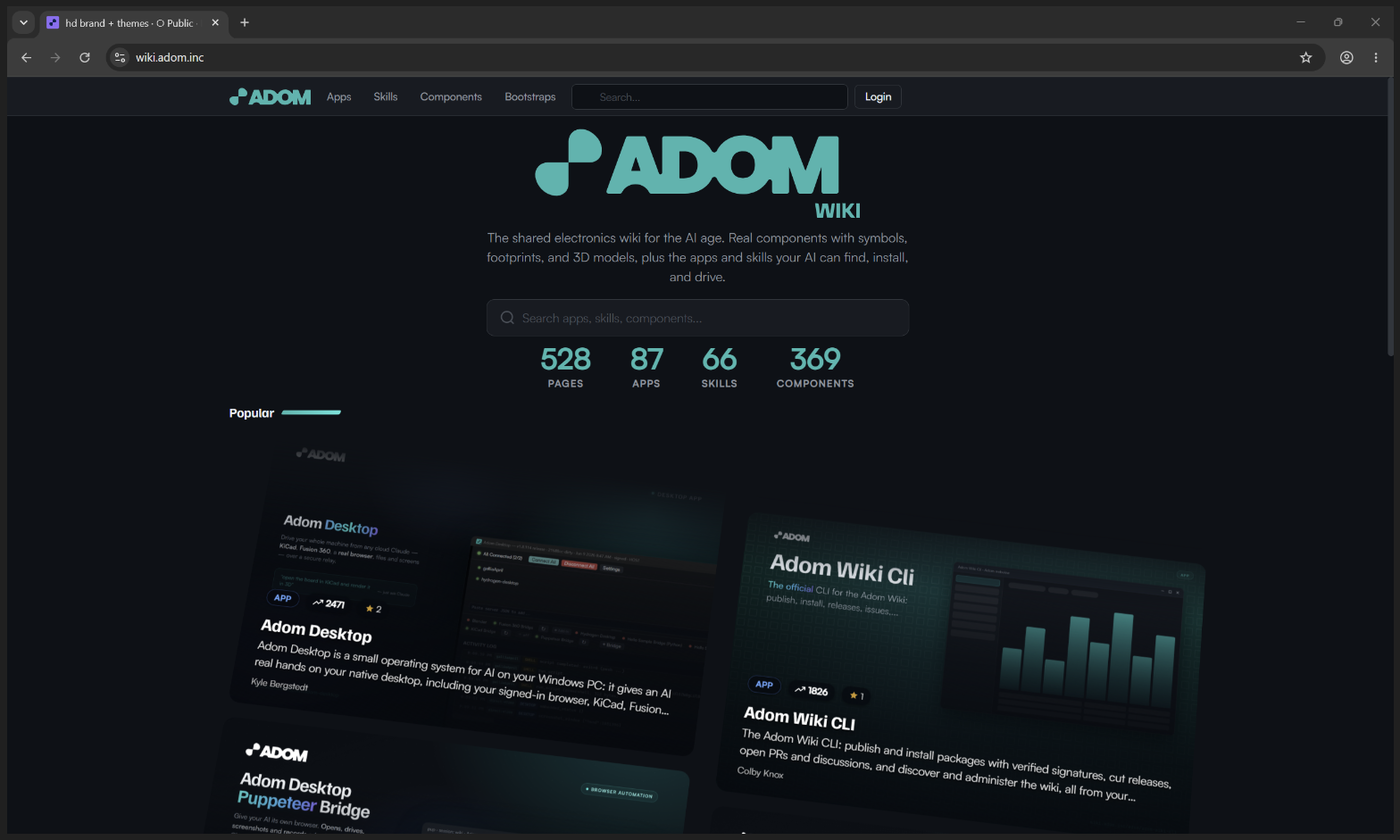
Its values are close cousins of Studio Dark rather than literal token consumers (it is a separate codebase serving the public internet). The alignment worth holding: teal #00b8b1 as the only accent, near-black grounds, no second accent hue creeping in.
6. Where the identity card plays in
Every Adom user has an identity card (avatar, handle, accent treatment) that follows them across surfaces: profile chips in HD, author cards on the wiki, caller identity in AD's approval prompts. The theme system and the identity card divide the work cleanly:
- The theme owns the stage: grounds, chrome, text ramps, status colors.
- The identity card owns the person: their image, their name, their card styling, designed to sit on any of the five schemes without clashing.
That separation is why the same card reads correctly in a #0d1117 Studio Bright panel and on Kickstand's navy overlay. The card assets and rules live in the adom/adom brand hub under skills/identity-card/; any surface rendering user identity should pull from there rather than restyling it per app.
7. Audit: the outer surfaces
The places a person meets Adom before installing anything should look like the same company as the product. Current state, screenshots taken 2026-07-26:
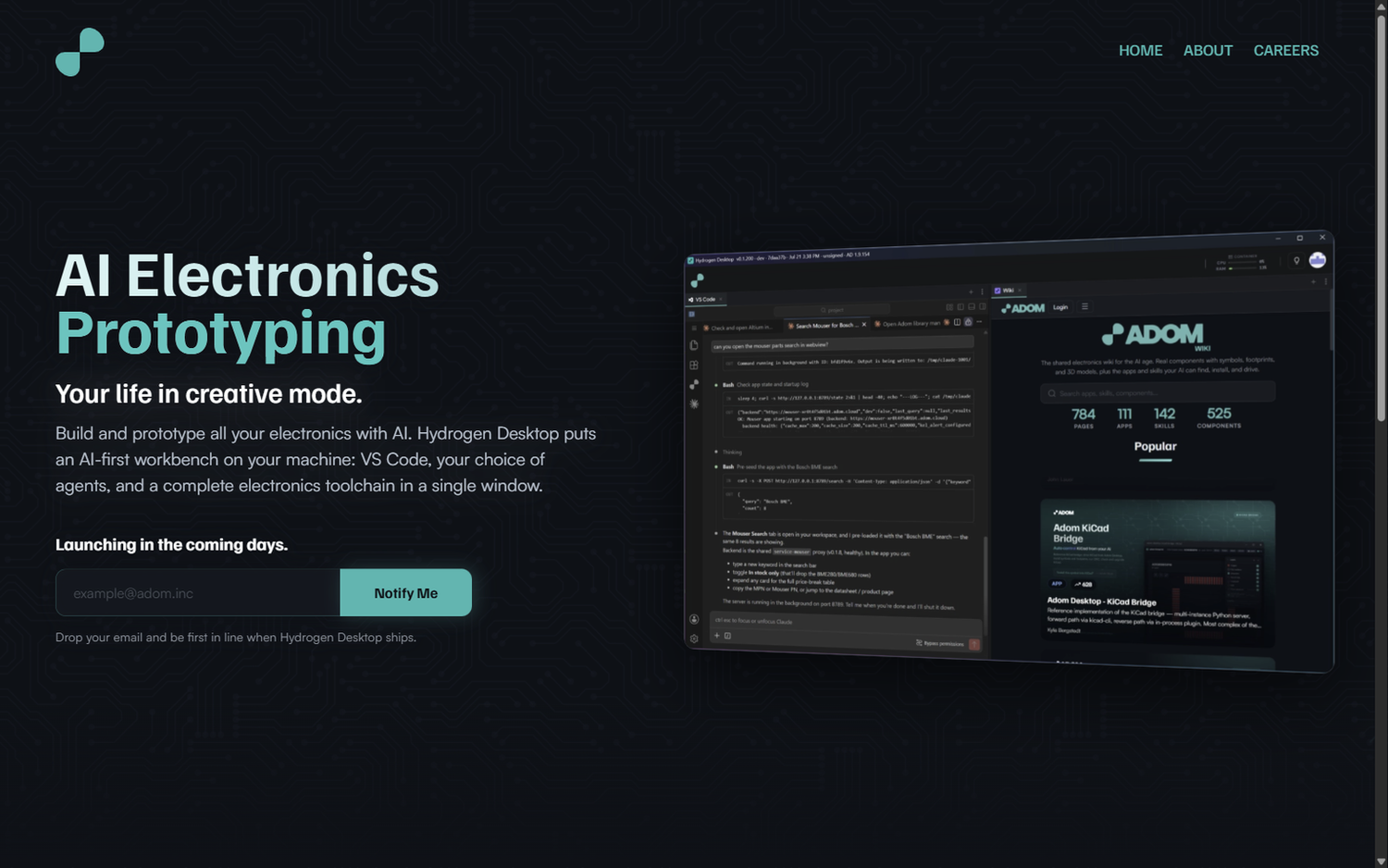
adom.inc homepage: consistent. Dark circuit-board ground, teal headline type, product shot of Hydrogen Desktop. On-system.
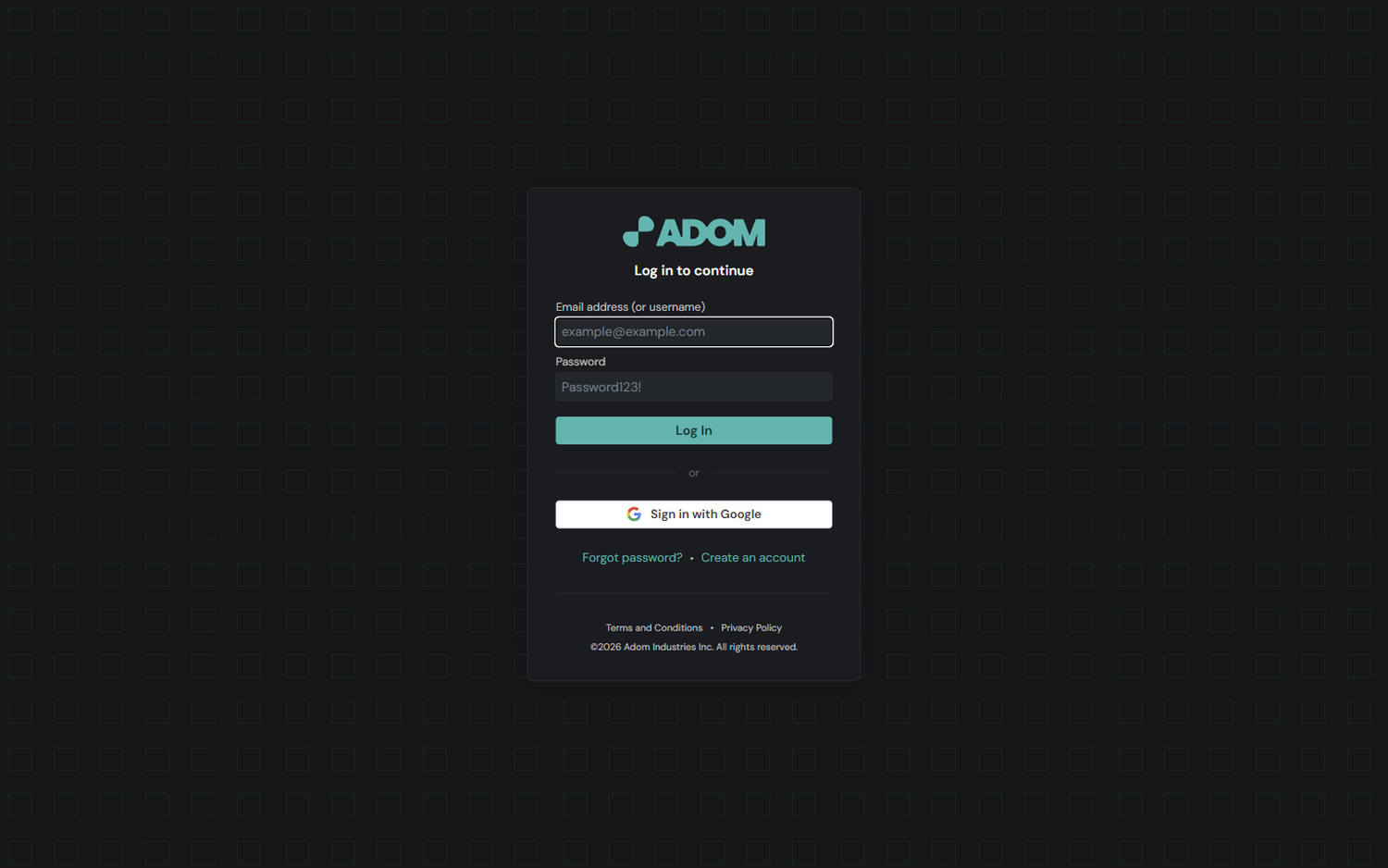
The auth page: consistent. hydrogen.adom.inc/auth/login is where the wiki's Login button lands. Adom logo, near-black ground, teal primary button. Minor nit: the button teal runs slightly lighter than #00b8b1, worth a token pass someday, but nobody would read it as a different company.
One real finding: adom.inc/login is an unbranded 404. A person who guesses the login URL (a normal guess) gets the framework's default purple rocket instead of anything Adom:
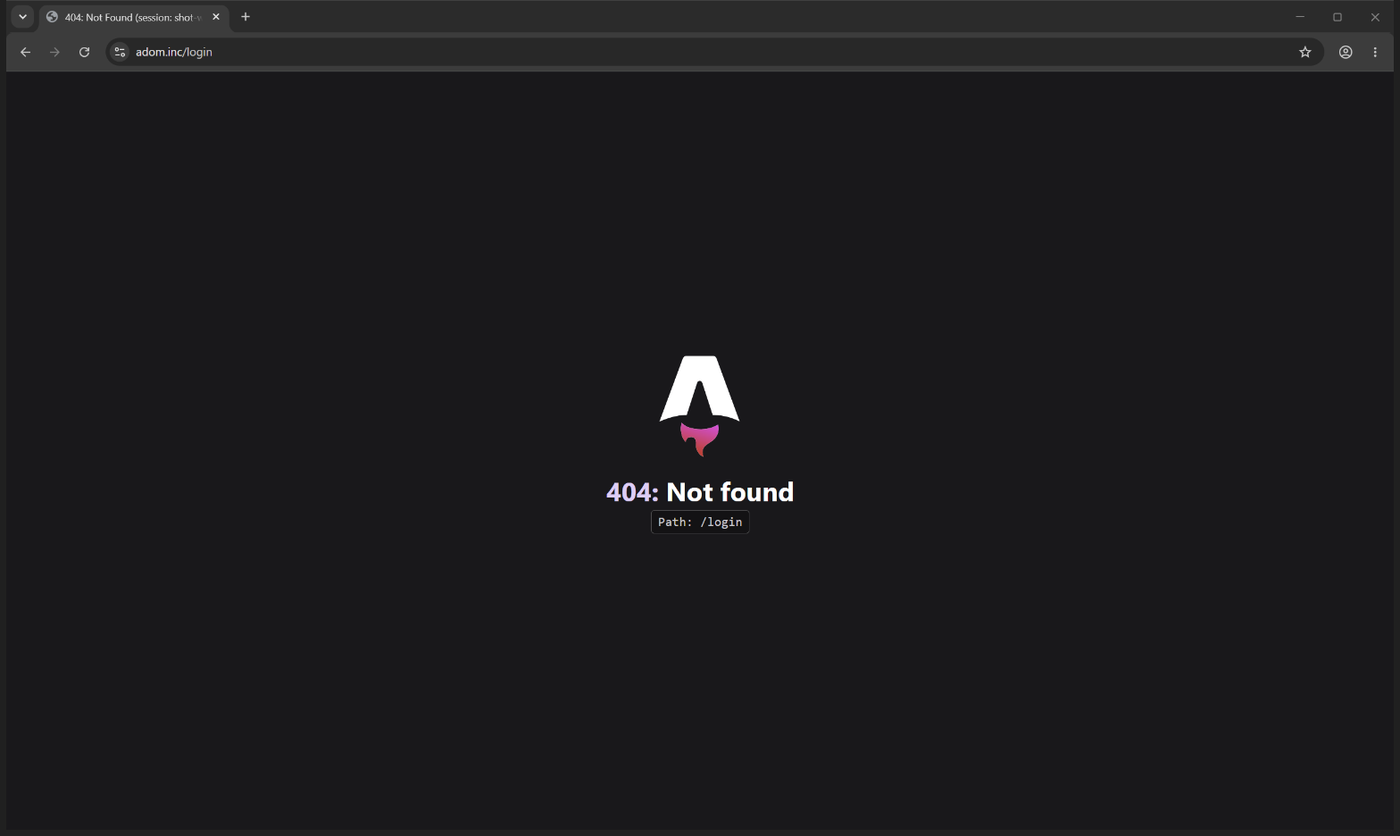
Two cheap fixes, either works: redirect /login to hydrogen.adom.inc/auth/login, or give adom.inc a branded 404 (ground #0d1117, teal accent, Satoshi). Ideally both, since a branded 404 covers every future bad URL, not just this one.
8. Files
Everything an implementer needs is ON this page, because the living repo below is private and other agents cannot read it. The page copies are pinned at commit a4c764be (theme pack v7.2.0); browse the full tree on the page's Files tab.
- SKILL.md: the implementation contract (full token tables, laws, fonts, VS Code, the AD checklist)
- tokens.css: all five schemes as CSS custom properties, extracted verbatim from the reference. The starting artifact for AD's re-brand and any web surface.
vscode/: the complete generated theme pack (package.json plus five theme JSONs). Cloud containers and any code-server install can copy this directly into~/.local/share/code-server/extensions/adom.adom-themes-7.2.0/.fonts/: the redistributable brand fonts with their licenses. JetBrains Mono (4 faces) and Familjen Grotesk (variable), each withOFL.txtbeside them. Satoshi has a folder too, holding only fonts/satoshi/README.md (where to get it and why no binaries live here); fonts/LICENSES.md explains the exact license situation for all three faces and what you may copy where.reference/: byte-exact copies of the machinery, since the repo is private: the theme generator, its template, the font installer, and all three guard scripts, with a provenance README.- install.sh:
adom-wiki pkg install adom-theme-systeminstalls the skill, and where code-server is present also installs the theme pack (making the five Adom themes selectable, without changing the active theme), the OFL fonts, and Satoshi fetched live from Fontshare's official servers with wOF2 verification. Verified end to end in a standard Adom cloud container. - docs/tokens.png and
docs/scheme-*.png: the rendered token sheet and the five verified captures.
Source of truth in the Hydrogen Desktop repo (private; the copies above exist because of that):
- src/routes/styles.css: every token, every scheme block
- src/lib/stores/settings.ts: scheme-to-font mapping, VS Code sync, migrations
- src/routes/+layout.svelte: boot paint and the versioned scheme cache
- tools/gen-vscode-themes.mjs: the VS Code theme generator
- scripts/install-brand-fonts.sh: workspace font installation
- scripts/check-scheme-parity.sh, scripts/check-installed-themes.sh, scripts/check-vscode-theme-names.sh: the guards
Related pages: adom/adom brand hub (brand + identity card), Adom Desktop, Adom Wiki Skill Pack (publishing conventions, including the wiki-bloat rule this page was weighed against before it earned its own slug).
# Adom Theme
The color schemes, tokens, and typefaces that make every Adom surface look like one company built it. This page is the extensive tour: what the five schemes look like, the exact background and foreground values, the fonts we install for the user, and how the system is wired into Hydrogen Desktop (including VS Code), Adom Desktop, and the wiki. The machine-readable contract an implementing agent should follow is [SKILL.md](https://wiki.adom.inc/api/pages/adom/adom-theme/files/SKILL.md) on this same page (install: `adom-wiki pkg install adom-theme-system`).
Why this gets its own page: themes are a big part of whether Adom reads as a professional product or an amateur one. A user touches three of our surfaces in their first ten minutes (Hydrogen Desktop, Adom Desktop, the wiki), and any mismatch between them is instantly visible. So the palette, the names, the fonts, and the rules live in one place, with screenshots proving what each surface actually renders today.
---
## 0. Identity and versioning (one number, everywhere)
This page is the whole Adom theme: docs, tokens, fonts, generators, and the VS Code theme pack. Two artifacts share ONE version, locked in the same commit, always:
| Artifact | Name | Version source |
|---|---|---|
| The wiki package (this page) | `adom-theme` | `package.json` at the page root |
| The VS Code extension it installs | `adom.adom-theme` | `vscode/package.json`, kept identical |
If the installed `adom.adom-theme` version differs from this package's version, the install is stale; run `adom-wiki pkg update`. That is the ONLY update channel: the extension is never published to the VS Code Marketplace or any gallery, so gallery update checks (`latestVersion`, `updateAvailable`) return null for it by design, and that null is not a defect.
History: before 2026-08-02 this page was `adom-theme-system` and the extension was `adom.adom-themes` with an independent 7.x version line. Both were renamed and version-locked at 2.0.0 while HD was still pre-release; install.sh purges the legacy extension id so theme pickers never show doubled entries.
One trap for auditors: extension files on disk carry the mtimes stored in the package tarball (publish time), not install time. Read timestamps with the date attached before concluding anything.
---
## 1. The five schemes and their standard names
Every scheme has a product label (what users see) and a slug (the frozen storage key). Labels and slugs were unified on 2026-07-25 so the HD settings picker, the VS Code theme pack, and stored preferences all agree. The naming rule: the flagship is plain **Adom Studio**, and variants earn a suffix.
| Product label | Slug | Character |
|---|---|---|
| **Adom Studio** (default) | `studio` | The editor sits on the lighter ground and the panels drop back, so the code you work in is the brightest thing on screen. Bright text ramp. |
| Adom Studio Dark (Brighter Text) | `studio-bright` | Everything on the deep ground with the brighter interface text. Adom Studio is exactly this scheme with the two grounds traded. |
| Adom Studio Dark | `studio-dark` | The original screen-tuned set with the quieter text ramp. This is the token base the other schemes override. |
| Adom Kickstand | `kickstand` | The identity palette as the design firm delivered it: near-black `#191919` ground, muted navy chrome, and the headline face used in prose. |
| Adom Slate | `slate` | A calm, cool blue-grey. Uses the code font Windows already ships, so it feels native on a stock machine. |
### The five schemes, side by side (real screenshots)
The comparison that actually matters when you pick a theme: the same live Claude chat, same content, captured five times with only `workbench.colorTheme` changed (applied live through adom-vscode, no reload). The background is what dominates your eye all day; the text color is what you read non-stop. Exact values under each column.

### Is "(Brighter Text)" honest? The measured delta
Fair question, asked and verified 2026-08-02: in the 5-column comparison the two Dark variants look nearly identical, because a 12.3:1 vs 16.0:1 text lift compresses at small sizes (both are "light gray on dark"; the jump is 10 points of perceptual lightness, carried entirely in thin glyph strokes). The pixels in the shipped screenshots confirm the lift is real: glyph cores measure 190 luma (Dark) vs 218 luma (Brighter Text), a 15 percent lift exactly tracking the designed #c9d1d9 to #e6edf3 move. Same sentence, same background, zoomed:

If a bigger delta is ever wanted, the knob is the fg anchor in the generator (one value), but past ~14:1 dark-mode text starts to halo, and Brighter Text already sits at 16:1, so push with care.
### Validation: does the active tab flow into the chat body?
The design intent (John, 2026-08-02): the active tab should share the chat body's background so the active conversation reads front-and-center, the tab flowing into its content.
**Status: PASS as of 2.3.0, by the one-ground contract.** Claude chats paint `sideBar.background` when resumed from history and `editor.background` in fullEditor (command-opened) mode, so the only rule that makes the active tab flow into EVERY chat, both modes, plus every file editor, is to unify the grounds: `sideBar.background`/`foreground` take the editor ground and text in all five themes. The active tab keeps 2026's anchor equality with the editor ground, so tab == chat == file body everywhere, and inactive tabs keep the raised 2026 chrome tone so the active one is unmistakable. (The interim 2.2.0 contract matched only the history mode; superseded the same day once the fullEditor mode was measured.) The sidebar/editor boundary is carried by the border, not a fill change.
**The three-panel consistency proof** (Adom Studio, one real screenshot, pixel-verified): an ACTIVE history-resumed chat, an INACTIVE history-resumed chat, and a BRAND-NEW command-opened chat side by side. Before the one-ground contract, the new-mode chat would render a different ground than the history chats; measured now, all three bodies are the identical Adom Studio ground (#161b22, capture-shifted #181b21 in all three panels), and every chat tab flows into its body.


One more measured nuance (2026-08-02): Claude Code has TWO chat surface modes, history-resumed (paints `sideBar.background`) and fullEditor/command-opened (paints `editor.background`). The one-ground contract above makes them identical by construction, so the mode difference is invisible in Adom themes.
Two operational notes for future auditors: VS Code caches computed theme data per extension VERSION, so editing theme files under an unchanged version renders nothing (bump to bust); and right after a theme switch, webviews restyle asynchronously, so tabs can wear different themes for a beat. Both are normal.
Each screenshot below is the real Hydrogen Desktop window, captured 2026-08-02 by driving HD's own Settings window: each scheme was selected in Settings > Appearance and Applied, which repaints HD's frontend AND pushes the mapped editor theme in one action. That flow doubled as the theme system's end-to-end unit test, and all five schemes passed on every axis: HD shell scheme attribute, the editor receiving the correct (current) theme label, and the chat body rendering the declared sideBar value within capture tolerance (downscaling shifts solid colors up to 3 channel counts; the hex values in this document are ground truth). Composition standard: sidebar closed, one Claude conversation open and ACTIVE with a second conversation as the inactive background tab, so every shot also proves the active vs inactive tab colors (active tab = the ground, flowing into the chat; inactive tab = the raised chrome tone). Each is the real window (VS Code plus the AI chat on the left, the wiki on the right) captured with that scheme applied end to end, then pixel-verified against the scheme's expected editor background before it was allowed on this page.
### Adom Studio (the default)

The flagship. The editor sheet is `#161b22` and the surrounding chrome drops back to `#0d1117`. Attention lands on the content, not the frame. The chat renders in Satoshi (an AI conversation is prose), the code blocks in JetBrains Mono.
### Adom Studio Dark (Brighter Text)

Same ramp as Adom Studio with the grounds swapped: deep `#0d1117` everywhere, panels raised on `#161b22`. A build-time guard ([check-scheme-parity.sh](https://github.com/adom-inc/hydrogen-desktop/blob/main/scripts/check-scheme-parity.sh)) fails the build if these two schemes ever differ by anything other than that swap. The relationship is a contract, not a hope: tune one and the guard makes you tune both.
### Adom Studio Dark

The original palette, tuned for long sessions: same grounds as Bright but with the quieter secondary text (`--text-2` drops from `#c9d1d9` to `#8b949e`). In CSS this is the base `:root` block; it deliberately has no override block of its own.
### Adom Kickstand

The brand identity palette. Menus, dropdowns, and other overlay chrome use a muted navy `#0e1c31`, which is a derivation (a 45/55 mix of the brand navy `#00204f` into the `#191919` ground), not a new color. Full-strength navy chrome read as "that weird blue" and was demoted. Prose leads with Familjen Grotesk, the headline face. One documented correction (2026-07-26): the firm's neutral Black ground stays byte-exact, but the chrome grays we derived from it carry a few points of blue, because a pure neutral gray sitting beside the blue-tinted sibling schemes is perceived as warm brown even when the pixels measure exactly neutral.
### Adom Slate

Cool blue-grey (`#17212e` ground) for people who find the black-on-black families too severe. Its code stack leads with Cascadia Code, which ships with Windows, so it never depends on our font install step.
---
## Fonts from the Settings window (and how that is even possible)
VS Code color themes cannot carry fonts, so the pack alone could never deliver Satoshi or JetBrains Mono. HD does it with two mechanisms working together, both visible in the Settings window's Appearance section:
1. **Delivery: the workspace serves the fonts itself.** `install-brand-fonts.sh` (run by the golden-image bake, re-runnable after code-server upgrades) copies the woff2 files into code-server's own workbench directory and injects an `@font-face` block into `workbench.html`. The editor fetches the fonts over HTTP from code-server, so a fresh machine needs no Windows font install and can never silently fall back because a machine missed a setup step.
2. **Selection: HD pushes VS Code settings keys.** The Editor Code Font and Editor Prose Font pickers write `editor.fontFamily`, `terminal.integrated.fontFamily`, `debug.console.fontFamily` (code face) and `chat.fontFamily`, `markdown.preview.fontFamily` (prose face). The chat pair was mapped by decompiling the Claude Code extension: `chat.fontFamily` is the conversation PROSE and `chat.editor.fontFamily` is the chat's CODE BLOCKS; getting those two backwards renders prose in the system font while code blocks go proportional. "Match theme" follows the scheme's pairing (Satoshi prose + JetBrains Mono code for the Studio family); an explicit pick overrides it for every scheme.
The pickers, in the real Settings window:

And the proof it works, honestly earned: the first A/B compared the chat INPUT placeholder, which ignores the prose font (John caught it). The redo plants a real chat message, the same pangram sentence at 40pt, prose on Match theme (Satoshi) versus Segoe UI, one Settings change, no reload, 12,800 differing pixels between renders of the identical sentence. The input-placeholder exception is itself now documented: only message prose follows chat.fontFamily.

## 2. Backgrounds and foregrounds: the token sheet
Backgrounds and foreground text colors are the two things that matter most, so here is the whole generated table, rendered from the live [styles.css](https://github.com/adom-inc/hydrogen-desktop/blob/main/src/routes/styles.css) rather than typed by hand:

How to read it:
- **Grounds.** `--bg` is the deepest sheet, `--surface` carries panels and toolbars, `--elevated` is hover states, raised cards, and always the active tab, `--overlay` is menus and popovers. The law that keeps Adom Studio usable: the active tab maps to `--elevated` (`#1c2128`), never to `--surface`, because in Adom Studio `--surface` is darker than the editor and a surface-mapped tab renders as a black hole.
- **Foregrounds.** Three working tiers: `--text` (`#e6edf3` family) for emphasis only, `--text-body` (`#c9d1d9`) for running text, `--text-2` for secondary. `--text-3` exists but fails AA contrast as text; it is for disabled glyphs and borders only.
- **The constants.** Adom teal `#00b8b1` is the accent in all five schemes, with `--accent-hover #00d4cb` and a scheme-tinted `--accent-bright`. Status colors (green `#3fb950`, red `#f85149`, yellow `#d29922`, blue `#64abff`, purple `#8c6bf7`) never change between schemes, so "red means error" stays true everywhere.
- **Text on teal** uses `--on-accent` (a near-black teal like `#05221f`), never white.
The token-by-token table with every hex value, plus the measured constraints behind them (contrast bands, the halation ceiling, why there is no teal ground), is in [SKILL.md](https://wiki.adom.inc/api/pages/adom/adom-theme/files/SKILL.md).
---
## 3. The fonts we install for the user
Three faces, all licensed for redistribution, all shipped by us so no scheme silently falls back to Segoe UI:
| Face | Role | License |
|---|---|---|
| **Satoshi** | Prose: UI copy, chat, markdown preview | Fontshare ITF FFL |
| **Familjen Grotesk** | Headlines, and Kickstand's leading prose face | OFL |
| **JetBrains Mono** | Code: editor, terminal, code blocks | OFL |
The stacks are defined once in [settings.ts](https://github.com/adom-inc/hydrogen-desktop/blob/main/src/lib/stores/settings.ts) and follow the scheme:
| Scheme | Code stack | Prose stack |
|---|---|---|
| studio, studio-bright, studio-dark | `'JetBrains Mono', 'Cascadia Code', Consolas, ui-monospace, monospace` | `Satoshi, -apple-system, 'Segoe UI', sans-serif` |
| kickstand | same code stack | `'Familjen Grotesk', Satoshi, -apple-system, 'Segoe UI', sans-serif` |
| slate | `'Cascadia Code', Consolas, 'JetBrains Mono', ui-monospace, monospace` | Satoshi stack |
Who installs what, and where:
- **Inside the workspace** (the WSL2 distro that runs the editor): [install-brand-fonts.sh](https://github.com/adom-inc/hydrogen-desktop/blob/main/scripts/install-brand-fonts.sh) fetches the woff2 faces and registers them for the editor, verifying each face over HTTP and checking the wOF2 magic bytes before trusting it. The webfont URL must be absolute (`/_static/lib/vscode/...`); a relative URL resolves against the `/?folder=` route and 404s silently.
- **On Windows itself**: the AI chat panel is an isolated webview that does not load the workbench's webfonts, so Satoshi must also be installed as a real Windows font for chat prose to render there. Standing deployment requirement, documented in [DEPLOYMENT-CHECKLIST.md](https://github.com/adom-inc/hydrogen-desktop/blob/main/docs/DEPLOYMENT-CHECKLIST.md).
- **Fresh installs**: [hd-bootstrap.sh](https://github.com/adom-inc/hydrogen-desktop/blob/main/scripts/hd-bootstrap.sh) seeds new machines with the Adom Studio theme and the full font pairing, including the chat font keys.
Licensing decides what this page can carry. JetBrains Mono and Familjen Grotesk are OFL 1.1, so their woff2 files live right here in [fonts/](https://wiki.adom.inc/adom/adom-theme-system) with their license texts beside them. Satoshi's Fontshare EULA explicitly forbids "uploading them in a public server", so its binaries are deliberately absent: [fonts/satoshi/README.md](https://wiki.adom.inc/api/pages/adom/adom-theme/files/fonts/satoshi/README.md) documents the official Fontshare endpoints, and this page's install.sh fetches the faces from those servers automatically (the EULA-sanctioned channel). Read [fonts/LICENSES.md](https://wiki.adom.inc/api/pages/adom/adom-theme/files/fonts/LICENSES.md) for the full rules before copying font files anywhere.
Users can override both slots in Settings. Each picker shows a readout of the family the workbench actually resolved (measured inside the editor document, not assumed), and "Match theme" states which font that means right now. Picks narrate their progress ("Reloading VS Code to set font...", then "Done. JetBrains Mono loaded.") because an editor reload is slow enough to need a spinner:

---
## 4. How Hydrogen Desktop implements it
### The app shell
- All tokens live in [src/routes/styles.css](https://github.com/adom-inc/hydrogen-desktop/blob/main/src/routes/styles.css): a base `:root` block (which IS Adom Studio Dark) plus one `[data-scheme='...']` override block per scheme. Components consume tokens only; a hardcoded hex in a component is a bug.
- The scheme applies as `<html data-scheme="...">`. Boot paint reads a versioned localStorage cache (`hd-color-scheme2`) written by [+layout.svelte](https://github.com/adom-inc/hydrogen-desktop/blob/main/src/routes/+layout.svelte), so there is no flash of the wrong scheme while stores load.
- Because the 2026-07-25 rename reused the slug `studio` with a different meaning, migrations are versioned: a one-shot boot migration stamps `desktop.scheme_slug_version = 2`, translates every legacy value (old `studio` becomes `studio-dark`; old `studio-bright-inverse` and `inverse` become `studio`; retired `blueprint` and `graphite` map to `slate`; `contrast` to `studio-bright`), then always reconciles the editor to match. The lesson: slugs are storage keys, and reusing one without a version bump corrupts every machine that saved the old meaning.
- Settings is a real OS window (so you can drag it aside and watch the scheme change underneath), talking to the main window over a small invoke bridge. Scheme picks preview instantly and persist only on Apply.
### VS Code specifically
The editor is the surface users stare at all day, so it gets the strictest contract:
- **Generated, not hand-maintained.** [tools/gen-vscode-themes.mjs](https://github.com/adom-inc/hydrogen-desktop/blob/main/tools/gen-vscode-themes.mjs) renders all five VS Code themes from the same tokens through [vscode-theme-template.json](https://github.com/adom-inc/hydrogen-desktop/blob/main/tools/vscode-theme-template.json) and packages them as the `adom.adom-themes` extension (currently v7.1.0). Change a token in styles.css, regenerate, and the editor follows. It is also why app-side laws (like the active tab being the elevated sheet) hold inside VS Code automatically.
- **Labels are the contract.** HD pushes `workbench.colorTheme` by label ("Adom Studio", "Adom Studio Dark (Brighter Text)", "Adom Studio Dark", "Adom Kickstand", "Adom Slate"). VS Code does not warn on an unknown theme name; it silently falls back to its default light theme. That failure turned the editor white three separate times during development, which is why two guards exist: [check-installed-themes.sh](https://github.com/adom-inc/hydrogen-desktop/blob/main/scripts/check-installed-themes.sh) verifies the pack on the machine and that the live setting resolves, and [check-vscode-theme-names.sh](https://github.com/adom-inc/hydrogen-desktop/blob/main/scripts/check-vscode-theme-names.sh) gates the bootstrap's theme name against the pack at build time.
- **Live switching.** A scheme pick writes the theme label, that scheme's font pairing, and the sizes through HD's control API in one combined write, then reloads the editor once, with the UI narrating the reload.
- **Editor fonts** follow section 3: `editor.fontFamily`, `terminal.integrated.fontFamily`, and chat code blocks get the code stack; `chat.fontFamily` and `markdown.preview.fontFamily` get the prose stack.
---
## 5. One system, three user-facing surfaces
The three surfaces a user actually looks at are Hydrogen Desktop, Adom Desktop, and the wiki. The theme system's job is to make them read as one product.
**Hydrogen Desktop** is the reference implementation: tokens, five schemes, generated VS Code pack, font installation, migrations. Everything above.
**Adom Desktop** already sits on the brand ground with teal accents and reads clearly as Adom:

What AD does not yet have is the token layer: its colors are its own CSS rather than the generated `--bg / --surface / --text` ramp, and it offers no scheme choice. The step-by-step checklist for bringing AD onto the system (adopt the token table, honor the five slugs, reuse the parity and naming laws, style approvals from the same tokens) is in [SKILL.md](https://wiki.adom.inc/api/pages/adom/adom-theme/files/SKILL.md), and the concrete artifacts to start from are on this page: [tokens.css](https://wiki.adom.inc/api/pages/adom/adom-theme/files/tokens.css) (drop-in CSS custom properties for all five schemes) and the generated [vscode/ pack](https://wiki.adom.inc/adom/adom-theme-system) as a worked example of projecting the tokens onto another surface. Since HD and AD share one machine and one user, the near-term win is AD honoring the same slugs so a scheme choice in HD can carry across.
**The wiki** ships the dark ground, teal identity, and Satoshi-style type today:

Its values are close cousins of Studio Dark rather than literal token consumers (it is a separate codebase serving the public internet). The alignment worth holding: teal `#00b8b1` as the only accent, near-black grounds, no second accent hue creeping in.
---
## 6. Where the identity card plays in
Every Adom user has an identity card (avatar, handle, accent treatment) that follows them across surfaces: profile chips in HD, author cards on the wiki, caller identity in AD's approval prompts. The theme system and the identity card divide the work cleanly:
- The **theme** owns the stage: grounds, chrome, text ramps, status colors.
- The **identity card** owns the person: their image, their name, their card styling, designed to sit on any of the five schemes without clashing.
That separation is why the same card reads correctly in a `#0d1117` Studio Bright panel and on Kickstand's navy overlay. The card assets and rules live in the [adom/adom brand hub](https://wiki.adom.inc/adom/adom) under `skills/identity-card/`; any surface rendering user identity should pull from there rather than restyling it per app.
---
## 7. Audit: the outer surfaces
The places a person meets Adom before installing anything should look like the same company as the product. Current state, screenshots taken 2026-07-26:
**adom.inc homepage: consistent.** Dark circuit-board ground, teal headline type, product shot of Hydrogen Desktop. On-system.

**The auth page: consistent.** [hydrogen.adom.inc/auth/login](https://hydrogen.adom.inc/auth/login) is where the wiki's Login button lands. Adom logo, near-black ground, teal primary button. Minor nit: the button teal runs slightly lighter than `#00b8b1`, worth a token pass someday, but nobody would read it as a different company.

**One real finding: adom.inc/login is an unbranded 404.** A person who guesses the login URL (a normal guess) gets the framework's default purple rocket instead of anything Adom:

Two cheap fixes, either works: redirect `/login` to [hydrogen.adom.inc/auth/login](https://hydrogen.adom.inc/auth/login), or give adom.inc a branded 404 (ground `#0d1117`, teal accent, Satoshi). Ideally both, since a branded 404 covers every future bad URL, not just this one.
---
## 8. Files
Everything an implementer needs is ON this page, because the living repo below is private and other agents cannot read it. The page copies are pinned at commit `a4c764be` (theme pack v7.2.0); browse the full tree on the [page's Files tab](https://wiki.adom.inc/adom/adom-theme-system).
- [SKILL.md](https://wiki.adom.inc/api/pages/adom/adom-theme/files/SKILL.md): the implementation contract (full token tables, laws, fonts, VS Code, the AD checklist)
- [tokens.css](https://wiki.adom.inc/api/pages/adom/adom-theme/files/tokens.css): all five schemes as CSS custom properties, extracted verbatim from the reference. The starting artifact for AD's re-brand and any web surface.
- `vscode/`: the complete generated theme pack ([package.json](https://wiki.adom.inc/api/pages/adom/adom-theme/files/vscode/package.json) plus five theme JSONs). Cloud containers and any code-server install can copy this directly into `~/.local/share/code-server/extensions/adom.adom-themes-7.2.0/`.
- `fonts/`: the redistributable brand fonts with their licenses. JetBrains Mono (4 faces) and Familjen Grotesk (variable), each with `OFL.txt` beside them. Satoshi has a folder too, holding only [fonts/satoshi/README.md](https://wiki.adom.inc/api/pages/adom/adom-theme/files/fonts/satoshi/README.md) (where to get it and why no binaries live here); [fonts/LICENSES.md](https://wiki.adom.inc/api/pages/adom/adom-theme/files/fonts/LICENSES.md) explains the exact license situation for all three faces and what you may copy where.
- `reference/`: byte-exact copies of the machinery, since the repo is private: the theme generator, its template, the font installer, and all three guard scripts, with a [provenance README](https://wiki.adom.inc/api/pages/adom/adom-theme/files/reference/README.md).
- [install.sh](https://wiki.adom.inc/api/pages/adom/adom-theme/files/install.sh): `adom-wiki pkg install adom-theme-system` installs the skill, and where code-server is present also installs the theme pack (making the five Adom themes selectable, without changing the active theme), the OFL fonts, and Satoshi fetched live from Fontshare's official servers with wOF2 verification. Verified end to end in a standard Adom cloud container.
- [docs/tokens.png](https://wiki.adom.inc/api/pages/adom/adom-theme/files/docs/tokens.png) and `docs/scheme-*.png`: the rendered token sheet and the five verified captures.
Source of truth in the Hydrogen Desktop repo (private; the copies above exist because of that):
- [src/routes/styles.css](https://github.com/adom-inc/hydrogen-desktop/blob/main/src/routes/styles.css): every token, every scheme block
- [src/lib/stores/settings.ts](https://github.com/adom-inc/hydrogen-desktop/blob/main/src/lib/stores/settings.ts): scheme-to-font mapping, VS Code sync, migrations
- [src/routes/+layout.svelte](https://github.com/adom-inc/hydrogen-desktop/blob/main/src/routes/+layout.svelte): boot paint and the versioned scheme cache
- [tools/gen-vscode-themes.mjs](https://github.com/adom-inc/hydrogen-desktop/blob/main/tools/gen-vscode-themes.mjs): the VS Code theme generator
- [scripts/install-brand-fonts.sh](https://github.com/adom-inc/hydrogen-desktop/blob/main/scripts/install-brand-fonts.sh): workspace font installation
- [scripts/check-scheme-parity.sh](https://github.com/adom-inc/hydrogen-desktop/blob/main/scripts/check-scheme-parity.sh), [scripts/check-installed-themes.sh](https://github.com/adom-inc/hydrogen-desktop/blob/main/scripts/check-installed-themes.sh), [scripts/check-vscode-theme-names.sh](https://github.com/adom-inc/hydrogen-desktop/blob/main/scripts/check-vscode-theme-names.sh): the guards
Related pages: [adom/adom brand hub](https://wiki.adom.inc/adom/adom) (brand + identity card), [Adom Desktop](https://wiki.adom.inc/adom/adom-desktop), [Adom Wiki Skill Pack](https://wiki.adom.inc/adom/adom-wiki-skillpack) (publishing conventions, including the wiki-bloat rule this page was weighed against before it earned its own slug).