Adom Statusline for Claude Code
Public Made by Adomby adom
The Adom team's Claude Code status line: model name, a 20-segment context-usage bar, and 5-hour session usage in Adom brand truecolor (teal → yellow → red as usage climbs). Pure POSIX sh, no dependencies; one-command install/uninstall that merges settings.json safely.
Adom Statusline for Claude Code
The Adom team's status line for Claude Code: one glance tells you which model you're on, how full the context window is, and how much of your 5-hour session window is spent — in Adom brand colors.
Fable 5 [━━━━━━━━╌╌╌╌╌╌╌╌╌╌╌╌ 42%] 5h: 17%
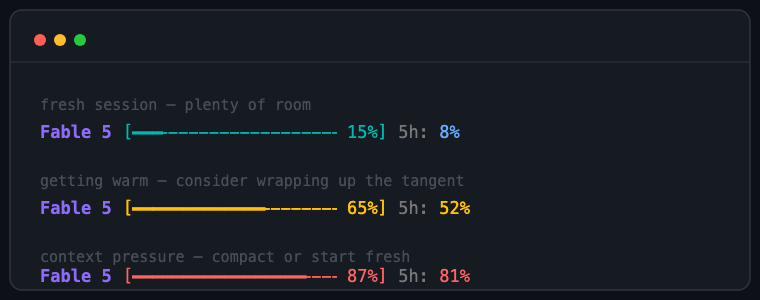
- Model name in Adom purple.
- A 20-segment context bar (each segment = 5%) that shifts teal → yellow (50%) → red (80%) so you feel context pressure before it bites.
- The 5-hour rate-limit window as
5h: N%, blue → yellow → red on the same thresholds.
Pure POSIX sh — no jq, no node, no python at render time. Works on macOS and Linux in any truecolor terminal (Terminal.app, iTerm2, VS Code, Ghostty, Windows Terminal).
Install
From a clone of this page (or the downloaded package):
./install.sh
That copies statusline.sh to ~/.claude/statusline.sh and merges the statusLine key
into ~/.claude/settings.json without touching your other settings (an existing custom
statusline is backed up to statusline.sh.bak). Restart Claude Code and the line appears
under the input box.
Prefer manual? Two steps:
statusline.sh→~/.claude/statusline.sh,chmod +x.- In
~/.claude/settings.json:{ "statusLine": { "type": "command", "command": "~/.claude/statusline.sh" } }
Customize
Everything is at the top of the script: brand colors as C_* truecolor escapes, the
50/80% color thresholds, and the 20-segment bar width. See SKILL.md for the exact
knobs.
Uninstall
./uninstall.sh
Removes the script and the statusLine settings key; everything else is left alone.
# Adom Statusline for Claude Code
The Adom team's status line for [Claude Code](https://claude.com/claude-code): one glance
tells you **which model you're on**, **how full the context window is**, and **how much of
your 5-hour session window is spent** — in Adom brand colors.
```
Fable 5 [━━━━━━━━╌╌╌╌╌╌╌╌╌╌╌╌ 42%] 5h: 17%
```

- Model name in Adom purple.
- A 20-segment context bar (each segment = 5%) that shifts **teal → yellow (50%) →
red (80%)** so you feel context pressure before it bites.
- The 5-hour rate-limit window as `5h: N%`, blue → yellow → red on the same thresholds.
Pure POSIX sh — no jq, no node, no python at render time. Works on macOS and Linux in any
truecolor terminal (Terminal.app, iTerm2, VS Code, Ghostty, Windows Terminal).
## Install
From a clone of this page (or the downloaded package):
```sh
./install.sh
```
That copies `statusline.sh` to `~/.claude/statusline.sh` and merges the `statusLine` key
into `~/.claude/settings.json` without touching your other settings (an existing custom
statusline is backed up to `statusline.sh.bak`). Restart Claude Code and the line appears
under the input box.
Prefer manual? Two steps:
1. `statusline.sh` → `~/.claude/statusline.sh`, `chmod +x`.
2. In `~/.claude/settings.json`:
```json
{ "statusLine": { "type": "command", "command": "~/.claude/statusline.sh" } }
```
## Customize
Everything is at the top of the script: brand colors as `C_*` truecolor escapes, the
50/80% color thresholds, and the 20-segment bar width. See `SKILL.md` for the exact
knobs.
## Uninstall
```sh
./uninstall.sh
```
Removes the script and the `statusLine` settings key; everything else is left alone.