adom-gchat — Google Chat CLI
Public Made by Adomby adom
Post to Google Chat from any Adom container. Webhook-based, org-customizable.

Install?
Post to Google Chat from any Adom container. Webhook-based, no OAuth. Each org configures its own spaces + attribution, then publishes an org-scoped wiki page so teammates auto-discover it.
adom-wiki pkg install adom/adom-gchatLatest: v2.0.3, published
Contents
- WHICH TOOL? Read this BEFORE sending anything
- Install
- Quick Start
- Setting up for your org
- Screenshots
- How it works
- Need more than posting? → adom-google
- Sharing across your org — who does what
- The one catch: webhook URLs are secrets
- Meet Kel — the face of your team's chat
- Kel icon kit
- Dependencies
- Features
- Talk to the AI
- Skills
- CLI Reference
- Security
- Open source — fork it, improve it, share it back
README
markdownadom-gchat — Google Chat CLI
WHICH TOOL? Read this BEFORE sending anything
Webhook spaces are TEAM-VISIBLE. On most orgs (including Adom) they are read by the ENTIRE COMPANY. Decide by audience, not by tool name:
- Message for the TEAM (announcement, deploy note, alert everyone should see):
this tool,
adom-gchat send --space <name>. - Message for ONE PERSON (a status ping to your user, "done", "need you", any
personal update):
adom-google chat send --to <their email>. It resolves their private DM; only they see it. That applies even when the user says "gchat me": they mean "reach me on Google Chat", not "post to a team space". - No private channel configured? That is NEVER a reason to post to a team space.
Use
adom-google(resolves DMs; note a SELF-DM needs the user to have opened "message yourself" once in Chat - if it says "no DM/space found", fall back toadom-google gmail sendto their email, or ask them in-session), but do not broadcast.
Post messages to Google Chat spaces from any Adom container. Webhook-based, no OAuth needed. Each org customizes it for their own Google Workspace, then publishes an org-scoped wiki page so teammates auto-discover it.

Install
adompkg install adom-gchat
Installs the adom-gchat binary to ~/.local/bin and deploys the Claude Code
skill. Then configure your org:
adom-gchat setup            # paste your space's webhook URL
adom-gchat send --space engineering --dry-run "hello from our org"
Quick Start
# Send a message to a configured space
adom-gchat send --space engineering "deploy complete, all tests green"

# Preview before posting
adom-gchat send --space engineering --dry-run "does this look right?"

# Threaded reply
adom-gchat send --space engineering --thread deploy-v2 "hotfix landed"

# List configured spaces / check connectivity
adom-gchat spaces
adom-gchat health
Setting up for your org
Webhooks are per-space. A Google Chat incoming webhook is created inside a single space and can only post to that space. To post to multiple spaces, you create one webhook per space — e.g. a
#deploysspace and a#generalspace need two separate webhooks.adom-gchat setuploops so you can add as many as you like, and--space <name>selects which webhook a message uses.
For each space you want to post to:
- Open that Google Chat space → Settings → Apps & integrations → Webhooks
- Create a webhook — name it "Kel", use this avatar URL:
https://wiki.adom.inc/blob/app/adom-gchat/icons/kel/png/256x256.png - Copy the webhook URL Google gives you (it's unique to that space)
Then, once, run adom-gchat setup — it walks you through pasting a name +
webhook URL for each space, your org name, and the attribution template.
Test with adom-gchat send --space <name> --dry-run "hello", then post for real.
Your webhook URLs stay private to your org in ~/.config/gchat-webhooks.json.
Screenshots
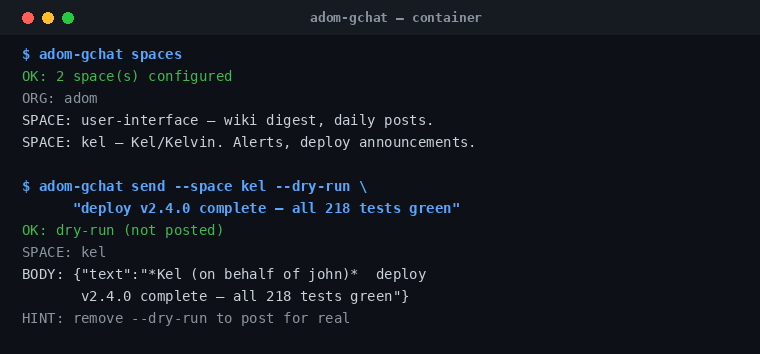
adom-gchat spaces then a --dry-run preview showing the attributed message body before it posts.
How it works
The CLI reads webhook URLs from ~/.config/gchat-webhooks.json and POSTs plain
text (with Google Chat markdown) to Google's incoming-webhook API. No server, no
OAuth, no open ports — the webhook URL is the only credential. Every message is
attributed: *OrgName (on behalf of username)* message.
Need more than posting? → adom-google
adom-gchat sends through a Google Chat incoming webhook, which is post-only and posts as the bot (attributed "Kel (on behalf of …)"). Webhooks cannot edit, delete, read, react to, or list messages — that's a Google limitation, not ours.
For any of that, use adom-google — the Google Workspace CLI with full Google Chat API access. It posts as you (your own identity, no prefix) and can do the whole message lifecycle:
adom-google chat send --to <space|email> "posted as me, no webhook"
adom-google chat read --from <space|email>          # read recent messages
adom-google api -X PATCH  '…/v1/<message-name>?updateMask=text' -d '{"text":"…"}'   # edit
adom-google api -X DELETE '…/v1/<message-name>'      # delete
Quick guide:
| You want to… | Use |
|---|---|
| Post an attributed bot message to a team space (deploys, alerts) | adom-gchat (send) |
| Edit / delete / read / react to messages, or post as yourself | adom-google |
adom-gchat edit and adom-gchat delete exist only to print the exact
adom-google commands — they don't (can't) edit/delete via the webhook.
Sharing across your org — who does what
adom-gchat is per-org (NTX Embedded, Teaazers, Cosmiic, you). One person sets it up; everyone else does far less. No employee starts from scratch.
The first person at your org (someone with access to your Google Chat spaces):
adom-gchat setup                 # 1. create webhooks in your spaces, then
                                 #    name the spaces + set org/attribution
adom-gchat publish --org acme    # 2. publish the org config to ONE private
                                 #    wiki page: adom-gchat-acme
Every other employee just runs:
adom-gchat install # auto-pulls your org's spaces from that page
install finds the page by a direct lookup of adom-gchat-<your-org> using
your container's org identity — there's no AI discovery and no searching.
The page is private to your org, so only your people can read it.
The one catch: webhook URLs are secrets
A Google Chat webhook URL is a secret (anyone with it can post). The wiki page is a git repo, so URLs aren't auto-shared by default. Pick your model:
| Mode | First person runs | Every teammate then does |
|---|---|---|
| Secure (default) | publish --org acme |
install (gets the spaces) + setup once to paste the shared webhook URL |
| Turnkey | publish --org acme --include-webhook-urls |
install — done, zero config (URLs come down too) |
Turnkey is the least work for teammates, but it stores the shared URLs in the (private) page's git repo — only do it for a page you trust to stay private.
Does the org need its own wiki page? Yes — exactly one, created by
publish --org. Does the AI find it? No —installfetches it directly by org identity. The AI only reacts to "post to gchat" (via the installed skill) and posts using whatever's already in your local config.
AI auto-discovery: the installed adom-gchat skill triggers on "post to
gchat" / "notify the team" for every org identically — the org's specific spaces
come from the locally-imported config, so nothing org-specific is baked into the
tool.
Meet Kel — the face of your team's chat
Kel is Adom's Google Chat persona — the friendly, energetic teammate who posts your deploys, DRC results, and alerts to your team's space. When a webhook posts as Kel, that's him. Set him as your space's webhook avatar so every post has a face.
Kel is a shared Adom brand asset — use him anywhere: chat avatars, bot profiles, dashboards, slides, stickers. He ships as a clean vector plus a full raster icon set, so he stays crisp from a 16px favicon to a print-size hero.
Kel icon kit
| Asset | File | Use |
|---|---|---|
| Circle avatar (vector) | kel-color.svg |
Scales to any size — profile pics, app icons |
| Bust cutout (vector) | kel-bust.svg |
Transparent background — drop him on any design |
| Bust cutout (PNG) | kel-bust.png |
Transparent, full-res |
| Raster avatars | png/ · webp/ |
16·24·32·36·48·64·128·256 px |
| Windows icon | icon.ico |
App / favicon bundle |
| macOS icon | icon.icns |
App icon bundle |




…and Kel in his Adom cap 🧢
Kel also comes repping the white Adom baseball cap (logo on the front) — same character, branded look. Use whichever fits.
| Asset | File | Use |
|---|---|---|
| Cap avatar (vector) | kel-hat-color.svg |
Circle avatar, with cap |
| Cap avatar (PNG) | kel-hat-256.png |
256px circle |
| Cap bust (vector) | kel-hat-bust.svg |
Transparent cutout, with cap |
| Cap bust (PNG) | kel-hat-bust.png |
Transparent, full-res |




Adom employees: the full kit lives in gallia under brand/logos/ — no-hat
as kel-color.svg / kel-bust.* / kel/ (icon set), cap as
kel-hat-color.svg / kel-hat-bust.* / kel-hat/, and both 2048px Gemini
masters in kel/original/.
Set Kel as your Google Chat webhook avatar:
https://wiki.adom.inc/blob/app/adom-gchat/icons/kel/png/256x256.png
Dependencies
| Dependency | Required? | Why |
|---|---|---|
| none | — | Pure CLI. No adompkg dependencies; talks directly to Google Chat incoming webhooks over HTTPS. |
Features
- One-command send to any configured space
--dry-runpreview gate before posting- Threaded replies via
--thread - Cards v2 preview in a Hydrogen webview (
adom-gchat preview) with a hash gate sosend --cardonly posts a card a human has reviewed - Per-org attribution prefix on every message
- Multi-space config;
--spaceis always required (no accidental default post)
Talk to the AI
- Post: "post to engineering chat: deploy is green" · "notify the team the build passed" · "post to kel"
- Preview: "dry-run a message to engineering before sending"
- Configure: "set up adom-gchat for our org" · "add a webhook for the #releases space"
- Inspect: "list my configured chat spaces" · "check gchat webhook connectivity"
Skills
| Skill | Purpose |
|---|---|
adom-gchat |
Send messages, configure org webhooks, manage spaces from Claude Code |
CLI Reference
| Command | Description |
|---|---|
adom-gchat send --space <s> <text> |
Send a message (add --dry-run, --thread <key>, --card) |
adom-gchat spaces |
List configured spaces |
adom-gchat health |
Check webhook connectivity |
adom-gchat setup |
Interactive webhook + org-identity setup |
adom-gchat preview |
Preview a Cards v2 card in a Hydrogen webview before posting |
adom-gchat install |
Deploy skill + bash completions; auto-import your org's config |
adom-gchat publish --org <org> |
Publish your org's config to a private org page (add --include-webhook-urls to also store shared URLs) |
adom-gchat edit / delete |
Not supported by webhooks — prints the adom-google commands to do it |
Security
- Webhook URLs are secrets — never commit them or paste them in chat
- The CLI never leaks container slugs or hostnames in messages
--spaceis required — there is no default space
Open source — fork it, improve it, share it back
adom-gchat is open source under the MIT License. Use it, read it, change it, ship it inside your own products — no permission needed, no strings attached. The full source lives right here on the Files tab (this wiki page is the git repo).
Better yet: make it better for everyone. This package is built to be a living, community-owned tool — the more people improve it, the better it gets for the whole Adom community.
The contribution loop:
- Get the source —
adompkg install adom-gchatdrops it into~/project/adom_modules/adom-gchat/, or browse/download it from the Files tab above. - Modify to your heart's content — add a feature, fix a bug, support a new chat platform, sharpen the docs. It's MIT; go wild.
- Publish it back to the wiki so everyone benefits — either:
- open a Pull Request on this page (Files tab → propose your changes), or
- bump the version and
adompkg publishyour improved build, then ask a maintainer to merge it.
- Once it's merged, every Adom user picks up your improvement automatically
the next time they run
adompkg update.
That's the whole idea: one person's fix becomes everyone's upgrade. Brand assets (see Meet Kel) are shared the same way. Build on each other's work — and put your name in the contributors list while you're at it.