Adom Altium SchLib
Public Made by Adomby adom
Native Rust parser for Altium .SchLib binary symbol libraries — pins + body to KiCad-shaped JSON, native SVG, .kicad_sym export. The symbol counterpart to altium-pcblib.
| Name | Last updated |
|---|---|
| screenshots | 3mo ago |
| skills | 3mo ago |
| src | 3mo ago |
| .gitignore | 3mo ago |
| adom-altium-schlib-hero-v3.png | 3mo ago |
| adom-altium-schlib-hero-v4.png | 3mo ago |
| adom-altium-schlib-svg | 3mo ago |
| Cargo.lock | 3mo ago |
| Cargo.toml | 3mo ago |
| install.sh | 3mo ago |
| LICENSE | 3mo ago |
| package.json | 3mo ago |
| page.json | 3mo ago |
| README.md | 3mo ago |
| SKILL.md | 3mo ago |
| uninstall.sh | 3mo ago |


What this is
altium-schlib is a native Rust crate that reads Altium Designer's binary
schematic-symbol libraries — .SchLib, and the SchLib stream embedded inside
.IntLib — with no Altium install and no KiCad round-trip. It is the symbol
counterpart to altium-pcblib
(footprints), and together they let the Adom EDA family read both halves of an
Altium library natively.
It emits pins (number, name, position, rotation) and the body as KiCad-shaped
JSON, renders a native SVG of the symbol, and can emit a .kicad_sym
for export.
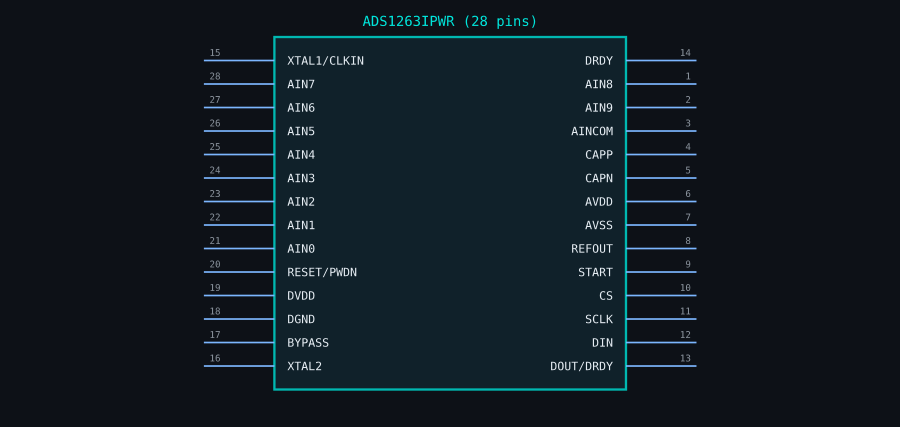
The ADS1263IPWR schematic symbol, rendered straight from its Altium .SchLib —
28 pins, both banks, correct names + numbers (validated pin-for-pin against KiCad).
Why it exists
Altium .SchLib is a Microsoft OLE2 / Compound File Binary container, and the
pins inside are not the pipe-delimited ASCII records the rest of the file
uses — they're a compact binary record format that no public Rust parser
read. Every Adom tool that wanted Altium symbols previously had to lean on
KiCad's importer (a lossy conversion that normalises everything to KiCad). This
crate reverse-engineers the binary pin record so a .SchLib renders its own
geometry — which is the whole point of comparing sources: you can only spot what
disagrees if each format shows its own truth.
Validation
The binary decode was validated pin-for-pin against KiCad 10's Altium
importer on a real part (ADS1263IPWR): 28/28 pin numbers and names match —
overbars and all (C̄S̄, R̄ĒS̄ĒT̄).
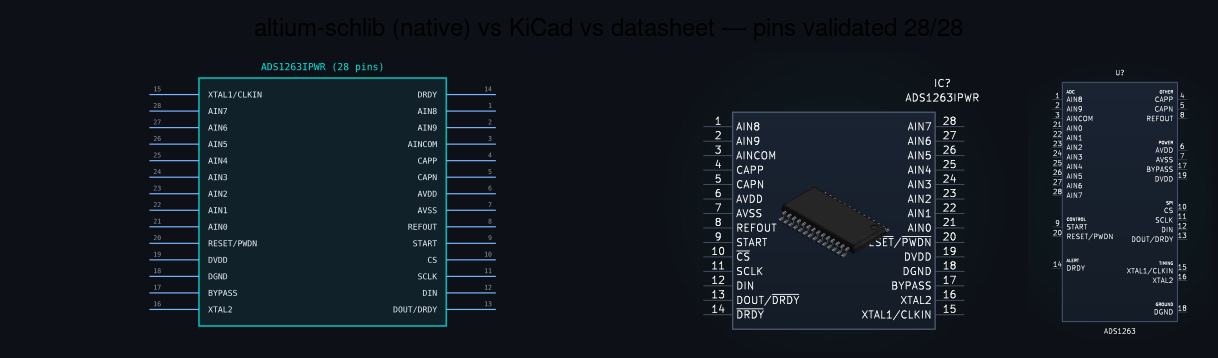
Left: the symbol altium-schlib parses straight from the .SchLib. Middle/right:
KiCad's own render and the datasheet extraction — every pin number and name agrees.
The format, briefly
.SchLib  =  OLE2 container
            └── /<ComponentName>/Data   ← record stream
                  ├── text records   <u16 len><u16 flags> |KEY=VAL|KEY=VAL
                  │     RECORD=1  component header (PartCount, AllPinCount…)
                  │     RECORD=14 rectangle (the symbol body)
                  │     RECORD=41 parameter
                  └── binary pin records  <u16 len><u16 flags> + payload[0]=0x02
                        [14]     PinConglomerate (orientation in bits 0..1)
                        [15..17] PinLength      (i16)
                        [17..19] Location.X     (i16)
                        [19..21] Location.Y     (i16)
                        [26..]   length-prefixed strings: Name, Designator
The OLE2 FAT that Altium writes overshoots the file's real sector count, so the
crate pads the buffer with the CFBF free-sector sentinel (0xFF) before opening
— the same trick altium-pcblib uses.
Public API
// Parse → symbol JSON { module_name, pin_count, pins:[…], body, part_count }
altium_schlib::parse_altium_schlib_path(&Path) -> Result<serde_json::Value>
altium_schlib::parse_altium_schlib_bytes(&[u8]) -> Result<serde_json::Value>

// Native SVG — draws the symbol directly from the parsed pins (no KiCad).
altium_schlib::render_symbol_svg(&Value) -> String

// Export path — emit a .kicad_sym (rendering uses the SVG above).
altium_schlib::to_kicad_sym(&Value, lib_name: &str) -> String
CLI
altium-schlib-json  part.SchLib            # parsed JSON
adom-altium-schlib-svg   part.SchLib       # native symbol SVG → stdout
altium-schlib-kicad part.SchLib [name]     # .kicad_sym → stdout
Who uses it
adom-sfconvert reads Altium symbols through this crate (fully native — no
service round-trip), and chip-fetcher shows the result as a per-source
thumbnail next to the KiCad, EAGLE/Fusion, and datasheet symbols so you can
compare what each source actually contains.