Adom Wiki Skill Pack
Public Unreviewedby John Lauer
How to use the Adom Wiki without breaking pages — the wiki is six tools in one (git, adompkg, releases, discussions, PRs, discovery), and three repo archetypes have emerged from real use: Page, Skillpack, and Family. Plus how to publish rich component pages (chips, molecules, boards). One install, 15 skills, plus a write-up of the design patterns for the people who build the wiki.

Install?
The Adom Wiki Skill Pack — one main skill plus 14 focused sub-skills that teach the AI to publish to wiki.adom.inc without breaking pages, name the wiki repo archetypes (Page, Skillpack, Family), and publish rich component pages (chips, molecules, boards). The wiki is six tools in one: git, adompkg, releases, discussions, pull requests, and discovery. One adompkg install drops the whole set onto your container.
adom-wiki pkg install john/adom-wiki-skillpackLatest: v0.7.6, published
Dependencies 1 skill
- skill adom/adom-wiki-hero-image ^0.2.2
Contents
- Install
- The wiki is six tools in one
- The repo archetypes (emerging from real use)
- 1. Page — one page = one thing
- 2. Skillpack — one repo, one main skill + N sub-skills
- 3. Family — an anchor page + separately-published children
- Skillpack vs Family — the decision rule
- The hard rules (page-breakers)
- Skills in this pack
- Talk to the AI
- Dependencies
- Relationship to gallia
- License
Adom Wiki Skill Pack
One install, 15 skills that teach the AI to use the Adom Wiki without breaking pages — plus a write-up of the wiki repo archetypes that have emerged from real use.
Publishing to wiki.adom.inc is powerful but fraught: the AI re-breaks pages (unlinks heroes, base64-mangles READMEs, writes only one of the two storage layers, forgets to verify what it shipped). And as the wiki has been used heavily, a set of repo archetypes has quietly emerged — patterns nobody had named or written down. This pack fixes both: it bundles the publishing know-how as installable skills, and it names the archetypes so they can be used deliberately.
📌 Note for Colby (and anyone building the wiki): the section The repo archetypes is for you. It documents the page structures that have emerged from heavy real-world use of the wiki — Page, Skillpack, and Family — and a few features they lean on (private source + public releases, the private readme, breadcrumbs, scoring). Some of it is built, some is partial, some is still a spec; each skill labels its status honestly. This is meant as a design mirror: here's how your heaviest user is actually structuring repos, so the platform can meet those patterns.
Install
adompkg install adom-wiki-skillpack
This drops the main adom-wiki-skillpack skill plus 14 sub-skills onto your
container, and pulls in adom-wiki-hero-image (a dependency) for hero
generation.
The wiki is six tools in one
It feels like a wiki, but it's a fusion of six tools you already know, all keyed off one slug per page:
| # | Tool | Like | What it powers |
|---|---|---|---|
| 1 | Git host | GitHub repo | Files tab, README, commits, contributors |
| 2 | adompkg | npm | install / publish / update, dependency maps |
| 3 | Release database | GitHub Releases | versioned downloadable binaries |
| 4 | Discussions | GitHub Issues | a forum thread per page |
| 5 | Pull requests | GitHub PRs | community edits, owner reviews/merges |
| 6 | Discovery | npm search / app-store surfacing | how a page/skill gets found — search, /discover triggers, local skill matching |
Plus a presentation layer (README.md or a custom readme.html, and a separate
private readme for proprietary pages). The scoring/trending signals (stars /
high-fives / installs) feed Discovery's ranking.
Discovery is a first-class pillar, and it's the least-finished one. Layer 1 (local installed-skill matching) works; Layer 2 (the registry
/discoverendpoint) does not yet match declareddiscovery_triggers. Thewiki-discoveryskill carries the current state + a TODO list of what discovery still needs — see it (and finding #3 in our Colby feedback).
The single most important consequence: the git repo and the package registry are
two independent storage layers. adompkg publish does not push your source to
git, and pushing files does not make a tarball. A correct publish writes both.
Doing one leaves the page half-broken — the root of most incidents.
The repo archetypes (emerging from real use)
Three repo shapes have emerged. Naming them turns "how should I structure this?" into a deliberate choice.
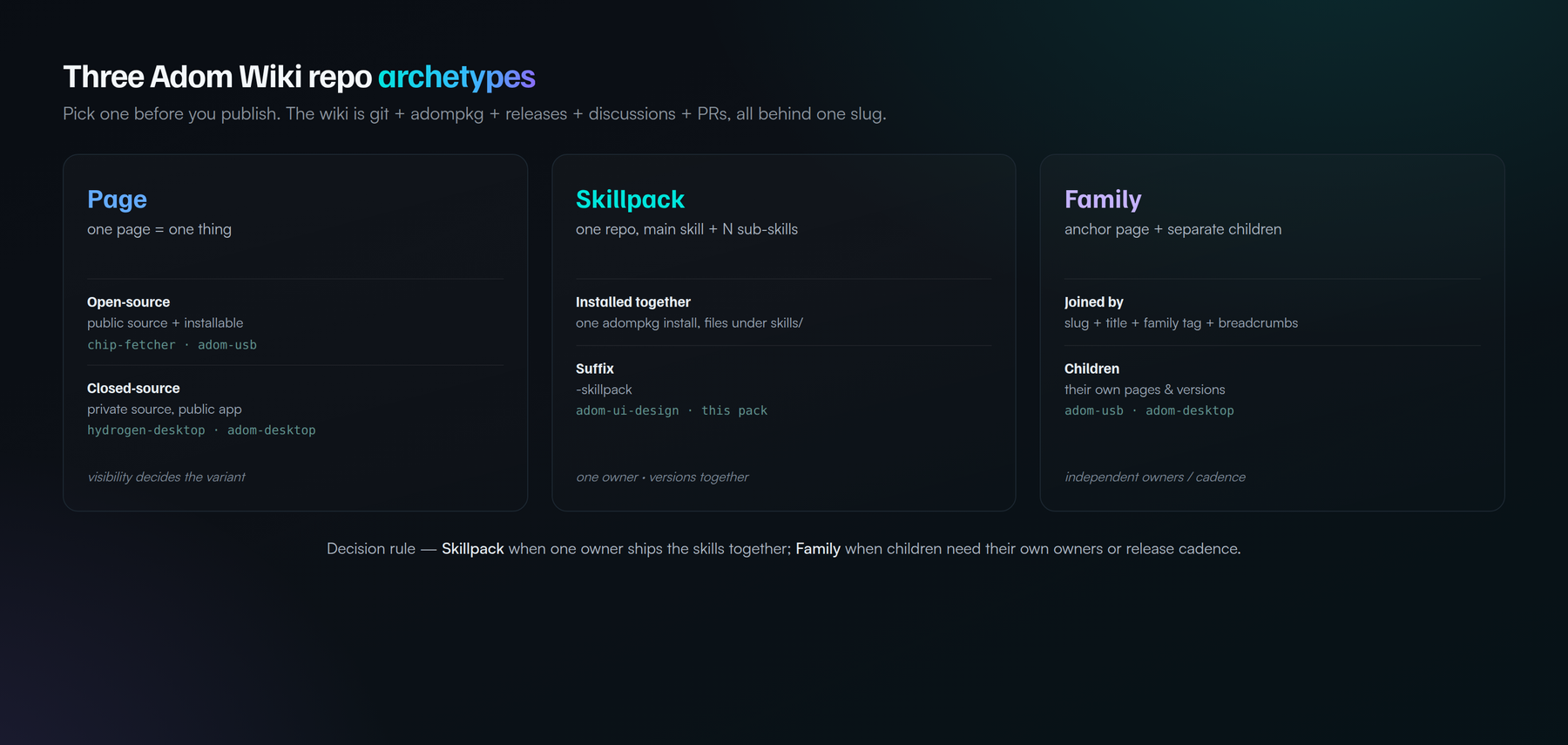
1. Page — one page = one thing
A single page for a single app/tool/skill/doc. Two sub-variants by source visibility:
- Open-source Page — source public + installable. e.g.
chip-fetcher,adom-usb. MIT, contributions welcome. - Closed-source Page — source private, releases/adompkg public, so
people install the compiled app but can't read the code. e.g.
hydrogen-desktop,adom-desktop. Uses the private readme so the page still has public docs.
The wiki lets the git source, the release/package, and the readme each be public or private independently — that's what makes a proprietary app and an open-source library both first-class on the same platform.
2. Skillpack — one repo, one main skill + N sub-skills
One repo / one installable package carrying a whole set of skills, deployed
together by a single adompkg install. Sub-skills are files under skills/, not
separate pages. Convention: the slug ends in -skillpack so the class is
recognizable.
- e.g.
adom-ui-design(grandfathered, predates the suffix), and this pack. - This very repo is a Skillpack — it dogfoods its own archetype.
3. Family — an anchor page + separately-published children
An anchor page plus children published as their own pages, joined by convention rather than living in one repo:
- Slug
<parent>-<descriptor>; Title leads with the parent (Adom USB - CDC serial sniffer); a family tag (<parent>-plugin); and breadcrumbs linking children back to the anchor. - e.g.
adom-desktop(+ bridges),adom-usb(+ sniffer/firmware plugins).
Skillpack vs Family — the decision rule
Both are "a main thing + many smaller things." The divider is ownership and update cadence:
- Skillpack when one author owns all the parts and they version together.
- Family when children have independent owners or release cadences — each is its own page, and third parties can add their own without touching the anchor.
Worked example — chip-fetcher: it's open source AND has many per-vendor
scraper skills (DigiKey, Mouser, TI, Analog Devices) that change daily and
that third parties want to own. As a Skillpack, every vendor tweak would force
the single owner to re-publish the whole pack. So it's better as a Family: an
anchor plus chip-fetcher-digikey, chip-fetcher-mouser, … each independently
publishable, discovered via the family tag + breadcrumbs. Rule of thumb: does
each part need its own lifecycle and maybe its own author? Yes → Family.
The hard rules (page-breakers)
The pack encodes these; they're worth stating here too:
- Write both storage layers every publish (git + registry).
adompkg publishclobbers the hero — it overwrites the repo'spage.json(nohero), so the hero gets unlinked (not deleted) on every publish. Fix: publish first, push a completepage.jsonLAST. (This is the recurring "hero disappeared" bug.)- Never base64 a text file — only real binaries are base64.
- Versions are immutable — bump; never delete-and-recreate (soft-delete trips a UNIQUE constraint).
- Verify with your eyes — open the live page in pup and screenshot it before calling any wiki edit done.
Skills in this pack
| Skill | What it's for |
|---|---|
| adom-wiki-skillpack | Entry point: the five-tools model, the archetypes, the hard rules, the map. |
| wiki-anatomy | The mental model — six tools in one, and the two storage layers. |
| wiki-api | The REST API + adompkg CLI and the publish workflow. |
| wiki-publish-safely | Operational pitfalls as hard rules + the verify-in-pup gate. |
| wiki-readme | Make a great README — README.md vs readme.html, sections, embeds. |
| wiki-visibility | Public vs private source, public releases, the private readme. |
| wiki-repo-styles | The archetype taxonomy and how to choose. |
| wiki-component | Publish a component — chip / molecule / board; the tabbed chip CAD-hub README (symbol, footprint, 3D, pins, specs, sourcing, tape & reel). |
| wiki-family | Build a Family: naming, family tag, anchor registry, breadcrumbs. |
| wiki-skillpack | Build a Skillpack: layout, install.sh, files[], the -skillpack suffix. |
| wiki-hero | Generate a hero, and never let it get unlinked. |
| wiki-breadcrumbs | Third-party "I built an add-on for X" links (implemented, basic). |
| wiki-forking | Fork + community-PR contribution (PRs live; fork-button planned). |
| wiki-discovery | How pages get found — the two layers, current state, and the TODO list (Layer 1 live; /discover partial). |
| wiki-scoring | Stars / high-fives / installs / trending (stars live; rest partial). |
Talk to the AI
- "Publish this tool to the wiki" → wiki-api + wiki-publish-safely
- "What kind of wiki repo should this be?" → wiki-repo-styles
- "Make a hero for this page" / "the hero disappeared" → wiki-hero
- "Write a README for this page" → wiki-readme
- "Keep the source private but let people install it" → wiki-visibility
- "Bundle these skills into one package" → wiki-skillpack
- "Add a child plugin to adom-usb / a bridge to adom-desktop" → wiki-family
Dependencies
| Dependency | Required? | Why |
|---|---|---|
| adom-wiki-hero-image | Yes | Generates the 16:10 hero billboard every page needs; self-contained (bundles brand fonts + wordmark + render pipeline). Pulled automatically by adompkg install. |
Companion tools (not hard dependencies): adompkg itself (the package manager),
and adom-desktop / pup for the verify-in-pup step.
Relationship to gallia
Gallia's adom-wiki-v2 and adom-wiki-hero-image skills remain the
employee-internal source of truth. This pack is the public, installable digest
of that knowledge plus the archetype taxonomy — same model as adom-ui-design.
Update gallia first, then refresh this page.
License
MIT.