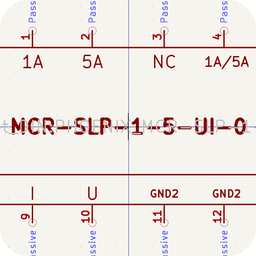
> **DEPRECATED: this page has moved to [Wolfgang's KiCad library](https://wiki.adom.inc/john/wolfgang-kicad-library).** This was the app-type page; the library now lives on a hardware project page. The KiCad PCM URL is unchanged: `https://wiki.adom.inc/api/pages/john/wolfgang-kicad-library/files/pcm/repository.json`

# Wolfgang's KiCad library

Wolfgang's own KiCad library for control-cabinet design, published as a **KiCad Plugin and Content Manager (PCM) repository** on this page. One URL in KiCad installs everything, keeps it up to date, and grows as Wolfgang adds libraries. It starts with his copy of Adam Skotarczak's cabinet-building symbol library, extended with DIN-rail footprints and 3D models for the modules he uses.

![Three DIN modules from this library in KiCad's 3D viewer: Pilz PNOZ mi1p, Pilz PNOZ mo3p and Phoenix Contact MCR-SLP-1-5-UI-0](docs/three-modules-kicad-3d.png)

> **About the fork shown here:** the fork this page builds from, [github.com/johnAdom/kicad-symlib](https://github.com/johnAdom/kicad-symlib), is a **demo fork** made to show the workflow. Wolfgang can point the package at his own fork of realAscot/kicad-symlib the same way.

## Install it in KiCad: one URL

```
https://wiki.adom.inc/api/pages/john/wolfgang-kicad-library/files/pcm/repository.json
```

1. KiCad project manager > **Plugin and Content Manager** > **Manage...** > **+** > paste the URL above > OK.
2. **Libraries** tab > **Wolfgang's cabinet symbols (fork of realAscot/kicad-symlib)** > **Install** > **Apply Pending Changes**.
3. Restart KiCad. The symbol libraries appear as `PCM_devices`, `PCM_elektronik`, `PCM_hauselektrik`, `PCM_hydraulik_pneumatic`, `PCM_lomix-industrietechnik-wasserhydraulik`, `PCM_mechanics` and `PCM_standart`, and the footprints as `PCM_realAscot_DIN`.

New versions arrive through the same dialog (Update) whenever this page publishes one. Works with KiCad 9 and 10; the 3D models need KiCad 10.

## What is in the repository

| Package | Contents | Version |
|---|---|---|
| Wolfgang's cabinet symbols (fork of realAscot/kicad-symlib) | 7 symbol libraries (95 symbols), `PCM_realAscot_DIN` footprints with 3D for 3 modules, 3 German drawing sheets as project templates | 0.8.2 |

## realAscot/kicad-symlib: Adam Skotarczak's symbols in this library
<table>
<tr>
<td width="104"><a href="realascot-kicad-symlib/README.md"><img src="realascot-kicad-symlib/docs/realascot-kicad-symlib-icon.png" width="112" alt="realAscot kicad-symlib"></a><br><sub>&nbsp;&nbsp;&nbsp;&nbsp;realAscot&nbsp;symbols&nbsp;&nbsp;&nbsp;&nbsp;</sub></td>
<td>The first package is Wolfgang's fork of <a href="https://github.com/realAscot/kicad-symlib">realAscot/kicad-symlib</a>, the cabinet-building symbol library by Adam Skotarczak. <strong><a href="realascot-kicad-symlib/README.md">Its sub-page</a></strong> carries Adam's credit and licence, what the fork changed, the drawing sheets, and all 95 symbols with English names. Use it to find the symbol you need and to credit Adam correctly when you share a design.<br><br><a href="realascot-kicad-symlib/README.md">Credit, licence and the 95-symbol table</a> &middot; <a href="https://github.com/johnAdom/kicad-symlib">The demo fork on GitHub</a></td>
</tr>
</table>

## Component pages

Three of the symbols are real products. Each has its own public component page in the Adom component library with the datasheet, a DIN-rail footprint and a 3D model with the part number laser-etched on the front, and its symbol's Footprint field points at that footprint.

| Part | What it is | Component page |
|---|---|---|
| Pilz PNOZ mi1p (773400) | PNOZmulti expansion module, 8 safety inputs | [adom/pilz-pnoz-mi1p](https://wiki.adom.inc/adom/pilz-pnoz-mi1p) |
| Pilz PNOZ mo3p (773510) | PNOZmulti expansion module, 2 safe semiconductor outputs | [adom/pilz-pnoz-mo3p](https://wiki.adom.inc/adom/pilz-pnoz-mo3p) |
| Phoenix Contact MCR-SLP-1-5-UI-0 (2814359) | Loop-powered 1/5 A AC current transducer, 0..10 V / 0..20 mA | [adom/phoenix-mcr-slp-1-5-ui-0](https://wiki.adom.inc/adom/phoenix-mcr-slp-1-5-ui-0) |

## Add more libraries: one repository, many packages

Wolfgang can clone any other KiCad library he wants to keep, and publish each one as another package in this same repository. Everyone who already added the URL above sees it in the Plugin and Content Manager without adding anything new.

1. Clone or fork the library, then copy it into `pcm/src/<package-name>/` here: `symbols/*.kicad_sym`, `footprints/*.pretty/`, `3dmodels/*.3dshapes/`, plus a `metadata.json` with its own reverse-DNS `identifier`, name, author, licence and version.
2. Run `python3 tools/build_pcm.py --package <package-name>`. The packer validates the files against KiCad's schema, writes the zip, and adds the package to `pcm/packages.json` next to the existing ones.
3. Push the new folder, the zip, `pcm/packages.json` and `pcm/repository.json` to this page with `adom-wiki repo push`. KiCad lists the new package on its next start.

Credit each library's author in its `metadata.json` and give it a sub-readme here like the realAscot one.

## Free wiki space for the world's electronic components

Space on the Adom wiki is free, and the US National Science Foundation (NSF) helps sponsor it. The goal is an AI-first wiki of electronic components for the world: every part with its datasheet, symbol, footprint and 3D model in one place, readable by people and by AI tools that design with them. Wolfgang's library and its component pages are part of it, and every part he adds makes it more useful for the next engineer.

## How it is built

`pcm/src/<package>/` is each package's source. `tools/build_pcm.py` (the Adom kicad-bridge packer, extended with the `templates` folder that KiCad 10 extracts) validates it against KiCad's `pcm.v1.schema.json` and writes `pcm/packages/*.zip`, `pcm/packages.json` and `pcm/repository.json`. To publish a new version: update the source, run `python3 tools/build_pcm.py --bump X.Y.Z`, and `adom-wiki repo push` the changed files. Packaged and maintained by John Lauer for Wolfgang.
