app
DigiKey Electronics Search
Public Made by Adomby adom
DigiKey component search in your workspace — millions of parts with real-time stock, quantity pricing and datasheets. CLI verbs, a Hydrogen app, and a shared backend service.
← All Pull Requests
Content fix: adompkg → adom-wiki CLI, retire dead host + gallia references #1
Closed opened by Drew Owens 2026-07-15
Housecleaning sweep (per Drew): adompkg and gallia/install.mjs are retired and wiki-ufypy5dpx93o.adom.cloud is decommissioned — the adom-wiki CLI + wiki.adom.inc are canonical. Updates install/publish commands to adom-wiki pkg equivalents and re-points the adom-app-model link. Docs-only; src/ and watchdog.sh still carry old references — owner's call on those (needs rebuild). Owner decides whether to merge.
Diff Skip to comments (1)
@@ -1,212 +1,213 @@-name: adom-digikey-description: Search DigiKey Electronics for components, pricing, stock, and part numbers. Use when the user asks to find components on DigiKey, check DigiKey pricing, look up a DigiKey part number, search for in-stock parts, get price breaks, compare alternatives, or find a datasheet or product page for a specific part. Also use for "open digikey", "digikey app", "digikey search UI".--# DigiKey Electronics Search--Search DigiKey's catalog of millions of electronic components from thousands of manufacturers. Real-time pricing, stock, lead times, and product links.--## What you have--A single CLI — `adom-digikey` — with three faces:--1. **One-shot search from the shell**, for when the AI just needs the data:- ```bash- adom-digikey search "STM32F103RBT6"- adom-digikey part 296-STM32F103RBT6-ND- adom-digikey health- ```- Each prints JSON on stdout and an `OK:` / `ERROR:` line on stderr, so `| jq` works cleanly.--2. **A Hydrogen webview app**, for when the user wants to browse interactively:- ```bash- adom-digikey app # opens a "DigiKey Search" tab in Hydrogen- ```- The app has a search bar, in-stock filter, per-result cards with price breaks, MPN/DigiKey-PN copy buttons, datasheet + product-page links, and hover tooltips on every control.--3. **A backend HTTP service** (port 8777), which is what the shared `service-digikey` container runs:- ```bash- adom-digikey serve # DIGIKEY_CLIENT_ID must be set- ```- The CLI and the app both talk to this backend over HTTP (`POST /` with an `{"action":"search"|"part"|"health", ...}` body, or `GET /search?keyword=...`). It caches responses for 10 min and keeps the API key server-side.--There is no MCP server. All access is through the CLI + HTTP service.--## Commands--### `adom-digikey search <keyword>`--Search by keyword, MPN, or DigiKey PN.--| Flag | Default | Description |-|---|---|---|-| `--limit N` | 10 | Max results (1–50) |-| `--in-stock-only` | false | Only parts currently in stock |-| `--api URL` / `$DIGIKEY_API` | auto | Backend URL. If unset, the CLI tries `http://127.0.0.1:8777`, and if that's also down it falls back to calling DigiKey directly (requires `DIGIKEY_CLIENT_ID`) |--Examples:-```bash-adom-digikey search "STM32F103RBT6" --limit 5-adom-digikey search "USB-C connector" --in-stock-only-adom-digikey search "LDO 3.3V 500mA SOT-23"-adom-digikey search "ESP32 WiFi Bluetooth" | jq '.components[].mpn'-```--### `adom-digikey part <part-number>`--Full detail lookup for a specific part. Accepts DigiKey PN (`296-STM32F103RBT6-ND`) or MPN (`STM32F103RBT6`). Returns a single-component result with full price-break table and attributes.--```bash-adom-digikey part 296-STM32F103RBT6-ND-adom-digikey part STM32F103RBT6 | jq '.components[0].price_tiers'-```--### `adom-digikey app`--Open the search UI in a Hydrogen webview tab.--| Flag | Default | Description |-|---|---|---|-| `--port N` | 8891 | Local app HTTP server port |-| `--api URL` | auto | Backend to use (same resolution as `search`) |-| `--tab-name S` | "DigiKey Search" | Hydrogen tab label |-| `--no-tab` | false | Skip opening the tab (test via curl or browser) |-| `--dev` | false | Enable the `/eval` hot-patch channel |--```bash-adom-digikey app # normal use-adom-digikey app --dev # enable /eval for UI debugging-adom-digikey app --no-tab --port 8891 & # local-browser mode-```--When `adom-digikey app` is running, these HTTP endpoints are AI-drivable (no UI clicks needed):--```bash-# run a search via HTTP, watch the UI update live-curl -X POST http://127.0.0.1:8891/search \- -H 'Content-Type: application/json' \- -d '{"keyword":"ESP32","limit":5,"inStockOnly":false}'--# state + cached last-search-curl http://127.0.0.1:8891/state | jq--# UI-side console logs (what the frontend JS printed)-curl http://127.0.0.1:8891/console | jq '.messages[-10:]'--# backend-health proxy (so the UI doesn't need CORS to 8777)-curl http://127.0.0.1:8891/backend-health | jq--# shutdown cleanly (removes the Hydrogen tab and exits)-curl -X POST http://127.0.0.1:8891/shutdown-```--### `adom-digikey serve`--Run the backend HTTP proxy. This is what the `service-digikey` container runs.--| Flag | Default | Description |-|---|---|---|-| `--port N` / `$DIGIKEY_PORT` | 8777 | Port |--Requires `DIGIKEY_CLIENT_ID`. Endpoints:--```-GET /health — health + live API ping-GET /search?keyword=...&limit=10&inStockOnly=false-GET /part?partNumber=...-POST / {"action":"search"|"part"|"health", ...}-GET / (text/html landing page)-```--### `adom-digikey health`--Check reachability.--```bash-adom-digikey health # checks backend (or falls back to DigiKey direct)-adom-digikey health --api http://127.0.0.1:8777-```--## What's in a result--Each component in `.components[]` has:--- `mouser_pn` — DigiKey part number, use this for BOM-- `mpn` — manufacturer part number, use this for schematic/footprint-- `manufacturer` — manufacturer name-- `description`, `category`-- `stock` — integer count in DigiKey's warehouse (live, 10-min cache on backend)-- `stock_text` — raw DigiKey text ("In Stock", "Non-Stocked", etc.)-- `popularity` — `low` / `medium` / `high` heuristic from stock-- `lead_time` — factory lead time if ordering more-- `unit_price` — price at qty 1-- `price_tiers` — array of `{qty, price}` for quantity price breaks-- `min_order`, `mult` — minimum order + order multiple-- `rohs` — compliance flag-- `lifecycle` — New Product / Active / NRND / Obsolete-- `datasheet_url`, `product_url`, `image_url`-- `attributes` — array of `{name, value}` from the product-attribute table--## Typical workflows--### Finding a part from scratch-```bash-adom-digikey search "32-bit ARM Cortex-M3 microcontroller LQFP-48"-# pick one, then:-adom-digikey part <digikey-pn>-```--### Confirming price for a BOM entry-```bash-adom-digikey part STM32F103RBT6 | jq '.components[0] | {mouser_pn, unit_price, price_tiers, stock}'-```--### Browsing interactively-```bash-adom-digikey app-# then type in the search box, click Product page / Datasheet, etc.-```--## Running the backend--There are two common setups.--### Dedicated `service-digikey` container (shared, has the API key)--The backend proxy runs on a dedicated `default-light` container with `DIGIKEY_CLIENT_ID` set in `/etc/environment` and a cron watchdog (`service/watchdog.sh`, every 2 min) that (a) keeps the service healthy and (b) auto-pulls `origin/main` + rebuilds when new versions land. Consumer containers point `DIGIKEY_API` at its public URL:--```-https://digikey-gjuu8l5t69uh.adom.cloud-```--`curl /health` should return `{"ok":true, "api_reachable":true, "version":"X.Y.Z", ...}`. Recover the current URL from `~/service-watcher/services.json` (`digikey` entry, `"primary": true`) if the slug has rotated. To point the CLI at it:--```bash-export DIGIKEY_API=https://digikey-gjuu8l5t69uh.adom.cloud-adom-digikey search "LM317"-adom-digikey app # UI reads $DIGIKEY_API automatically-```--Users don't need to set `DIGIKEY_API` explicitly — `adom-digikey` is a Tier A app (see `adom-app-model`), so it's installed by every `adompkg install` run from the registry. The CLI autodetects a local `adom-digikey serve` on 127.0.0.1:8777 and falls back to calling DigiKey directly if `DIGIKEY_CLIENT_ID` is set locally.--### Local-only (quick testing)--On any container, if `DIGIKEY_CLIENT_ID` is set and you run `adom-digikey serve &`, the CLI and the app will autodetect `http://127.0.0.1:8777` and use it. This is the dev-loop path.--## Installation--The binary is distributed as a GitHub release from `adom-inc/adom-digikey`. After downloading to `/usr/local/bin/adom-digikey` and making it executable, run:--```bash-adom-digikey install-```--This deploys the skill to `~/.claude/skills/digikey/SKILL.md` and installs bash completions.--## Notes--- Price data does not include shipping or tariffs.-- Stock is live at query time (10-min cache on the backend).-- Results are sorted by DigiKey's internal relevance algorithm, not strictly by stock.-- `DIGIKEY_CLIENT_ID` is only ever needed on the backend (`serve`) side. Consumer containers just need `DIGIKEY_API` pointing at a running backend.+---+name: adom-digikey+description: Search DigiKey Electronics for components, pricing, stock, and part numbers. Use when the user asks to find components on DigiKey, check DigiKey pricing, look up a DigiKey part number, search for in-stock parts, get price breaks, compare alternatives, or find a datasheet or product page for a specific part. Also use for "open digikey", "digikey app", "digikey search UI".+---++# DigiKey Electronics Search++Search DigiKey's catalog of millions of electronic components from thousands of manufacturers. Real-time pricing, stock, lead times, and product links.++## What you have++A single CLI — `adom-digikey` — with three faces:++1. **One-shot search from the shell**, for when the AI just needs the data:+ ```bash+ adom-digikey search "STM32F103RBT6"+ adom-digikey part 296-STM32F103RBT6-ND+ adom-digikey health+ ```+ Each prints JSON on stdout and an `OK:` / `ERROR:` line on stderr, so `| jq` works cleanly.++2. **A Hydrogen webview app**, for when the user wants to browse interactively:+ ```bash+ adom-digikey app # opens a "DigiKey Search" tab in Hydrogen+ ```+ The app has a search bar, in-stock filter, per-result cards with price breaks, MPN/DigiKey-PN copy buttons, datasheet + product-page links, and hover tooltips on every control.++3. **A backend HTTP service** (port 8777), which is what the shared `service-digikey` container runs:+ ```bash+ adom-digikey serve # DIGIKEY_CLIENT_ID must be set+ ```+ The CLI and the app both talk to this backend over HTTP (`POST /` with an `{"action":"search"|"part"|"health", ...}` body, or `GET /search?keyword=...`). It caches responses for 10 min and keeps the API key server-side.++There is no MCP server. All access is through the CLI + HTTP service.++## Commands++### `adom-digikey search <keyword>`++Search by keyword, MPN, or DigiKey PN.++| Flag | Default | Description |+|---|---|---|+| `--limit N` | 10 | Max results (1–50) |+| `--in-stock-only` | false | Only parts currently in stock |+| `--api URL` / `$DIGIKEY_API` | auto | Backend URL. If unset, the CLI tries `http://127.0.0.1:8777`, and if that's also down it falls back to calling DigiKey directly (requires `DIGIKEY_CLIENT_ID`) |++Examples:+```bash+adom-digikey search "STM32F103RBT6" --limit 5+adom-digikey search "USB-C connector" --in-stock-only+adom-digikey search "LDO 3.3V 500mA SOT-23"+adom-digikey search "ESP32 WiFi Bluetooth" | jq '.components[].mpn'+```++### `adom-digikey part <part-number>`++Full detail lookup for a specific part. Accepts DigiKey PN (`296-STM32F103RBT6-ND`) or MPN (`STM32F103RBT6`). Returns a single-component result with full price-break table and attributes.++```bash+adom-digikey part 296-STM32F103RBT6-ND+adom-digikey part STM32F103RBT6 | jq '.components[0].price_tiers'+```++### `adom-digikey app`++Open the search UI in a Hydrogen webview tab.++| Flag | Default | Description |+|---|---|---|+| `--port N` | 8891 | Local app HTTP server port |+| `--api URL` | auto | Backend to use (same resolution as `search`) |+| `--tab-name S` | "DigiKey Search" | Hydrogen tab label |+| `--no-tab` | false | Skip opening the tab (test via curl or browser) |+| `--dev` | false | Enable the `/eval` hot-patch channel |++```bash+adom-digikey app # normal use+adom-digikey app --dev # enable /eval for UI debugging+adom-digikey app --no-tab --port 8891 & # local-browser mode+```++When `adom-digikey app` is running, these HTTP endpoints are AI-drivable (no UI clicks needed):++```bash+# run a search via HTTP, watch the UI update live+curl -X POST http://127.0.0.1:8891/search \+ -H 'Content-Type: application/json' \+ -d '{"keyword":"ESP32","limit":5,"inStockOnly":false}'++# state + cached last-search+curl http://127.0.0.1:8891/state | jq++# UI-side console logs (what the frontend JS printed)+curl http://127.0.0.1:8891/console | jq '.messages[-10:]'++# backend-health proxy (so the UI doesn't need CORS to 8777)+curl http://127.0.0.1:8891/backend-health | jq++# shutdown cleanly (removes the Hydrogen tab and exits)+curl -X POST http://127.0.0.1:8891/shutdown+```++### `adom-digikey serve`++Run the backend HTTP proxy. This is what the `service-digikey` container runs.++| Flag | Default | Description |+|---|---|---|+| `--port N` / `$DIGIKEY_PORT` | 8777 | Port |++Requires `DIGIKEY_CLIENT_ID`. Endpoints:++```+GET /health — health + live API ping+GET /search?keyword=...&limit=10&inStockOnly=false+GET /part?partNumber=...+POST / {"action":"search"|"part"|"health", ...}+GET / (text/html landing page)+```++### `adom-digikey health`++Check reachability.++```bash+adom-digikey health # checks backend (or falls back to DigiKey direct)+adom-digikey health --api http://127.0.0.1:8777+```++## What's in a result++Each component in `.components[]` has:++- `mouser_pn` — DigiKey part number, use this for BOM+- `mpn` — manufacturer part number, use this for schematic/footprint+- `manufacturer` — manufacturer name+- `description`, `category`+- `stock` — integer count in DigiKey's warehouse (live, 10-min cache on backend)+- `stock_text` — raw DigiKey text ("In Stock", "Non-Stocked", etc.)+- `popularity` — `low` / `medium` / `high` heuristic from stock+- `lead_time` — factory lead time if ordering more+- `unit_price` — price at qty 1+- `price_tiers` — array of `{qty, price}` for quantity price breaks+- `min_order`, `mult` — minimum order + order multiple+- `rohs` — compliance flag+- `lifecycle` — New Product / Active / NRND / Obsolete+- `datasheet_url`, `product_url`, `image_url`+- `attributes` — array of `{name, value}` from the product-attribute table++## Typical workflows++### Finding a part from scratch+```bash+adom-digikey search "32-bit ARM Cortex-M3 microcontroller LQFP-48"+# pick one, then:+adom-digikey part <digikey-pn>+```++### Confirming price for a BOM entry+```bash+adom-digikey part STM32F103RBT6 | jq '.components[0] | {mouser_pn, unit_price, price_tiers, stock}'+```++### Browsing interactively+```bash+adom-digikey app+# then type in the search box, click Product page / Datasheet, etc.+```++## Running the backend++There are two common setups.++### Dedicated `service-digikey` container (shared, has the API key)++The backend proxy runs on a dedicated `default-light` container with `DIGIKEY_CLIENT_ID` set in `/etc/environment` and a cron watchdog (`service/watchdog.sh`, every 2 min) that (a) keeps the service healthy and (b) auto-pulls `origin/main` + rebuilds when new versions land. Consumer containers point `DIGIKEY_API` at its public URL:++```+https://digikey-gjuu8l5t69uh.adom.cloud+```++`curl /health` should return `{"ok":true, "api_reachable":true, "version":"X.Y.Z", ...}`. Recover the current URL from `~/service-watcher/services.json` (`digikey` entry, `"primary": true`) if the slug has rotated. To point the CLI at it:++```bash+export DIGIKEY_API=https://digikey-gjuu8l5t69uh.adom.cloud+adom-digikey search "LM317"+adom-digikey app # UI reads $DIGIKEY_API automatically+```++Users don't need to set `DIGIKEY_API` explicitly — `adom-digikey` is a Tier A app (see `adom-app-model`), so it's installed by `adom-wiki pkg install adom/adom-digikey`. The CLI autodetects a local `adom-digikey serve` on 127.0.0.1:8777 and falls back to calling DigiKey directly if `DIGIKEY_CLIENT_ID` is set locally.++### Local-only (quick testing)++On any container, if `DIGIKEY_CLIENT_ID` is set and you run `adom-digikey serve &`, the CLI and the app will autodetect `http://127.0.0.1:8777` and use it. This is the dev-loop path.++## Installation++The binary is distributed as a GitHub release from `adom-inc/adom-digikey`. After downloading to `/usr/local/bin/adom-digikey` and making it executable, run:++```bash+adom-digikey install+```++This deploys the skill to `~/.claude/skills/digikey/SKILL.md` and installs bash completions.++## Notes++- Price data does not include shipping or tariffs.+- Stock is live at query time (10-min cache on the backend).+- Results are sorted by DigiKey's internal relevance algorithm, not strictly by stock.+- `DIGIKEY_CLIENT_ID` is only ever needed on the backend (`serve`) side. Consumer containers just need `DIGIKEY_API` pointing at a running backend.+@@ -1,100 +1,101 @@-# DigiKey Electronics Search--**DigiKey's catalog — millions of parts, real-time stock and quantity pricing — one command away.**--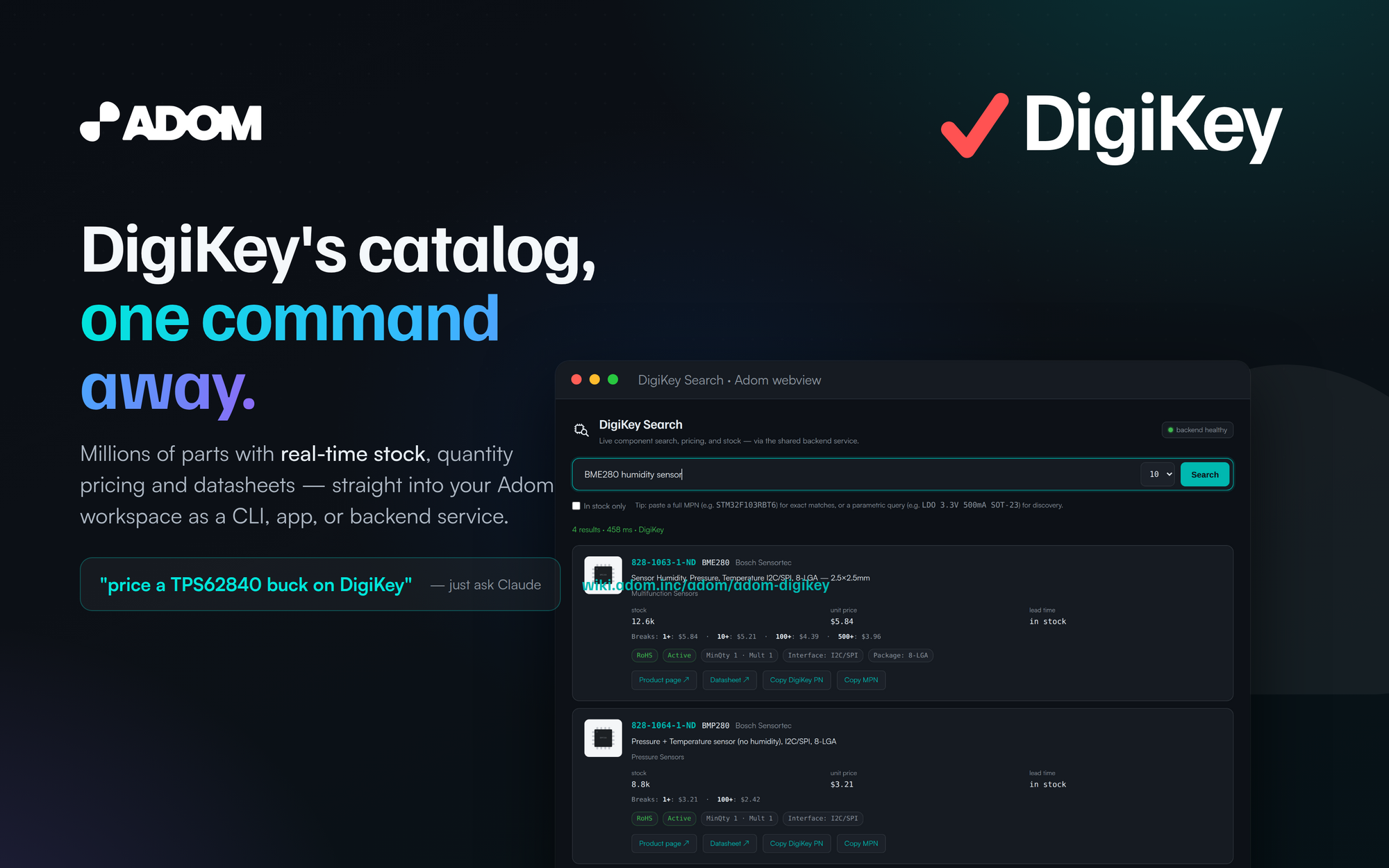--`adom-digikey` is the single-vendor DigiKey tool for the Adom ecosystem — one Rust binary, three-faces:--- **CLI** — `adom-digikey search | part | health` for quick JSON-returning shell use and BOMs.-- **Hydrogen app** — `adom-digikey app` opens a searchable UI as a first-class Hydrogen tab.-- **Backend service** — `adom-digikey serve` runs the shared proxy (port 8777) that powers the- `service-digikey` container and feeds [`adom-parts-search`](/adom/adom-parts-search).--It replaces the old `service-digikey` + MCP setup: no MCP server.--```bash-adompkg install adom-digikey-adom-digikey search "BME280"-```--## Real-time stock, straight to the bench--DigiKey shines when you need it *today*. Every card shows live stock, qty-1 price and the full-break ladder, lead time, RoHS and lifecycle — and DigiKey's deep catalog means the obscure sensor-or alt part is usually right there.--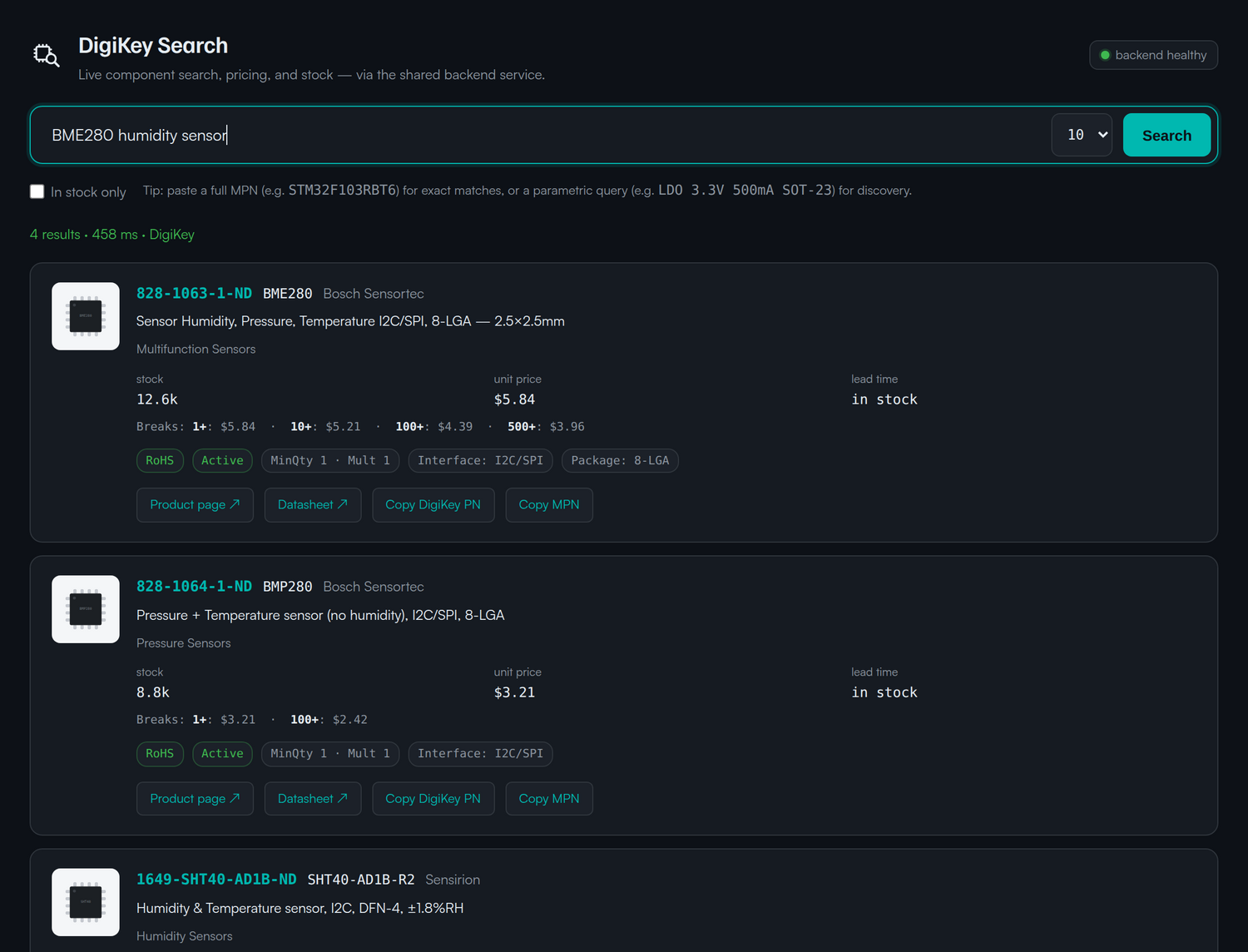--## Find the exact part, and its alternates--Search a function (`buck regulator 1A SOT-23`) or a precise MPN. DigiKey's parametric data lets the-cards surface the specs that actually drive a decision — Iq, Iout, Vin range, package — so the-substitute is one glance away when the first choice is out.--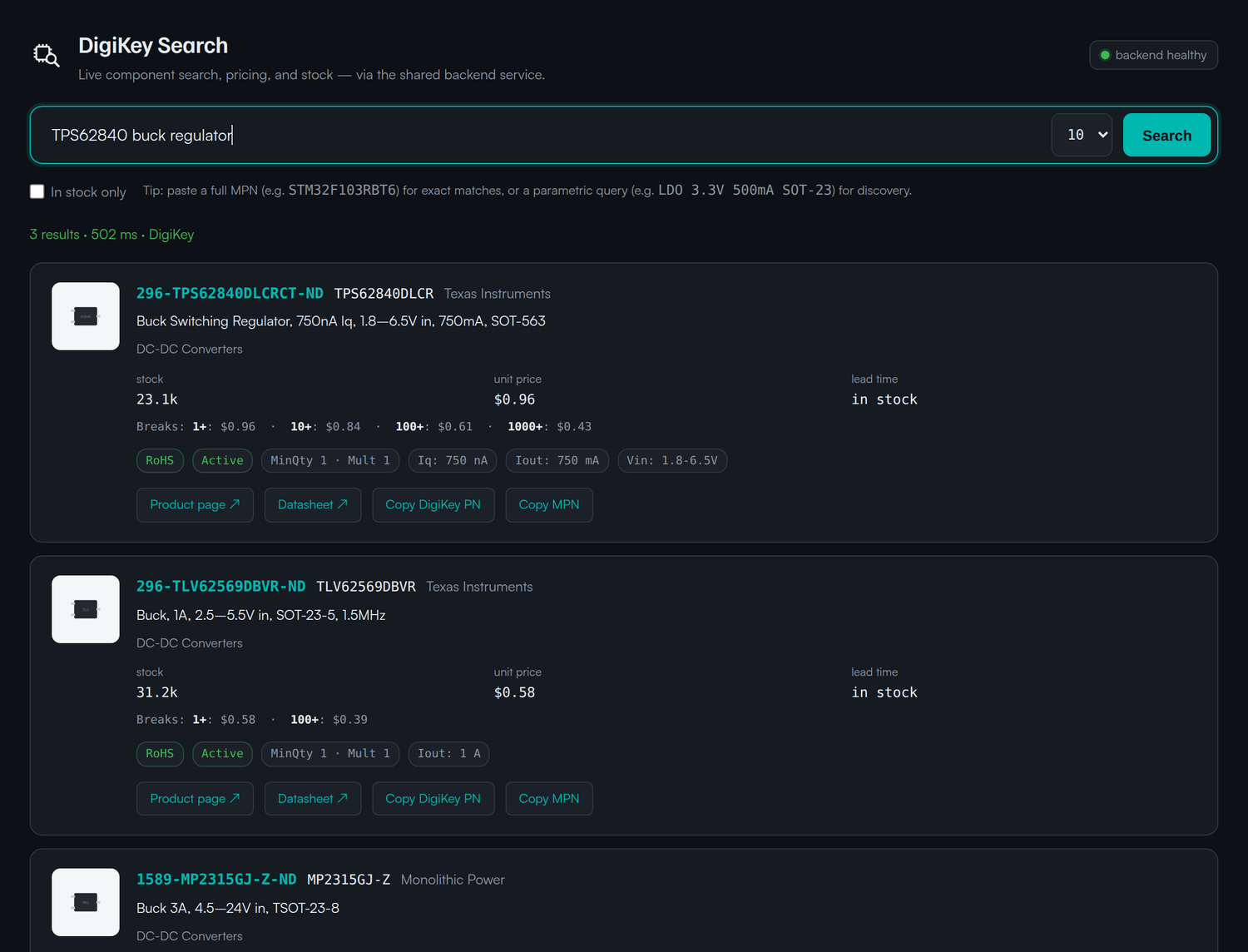--## Scriptable from the first keystroke--`search` returns JSON; `part` fetches one MPN; `health` checks the backend's OAuth token. Pipe it-into `jq`, a BOM, or another Claude step.--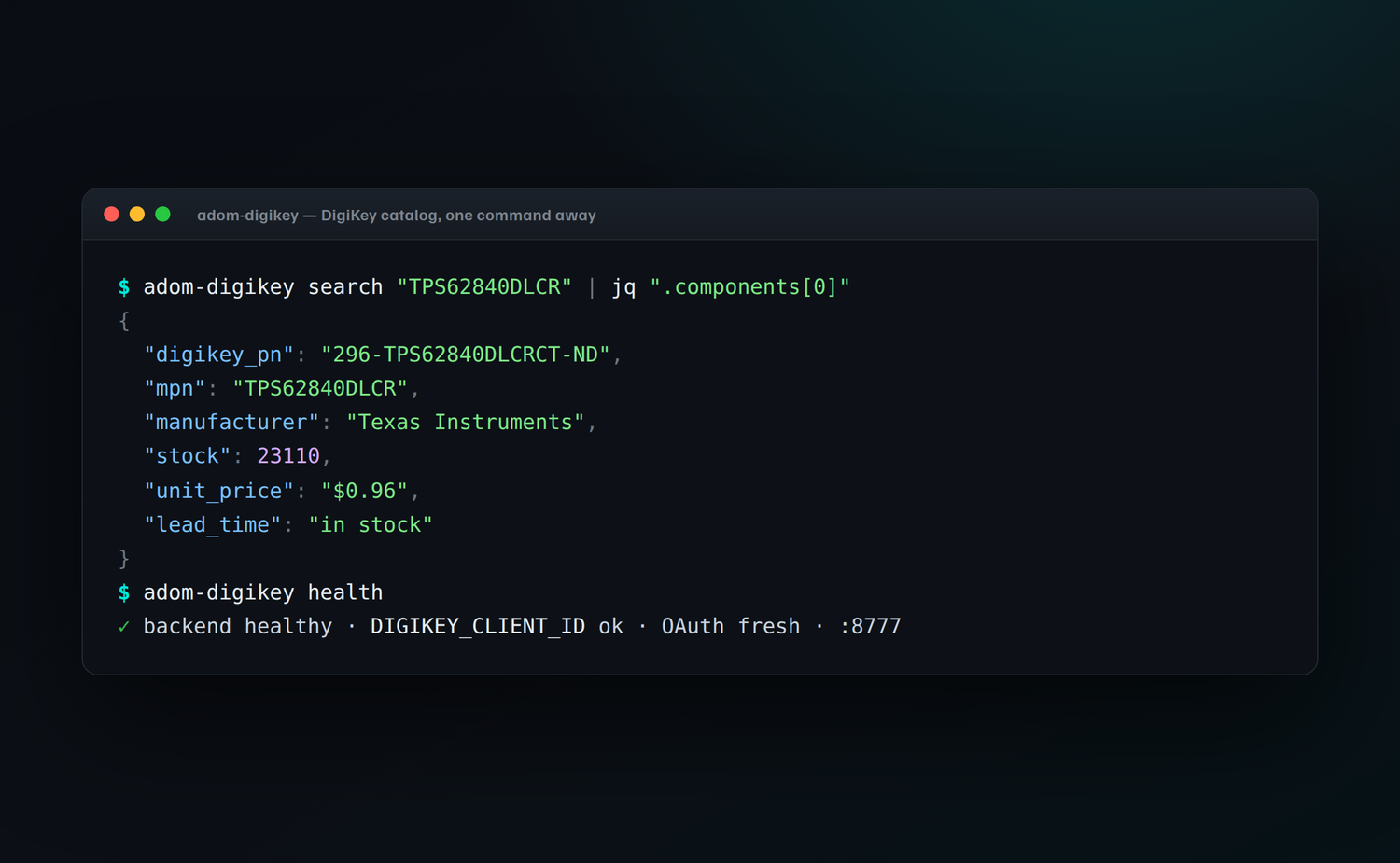--```bash-adom-digikey search "TPS62840DLCR" | jq '.components[0]'-adom-digikey part "296-TPS62840DLCRCT-ND"-adom-digikey health-```--## Install--```bash-adompkg install adom-digikey-```--## How it works--```- any container service-digikey- $ adom-digikey search "BME280" ──POST──▶ adom-digikey serve (:8777)- $ adom-digikey app DIGIKEY_CLIENT_ID + OAuth- (Hydrogen webview tab) token-refresh + cache- │- ▼- api.digikey.com (v4)-```--The backend manages the DigiKey OAuth handshake and token refresh for you; the CLI auto-detects it-(or a local `:8777`). DigiKey is the go-to alternate when Mouser is out of stock or long-lead —-see how [`adom-parts-search`](/adom/adom-parts-search) flips the recommendation automatically.--## See also--- [`adom-parts-search`](/adom/adom-parts-search) — searches Mouser, DigiKey and JLCPCB at once and picks the best buy.--## Open source — make it yours, then give it back--This app is **open source under the MIT license**. Fork it, rewrite it, rename it, bend it to your-own workflow — and when you've made it better, **send your changes back to the Adom Wiki so the-whole community benefits**. Every wiki page is a git repo with a package registry on top, so-contributing back is first-class — improvements that land here ship to every Adom user who installs-the app.--```bash-adompkg install adom-digikey # install it-# …edit the source to taste…-adompkg publish # publish your own fork, or-# open a pull request against this page so the change lands for everyone-```--> **One caveat — the search backend is an Adom service.** The actual lookups run against-> Adom's hosted DigiKey backend (`service-digikey`), which uses **Adom's vendor API credentials and counts against Adom's quota**. That-> hosted backend is an Adom service and is **subject to change** — rate limits, endpoints, and-> availability can move at any time. Everything client-side (the CLI, the webview, the rendering-> and recommendation logic) is yours to fork and republish; the cloud API quota is not.--## License--MIT © Adom — do what you want with the code, just pass it on.+# DigiKey Electronics Search++**DigiKey's catalog — millions of parts, real-time stock and quantity pricing — one command away.**++++`adom-digikey` is the single-vendor DigiKey tool for the Adom ecosystem — one Rust binary, three+faces:++- **CLI** — `adom-digikey search | part | health` for quick JSON-returning shell use and BOMs.+- **Hydrogen app** — `adom-digikey app` opens a searchable UI as a first-class Hydrogen tab.+- **Backend service** — `adom-digikey serve` runs the shared proxy (port 8777) that powers the+ `service-digikey` container and feeds [`adom-parts-search`](/adom/adom-parts-search).++It replaces the old `service-digikey` + MCP setup: no MCP server.++```bash+adom-wiki pkg install adom/adom-digikey+adom-digikey search "BME280"+```++## Real-time stock, straight to the bench++DigiKey shines when you need it *today*. Every card shows live stock, qty-1 price and the full+break ladder, lead time, RoHS and lifecycle — and DigiKey's deep catalog means the obscure sensor+or alt part is usually right there.++++## Find the exact part, and its alternates++Search a function (`buck regulator 1A SOT-23`) or a precise MPN. DigiKey's parametric data lets the+cards surface the specs that actually drive a decision — Iq, Iout, Vin range, package — so the+substitute is one glance away when the first choice is out.++++## Scriptable from the first keystroke++`search` returns JSON; `part` fetches one MPN; `health` checks the backend's OAuth token. Pipe it+into `jq`, a BOM, or another Claude step.++++```bash+adom-digikey search "TPS62840DLCR" | jq '.components[0]'+adom-digikey part "296-TPS62840DLCRCT-ND"+adom-digikey health+```++## Install++```bash+adom-wiki pkg install adom/adom-digikey+```++## How it works++```+ any container service-digikey+ $ adom-digikey search "BME280" ──POST──▶ adom-digikey serve (:8777)+ $ adom-digikey app DIGIKEY_CLIENT_ID + OAuth+ (Hydrogen webview tab) token-refresh + cache+ │+ ▼+ api.digikey.com (v4)+```++The backend manages the DigiKey OAuth handshake and token refresh for you; the CLI auto-detects it+(or a local `:8777`). DigiKey is the go-to alternate when Mouser is out of stock or long-lead —+see how [`adom-parts-search`](/adom/adom-parts-search) flips the recommendation automatically.++## See also++- [`adom-parts-search`](/adom/adom-parts-search) — searches Mouser, DigiKey and JLCPCB at once and picks the best buy.++## Open source — make it yours, then give it back++This app is **open source under the MIT license**. Fork it, rewrite it, rename it, bend it to your+own workflow — and when you've made it better, **send your changes back to the Adom Wiki so the+whole community benefits**. Every wiki page is a git repo with a package registry on top, so+contributing back is first-class — improvements that land here ship to every Adom user who installs+the app.++```bash+adom-wiki pkg install adom/adom-digikey # install it+# …edit the source to taste…+adom-wiki pkg publish # publish your own fork, or+# open a pull request against this page so the change lands for everyone+```++> **One caveat — the search backend is an Adom service.** The actual lookups run against+> Adom's hosted DigiKey backend (`service-digikey`), which uses **Adom's vendor API credentials and counts against Adom's quota**. That+> hosted backend is an Adom service and is **subject to change** — rate limits, endpoints, and+> availability can move at any time. Everything client-side (the CLI, the webview, the rendering+> and recommendation logic) is yours to fork and republish; the cloud API quota is not.++## License++MIT © Adom — do what you want with the code, just pass it on.+@@ -1,75 +1,76 @@-name: adom-digikey-build-description: Build and release a new version of adom-digikey. Use when the user says "release adom-digikey", "publish adom-digikey", "cut a new adom-digikey version", "bump adom-digikey", "ship adom-digikey", or "push adom-digikey to the wiki".--# Release adom-digikey--A release syncs five places to the same version X.Y.Z:-`VERSION`, `Cargo.toml`, `adom-digikey --version`, wiki page `metadata.version`, running `/health` on the service container.--## Steps--1. **Bump** — decide X.Y.Z (semver). Then:- ```bash- echo "X.Y.Z" > VERSION- sed -i 's/^version = .*/version = "X.Y.Z"/' Cargo.toml- ```--2. **Local build + smoke test**:- ```bash- ./build.sh- adom-digikey --version # must print "adom-digikey X.Y.Z"- adom-digikey health # backend reachable- adom-digikey search "STM32F103RBT6" --limit 1 | jq '.components[0].mouser_pn'- ```--3. **Ralph loop the UI** (per app-creator): open in pup, drive a real search, screenshot, check `/console` for errors.- ```bash- DIGIKEY_API=<backend> adom-digikey app --no-tab &- adom-desktop browser_open_window '{"sessionId":"digikey","profile":"digikey","url":"http://127.0.0.1:8891"}'- # drive a search, screenshot, verify 0 console errors- ```--4. **Show the user a screenshot and wait for explicit approval** before publishing. The app-creator skill is hard about this.--5. **Publish**:- ```bash- ./publish.sh- ```- Runs: git commit + tag `vX.Y.Z`, `git push origin main --tags`, `gh release create`, `adom-wiki asset upload` (replaces the prior `docker_binary`), `adom-wiki page update`, and a final curl of the wiki binary to check `--version` returns X.Y.Z.--6. **Service container picks it up automatically** — `service/watchdog.sh` runs every 2 min, `git fetch`es origin/main, and rebuilds + restarts when HEAD moves. Verify within ~5 min:- ```bash- curl -s https://digikey-<slug>.adom.cloud/health | jq '.version' # → "X.Y.Z"- ```--7. **Verify on a fresh user container** (optional, but catches install regressions):- ```bash- # on a fresh container:- adompkg install --refresh # Tier A block fetches from the registry- adom-digikey --version # → "adom-digikey X.Y.Z"- ```--## Pre-release checklist--- [ ] `VERSION`, `Cargo.toml`, `adom-digikey --version`, wiki `metadata.version`, `/health` all return X.Y.Z-- [ ] Wiki page at `apps/adom-digikey` renders the new `install_hint` one-liner-- [ ] User has seen a working screenshot of the webview-- [ ] No console errors via `GET /console`-- [ ] `adompkg install --refresh` still pulls + installs the new version (Tier A)-- [ ] **Brand audit — in-app icons are monochrome white.** Run:- ```- grep -nE 'fill="#00b8b0"|stroke="#00b8b0"|color: var\(--accent\)' src/app/*.html src/app/*.svg 2>/dev/null- ```- Expected result: empty, OR only the text-color rules (`.digikey-pn`,- `<a>`, focus-rings) on non-SVG elements. Any match on an `<svg>` or- a `.logo` / `.icon` class CSS rule is a bug — the brand skill- requires monochrome white for in-app icons. See- `app-creator` §1b and §Checklist.--## Notes--- **Never skip the ralph loop** — a green `cargo build` is not proof the UI works. Fonts, search, card rendering must be seen working.-- **Wiki upload is idempotent** — `adom-wiki asset upload --asset-type docker_binary` replaces the prior binary for this app automatically.-- **Version discipline is load-bearing** — `refresh-wiki-catalog.mjs` uses semver comparison to surface stale installs; inconsistent versions silently break that.+---+name: adom-digikey-build+description: Build and release a new version of adom-digikey. Use when the user says "release adom-digikey", "publish adom-digikey", "cut a new adom-digikey version", "bump adom-digikey", "ship adom-digikey", or "push adom-digikey to the wiki".+---++# Release adom-digikey++A release syncs five places to the same version X.Y.Z:+`VERSION`, `Cargo.toml`, `adom-digikey --version`, wiki page `metadata.version`, running `/health` on the service container.++## Steps++1. **Bump** — decide X.Y.Z (semver). Then:+ ```bash+ echo "X.Y.Z" > VERSION+ sed -i 's/^version = .*/version = "X.Y.Z"/' Cargo.toml+ ```++2. **Local build + smoke test**:+ ```bash+ ./build.sh+ adom-digikey --version # must print "adom-digikey X.Y.Z"+ adom-digikey health # backend reachable+ adom-digikey search "STM32F103RBT6" --limit 1 | jq '.components[0].mouser_pn'+ ```++3. **Ralph loop the UI** (per app-creator): open in pup, drive a real search, screenshot, check `/console` for errors.+ ```bash+ DIGIKEY_API=<backend> adom-digikey app --no-tab &+ adom-desktop browser_open_window '{"sessionId":"digikey","profile":"digikey","url":"http://127.0.0.1:8891"}'+ # drive a search, screenshot, verify 0 console errors+ ```++4. **Show the user a screenshot and wait for explicit approval** before publishing. The app-creator skill is hard about this.++5. **Publish**:+ ```bash+ ./publish.sh+ ```+ Runs: git commit + tag `vX.Y.Z`, `git push origin main --tags`, `gh release create`, `adom-wiki asset upload` (replaces the prior `docker_binary`), `adom-wiki page update`, and a final curl of the wiki binary to check `--version` returns X.Y.Z.++6. **Service container picks it up automatically** — `service/watchdog.sh` runs every 2 min, `git fetch`es origin/main, and rebuilds + restarts when HEAD moves. Verify within ~5 min:+ ```bash+ curl -s https://digikey-<slug>.adom.cloud/health | jq '.version' # → "X.Y.Z"+ ```++7. **Verify on a fresh user container** (optional, but catches install regressions):+ ```bash+ # on a fresh container:+ adom-wiki pkg install adom/adom-digikey # fetches + installs from the registry+ adom-digikey --version # → "adom-digikey X.Y.Z"+ ```++## Pre-release checklist++- [ ] `VERSION`, `Cargo.toml`, `adom-digikey --version`, wiki `metadata.version`, `/health` all return X.Y.Z+- [ ] Wiki page at `apps/adom-digikey` renders the new `install_hint` one-liner+- [ ] User has seen a working screenshot of the webview+- [ ] No console errors via `GET /console`+- [ ] `adom-wiki pkg install adom/adom-digikey` still pulls + installs the new version+- [ ] **Brand audit — in-app icons are monochrome white.** Run:+ ```+ grep -nE 'fill="#00b8b0"|stroke="#00b8b0"|color: var\(--accent\)' src/app/*.html src/app/*.svg 2>/dev/null+ ```+ Expected result: empty, OR only the text-color rules (`.digikey-pn`,+ `<a>`, focus-rings) on non-SVG elements. Any match on an `<svg>` or+ a `.logo` / `.icon` class CSS rule is a bug — the brand skill+ requires monochrome white for in-app icons. See+ `app-creator` §1b and §Checklist.++## Notes++- **Never skip the ralph loop** — a green `cargo build` is not proof the UI works. Fonts, search, card rendering must be seen working.+- **Wiki upload is idempotent** — `adom-wiki asset upload --asset-type docker_binary` replaces the prior binary for this app automatically.+- **Version discipline is load-bearing** — `refresh-wiki-catalog.mjs` uses semver comparison to surface stale installs; inconsistent versions silently break that.+@@ -1,59 +1,56 @@-# adom-digikey--Search DigiKey Electronics for components, pricing, stock, and datasheets. One Rust binary with three faces:--- **CLI verbs** — `adom-digikey search|part|health` return normalized JSON on stdout, ready for `| jq`.-- **Hydrogen webview app** — `adom-digikey app` opens a first-class "DigiKey Search" tab with per-card images, price breaks, RoHS / lifecycle / packaging flags, copy-to-clipboard for MPN and DigiKey PN, and a backend-health indicator.-- **Backend HTTP service** — `adom-digikey serve` runs an HTTP proxy (port 8777) with a 10-minute LRU cache. Keeps the DigiKey API key server-side; consumer containers point `DIGIKEY_API` at it.--## Install--```bash-curl -fsSL https://wiki-ufypy5dpx93o.adom.cloud/static/apps/adom-digikey/adom-digikey \- -o /tmp/adom-digikey \- && chmod +x /tmp/adom-digikey \- && sudo install -m 0755 /tmp/adom-digikey /usr/local/bin/adom-digikey \- && adom-digikey install-```--Installs the binary to `/usr/local/bin/adom-digikey`, deploys `~/.claude/skills/adom-digikey/SKILL.md` and `~/.claude/skills/adom-digikey-build/SKILL.md`, and registers bash completions.--For gallia containers, this is done automatically by `gallia/install.mjs` — adom-digikey is a **Tier A app** (every Adom user needs component search day-one).--## Use--```bash-# CLI-adom-digikey search "STM32F103RBT6" --limit 5-adom-digikey part 296-STM32F103RBT6-ND | jq '.components[0] | {mouser_pn, unit_price, price_tiers, stock}'-adom-digikey health--# UI-adom-digikey app # opens a Hydrogen webview tab--# Backend-DIGIKEY_CLIENT_ID=<key> adom-digikey serve # runs on service-digikey container-```--## Architecture--```- any user container service-digikey (default-light)- ────────────────── ──────────────────────────────- adom-digikey search ─┐- adom-digikey app ─┼──▶ adom-digikey serve (port 8777)- adom-digikey health ─┘ + DIGIKEY_CLIENT_ID- + 10-min LRU cache- + self-heal cron watchdog- │- ▼- api.digikey.com / v2-```--The service container clones only `adom-inc/adom-digikey`; its `service/watchdog.sh` runs every 2 min to (1) keep the service healthy and (2) `git fetch origin main` + rebuild + swap binary when a new release lands. No redeploy step after publishing — publish.sh pushes to main, the service container picks it up within ~5 minutes.--## Source--Source at [adom-inc/adom-digikey](https://github.com/adom-inc/adom-digikey) (private). The public artifact is this wiki page's `docker-binary` asset — source access is not required to install or use the app.--Built following the canonical [adom-app-model](https://wiki-ufypy5dpx93o.adom.cloud/wiki/skills/adom-app-model): single private repo for both client + service code, binary published to the wiki, service on its own default-light container, Tier A distribution via `gallia/install.mjs`.+# adom-digikey++Search DigiKey Electronics for components, pricing, stock, and datasheets. One Rust binary with three faces:++- **CLI verbs** — `adom-digikey search|part|health` return normalized JSON on stdout, ready for `| jq`.+- **Hydrogen webview app** — `adom-digikey app` opens a first-class "DigiKey Search" tab with per-card images, price breaks, RoHS / lifecycle / packaging flags, copy-to-clipboard for MPN and DigiKey PN, and a backend-health indicator.+- **Backend HTTP service** — `adom-digikey serve` runs an HTTP proxy (port 8777) with a 10-minute LRU cache. Keeps the DigiKey API key server-side; consumer containers point `DIGIKEY_API` at it.++## Install++```bash+adom-wiki pkg install adom/adom-digikey # installs the CLI+```++Installs the binary to `/usr/local/bin/adom-digikey`, deploys `~/.claude/skills/adom-digikey/SKILL.md` and `~/.claude/skills/adom-digikey-build/SKILL.md`, and registers bash completions.++adom-digikey is a core app — every Adom user needs component search day-one; install it with the one-liner above.++## Use++```bash+# CLI+adom-digikey search "STM32F103RBT6" --limit 5+adom-digikey part 296-STM32F103RBT6-ND | jq '.components[0] | {mouser_pn, unit_price, price_tiers, stock}'+adom-digikey health++# UI+adom-digikey app # opens a Hydrogen webview tab++# Backend+DIGIKEY_CLIENT_ID=<key> adom-digikey serve # runs on service-digikey container+```++## Architecture++```+ any user container service-digikey (default-light)+ ────────────────── ──────────────────────────────+ adom-digikey search ─┐+ adom-digikey app ─┼──▶ adom-digikey serve (port 8777)+ adom-digikey health ─┘ + DIGIKEY_CLIENT_ID+ + 10-min LRU cache+ + self-heal cron watchdog+ │+ ▼+ api.digikey.com / v2+```++The service container clones only `adom-inc/adom-digikey`; its `service/watchdog.sh` runs every 2 min to (1) keep the service healthy and (2) `git fetch origin main` + rebuild + swap binary when a new release lands. No redeploy step after publishing — publish.sh pushes to main, the service container picks it up within ~5 minutes.++## Source++Source at [adom-inc/adom-digikey](https://github.com/adom-inc/adom-digikey) (private). The public artifact is this wiki page's `docker-binary` asset — source access is not required to install or use the app.++Built following the canonical [adom-app-model](https://wiki.adom.inc/adom/adom-app-model): single private repo for both client + service code, binary published to the wiki, service on its own default-light container, distribution via the wiki registry (`adom-wiki pkg install`).+@@ -1,212 +1,213 @@-name: adom-digikey-description: Search DigiKey Electronics for components, pricing, stock, and part numbers. Use when the user asks to find components on DigiKey, check DigiKey pricing, look up a DigiKey part number, search for in-stock parts, get price breaks, compare alternatives, or find a datasheet or product page for a specific part. Also use for "open digikey", "digikey app", "digikey search UI".--# DigiKey Electronics Search--Search DigiKey's catalog of millions of electronic components from thousands of manufacturers. Real-time pricing, stock, lead times, and product links.--## What you have--A single CLI — `adom-digikey` — with three faces:--1. **One-shot search from the shell**, for when the AI just needs the data:- ```bash- adom-digikey search "STM32F103RBT6"- adom-digikey part 296-STM32F103RBT6-ND- adom-digikey health- ```- Each prints JSON on stdout and an `OK:` / `ERROR:` line on stderr, so `| jq` works cleanly.--2. **A Hydrogen webview app**, for when the user wants to browse interactively:- ```bash- adom-digikey app # opens a "DigiKey Search" tab in Hydrogen- ```- The app has a search bar, in-stock filter, per-result cards with price breaks, MPN/DigiKey-PN copy buttons, datasheet + product-page links, and hover tooltips on every control.--3. **A backend HTTP service** (port 8777), which is what the shared `service-digikey` container runs:- ```bash- adom-digikey serve # DIGIKEY_CLIENT_ID must be set- ```- The CLI and the app both talk to this backend over HTTP (`POST /` with an `{"action":"search"|"part"|"health", ...}` body, or `GET /search?keyword=...`). It caches responses for 10 min and keeps the API key server-side.--There is no MCP server. All access is through the CLI + HTTP service.--## Commands--### `adom-digikey search <keyword>`--Search by keyword, MPN, or DigiKey PN.--| Flag | Default | Description |-|---|---|---|-| `--limit N` | 10 | Max results (1–50) |-| `--in-stock-only` | false | Only parts currently in stock |-| `--api URL` / `$DIGIKEY_API` | auto | Backend URL. If unset, the CLI tries `http://127.0.0.1:8777`, and if that's also down it falls back to calling DigiKey directly (requires `DIGIKEY_CLIENT_ID`) |--Examples:-```bash-adom-digikey search "STM32F103RBT6" --limit 5-adom-digikey search "USB-C connector" --in-stock-only-adom-digikey search "LDO 3.3V 500mA SOT-23"-adom-digikey search "ESP32 WiFi Bluetooth" | jq '.components[].mpn'-```--### `adom-digikey part <part-number>`--Full detail lookup for a specific part. Accepts DigiKey PN (`296-STM32F103RBT6-ND`) or MPN (`STM32F103RBT6`). Returns a single-component result with full price-break table and attributes.--```bash-adom-digikey part 296-STM32F103RBT6-ND-adom-digikey part STM32F103RBT6 | jq '.components[0].price_tiers'-```--### `adom-digikey app`--Open the search UI in a Hydrogen webview tab.--| Flag | Default | Description |-|---|---|---|-| `--port N` | 8891 | Local app HTTP server port |-| `--api URL` | auto | Backend to use (same resolution as `search`) |-| `--tab-name S` | "DigiKey Search" | Hydrogen tab label |-| `--no-tab` | false | Skip opening the tab (test via curl or browser) |-| `--dev` | false | Enable the `/eval` hot-patch channel |--```bash-adom-digikey app # normal use-adom-digikey app --dev # enable /eval for UI debugging-adom-digikey app --no-tab --port 8891 & # local-browser mode-```--When `adom-digikey app` is running, these HTTP endpoints are AI-drivable (no UI clicks needed):--```bash-# run a search via HTTP, watch the UI update live-curl -X POST http://127.0.0.1:8891/search \- -H 'Content-Type: application/json' \- -d '{"keyword":"ESP32","limit":5,"inStockOnly":false}'--# state + cached last-search-curl http://127.0.0.1:8891/state | jq--# UI-side console logs (what the frontend JS printed)-curl http://127.0.0.1:8891/console | jq '.messages[-10:]'--# backend-health proxy (so the UI doesn't need CORS to 8777)-curl http://127.0.0.1:8891/backend-health | jq--# shutdown cleanly (removes the Hydrogen tab and exits)-curl -X POST http://127.0.0.1:8891/shutdown-```--### `adom-digikey serve`--Run the backend HTTP proxy. This is what the `service-digikey` container runs.--| Flag | Default | Description |-|---|---|---|-| `--port N` / `$DIGIKEY_PORT` | 8777 | Port |--Requires `DIGIKEY_CLIENT_ID`. Endpoints:--```-GET /health — health + live API ping-GET /search?keyword=...&limit=10&inStockOnly=false-GET /part?partNumber=...-POST / {"action":"search"|"part"|"health", ...}-GET / (text/html landing page)-```--### `adom-digikey health`--Check reachability.--```bash-adom-digikey health # checks backend (or falls back to DigiKey direct)-adom-digikey health --api http://127.0.0.1:8777-```--## What's in a result--Each component in `.components[]` has:--- `mouser_pn` — DigiKey part number, use this for BOM-- `mpn` — manufacturer part number, use this for schematic/footprint-- `manufacturer` — manufacturer name-- `description`, `category`-- `stock` — integer count in DigiKey's warehouse (live, 10-min cache on backend)-- `stock_text` — raw DigiKey text ("In Stock", "Non-Stocked", etc.)-- `popularity` — `low` / `medium` / `high` heuristic from stock-- `lead_time` — factory lead time if ordering more-- `unit_price` — price at qty 1-- `price_tiers` — array of `{qty, price}` for quantity price breaks-- `min_order`, `mult` — minimum order + order multiple-- `rohs` — compliance flag-- `lifecycle` — New Product / Active / NRND / Obsolete-- `datasheet_url`, `product_url`, `image_url`-- `attributes` — array of `{name, value}` from the product-attribute table--## Typical workflows--### Finding a part from scratch-```bash-adom-digikey search "32-bit ARM Cortex-M3 microcontroller LQFP-48"-# pick one, then:-adom-digikey part <digikey-pn>-```--### Confirming price for a BOM entry-```bash-adom-digikey part STM32F103RBT6 | jq '.components[0] | {mouser_pn, unit_price, price_tiers, stock}'-```--### Browsing interactively-```bash-adom-digikey app-# then type in the search box, click Product page / Datasheet, etc.-```--## Running the backend--There are two common setups.--### Dedicated `service-digikey` container (shared, has the API key)--The backend proxy runs on a dedicated `default-light` container with `DIGIKEY_CLIENT_ID` set in `/etc/environment` and a cron watchdog (`service/watchdog.sh`, every 2 min) that (a) keeps the service healthy and (b) auto-pulls `origin/main` + rebuilds when new versions land. Consumer containers point `DIGIKEY_API` at its public URL:--```-https://digikey-gjuu8l5t69uh.adom.cloud-```--`curl /health` should return `{"ok":true, "api_reachable":true, "version":"X.Y.Z", ...}`. Recover the current URL from `~/service-watcher/services.json` (`digikey` entry, `"primary": true`) if the slug has rotated. To point the CLI at it:--```bash-export DIGIKEY_API=https://digikey-gjuu8l5t69uh.adom.cloud-adom-digikey search "LM317"-adom-digikey app # UI reads $DIGIKEY_API automatically-```--Users don't need to set `DIGIKEY_API` explicitly — `adom-digikey` is a Tier A app (see `adom-app-model`), so it's installed by every `adompkg install` run from the registry. The CLI autodetects a local `adom-digikey serve` on 127.0.0.1:8777 and falls back to calling DigiKey directly if `DIGIKEY_CLIENT_ID` is set locally.--### Local-only (quick testing)--On any container, if `DIGIKEY_CLIENT_ID` is set and you run `adom-digikey serve &`, the CLI and the app will autodetect `http://127.0.0.1:8777` and use it. This is the dev-loop path.--## Installation--The binary is distributed as a GitHub release from `adom-inc/adom-digikey`. After downloading to `/usr/local/bin/adom-digikey` and making it executable, run:--```bash-adom-digikey install-```--This deploys the skill to `~/.claude/skills/digikey/SKILL.md` and installs bash completions.--## Notes--- Price data does not include shipping or tariffs.-- Stock is live at query time (10-min cache on the backend).-- Results are sorted by DigiKey's internal relevance algorithm, not strictly by stock.-- `DIGIKEY_CLIENT_ID` is only ever needed on the backend (`serve`) side. Consumer containers just need `DIGIKEY_API` pointing at a running backend.+---+name: adom-digikey+description: Search DigiKey Electronics for components, pricing, stock, and part numbers. Use when the user asks to find components on DigiKey, check DigiKey pricing, look up a DigiKey part number, search for in-stock parts, get price breaks, compare alternatives, or find a datasheet or product page for a specific part. Also use for "open digikey", "digikey app", "digikey search UI".+---++# DigiKey Electronics Search++Search DigiKey's catalog of millions of electronic components from thousands of manufacturers. Real-time pricing, stock, lead times, and product links.++## What you have++A single CLI — `adom-digikey` — with three faces:++1. **One-shot search from the shell**, for when the AI just needs the data:+ ```bash+ adom-digikey search "STM32F103RBT6"+ adom-digikey part 296-STM32F103RBT6-ND+ adom-digikey health+ ```+ Each prints JSON on stdout and an `OK:` / `ERROR:` line on stderr, so `| jq` works cleanly.++2. **A Hydrogen webview app**, for when the user wants to browse interactively:+ ```bash+ adom-digikey app # opens a "DigiKey Search" tab in Hydrogen+ ```+ The app has a search bar, in-stock filter, per-result cards with price breaks, MPN/DigiKey-PN copy buttons, datasheet + product-page links, and hover tooltips on every control.++3. **A backend HTTP service** (port 8777), which is what the shared `service-digikey` container runs:+ ```bash+ adom-digikey serve # DIGIKEY_CLIENT_ID must be set+ ```+ The CLI and the app both talk to this backend over HTTP (`POST /` with an `{"action":"search"|"part"|"health", ...}` body, or `GET /search?keyword=...`). It caches responses for 10 min and keeps the API key server-side.++There is no MCP server. All access is through the CLI + HTTP service.++## Commands++### `adom-digikey search <keyword>`++Search by keyword, MPN, or DigiKey PN.++| Flag | Default | Description |+|---|---|---|+| `--limit N` | 10 | Max results (1–50) |+| `--in-stock-only` | false | Only parts currently in stock |+| `--api URL` / `$DIGIKEY_API` | auto | Backend URL. If unset, the CLI tries `http://127.0.0.1:8777`, and if that's also down it falls back to calling DigiKey directly (requires `DIGIKEY_CLIENT_ID`) |++Examples:+```bash+adom-digikey search "STM32F103RBT6" --limit 5+adom-digikey search "USB-C connector" --in-stock-only+adom-digikey search "LDO 3.3V 500mA SOT-23"+adom-digikey search "ESP32 WiFi Bluetooth" | jq '.components[].mpn'+```++### `adom-digikey part <part-number>`++Full detail lookup for a specific part. Accepts DigiKey PN (`296-STM32F103RBT6-ND`) or MPN (`STM32F103RBT6`). Returns a single-component result with full price-break table and attributes.++```bash+adom-digikey part 296-STM32F103RBT6-ND+adom-digikey part STM32F103RBT6 | jq '.components[0].price_tiers'+```++### `adom-digikey app`++Open the search UI in a Hydrogen webview tab.++| Flag | Default | Description |+|---|---|---|+| `--port N` | 8891 | Local app HTTP server port |+| `--api URL` | auto | Backend to use (same resolution as `search`) |+| `--tab-name S` | "DigiKey Search" | Hydrogen tab label |+| `--no-tab` | false | Skip opening the tab (test via curl or browser) |+| `--dev` | false | Enable the `/eval` hot-patch channel |++```bash+adom-digikey app # normal use+adom-digikey app --dev # enable /eval for UI debugging+adom-digikey app --no-tab --port 8891 & # local-browser mode+```++When `adom-digikey app` is running, these HTTP endpoints are AI-drivable (no UI clicks needed):++```bash+# run a search via HTTP, watch the UI update live+curl -X POST http://127.0.0.1:8891/search \+ -H 'Content-Type: application/json' \+ -d '{"keyword":"ESP32","limit":5,"inStockOnly":false}'++# state + cached last-search+curl http://127.0.0.1:8891/state | jq++# UI-side console logs (what the frontend JS printed)+curl http://127.0.0.1:8891/console | jq '.messages[-10:]'++# backend-health proxy (so the UI doesn't need CORS to 8777)+curl http://127.0.0.1:8891/backend-health | jq++# shutdown cleanly (removes the Hydrogen tab and exits)+curl -X POST http://127.0.0.1:8891/shutdown+```++### `adom-digikey serve`++Run the backend HTTP proxy. This is what the `service-digikey` container runs.++| Flag | Default | Description |+|---|---|---|+| `--port N` / `$DIGIKEY_PORT` | 8777 | Port |++Requires `DIGIKEY_CLIENT_ID`. Endpoints:++```+GET /health — health + live API ping+GET /search?keyword=...&limit=10&inStockOnly=false+GET /part?partNumber=...+POST / {"action":"search"|"part"|"health", ...}+GET / (text/html landing page)+```++### `adom-digikey health`++Check reachability.++```bash+adom-digikey health # checks backend (or falls back to DigiKey direct)+adom-digikey health --api http://127.0.0.1:8777+```++## What's in a result++Each component in `.components[]` has:++- `mouser_pn` — DigiKey part number, use this for BOM+- `mpn` — manufacturer part number, use this for schematic/footprint+- `manufacturer` — manufacturer name+- `description`, `category`+- `stock` — integer count in DigiKey's warehouse (live, 10-min cache on backend)+- `stock_text` — raw DigiKey text ("In Stock", "Non-Stocked", etc.)+- `popularity` — `low` / `medium` / `high` heuristic from stock+- `lead_time` — factory lead time if ordering more+- `unit_price` — price at qty 1+- `price_tiers` — array of `{qty, price}` for quantity price breaks+- `min_order`, `mult` — minimum order + order multiple+- `rohs` — compliance flag+- `lifecycle` — New Product / Active / NRND / Obsolete+- `datasheet_url`, `product_url`, `image_url`+- `attributes` — array of `{name, value}` from the product-attribute table++## Typical workflows++### Finding a part from scratch+```bash+adom-digikey search "32-bit ARM Cortex-M3 microcontroller LQFP-48"+# pick one, then:+adom-digikey part <digikey-pn>+```++### Confirming price for a BOM entry+```bash+adom-digikey part STM32F103RBT6 | jq '.components[0] | {mouser_pn, unit_price, price_tiers, stock}'+```++### Browsing interactively+```bash+adom-digikey app+# then type in the search box, click Product page / Datasheet, etc.+```++## Running the backend++There are two common setups.++### Dedicated `service-digikey` container (shared, has the API key)++The backend proxy runs on a dedicated `default-light` container with `DIGIKEY_CLIENT_ID` set in `/etc/environment` and a cron watchdog (`service/watchdog.sh`, every 2 min) that (a) keeps the service healthy and (b) auto-pulls `origin/main` + rebuilds when new versions land. Consumer containers point `DIGIKEY_API` at its public URL:++```+https://digikey-gjuu8l5t69uh.adom.cloud+```++`curl /health` should return `{"ok":true, "api_reachable":true, "version":"X.Y.Z", ...}`. Recover the current URL from `~/service-watcher/services.json` (`digikey` entry, `"primary": true`) if the slug has rotated. To point the CLI at it:++```bash+export DIGIKEY_API=https://digikey-gjuu8l5t69uh.adom.cloud+adom-digikey search "LM317"+adom-digikey app # UI reads $DIGIKEY_API automatically+```++Users don't need to set `DIGIKEY_API` explicitly — `adom-digikey` is a Tier A app (see `adom-app-model`), so it's installed by `adom-wiki pkg install adom/adom-digikey`. The CLI autodetects a local `adom-digikey serve` on 127.0.0.1:8777 and falls back to calling DigiKey directly if `DIGIKEY_CLIENT_ID` is set locally.++### Local-only (quick testing)++On any container, if `DIGIKEY_CLIENT_ID` is set and you run `adom-digikey serve &`, the CLI and the app will autodetect `http://127.0.0.1:8777` and use it. This is the dev-loop path.++## Installation++The binary is distributed as a GitHub release from `adom-inc/adom-digikey`. After downloading to `/usr/local/bin/adom-digikey` and making it executable, run:++```bash+adom-digikey install+```++This deploys the skill to `~/.claude/skills/digikey/SKILL.md` and installs bash completions.++## Notes++- Price data does not include shipping or tariffs.+- Stock is live at query time (10-min cache on the backend).+- Results are sorted by DigiKey's internal relevance algorithm, not strictly by stock.+- `DIGIKEY_CLIENT_ID` is only ever needed on the backend (`serve`) side. Consumer containers just need `DIGIKEY_API` pointing at a running backend.+@@ -1,75 +1,76 @@-name: adom-digikey-build-description: Build and release a new version of adom-digikey. Use when the user says "release adom-digikey", "publish adom-digikey", "cut a new adom-digikey version", "bump adom-digikey", "ship adom-digikey", or "push adom-digikey to the wiki".--# Release adom-digikey--A release syncs five places to the same version X.Y.Z:-`VERSION`, `Cargo.toml`, `adom-digikey --version`, wiki page `metadata.version`, running `/health` on the service container.--## Steps--1. **Bump** — decide X.Y.Z (semver). Then:- ```bash- echo "X.Y.Z" > VERSION- sed -i 's/^version = .*/version = "X.Y.Z"/' Cargo.toml- ```--2. **Local build + smoke test**:- ```bash- ./build.sh- adom-digikey --version # must print "adom-digikey X.Y.Z"- adom-digikey health # backend reachable- adom-digikey search "STM32F103RBT6" --limit 1 | jq '.components[0].mouser_pn'- ```--3. **Ralph loop the UI** (per app-creator): open in pup, drive a real search, screenshot, check `/console` for errors.- ```bash- DIGIKEY_API=<backend> adom-digikey app --no-tab &- adom-desktop browser_open_window '{"sessionId":"digikey","profile":"digikey","url":"http://127.0.0.1:8891"}'- # drive a search, screenshot, verify 0 console errors- ```--4. **Show the user a screenshot and wait for explicit approval** before publishing. The app-creator skill is hard about this.--5. **Publish**:- ```bash- ./publish.sh- ```- Runs: git commit + tag `vX.Y.Z`, `git push origin main --tags`, `gh release create`, `adom-wiki asset upload` (replaces the prior `docker_binary`), `adom-wiki page update`, and a final curl of the wiki binary to check `--version` returns X.Y.Z.--6. **Service container picks it up automatically** — `service/watchdog.sh` runs every 2 min, `git fetch`es origin/main, and rebuilds + restarts when HEAD moves. Verify within ~5 min:- ```bash- curl -s https://digikey-<slug>.adom.cloud/health | jq '.version' # → "X.Y.Z"- ```--7. **Verify on a fresh user container** (optional, but catches install regressions):- ```bash- # on a fresh container:- adompkg install --refresh # Tier A block fetches from the registry- adom-digikey --version # → "adom-digikey X.Y.Z"- ```--## Pre-release checklist--- [ ] `VERSION`, `Cargo.toml`, `adom-digikey --version`, wiki `metadata.version`, `/health` all return X.Y.Z-- [ ] Wiki page at `apps/adom-digikey` renders the new `install_hint` one-liner-- [ ] User has seen a working screenshot of the webview-- [ ] No console errors via `GET /console`-- [ ] `adompkg install --refresh` still pulls + installs the new version (Tier A)-- [ ] **Brand audit — in-app icons are monochrome white.** Run:- ```- grep -nE 'fill="#00b8b0"|stroke="#00b8b0"|color: var\(--accent\)' src/app/*.html src/app/*.svg 2>/dev/null- ```- Expected result: empty, OR only the text-color rules (`.digikey-pn`,- `<a>`, focus-rings) on non-SVG elements. Any match on an `<svg>` or- a `.logo` / `.icon` class CSS rule is a bug — the brand skill- requires monochrome white for in-app icons. See- `app-creator` §1b and §Checklist.--## Notes--- **Never skip the ralph loop** — a green `cargo build` is not proof the UI works. Fonts, search, card rendering must be seen working.-- **Wiki upload is idempotent** — `adom-wiki asset upload --asset-type docker_binary` replaces the prior binary for this app automatically.-- **Version discipline is load-bearing** — `refresh-wiki-catalog.mjs` uses semver comparison to surface stale installs; inconsistent versions silently break that.+---+name: adom-digikey-build+description: Build and release a new version of adom-digikey. Use when the user says "release adom-digikey", "publish adom-digikey", "cut a new adom-digikey version", "bump adom-digikey", "ship adom-digikey", or "push adom-digikey to the wiki".+---++# Release adom-digikey++A release syncs five places to the same version X.Y.Z:+`VERSION`, `Cargo.toml`, `adom-digikey --version`, wiki page `metadata.version`, running `/health` on the service container.++## Steps++1. **Bump** — decide X.Y.Z (semver). Then:+ ```bash+ echo "X.Y.Z" > VERSION+ sed -i 's/^version = .*/version = "X.Y.Z"/' Cargo.toml+ ```++2. **Local build + smoke test**:+ ```bash+ ./build.sh+ adom-digikey --version # must print "adom-digikey X.Y.Z"+ adom-digikey health # backend reachable+ adom-digikey search "STM32F103RBT6" --limit 1 | jq '.components[0].mouser_pn'+ ```++3. **Ralph loop the UI** (per app-creator): open in pup, drive a real search, screenshot, check `/console` for errors.+ ```bash+ DIGIKEY_API=<backend> adom-digikey app --no-tab &+ adom-desktop browser_open_window '{"sessionId":"digikey","profile":"digikey","url":"http://127.0.0.1:8891"}'+ # drive a search, screenshot, verify 0 console errors+ ```++4. **Show the user a screenshot and wait for explicit approval** before publishing. The app-creator skill is hard about this.++5. **Publish**:+ ```bash+ ./publish.sh+ ```+ Runs: git commit + tag `vX.Y.Z`, `git push origin main --tags`, `gh release create`, `adom-wiki asset upload` (replaces the prior `docker_binary`), `adom-wiki page update`, and a final curl of the wiki binary to check `--version` returns X.Y.Z.++6. **Service container picks it up automatically** — `service/watchdog.sh` runs every 2 min, `git fetch`es origin/main, and rebuilds + restarts when HEAD moves. Verify within ~5 min:+ ```bash+ curl -s https://digikey-<slug>.adom.cloud/health | jq '.version' # → "X.Y.Z"+ ```++7. **Verify on a fresh user container** (optional, but catches install regressions):+ ```bash+ # on a fresh container:+ adom-wiki pkg install adom/adom-digikey # fetches + installs from the registry+ adom-digikey --version # → "adom-digikey X.Y.Z"+ ```++## Pre-release checklist++- [ ] `VERSION`, `Cargo.toml`, `adom-digikey --version`, wiki `metadata.version`, `/health` all return X.Y.Z+- [ ] Wiki page at `apps/adom-digikey` renders the new `install_hint` one-liner+- [ ] User has seen a working screenshot of the webview+- [ ] No console errors via `GET /console`+- [ ] `adom-wiki pkg install adom/adom-digikey` still pulls + installs the new version+- [ ] **Brand audit — in-app icons are monochrome white.** Run:+ ```+ grep -nE 'fill="#00b8b0"|stroke="#00b8b0"|color: var\(--accent\)' src/app/*.html src/app/*.svg 2>/dev/null+ ```+ Expected result: empty, OR only the text-color rules (`.digikey-pn`,+ `<a>`, focus-rings) on non-SVG elements. Any match on an `<svg>` or+ a `.logo` / `.icon` class CSS rule is a bug — the brand skill+ requires monochrome white for in-app icons. See+ `app-creator` §1b and §Checklist.++## Notes++- **Never skip the ralph loop** — a green `cargo build` is not proof the UI works. Fonts, search, card rendering must be seen working.+- **Wiki upload is idempotent** — `adom-wiki asset upload --asset-type docker_binary` replaces the prior binary for this app automatically.+- **Version discipline is load-bearing** — `refresh-wiki-catalog.mjs` uses semver comparison to surface stale installs; inconsistent versions silently break that.+
Comments
Log in to comment.